
We may earn commissions from products we recommend. Learn more.
How to check if a website is legit before you buy

How to check if a website is legit before you buy
The internet has fundamentally changed the way we shop today, mostly for the better. However, it has also enabled cybercriminals and other bad actors to exploit our trust. Fraudulent online shops are becoming a real problem. They look like legitimate websites and often impersonate real online stores.
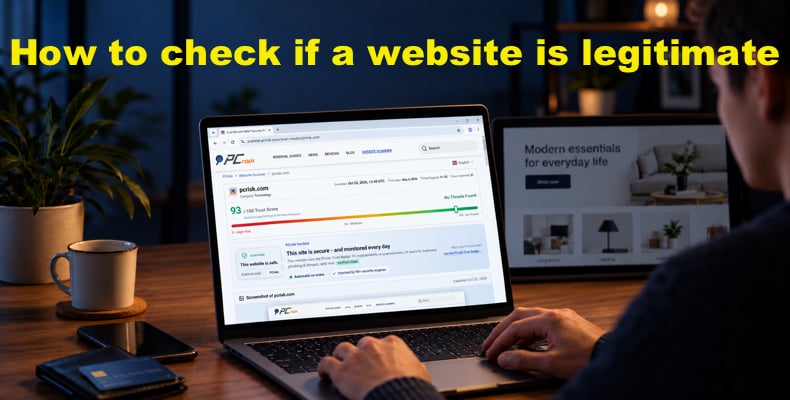
Scam websites can misuse familiar logos, publish fabricated news stories and convincing fake reviews, and use AI-generated content to appear legitimate. A professional-looking website is not enough to establish that an online store is trustworthy. Our PCrisk Website Scanner can help you identify security warning signs and review technical information before making a purchase. This information, combined with checks of the seller's identity, customer reviews, and purchase terms, will help you determine whether the online store is legitimate.
Check website safety with PCrisk Website Scanner
Table of Contents:
- Introduction
- Start with a website security check
- Understand what the website report tells you
- Check the website address and verify the seller's identity
- Check the SSL/TLS Certificate
- Look for independent customer experiences
- Check prices, shipping, and return terms
- Look for a trust badge and verify its report
- Choose a payment method with appropriate protection
- Know when to stop and choose another store
- What to do if you have already paid
- Own an online store? Make your security checks easy to verify
- Final recommendations
- Frequently asked questions (FAQs)
Start with a website security check
In 2025/26, ASIC took down more than 19,400 scams, including investment platforms, phishing links, and social media advertisements, an increase of 182% from the previous year.
Check for security indicators to assess a website’s credibility. HTTPS (Hypertext Transfer Protocol Secure) is more secure than HTTP (Hypertext Transfer Protocol) because it uses encryption to protect data.
Does HTTPS mean an online store is legitimate? HTTPS is not a guarantee that a website is legitimate, as phishing and scam websites also implement it. If you came across a suspicious site or online shop, you can use our PCrisk Website Scanner to look for security warning signs.
1. Scan the website. Open the PCrisk Website Scanner, enter the website’s URL, and click "Check website." Submit the store's public address, not a private order, checkout, or password reset link that contains personal information or access tokens. Scan reports are public, so screenshots and summaries may include information visible on the submitted pages.
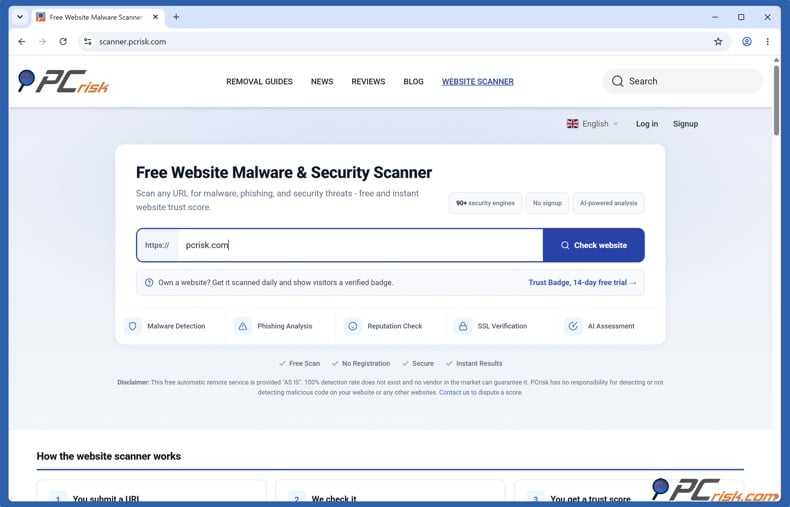
The scanner checks websites against 90+ independent malware engines and 10 threat databases, including Google Safe Browsing, Spamhaus, and PhishTank, and verifies the SSL certificate. Also, it scans the page code for hidden malware and resolves WHOIS, SSL, hosting, and domain age.
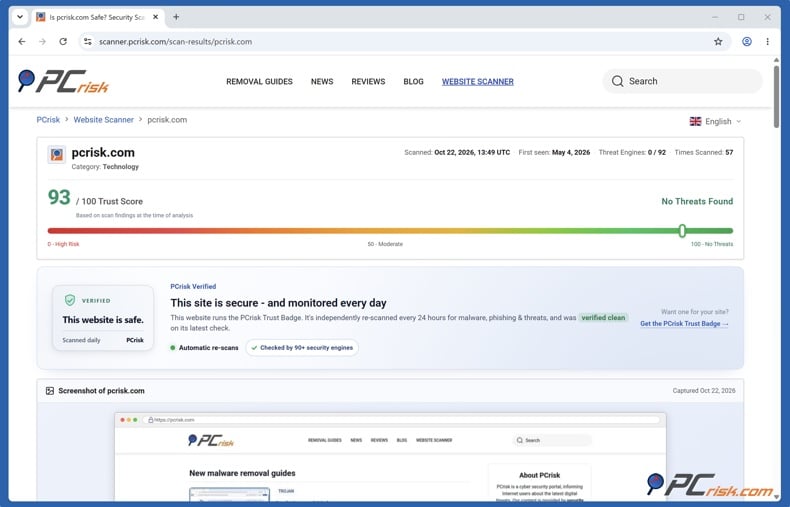
2. Read the report. The report includes links to detailed engine results on VirusTotal, blocklist status, certificate details, and any flagged outbound links. The scanner assigns a trust score from 0 to 100 and provides a full public report that includes engine verdicts, screenshots, technical information, and an AI-generated website safety assessment.
Regarding the domain's age, compare the domain's registration date with the store's claimed history. If you find a discrepancy, investigate further, but a matching date does not verify that the website belongs to the company.
Understand what the website report tells you
A PCrisk website check provides evidence about a website's security and reputation. Still, it does not, by itself, establish that the seller is a genuine, reliable business or that a purchase will go smoothly.
The scan score is an aggregated assessment of signals at the time of the scan. A score of 0-19 indicates a website is potentially dangerous; 20-39 indicates it is potentially suspicious; 40-69 indicates it is of moderate risk; and 70-100 indicates it is in the green.
Scores from 70 to 100 can receive either a "No Threats Found" or "Low Risk" verdict. A "Low Risk" result can still include a security engine warning, so don’t rely solely on the score; read the report’s findings. The score is a rating, not a percentage probability that a purchase will be safe.
What does a website check establish, and what remains unknown?
What the check can tell you: It can tell you whether the security resources flagged the website as unreliable. The PCrisk Website Scanner scans against more than 90 antivirus and URL-reputation engines, as well as 10 threat databases. The results provide evidence of malware, phishing, and other threats. The scanner also examines website code and resources for suspicious or malicious content.
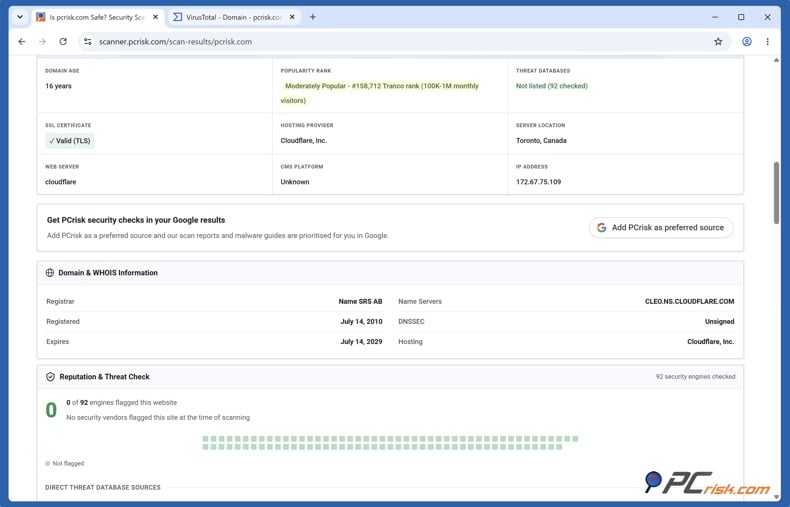
The report provides information such as the domain registration date, certificate status, hosting details, redirects, and external links. This information helps with further investigation.
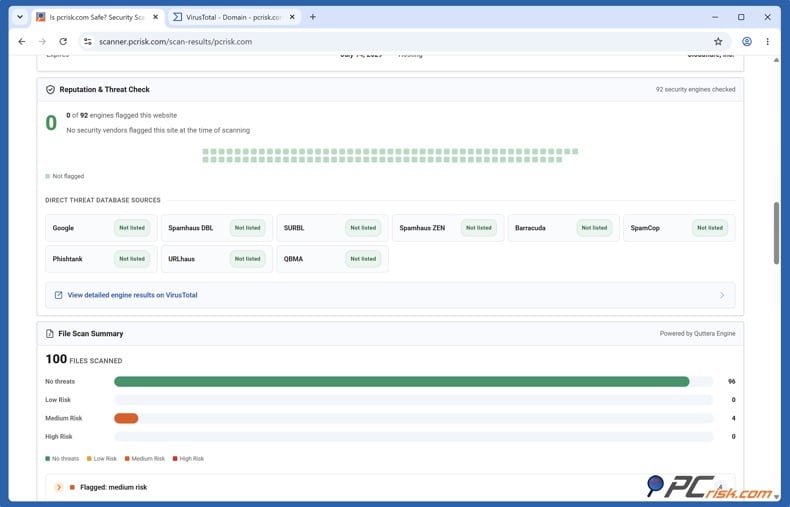
What remains unknown: the scan doesn't independently verify the business behind the store (i.e., the seller's legal identity, business address, authorization as a reseller, etc.). A business name on the website, domain registration details, and a valid SSL/TLS certificate do not constitute proof that the seller is legitimate.
It does not tell whether the seller will fulfill its promises. The website check does not determine whether the products for sale are in stock, genuine, accurately described, or whether they will be delivered.
It does not tell whether the website and its handling of customer data are secure. The scan should not be regarded as an audit of the site, account function, checkout, and internal database. Furthermore, it does not show how the merchant handles customer information once it has received it.
Note that a website’s conditions can also change right after the recorded scan.
A website security check is only one part of assessing an unfamiliar store. Before buying, we also recommend checking who operates the store, whether customers receive their orders, whether its shipping and return policies are clear and credible, and what protection the payment method provides.
Check the website address and verify the seller's identity
Inspect the actual website address
Start with the simplest way to spot a fake website: examine the URL. Cybercriminals often tweak the spelling of known domain names, hoping you won’t notice. They can also change the domain extension by switching from .com to .net, .org, or another popular extension so the URL reads brand.example.net instead of brand.example.com. PCRisk website scanner usually catches and indicates about such lookalike URLs.
Click or tap the browser’s address bar so you can examine the address instead of relying on the store’s logo or page title. Then, compare it with the retailer’s independently located official address. The NCSC warns that fake stores can copy genuine website designs and use deceptively similar domain names. It also recommends entering a known official address directly or carefully examining your search engine’s search results rather than automatically selecting the first search result.
For example, suppose a fictional retailer's genuine domain is brand.example:
shop.brand.example is a subdomain of brand.example.
brand-outlet.example is an entirely different domain. Adding "outlet" does not establish a connection to the retailer.
brand.example.discount-store.example belongs under discount-store.example, not brand.example. The familiar name at the beginning is misleading.
Check the SSL/TLS Certificate
HTTPS is another indicator that a website has a secure protocol. It means the site uses encryption to secure data transmitted between you and the site’s server. Basically, your web browser encrypts the data with an encryption key, and the recipient server decrypts it with a decryption key. This is achieved using an SSL/TLS certificate.
HTTPS protects the connection between your browser and the website, but it doesn’t make the seller any more trustworthy. Scam websites can use HTTPS and valid certificates too. Check the certificate as one technical indicator, then investigate the seller and its purchasing history separately.
You need to evaluate the digital identity of a website and the entity that owns it to avoid becoming a victim of a fraudulent online store or worse - a victim of identity theft or a significant data breach. Scam websites can use HTTPS and valid certificates too. You should treat this as a single technical check, alongside an investigation of the seller and its purchasing history.
Once you visit a website, check its SSL/TLS certificate information. Use the browser's controls beside the address bar, not a padlock graphic displayed within the webpage.
On a desktop computer, you can inspect the certificate as follows:
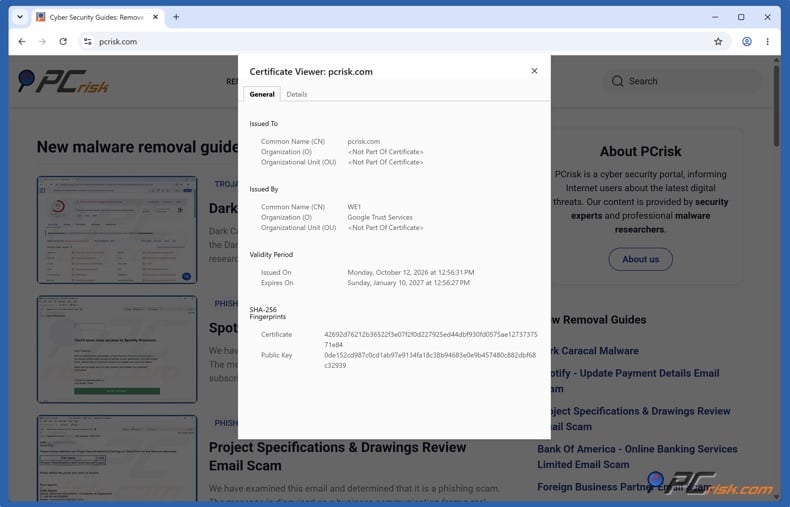
Google Chrome: Click the site-controls icon to the left of the address, select "Connection is secure," then "Certificate is valid." This opens the certificate viewer.
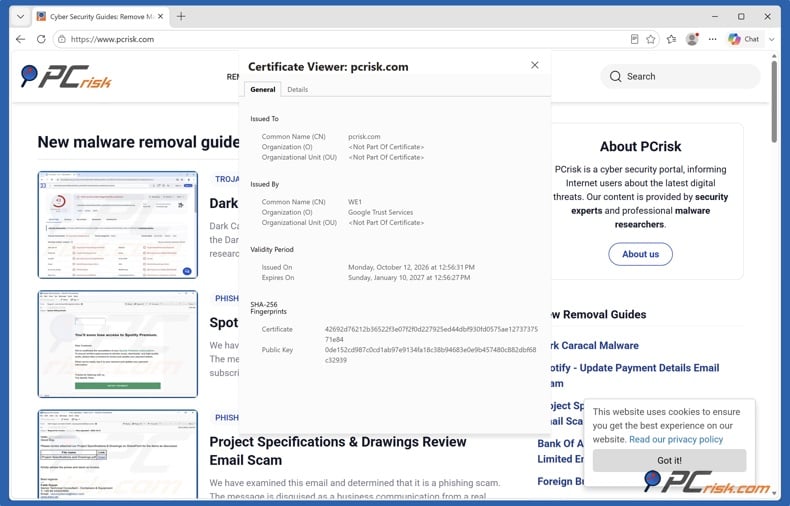
Microsoft Edge: Click the padlock beside the address, select "Connection is secure," then click the certificate icon.
Mozilla Firefox: Click the security icon beside the address, select "Connection secure," then "More site information". Select "View Certificate" in the window that opens.
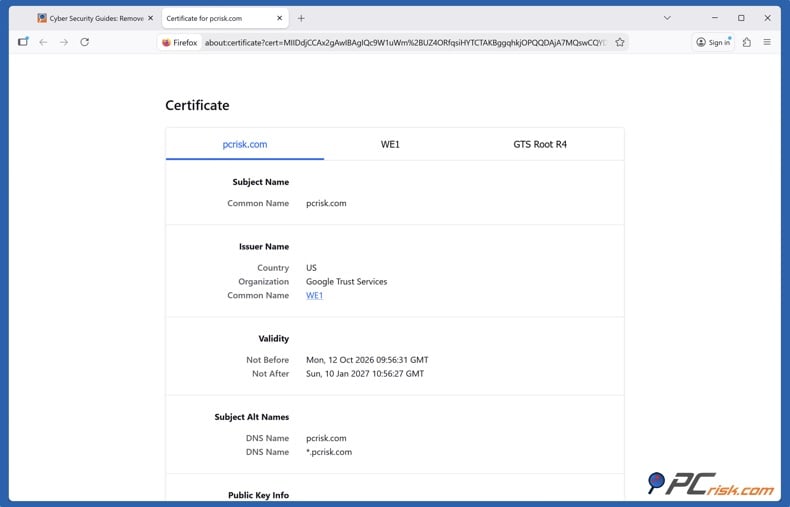
Check the domain, validity dates, and browser trust
Check the addresses covered by the certificate. The certificate's "Subject Alternative Name" field lists the addresses it is valid for. Your browser checks whether the address you visit matches the certificate. However, a matching certificate for a lookalike address doesn’t mean it’s a genuine retailer, so you must still verify the website's actual domain.
Check how long the certificate is valid. In the Certificates window, look for the certificate start and expiration dates. The certificate's validity must fall between “Not Before” and “Not After”, meaning it can’t be expired. These dates concern the certificate's validity, not how long the store has been operating.
Check that the browser accepts the certificate. The "Issuer" field shows the certificate authority that issued it. Browsers verify a chain of certificates related to an authority they trust. However, do not treat a familiar issuer name alone as proof of safety.
Find out who the seller says it is
Start by examining the footer: check the “Contact us,” “About us,” “Terms and Conditions,” and “Return Policy” pages. Note the stated business name, country, postal address, contact details, and the company registration number. However, keep in mind that registration requirements can vary by location and business structure. The SBA notes that some people trading under their own legal names do not need separate business registration.
Keep in mind that the brand name and legal company name may not be identical. A company can do business under a different name, and its domain name can differ from both. The U.S. Small Business Administration says that entity names, trading names, and domain names are separate registrations.
For example, a fictional store called "Example Footwear" might identify its operator as "Example Footwear Retail LLC." That is not inherently suspicious. The names do not have to match word for word, but you should check whether the relationship between the brand name and operator name can be corroborated.
Therefore, check a claimed company registration through the relevant official registry, compare the record with the store's information, and establish whether that business actually operates the website. To help you verify the store's legitimacy, check for a link from an independently verified corporate website to the store, or contact the business through a separately verified channel.
Check website safety with PCrisk Website Scanner
Look for independent customer experiences
The FTC recommends searching for a company’s name along with words like “complaint” or “scam” to see what others experienced when purchasing.
We recommend comparing multiple sources rather than relying on the seller's testimonials. BBB specifically advises checking multiple websites and comparing reviews. Nevertheless, keep in mind that a review published on another website does not mean that it's genuine, since scammers can write fabricated positive reviews to appear more legitimate.
Confirm that the reviews match the same domain name and business - not a similarly named company - since scammers can use another seller’s reputation to manufacture legitimacy.
Look for accounts that address:
- Delivery: Did the order arrive, and did the timing match the seller’s promise?
- The product received: Was it the correct product, with all the content shown and in the advertised condition?
- Problem resolution: When something went wrong, did shoppers receive customer support, and did a replacement or refund happen?
These questions will allow you to evaluate whether a review has substance.
Read both positive and negative reviews. Examine recent user feedback to identify recurring issues, and don’t rely on an overall score. Look for recurring reports of the same problem when purchasing, such as orders that never arrived, products that were substantially different from those advertised, and refunds that were never received.
If you come across a new or lesser-known online store, you may feel uneasy providing your payment details and other personal information. However, being new or having no reviews is a reason to investigate further, not proof of a scam. A legitimate new retailer may not yet have an established customer history. But, without independent feedback, you have no information on whether it delivers orders, supplies products as described, and resolves refund requests.
The lack of complaints doesn’t mean the website is safe. When you cannot verify important information or resolve inconsistencies, we recommend choosing another store rather than taking an unnecessary risk.
Check prices, shipping, and return terms
Check the store’s offer against those of a few established retailers and the manufacturer’s website. Compare the model, size, quantity, condition, and included accessories rather than similar-looking products. The FTC recommends using model numbers and product details when comparing.
For example, a fictional listing for a refurbished device without accessories is not directly comparable to a new, complete retail package. Moreover, an unusually cheap offer for supposedly new branded merchandise deserves further investigation. The FTC warns that very low-cost brand-name goods can be counterfeit or stolen. It also warns that such websites frequently use countdown timers that suggest an offer is about to expire, but that's not a reason to skip the checks.
Look beyond the product page price and see the order total before paying. Check the full price, including taxes, shipping, and handling fees. Also check for unwanted additions or ongoing commitments.
Check whether the advertised price depends on a membership, subscription, or other conditions, and whether anything has been added to the basket without you selecting it.
For international orders, check whether import duties, taxes, and clearance fees are included and who’s paying them.
Separate dispatch time from delivery time. Examine statements like "ships within two business days". Take note that such promises say when the seller expects to send the items to you - not that you will receive them within two business days.
Check the product listing and shipping policy for the processing time, expected arrival time, and whether the product is in stock, on preorder, or awaiting restocking.
What you should find in a return policy. BBB recommends checking return eligibility, shipping costs, fees, and whether the seller offers a refund, exchange, or store credit.
- Deadline and eligibility: How long is the return window, when does it start, and does this window apply to your particular chosen product? Find out whether opening or using the product affects return eligibility.
- Procedure and destination: Learn how to request a return. Do you need the seller's approval before returning it? Check the return address and country before buying. Also ask whether restocking fees or other deductions apply.
- Costs: Who pays for the return? Is a prepaid label available, and is the return cost deducted from the refund?
- Outcome: Does returning the product result in a full refund to the original payment method or store credit? Check the stated refund-processing time.
Let’s say you purchased a $40 item. If the return shipping cost is, for example, $30, it makes little financial sense to return it if you changed your mind after receiving it. The FTC says that, specifically in the U.S., a seller that does not ship must provide a full refund, not just a gift card or store credit.
You should try to understand the full terms of the offer before paying. A low price or reassuring guarantee is no substitute for clear costs, realistic delivery information, and a usable return process.
Look for a trust badge and verify its report
A trust badge can indicate a website's security checks, but keep in mind that the image alone does not prove that the seller is legitimate or that buying from them is safe. Bad actors are known to copy familiar security logos, so we recommend inspecting the evidence behind a badge rather than accepting its appearance at face value.
We recommend opening the supporting report and checking what was assessed. Trust seals like our own PCrisk Trust Badge are interactive: when you click the seal, it opens a security report that is updated daily. The service scans websites every 24 hours for malware, phishing, and other security-related issues. So, before you rely on a badge, follow the verification process below.
Open the report and verify its address. Click the PCrisk Trust Badge and inspect the browser's address bar. The report will be hosted on scanner.pcrisk.com, not on the seller’s website or on a completely unrelated domain.
Match the report to the store. Compare the domain name in the report with the store's actual website address. A report for another website or a similarly named business does not provide evidence about the store you’re thinking of buying from.
Check the scan date and read the findings. Review when the website was last scanned and then look at the supporting security results. Note that the reports are snapshots of the information available at the time of the scan. A website's condition can change afterward between scans. Therefore, old results should not be treated as current reassurance. Use the option to rescan the website.
Check the website directly when the badge cannot be verified. Open our PCrisk Website Scanner and enter the store's public address. Of course, you can also check stores that do not display a badge. An absent or unverifiable badge is not, by itself, proof of fraud.
Does the PCrisk Trust Badge guarantee delivery or refunds? No, a verifiable security report is not a guarantee of a successful purchase. The PCrisk Trust Badge and scan results provide an automated security assessment, not a guarantee of the merchant or their promise that products will arrive, match their descriptions, or qualify for a refund.
Therefore, use the report alongside other signals, such as seller identity, customer reviews, and purchase term checks described in this guide, to determine whether you should trust the online store.
Choose a payment method with appropriate protection
Consider what you could do if your order never arrived or the seller refused to fix an issue. We recommend using a payment method with a built-in dispute process, as you can’t rely on the seller’s goodwill to resolve payment-related issues. The option to dispute payments is more important than payment convenience. Use guest checkout where appropriate and provide only necessary information. When creating an account, choose a unique password.
Pay with a credit card where possible. For U.S.-based shoppers, credit cards come with legal protections for certain billing errors, including charges for items that were not delivered as agreed. Find out if your card issuer can reverse an eligible disputed transaction, which is a process known as a chargeback. However, don’t assume that debit-card protection will be the same as credit-card protection for an authorized purchase.
PayPal's U.S. Purchase Protection program may cover eligible purchases when an item does not arrive or is significantly different from its description. But exclusions, proof, and deadlines apply. PayPal may also require you to return an item at your own expense. Note that personal payments, including "friends and family," are not covered by PayPal's US Purchase Protection program, so decline requests to use this payment type.
A familiar payment app does not necessarily provide purchase protection. Zelle, for example, states that it does not offer protection when a purchased item fails to arrive or is not as described, although your financial institution may have separate terms. We strongly recommend avoiding personal transfers to unfamiliar sellers when you don’t know which protections apply.
To be on the safe side, keep the order confirmation, product description, delivery information, receipt, and correspondence with the seller. For U.S. credit card billing errors, make sure your written dispute reaches the issuer within 60 days of the first statement containing the error, so act promptly. Failing to contact the issuer within the time limit means they will no longer be legally required to follow the strict federal procedure for investigating, acknowledging, or resolving the error. Remember - payment protection is a fallback, not proof that the store is legitimate.
Know when to stop and choose another store
You don’t need to prove that a website is fraudulent to not buy from it. We recommend walking away when a serious warning remains unresolved, regardless of how appealing the price is. The purpose of these checks is to make an informed purchasing decision, not to conduct a fraud investigation.
Don’t ignore security warnings to complete a purchase. If your browser displays a phishing, malware, or "Dangerous site" warning, leave the page immediately without entering personal or payment information. Google explicitly recommends not visiting sites flagged as dangerous and does not recommend turning off Safe Browsing.
Reject payment demands that leave you with little recourse. Stop when an unfamiliar seller insists on gift card codes, cryptocurrency, or wire transfers through money transfer services instead of offering an appropriate payment method. The FTC warns that scammers favor payment methods that make it difficult to recover money.
Pause when you can’t find out who is selling or what they are promising. Suspicious business-name discrepancies, unusable contact details, and contradictory shipping or return terms deserve clarification before payment. A store that appears to impersonate another retailer is grounds to leave. Verify the retailer through an independently located official channel instead.
Don’t let a limited deal countdown pressure you into making a decision. The FTC has documented misleading timers that create a sense of urgency even when an offer is not really time-limited. Leave the checkout when you feel pressure to decide without checking essential details.
Insufficient evidence for legitimacy is a valid reason not to buy. When important questions remain unanswered, don’t purchase and look for a store whose identity, customer history, terms, and payment options you can verify.
What to do if you have already paid
If you have already purchased and later determined that the store was fraudulent, you should contact your payments provider. Explain your situation and ask whether they can stop, reverse, or dispute the payment. Recovery is not guaranteed, but the FTC recommends contacting the company you used for payments, even if getting your money back may be difficult.
Describe your problem accurately. Tell the payments provider whether your issue involves non-delivery, the wrong item, an incorrect amount, or an unauthorized charge. In case of an ordinary delivery problem, request a resolution from the seller. However, in case of repeated promises or delayed responses from the seller, don’t delay contacting your payments provider, as you may go past the dispute deadline.
Save the evidence supporting your claim. Keep your order confirmation, payment receipt, exact website address, product description, advertised delivery date, return terms, and correspondence with the seller as it may prove important. Also, keep screenshots of relevant claims and photos of products you received that differ from the order. Keep this information so that you can explain what you bought and what you actually received.
Check applicable dispute deadlines. For some US credit-card billing errors, including goods not delivered as agreed, you must send a notice to the issuer at its designated billing-inquiries address within 60 days after you receive the first statement showing the error. However, keep in mind this is not a universal deadline for every payment method or purchase complaint, so ask your provider which process applies.
Protect any payment details that may have been exposed. Contact your card issuer and let them know that you have entered your card information on a potentially fraudulent website. The card issuer will advise you whether you should block or replace your card. Also, check your account activity and report unfamiliar charges as soon as possible. Keep in mind that reporting the first purchase doesn't fix later unauthorized charges.
Secure affected accounts. If you created a store account using a password you also use elsewhere, change that password on the other accounts, especially your email and financial accounts. Use unique passwords and enable two-factor authentication where available. In the event of misuse of sensitive personal information, an identity theft recovery plan may also be necessary.
Report the suspected scam. If you’re in the U.S., you can use the FTC’s fraud-reporting service. Reporting scams will help the authorities build cases, but to recover your money, you must contact your payment provider first.
Be wary of suspicious people contacting you about recovering your payments for a processing fee or asking for additional financial information. Do not send any money to “release” your funds. You should only deal with your payment provider through verified channels.
Own an online store? Make your security checks easy to verify
To help prospective customers feel confident about making purchases from your online store, give them security information they can verify. The PCrisk Trust Badge links to a public report hosted by PCrisk, where visitors can inspect the latest scan and trust score of your online store.
Our paid monitoring service scans your website every 24 hours for malware, phishing, certificate issues, and reputation warnings. It will send email alerts when problems are detected. To get started, add your domain, choose a badge design, and install the supplied code snippet or a supported platform integration.
The PCrisk Trust Badge makes scan results accessible, but it does not certify your business or guarantee safety. It provides shoppers with an automated assessment of the website at the time of scanning and complements, rather than replaces, measures that prevent or remove threats.
Make your store's security-check results easier for shoppers to verify. Learn how our monitoring service works and how to add the PCrisk Trust Badge to your website.
Get the PCrisk Trust Badge for Shopify
Final recommendations
Our final recommendation is this: Always check an unfamiliar store before you share any personal or financial information or make a payment. Start with our PCrisk Website Scanner, which will scan it for security warning signs. Then, investigate the seller’s identity, independent customer experiences with the online store, and purchase terms. Review the full price, delivery promises, and return and refund conditions.
Check the store’s trust badges. Look for clickable security-related badges like our PCrisk Trust Badge, open its report, and check the domain, scan date, and its findings. A verifiable report provides security information to consider, but it does not certify the seller or guarantee that products will arrive or refunds will be honored.
When you come across an unfamiliar online store, perform the checks discussed in this article: Check the seller's identity and contact details, compare prices with established retailers, and read the shipping and return conditions carefully. Choose a payment method with an available, appropriate dispute process, understand its conditions, and keep your purchase records. And don’t trust a website with serious warnings. Above all, you do not have to prove that a store is fraudulent before choosing another seller you can verify with greater confidence.
Scan your website with PCrisk Website Scanner
Frequently asked questions (FAQs)
How can I check if an online store is secure?
Our PCrisk Website Scanner lets you check a store's public website address. Enter the address, click "Check website." After the scan is complete, review the scan date, overall assessment, and detailed findings for malware, phishing, and other security warning signs. We recommend reading the scan results rather than relying on the score alone.
Should I avoid an online store that has no customer reviews?
If you don’t find any reviews, it doesn't mean the store is fraudulent, but it leaves you without independent customer evidence of successful purchases. Search for the business name and exact domain with terms such as "reviews," "complaints," and "scam." Compare several independent sources, and do not mistake the lack of complaints as confirmation of safety. Choose another seller when you cannot find enough reliable information to feel comfortable making a purchase.
Does HTTPS usage mean an online store is legitimate?
No. HTTPS only encrypts the connection between your browser and the website. It does not make the seller any more trustworthy. Scam websites can use HTTPS as well. Encryption helps protect information in transit, but it does not verify who operates the store or whether you will receive your order. Check the seller and purchase terms separately before paying.
Does a high PCrisk trust score guarantee a safe purchase?
No. The score reflects an automated assessment of the information available at the time of the scan. It’s not a guarantee or merchant certification. Threats can be missed, and a website can change after it was checked. A high score also does not mean that the seller will deliver genuine products or honor refunds. Use it alongside independent checks of the business and its purchasing history.
How can you verify a PCrisk Trust Badge?
Click the badge on the store to open the linked report. Go to the browser's address bar and confirm that the report is hosted on scanner.pcrisk.com, then make sure the domain matches the store you are visiting. See the latest scan date, score, and the findings. A badge image or a screenshot supplied by the seller is not a substitute for opening the report directly on our website.
Share:
 Facebook
 X.com
X.com
 LinkedIn
 Copy Link