
How to remove CrystalX RAT from infected devices
TrojanAlso Known As: CrystalX remote administration trojan

Get free scan and check if your device is infected.
Remove it nowTo use full-featured product, you have to purchase a license for Combo Cleaner. Seven days free trial available. Combo Cleaner is owned and operated by RCS LT, the parent company of PCRisk.com.
What kind of malware is CrystalX?
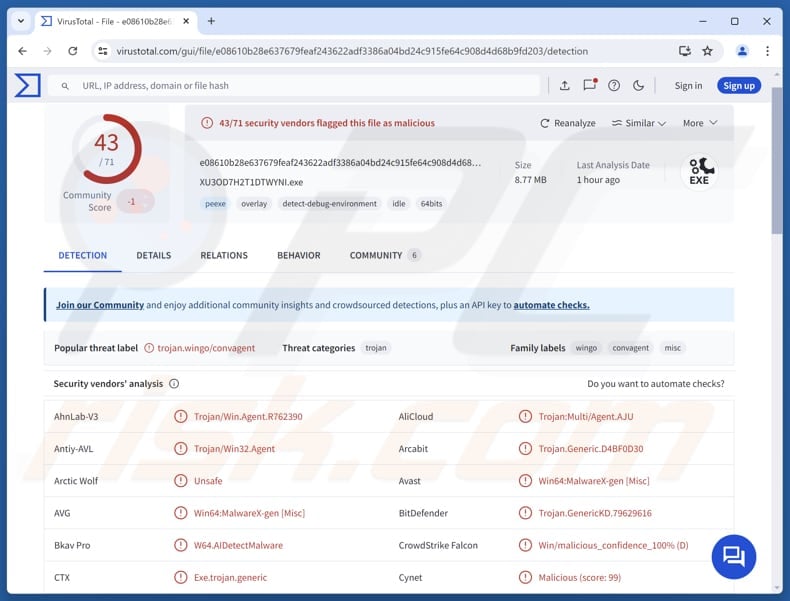
CrystalX is a remote access Trojan (RAT) offered as MaaS (malware‑as‑a‑service) and promoted through Telegram. It is mainly used to steal information from infected devices and to control devices remotely, and it also has a prankware capability. If detected on a device, CrystalX should be removed as soon as possible.
More about CrystalX
CrystalX is a rebranded version of earlier malware (originally promoted as Webcrystal RAT). Its design and control panel appear to be copied or heavily based on an older RAT (WebRAT/Salat Stealer). Basically, CrystalX is a commercial and actively promoted remote access tool.
CrystalX has a built-in tool that lets cybercriminals create customized versions of it. They can choose settings like blocking certain countries, hiding from analysis tools, changing the file icon, and more. It also includes anti-analysis features designed to prevent detection or examination.
When the RAT runs, it connects to a remote server and sends basic information about the infected device. Then it tries to steal sensitive data, such as login details from apps like Steam, Discord, and Telegram, as well as information stored in Chromium‑based web browsers. After collecting the information, it sends everything back to the attacker's server.
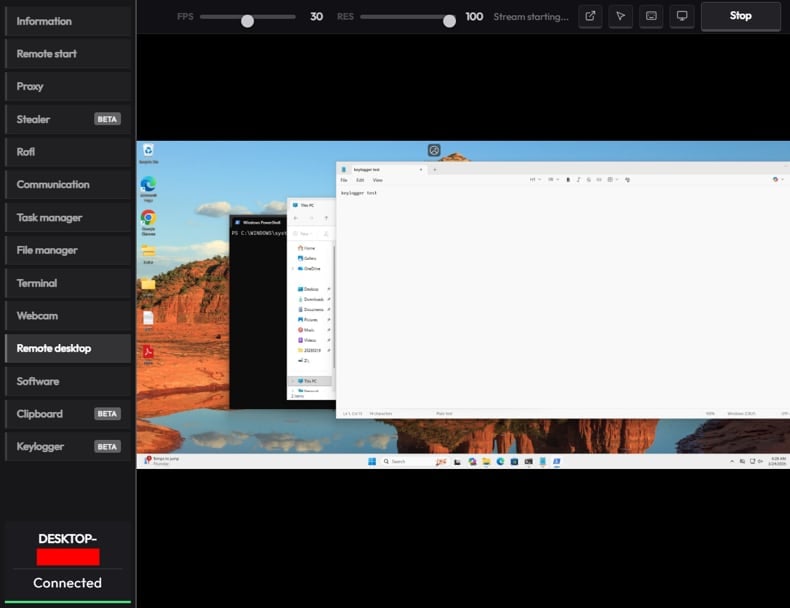
Furthermore, CrystalX is capable of logging keystrokes. The keylogger feature records what the victim types, including passwords and credit card details. Also, the malware can secretly inject a fake browser extension in Chrome or Edge. This extension monitors copied text for cryptocurrency wallet addresses.
If it finds one, it replaces it with the attacker's wallet address. This can be used to redirect crypto transfers to cybercriminals instead of the intended recipient. Clipboard hijacking can also be used for other malicious purposes, such as stealing login credentials or other personal information.
Moreover, CrystalX allows threat actors to run commands, upload files, and explore all folders and drives on infected devices. It also includes a built-in tool that lets them see and control the victim's screen like a remote desktop (VNC). In addition, it can secretly access the microphone and camera.
The malware also includes "pranking" features that cybercriminals can use to change the desktop background, rotate the screen, swap mouse buttons, or make the cursor move randomly. It can also disable system tools, hide icons, or display fake pop-up messages. Additionally, CrystalX can enable a chat between the victim and the attacker.
| Name | CrystalX remote administration trojan |
| Threat Type | Remote Access Trojan (RAT) |
| Detection Names | Avast (Win64:MalwareX-gen [Misc]), Combo Cleaner (Trojan.GenericKD.79629616), ESET-NOD32 (WinGo/Agent.AHJ Trojan), Kaspersky (Backdoor.Win64.CrystalX.b), MaxSecure (Trojan.Malware.324995110.susgen), Full List (VirusTotal) |
| Symptoms | RATs are designed to stealthily infiltrate the victim's computer and remain silent, and thus no particular symptoms are clearly visible on an infected machine. |
| Possible distribution methods | Infected email attachments, malicious online advertisements, social engineering, software vulnerabilities, software 'cracks'. |
| Damage | Stolen passwords and banking information, identity theft, the victim's computer added to a botnet, additional infections, financial loss. |
| Malware Removal (Windows) |
To eliminate possible malware infections, scan your computer with legitimate antivirus software. Our security researchers recommend using Combo Cleaner. Download Combo CleanerTo use full-featured product, you have to purchase a license for Combo Cleaner. 7 days free trial available. Combo Cleaner is owned and operated by RCS LT, the parent company of PCRisk.com. |
Conclusion
CrystalX is a RAT that provides attackers with a wide range of capabilities, including data theft, keylogging, clipboard hijacking, and remote control of infected systems. It also includes anti-analysis and evasion features. Overall, CrystalX is a dangerous tool that can lead to financial loss, identity theft, account hijacking, and other problems.
More examples of RATs are GHOSTFORM, KarstoRAT, and Moonrise.
How did CrystalX infiltrate my computer?
Malware like CrystalX is often distributed through infected files such as executables (.exe), archives (e.g., ZIP or RAR), scripts, or documents (e.g., MS Office or PDF). Interacting with these files can cause a system infection.
Attackers spread malware through email attachments or links, software vulnerabilities, fake support scams, unsafe (or compromised) websites, pirated software, cracked tools, malicious ads, infected USB drives, peer-to-peer networks, third-party downloaders, and similar channels.
How to avoid installation of malware?
Keep your operating system and applications up to date. Download software from trusted sources such as official websites or verified app stores, and avoid cracked programs, pirated software, or key generators. Do not click on ads, links, or buttons from untrustworthy websites, and refuse to get notifications from suspicious pages.
Be careful with unexpected emails or messages, especially from unknown senders, and avoid opening any links or attachments that look suspicious or unnecessary. If you believe that your computer is already infected, we recommend running a scan with Combo Cleaner Antivirus for Windows to automatically eliminate infiltrated malware.
CrystalX's administration panel (source: securelist.com):
How to remove malware manually?
Most trojan infections can be removed by running a full system scan with Combo Cleaner. The full manual procedure below is for cases where automatic removal failed, where you want to verify a scan caught everything, or where the threat has multiple persistence points.
Disconnect from the network
Unplug your Ethernet cable and turn off Wi-Fi. If you're on a laptop, the airplane-mode key works fastest.
Many trojans exfiltrate data - saved browser passwords, banking sessions, screenshots - and accept remote commands. Cutting the network stops both immediately. Keep it disconnected until Phase 4.
Boot into Safe Mode with Networking
Safe Mode loads a minimal set of drivers and stops most malware from auto-running. "With Networking" lets you download tools - re-enable Wi-Fi only after you've booted in.
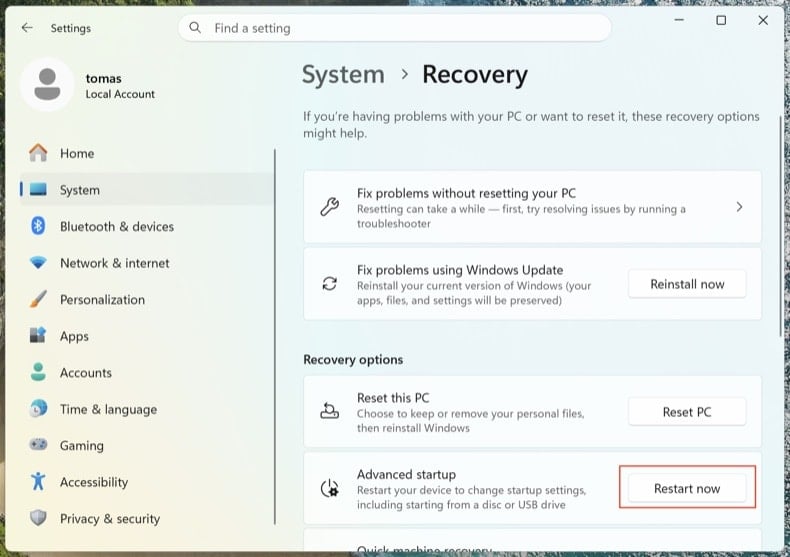
Open . Click Restart now next to Advanced startup.
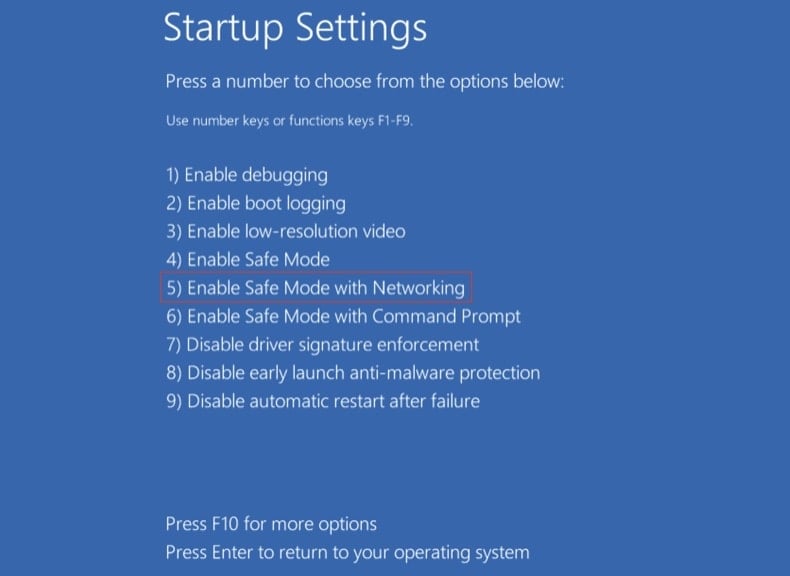
Your computer will restart into the "Choose an option" menu. Click . After the second reboot, press 5 or F5.
Click the Windows logo, hold Shift, click the Power icon and choose Restart. In the Choose an option screen, click . Press F5.
Windows 8
Go to the Start Screen, type Advanced, select Settings → Advanced startup options → Restart now → Troubleshoot → Advanced options → Startup settings → Restart → F5.
Note: Windows 8 reached end-of-life in January 2023 - running on it puts you at much higher risk of reinfection.
Windows 7
Click Start → Shut Down → Restart → OK. As the system boots, press F8 repeatedly until the Windows Advanced Options menu appears, then choose Safe Mode with Networking.
Note: Windows 7 reached end-of-life in January 2020 - running on it puts you at much higher risk of reinfection.
Inspect running processes with Process Explorer
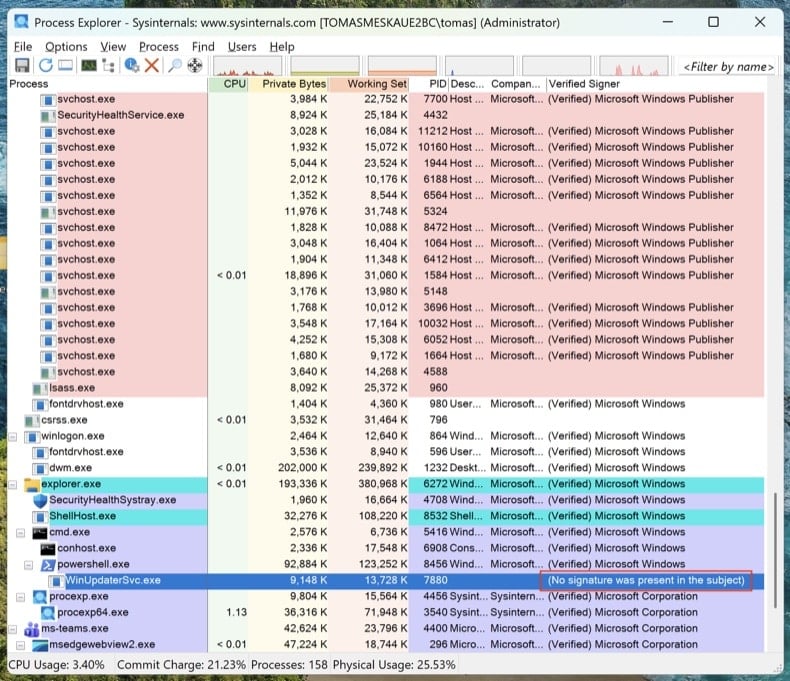
Download Process Explorer from Microsoft Sysinternals. Run it as Administrator. Click and .
Sort by "Verified Signer." Anything unsigned running from %AppData%, %LocalAppData%, %Temp%, or %ProgramData% is suspicious. Right-click → Properties to see the full image path. Right-click → "Search Online" to look up unfamiliar process names.
Task Manager hides full file paths, doesn't show digital signatures, and groups processes in ways that make malware easy to miss. Process Explorer is the same tool Microsoft engineers use.
Map every persistence point with Autoruns
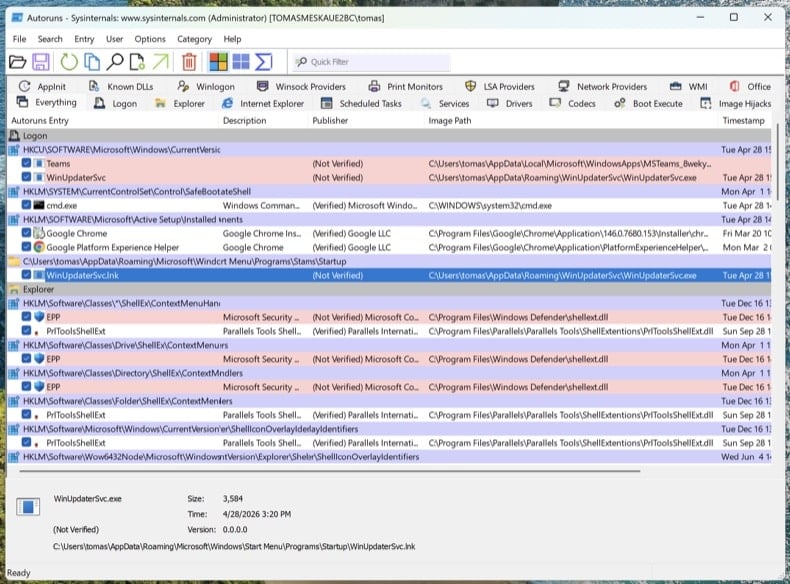
Download Autoruns. Right-click Autoruns.exe and choose Run as administrator - without elevation, Autoruns can't inspect protected registry hives.
In the menu, open and , then click Refresh.
Modern trojans don't just live in startup. Walk through these tabs and look for unsigned or unfamiliar entries:
- Logon - classic Run/RunOnce keys
- Scheduled Tasks - frequent hiding spot, especially tasks with PowerShell, MSHTA, or rundll32 actions
- Services - unsigned services in non-Microsoft folders
- WMI - Event Subscriptions are a stealthy persistence mechanism (MITRE T1546.003)
- Image Hijacks - Image File Execution Options "Debugger" abuse
- AppInit - DLLs loaded into every GUI process
- Browser plug-ins - unsigned add-ons across all installed browsers
Right-click any suspicious entry → "Jump to Image" to see the actual file. Right-click → "Search Online" opens VirusTotal for the file hash. Don't delete yet - just write down the file paths and entry names. We'll remove them after the scans.
Check the hosts file and DNS settings
Trojans often redirect bank, antivirus, and update domains to attacker-controlled servers by editing the hosts file or DNS settings.
Hosts file: Open Notepad as Administrator and open C:\Windows\System32\drivers\etc\hosts. Legitimate entries are commented with #. Any uncommented IP-to-domain mapping is suspicious - especially redirects for microsoft.com, windowsupdate, or your bank.
DNS settings: Open Command Prompt as Administrator and run ipconfig /all. Confirm your DNS servers point to your ISP, your router, or a known public resolver (Cloudflare 1.1.1.1, Google 8.8.8.8). Then open and verify both DNS and DNS over HTTPS (DoH) settings haven't been hijacked.
A clean PC with hijacked DNS is still a compromised PC. You'll think you're at chase.com and you'll be at the attacker's clone.
No single antivirus catches everything. The order below is intentional: offline scan first (catches rootkits before Windows fully loads), then on-demand scanners on the running system, then manual cleanup of anything they missed.
Run Microsoft Defender Offline
Reboot to normal Windows. Open . Select Microsoft Defender Antivirus (offline scan) and click Scan now. Your computer will restart into a stripped-down environment and scan before the full operating system loads.
Rootkits and bootkits hide from any scanner running on the same Windows session that's already infected. A pre-boot offline scan sees the disk before the malware can hide itself.
VB100 certified. Includes anti-trojan, registry/persistence scanning, anti-spyware in one pass. The 7-day free trial is available.
Download Combo CleanerRun Combo Cleaner full system scan
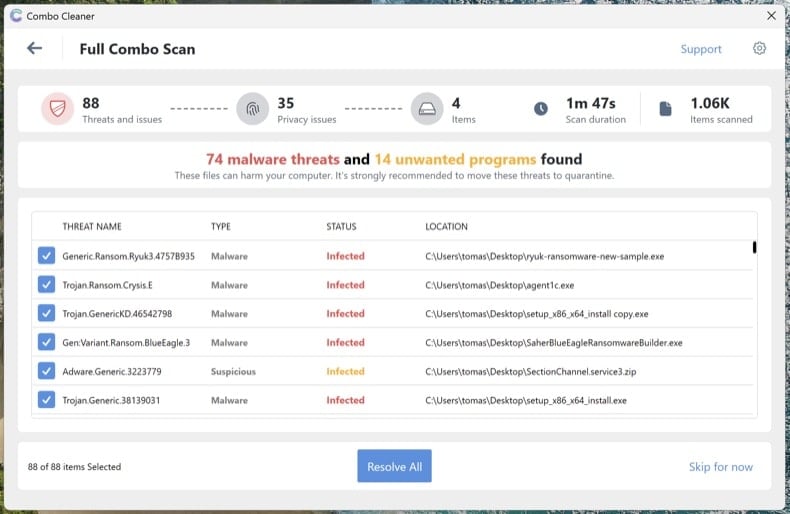
Install Combo Cleaner and run a full system scan (not the quick scan). Let it complete fully, review the detected threats, and apply the recommended actions. Combo Cleaner will quarantine known trojans and registry persistence.
Run Microsoft Safety Scanner as a second-opinion scan
Download Microsoft Safety Scanner (MSERT.exe), Microsoft's free on-demand tool. The binary expires every 10 days, which means every download has the latest signatures. Run a full scan after Combo Cleaner to catch anything one engine alone might miss.
Different scanning engines catch different threats. Running an additional Microsoft scan after Combo Cleaner is the single most underused verification step in malware removal.
Manually remove anything still listed in Autoruns
Reopen Autoruns. Anything you flagged in Step 4 that's still present hasn't been caught by the automated scans. For each remaining suspicious entry: right-click → Delete in Autoruns (this removes the persistence registration), then navigate to the file path and delete the actual file. Empty the Recycle Bin.
Some malware files reappear after deletion because something else on the system recreates them. If you delete a file and it returns within minutes, you have a remaining persistence point that Autoruns didn't show - usually a service or scheduled task running under SYSTEM. Re-run the scans from Steps 6-8 or proceed to a clean install (see end of guide).
Reset browsers and clear notification permissions
Trojans and adware frequently hijack browsers - change the default search engine, install rogue extensions, or grant themselves notification permissions to keep displaying scam pop-ups even after the malware is gone.
- Chrome: visit
chrome://settings/resetand click "Restore settings to their original defaults." Then visitchrome://settings/content/notificationsand remove any unfamiliar sites. - Edge: visit
edge://settings/reset. Then checkedge://settings/content/notifications. - Firefox: open
about:supportand click Refresh Firefox (Firefox uses "Refresh," not "Reset"). Then check Settings → Privacy & Security → Permissions → Notifications.
Review installed extensions in each browser and remove anything you don't recognize, especially extensions you didn't install yourself.
Re-enable Defender, Tamper Protection, and update everything
Many trojans disable security software. Open and confirm Real-time protection, Cloud-delivered protection, and Tamper Protection are all turned on. Tamper Protection prevents malware from disabling Defender silently.
Then run Windows Update () and update your browsers and applications. The infection vector that let the trojan in originally usually involves outdated software.
Change passwords from a clean device
If the trojan was an info-stealer (Lumma, RedLine, Vidar, and similar are extremely common), assume every password saved in your browser is compromised. Change them from a different, known-clean device - your phone is fine if it's not infected.
Recommended order:
- Primary email first - it's the recovery hub for everything else
- Banking and financial accounts
- Password manager master password (if you use one)
- Social media, shopping, and remaining accounts
Where available, enable phishing-resistant multi-factor authentication (passkeys / FIDO2 hardware keys / authenticator apps) - SMS-based MFA is bypassable by sophisticated attackers.
Verify the clean and monitor for 7 days
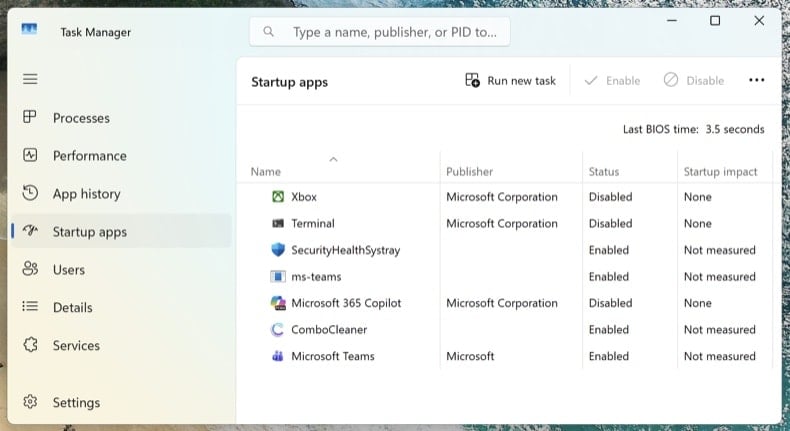
Reconnect to the network and run one final full scan with Combo Cleaner. Open Task Manager (Ctrl + Shift + Esc) and switch to the Startup apps tab - confirm nothing suspicious has reappeared.
Over the next 7 days, watch for symptom recurrence: unexpected high CPU usage, unknown processes returning, browser redirects, or pop-ups. If anything returns, you missed a persistence point and the procedure needs to be repeated - or you may have a deeper compromise that requires a clean install.
When to clean install Windows instead
Manual removal isn't always the right answer. Reinstalling Windows from scratch is the only way to be 100% certain when:
- The malware reappears after every removal attempt
- A bootkit or UEFI rootkit was detected (this class of threat sits below the operating system and survives a normal Windows reinstall)
- A confirmed credential-theft trojan ran with administrator privileges (Lumma, RedLine, Vidar) - the system likely has multiple unknown payloads
- The PC is used for online banking, business email, or anything where partial doubt isn't acceptable
A clean install is a 30-60 minute process: Windows 11 reinstall via . Back up documents to external storage first, scan the backup with Combo Cleaner before restoring it, and reinstall applications fresh - never restore them from a backup of the infected system.
Important: Manual removal requires advanced computer skills. If you're not confident identifying system files from malicious files, run an automated scan with Combo Cleaner and Windows Defender and stop there - that path catches the vast majority of consumer trojans without the risk of breaking Windows by deleting the wrong file.
Frequently Asked Questions (FAQ)
My computer is infected with CrystalX malware, should I format my storage device to get rid of it?
A full device format will remove CrystalX, but it also erases all data on the system. Before doing this, it is generally better to first attempt malware removal using a trusted security tool like Combo Cleaner.
What are the biggest issues that malware can cause?
Malware can steal or damage files, execute more malicious software, collect private data, and more. This may result in serious consequences such as data loss, compromised accounts, financial loss, identity theft, and other issues.
What is the purpose of CrystalX RAT?
The purpose of CrystalX RAT is to give attackers remote control over infected computers in order to steal data, monitor activity, and perform malicious actions such as spying, system manipulation, and financial theft.
How did a malware infiltrate my computer?
Malware is often spread through infected files such as executables, archives, scripts, or documents, which can infect a system when interacted with. It is distributed via email attachments, malicious links, software vulnerabilities, fake support scams, unsafe websites, pirated or cracked software, malicious ads, infected USB drives, peer-to-peer networks, third-party downloaders, etc.
Will Combo Cleaner protect me from malware?
Yes, Combo Cleaner can detect and remove most known malware infections. However, advanced threats may hide deeply within the system, so performing a full system scan is essential.
Share:
 Facebook
 X.com
X.com
 LinkedIn
 Copy Link

Tomas Meskauskas
Expert security researcher, professional malware analyst
I am passionate about computer security and technology. I have an experience of over 10 years working in various companies related to computer technical issue solving and Internet security. I have been working as an author and editor for pcrisk.com since 2010. Follow me on Twitter and LinkedIn to stay informed about the latest online security threats.
PCrisk security portal is brought by a company RCS LT.
Joined forces of security researchers help educate computer users about the latest online security threats. More information about the company RCS LT.
Our malware removal guides are free. However, if you want to support us you can send us a donation.
DonatePCrisk security portal is brought by a company RCS LT.
Joined forces of security researchers help educate computer users about the latest online security threats. More information about the company RCS LT.
Our malware removal guides are free. However, if you want to support us you can send us a donation.
Donate
▼ Show Discussion