
What kind of scam is "Crypto Wallet Validation"
Phishing/ScamAlso Known As: Crypto Wallet Validation phishing scam

Get free scan and check if your device is infected.
Remove it nowTo use full-featured product, you have to purchase a license for Combo Cleaner. Seven days free trial available. Combo Cleaner is owned and operated by RCS LT, the parent company of PCRisk.com.
What kind of email is "Crypto Wallet Validation"?
We have examined this email and determined that it is a phishing scam. The message falsely claims that recipients must validate their cryptocurrency wallets to unlock financial benefits and exclusive rewards. Its actual purpose is to lure victims into visiting a fraudulent website and surrendering their wallet recovery phrases or other credentials. This email should be ignored.
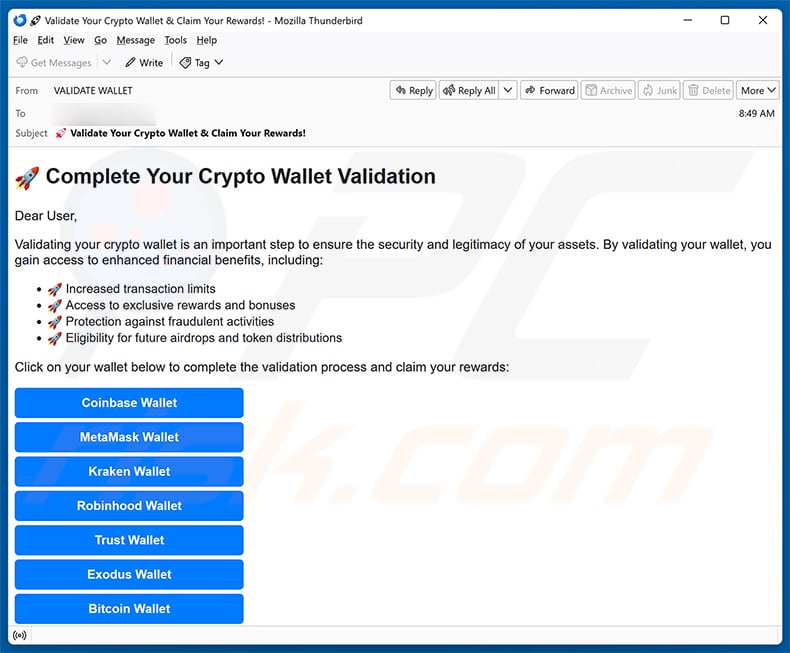
"Crypto Wallet Validation" email scam overview
The email, sent under the name "CryptoWallet Team," urges recipients to validate their cryptocurrency wallet to unlock increased transaction limits, exclusive rewards, fraud protection, and eligibility for future airdrops and token distributions.
The message presents numerous well-known wallet brands as clickable buttons - Coinbase, MetaMask, Kraken, Robinhood, Trust Wallet, Exodus, Bitcoin Wallet, Phantom, Binance, and others. Each button leads to a fraudulent website operating under the domain walletcrypto[.]com.
Although the linked website is no longer active, it was designed to steal victims' wallet recovery phrases (also called seed phrases) or similar sensitive credentials. A recovery phrase is a set of 12 to 24 words that grants complete control over a wallet.
Anyone who enters their recovery phrase on such a site hands full access to their funds directly to the scammers. Because cryptocurrency transactions are irreversible, stolen assets cannot be recovered.
It should be noted that none of the wallet providers named in this email - Coinbase, MetaMask, Binance, or any other - are affiliated with this scam. Wallet validation through unsolicited email is not a real process offered by any legitimate service.
| Name | Crypto Wallet Validation phishing scam |
| Threat Type | Phishing, Scam, Social Engineering, Fraud |
| Fake Claim | Recipients must validate their cryptocurrency wallets to unlock financial benefits and exclusive rewards |
| Disguise | Official notification from a cryptocurrency wallet services team |
| Symptoms | Unauthorized online purchases, changed online account passwords, identity theft, illegal access of the computer. |
| Distribution methods | Deceptive emails, rogue online pop-up ads, search engine poisoning techniques, misspelled domains. |
| Damage | Loss of sensitive private information, monetary loss, identity theft. |
| Malware Removal (Windows) |
To eliminate possible malware infections, scan your computer with legitimate antivirus software. Our security researchers recommend using Combo Cleaner. Download Combo CleanerTo use full-featured product, you have to purchase a license for Combo Cleaner. 7 days free trial available. Combo Cleaner is owned and operated by RCS LT, the parent company of PCRisk.com. |
Similar scam emails in general
In conclusion, the "Crypto Wallet Validation" email is a phishing scam masquerading as a cryptocurrency service notification. It tries to trick recipients into entering their wallet recovery phrases on a fraudulent site, resulting in the theft of all funds held in those wallets.
It should also be noted that scam emails of this kind are sometimes used to deliver malware. Ignoring and deleting suspicious messages is always the safest approach.
More examples of similar scam emails are Zoho Workplace Payment Method Update, LinkedIn Purchase Inquiry, and cPanel Email Quota Limit.
How do spam campaigns infect computers?
Malicious emails typically deliver malware through infected attachments. Common formats include executable files, ZIP or RAR archives, PDF documents, Microsoft Office files, and scripts. Opening these files - or enabling features such as malicious macro commands in Office files - can trigger a malware installation.
Some spam emails skip attachments and instead include links to harmful websites. Visiting those sites may trigger automatic malware downloads, or the site may present a file the user must manually run. Either way, malware can only take hold if the user actively opens or executes the malicious content.
How to avoid installation of malware?
Be cautious with unexpected emails, especially those containing attachments or links. If the sender is unfamiliar or the message feels out of place, do not open files or follow any links. When in doubt, verify with the supposed sender through an independent channel.
Download software only from official websites and legitimate app stores. Avoid pirated content, unofficial third-party download sites, and tools such as key generators or software cracks - these are common vehicles for malware distribution.
Keep your operating system and applications updated and use a reputable antivirus program with regular scans. If you have already opened a suspicious attachment, we recommend scanning your device with Combo Cleaner Antivirus for Windows to remove any malware that may be present.
Text presented in the "Crypto Wallet Validation" email letter:
Subject: Validate Your Crypto Wallet & Claim Your Rewards!
Share:
 Facebook
 X.com
X.com
 LinkedIn
 Copy Link

Tomas Meskauskas
Expert security researcher, professional malware analyst
I am passionate about computer security and technology. I have an experience of over 10 years working in various companies related to computer technical issue solving and Internet security. I have been working as an author and editor for pcrisk.com since 2010. Follow me on Twitter and LinkedIn to stay informed about the latest online security threats.
PCrisk security portal is brought by a company RCS LT.
Joined forces of security researchers help educate computer users about the latest online security threats. More information about the company RCS LT.
Our malware removal guides are free. However, if you want to support us you can send us a donation.
DonatePCrisk security portal is brought by a company RCS LT.
Joined forces of security researchers help educate computer users about the latest online security threats. More information about the company RCS LT.
Our malware removal guides are free. However, if you want to support us you can send us a donation.
Donate
▼ Show Discussion