

Get free scan and check if your device is infected.
Remove it nowTo use full-featured product, you have to purchase a license for Combo Cleaner. Seven days free trial available. Combo Cleaner is owned and operated by RCS LT, the parent company of PCRisk.com.
What kind of malware is Vanta Stealer?
Vanta Stealer is an information stealer written in Python and designed to harvest credentials, session tokens, gaming account data, and cryptocurrency wallet details from infected computers.
Once executed, the malware targets saved browser passwords and cookies, Discord and Telegram session files, Steam, Valorant, Roblox, and Minecraft account data, and stored cryptocurrency wallet recovery phrases. It packages everything into a compressed archive and sends it to the attacker's server.
As detailed in research published by Point Wild's Lat61 Threat Intelligence Team, the malware's modular design and use of obfuscation suggest an author focused on evasion and broad data coverage.
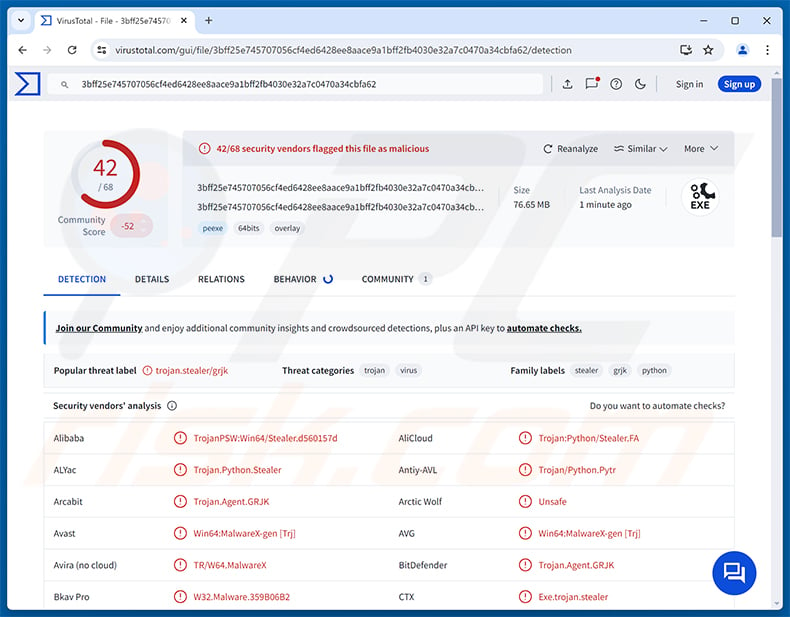
Vanta Stealer overview
Vanta Stealer is packaged as a standalone Windows executable using PyInstaller. This wraps the Python script into a single file that runs without requiring Python to be installed. Inside, the actual malicious code is further shielded by PyArmor bytecode obfuscation, making it significantly harder for antivirus tools to inspect the payload.
On execution, the malware downloads a dedicated browser credential extractor at runtime and then runs a series of collection modules targeting different applications. Once all data has been gathered, Vanta Stealer compiles a summary inventory, compresses everything into a ZIP archive, and transmits it to the attacker's server.
Exfiltration happens over HTTP POST, with the malware confirming a successful upload by checking the server's response code. It also accounts for oversized archives, handling the error gracefully rather than crashing, which points to a backend infrastructure with defined upload limits.
Targeted data and applications
Vanta Stealer focuses its browser harvesting on Chromium-based browsers, pulling saved passwords, cookies, and stored payment card details. These credentials can give attackers direct access to banking portals, email accounts, and any other service where the victim has saved their login.
On the messaging and gaming side, the stealer extracts Discord tokens and enriches them with account details such as subscription status and billing information. It also targets Telegram Desktop session files and collects account artifacts from Steam, Valorant, Roblox, and Minecraft.
Cryptocurrency wallet files and wallet seed phrases are also in scope, giving an attacker the ability to drain crypto holdings entirely. Mullvad VPN configuration files are targeted as well, and the malware specifically searches for documents that contain wallet recovery phrases.
Vanta Stealer also takes desktop screenshots and captures images from the webcam before sending everything to the server, giving the attacker a visual snapshot of the victim's environment at the moment of infection.
Obfuscation and evasion
The malware relies on a two-layer obfuscation strategy. PyInstaller first bundles the Python code into a compiled executable, concealing the source from casual inspection. PyArmor then applies bytecode-level protection to the inner code, adding another barrier for security researchers and automated scanners.
Together, these layers make it considerably harder for both automated scanners and manual analysts to understand what the malware is doing without specialized tools. Python-compiled executables are increasingly used in malware precisely because this packaging-plus-obfuscation combination sidesteps many common signature-based detection methods.
| Name | Vanta infostealer |
| Threat Type | Information Stealer, Trojan, Password-stealing virus |
| Detection Names | Avast (Win64:MalwareX-gen [Trj]), Combo Cleaner (Trojan.Agent.GRJK), ESET-NOD32 (Python/PSW.Stealer.FE Trojan), Kaspersky (UDS:Trojan-PSW.Multi.Stealer), Microsoft (Trojan:Win64/Tedy!pz), Full List (VirusTotal) |
| Symptoms | Stealers are designed to stealthily infiltrate the victim's computer and remain silent, and thus no particular symptoms are clearly visible on an infected machine. |
| Distribution methods | Phishing emails, trojanized software installers, game cheats and mods, fake software updates, malvertising. |
| Damage | Stolen passwords and banking information, identity theft, the victim's computer added to a botnet, additional infections, monetary loss, account hijacking. |
| Malware Removal (Windows) |
To eliminate possible malware infections, scan your computer with legitimate antivirus software. Our security researchers recommend using Combo Cleaner. Download Combo CleanerTo use full-featured product, you have to purchase a license for Combo Cleaner. 7 days free trial available. Combo Cleaner is owned and operated by RCS LT, the parent company of PCRisk.com. |
Conclusion
Vanta Stealer can quietly drain a broad set of sensitive data in a single infection event: browser credentials, payment details, gaming sessions, Telegram files, and cryptocurrency wallet recovery phrases. Victims often have no warning until accounts are compromised or funds have already disappeared.
Given the breadth of data it targets and the obfuscation it uses to avoid detection, Vanta Stealer should be treated as a serious threat. Anyone who suspects an infection should run a reputable security scanner immediately to confirm and clean the device.
More examples of stealers are WARDEN, KuinaExtractor, and CastleStealer.
How did Vanta Stealer infiltrate my computer?
Point Wild's research notes that no confirmed delivery chain was directly observed for Vanta Stealer. That said, the malware's targeting of gaming platforms and its Python-based tooling are consistent with distribution through game cheats, cracked utilities, and trojanized installers that gamers and software pirates frequently seek out.
Phishing emails with malicious attachments are another likely vector, along with fake software update pages and malicious code repositories. SEO poisoning and malvertising can also steer unsuspecting users to download sites hosting trojanized installers.
In general, threats of this kind circulate on peer-to-peer networks, unverified file-sharing channels, and messaging platforms where pirated content is exchanged. The disguise varies, but the common thread is a convincing-looking file that the victim has no obvious reason to distrust before running it.
How to avoid installation of malware?
Download software only from official developer websites and trusted storefronts. Avoid game cheats, cracks, key generators, and tools shared in forums, Discord servers, or unofficial repositories. Keep your operating system and all applications updated, as attackers often exploit known vulnerabilities in outdated software.
Be cautious with unexpected emails and their attachments, especially if the sender urges you to run a file or enable something. Treat any unsolicited download link with suspicion, even if it appears to arrive from a contact you know. If you believe that your computer is already infected, we recommend running a scan with Combo Cleaner Antivirus for Windows to automatically eliminate infiltrated malware.
Instant automatic malware removal:
Manual threat removal might be a lengthy and complicated process that requires advanced IT skills. Combo Cleaner is a professional automatic malware removal tool that is recommended to get rid of malware. Download it by clicking the button below:
DOWNLOAD Combo CleanerBy downloading any software listed on this website you agree to our Privacy Policy and Terms of Use. To use full-featured product, you have to purchase a license for Combo Cleaner. 7 days free trial available. Combo Cleaner is owned and operated by RCS LT, the parent company of PCRisk.com.
Quick menu:
- What is Vanta Stealer?
- STEP 1. Manual removal of Vanta Stealer malware.
- STEP 2. Check if your computer is clean.
How to remove malware manually?
Manual malware removal is a complicated task - usually it is best to allow antivirus or anti-malware programs to do this automatically. To remove this malware we recommend using Combo Cleaner Antivirus for Windows.
If you wish to remove malware manually, the first step is to identify the name of the malware that you are trying to remove. Here is an example of a suspicious program running on a user's computer:
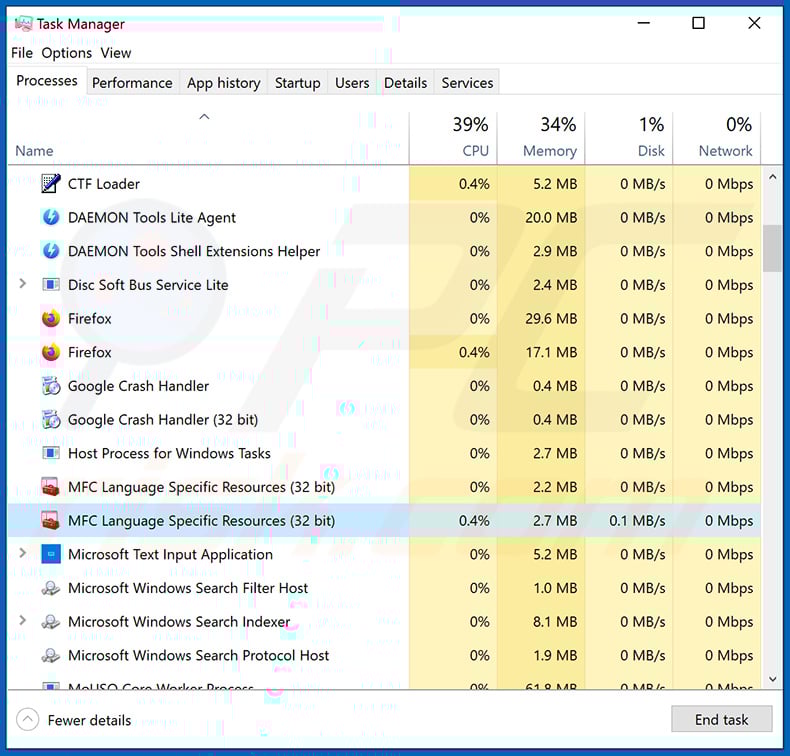
If you checked the list of programs running on your computer, for example, using task manager, and identified a program that looks suspicious, you should continue with these steps:
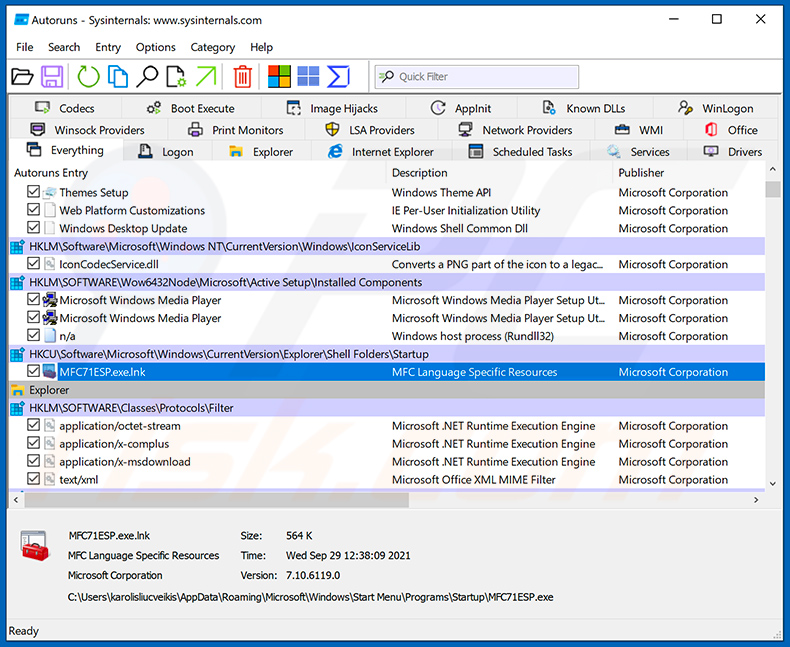
 Download a program called Autoruns. This program shows auto-start applications, Registry, and file system locations:
 Restart your computer into Safe Mode:
Windows XP and Windows 7 users: Start your computer in Safe Mode. Click Start, click Shut Down, click Restart, click OK. During your computer start process, press the F8 key on your keyboard multiple times until you see the Windows Advanced Option menu, and then select Safe Mode with Networking from the list.
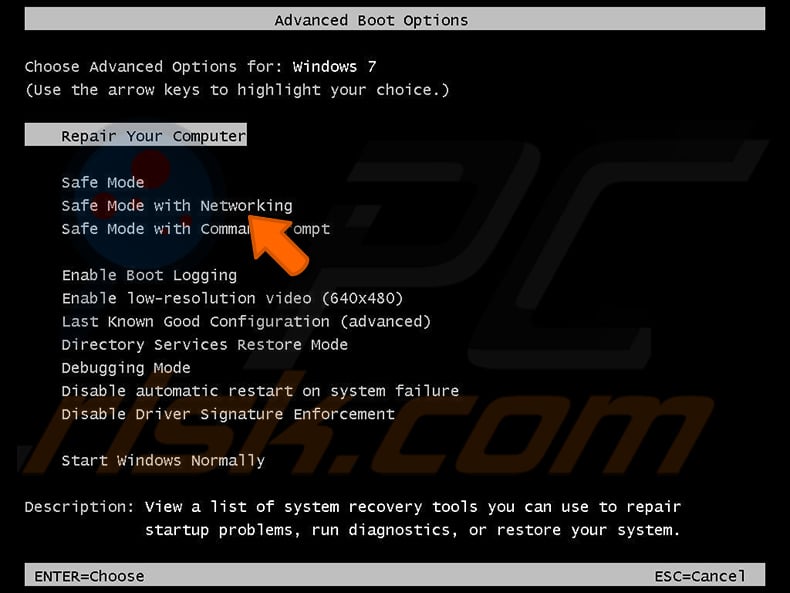
Video showing how to start Windows 7 in "Safe Mode with Networking":
Windows 8 users: Start Windows 8 is Safe Mode with Networking - Go to Windows 8 Start Screen, type Advanced, in the search results select Settings. Click Advanced startup options, in the opened "General PC Settings" window, select Advanced startup.
Click the "Restart now" button. Your computer will now restart into the "Advanced Startup options menu". Click the "Troubleshoot" button, and then click the "Advanced options" button. In the advanced option screen, click "Startup settings".
Click the "Restart" button. Your PC will restart into the Startup Settings screen. Press F5 to boot in Safe Mode with Networking.
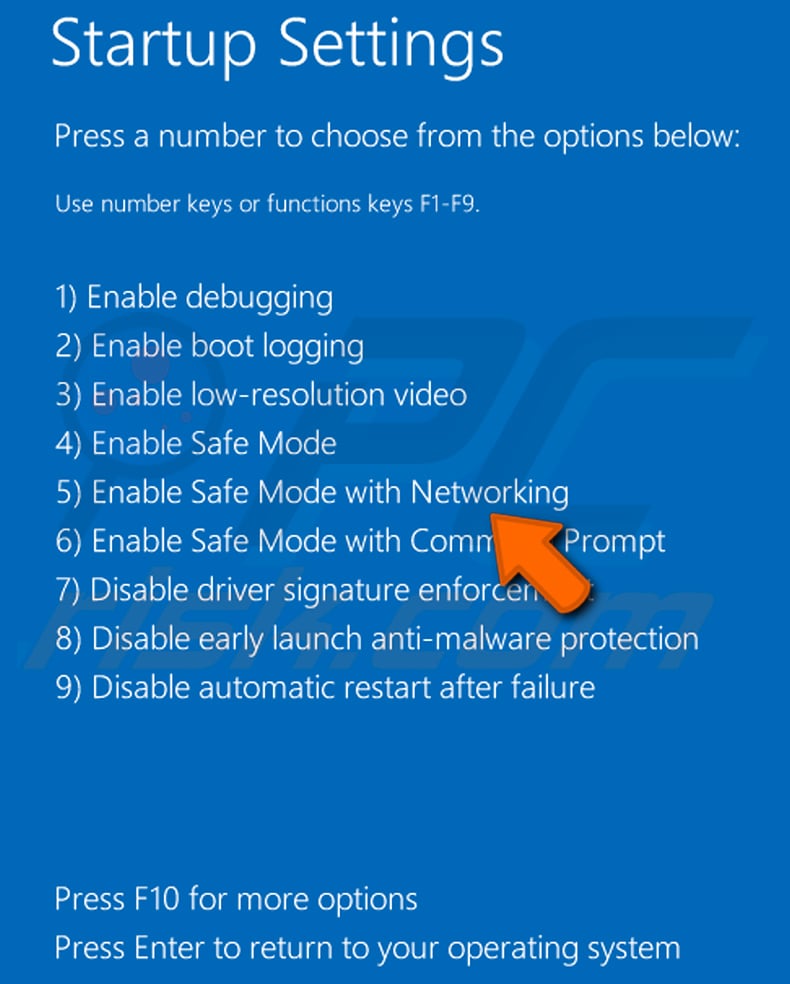
Video showing how to start Windows 8 in "Safe Mode with Networking":
Windows 10 users: Click the Windows logo and select the Power icon. In the opened menu click "Restart" while holding "Shift" button on your keyboard. In the "choose an option" window click on the "Troubleshoot", next select "Advanced options".
In the advanced options menu select "Startup Settings" and click on the "Restart" button. In the following window you should click the "F5" button on your keyboard. This will restart your operating system in safe mode with networking.
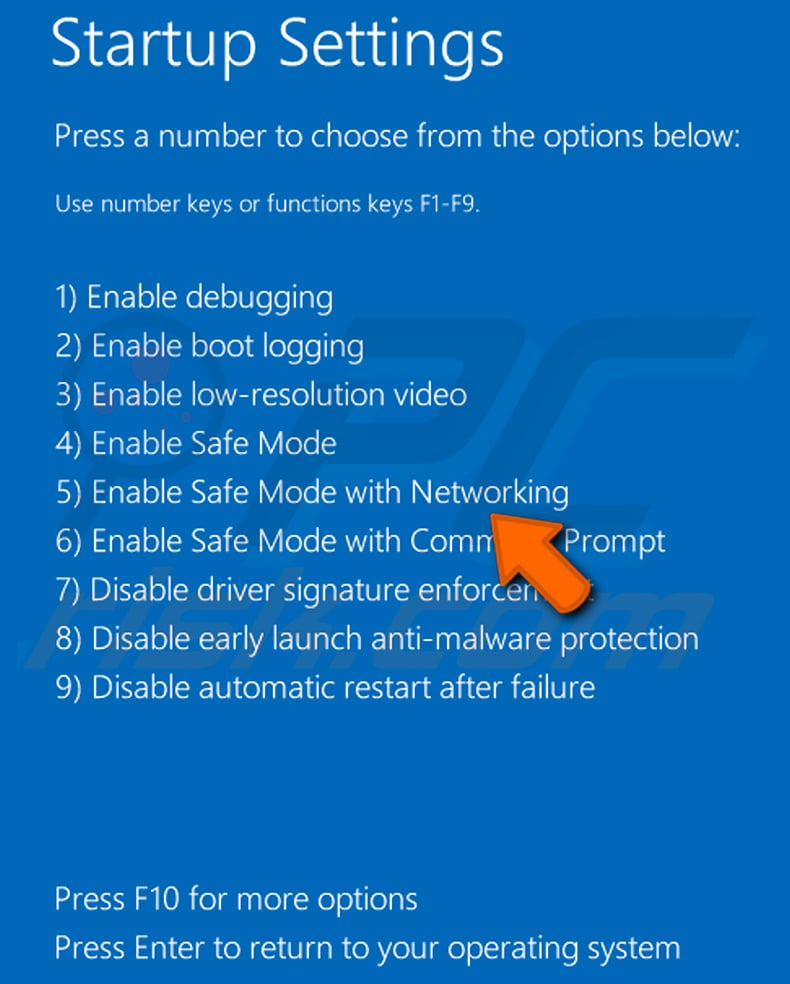
Video showing how to start Windows 10 in "Safe Mode with Networking":
 Extract the downloaded archive and run the Autoruns.exe file.
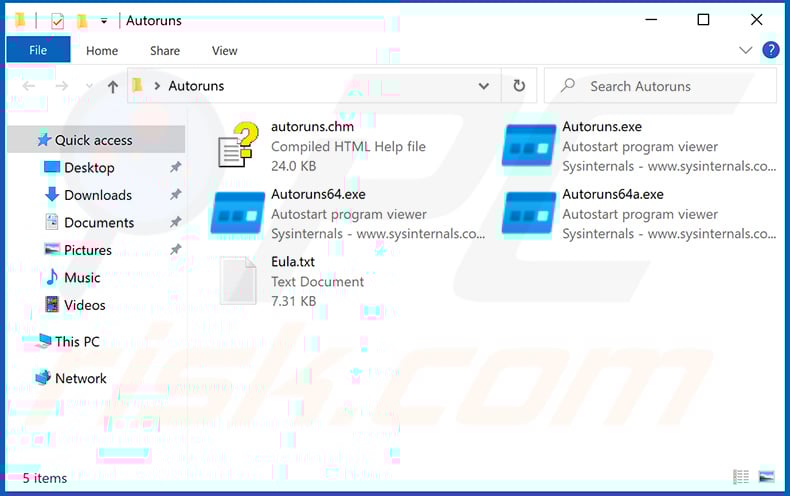
 In the Autoruns application, click "Options" at the top and uncheck "Hide Empty Locations" and "Hide Windows Entries" options. After this procedure, click the "Refresh" icon.
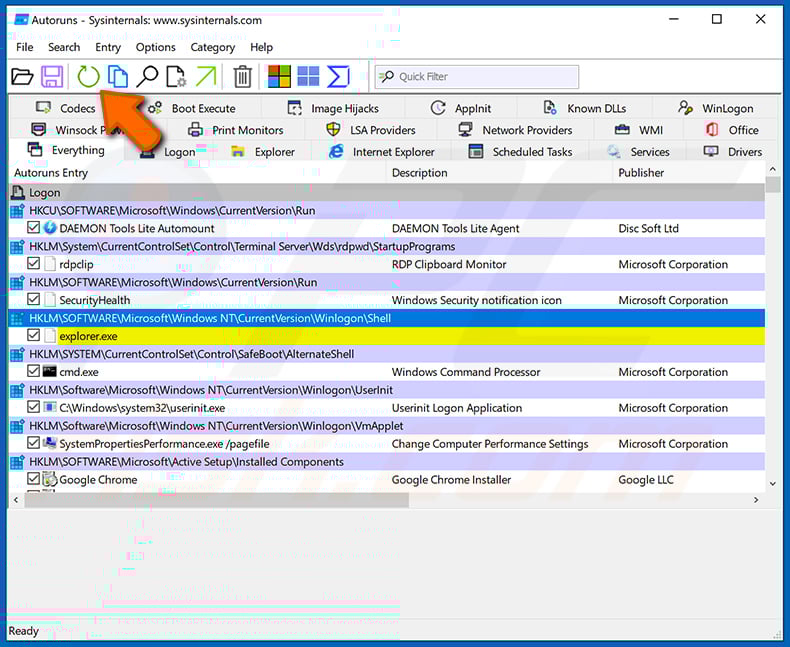
 Check the list provided by the Autoruns application and locate the malware file that you want to eliminate.
You should write down its full path and name. Note that some malware hides process names under legitimate Windows process names. At this stage, it is very important to avoid removing system files. After you locate the suspicious program you wish to remove, right click your mouse over its name and choose "Delete".
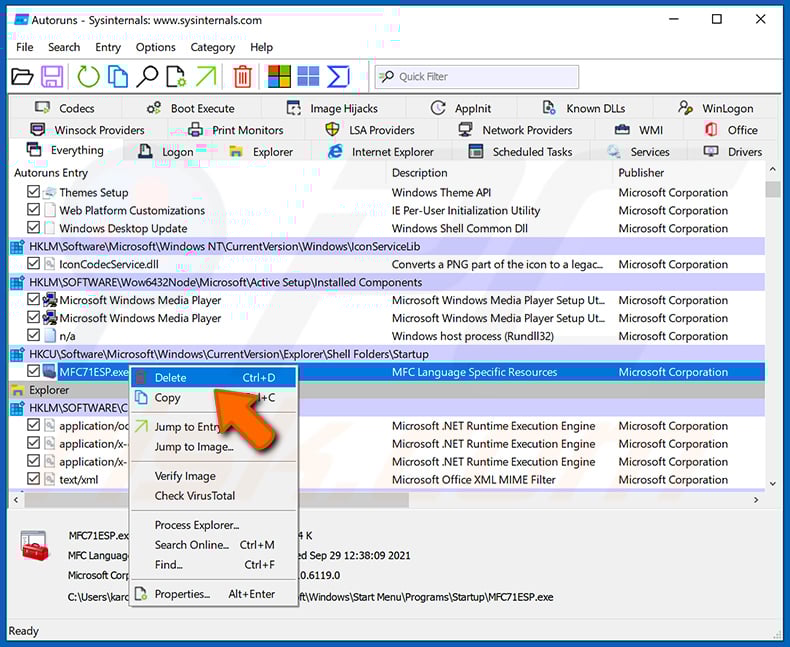
After removing the malware through the Autoruns application (this ensures that the malware will not run automatically on the next system startup), you should search for the malware name on your computer. Be sure to enable hidden files and folders before proceeding. If you find the filename of the malware, be sure to remove it.
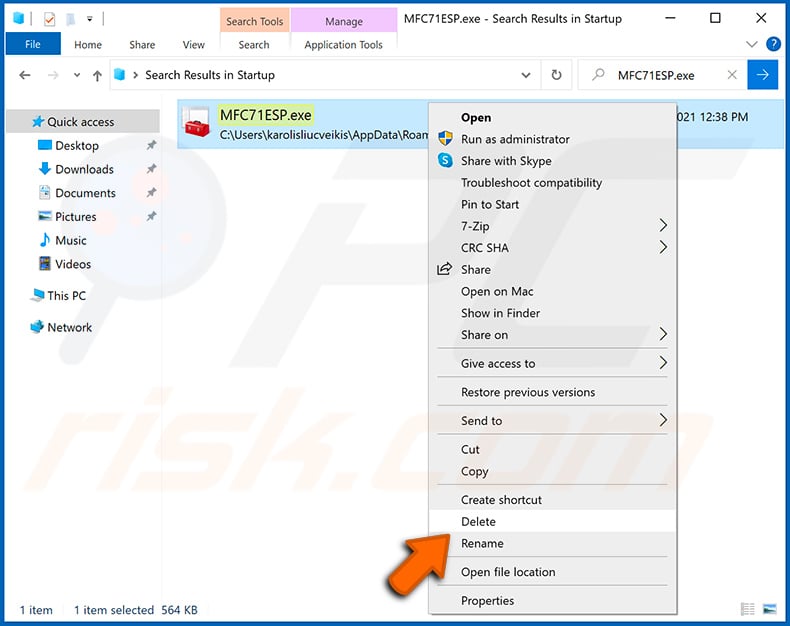
Reboot your computer in normal mode. Following these steps should remove any malware from your computer. Note that manual threat removal requires advanced computer skills. If you do not have these skills, leave malware removal to antivirus and anti-malware programs.
These steps might not work with advanced malware infections. As always it is best to prevent infection than try to remove malware later. To keep your computer safe, install the latest operating system updates and use antivirus software. To be sure your computer is free of malware infections, we recommend scanning it with Combo Cleaner Antivirus for Windows.
Frequently Asked Questions (FAQ)
My computer is infected with Vanta Stealer malware, should I format my storage device to get rid of it?
Formatting will remove Vanta Stealer, but it will also erase every file on the drive. It should be treated as a last resort. Running a reputable security tool such as Combo Cleaner is the safer first step, since it can remove the malware without destroying your data.
What are the biggest issues that Vanta Stealer malware can cause?
Vanta Stealer can expose saved browser passwords, payment details, Discord and Telegram sessions, gaming credentials, and cryptocurrency wallet recovery phrases to attackers. The consequences can include account takeovers, identity theft, financial fraud, and the total loss of any crypto assets stored in affected wallets.
What is the purpose of Vanta Stealer malware?
Vanta Stealer is built to harvest as much sensitive data as possible from an infected device in a single session and transmit it to the attacker. Targets include browser credentials, payment data, gaming and messaging platform accounts, and cryptocurrency wallet files and seed phrases.
How did Vanta Stealer malware infiltrate my computer?
Vanta Stealer is suspected to spread through phishing emails, trojanized game cheats and mods, fake software installers, malicious code repositories, and malvertising. Downloading files from unofficial or unverified sources is the most common risk factor for this type of infection.
Will Combo Cleaner protect me from malware?
Yes. Combo Cleaner can detect and remove Vanta Stealer and most other known threats. A full system scan is recommended to ensure nothing has been missed, particularly since stealers can download or drop additional files during execution.
Share:
 Facebook
 X.com
X.com
 LinkedIn
 Copy Link

Tomas Meskauskas
Expert security researcher, professional malware analyst
I am passionate about computer security and technology. I have an experience of over 10 years working in various companies related to computer technical issue solving and Internet security. I have been working as an author and editor for pcrisk.com since 2010. Follow me on Twitter and LinkedIn to stay informed about the latest online security threats.
PCrisk security portal is brought by a company RCS LT.
Joined forces of security researchers help educate computer users about the latest online security threats. More information about the company RCS LT.
Our malware removal guides are free. However, if you want to support us you can send us a donation.
DonatePCrisk security portal is brought by a company RCS LT.
Joined forces of security researchers help educate computer users about the latest online security threats. More information about the company RCS LT.
Our malware removal guides are free. However, if you want to support us you can send us a donation.
Donate
▼ Show Discussion