
What sort of pop-up scam is "Microsoft Firewall Alert"
Phishing/ScamAlso Known As: Microsoft Firewall Alert tech support scam

Get free scan and check if your device is infected.
Remove it nowTo use full-featured product, you have to purchase a license for Combo Cleaner. Seven days free trial available. Combo Cleaner is owned and operated by RCS LT, the parent company of PCRisk.com.
What is the "Microsoft Firewall Alert" pop-up scam?
We analyzed this page and determined that it is a technical support scam. It uses fake Windows security warnings to frighten visitors into calling a fraudulent support number. Microsoft Corporation and Windows have no connection to this scheme whatsoever.
"Microsoft Firewall Alert" scam in detail
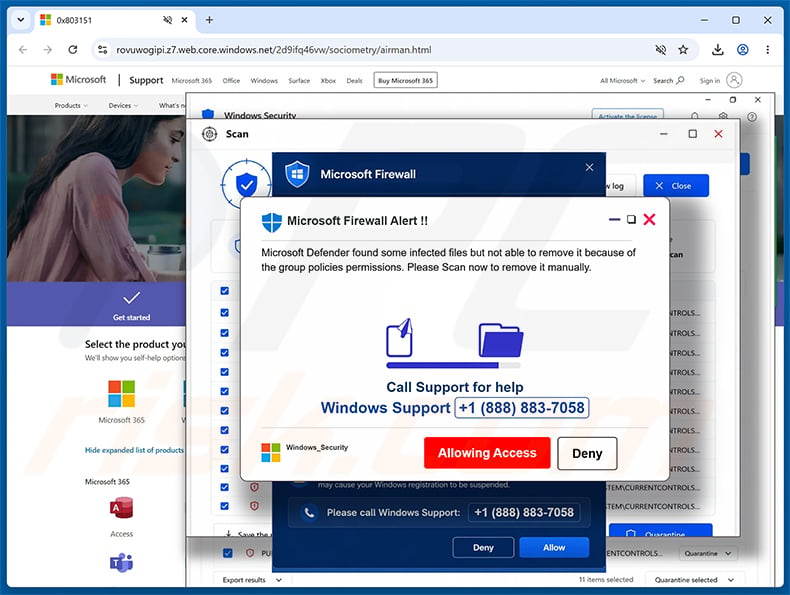
The page at rovuwogipi.z7.web.core.windows[.]net deploys multiple overlapping pop-up windows to overwhelm visitors and make the browser difficult to close.
The foreground pop-up carries the heading "Microsoft Firewall Alert !!" and claims that Microsoft Defender has found infected files it cannot remove due to group policy restrictions. Visitors are instructed to call a "Windows Support" number for help.
It must be emphasized that Microsoft Corporation and Windows have no connection to this scheme. Real Windows security alerts appear through the operating system itself, not through a browser window, and they never direct users to call a phone number.
Anyone who calls the number shown will reach scammers posing as Microsoft support agents. They typically ask to connect to the computer remotely via remote access software such as TeamViewer. Once connected, they can steal saved passwords, access bank accounts, or charge the victim for fabricated repair work.
Granting remote access carries serious lasting risks. Attackers can plant trojans, ransomware, or keyloggers that keep running on the device long after the call ends, causing harm that extends well beyond the initial session.
This scam is also spread through deceptive spam emails. These messages arrive under the subject line "Activity Sent From Your Own Account" and warn that unusual activity was detected on the recipient's account. The email includes links labeled "Review account activity" and "Review security settings" - clicking either one redirects the recipient directly to the scam page.
The correct response when encountering this page is to close the browser immediately. If the browser has become unresponsive, use Task Manager to force it closed. Do not call the number displayed on the page, and do not interact with any button shown in the pop-ups.
| Name | Microsoft Firewall Alert tech support scam |
| Threat Type | Phishing, Scam, Social Engineering, Fraud |
| Fake Claim | Microsoft Defender found infected files on the computer that cannot be removed due to group policy restrictions |
| Disguise | Legitimate Microsoft Windows Firewall and Defender security alert |
| Fake Phone Number | +1 (888) 883-7058 |
| Related Domain | rovuwogipi.z7.web.core.windows[.]net |
| Threat Status (Phishing Site) | PCrisk Website Scanner Results |
| Symptoms | Fake error messages, fake system warnings, pop-up errors, hoax computer scan. |
| Distribution methods | Compromised websites, rogue online pop-up ads, spam emails, potentially unwanted applications. |
| Damage | Loss of sensitive private information, monetary loss, identity theft, possible malware infections. |
| Malware Removal (Windows) |
To eliminate possible malware infections, scan your computer with legitimate antivirus software. Our security researchers recommend using Combo Cleaner. Download Combo CleanerTo use full-featured product, you have to purchase a license for Combo Cleaner. 7 days free trial available. Combo Cleaner is owned and operated by RCS LT, the parent company of PCRisk.com. |
Online scams in general
Technical support scams are among the most common categories of online fraud. They rely on fake urgency and authoritative-looking branding to push victims into acting without stopping to question what they are seeing - usually by calling a fraudulent number or allowing remote access to their computer.
Some examples of similar scams are "Your Avast Protection Expired", "Scan Computer To See If Antivirus Is Working", and "Windows Security Certificate Expired/Invalid".
How did I open a scam website?
Many visitors reach pages like this through deceptive spam emails. The "Activity Sent From Your Own Account" message used to promote this scam creates a false sense of urgency and contains links that send recipients directly to the fake alert page.
Rogue advertising networks on torrent sites, illegal streaming services, and similar platforms are another common pathway. Notifications sent by previously-visited rogue sites and adware installed on the device are also frequent sources of these unwanted redirects.
How to avoid visiting scam pages?
Do not grant notification permissions to unfamiliar or untrustworthy websites. Avoid clicking ads, pop-up buttons, or links on dubious pages, and download software only from official sources or authorized app stores.
Treat unexpected emails with caution - particularly those claiming urgent security issues or account compromise. Keep the operating system and all installed software up to date. If unwanted programs are already present on the device, we recommend scanning with Combo Cleaner Antivirus for Windows to eliminate them automatically.
Full appearance of the "Microsoft Firewall Alert" pop-up (GIF):
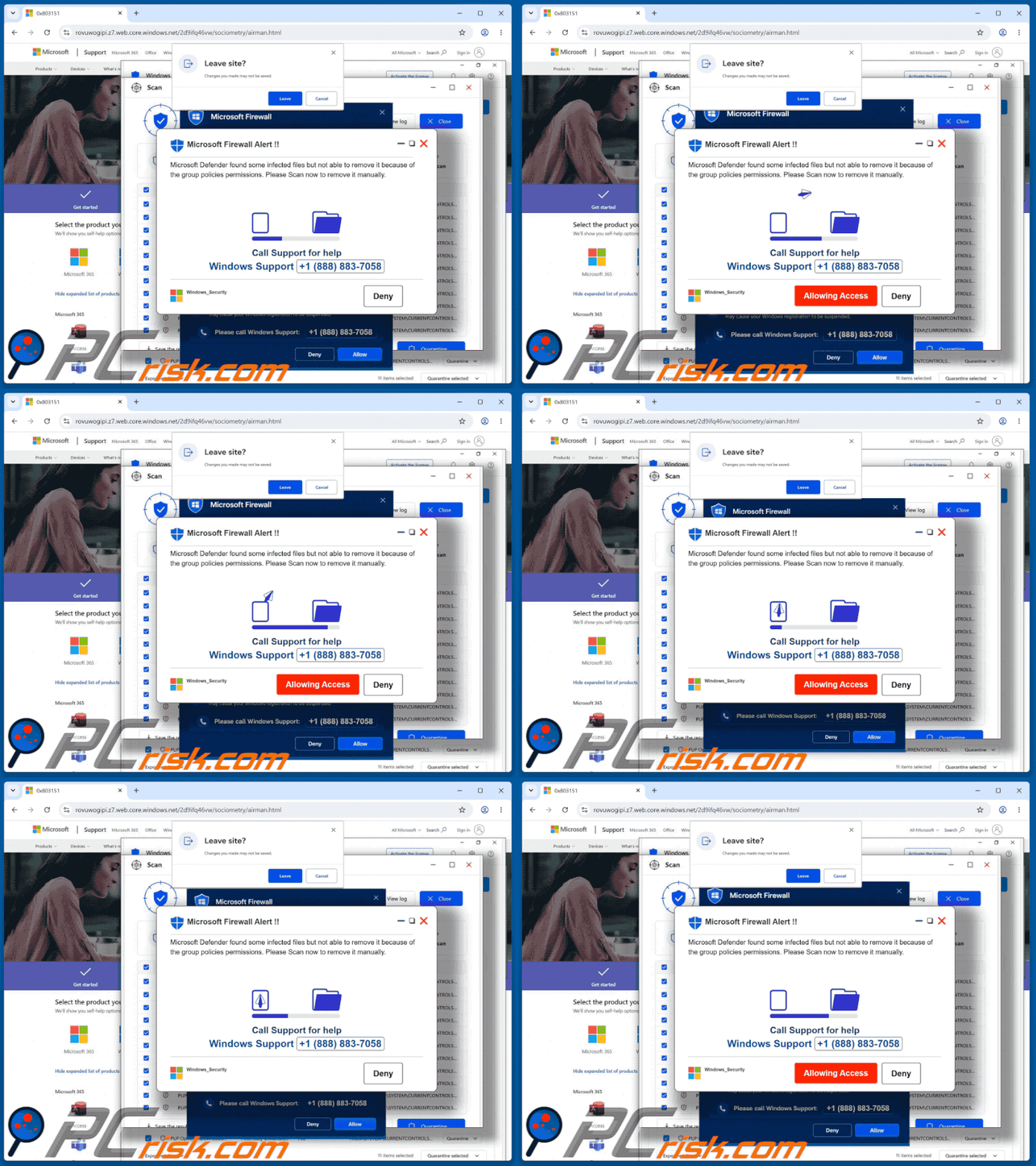
Text presented in the "Microsoft Firewall Alert" pop-up:
Microsoft Firewall Alert !!
microsoft Defender found some infected files but not able to remove it because of the group policies permissions. Please Scan now to remove it manually.
Call Support for help
Windows Support +1 (888) 883-7058[Allowing Access] [Deny]
Screenshot of the spam email used to promote this scam:
![Spam email promoting Microsoft Firewall Alert POP-UP Scam (rovuwogipi.z7.web.core.windows[.]net)](/images/stories/screenshots202609/microsoft-firewall-alert-pop-up-scam-spam-email.jpg)
Text presented in the "Activity Sent From Your Own Account" spam email:
Subject: Activity Sent From Your Own Account
IMPORTANT NOTICE
Regarding activity sent from your own account
Unusual activity has been detected from your account.
In addition, this email has been recorded as having been sent from your own account.
If you did not perform this action or send this email, please review your account activity.
Please use the link below to review your recent account activity.
Review account activity
When reviewing your account, please check your recent login activity and actions performed from your account.
If you find any activity that you do not recognize, please review your account security settings.
Review security settings
******** Security Team
Instant automatic malware removal:
Manual threat removal might be a lengthy and complicated process that requires advanced IT skills. Combo Cleaner is a professional automatic malware removal tool that is recommended to get rid of malware. Download it by clicking the button below:
DOWNLOAD Combo CleanerBy downloading any software listed on this website you agree to our Privacy Policy and Terms of Use. To use full-featured product, you have to purchase a license for Combo Cleaner. 7 days free trial available. Combo Cleaner is owned and operated by RCS LT, the parent company of PCRisk.com.
Quick menu:
- What is Microsoft Firewall Alert tech support scam?
- How to identify a pop-up scam?
- How do pop-up scams work?
- How to remove fake pop-ups?
- How to prevent fake pop-ups?
- What to do if you fell for a pop-up scam?
How to identify a pop-up scam?
Pop-up windows with various fake messages are a common type of lures cybercriminals use. They collect sensitive personal data, trick Internet users into calling fake tech support numbers, subscribe to useless online services, invest in shady cryptocurrency schemes, etc.
While in the majority of cases these pop-ups don't infect users' devices with malware, they can cause direct monetary loss or could result in identity theft.
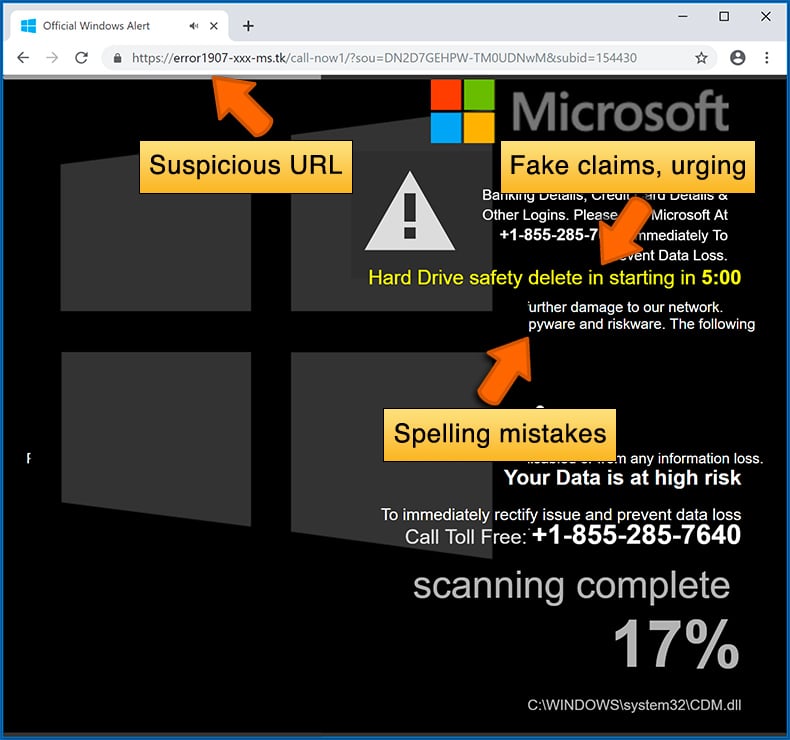
Cybercriminals strive to create their rogue pop-up windows to look trustworthy, however, scams typically have the following characteristics:
- Spelling mistakes and non-professional images - Closely inspect the information displayed in a pop-up. Spelling mistakes and unprofessional images could be a sign of a scam.
- Sense of urgency - Countdown timer with a couple of minutes on it, asking you to enter your personal information or subscribe to some online service.
- Statements that you won something - If you haven't participated in a lottery, online competition, etc., and you see a pop-up window stating that you won.
- Computer or mobile device scan - A pop-up window that scans your device and informs of detected issues - is undoubtedly a scam; webpages cannot perform such actions.
- Exclusivity - Pop-up windows stating that only you are given secret access to a financial scheme that can quickly make you rich.
Example of a pop-up scam:
How do pop-up scams work?
Cybercriminals and deceptive marketers usually use various advertising networks, search engine poisoning techniques, and shady websites to generate traffic to their pop-ups. Users land on their online lures after clicking on fake download buttons, using a torrent website, or simply clicking on an Internet search engine result.
Based on users' location and device information, they are presented with a scam pop-up. Lures presented in such pop-ups range from get-rich-quick schemes to fake virus scans.
How to remove fake pop-ups?
In most cases, pop-up scams do not infect users' devices with malware. If you encountered a scam pop-up, simply closing it should be enough. In some cases scam, pop-ups may be hard to close; in such cases - close your Internet browser and restart it.
In extremely rare cases, you might need to reset your Internet browser. For this, use our instructions explaining how to reset Internet browser settings.
How to prevent fake pop-ups?
To prevent seeing pop-up scams, you should visit only reputable websites. Torrent, Crack, free online movie streaming, YouTube video download, and other websites of similar reputation commonly redirect Internet users to pop-up scams.
To minimize the risk of encountering pop-up scams, you should keep your Internet browsers up-to-date and use reputable anti-malware application. For this purpose, we recommend Combo Cleaner Antivirus for Windows.
What to do if you fell for a pop-up scam?
This depends on the type of scam that you fell for. Most commonly, pop-up scams try to trick users into sending money, giving away personal information, or giving access to one's device.
- If you sent money to scammers: You should contact your financial institution and explain that you were scammed. If informed promptly, there's a chance to get your money back.
- If you gave away your personal information: You should change your passwords and enable two-factor authentication in all online services that you use. Visit Federal Trade Commission to report identity theft and get personalized recovery steps.
- If you let scammers connect to your device: You should scan your computer with reputable anti-malware (we recommend Combo Cleaner Antivirus for Windows) - cyber criminals could have planted trojans, keyloggers, and other malware, don't use your computer until removing possible threats.
- Help other Internet users: report Internet scams to Federal Trade Commission.
Frequently Asked Questions (FAQ)
What is a pop-up scam?
A pop-up scam is a fake message that appears in the browser while visiting a website. It is designed to trick the visitor into taking a harmful action - such as calling a fraudulent phone number, handing over personal information, sending money, or installing unwanted software.
What is the purpose of a pop-up scam?
The purpose is financial gain for the cybercriminals behind it. In tech support scams like this one, the main goal is to extract direct payments for fake services, or to gain remote access to the victim's device in order to steal banking credentials and sensitive personal data.
Why do I encounter fake pop-ups?
These pages reach users through several channels: spam emails with deceptive links, rogue advertising networks on untrustworthy websites, notifications from previously-visited rogue sites, and adware already running on the device. Most people who encounter them did not seek them out.
Will Combo Cleaner protect me from pop-up scams?
Yes. Combo Cleaner checks every website visited against a database of known malicious and deceptive pages. If a tech support scam page like this one is detected, Combo Cleaner blocks access and alerts the user before any harm can occur.
Share:
 Facebook
 X.com
X.com
 LinkedIn
 Copy Link

Tomas Meskauskas
Expert security researcher, professional malware analyst
I am passionate about computer security and technology. I have an experience of over 10 years working in various companies related to computer technical issue solving and Internet security. I have been working as an author and editor for pcrisk.com since 2010. Follow me on Twitter and LinkedIn to stay informed about the latest online security threats.
PCrisk security portal is brought by a company RCS LT.
Joined forces of security researchers help educate computer users about the latest online security threats. More information about the company RCS LT.
Our malware removal guides are free. However, if you want to support us you can send us a donation.
DonatePCrisk security portal is brought by a company RCS LT.
Joined forces of security researchers help educate computer users about the latest online security threats. More information about the company RCS LT.
Our malware removal guides are free. However, if you want to support us you can send us a donation.
Donate
▼ Show Discussion