
How to remove ClosedQuorum RAT from the operating system
TrojanAlso Known As: ClosedQuorum remote access trojan

Get free scan and check if your device is infected.
Remove it nowTo use full-featured product, you have to purchase a license for Combo Cleaner. Seven days free trial available. Combo Cleaner is owned and operated by RCS LT, the parent company of PCRisk.com.
What kind of malware is ClosedQuorum?
ClosedQuorum is a Windows implant classified as a trojan that combines Remote Access Trojan (RAT) functionality with credential and cryptocurrency theft. What sets it apart is its use of commercial AI language models to autonomously decide which attack action to take next, without requiring a human operator to send commands.
Once active, the malware queries up to four AI services, tallies their responses, and executes one of four predefined actions: steal credentials, inject malicious code, establish persistence, or attempt lateral movement. Stolen data is sent to the attacker through a Discord webhook rather than a conventional command-and-control server.
According to research published by Cisco Talos, ClosedQuorum is the first documented implant to delegate tactical decisions entirely to AI models. The analyzed samples contain placeholder credentials, and no confirmed in-the-wild deployments have been reported at the time of writing.
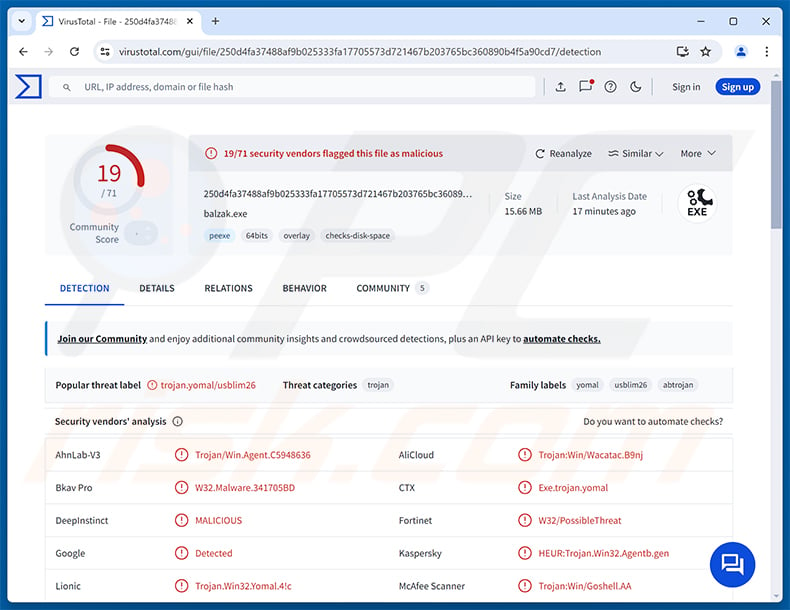
ClosedQuorum overview
ClosedQuorum is compiled in Go and runs on 64-bit Windows systems. Instead of contacting a dedicated command-and-control server, it sends requests to up to four commercial AI providers: DeepSeek, Qwen, Mistral, and Google Gemini.
Each model receives a system prompt instructing it to act as a malware strategist and return one of four predefined decisions: steal, inject, persist, or move. The responses are compared using a plurality vote. If the result is tied, DeepSeek has tiebreaker priority.
This architecture shifts attack decision-making off the operator and onto commercial AI infrastructure. The malware can keep executing attack stages autonomously even when no operator is actively watching, which Cisco Talos describes as a form of "effort displacement."
ClosedQuorum's capabilities
The steal action directs ClosedQuorum to dump credentials from LSASS memory using the MiniDumpWriteDump function, extract saved passwords and session data from Chrome, Edge, and Firefox, and collect files from cryptocurrency wallet software and browser extensions including MetaMask, Exodus, and Ethereum.
The inject action executes shellcode inside another running process using either Early Bird APC injection or process hollowing with a PEB-walk technique. Both methods allow the malware to run code under the cover of a legitimate process.
The persist action creates a Windows Registry Run key, registers a scheduled task, and sets up a WMI event subscription that fires every 60 seconds. These three mechanisms work independently, making the infection harder to fully eliminate.
The move action is designed for lateral movement through the local network. In the samples analyzed by Cisco Talos, this option is present in the code but non-functional, suggesting it is reserved for future builds.
Stealth and data exfiltration
To hinder behavioral monitoring, ClosedQuorum overwrites the EtwEventWrite function, suppressing Event Tracing for Windows (ETW) - a logging mechanism many security tools depend on to detect suspicious activity.
The malware delays its first action by five minutes after launch and then polls the AI providers at randomized intervals of five to fifteen minutes. This timing helps avoid sandbox analysis environments, which typically run samples for a fixed short window.
ClosedQuorum disguises itself using Windows Update-themed filenames. Before exfiltration, stolen data is encrypted with AES-256-GCM using a date-derived key, Base64-encoded, and split into 1,900-byte chunks transmitted to the operator via a Discord webhook.
| Name | ClosedQuorum remote access trojan |
| Threat Type | Remote Access Trojan (RAT), Information Stealer, Trojan |
| Detection Names | Kaspersky (HEUR:Trojan.Win32.Agentb.gen), Microsoft (Trojan:Win32/Yomal!rfn), Sophos (Mal/Generic-S), Full List (VirusTotal) |
| Symptoms | Remote Access Trojans are designed to stealthily infiltrate the victim's computer and remain silent, and thus no particular symptoms are clearly visible on an infected machine. |
| Distribution methods | Phishing emails, malicious software installers, software 'cracks', untrustworthy download sources. |
| Damage | Stolen passwords and banking information, identity theft, the victim's computer added to a botnet, additional infections, monetary loss, account hijacking. |
| Malware Removal (Windows) |
To eliminate possible malware infections, scan your computer with legitimate antivirus software. Our security researchers recommend using Combo Cleaner. Download Combo CleanerTo use full-featured product, you have to purchase a license for Combo Cleaner. 7 days free trial available. Combo Cleaner is owned and operated by RCS LT, the parent company of PCRisk.com. |
Conclusion
ClosedQuorum is a stealthy, self-directing threat capable of stealing browser credentials, system passwords, and cryptocurrency wallet data, injecting code into other processes, and maintaining persistent access through multiple independent mechanisms.
Its AI-driven decision loop makes it more unpredictable than conventional malware: it does not wait for operator input and can keep executing attack stages on its own. Any machine found to be infected with ClosedQuorum should be cleaned immediately.
More examples of RATs are DarkTortilla, PEEP, and PollCat.
How did ClosedQuorum infiltrate my computer?
As documented by Cisco Talos, ClosedQuorum follows a credentials-as-a-service distribution model aimed at criminal operators. Developers produce a customized binary for each buyer, embedding that operator's LLM API keys and Discord webhook URL at compile time. Every resulting build is unique, with its own exfiltration channel.
The specific methods used to deliver ClosedQuorum to end victims have not been confirmed in the analyzed samples. That said, malware of this category is commonly distributed through phishing emails carrying malicious attachments, fake download pages impersonating legitimate software, and deceptive ads.
Other typical delivery routes include pirated software and activation cracks, third-party download platforms, malvertising, and fake software update prompts. File formats commonly used to package such payloads include ZIP, RAR, EXE, and MSI archives.
How to avoid installation of malware?
Be cautious with unexpected emails, particularly those containing attachments or links from unfamiliar senders. Download software only from official developer websites and verified app stores. Avoid pirated content, key generators, and activation tools sourced from unofficial channels, as these are among the most common delivery vehicles for malware.
Keep your operating system and all installed software up to date, since outdated applications are a frequent target for exploitation. Use reputable security software and run regular system scans to catch threats early. If you believe that your computer is already infected, we recommend running a scan with Combo Cleaner Antivirus for Windows to automatically eliminate infiltrated malware.
Instant automatic malware removal:
Manual threat removal might be a lengthy and complicated process that requires advanced IT skills. Combo Cleaner is a professional automatic malware removal tool that is recommended to get rid of malware. Download it by clicking the button below:
DOWNLOAD Combo CleanerBy downloading any software listed on this website you agree to our Privacy Policy and Terms of Use. To use full-featured product, you have to purchase a license for Combo Cleaner. 7 days free trial available. Combo Cleaner is owned and operated by RCS LT, the parent company of PCRisk.com.
Quick menu:
- What is ClosedQuorum?
- STEP 1. Manual removal of ClosedQuorum malware.
- STEP 2. Check if your computer is clean.
How to remove malware manually?
Manual malware removal is a complicated task - usually it is best to allow antivirus or anti-malware programs to do this automatically. To remove this malware we recommend using Combo Cleaner Antivirus for Windows.
If you wish to remove malware manually, the first step is to identify the name of the malware that you are trying to remove. Here is an example of a suspicious program running on a user's computer:
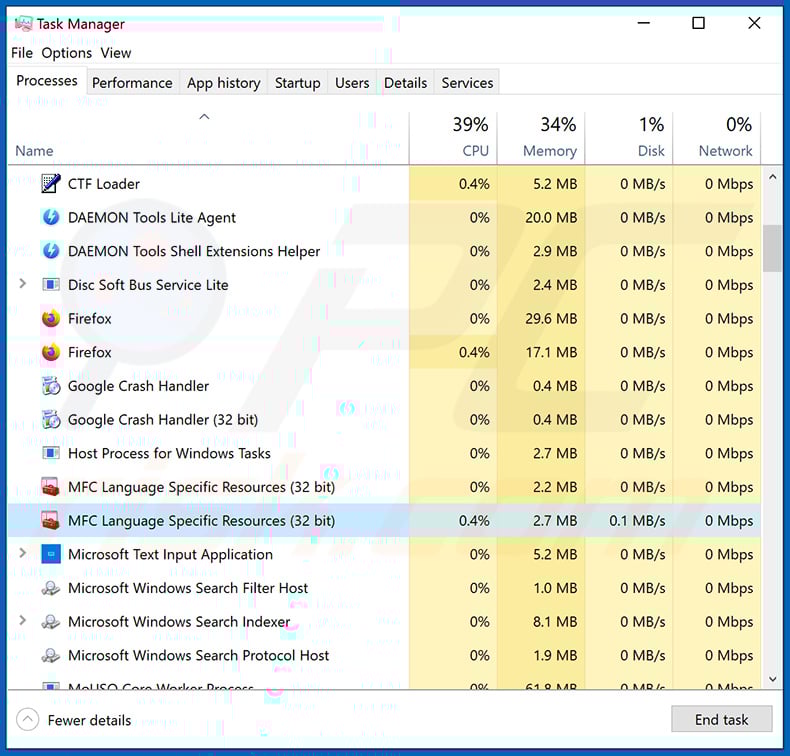
If you checked the list of programs running on your computer, for example, using task manager, and identified a program that looks suspicious, you should continue with these steps:
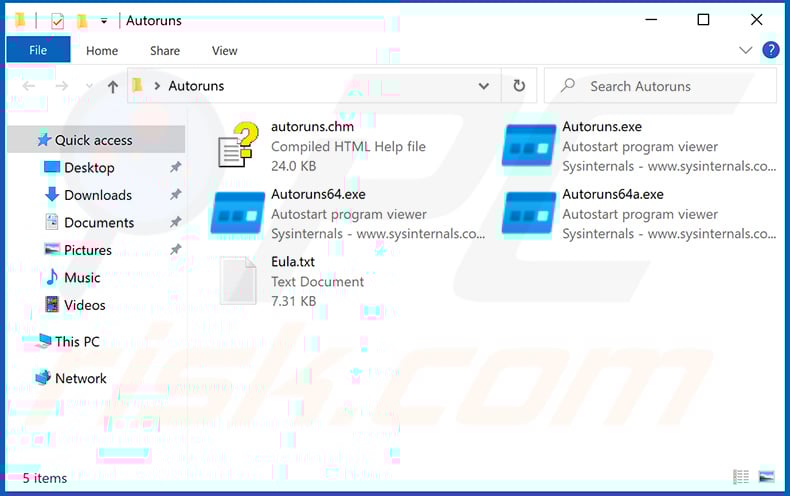
 Download a program called Autoruns. This program shows auto-start applications, Registry, and file system locations:
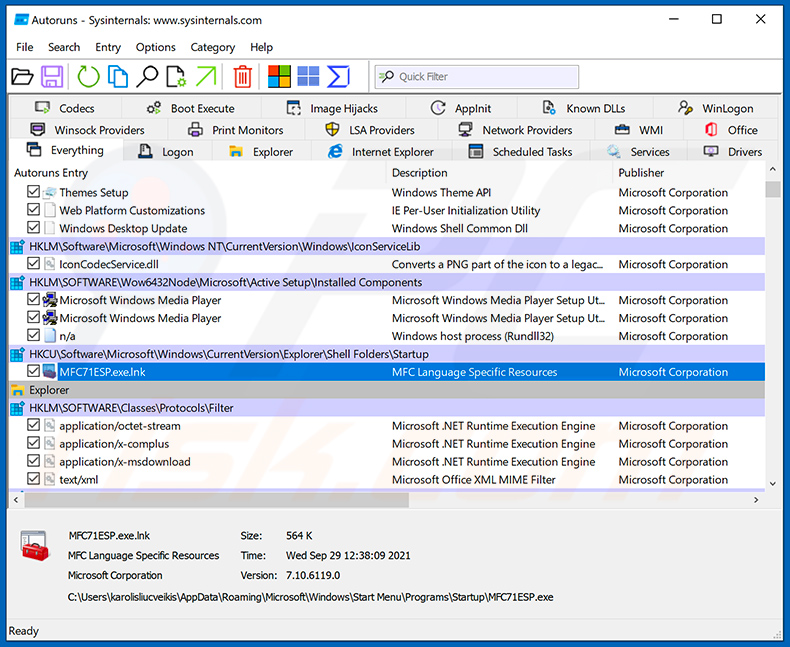
 Restart your computer into Safe Mode:
Windows XP and Windows 7 users: Start your computer in Safe Mode. Click Start, click Shut Down, click Restart, click OK. During your computer start process, press the F8 key on your keyboard multiple times until you see the Windows Advanced Option menu, and then select Safe Mode with Networking from the list.
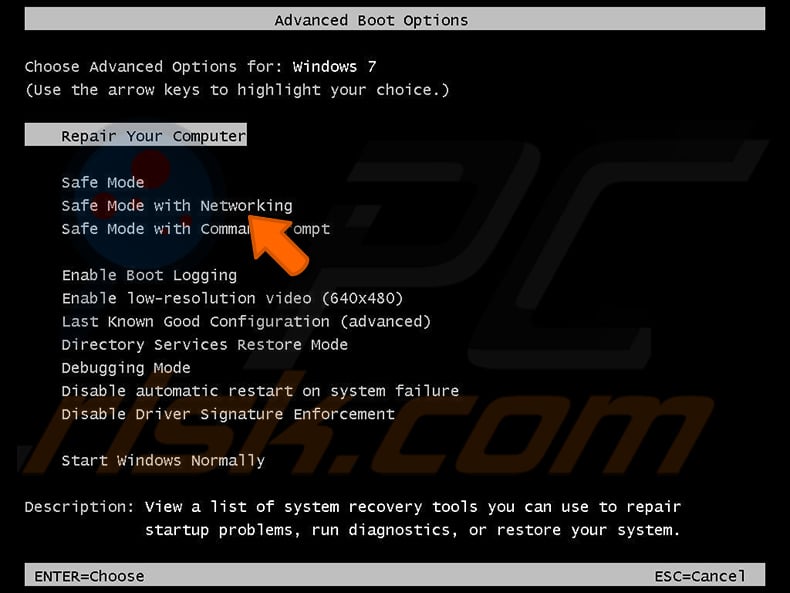
Video showing how to start Windows 7 in "Safe Mode with Networking":
Windows 8 users: Start Windows 8 is Safe Mode with Networking - Go to Windows 8 Start Screen, type Advanced, in the search results select Settings. Click Advanced startup options, in the opened "General PC Settings" window, select Advanced startup.
Click the "Restart now" button. Your computer will now restart into the "Advanced Startup options menu". Click the "Troubleshoot" button, and then click the "Advanced options" button. In the advanced option screen, click "Startup settings".
Click the "Restart" button. Your PC will restart into the Startup Settings screen. Press F5 to boot in Safe Mode with Networking.
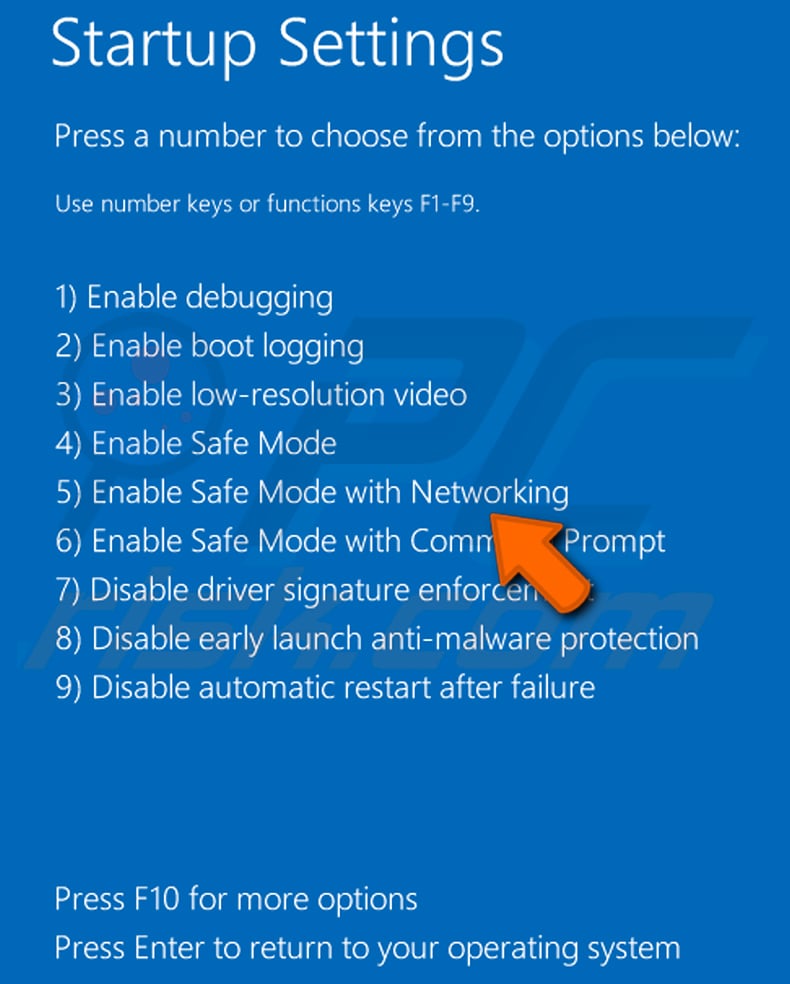
Video showing how to start Windows 8 in "Safe Mode with Networking":
Windows 10 users: Click the Windows logo and select the Power icon. In the opened menu click "Restart" while holding "Shift" button on your keyboard. In the "choose an option" window click on the "Troubleshoot", next select "Advanced options".
In the advanced options menu select "Startup Settings" and click on the "Restart" button. In the following window you should click the "F5" button on your keyboard. This will restart your operating system in safe mode with networking.
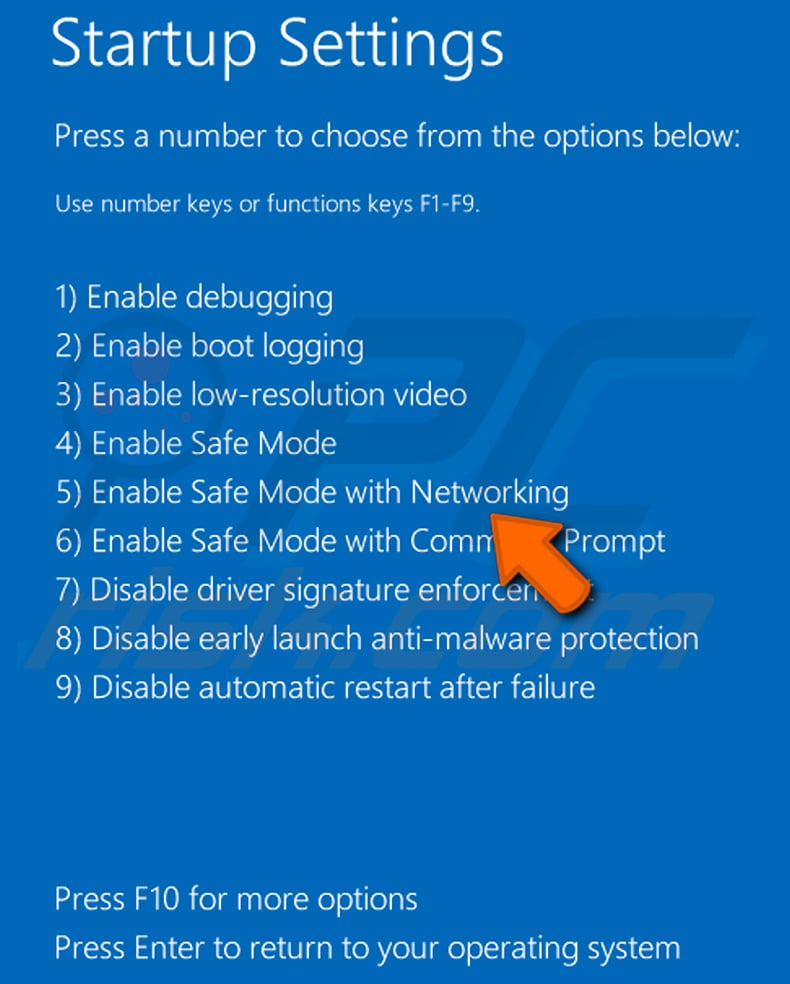
Video showing how to start Windows 10 in "Safe Mode with Networking":
 Extract the downloaded archive and run the Autoruns.exe file.
 In the Autoruns application, click "Options" at the top and uncheck "Hide Empty Locations" and "Hide Windows Entries" options. After this procedure, click the "Refresh" icon.
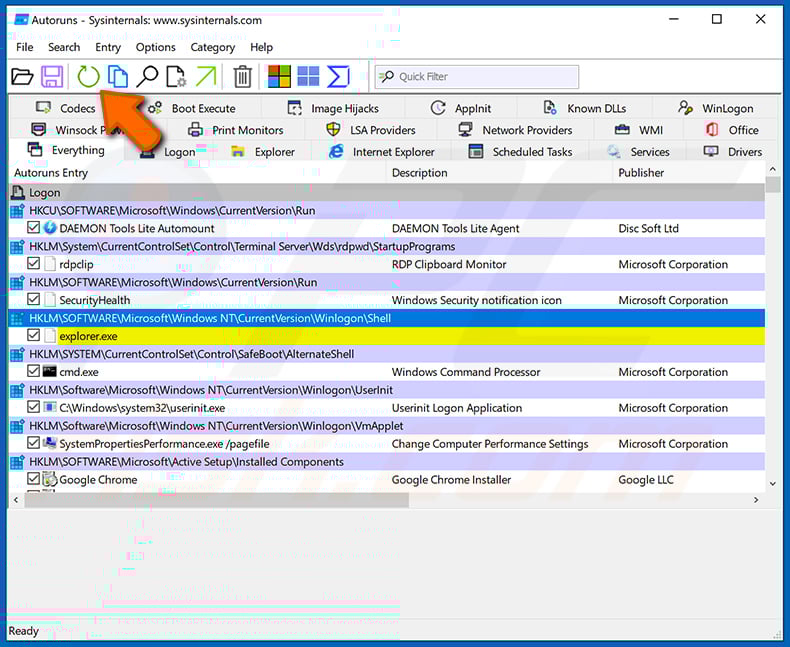
 Check the list provided by the Autoruns application and locate the malware file that you want to eliminate.
You should write down its full path and name. Note that some malware hides process names under legitimate Windows process names. At this stage, it is very important to avoid removing system files. After you locate the suspicious program you wish to remove, right click your mouse over its name and choose "Delete".
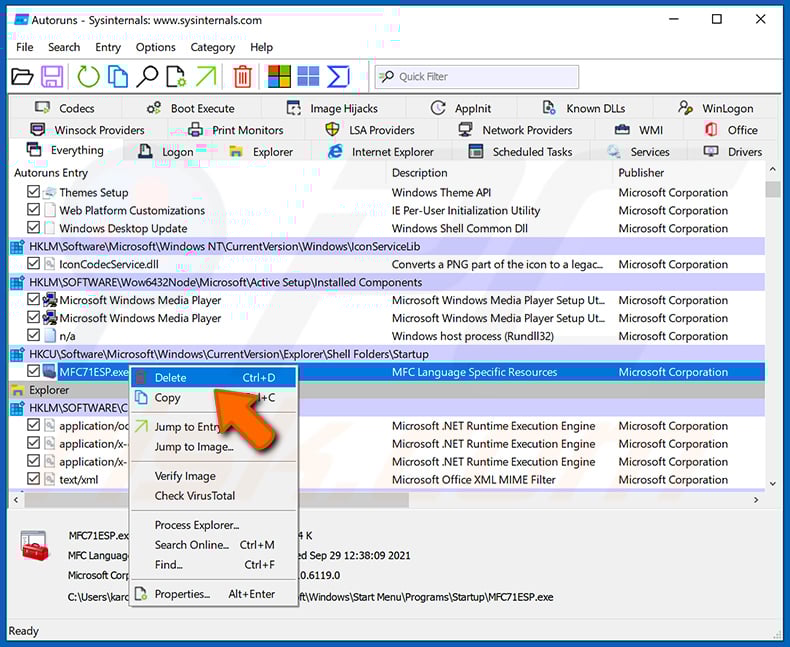
After removing the malware through the Autoruns application (this ensures that the malware will not run automatically on the next system startup), you should search for the malware name on your computer. Be sure to enable hidden files and folders before proceeding. If you find the filename of the malware, be sure to remove it.
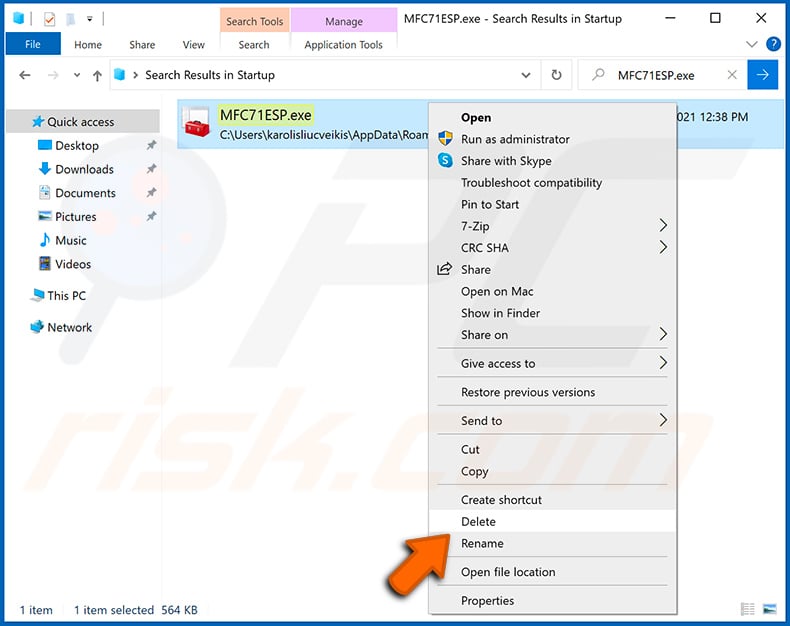
Reboot your computer in normal mode. Following these steps should remove any malware from your computer. Note that manual threat removal requires advanced computer skills. If you do not have these skills, leave malware removal to antivirus and anti-malware programs.
These steps might not work with advanced malware infections. As always it is best to prevent infection than try to remove malware later. To keep your computer safe, install the latest operating system updates and use antivirus software. To be sure your computer is free of malware infections, we recommend scanning it with Combo Cleaner Antivirus for Windows.
Frequently Asked Questions (FAQ)
My computer is infected with ClosedQuorum malware, should I format my storage device to get rid of it?
Formatting will remove ClosedQuorum, but it also erases every file on the drive. Running a reputable security tool such as Combo Cleaner is the safer first step in most cases, since it can eliminate the infection without destroying your data.
What are the biggest issues that ClosedQuorum malware can cause?
ClosedQuorum can steal browser passwords, system credentials, and cryptocurrency wallet contents. It can also inject malicious code into running processes and entrench itself through multiple persistence mechanisms.
These capabilities can lead to account hijacking, financial loss through stolen cryptocurrency, identity theft, and the delivery of additional malware to the compromised machine.
What is the purpose of ClosedQuorum malware?
ClosedQuorum is designed to automate post-compromise attack stages using AI decision-making. Its primary goals are stealing credentials and cryptocurrency wallet data, with additional capabilities for code injection, persistence, and lateral movement.
How did ClosedQuorum malware infiltrate my computer?
ClosedQuorum is sold as a customized build to criminal operators, with each binary carrying unique API keys and an exfiltration channel. The actual delivery to victims likely follows common methods such as phishing emails, fake software downloads, pirated content, or malicious advertisements.
Will Combo Cleaner protect me from malware?
Yes. Combo Cleaner can detect and remove most known malware. Because threats like ClosedQuorum use several independent persistence mechanisms, running a full system scan is recommended to make sure the infection is completely cleared.
Share:
 Facebook
 X.com
X.com
 LinkedIn
 Copy Link

Tomas Meskauskas
Expert security researcher, professional malware analyst
I am passionate about computer security and technology. I have an experience of over 10 years working in various companies related to computer technical issue solving and Internet security. I have been working as an author and editor for pcrisk.com since 2010. Follow me on Twitter and LinkedIn to stay informed about the latest online security threats.
PCrisk security portal is brought by a company RCS LT.
Joined forces of security researchers help educate computer users about the latest online security threats. More information about the company RCS LT.
Our malware removal guides are free. However, if you want to support us you can send us a donation.
DonatePCrisk security portal is brought by a company RCS LT.
Joined forces of security researchers help educate computer users about the latest online security threats. More information about the company RCS LT.
Our malware removal guides are free. However, if you want to support us you can send us a donation.
Donate
▼ Show Discussion