
How to block mirablock.it.com notification spam
Notification SpamAlso Known As: Ads by mirablock.it.com

Get free scan and check if your device is infected.
Remove it nowTo use full-featured product, you have to purchase a license for Combo Cleaner. Seven days free trial available. Combo Cleaner is owned and operated by RCS LT, the parent company of PCRisk.com.
What kind of page is mirablock[.]it.com?
Our analysis has revealed that mirablock[.]it.com is designed to trick visitors into agreeing to receive browser notifications. The site uses a fake CAPTCHA check as its lure. If permitted, mirablock[.]it.com can deliver fake virus alerts and other deceptive notifications that expose users to various online threats.
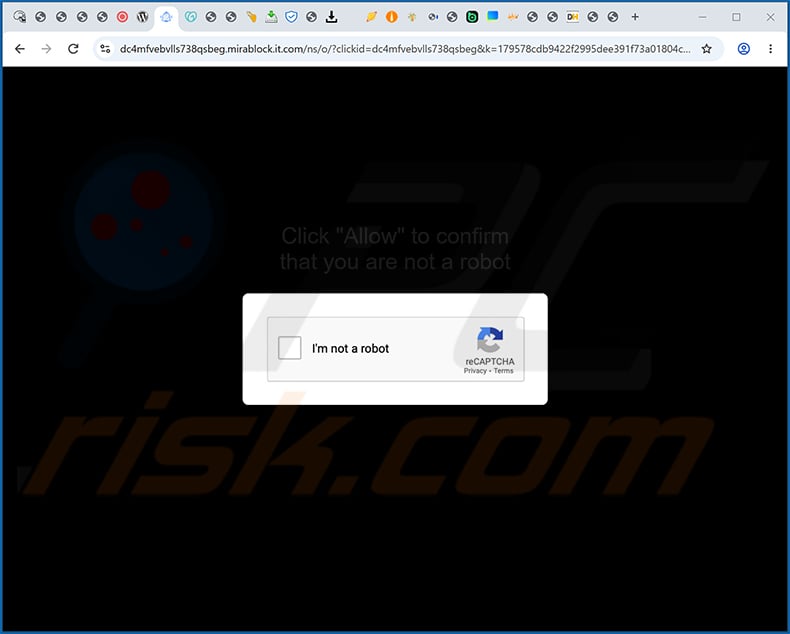
Mirablock[.]it.com in detail
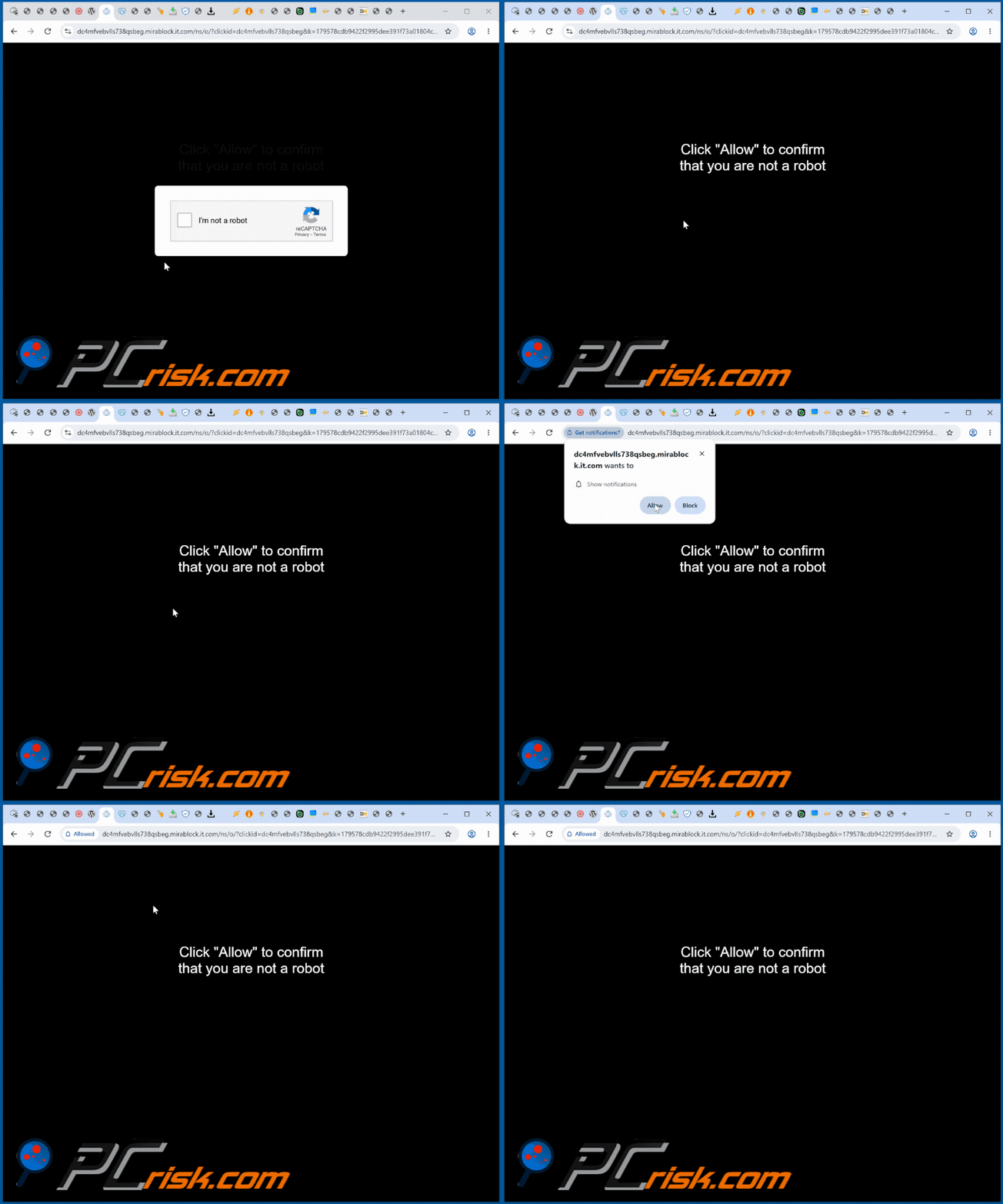
Mirablock[.]it.com presents visitors with a stark black-screen page built around a fake reCAPTCHA widget. A checkbox labeled "I'm not a robot" is displayed alongside the reCAPTCHA logo, and the page instructs visitors to click "Allow" to confirm they are human.
This is not a genuine CAPTCHA. Clicking "Allow" does not verify anything - it grants mirablock[.]it.com permission to send push notifications directly to the user's device. It is also worth noting that the page may display entirely different content on other subdomains, so other visitors may encounter quite different lures.
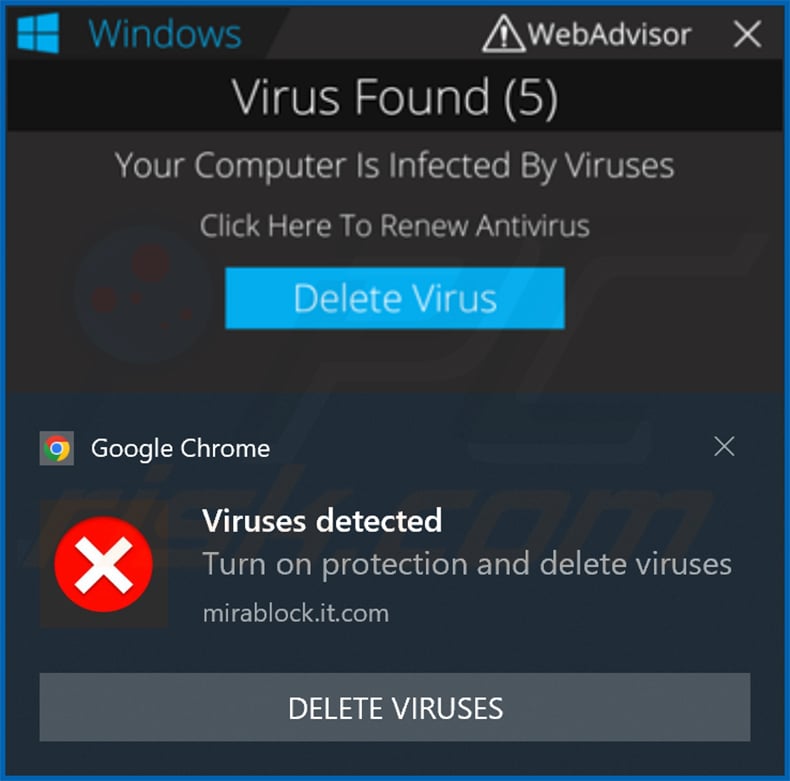
Notifications from mirablock[.]it.com display fake security alerts impersonating Windows system tools and security software. They claim that multiple viruses have been detected on the device and urge users to click buttons labeled "Delete Virus" or "DELETE VIRUSES." These warnings are entirely fabricated and designed to alarm users into clicking.
Clicking these fake alerts is likely to redirect users to tech support scam pages, fake antivirus purchase portals, or phishing sites. These destinations may demand payment for unnecessary software, claim to remove threats for a fee, or harvest personal and financial details through fraudulent forms.
The ads may also link to sites that push potentially unwanted applications onto the device or trigger downloads of harmful software. Even when a known brand appears in a notification, the pages behind such ads are typically run by scammers exploiting affiliate programs to earn illegitimate commissions.
If mirablock[.]it.com has been granted notification permissions, those permissions should be revoked without delay to prevent continued exposure to financial scams, malware, and potential account theft.
| Name | Ads by mirablock.it.com |
| Threat Type | Push notifications ads, Unwanted ads, Pop-up ads |
| Threat Status (mirablock[.]it.com) | PCrisk Website Scanner Results |
| Serving IP Address | 104.21.29.137 |
| Symptoms | Seeing advertisements not originating from the sites you are browsing. Intrusive pop-up ads. Decreased Internet browsing speed. |
| Distribution Methods | Deceptive pop-up ads, false claims within visited websites, unwanted applications (adware) |
| Damage | Decreased computer performance, browser tracking - privacy issues, possible additional malware infections. |
| Malware Removal (Windows) |
To eliminate possible malware infections, scan your computer with legitimate antivirus software. Our security researchers recommend using Combo Cleaner. Download Combo CleanerTo use full-featured product, you have to purchase a license for Combo Cleaner. 7 days free trial available. Combo Cleaner is owned and operated by RCS LT, the parent company of PCRisk.com. |
More on similar pages
Rogue notification sites like mirablock[.]it.com are most often reached through redirects from other shady websites. Users frequently land on them after interacting with misleading pop-ups, fake download buttons, or intrusive ads on torrent sites, illegal streaming platforms, or adult content pages. Adware silently installed on the device can generate these redirects as well.
Additional examples of websites similar to mirablock[.]it.com are snedgiones[.]co.in, emberfixpro.it[.]com, and essoaxole[.]co.in.
How did mirablock[.]it.com gain permission to deliver spam notifications?
Push notifications require explicit permission from the user - no website can deliver them without it. If notifications from mirablock[.]it.com are appearing on your device, it means you previously visited this page and clicked "Allow" (or a similar option) when the notification prompt appeared.
How to prevent deceptive sites from delivering spam notifications?
Any site that asks users to click "Allow" to prove they are not a robot, access a video, or download a file is using a deceptive tactic - not a real CAPTCHA. When such a prompt appears, the right response is to close the tab or select "Block" to deny the notification request entirely.
If unwanted notifications from mirablock[.]it.com or similar sites continue to appear, we recommend running a scan with Combo Cleaner Antivirus for Windows to automatically revoke any permissions they hold and clear associated threats.
Appearance of mirablock[.]it.com website (GIF):
Notifications delivered by mirablock[.]it.com:
Instant automatic malware removal:
Manual threat removal might be a lengthy and complicated process that requires advanced IT skills. Combo Cleaner is a professional automatic malware removal tool that is recommended to get rid of malware. Download it by clicking the button below:
DOWNLOAD Combo CleanerBy downloading any software listed on this website you agree to our Privacy Policy and Terms of Use. To use full-featured product, you have to purchase a license for Combo Cleaner. 7 days free trial available. Combo Cleaner is owned and operated by RCS LT, the parent company of PCRisk.com.
Quick menu:
- What is Ads by mirablock.it.com?
- STEP 1. Remove spam notifications from Google Chrome
- STEP 2. Remove spam notifications from Google Chrome (Android)
- STEP 3. Remove spam notifications from Mozilla Firefox
- STEP 4. Remove spam notifications from Microsoft Edge
- STEP 5. Remove spam notifications from Safari (macOS)
Disable unwanted browser notifications:
Video showing how to disable web browser notifications:
 Remove spam notifications from Google Chrome:
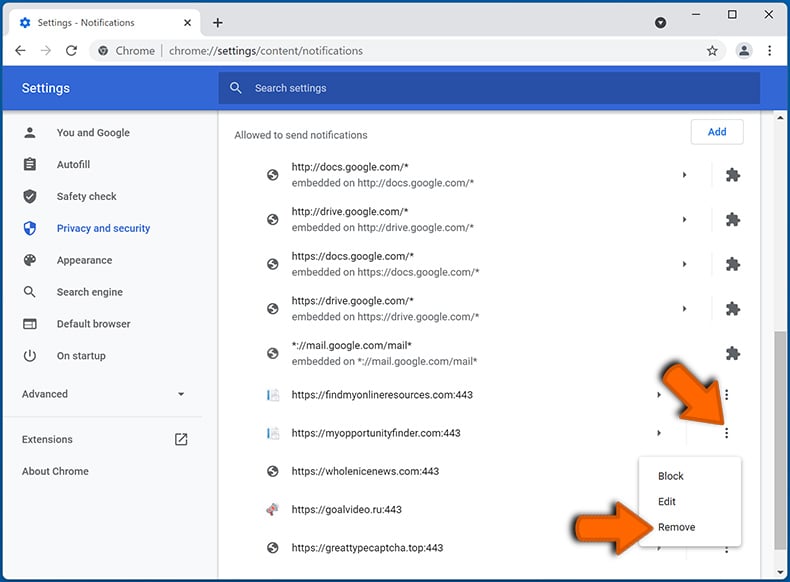
Click the Menu button (three dots) on the right upper corner of the screen and select "Settings". In the opened window select "Privacy and security", then click on "Site Settings" and choose "Notifications".
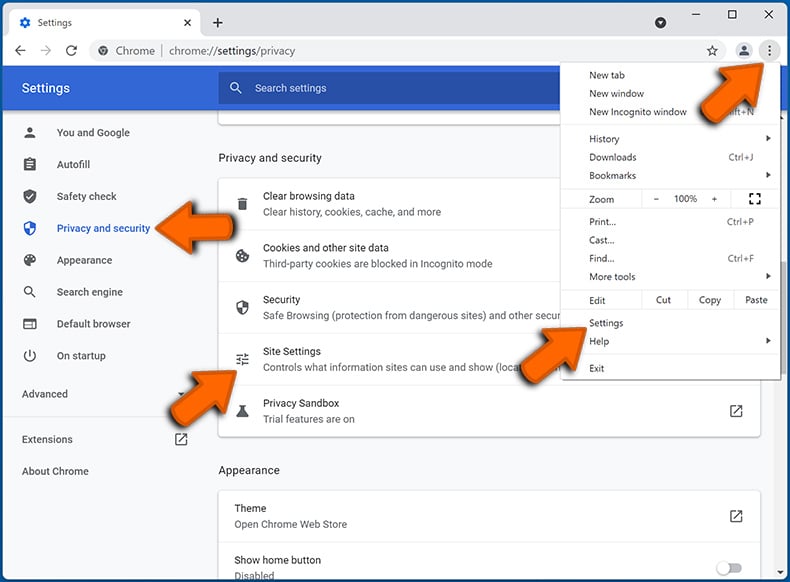
In the "Allowed to send notifications" list search for websites that you want to stop receiving notifications from. Click on the three dots icon near the website URL and click "Block" or "Remove" (if you click "Remove" and visit the malicious site once more, it will ask to enable notifications again).
 Remove spam notifications from Google Chrome (Android):
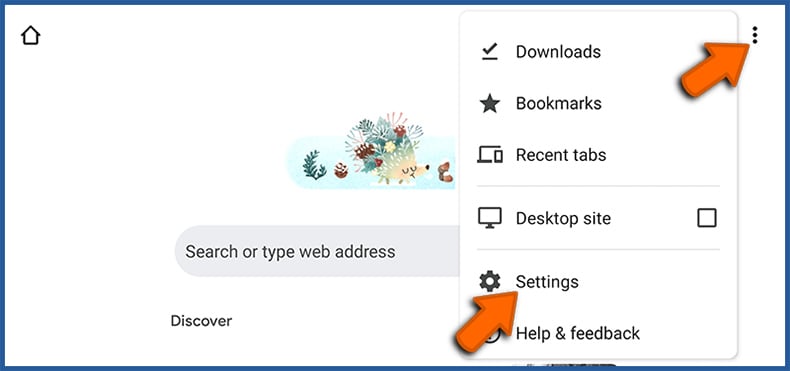
Tap the Menu button (three dots) on the right upper corner of the screen and select "Settings". Scroll down, tap on "Site settings" and then "Notifications".
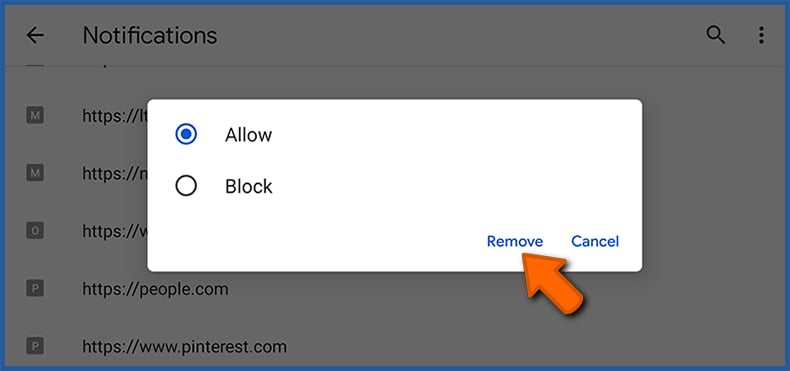
In the opened window, locate all suspicious URLs and tap on them one-by-one. Once the pop-up shows up, select either "Block" or "Remove" (if you tap "Remove" and visit the malicious site once more, it will ask to enable notifications again).
 Remove spam notifications from Mozilla Firefox:
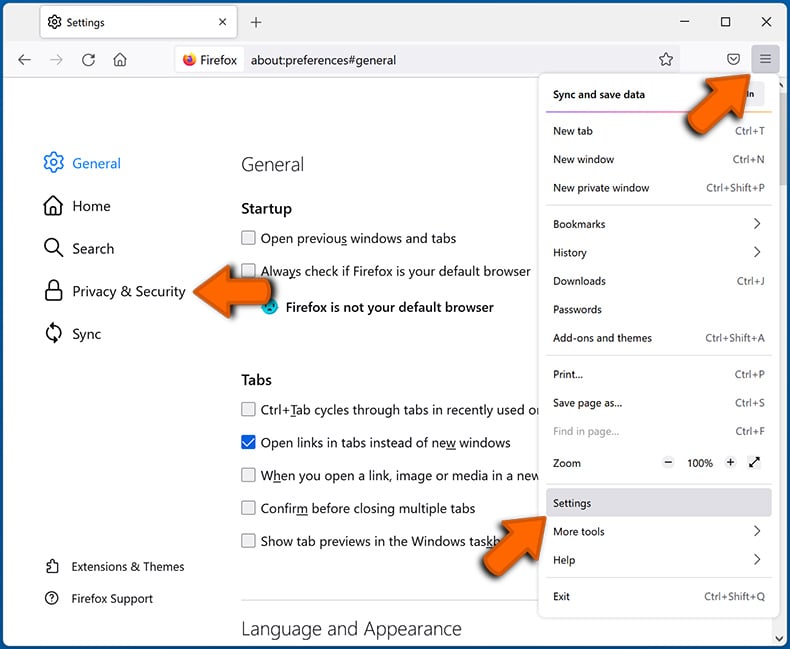
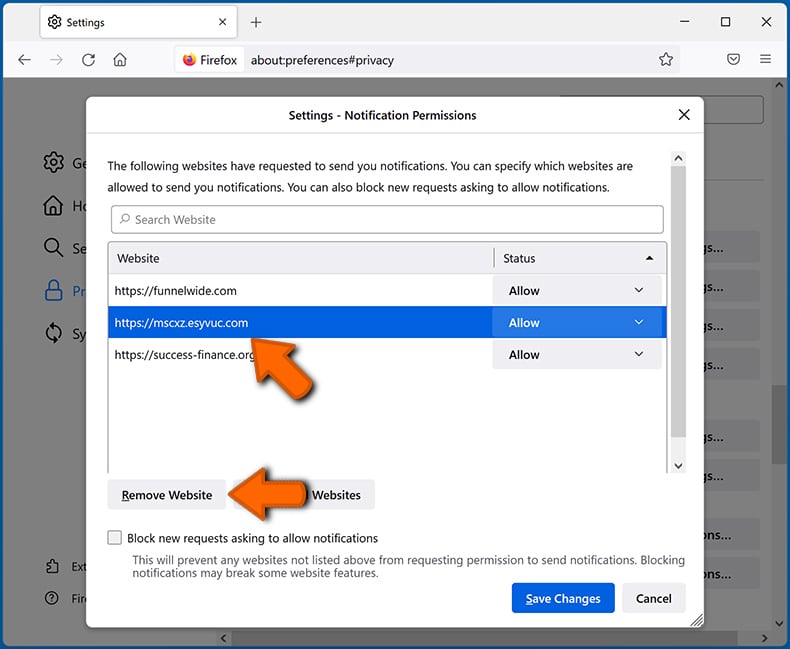
Click the Menu button (three bars) on the right upper corner of the screen. Select "Settings" and click on "Privacy & Security" in the toolbar on the left hand side of the screen. Scroll down to the "Permissions" section and click the "Settings" button next to "Notifications".
In the opened window, locate all suspicious URLs and block them using the drop-down menu or either remove them by clicking "Remove Website" at the bottom of the window (if you click "Remove Website" and visit the malicious site once more, it will ask to enable notifications again).
 Remove spam notifications from Microsoft Edge:
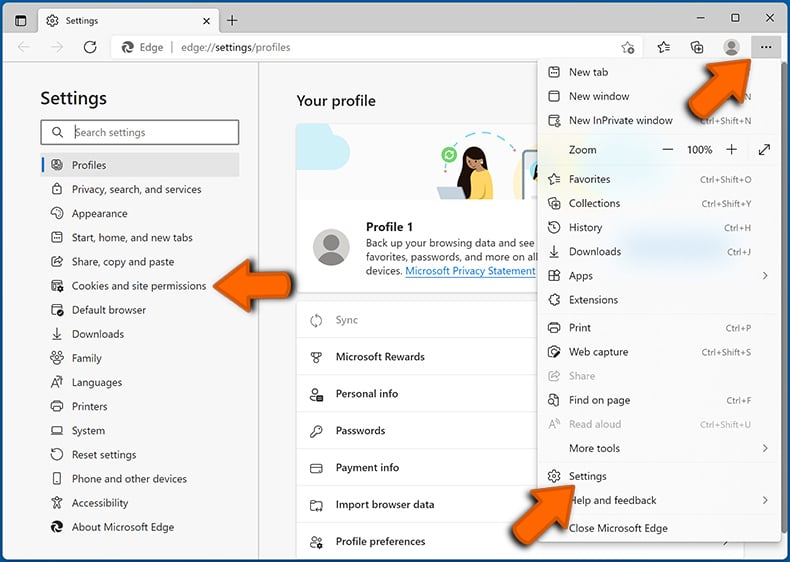
Click the menu button (three dots) on the right upper corner of the Edge window and select "Settings". Click on "Cookies and site permissions" in the toolbar on the left hand side of the screen and select "Notifications".
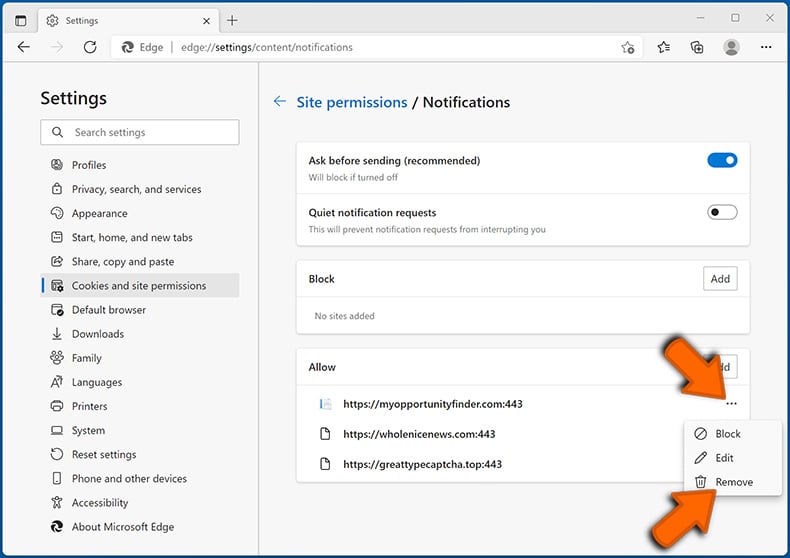
Click three dots on the right hand side of each suspicious URL under "Allow" section and click "Block" or "Remove" (if you click "Remove" and visit the malicious site once more, it will ask to enable notifications again).
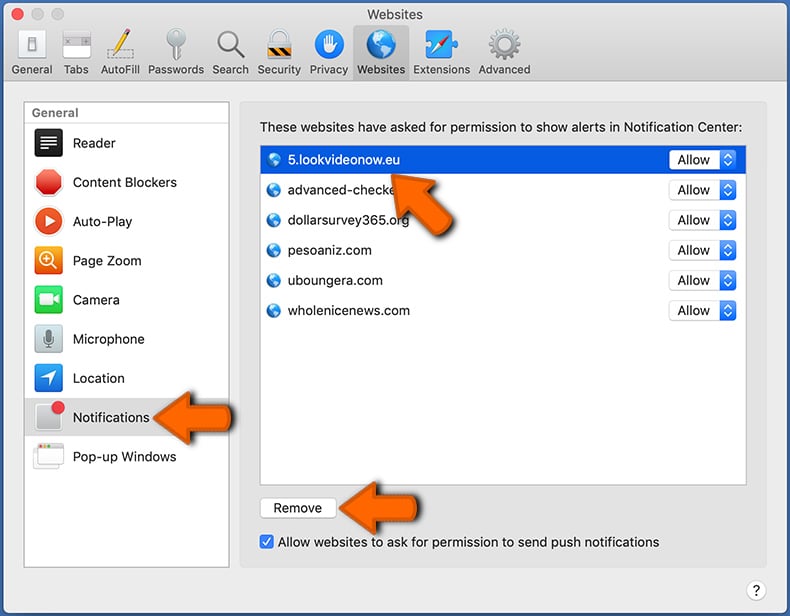
 Remove spam notifications from Safari (macOS):
Click "Safari" button on the left upper corner of the screen and select "Preferences...". Select the "Websites" tab and then select "Notifications" section on the left pane.
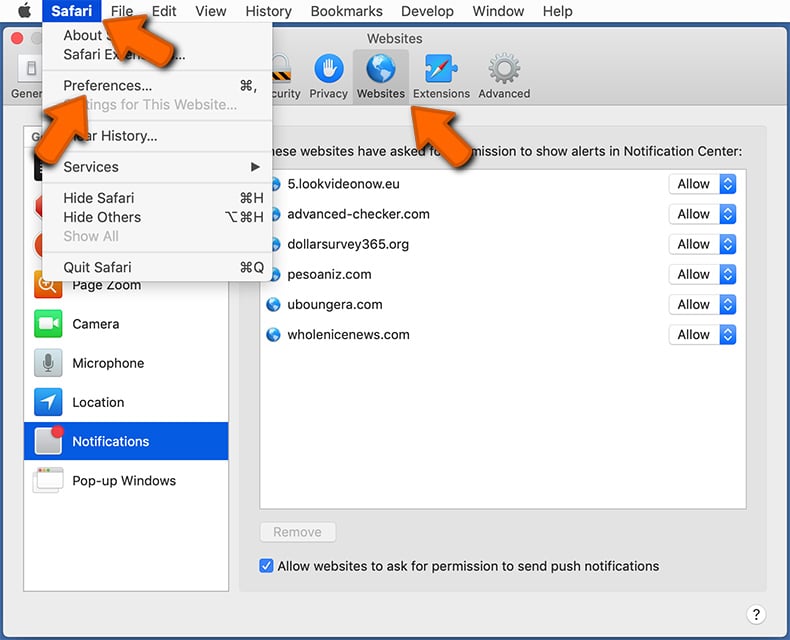
Check for suspicious URLs and apply the "Deny" option using the drop-down menu or either remove them by clicking "Remove" at the bottom of the window (if you click "Remove" and visit the malicious site once more, it will ask to enable notifications again)
How to avoid browser notification spam?
Internet users should be very skeptical when being asked to allow notifications. While this is a useful feature that allows you to receive timely news from websites you like, deceptive marketers frequently abuse it.
Only allow notifications from websites that you fully trust. For added security - use an anti-malware application with a real-time web browsing monitor to block shady websites that tries to trick you into allowing spam notifications. We recommend using Combo Cleaner Antivirus for Windows.
Frequently Asked Questions (FAQ)
Why am I seeing ads (browser notifications) delivered by mirablock[.]it.com in the right lower corner of my desktop?
Browser notifications require explicit user permission before any site can send them. If you are seeing notifications from mirablock[.]it.com, you must have previously visited this page and clicked "Allow" or a similar option, giving it permission to deliver these ads to your device.
I have clicked on notification ads, is my computer infected?
Clicking a browser notification ad does not directly infect your computer. However, the pages these ads link to can promote scams, unwanted software, or malware, so the content you encounter after clicking may be harmful.
Is mirablock[.]it.com a virus?
Mirablock[.]it.com is not a virus in the traditional sense. However, it is considered a threat - it promotes browser notification spam and directs users toward scams, potentially unwanted programs, and other malicious content.
Will Combo Cleaner remove mirablock[.]it.com ads automatically or manual steps are still required?
Yes. Combo Cleaner will scan your device, revoke all permissions granted to mirablock[.]it.com, and block it from delivering further notifications. No additional manual steps will be required.
Share:
 Facebook
 X.com
 LinkedIn
 Copy Link

Tomas Meskauskas
Expert security researcher, professional malware analyst
I am passionate about computer security and technology. I have an experience of over 10 years working in various companies related to computer technical issue solving and Internet security. I have been working as an author and editor for pcrisk.com since 2010. Follow me on Twitter and LinkedIn to stay informed about the latest online security threats.
PCrisk security portal is brought by a company RCS LT.
Joined forces of security researchers help educate computer users about the latest online security threats. More information about the company RCS LT.
Our malware removal guides are free. However, if you want to support us you can send us a donation.
DonatePCrisk security portal is brought by a company RCS LT.
Joined forces of security researchers help educate computer users about the latest online security threats. More information about the company RCS LT.
Our malware removal guides are free. However, if you want to support us you can send us a donation.
Donate
▼ Show Discussion