
We may earn commissions from products we recommend. Learn more.
How to opt out of Intelius in 2026

How to opt out of Intelius in 2026
Intelius is a people-search website that gathers personal information from public records and other sources into searchable reports. These reports may link a person's name to phone numbers, email addresses, home addresses, relatives, property details, possible social media profiles, and public court records. While this makes finding people easier, it also increases the risk of sensitive data being accessed by strangers, scammers, marketers, and other unwanted parties.

Removing your information from Intelius does not delete all public records about you, but it does remove a major access point. This article outlines the current suppression process, steps to take if it fails, and how automated removal services can offer much wider, longer-lasting protection.
Opt out of Intelius with Incogni
Table of Contents:
- Introduction
- What is Intelius?
- How to manually remove your information from Intelius?
- Common issues with manual removal and alternative opt-out routes
- How to automatically remove your information from Intelius?
- Why should you remove your information from Intelius?
- How to prevent data brokers from collecting more of your data?
- In closing
- Frequently Asked Questions (FAQ)
What is Intelius?
Intelius is a US-based people-search and public-records service operated by the PeopleConnect group. It offers people search, reverse phone lookup, reverse address lookup, and access to reports compiled from public and commercial sources. Established in 2003, Intelius is a well-known provider in the people-search industry.
Intelius can be used to find old acquaintances, identify unknown callers, research addresses, or review publicly available information linked to their identity. Reports may contain names, aliases, age or date of birth, addresses, phone numbers, email addresses, possible relatives, property details, education or employment history, and records from government databases. The information provided varies, as Intelius does not have the same data for every person.
Intelius states that it is not a consumer reporting agency under the Fair Credit Reporting Act (FCRA). Its reports cannot be used to determine eligibility for employment, housing, credit, insurance, tenant screening, or any other FCRA-regulated purpose. While people-search reports may appear similar to background reports, they are not compiled, verified, or maintained to FCRA standards.
The primary privacy concern is not the secrecy of each data point, as much of the information comes from public records, social media, commercial databases, or other data brokers. The issue is aggregation. While someone could manually search various sources, people-search services consolidate these details into a single, easily accessible profile.
The Federal Trade Commission (FTC) explains that people-search websites may buy information from other brokers, gather details from public-facing social media profiles, and compile federal, state, and local records. These records can include property ownership, voter registration, driving information, professional licenses, court cases, judgments, marriages, divorces, and other data. Someone who starts with only a name or phone number may consequently discover addresses, relatives, contact details, and other identifying information.
This concentration of information creates several risks. Scammers may use combined data to make impersonation attempts more convincing. Abusive individuals could exploit address history and family connections to locate someone seeking privacy. Marketers may profile individuals using contact and demographic data, and automated scrapers can transfer this information to other databases.
Data may be incomplete, outdated, or incorrectly linked to the wrong individual. Common names, shared addresses, recycled phone numbers, or incomplete court records can result in unrelated information appearing in a profile. Despite warnings not to treat these reports as FCRA-compliant, third-parties may still misinterpret or misuse the information.
Regulators have emphasized serious risks in the data broker industry. The Consumer Financial Protection Bureau (CFPB) warns that access to sensitive brokered information can enable scams, stalking, and spying. Excessive personal data exposure is also linked to identity theft, harassment, stalking, and physical harm.
Opting out is a prudent privacy measure, even if you do not face a specific threat. It reduces the number of platforms where your information is easily accessible and limits sources that websites, search engines, marketers, or scammers might use.
How to manually remove your information from Intelius?
Removing your information from Intelius makes it harder for others to compile a profile about you. This process does not delete original public records, such as courthouse, property, voter, or licensing records. It only suppresses the PeopleConnect report from public view on covered people-search websites, including Intelius.com, InstantCheckmate.com, TruthFinder.com, and USSearch.com.
To manually remove your information from Intelius, follow the steps below. If website labels or layouts differ, use the most current privacy and public data options available.
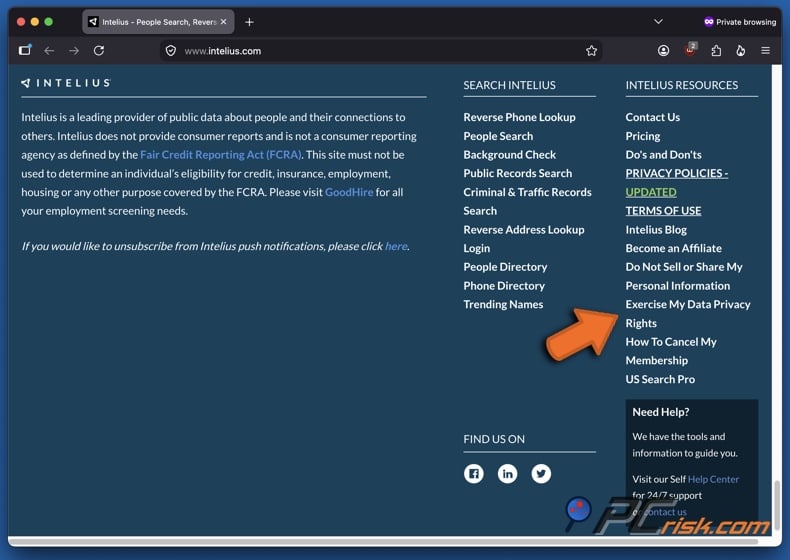
1. Open Intelius and access the Data Privacy Center. Currently, the workflow is as follows: navigate to the footer of Intelius' homepage and click "Exercise My Data Privacy Rights" in the "INTELIUS RESOURCES" section. As mentioned above, opt-out processes, page layouts, and wording may change. Generally, opt-out options on people-search and data broker sites can be found in website footers or privacy sections.
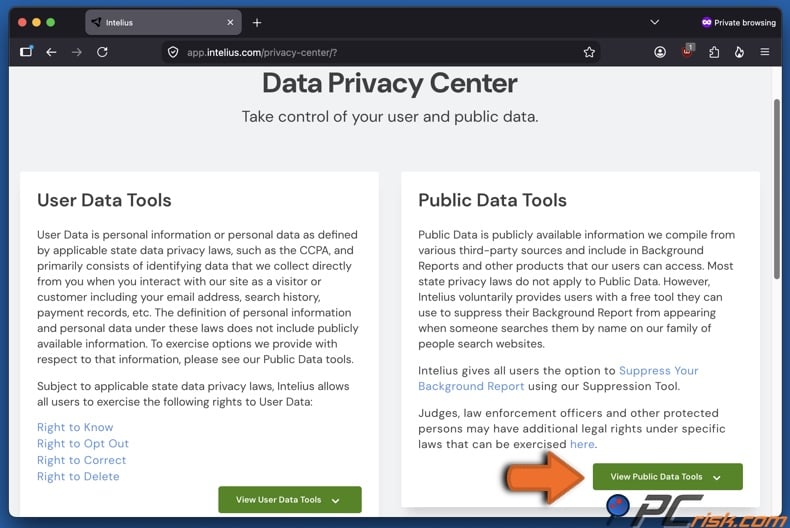
2. Expand the Public Data Tools. In the Intelius Data Privacy Center, click "View Public Data Tools". There is a distinction between "User Data" and "Public Data"; the former is information provided by a customer, and the latter is data in public reports. Deleting account data, changing marketing preferences, or canceling a subscription does not remove your public-record report. Hence, you have to use the Public Data Tools to remove searchable listings.
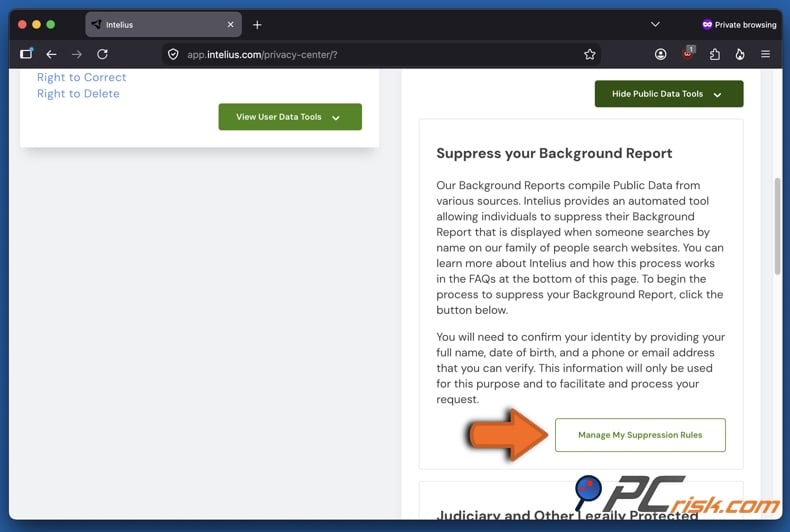
3. Click "Manage My Suppression Rules". In the expanded Public Data Tools section, press the "Manage My Suppression Rules" button. This will redirect you to the PeopleConnect Suppression Center. As indicated previously, Intelius is part of PeopleConnect, which operates the centralized tool controlling the visibility of background reports on its network.
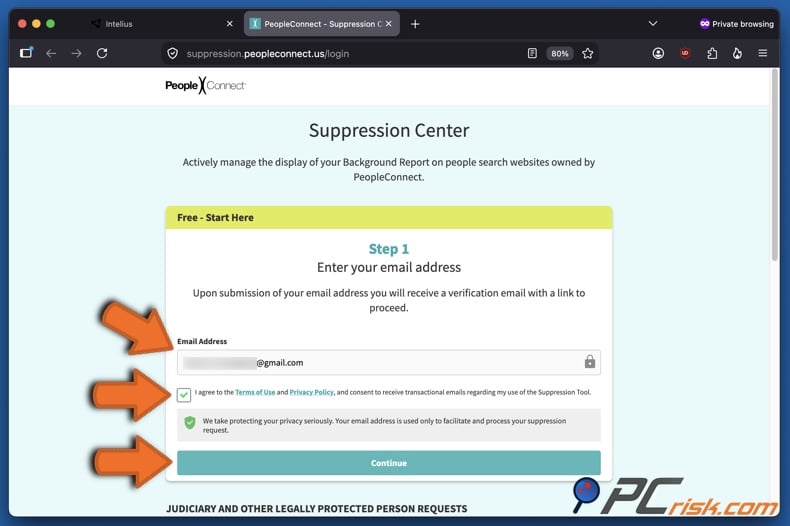
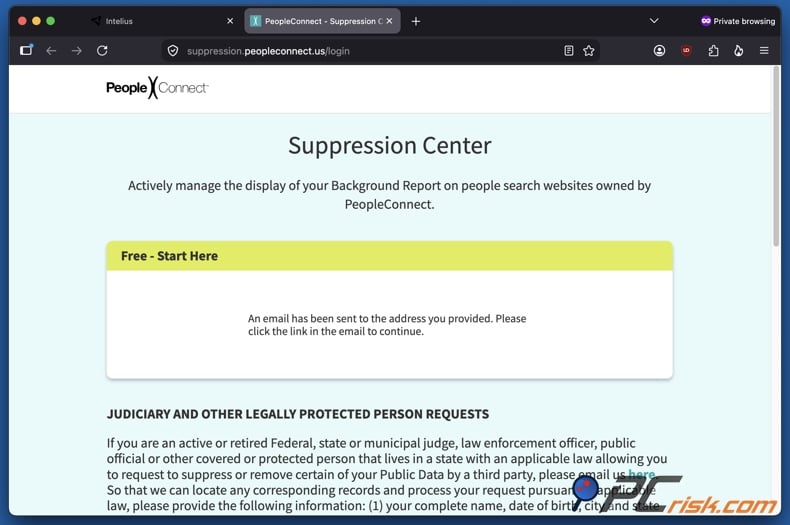
4. Enter an email address that you can access. On the Suppression Center page, provide a valid email address in the appropriate field, review the terms of use and privacy policy, check the agreement box, and click "Continue". Consider using a secondary email address reserved for privacy requests or non-personal communication. Ensure you control this inbox, as PeopleConnect will send a verification email to it. A separate inbox could help you organize confirmation messages and keep a record of your request.
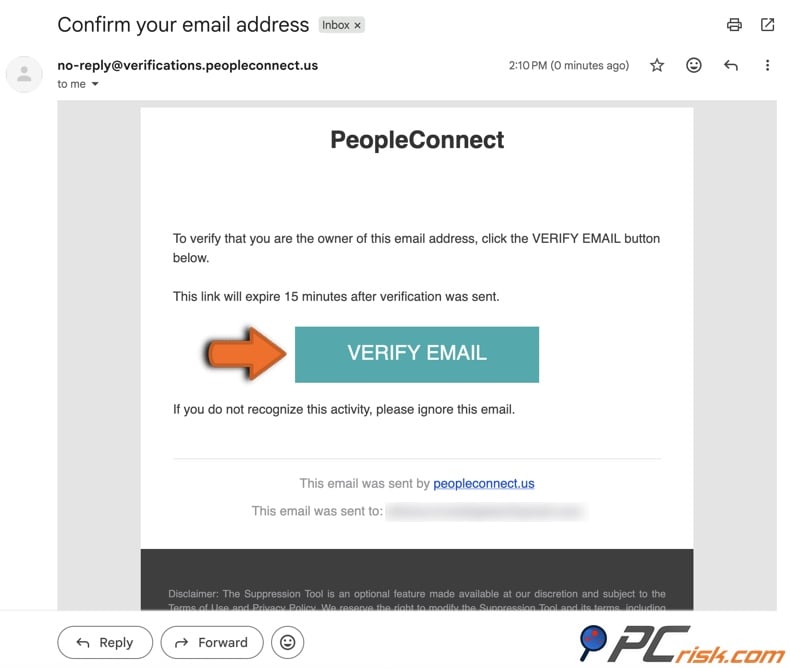
5. Open the verification email and promptly follow the link therein. Find the message from PeopleConnect in your email inbox and click "VERIFY EMAIL". If the message does not appear in your inbox, check your spam, junk, or promotions folders. Note that the verification link expires in 15 minutes. If it has expired, return to the Suppression Center and request a new email instead of clicking the old link repeatedly.
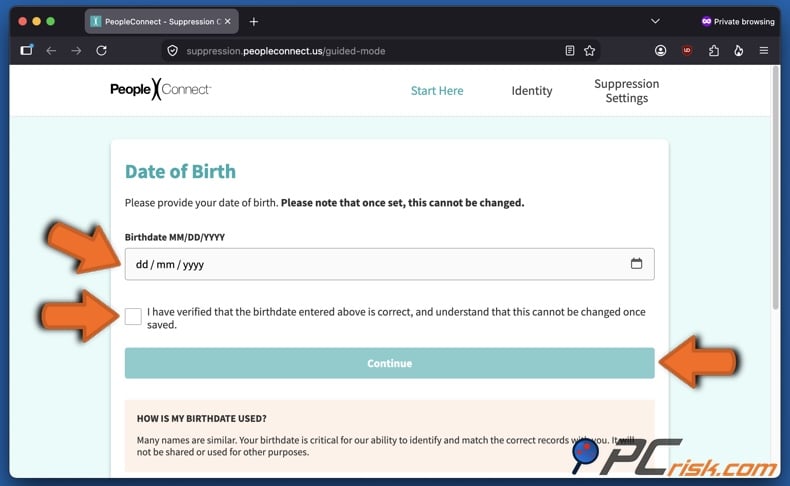
6. Enter your date of birth. After clicking the verification link, you will be redirected back to the PeopleConnect Suppression Center. Enter your birthdate in the appropriate field, confirm the information is correct by checking the checkbox, then click "Continue". Remember to check whether the date is correct, as you will be unable to change this information later.
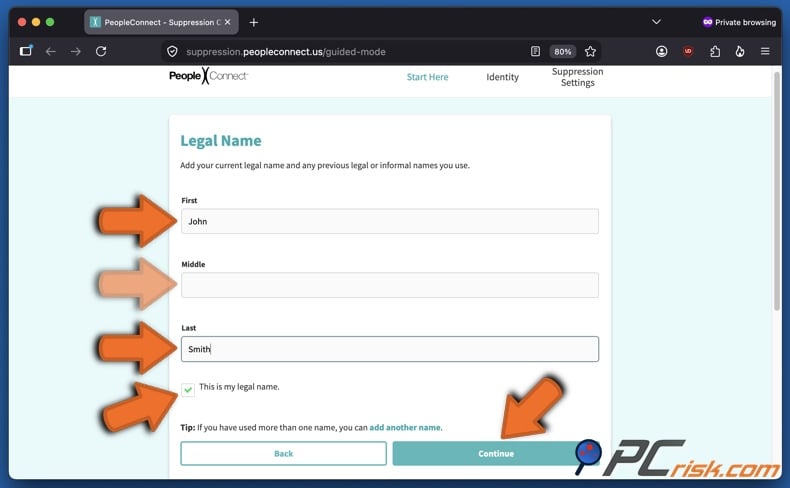
7. Enter your full legal name. In the following page, provide your first, middle (if applicable), and last name. Confirm it is your legal name by clicking the checkbox, then click "Continue". If you have used other names, those can be entered by clicking "add another name".
8. Review matching records and select your profile. The system will search for records matching your details. Carefully review the results and do not select a profile based only on the name. Compare age, cities, address history, possible relatives, and contact information. Suppressing the wrong record will not remove your profile. If multiple records belong to you, review each one. Once you locate your profile, select it and click "Continue".
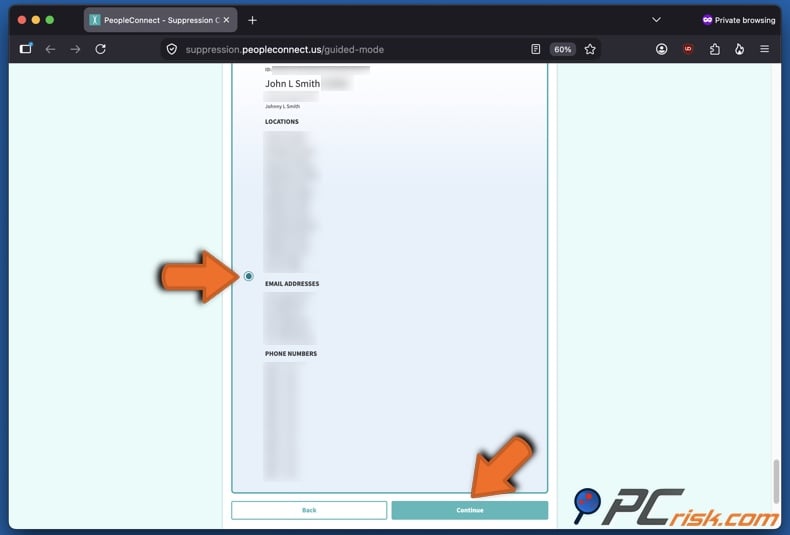
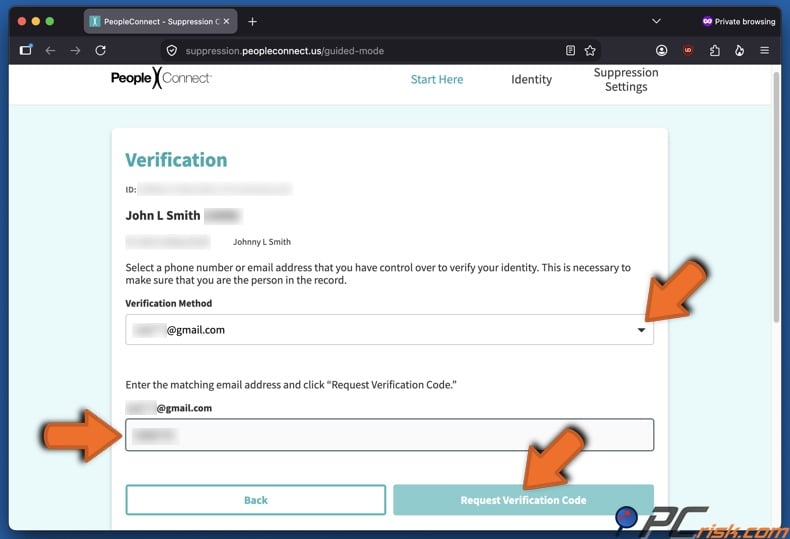
9. Choose an identity-verification method and request a code. PeopleConnect will show partially hidden email addresses and/or phone numbers linked to your record. Choose one you can access, enter the requested information, and click "Request Verification Code". Depending on the record, the system may request verification by email, SMS, or both.
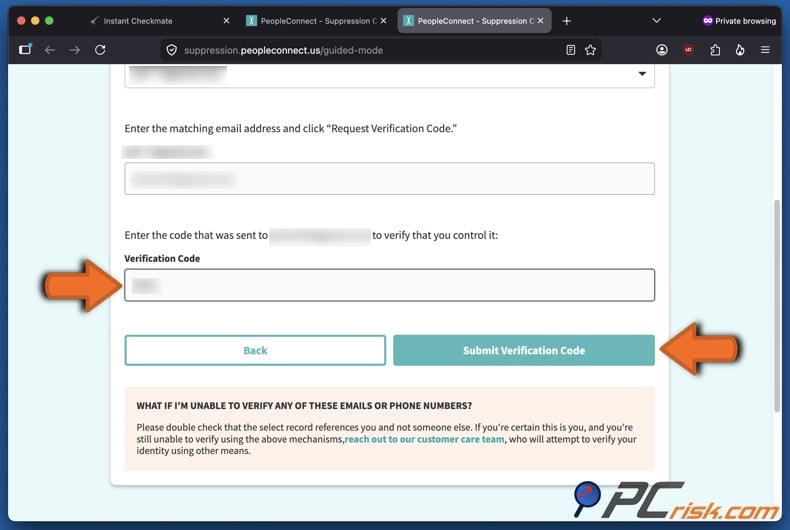
10. Enter the verification code. Retrieve the code from your email or phone, enter it , and click "Submit Verification Code". Complete this step promptly. Codes might expire, and requesting multiple codes in quick succession may cause confusion about which one is valid.
11. Change the record's visibility to "Suppressed". After verification, find the matching report in the suppression settings. Change its visibility to "Suppressed" and save the change. Suppression is the key step. Verifying your email or identity does not automatically hide the report. Confirm the final visibility setting says "Suppressed" and that your change is saved.
12. Document the request and check the result. Save confirmation emails and take a screenshot of the final suppression setting. Record the date you completed the process. Check Intelius again after 48 to 72 hours. Search using your full name, previous city, phone number, and other identifiers. If the record is still visible, confirm you suppressed the correct profile and contact Intelius or PeopleConnect support. Remember to check periodically, as your information may reappear when public records change or brokers receive updated data feeds.
Common issues with manual removal and alternative opt-out routes
Manual removal is free but can be complex. People-search websites often update their interfaces, add new verification measures, and may hold multiple records for one person. Suppressing an Intelius record does not remove your information from data brokers that are not part of the PeopleConnect network. Below are some of the main issues with manual opt-out:
Verification email does not arrive: email filters can classify automated privacy messages as spam, junk, or promotional content. Delivery may also be delayed. Check all filtered folders and search your inbox for "PeopleConnect". Confirm the email address was entered correctly. Avoid making multiple verification requests in a short period of time, as this can generate several messages with differing expiration.
No matching record appears: the entered name or date of birth may not match the Intelius data format. The profile may also be linked to an alternate name, previous location, or incomplete birthdate. Retry using your full legal name, including a middle name if applicable. Add former names or different spellings as needed. Search Intelius separately to see how your public listing appears, but do not purchase a report solely for opt-out purposes. If no result appears, there may be no searchable Intelius profile associated with your details. Document your search and check again later.
Several records appear: duplicate profiles are possible due to different data feeds linking you to multiple addresses, names, phone numbers, or relatives. Review each result and suppress every record that clearly belongs to you. Repeat as necessary. After the initial waiting period, conduct multiple searches rather than relying on a single saved result.
Verification options display outdated contact information: PeopleConnect may ask you to verify through an email address or phone number you no longer control. Contact Intelius or PeopleConnect to explain that the information is out-of-date. Provide enough details to identify the record, but only send sensitive documents if the company offers a secure channel and clearly explains the need.
Suppression setting cannot be saved: browser extensions, blocked scripts, expired sessions, disabled cookies, or temporary website errors may be interfering. Reload the page and sign in using a new verification link. Temporarily disable content blockers for the suppression page, try a private browser window, or use another reputable browser. Switching devices or networks may also solve persistent technical errors.
Listing remains visible: suppression may not be immediate. You may also have selected an incorrect or duplicate record. Wait 48 to 72 hours, then search again. Review the original profile and perform a new search using variations of your name, city, address, and phone number. If the profile is still accessible after several days, contact support with your request date and any confirmation reference.
Google continues to display the Intelius result: search engine results may remain visible after the source page has changed. A cached title or snippet does not always mean the original report is still available. First, confirm that Intelius has suppressed the source record. If a Google result exposes qualifying contact information, use Google's "Results about you" feature. If the source page has been removed or changed but an old result remains, submit it via Google's "Refresh outdated content" tool. Search result removal and source suppression are separate processes.
Your information appears in another person's report: opting out may not remove every mention of you. Your name, address, or relationship may still be visible in reports linked to relatives, household members, neighbors, or associates. Review profiles of close relatives as needed, and ask them to submit their own requests if they want their information suppressed.
Your data returns after removal: Intelius may have received a new record not matched to your previous suppression, especially after a move, name change, new phone number, or public-record update. Search periodically and submit another suppression request if necessary. Keep your original confirmation to show that a matching profile has reappeared. Automated services can help, but no removal method guarantees that all sources will permanently stop collecting your information.
If the standard Intelius workflow does not work, consider these alternatives:
Contact Intelius or PeopleConnect support: clearly describe the issue, include the name on the record, and specify that you are requesting suppression of the public report. Do not send passwords, financial information, or unredacted identity documents by regular email. PeopleConnect's Privacy Policy explains that verification requirements and rights relating to deletion, correction, authorized agents, and appeals may vary depending on applicable state law.
Exercise state privacy rights: residents of states with extensive privacy laws may have rights to access, correct, delete, or opt out of certain uses of personal information. Specific rights, exemptions, and appeal procedures vary by state and information type. A statutory deletion request may be broader than changing a public report's visibility, though legal exceptions may require some information to be retained.
Use California's DROP system: California residents can submit a single request through the Delete Request and Opt-out Platform (DROP) to over 600 registered data brokers. Starting August 1, 2026, registered data brokers must access DROP at least once every 45 days to retrieve and process consumer deletion requests, and report the status of each within 45 days of retrieval.
Use a personal data removal service: a paid service can submit and track requests across multiple brokers, eliminating the need to manage each opt-out yourself. Before subscribing, review the number of covered companies, whether the service provides reports, how often it repeats requests, and if it supports custom removals.
Keep in mind that canceling an Intelius subscription, deleting a customer account, and suppressing a public report are separate actions. Canceling billing stops future subscription charges. Deleting account data removes information related to your direct use of the service. Suppression determines whether a public-data report is displayed. Therefore, complete each relevant process individually.
How to automatically remove your information from Intelius?
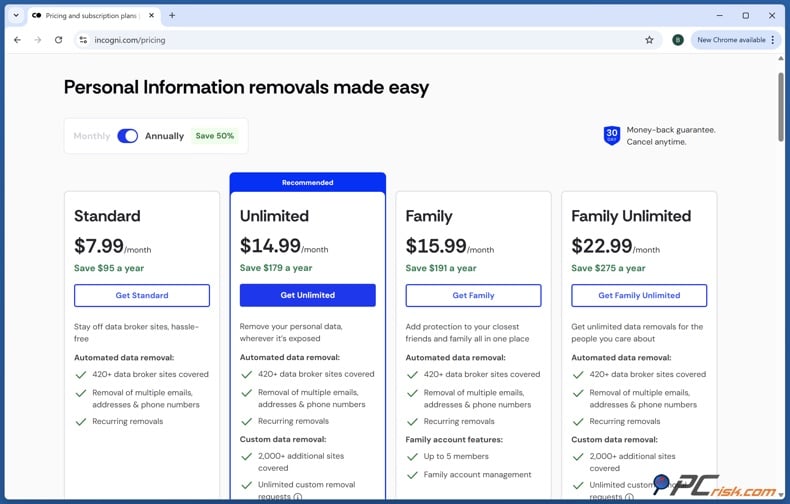
Manual suppression is effective if you only need to address Intelius. However, it is less practical when your information is listed on multiple people-search and data broker sites. Each company may require a different form, verification process, processing time, and follow-up. Incogni is our top recommendation for automated removal in 2026; you can review our top five picks by checking out the dedicated article. Incogni manages requests across an extensive broker network, tracks responses, and repeats removal actions while your subscription is active. It covers over 420 data brokers, and the higher-tier plans offer custom removal requests for additional websites.
Opt out of Intelius with Incogni
To automatically remove your information from Intelius using Incogni, follow these steps:
1. Create an Incogni account and select a plan. Choose the subscription that fits your needs. The main advantage is Incogni's ability to send and manage requests to multiple brokers from a single account. This is especially helpful if your name appears on several websites not visible in standard search results.
2. Provide the personal information needed for matching. Enter the identifiers Incogni requires to search broker records and prepare requests. These may include your full name, email addresses, phone numbers, current address, and previous addresses. Accuracy is important. Data brokers may retain outdated or incomplete details - hence, including valid former addresses or contact information can improve matching.
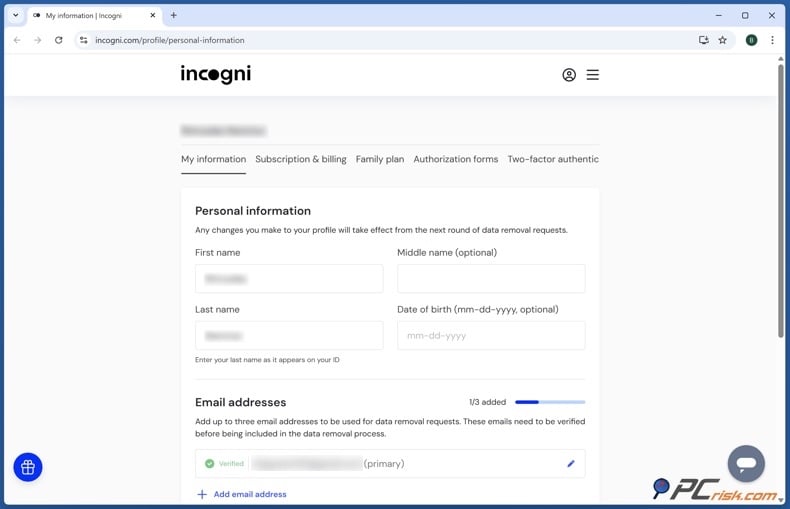
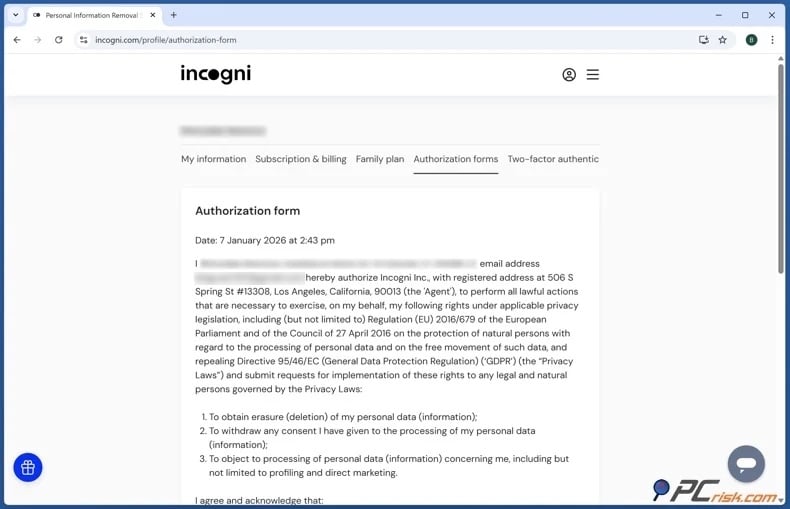
3. Sign the authorization form. Complete Incogni's authorization form, which allows the company to act as your representative when contacting data brokers.
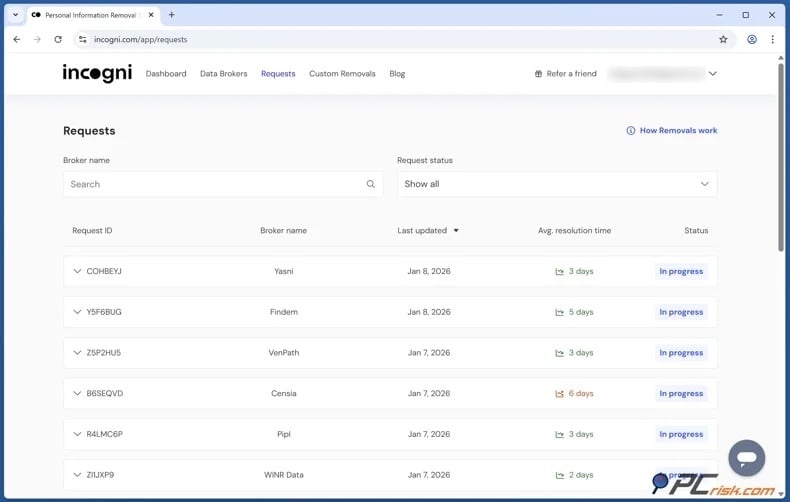
4. Allow Incogni to send and manage removal requests. After setup, Incogni sends requests to applicable brokers and tracks their status. It follows up with companies that have not responded and repeats removal efforts as needed. This recurring process is valuable because data removal is rarely permanent.
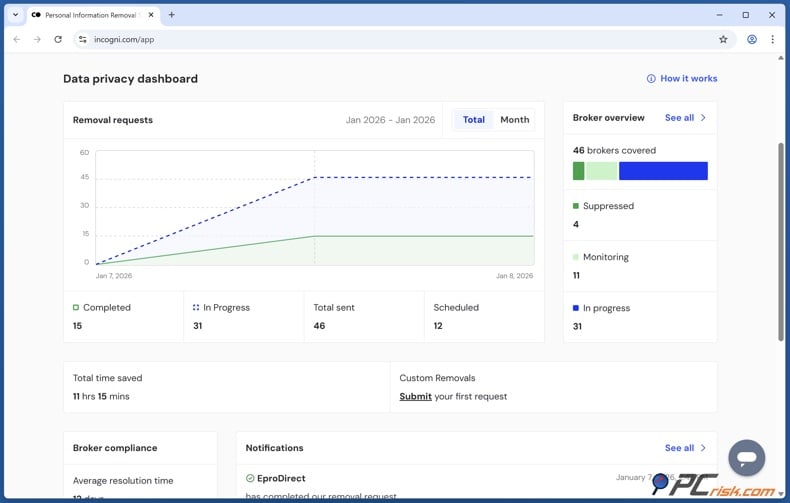
5. Monitor the Incogni dashboard. The interface provides a centralized view, eliminating the need to track separate broker forms and confirmation emails. Note that Incogni may occasionally request additional information or confirmation to distinguish your identity from others with similar details.
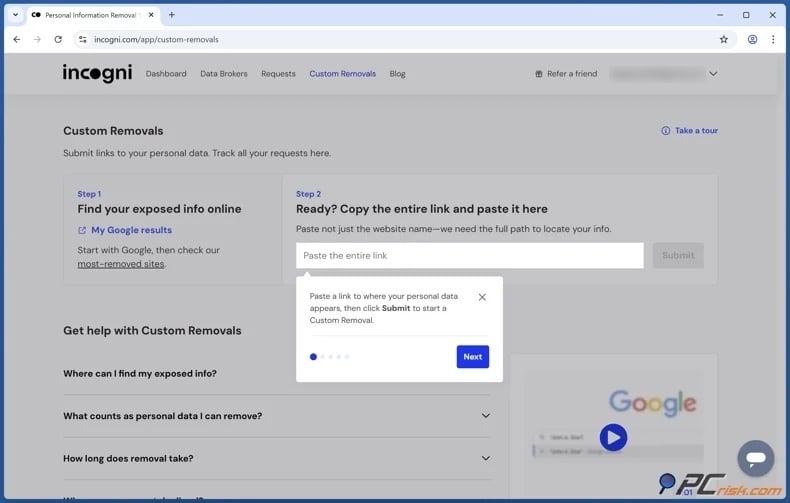
If you want to remove your data from a website or broker not included in Incogni's list, use Custom Removals. Eligible plans allow you to submit a page for custom removal. Copy the address of the webpage containing your information into the custom removal feature and provide the requested context.
Automation greatly saves time, but it does not provide complete anonymity. Therefore, continue to check major search engines and prominent people-search websites. Review the dashboard for unresolved requests and manually escalate urgent safety issues instead of waiting for the next automated cycle. It must also be emphasized that no personal data removal service can guarantee removal. Furthermore, legally required public records, journalistic content, government documents, or similar material may be exempt from removal.
Why should you remove your information from Intelius?
The primary reason to remove an Intelius profile is that aggregated information can escalate a vague threat into a targeted one. While a scammer with only your phone number has limited context, access to your age, previous addresses, relatives, and property history can make scams much more convincing. To elaborate, using accurate personal details, a scammer may impersonate a bank, delivery company, utility provider, government office, or family member. Public information can also help criminals answer weak account-recovery questions or determine which organization is most convincing to impersonate.
People-search profiles can facilitate doxxing by linking an online identity to a real name, address, phone number, relatives, or workplace. It must be stressed that these risks are not faced only by public figures, teachers, healthcare workers, journalists, business owners, online creators, legal professionals, or individuals involved in disputes.
Personal safety is yet another risk. Survivors of stalking, harassment, domestic abuse, or coercive control may have changed addresses or contact information for protection. A people-search profile can link a new location to an old identity or expose relatives who could be contacted.
Family connections can further increase exposure. Reports may identify parents, children, siblings, partners, roommates, or other associates, enabling someone to move between profiles and reconstruct a more extensive personal network.
Accuracy is a concern as well. Aggregated reports may include outdated addresses, incorrect relatives, records without context, or information belonging to someone with a similar name. Although Intelius prohibits the use of its reports for certain FCRA-regulated decisions, others may still draw incorrect informal conclusions.
To summarize, removing an Intelius listing does not delete the underlying public records, but it limits convenient access. A casual searcher may stop when a ready-made profile is unavailable, and a scammer or harasser may have fewer direct leads. Suppression adds friction and gives you greater control over how easily your personal information can be found and connected.
How to prevent data brokers from collecting more of your data?
No setting can completely prevent data brokers from gathering information. Government records, property transactions, professional licenses, court filings, voter records, and other legally public materials may remain available. Commercial databases can also receive information from retailers, applications, advertising companies, surveys, loyalty programs, and other brokers. The key to reducing your informational footprint is implementing a layered privacy strategy:
Set social media accounts to private. Review each platform's audience and discovery settings. Hide your phone number, personal email, birthdate, hometown, employer, education history, family connections, and friend list from public view. Disable search by phone number or email where possible.
Delete old public posts that reveal your home, routine, workplace, relatives, travel plans, or frequently visited locations. Be aware that photographs may disclose additional details, such as street signs, house numbers, school logos, license plates, or landmarks.
Avoid publishing full identity combinations. While a full name may be difficult to keep private, it becomes more valuable when combined with a birthdate, personal phone number, home address, or relatives' names. Do not include all of these details in a public biography, business profile, resume, forum account, or personal website unless strictly necessary. When professional visibility is required, use a dedicated email address and office contact information instead of personal details.
Use separate emails for different purposes. Maintain distinct addresses for financial accounts, personal communication, shopping, newsletters, promotions, and privacy requests. A secondary email address may help to identify phishing scams. For example, a bank message sent to an address used only for retail promotions is immediately suspicious.
Use a secondary telephone number where appropriate. A reputable virtual number or separate SIM can be useful for deliveries, shopping accounts, classifieds, loyalty programs, and organizations that do not require your primary number. However, do not use a disposable or inaccessible number for banking, government, healthcare, emergency, or other critical services. The goal is to compartmentalize, not to risk losing access to important accounts.
Decline optional marketing disclosures. Uncheck boxes that allow a company to share your information with partners, affiliates, advertisers, or unrelated third-parties. Do not assume an optional field is required simply because it appears on a form.
Be cautious with sweepstakes, personality quizzes, warranty registrations, discount clubs, and free apps that request extensive demographic information. The value of the offer is often much lower than the value of the profile created from your responses.
Adjust browser and device privacy settings. Block unnecessary third-party cookies, clear stored website data regularly, restrict cross-site tracking, and review advertising personalization settings. Private browsing prevents local history from being saved after a session, but it does not hide activity from websites, Internet service providers, employers, or tracking systems.
Review mobile application permissions. Remove access to contacts, precise location, photos, microphone, Bluetooth, and nearby devices when these permissions are not essential to the app's core function.
Delete applications you no longer use. Inactive accounts or forgotten apps may retain personal information for long periods of time.
Remove old online accounts. Search your email for registration, welcome, verification, and password-reset messages to identify past services. Close accounts you no longer need and request deletion where possible. Before closing an account, remove optional profile details, saved payment methods, old addresses, and connected social accounts. Deactivation may only hide a profile, while deletion may require a separate process.
Use unique and strong passwords and non-discoverable recovery answers. Removing data from brokers does not directly secure your accounts, but limiting the usefulness of exposed personal details reduces their value to attackers.
Use a password manager to generate a unique password for each account. Enable Multi-Factor Authentication (MFA), preferably with an authenticator app or security key where supported. Treat security question answers like passwords. They do not need to be factually accurate, but should be unique, random, and stored securely.
Use privacy controls available under state law. Depending on your location, you may request access, correction, deletion, or opt out of sale, sharing, or targeted advertising. Some websites recognize the Global Privacy Control (GPC) signal as a legally binding opt-out in certain jurisdictions. PeopleConnect's current policy states that it interprets a detected GPC signal as an applicable request, depending on the governing law. The same policy notes that available rights and verification procedures vary by state.
Use California's DROP platform if eligible. California residents can submit a request that applies to all registered data brokers, rather than completing multiple forms. Brokers began processing requests on August 1, 2026 and must return to the platform at least once every 45 days. When a broker finds a match, it must generally delete associated non-exempt personal information and retain only identifiers needed to prevent future reappearance. Legal exemptions may apply, and a broker may report that no matching record was found.
Investigate public-record confidentiality programs. Some states and local agencies offer address confidentiality or record suppression for survivors of abuse, stalking victims, judges, law enforcement personnel, election workers, and other protected groups. Eligibility is limited, and the process varies by record type and jurisdiction. Contact the agency that keeps the original record, not a third-party broker.
Monitor your name and contact details. Search for your full name in quotation marks, along with cities, phone numbers, email addresses, and previous names. Check major people-search websites regularly.
Monitor search engine results for outdated snippets, cached pages, or exposed personal details. Use Google's "Refresh outdated content" tool when a source page has been removed or changed, and "Results about you" for eligible search results containing personal contact information. Note that removal from Google does not delete the source page.
Keep records of every opt-out. Maintain a document, ideally a spreadsheet, with the broker name, profile searched, submission date, confirmation number, expected completion date, and follow-up results. This makes recurring removals manageable and provides evidence if a record reappears. It also helps prevent submitting requests to the wrong company or confusing account deletion with public profile suppression.
Use a personal data removal service. Paid removal services can automate opt-out requests across multiple data brokers and monitor for reappearing profiles. Before subscribing, review broker coverage, custom removal options, rescan frequency, reporting features, identity verification requirements, and cancellation policies. While automated services are helpful, they cannot ensure complete or permanent removal, so periodic manual searches are still recommended.
Check our top personal data removal services
To summarize, reducing your exposure to data brokers requires ongoing, multi-layered efforts. Limit the information you share, separate your contact details, strengthen account privacy settings, delete unused accounts, use legal privacy tools, and regularly search for exposed data. Remove profiles directly at their source where possible, and keep records of your requests. Government resources and automated services can expand your coverage, but no single solution will eliminate data collection entirely. Routine monitoring and repeated removal remain the most efficient methods to protect your personal information.
In closing
Intelius organizes public and commercially available information into consolidated reports, making it easier to search. While this serves legitimate purposes, it also increases the risk of exposing addresses, contact details, relatives, and other personal information to scammers, harassers, marketers, or casual searchers. Removing your profile limits this exposure and eliminates the ease with which your data can be found.
Check our top personal data removal services
Suppressing your Intelius profile makes your information more difficult to access, but it does not remove original public records or outdated search results. For greater protection, consider a personal data removal service that submits and repeats opt-out requests with multiple brokers. Keep in mind that maintaining long-term privacy requires continued oversight and a layered strategy to limit data exposure.
Frequently Asked Questions (FAQ)
Is Intelius legal?
Yes, Intelius is a legal people-search and public-records service. However, it is not a consumer reporting agency under the FCRA and cannot be used for employment, housing, credit, insurance, tenant screening, or other regulated decisions.
Is it dangerous to have my data on Intelius?
Having your data on Intelius can pose privacy and safety risks. Profiles may expose your addresses, phone numbers, relatives, and other identifying details, which can be used for phishing, impersonation, harassment, doxxing, stalking, or other targeted actions.
Will opting out of Intelius remove me from Google search?
Not necessarily. Suppressing your Intelius report removes or hides the source, but Google may still display outdated results. Once the source page is unavailable, you can use Google's removal tools for outdated content or personal information.
How do I remove my data from Intelius?
Go to the Intelius Privacy Center, expand "Public Data Tools," and select "Manage My Suppression Rules". Complete the PeopleConnect verification, locate your record, set its visibility to "Suppressed," save the change, and check Intelius again after processing.
How long does it take Intelius to remove my data?
Processing usually takes 48 to 72 hours, but timing may vary. Look again after a few days and contact Intelius or PeopleConnect if your profile is still public.
Does removing myself from Intelius remove the original public record?
No, suppression only hides your Intelius or PeopleConnect report from public view. It does not remove information held by government agencies or other original sources.
How is using Incogni different from manually removing my data from Intelius?
Manual removal requires you to verify, suppress, monitor, and follow up with Intelius yourself. Incogni acts as your authorized representative, submits requests to multiple brokers, tracks responses, and repeats requests while your protection is active.
Will my data come back to Intelius after I opt out?
Yes, your data may reappear if Intelius or related databases receive updated public or commercial information. Periodically search for your name, keep confirmation records, and repeat the suppression process if your profile returns.
Share:
 Facebook
 X.com
X.com
 LinkedIn
 Copy Link

Karolis Liucveikis
Experienced software engineer, passionate about behavioral analysis of malicious apps
Author and general operator of PCrisk's News and Removal Guides section. Co-researcher working alongside Tomas to discover the latest threats and global trends in the cyber security world. Karolis has experience of over 8 years working in this branch. He attended Kaunas University of Technology and graduated with a degree in Software Development in 2017. Extremely passionate about technical aspects and behavior of various malicious applications.
▼ Show Discussion