
We may earn commissions from products we recommend. Learn more.
How to opt out of PeopleFinders in 2026 | Easy guide

How to opt out of PeopleFinders in 2026
People-search websites let strangers easily find information about others. With just one search, someone can see your current or past addresses, phone numbers, age, relatives, property records, and more, all gathered from public records and other sources. The Federal Trade Commission considers these sites data brokers because they collect personal details from different places, put them into reports, and share those reports with others.

PeopleFinders is one of these sites. While there are valid reasons to use people-search websites, having your detailed profile available online can raise privacy issues. At PCrisk, we suggest limiting how much personal information is available online, especially if a listing includes your home address, phone number, or relatives. The good news is you can opt out of PeopleFinders for free. As of August 2026, you need to provide your name and a valid email, verify your email, and fill out a record-suppression form. PeopleFinders says it usually takes about three days to process your request.
This guide will show you how to opt out of PeopleFinders by yourself and how to use Incogni to automate the process. We’ll also explain what to do if your opt-out request doesn’t work, why your information might show up again, how data removal services operate, and what steps you can take afterward to protect your privacy on other people-search and data broker sites.
Opt out of PeopleFinders with Incogni
Table of Contents:
- Introduction
- What is PeopleFinders?
- Why you should remove your data from PeopleFinders
- Opt out of PeopleFinders automatically
- Opt out of PeopleFinders manually
- Common issues with removing information from PeopleFinders manually
- Alternative ways to opt out of PeopleFinders
- What are personal data removal services?
- How to keep your information off people search sites like PeopleFinders
- Final recommendations
- Frequently asked questions (FAQs)
What is PeopleFinders?
PeopleFinders is a people search and public records service focused on the US. You can use its website or app to look up information by name, phone number, or address. The service offers people search, public records, background checks, reverse phone lookup, and address lookup. According to its Google Play listing, you can search public records starting with a phone number or address, including property ownership details.
PeopleFinders is not a Consumer Reporting Agency under the Fair Credit Reporting Act. Its app clearly says you can’t use it for employment, credit, tenant screening, or similar purposes. This is important because a PeopleFinders report is not an FCRA-compliant consumer report and shouldn’t be used for decisions about jobs, housing, credit, or other regulated matters.
People-search sites usually get information from many sources, not just one big database. These sources can include other data brokers, public social media profiles, and government records at all levels. Public records might show property transactions, voter registration, criminal and civil cases, births, marriages, divorces, deaths, and professional licenses.
After collecting and matching information to a person, a people-search report can reveal much more than just the details you searched for. These reports may include age or date of birth, aliases, current and past addresses, property history, marital status, education or job details, civil and criminal records, and family information. The details you see depend on the person, the sources, and the databases used.
This combining of information is what makes people-search websites a big privacy concern. Your home address might be in one public database and an old phone number in another, but a people-search site can pull these together and make it much easier to connect them to you.
It’s important to know that opting out of PeopleFinders usually just hides your listing on their site. It doesn’t remove the original government records or information held by other organizations. Opting out of people-search sites does not delete the public records themselves.
Why you should remove your data from PeopleFinders
Not every listing of your personal information on a people-search site is a security crisis. Still, limiting how much of your information is public is a smart privacy step. When small details are combined, they can become much more valuable to anyone looking you up.
For instance, a profile that links your full name to your age, current and past addresses, phone number, and family members can give away details that would otherwise take much more effort to find. The FTC points out that people-search reports can reveal addresses and relatives, which is especially risky for people dealing with stalking or domestic violence.
When fewer companies have your personal information, there are fewer places where it can be found or misused. The Electronic Frontier Foundation says that cutting down on data held by brokers can boost your cybersecurity, since fewer groups have your details if a breach happens. EFF also points out that data broker info can lead to unwanted calls, messages, and other spam.
Impersonation and targeted scams are also a risk. If someone has access to details like your old addresses, family ties, phone numbers, or age, they can make fake messages seem more believable by using real facts about you. Taking down your PeopleFinders profile won't stop all phishing or fraud, but it does remove some of the information scammers use to make their attacks more personal.
Privacy is important even if no one is trying to harm you. You may prefer that coworkers, customers, neighbors, or strangers can't easily find your home address or family details online. Taking your information off PeopleFinders gives you more control over who can find these details.
Another reason to review your listing is that people-search sites don't always have accurate or up-to-date information. They pull data from many sources, and those records can change over time. So, not every address, relationship, or phone number shown is guaranteed to be current or correct.
Lastly, opting out costs nothing. You don't need to buy a PeopleFinders report or have a membership to make a standard opt-out request. Right now, the process usually takes about five to ten minutes, and PeopleFinders says it takes around three days to complete the removal.
Opt out of PeopleFinders automatically
You can remove yourself from PeopleFinders on your own, but the process gets much harder when you realize how many other people-search sites and data brokers might have your information too. Manual removal takes time because you have to find each service, follow their opt-out steps, send requests one by one, and keep checking if your information comes back.
That’s why personal data removal services are available. Instead of sending dozens or even hundreds of requests yourself, you give the service enough details to find your records and let them handle the removal process for you.
In our 2026 review of personal data removal services, we ranked Incogni as the best option. When we tested it, Incogni handled opt-out requests automatically, let us track progress on a dashboard, and kept checking for records that might reappear. We gave Incogni a PCrisk score of 4.5 out of 5.
PeopleFinders is part of Incogni’s automated coverage right now. According to Incogni’s broker directory, PeopleFinders is included in its US coverage, and the service says it covers over 420 data broker websites in total.
Here’s how I suggest you set up automatic removal from PeopleFinders using Incogni.
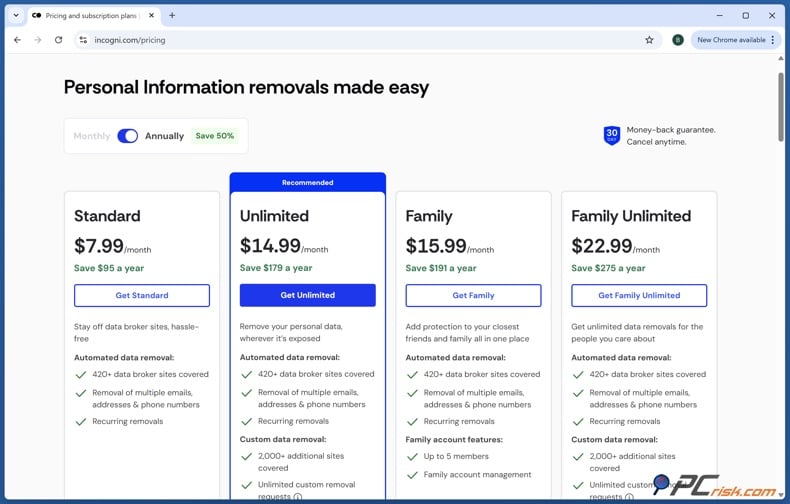
1. First, create an Incogni account. Choose the subscription that works best for you. The Standard plan covers automated removals from over 420 data broker sites and sends recurring requests. The Unlimited plan lets you request removals from sites not on the regular list. Prices can change, so check the latest details before you buy.
2. Next, enter your personal details. Incogni asks for your first and last name, date of birth, and address to find your records. If you live in the US, you’ll also need to provide a phone number. Make sure your information is accurate so Incogni can match you with the right records.
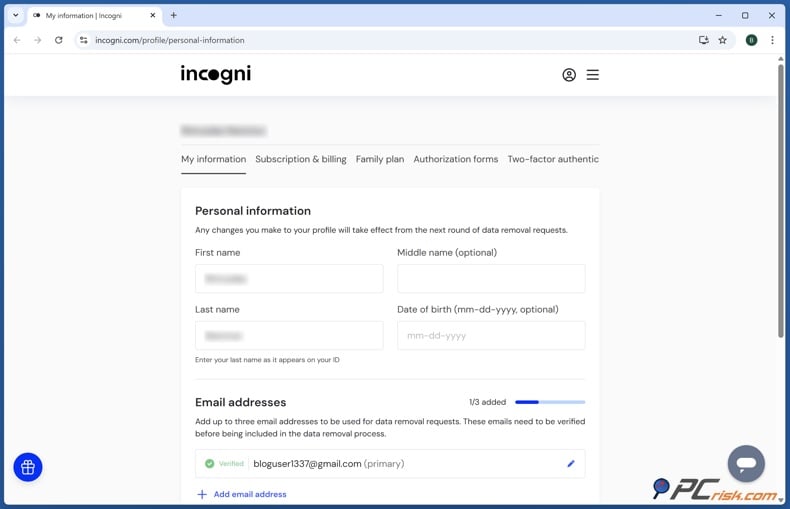
3. Add any old information if needed. Incogni lets you include extra addresses, phone numbers, or other contact details. This helps if your data broker profiles are linked to an old home or previous contact info. Adding both current and past details can help Incogni find more of your records.
4. Sign the authorization form online. Incogni needs your permission to contact data brokers and submit removal requests on your behalf. Double-check your information before signing. You can sign electronically and then move on to the final review step.
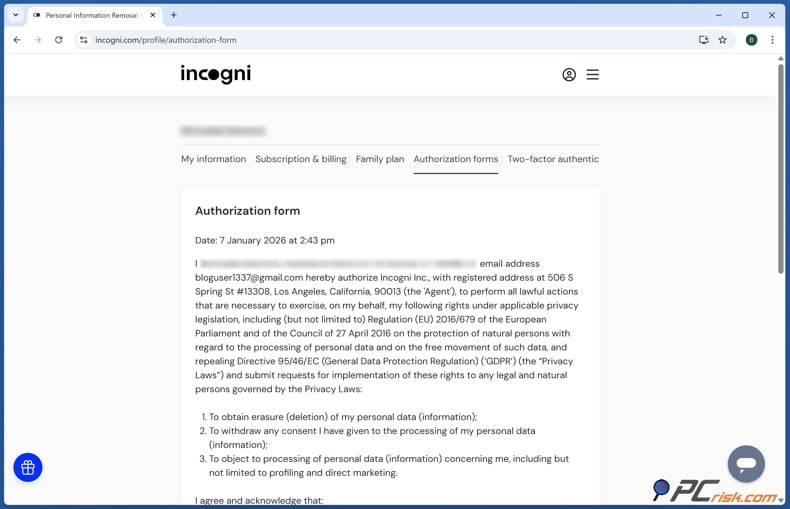
5. Look over your profile details. Make sure your name, date of birth, address, and other information are correct. Typos can make it harder to match your records. Once you’ve checked everything, click "Start data removal."
6. Let Incogni handle the requests. After you start the process, Incogni will automatically contact the brokers it supports. Since PeopleFinders is on Incogni’s current list, you don’t need to fill out the PeopleFinders web form yourself.
7. Keep an eye on the dashboard. Incogni shows you the status of each broker it contacts. In our PCrisk review, we saw that the dashboard clearly shows which requests are waiting, which are in progress, and which are done. This helps you track what still needs time.
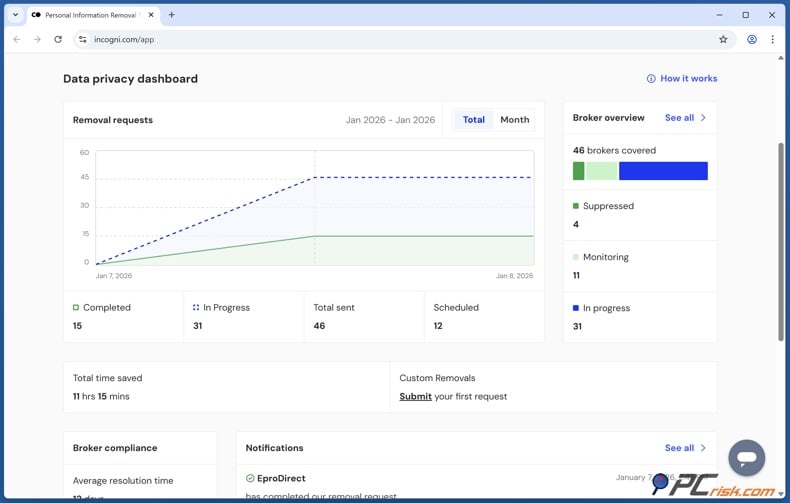
8. Keep checking after the first removal. The first opt-out is just the beginning. Incogni says it keeps sending new requests and adds more brokers over time. This matters because people-search sites can get updated information even after your old listing is gone.
Don’t expect an automated removal service to wipe out your whole online presence. These services primarily focus on data brokers and people search sites. They can’t remove government records, unrelated websites, social media posts, news stories, or every place your name might appear.
So, automatic removal is best if you want broad, ongoing coverage without tracking every form yourself. If PeopleFinders is your only concern, the free manual steps below might be enough.
Opt out of PeopleFinders manually
You can opt out of PeopleFinders for free, and you don't need a membership. As of August 2026, the steps are to open the opt-out page, enter your name and email, verify your email, and fill out the suppression form.
Check our top personal data removal services
Before you start, it's a good idea to set up a separate email just for privacy requests. You'll need to check this inbox for a verification link from PeopleFinders. Using a different email helps keep your main accounts, like your banking or work accounts, more secure.
It's helpful to search PeopleFinders for your own record before you fill out the suppression form. This way, you can see what information they already have and avoid giving extra details they don't list. Save the profile link or note key details so you can check later. Current advice says to find your profile first and only give the info needed to match it.
Follow these steps:
1. Go to peoplefinders.com/opt-out to open the PeopleFinders opt-out page. You can also find it through their privacy links, but the direct page is usually the fastest way.
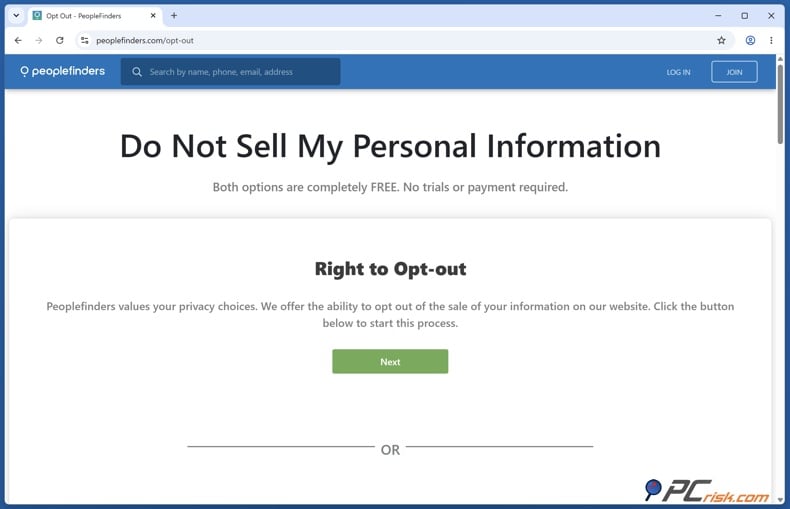
2. Look for the "Right to Opt-out" section on the privacy page and choose that option. Ignore any offers for other products - your goal is to remove your public PeopleFinders record.
3. Type in your full name and a working email address. You'll need to access this email right away for verification. According to the latest instructions, these are the main things you need to start the process.
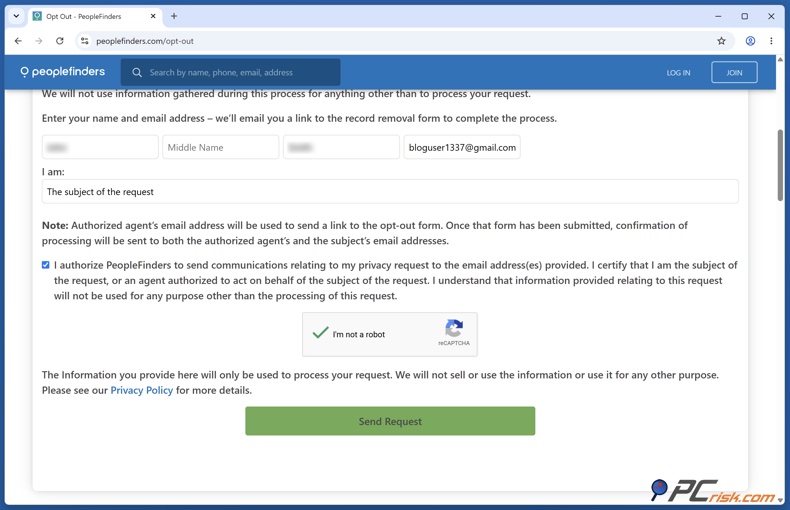
4. When the form asks about your relationship, choose the option that shows you are requesting removal of your own information. Complete any required acknowledgements and the CAPTCHA, then submit your request.
5. Check your email for a message from PeopleFinders with a link to the suppression form. If you don't see it, look in your spam, junk, or promotions folders.
6. Click the verification link as soon as you get it. The link expires after 24 hours, so if you wait too long, you'll have to start over.
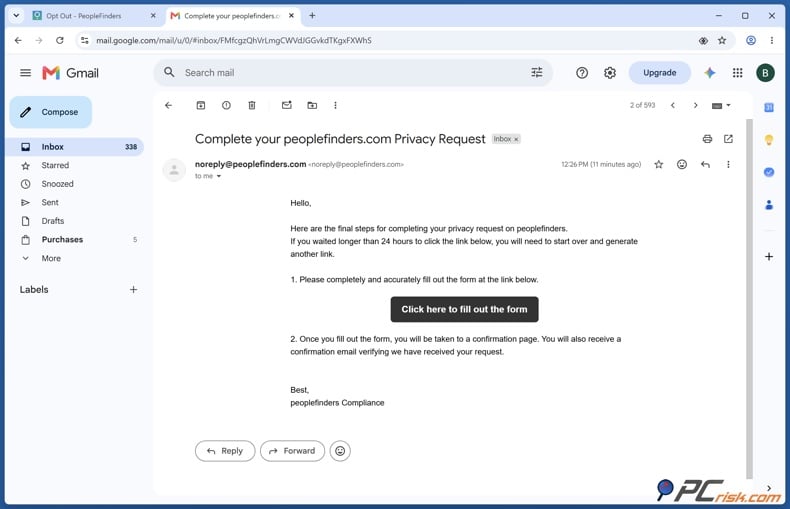
7. Fill out the suppression form with the details needed to identify your record. Stick to the required fields. Only add extra personal information if it's needed to tell your record apart from someone else with a similar name.
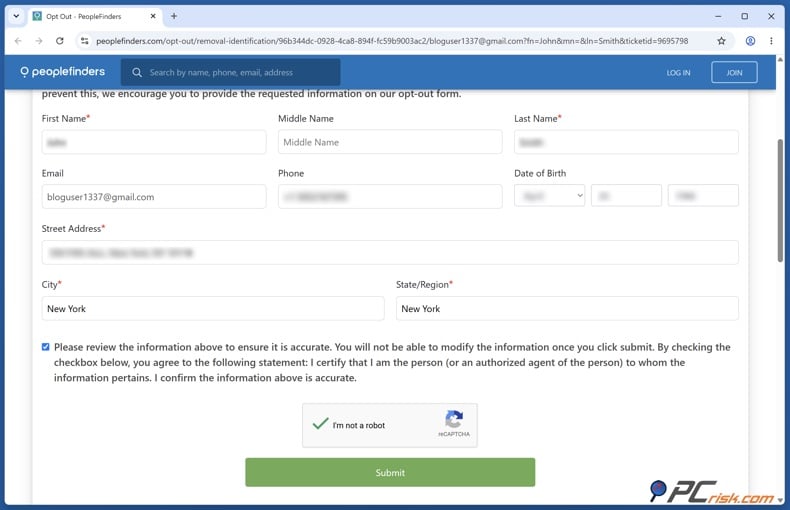
8. Double-check your information and complete the CAPTCHA before submitting the form. Mistakes can make it harder to match your record. If your request goes through, you'll see a confirmation on the screen and get a confirmation email.
9. Save the confirmation email and, if you can, take a screenshot of the submission page. This way, you have proof of your request in case the profile doesn't disappear or comes back later.
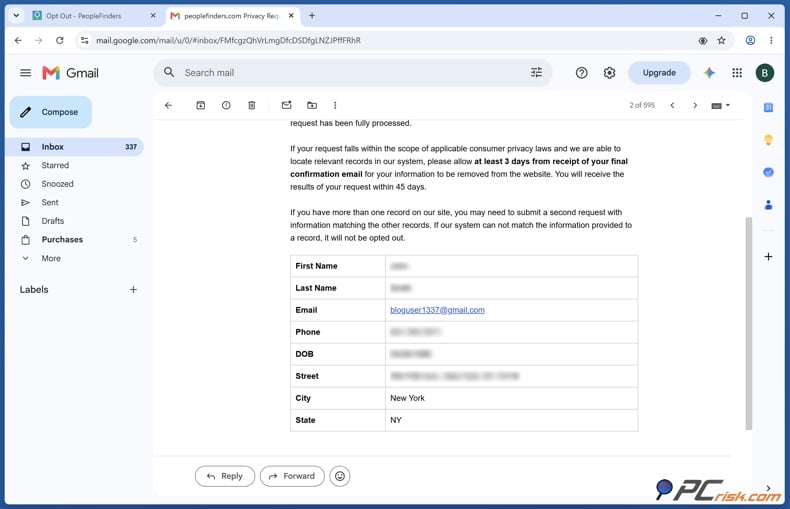
10. Wait about three days for PeopleFinders to process your request. Sometimes it takes a bit longer, so don't send another request right away if your listing is still there after a few hours.
11. Check PeopleFinders again using the same name and location to see if your record is gone. You can also use the profile link you saved. If needed, use a new browser session to avoid seeing an old cached page.
Keep in mind that removing your information from PeopleFinders does not delete government records or remove your details from other people-search sites. We recommend repeating the opt-out process on other services and checking regularly for new information.
Common issues with removing information from PeopleFinders manually
The PeopleFinders removal process is usually simple, but issues can sometimes arise.
If you do not get the verification email, check your spam, junk, and promotions folders, and search your inbox for PeopleFinders. Double-check that you entered your email address correctly. If you still do not see the message, try the opt-out request again with a different working email address. If you keep having trouble, use a regular personal email provider as recommended.
If your verification link has expired, remember that PeopleFinders links are only active for 24 hours. Start the opt-out process again and use the new link right away. Do not use the old link.
If PeopleFinders cannot find the right record, search the site yourself before sending another request. Check details like location, age, past addresses, or relatives in the profiles. Give enough matching information in the form to help identify your record, but do not include extra details you do not need.
If you have more than one PeopleFinders listing, such as profiles with old addresses, different names, or other variations, handle each one separately. If removing one listing does not remove the others, send a separate request for each profile or family member. Do not assume one request will cover everything.

If your information is still showing after three days, wait a bit longer and make sure you are viewing the current PeopleFinders page, not an old browser version. If the record is still there, contact PeopleFinders customer support. Their public support number is 800-718-8997, and the opt-out phone number is 877-551-9688.
If the online form does not work, you can call PeopleFinders at 877-551-9688 to request removal of your record. Be ready to provide details such as your full name, current or past addresses, and date of birth. Ask for a reference or case number, if possible, and check later to confirm your information has been removed.
If your information is removed but reappears later, it does not necessarily mean the first opt-out failed. People-search sites often get new data from outside sources. The FTC warns that your details may reappear if public records are updated, so check these sites regularly and resend your request if needed. PeopleFinders also notes that new public records can create a new profile.
If you no longer see your PeopleFinders listing but still find old search engine results, remember that search engines and browser caches may not update right away. Make sure the actual PeopleFinders record is gone, since that is what matters. Search engine results will update on their own later.
Because these issues can keep happening, it is best to think of data removal as an ongoing task, not a one-time fix. The FTC suggests checking regularly, and Incogni’s recurring removal service is built for situations in which brokers collect your data again.
Alternative ways to opt out of PeopleFinders
The online suppression form is the simplest manual option, but there are other privacy strategies you might want to try.
Opt out of PeopleFinders with Incogni
Another option is to remove your information by phone. PeopleFinders currently lists 877-551-9688 as their opt-out number. This can help if the email verification does not work, the form rejects your details, or you run into other technical issues. Since phone requests do not provide an electronic record, ask for a reference number if you can, and check later to confirm your information was removed.
California residents have an additional option in 2026. The California Delete Request and Opt-out Platform, or DROP, launched on January 1, 2026. The state describes DROP as a system through which an eligible California resident can submit a single deletion request to more than 600 registered data brokers. Data brokers were required to begin processing requests on August 1, 2026, and the official DROP site says brokers operate on repeated 45-day deletion cycles. The state also says consumers choose how much identifying information to provide for matching.
DROP is a broad privacy tool for data brokers, but you should still check your individual PeopleFinders listing. If you live in California, use DROP and check major people-search sites for extra protection. Note that only California residents can use DROP.
What are personal data removal services?
Personal data removal services are companies that automate much of the work of finding data broker records and requesting their removal. Instead of doing everything yourself—like finding each broker, filling out forms, verifying your identity, tracking deadlines, and checking if your data comes back - you let the service handle most of these steps.
Check our top personal data removal services
The FTC describes essentially two approaches to people-search removal: consumers can opt out individually for free, or they can pay a service to do it on their behalf. When considering a paid service, we recommend checking how many sites it covers, whether it reports completed opt-outs, and how often it rescans sites for information that returns.
At PCrisk, we reviewed the top services for 2026. Our current favorites are Incogni, DeleteMe, Optery, Privacy Bee, and Aura. We ranked Incogni first overall, but the best choice for you may depend on your budget, how many people you want to cover, which brokers are included, and if you want extra security features.
The biggest advantage is scale. It's easy to remove yourself from one people-search site, but doing it for dozens or even hundreds is much more work. You also have to keep track of which requests worked and repeat them if your data shows up again. In our tests, Incogni's automated system sent many requests quickly, and its ongoing monitoring helped us catch records that came back.
There is an important trade-off to consider. A removal service needs enough personal information to find your records. For example, Incogni asks for your name, date of birth, address, and, for US users, a phone number. This is why we suggest using a well-known service with clear privacy and security policies rather than giving your sensitive information to a website you do not trust.
No removal service can delete everything. Our research emphasizes that these products primarily address data brokers and people-search sites. They generally cannot delete official public records, news articles, social media content, and unrelated websites that fall outside their scope.
How to keep your information off people search sites like PeopleFinders
Start by searching for yourself every so often. Try different combinations of your full name, city, phone number, and address. The FTC suggests checking people-search websites regularly and sending another opt-out request if you find new information.
Check your social media privacy settings. People-search companies can obtain information from public or widely visible profiles, so do not share details such as your phone number, exact home address, date of birth, family information, or other personal data unless necessary.
Be careful when filling out online forms, surveys, contests, loyalty programs, or marketing sign-ups. The more companies that have your contact details, the more likely your information could end up in commercial databases. Not every company sells your data to people-search sites, but sharing less helps limit who has your information.
Think about using different identities for different purposes. For example, use a separate email address for newsletters and privacy requests instead of your main inbox. Also, do not share your personal phone number unless you really need to.
Remember that public records are a separate issue. Removing a PeopleFinders profile does not erase the government record that may have supplied some of the information. The FTC explicitly notes that opting out of a people-search service does not delete information from public records.
Keep an eye on major life changes. Moving, changing your phone number, buying property, or updating records can create new information that ends up in people-search databases. Since your profile can come back after these changes, it is a good idea to check again after big updates.
If you want less work, the main benefit of an automated service is that it keeps removing your data over time. Incogni, for example, says it regularly sends new requests and keeps adding brokers to its system, instead of treating deletion as a one-time job.
Final recommendations
If you only need to remove one PeopleFinders listing, we suggest starting with the free manual opt-out. It is easy, does not need a paid membership, and PeopleFinders says removal usually takes a few days. Save any confirmation you get and check the listing yourself afterward.
If you want a bigger privacy cleanup, just removing yourself from PeopleFinders is not enough. The same information can appear on many other people-search sites and in data broker databases. We recommend repeating opt-outs on different services and checking for new listings from time to time.
If you do not want to handle this process yourself, you can use a personal data removal service. Based on our latest tests, Incogni is our top pick for 2026. It covers PeopleFinders automatically and combines automated requests with regular monitoring.
Most importantly, think of opting out as a way to reduce your digital footprint, not to make yourself invisible. Removing your PeopleFinders listing removes one major source of searchable information. However, copies may still appear in public records, other people-search sites, commercial databases, and websites that PeopleFinders does not control.
Opt out of PeopleFinders with Incogni
Frequently asked questions (FAQs)
How accurate is PeopleFinders' data?
The accuracy of PeopleFinders data can vary. PeopleFinders says it provides accurate public-record information, but its database relies on information collected from other sources. The FTC says this industry gets data from public records, other data brokers, and online sources that anyone can access.
This means a PeopleFinders profile might have old, incomplete, or mixed-up information. For example, a past address could still show up after you move, or details about someone with a similar name might get linked to you. We suggest double-checking people-search information instead of treating it as a final or official record.
PeopleFinders also states that it is not an FCRA Consumer Reporting Agency and cannot be used for employment, credit, or tenant screening.
Can PeopleFinders re-add my information after I opt out?
Yes, your information might show up again. This happens with many people-search sites, not just PeopleFinders. Your details can reappear when public records change, so it’s a good idea to check these sites from time to time for new information.
Current PeopleFinders instructions also warn that a new record can be created if the site gets updated data. If this happens, just send another opt-out request.
This is one reason why ongoing data removal services can help. Incogni, for example, says it keeps sending new removal requests instead of stopping after the first one works.
How long does PeopleFinders take to remove my information?
PeopleFinders currently says it takes about three days to process your request. Sometimes it can take longer, depending on the situation.
We suggest waiting at least the stated processing time before trying to fix any issues. After that, check PeopleFinders again using a new browser session to see if your record is still there. If it’s still showing after some extra time, reach out to PeopleFinders support or call their opt-out number.
Is opting out of PeopleFinders free?
Yes, opting out of PeopleFinders is free. You don’t need to buy a report or sign up for a subscription. Right now, you just need to provide your name, a working email address, verify your email, and fill out the suppression form.
Don’t mix up the site’s paid search services with its privacy removal process. You don’t have to buy a PeopleFinders membership just to request that your record be hidden.
Do I need a PeopleFinders account to opt out?
No, you don’t need a PeopleFinders account to opt out. You can start your privacy request right from the opt-out page.
A paid PeopleFinders account and your public people-search record are two different things. That’s why canceling your membership doesn’t automatically hide your listing.
Why does PeopleFinders need my email address to remove my information?
Your email address is needed to verify your request. After you send your opt-out request, PeopleFinders will email you a link to the suppression form. The current instructions say this link expires after 24 hours.
If you’d rather not use your main email address, you can use a separate email just for opt-outs and privacy requests. Just make sure you can access it long enough to finish the verification and get any confirmation emails.
The broader practice of requesting identifying information during people-search opt-outs is not unusual. Both manual and service-assisted opt-outs may require you to provide information to verify their identity.
Does removing myself from PeopleFinders remove my public records?
No. This is one of the most important limitations of the process.
PeopleFinders aggregates information obtained from other sources. Suppressing your PeopleFinders profile prevents that particular people-search listing from being offered in the same way, but it does not rewrite property records, voter records, court documents, professional licensing information, or other original records maintained by government agencies. The FTC explicitly warns that opting out of a people-search site does not delete the underlying public records.
So, those records can still be found through their original sources and might also show up on other people-search sites.
Will opting out of PeopleFinders remove me from every people-search website?
No, opting out of PeopleFinders only removes your information from PeopleFinders. It doesn’t affect other data broker sites. We recommend repeating the opt-out process on other people-search sites, since each one may have its own copy of your details.
This is a good reason to use a personal data removal service if your information is on many sites. Our current recommendations include Incogni, DeleteMe, Optery, Privacy Bee, and Aura.
No matter which method you use, we recommend checking the results instead of assuming your request is a one-time fix. People-search privacy is an ongoing process because the data and broker sites keep changing.
Share:
 Facebook
 X.com
X.com
 LinkedIn
 Copy Link

Rimvydas Iliavicius
Researcher, author
Rimvydas is a researcher with over four years of experience in the cybersecurity industry. He attended Kaunas University of Technology and graduated with a Master's degree in Translation and Localization of Technical texts. His interests in computers and technology led him to become a versatile author in the IT industry. At PCrisk, he's responsible for writing in-depth how-to articles for Microsoft Windows.
▼ Show Discussion