
How to eliminate Fickle stealer-type malware from the operating system
TrojanAlso Known As: Fickle malware

Get free scan and check if your device is infected.
Remove it nowTo use full-featured product, you have to purchase a license for Combo Cleaner. Seven days free trial available. Combo Cleaner is owned and operated by RCS LT, the parent company of PCRisk.com.
What kind of malware is Fickle?
Fickle is a stealer-type malware written in the Rust programming language. This malicious program is designed to steal vulnerable information from devices. Fickle has bee around since at least the spring of 2024. This stealer is highly flexible and can infiltrates system in several different multi-stage infection chains.
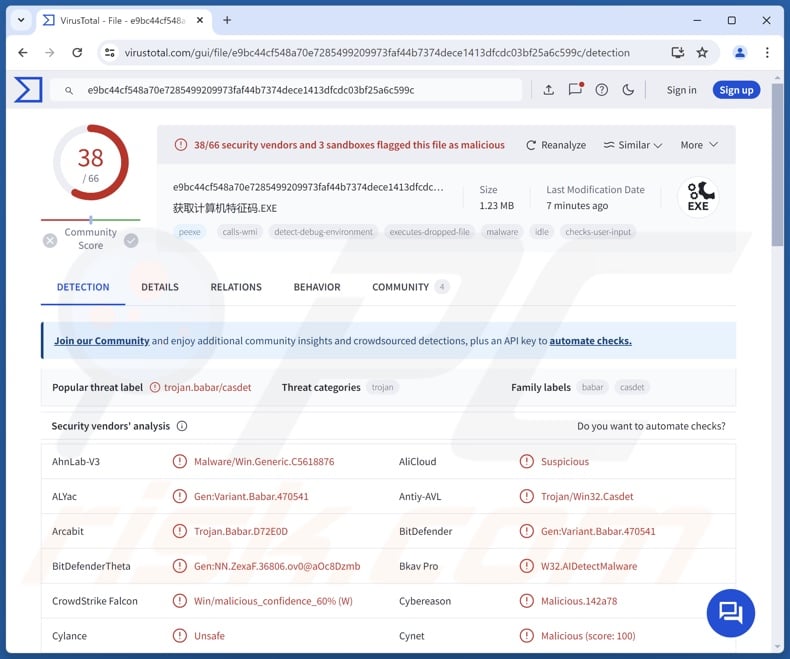
Fickle malware overview
As mentioned in the introduction, Fickle can infiltrate devices via different processes. The stealer has anti-analysis capabilities, such as anti-debugging, VM (Virtual Machine) and sandbox detection, as well as checking for terms/names associated with malware analysis and analysts.
Fickle gathers extensive information about the infected machine, such as device name, hardware details (e.g., CPU, GPU, etc.), operating system version and architecture, language settings, geolocation data (e.g., IP address, country, city, etc.), username, installed programs, running processes, and so on.
The stealer can exfiltrate information from a variety of applications. It can acquire data from Chromium and Gecko based browsers. From browsers, cyber criminals primarily seek browsing histories, Internet cookies, log-in credentials (usernames/passwords), personally identifiable details, credit card numbers, etc.
Furthermore, Fickle seeks information from messengers, cryptocurrency wallets, password managers, remote access programs, FTP (File Transfer Protocol) clients, and gaming-related software (extensive list below).
The program can download files from devices (targeted format list below). Additionally, Fickle can take screenshots. It can also terminate itself, and before deletion, the malware can display a fake error message.
It is noteworthy that malicious software developers commonly improve upon their programs and methodologies. What is more, evidence suggests that Fickle is in active development and use. Therefore, potential future iterations of this stealer can have additional/different functionalities and features.
To summarize, the presence of software like Fickle on devices can lead to severe privacy issues, financial losses, and identity theft.
| Name | Fickle malware |
| Threat Type | Trojan, stealer, password-stealing virus. |
| Detection Names | Avast (Win32:Malware-gen), Combo Cleaner (Gen:Variant.Babar.470541), DrWeb (Trojan.PWS.Siggen3.37131), Kaspersky (UDS:Trojan-Spy.Win32.Stealer.a), Microsoft (Trojan:Win32/Casdet!rfn), Full List Of Detections (VirusTotal) |
| Symptoms | Trojans are designed to stealthily infiltrate the victim's computer and remain silent, and thus no particular symptoms are clearly visible on an infected machine. |
| Distribution methods | Infected email attachments, malicious online advertisements, social engineering, software 'cracks'. |
| Damage | Stolen passwords and banking information, identity theft, the victim's computer added to a botnet. |
| Malware Removal (Windows) |
To eliminate possible malware infections, scan your computer with legitimate antivirus software. Our security researchers recommend using Combo Cleaner. Download Combo CleanerTo use full-featured product, you have to purchase a license for Combo Cleaner. 7 days free trial available. Combo Cleaner is owned and operated by RCS LT, the parent company of PCRisk.com. |
Stealer-type malware examples
We have investigated countless malware samples; Kematian, KoiStealer, Waltuhium, Vert, and Braodo are merely some of our newest articles on stealers. Information-targeting malware can seek specific details or a broad range of data. These abilities (i.e., data extraction) are common for various types of malware.
Yet regardless of whether a malicious program steals information or operates in a different manner, its presence on a system threatens device and user safety. Hence, all threats must be eliminated immediately upon detection.
How did Fickle infiltrate my computer?
Fickle has been observed originating from different format files, several Microsoft Word documents, executables, and LNK (Windows Shortcut) files. Four primary delivery methods were noted in use for this stealer – VBA dropper, VBA downloader, link downloader, and executable downloader.
Regardless of the technique, they typically rely on PowerShell scripts to lay the groundwork for the infection. Fickle arrives onto systems in multi-stage chains that can involve batch and data files, executables, embedded URLs, etc. However, how the originator files are distributed is currently unknown.
Generally, cyber criminals proliferate malware by using phishing and social engineering tactics. Infectious files come in various formats, e.g., documents (Microsoft Office, Microsoft OneNote, PDF, etc.), executables (.exe, .run, etc.), archives (ZIP, RAR, etc.), JavaScript, and so on.
The most widespread malware distribution techniques include: drive-by (stealthy/deceptive) downloads, malicious attachments/links in spam mail (e.g., emails, PMs/DMs, SMSes, etc.), online scams, malvertising, dubious download channels (e.g., freeware and third-party sites, P2P sharing networks, etc.), illegal software activation tools ("cracks"), and fake updates.
Some malicious programs can even self-spread via local networks and removable storage devices (e.g., external hard drives, USB flash drives, etc.).
How to avoid installation of malware?
We strongly recommend downloading only from official and verified sources. All programs must be activated and updated using legitimate functions/tools, as those obtained from third-parties may contain malware.
Another recommendation is to be careful while browsing, as fraudulent and dangerous online content usually appears genuine and harmless. Incoming emails and other messages must be approached with caution. Attachments or links in suspicious/irrelevant mail must not be opened, as they can be malicious.
It is essential for device/user safety to have a dependable anti-virus installed and kept updated. Security software must be used to run regular system scans and to remove threats and issues. If you believe that your computer is already infected, we recommend running a scan with Combo Cleaner Antivirus for Windows to automatically eliminate infiltrated malware.
Partial list of software targeted by Fickle stealer;
Targeted browsers:
- Google Chrome
- Microsoft Edge
- Opera
- Opera GX
- 7 Star
- Amigo
- Brave
- CentBrowser
- Epic
- Iridium
- Kometa
- Orbitum
- Sputnik
- Torch
- Vivaldi
- Yandex
Targeted cryptocurrency wallets and crypto-related extensions:
Armory, Atomic, Auro, BinanceChain, BitClip, Byone, ByteCoin, Clover, Coin98, Coinbase, Coinomi, Cyano, Cyano Wallet Pro, Electrum, EQUAL, Eternl, Ethereum, Exodus, Guarda, Hycon Lite Client, ICONex, iWallet, Jaxx, Keplr, KHC, LeafWallet, Liquality, Maiar DeFi, Math, MetaMask, MEW CX, Nabox, Nami, Nash, NeoLine, Nifty, OneKey, Polymesh, Ronin, Saturn, Sollet, SteemKeychain, Terra Station, TezBox, TronLink, UniSat, Wombat, Yoroi, ZCash, ZilPay, etc.
Targeted password managers and authentication software:
- 1Password
- Authenticator
- Avira Password Manager
- Bitwarden
- BrowserPass
- CommonKey
- Dashlane
- EOS Authenticator
- KeePassXC
- Keeper
- LastPass
- MYKI
- NordPass
- Norton Password Manager
- RoboForm
- Splikity
- Trezor Password Manager
- Zoho Vault
Targeted messaging software:
- Discord
- Element
- ICQ
- Pidgin
- Signal
- Skype
- Telegram
- Tox
Targeted miscellaneous software:
- Anydesk
- FileZilla
- Steam
- Ubisoft
Targeted file extensions:
.doc, .docx, .kdbx, .odp, .odt, .pdf, .ppt, .pptx, .txt, wallet.dat, .xls, .xlsx
Update February 28, 2025 – Fickle stealer has been used in campaigns carried out by threat actors tracked as EncryptHub (aka Larva-208). This group has been active since the summer of 2024 and has attacked over six hundred organizations worldwide.
These campaigns employed phishing, social engineering, and tech support scam tactics. Another group – Larva-148 – is responsible for the phishing and associated infrastructure.
After successfully breaching corporate networks, EncryptHub introduces stealers like Fickle, Rhadamanthys, or Stealc. The infection can then culminate in a ransomware infection. The known malware used were linked to groups behind the BlackSuit and RansomHub ransomware-type programs.
More information on these campaigns can be found in an article by Bill Toulas on BleepingComputer.
Update April 1, 2025 – In a recent interview, the developer stated that Fickle Stealer was inspired by Kematian. The developer noted that Fickle Stealer is optimized to bypass corporate security where other stealers fail and can disable defenses for further infections. Alternative delivery methods are also being tested to improve stealth.
Update July 21, 2025 – threat actors tracked as EncryptHub (Larva-208) continue using Fickle stealer in their operations. New sophisticated social engineering campaigns spreading this malware have emerged. The latest targets are Web3 developers, who are contacted with bogus job offers or requests to review their portfolios.
Several campaigns seeking these victims have been observed. The steps differ depending on the platform through which victims are initially contacted.
Targeted individuals can be sent malicious links directly if the platform allows it. The lure is a meeting link to a fake AI (Artificial Intelligence) Workspace application ("Norlax AI"; possibly other names), accessible only with a code sent to the victim. Eventually, users encounter an error on the page stating that their audio drivers are missing/outdated. The infection chain is triggered once victims download and install the malware, which is disguised as the Realtek HD Audio Driver.
Alternatively, if victims are contacted via a platform like Remote3, which warns users against clicking links outside of those associated with legitimate conferencing software like Zoom or Google Meet, the cyber criminals first set an online meeting using said programs. In the chat windows therein, they share malicious links to the fake AI Workspace application.
Instant automatic malware removal:
Manual threat removal might be a lengthy and complicated process that requires advanced IT skills. Combo Cleaner is a professional automatic malware removal tool that is recommended to get rid of malware. Download it by clicking the button below:
DOWNLOAD Combo CleanerBy downloading any software listed on this website you agree to our Privacy Policy and Terms of Use. To use full-featured product, you have to purchase a license for Combo Cleaner. 7 days free trial available. Combo Cleaner is owned and operated by RCS LT, the parent company of PCRisk.com.
Quick menu:
How to remove malware manually?
Manual malware removal is a complicated task - usually it is best to allow antivirus or anti-malware programs to do this automatically. To remove this malware we recommend using Combo Cleaner Antivirus for Windows.
If you wish to remove malware manually, the first step is to identify the name of the malware that you are trying to remove. Here is an example of a suspicious program running on a user's computer:
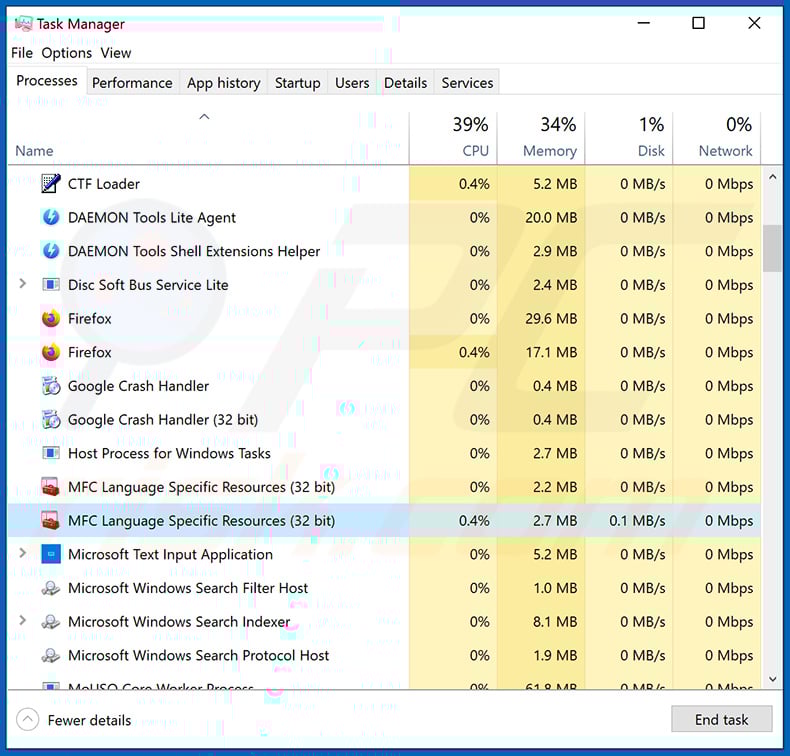
If you checked the list of programs running on your computer, for example, using task manager, and identified a program that looks suspicious, you should continue with these steps:
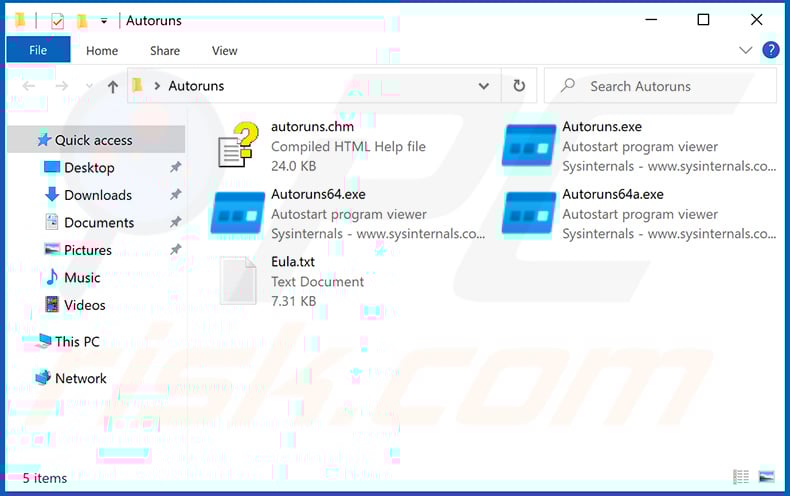
 Download a program called Autoruns. This program shows auto-start applications, Registry, and file system locations:
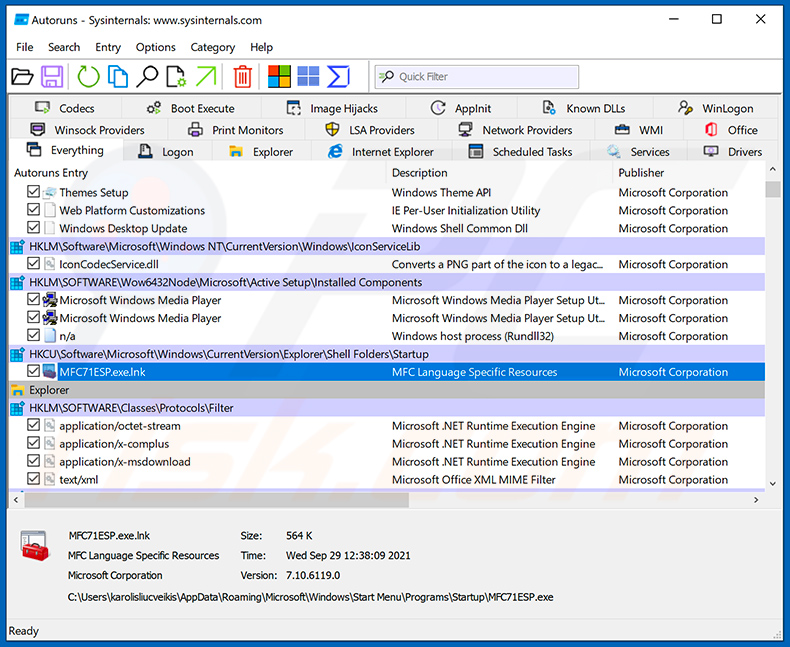
 Restart your computer into Safe Mode:
Windows XP and Windows 7 users: Start your computer in Safe Mode. Click Start, click Shut Down, click Restart, click OK. During your computer start process, press the F8 key on your keyboard multiple times until you see the Windows Advanced Option menu, and then select Safe Mode with Networking from the list.
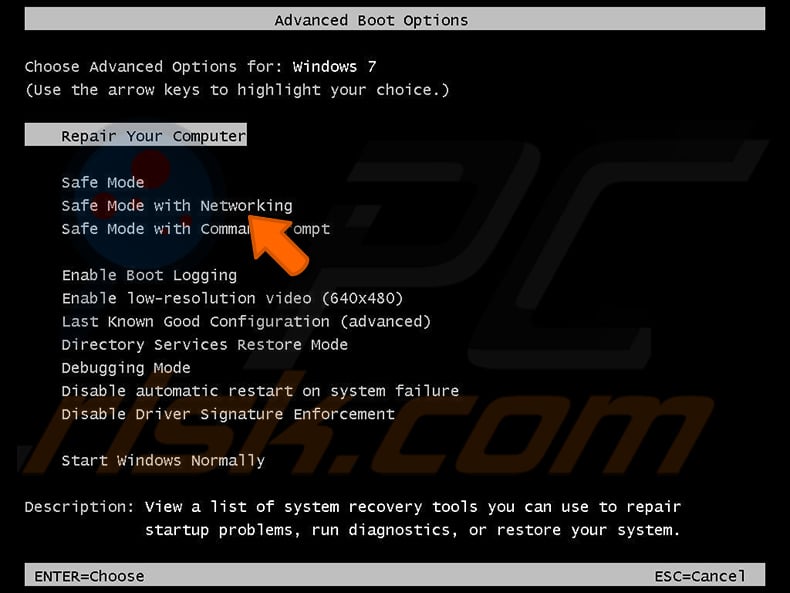
Video showing how to start Windows 7 in "Safe Mode with Networking":
Windows 8 users: Start Windows 8 is Safe Mode with Networking - Go to Windows 8 Start Screen, type Advanced, in the search results select Settings. Click Advanced startup options, in the opened "General PC Settings" window, select Advanced startup.
Click the "Restart now" button. Your computer will now restart into the "Advanced Startup options menu". Click the "Troubleshoot" button, and then click the "Advanced options" button. In the advanced option screen, click "Startup settings".
Click the "Restart" button. Your PC will restart into the Startup Settings screen. Press F5 to boot in Safe Mode with Networking.
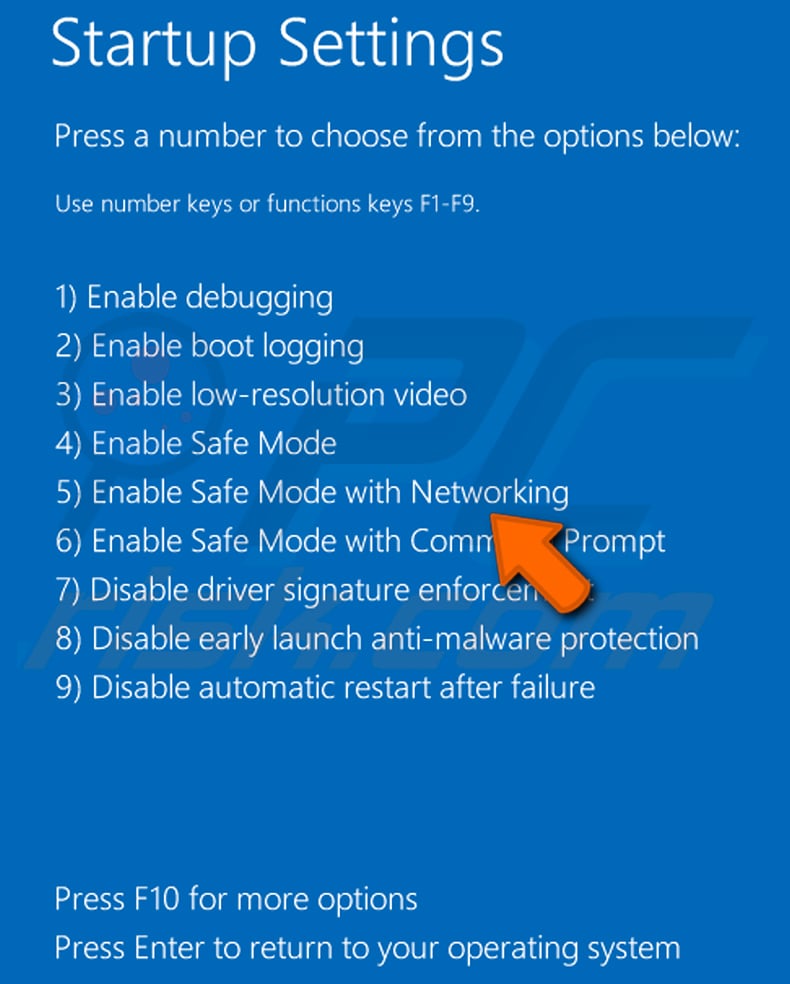
Video showing how to start Windows 8 in "Safe Mode with Networking":
Windows 10 users: Click the Windows logo and select the Power icon. In the opened menu click "Restart" while holding "Shift" button on your keyboard. In the "choose an option" window click on the "Troubleshoot", next select "Advanced options".
In the advanced options menu select "Startup Settings" and click on the "Restart" button. In the following window you should click the "F5" button on your keyboard. This will restart your operating system in safe mode with networking.
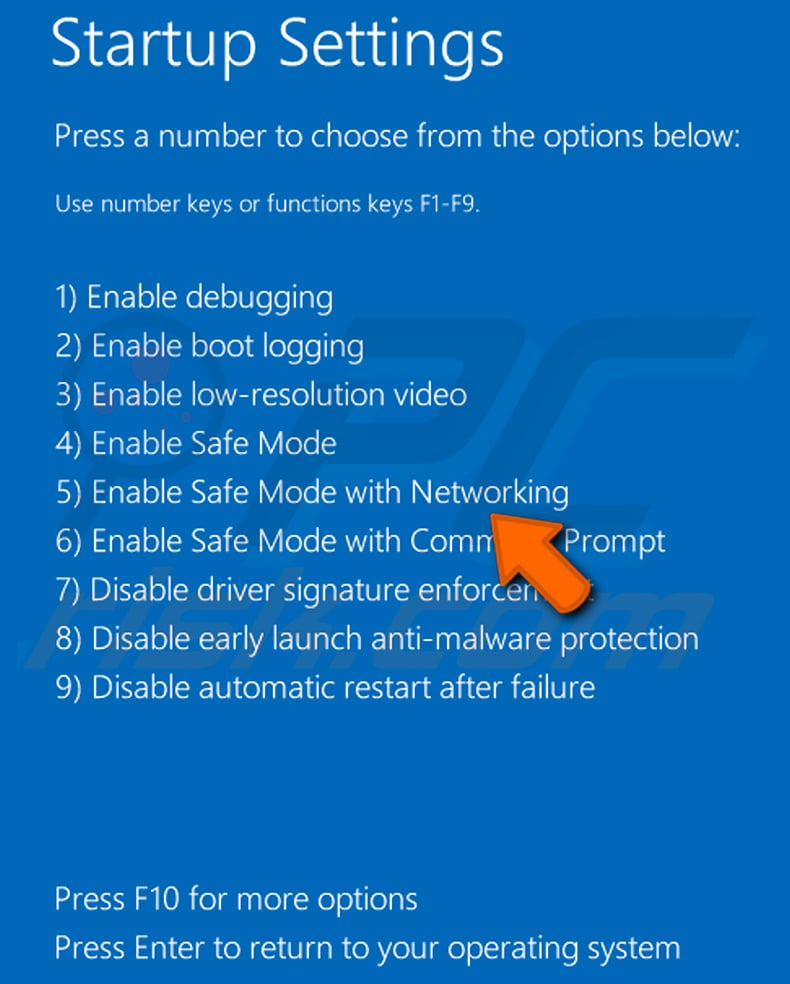
Video showing how to start Windows 10 in "Safe Mode with Networking":
 Extract the downloaded archive and run the Autoruns.exe file.
 In the Autoruns application, click "Options" at the top and uncheck "Hide Empty Locations" and "Hide Windows Entries" options. After this procedure, click the "Refresh" icon.
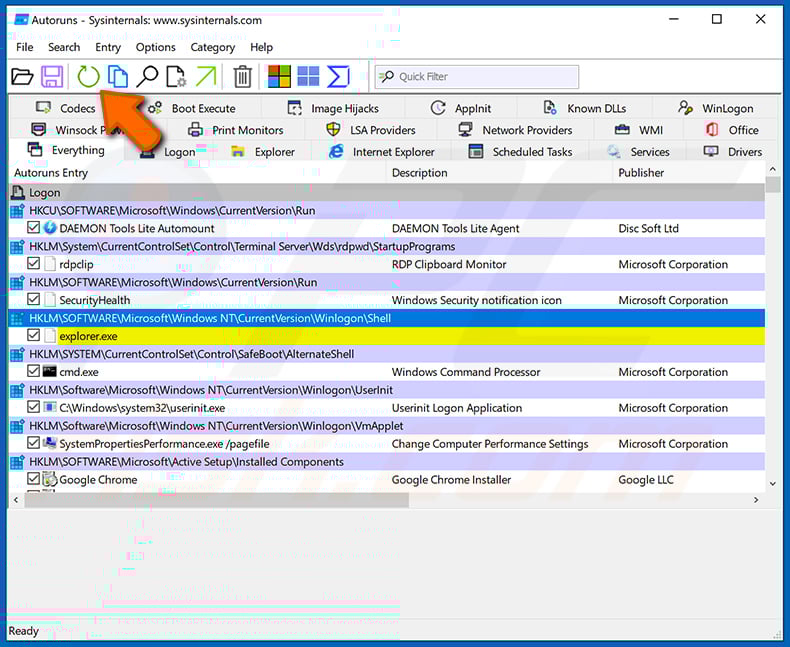
 Check the list provided by the Autoruns application and locate the malware file that you want to eliminate.
You should write down its full path and name. Note that some malware hides process names under legitimate Windows process names. At this stage, it is very important to avoid removing system files. After you locate the suspicious program you wish to remove, right click your mouse over its name and choose "Delete".
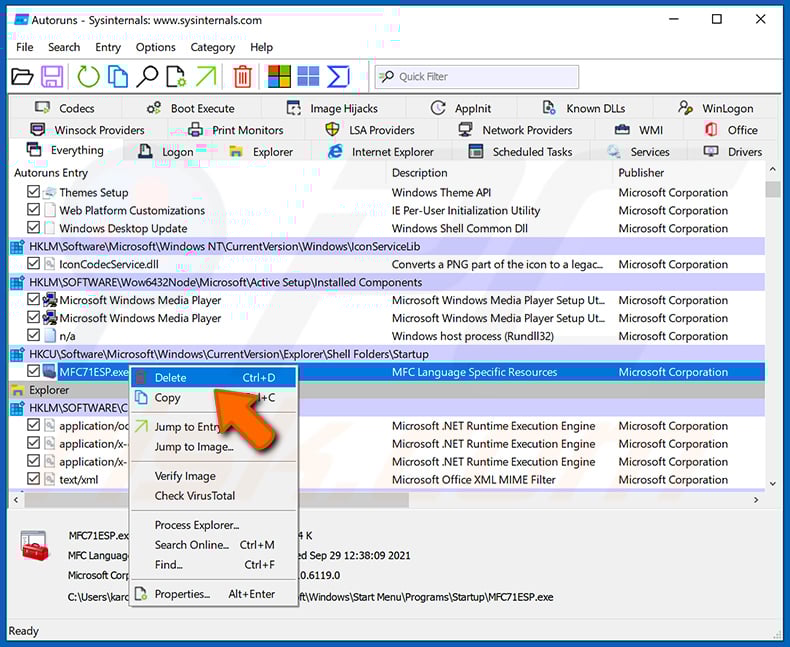
After removing the malware through the Autoruns application (this ensures that the malware will not run automatically on the next system startup), you should search for the malware name on your computer. Be sure to enable hidden files and folders before proceeding. If you find the filename of the malware, be sure to remove it.
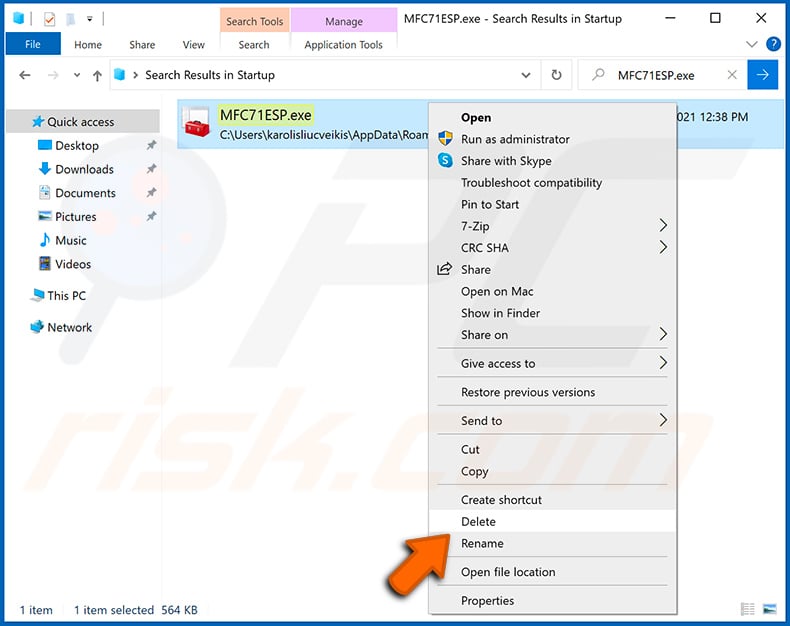
Reboot your computer in normal mode. Following these steps should remove any malware from your computer. Note that manual threat removal requires advanced computer skills. If you do not have these skills, leave malware removal to antivirus and anti-malware programs.
These steps might not work with advanced malware infections. As always it is best to prevent infection than try to remove malware later. To keep your computer safe, install the latest operating system updates and use antivirus software. To be sure your computer is free of malware infections, we recommend scanning it with Combo Cleaner Antivirus for Windows.
Frequently Asked Questions (FAQ)
My computer is infected with Fickle malware, should I format my storage device to get rid of it?
Malware removal rarely requires such drastic measures.
What are the biggest issues that Fickle malware can cause?
The dangers associated with an infection depend on the malware's capabilities and the cyber criminals' modus operandi. Fickle is designed to steal sensitive information from devices. Typically, infections of this kind can lead to severe privacy issues, financial losses, and identity theft.
What is the purpose of Fickle malware?
Most malware infections are motivated by profit. However, cyber criminals can also use malicious software to amuse themselves, carry out personal vendettas, disrupt processes (e.g., websites, services, companies, organizations, etc.), and launch politically/geopolitically motivated attacks.
How did Fickle malware infiltrate my computer?
Malware is primarily distributed via drive-by downloads, spam mail, online scams, malvertising, untrustworthy download channels (e.g., freeware and free file-hosting sites, P2P sharing networks, etc.), fake updaters, and illegal software activation ("cracking") tools. Furthermore, some malicious programs can self-proliferate through local networks and removable storage devices.
Will Combo Cleaner protect me from malware?
Yes, Combo Cleaner can scan devices and eliminate all kinds of threats. It can remove most of the known malware infections. It must be stressed that performing a full system scan is crucial since sophisticated malicious programs usually hide deep within systems.
Share:
 Facebook
 X.com
X.com
 LinkedIn
 Copy Link

Tomas Meskauskas
Expert security researcher, professional malware analyst
I am passionate about computer security and technology. I have an experience of over 10 years working in various companies related to computer technical issue solving and Internet security. I have been working as an author and editor for pcrisk.com since 2010. Follow me on Twitter and LinkedIn to stay informed about the latest online security threats.
PCrisk security portal is brought by a company RCS LT.
Joined forces of security researchers help educate computer users about the latest online security threats. More information about the company RCS LT.
Our malware removal guides are free. However, if you want to support us you can send us a donation.
DonatePCrisk security portal is brought by a company RCS LT.
Joined forces of security researchers help educate computer users about the latest online security threats. More information about the company RCS LT.
Our malware removal guides are free. However, if you want to support us you can send us a donation.
Donate
▼ Show Discussion