

Get free scan and check if your device is infected.
Remove it nowTo use full-featured product, you have to purchase a license for Combo Cleaner. Seven days free trial available. Combo Cleaner is owned and operated by RCS LT, the parent company of PCRisk.com.
What kind of malware is ModeloRAT?
ModeloRAT is a Remote Access Trojan (RAT) written using the Python programming language. The malicious program allows attackers to remotely access and control devices. This malware can cause chain infections.
ModeloRAT has been proliferated using the CrashFix technique in January 2026. This campaign was undertaken by the "KongTuke" threat actor and targeted corporate entities.
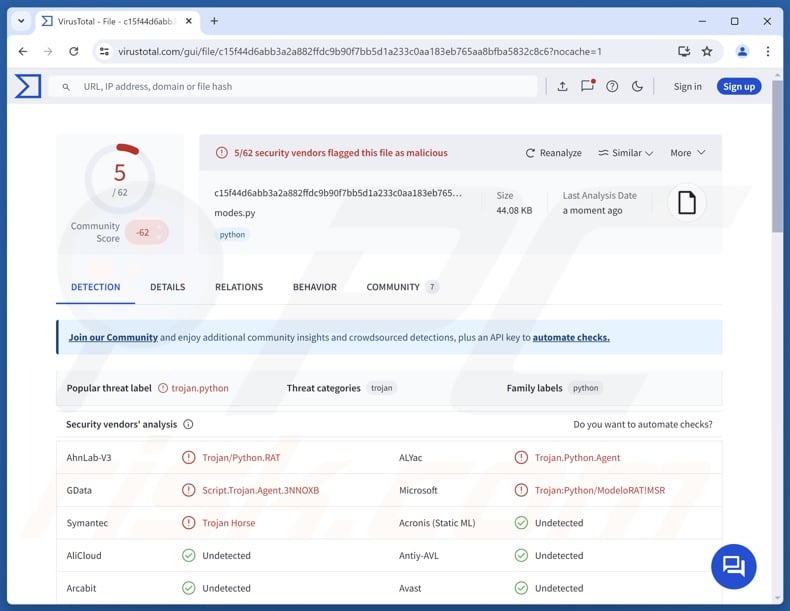
ModeloRAT malware overview
ModeloRAT enables remote access and control over infected machines. This malware has infiltrated systems via CrashFix social engineering. This technique involves a malicious browser extension – NexShield (other names/extensions are possible). This extension is disguised as uBlock Origin Lite.
An hour after installation, the extension crashes the victim's browser by performing DoS (Denial-of-Service) attacks on it. NexShield displays fake instructions on how to manually fix the issue. By following the provided steps, the victim is deceived into executing a malicious command that initiates the ModeloRAT's infection chain.
This malicious program is highly obfuscated and incorporates chunks of junk code to complicate analysis. The trojan establishes persistence by making modifications to the Windows Registry. ModeloRAT performs system reconnaissance by collecting data such as OS version, device name, MAC address, storage device details, network configuration, ARP cache, active TCP (Transmission Control Protocol) connections, user type (admin/standard), running services/processes, and so on.
The RAT's core functionality is causing chain infections – downloading/installing additional malicious programs or components. It supports several payload formats, including Python scripts, EXE (executables), and DLLs (Dynamic-Link Libraries).
In theory, software that causes further infection can introduce trojans, ransomware, cryptocurrency miners, and other malware into compromised systems. In practice, programs like ModeloRAT often operate within certain specifications or limitations.
It must be mentioned that this trojan is capable of self-updating. Generally, it is common for malware developers to upgrade/alter their tools and methodologies. Therefore, potential future versions of ModeloRAT could have additional/different capabilities and features.
In summary, the presence of malicious software like ModeloRAT on devices can lead to multiple system infections, permanent data loss, severe privacy issues, financial losses, and identity theft.
| Name | ModeloRAT virus |
| Threat Type | Trojan, Remote Access Trojan, Remote Administration Tool, RAT. |
| Detection Names | AhnLab-V3 (Trojan/Python.RAT), DrWeb (Python.BackDoor.269), ESET-NOD32 (Python/Agent.CEM Trojan), GData (Script.Trojan.Agent.3NNOXB), Microsoft (Trojan:Python/ModeloRAT!MSR), Full List Of Detections (VirusTotal) |
| Symptoms | Trojans are designed to stealthily infiltrate the victim's computer and remain silent, and thus no particular symptoms are clearly visible on an infected machine. |
| Distribution methods | Infected email attachments, malicious online advertisements, social engineering, software 'cracks'. |
| Damage | Stolen passwords and banking information, identity theft, the victim's computer added to a botnet. |
| Malware Removal (Windows) |
To eliminate possible malware infections, scan your computer with legitimate antivirus software. Our security researchers recommend using Combo Cleaner. Download Combo CleanerTo use full-featured product, you have to purchase a license for Combo Cleaner. 7 days free trial available. Combo Cleaner is owned and operated by RCS LT, the parent company of PCRisk.com. |
Remote access trojan examples
We have written about thousands of malicious programs; Covert, Pulsar, EndRAT, and SpecRAT are merely a few of our newest articles on RATs. In many cases, remote access trojans are incredibly multifunctional or rely on downloading content to expand their functionalities.
However, regardless of how a piece of malicious software operates – its presence on a system threatens device integrity and user safety. Hence, all threats must be eliminated immediately upon detection.
How did ModeloRAT infiltrate my computer?
ModeloRAT has been spread in a January 2026 CrashFix campaign targeting corporate environments. This activity is facilitated through a malicious browser extension named NexShield.
The extension was promoted via malvertising, specifically, malicious ads served by search engines when victims searched for an ad blocker. These adverts redirected either to the Chrome Web Store or NexShield's "official" promotional webpages. Sites of this kind could be accessed in other ways, such as through redirects generated by sites employing rogue advertising networks, spam browser notifications, mistyped URLs, or adware.
It is noteworthy that CrashFix social engineering could be carried out by other browser extensions or applications. Likewise, ModeloRAT could be proliferated using different methods.
Social engineering and phishing tactics are standard in malware distribution. Usually, malicious programs are disguised as or bundled with regular software/media files. They can be archives (ZIP, RAR, etc.), executables (EXE, RUN, etc.), documents (PDF, Microsoft Office, Microsoft OneNote, etc.), JavaScript, and so on. Merely opening a virulent file can be enough to initiate the infection chain.
The most prevalent malware proliferation techniques include: trojans (backdoors/loaders), drive-by (stealthy/deceptive) downloads, suspicious download sources (e.g., freeware and third-party sites, Peer-to-Peer sharing networks, etc.), malicious attachments or links in spam emails/messages, online scams, malvertising, pirated content, illegal software activation tools ("cracks"), and fake updates.
Furthermore, some malicious programs can self-spread through local networks and removable storage devices (e.g., external hard drives, USB flash drives, etc.).
How to avoid installation of malware?
We strongly recommend researching software and downloading it only from official/verified channels. Programs must be activated and updated using functions/tools provided by legitimate developers, as those acquired from third-parties can contain malware.
Another recommendation is to be careful while browsing, since fraudulent and dangerous online content usually appears genuine and harmless. Incoming emails and other messages must be approached with vigilance. Attachments or links present in suspect/irrelevant mail must not be opened, as they can be infectious.
It is essential to have a reputable antivirus installed and kept updated. Security software must be used to perform regular system scans and to remove detected threats and issues. If you believe that your computer is already infected, we recommend running a scan with Combo Cleaner Antivirus for Windows to automatically eliminate infiltrated malware.
Instant automatic malware removal:
Manual threat removal might be a lengthy and complicated process that requires advanced IT skills. Combo Cleaner is a professional automatic malware removal tool that is recommended to get rid of malware. Download it by clicking the button below:
DOWNLOAD Combo CleanerBy downloading any software listed on this website you agree to our Privacy Policy and Terms of Use. To use full-featured product, you have to purchase a license for Combo Cleaner. 7 days free trial available. Combo Cleaner is owned and operated by RCS LT, the parent company of PCRisk.com.
Quick menu:
- What is ModeloRAT?
- STEP 1. Manual removal of ModeloRAT malware.
- STEP 2. Check if your computer is clean.
How to remove malware manually?
Manual malware removal is a complicated task - usually it is best to allow antivirus or anti-malware programs to do this automatically. To remove this malware we recommend using Combo Cleaner Antivirus for Windows.
If you wish to remove malware manually, the first step is to identify the name of the malware that you are trying to remove. Here is an example of a suspicious program running on a user's computer:
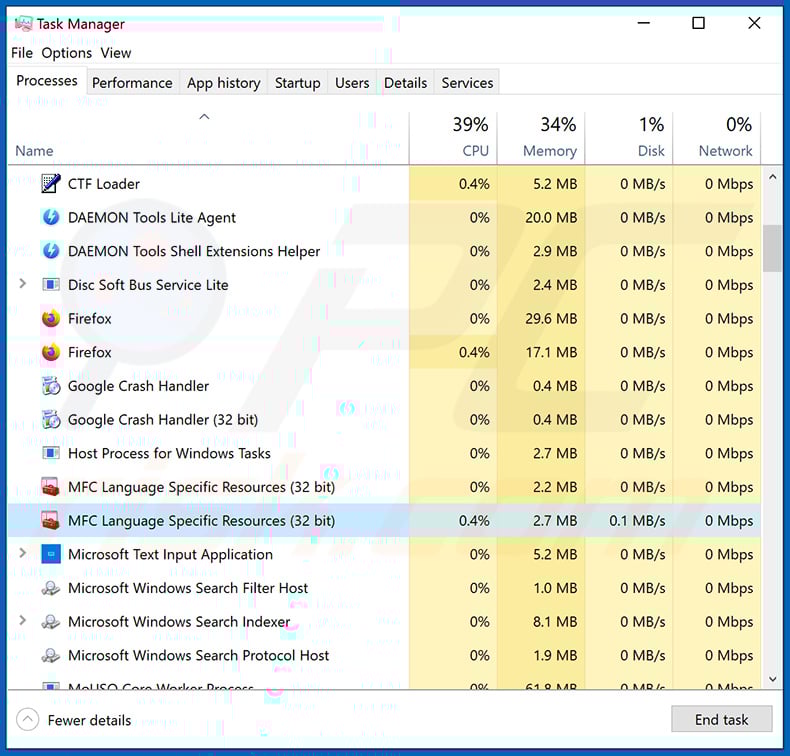
If you checked the list of programs running on your computer, for example, using task manager, and identified a program that looks suspicious, you should continue with these steps:
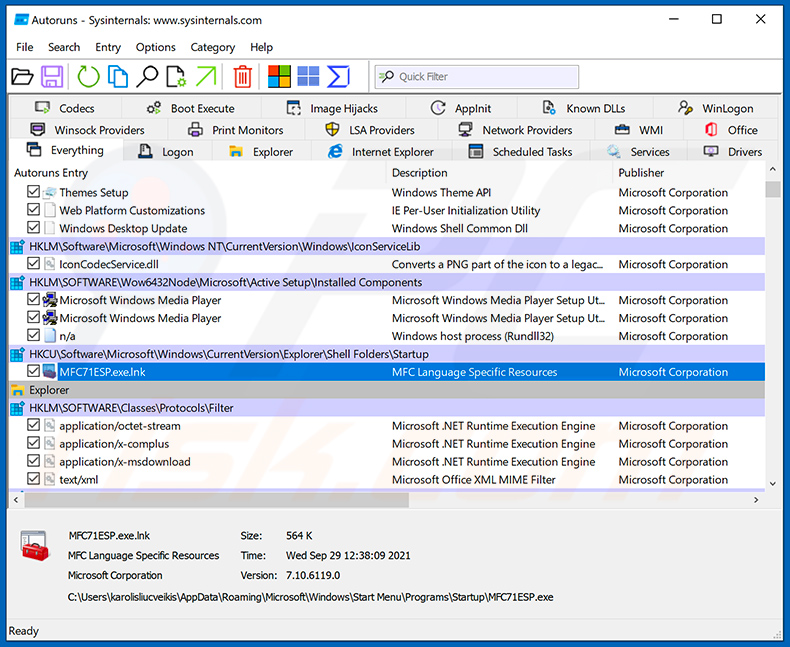
 Download a program called Autoruns. This program shows auto-start applications, Registry, and file system locations:
 Restart your computer into Safe Mode:
Windows XP and Windows 7 users: Start your computer in Safe Mode. Click Start, click Shut Down, click Restart, click OK. During your computer start process, press the F8 key on your keyboard multiple times until you see the Windows Advanced Option menu, and then select Safe Mode with Networking from the list.
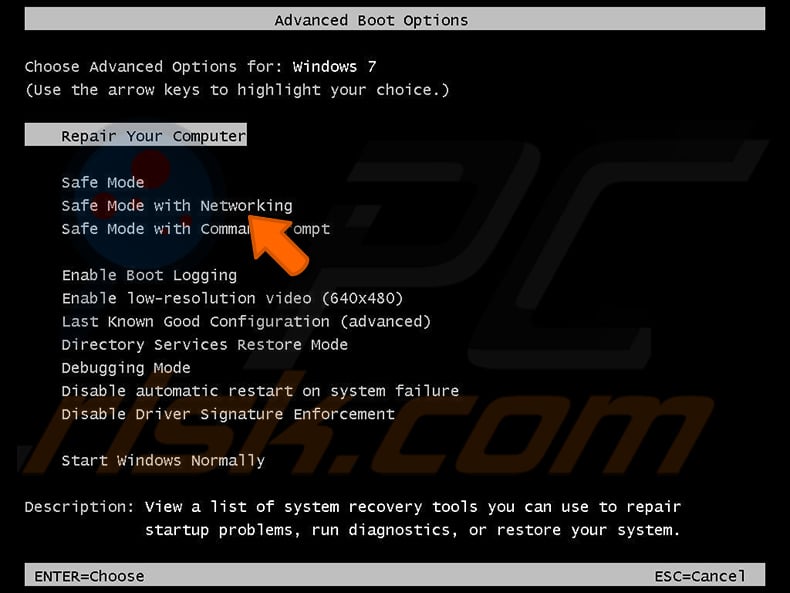
Video showing how to start Windows 7 in "Safe Mode with Networking":
Windows 8 users: Start Windows 8 is Safe Mode with Networking - Go to Windows 8 Start Screen, type Advanced, in the search results select Settings. Click Advanced startup options, in the opened "General PC Settings" window, select Advanced startup.
Click the "Restart now" button. Your computer will now restart into the "Advanced Startup options menu". Click the "Troubleshoot" button, and then click the "Advanced options" button. In the advanced option screen, click "Startup settings".
Click the "Restart" button. Your PC will restart into the Startup Settings screen. Press F5 to boot in Safe Mode with Networking.
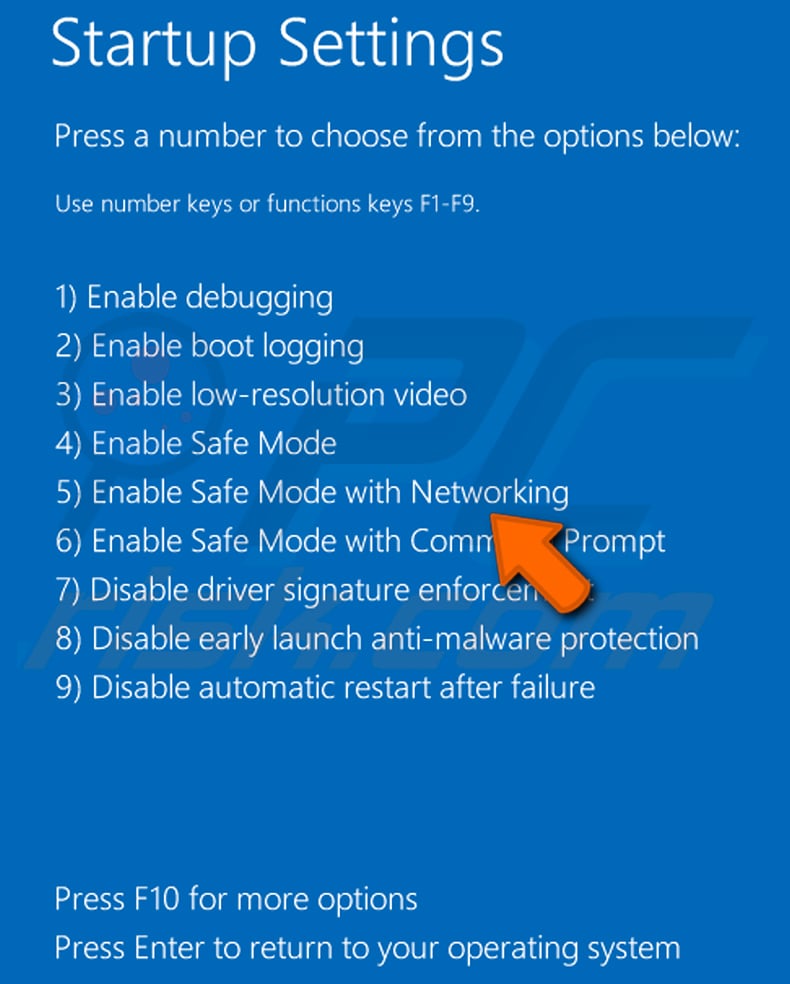
Video showing how to start Windows 8 in "Safe Mode with Networking":
Windows 10 users: Click the Windows logo and select the Power icon. In the opened menu click "Restart" while holding "Shift" button on your keyboard. In the "choose an option" window click on the "Troubleshoot", next select "Advanced options".
In the advanced options menu select "Startup Settings" and click on the "Restart" button. In the following window you should click the "F5" button on your keyboard. This will restart your operating system in safe mode with networking.
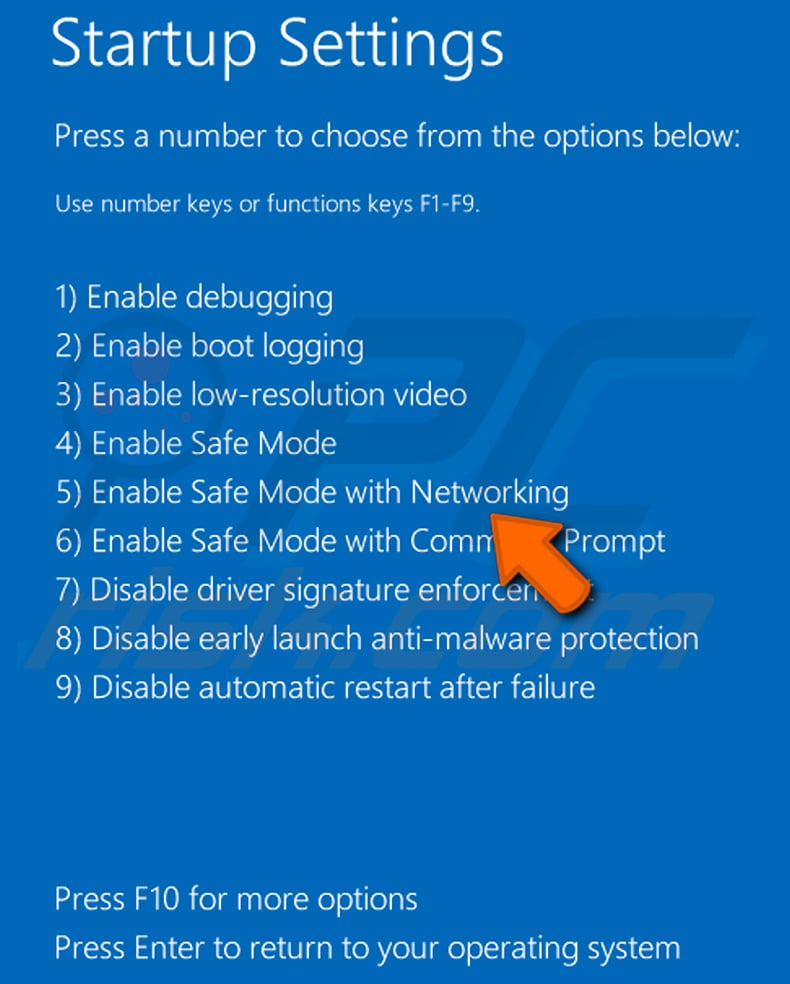
Video showing how to start Windows 10 in "Safe Mode with Networking":
 Extract the downloaded archive and run the Autoruns.exe file.
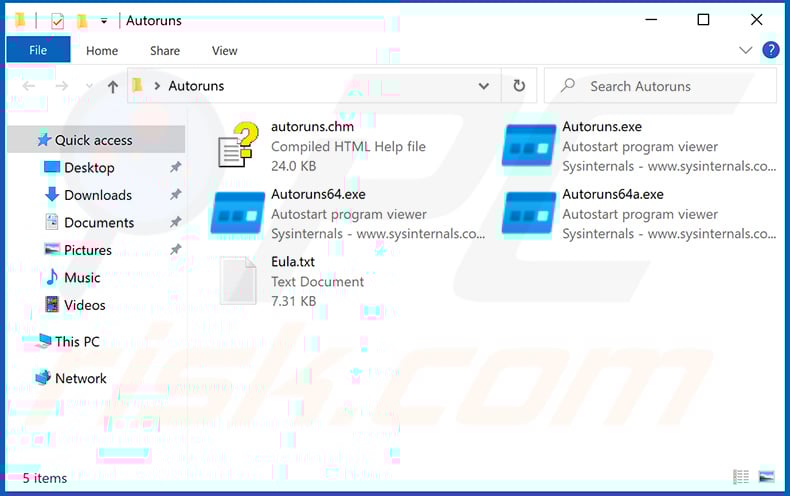
 In the Autoruns application, click "Options" at the top and uncheck "Hide Empty Locations" and "Hide Windows Entries" options. After this procedure, click the "Refresh" icon.
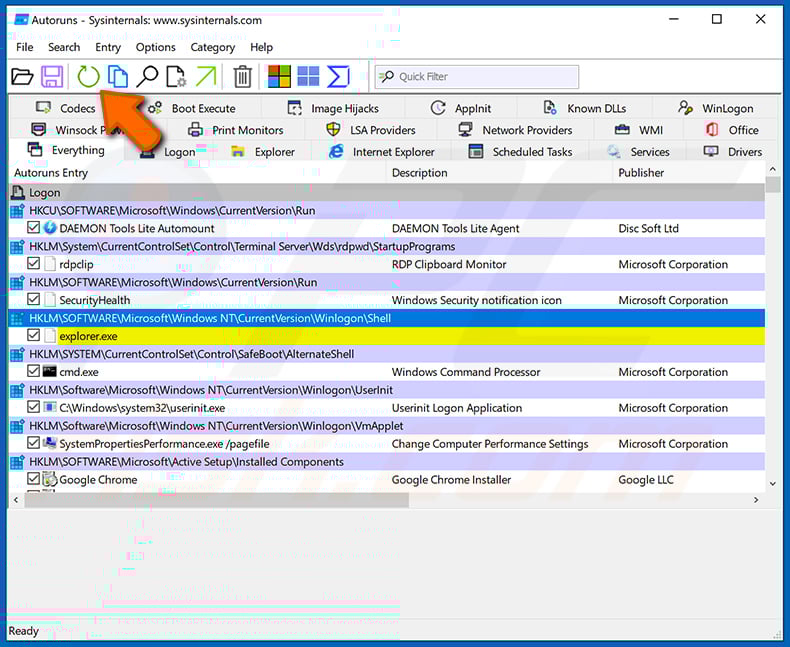
 Check the list provided by the Autoruns application and locate the malware file that you want to eliminate.
You should write down its full path and name. Note that some malware hides process names under legitimate Windows process names. At this stage, it is very important to avoid removing system files. After you locate the suspicious program you wish to remove, right click your mouse over its name and choose "Delete".
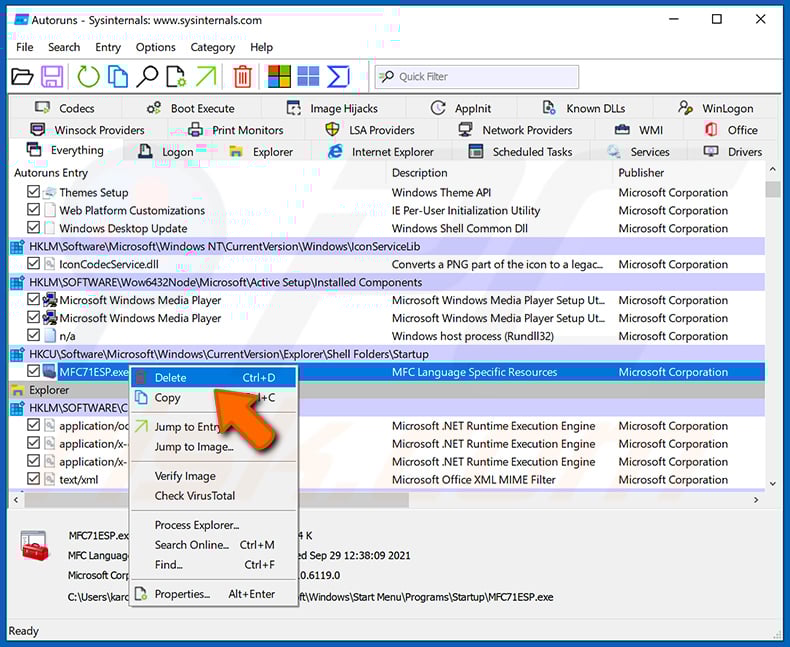
After removing the malware through the Autoruns application (this ensures that the malware will not run automatically on the next system startup), you should search for the malware name on your computer. Be sure to enable hidden files and folders before proceeding. If you find the filename of the malware, be sure to remove it.
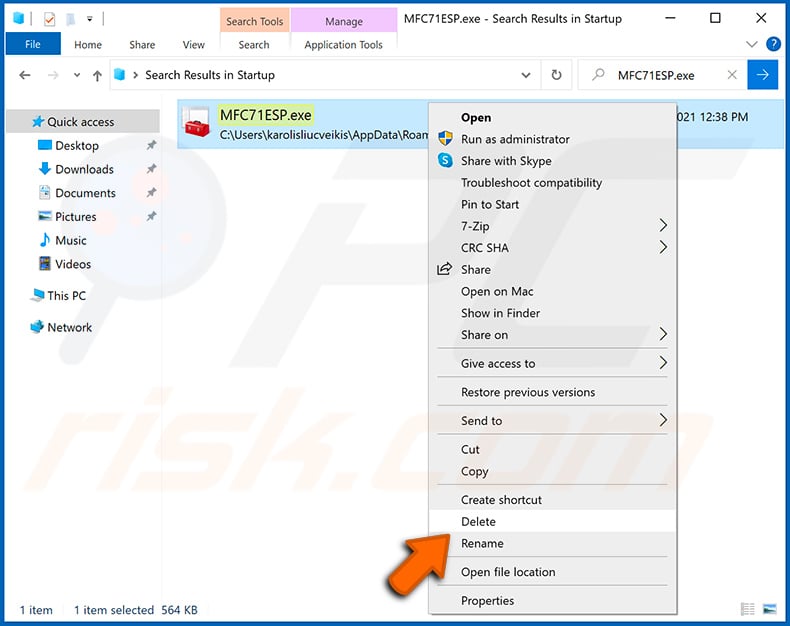
Reboot your computer in normal mode. Following these steps should remove any malware from your computer. Note that manual threat removal requires advanced computer skills. If you do not have these skills, leave malware removal to antivirus and anti-malware programs.
These steps might not work with advanced malware infections. As always it is best to prevent infection than try to remove malware later. To keep your computer safe, install the latest operating system updates and use antivirus software. To be sure your computer is free of malware infections, we recommend scanning it with Combo Cleaner Antivirus for Windows.
Frequently Asked Questions (FAQ)
My computer is infected with ModeloRAT malware, should I format my storage device to get rid of it?
Most likely, no. Malware removal rarely necessitates formatting.
What are the biggest issues that ModeloRAT malware can cause?
The dangers posed by an infection depend on the malicious program's abilities and the cyber criminals' modus operandi. ModeloRAT enables remote access/control of machines and can cause chain infections. Therefore, its presence can result in multiple system infections, serious privacy issues, financial losses, and identity theft.
What is the purpose of ModeloRAT malware?
The predominant purpose of malware is to generate revenue for the attackers. However, attacks can also be motivated by cyber criminals seeking amusement or personal grudges, process disruption (e.g., websites, services, companies, etc.), hacktivism, and political/geopolitical reasons.
How did ModeloRAT malware infiltrate my computer?
ModeloRAT has been spread via a ClickFix campaign, and the browser extension used to facilitate it was promoted through malvertising. Malware is primarily distributed via trojans, drive-by downloads, dubious download sources (e.g., freeware and free file-hosting websites, P2P sharing networks, etc.), online scams, spam emails/messages, illegal software activation ("cracking") tools, and fake updates. Some malicious programs can self-proliferate through local networks and removable storage devices.
Will Combo Cleaner protect me from malware?
Combo Cleaner is designed to scan systems and remove all manner of threats. It is capable of detecting and eliminating practically all known malware infections. Remember that running a full system scan is paramount since sophisticated malicious software usually hides deep within systems.
Share:
 Facebook
 X.com
X.com
 LinkedIn
 Copy Link

Tomas Meskauskas
Expert security researcher, professional malware analyst
I am passionate about computer security and technology. I have an experience of over 10 years working in various companies related to computer technical issue solving and Internet security. I have been working as an author and editor for pcrisk.com since 2010. Follow me on Twitter and LinkedIn to stay informed about the latest online security threats.
PCrisk security portal is brought by a company RCS LT.
Joined forces of security researchers help educate computer users about the latest online security threats. More information about the company RCS LT.
Our malware removal guides are free. However, if you want to support us you can send us a donation.
DonatePCrisk security portal is brought by a company RCS LT.
Joined forces of security researchers help educate computer users about the latest online security threats. More information about the company RCS LT.
Our malware removal guides are free. However, if you want to support us you can send us a donation.
Donate
▼ Show Discussion