

Get free scan and check if your device is infected.
Remove it nowTo use full-featured product, you have to purchase a license for Combo Cleaner. Seven days free trial available. Combo Cleaner is owned and operated by RCS LT, the parent company of PCRisk.com.
What kind of malware is Banana RAT?
Banana RAT is a banking Remote Access Trojan (RAT) that targets people who bank in Brazil. According to research by Trend Micro, the malware lets attackers watch the victim's screen in real time, take over the keyboard and mouse, log keystrokes, and overlay fake bank or Windows Update screens while they drive transactions in the background.
Trend Micro tracks the group behind it as SHADOW-WATER-063 and links the operation to Brazil's broader Tetrade banking trojan ecosystem, which already includes families like Grandoreiro, Mekotio, Casbaneiro, Guildma, and CHAVECLOAK.
Victims are typically lured into running a malicious batch file named Consultar_NF-e.bat, disguised as a Brazilian electronic invoice (NF-e) and delivered through WhatsApp messages or phishing links.
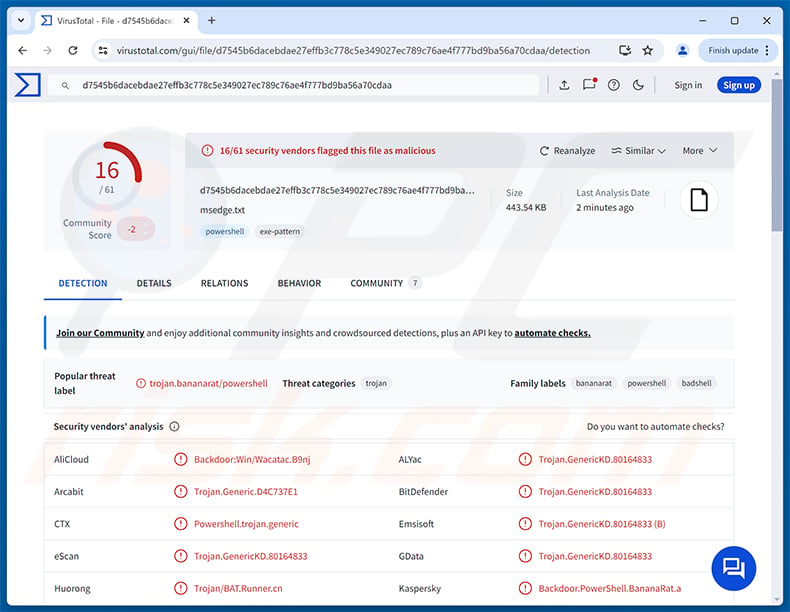
Banana RAT overview
Banana RAT runs as a Malware-as-a-Service style platform. Rather than sending the same file to every target, the attacker's server keeps a pool of 100 to 200 ready-made polymorphic copies. Each copy is scrambled differently, which makes file-hash detection close to useless at scale.
Trend Micro reports that every payload goes through nine separate obfuscation layers and is wrapped in AES-256 encryption. When the user runs the batch file, a small PowerShell stager pulls the encrypted payload, decrypts it directly in memory, and runs it without dropping the readable code to disk. This fileless approach helps the malware slip past traditional antivirus scanners.
The command-and-control channel runs over TCP port 443 to a typosquatted domain that imitates a Microsoft CDN address. Communication is encrypted with AES-256-CBC and authenticated with an HMAC token tied to the machine's GUID and MAC address, so only the operator can talk to the infected client.
Banana RAT's capabilities
Once active, Banana RAT gives the operator hands-on control of the infected PC. They can stream the desktop in real time across every monitor, click and type as if they were sitting at the keyboard, and even temporarily freeze the victim's own mouse and keyboard so they cannot interfere while a fraudulent transfer is going through.
The trojan records every keystroke through a built-in keylogger and stores them in a ring buffer that the attacker can pull on demand. It also watches the clipboard and can silently swap copied text, including replacing a copied cryptocurrency wallet address with one belonging to the attacker.
What makes Banana RAT stand out is its banking layer. It watches the title of the active browser window and looks for a hardcoded list of 16 Brazilian financial institutions, including Itau, Bradesco, Santander, Caixa, and Banco do Brasil, alongside Brazilian crypto exchange pages. When a match is found, the attacker can drop a full-screen overlay impersonating a real bank or a fake Windows Update screen while they operate the live banking session in the background.
Pix interception and the Brazilian focus
Because Pix is Brazil's instant payment system, Banana RAT ships with a subsystem just for it. The trojan loads the ZXing barcode library at runtime and scans the screen for Pix QR codes. When one appears, the attacker can swap the legitimate QR code with their own, redirecting the payment to an account they control.
This QR-swap trick has already been documented in other Brazilian banking trojans like Mekotio and CHAVECLOAK, and it is one of the reasons Trend Micro classifies Banana RAT alongside the Tetrade family. Every targeted bank, every overlay, and the Pix subsystem itself confirms the malware is purpose-built for Brazil and has no use against victims elsewhere.
Persistence and defense evasion
To stick around, Banana RAT registers a hidden Windows Task Scheduler entry that relaunches the PowerShell payload every minute for 9,999 days. The scheduled task runs with the window hidden and the execution policy bypassed, so it never shows a console on screen and never asks for permission.
The malware also copies itself into a folder path that looks like a legitimate Microsoft diagnostic location, blending in with trusted system files. Combined with the in-memory execution, polymorphic builds, and AES-encrypted C&C channel, this makes Banana RAT hard to spot during a casual look at the file system or with hash-based scanners.
| Name | Banana remote access trojan |
| Threat Type | Banking Trojan, Remote Access Trojan (RAT), Password-stealing virus |
| Detection Names | Combo Cleaner (Trojan.GenericKD.80164833), Emsisoft (Trojan.GenericKD.80164833 (B)), Kaspersky (Backdoor.PowerShell.BananaRat.a), Microsoft (Trojan:Script/Wacatac.B!ml), TrendMicro (Backdoor.PS1.BANANARAT.A), Full List (VirusTotal) |
| Symptoms | Banking trojans are designed to stealthily infiltrate the victim's computer and remain silent, and thus no particular symptoms are clearly visible on an infected machine. |
| Distribution methods | WhatsApp messages, phishing links, fake invoice attachments, malicious batch files, social engineering. |
| Damage | Stolen banking credentials, unauthorized bank transfers, hijacked Pix payments, monetary loss, identity theft, account hijacking. |
| Malware Removal (Windows) |
To eliminate possible malware infections, scan your computer with legitimate antivirus software. Our security researchers recommend using Combo Cleaner. Download Combo CleanerTo use full-featured product, you have to purchase a license for Combo Cleaner. 7 days free trial available. Combo Cleaner is owned and operated by RCS LT, the parent company of PCRisk.com. |
Conclusion
Banana RAT is a banking trojan built to drain money from Brazilian accounts in real time. With live remote control, keystroke capture, bank-branded overlays, and Pix QR swapping, it gives operators the tools they need to take over an active banking session and walk the victim through a fraudulent transfer.
Anyone who notices unexpected scheduled tasks, hidden PowerShell processes, or unusual bank account activity should remove the malware immediately and assume their saved banking credentials, clipboard contents, and crypto wallet details are compromised.
More examples of RATs are QUIC, NexusRAT, and CloudZ.
How did Banana RAT infiltrate my computer?
According to Trend Micro, Banana RAT has been delivered to Brazilian users through WhatsApp messages and phishing links pointing to a malicious batch file named Consultar_NF-e.bat. The file was hosted on a campaign-specific domain and disguised as a Brazilian electronic invoice (NF-e, or Nota Fiscal Eletronica), a format anyone running a business in the country is used to seeing.
Once opened, the batch file silently runs a PowerShell command that downloads the encrypted second-stage payload from the attacker's server. Because each delivered build is unique, the file hash is different for every victim, making detection considerably harder.
More broadly, threats of this kind reach victims through phishing emails, fake invoice attachments, chat-app messages, drive-by downloads from compromised websites, malvertising, pirated software, fake updates, and cracked applications. Common carrier file types include batch files, JavaScript, LNK shortcuts, archives (ZIP, RAR), Office documents, and EXE or MSI installers.
How to avoid installation of malware?
Be cautious with unexpected emails, chat messages, and links, especially those that ask you to open an invoice, receipt, or "official" document you were not expecting. Download software only from the developer's official site or a trusted app store. Cracks, key generators, and pirated programs are common malware carriers and should be avoided entirely.
Keep Windows and all installed applications up to date, ignore pop-ups urging you to install drivers, codecs, or browser updates from random sites, and run regular scans with reputable security software. If you believe that your computer is already infected, we recommend running a scan with Combo Cleaner Antivirus for Windows to automatically eliminate infiltrated malware.
Update July 9, 2026 - Researchers at ANY.RUN have published an analysis tracking the evolution of Banana RAT between May and June 2026. The newer variant installs itself in randomized folder locations rather than fixed paths, making it harder for security tools to locate and remove.
The updated version also changed how it connects to attacker-controlled servers - it now uses WebSocket connections routed through Cloudflare instead of standard HTTPS, and generates unique server addresses based on each infected machine's identifier. Analysis of an exposed attacker server additionally revealed automated tools that produce a customized, unique copy of the malware for each target. (source: any.run).
Instant automatic malware removal:
Manual threat removal might be a lengthy and complicated process that requires advanced IT skills. Combo Cleaner is a professional automatic malware removal tool that is recommended to get rid of malware. Download it by clicking the button below:
DOWNLOAD Combo CleanerBy downloading any software listed on this website you agree to our Privacy Policy and Terms of Use. To use full-featured product, you have to purchase a license for Combo Cleaner. 7 days free trial available. Combo Cleaner is owned and operated by RCS LT, the parent company of PCRisk.com.
Quick menu:
- What is Banana RAT?
- STEP 1. Manual removal of Banana RAT malware.
- STEP 2. Check if your computer is clean.
How to remove malware manually?
Manual malware removal is a complicated task - usually it is best to allow antivirus or anti-malware programs to do this automatically. To remove this malware we recommend using Combo Cleaner Antivirus for Windows.
If you wish to remove malware manually, the first step is to identify the name of the malware that you are trying to remove. Here is an example of a suspicious program running on a user's computer:
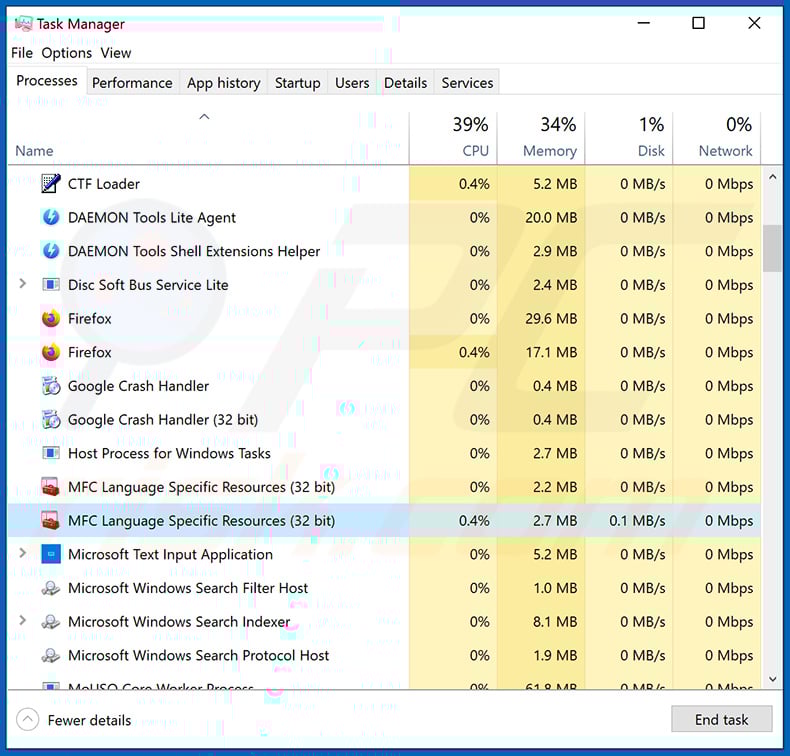
If you checked the list of programs running on your computer, for example, using task manager, and identified a program that looks suspicious, you should continue with these steps:
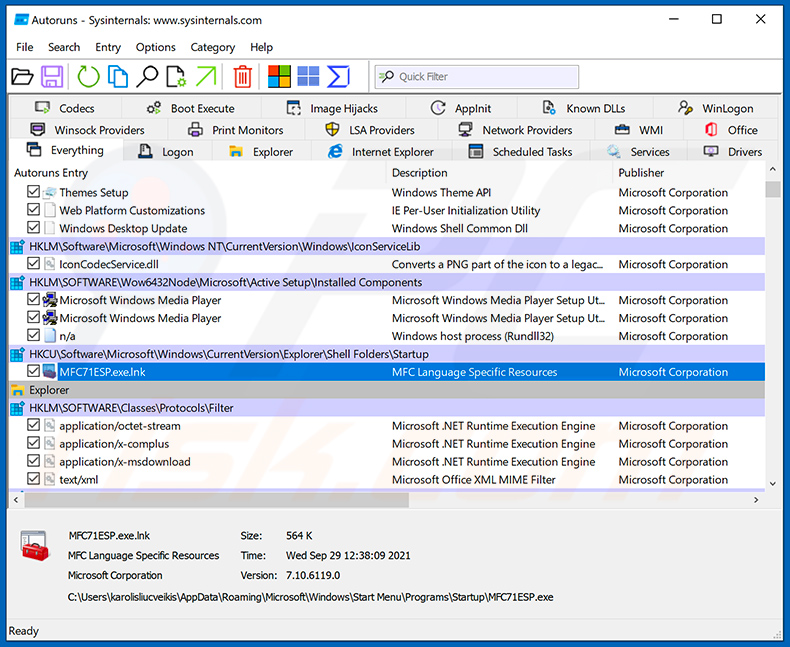
 Download a program called Autoruns. This program shows auto-start applications, Registry, and file system locations:
 Restart your computer into Safe Mode:
Windows XP and Windows 7 users: Start your computer in Safe Mode. Click Start, click Shut Down, click Restart, click OK. During your computer start process, press the F8 key on your keyboard multiple times until you see the Windows Advanced Option menu, and then select Safe Mode with Networking from the list.
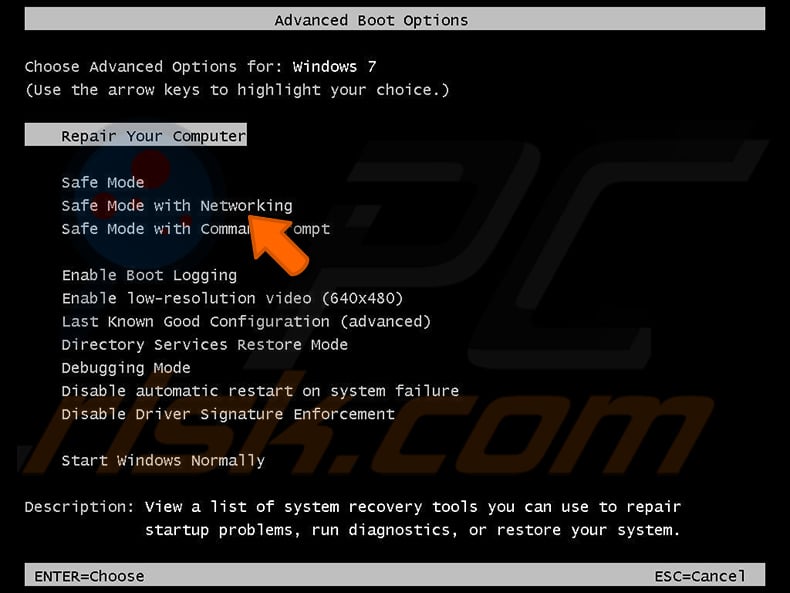
Video showing how to start Windows 7 in "Safe Mode with Networking":
Windows 8 users: Start Windows 8 is Safe Mode with Networking - Go to Windows 8 Start Screen, type Advanced, in the search results select Settings. Click Advanced startup options, in the opened "General PC Settings" window, select Advanced startup.
Click the "Restart now" button. Your computer will now restart into the "Advanced Startup options menu". Click the "Troubleshoot" button, and then click the "Advanced options" button. In the advanced option screen, click "Startup settings".
Click the "Restart" button. Your PC will restart into the Startup Settings screen. Press F5 to boot in Safe Mode with Networking.
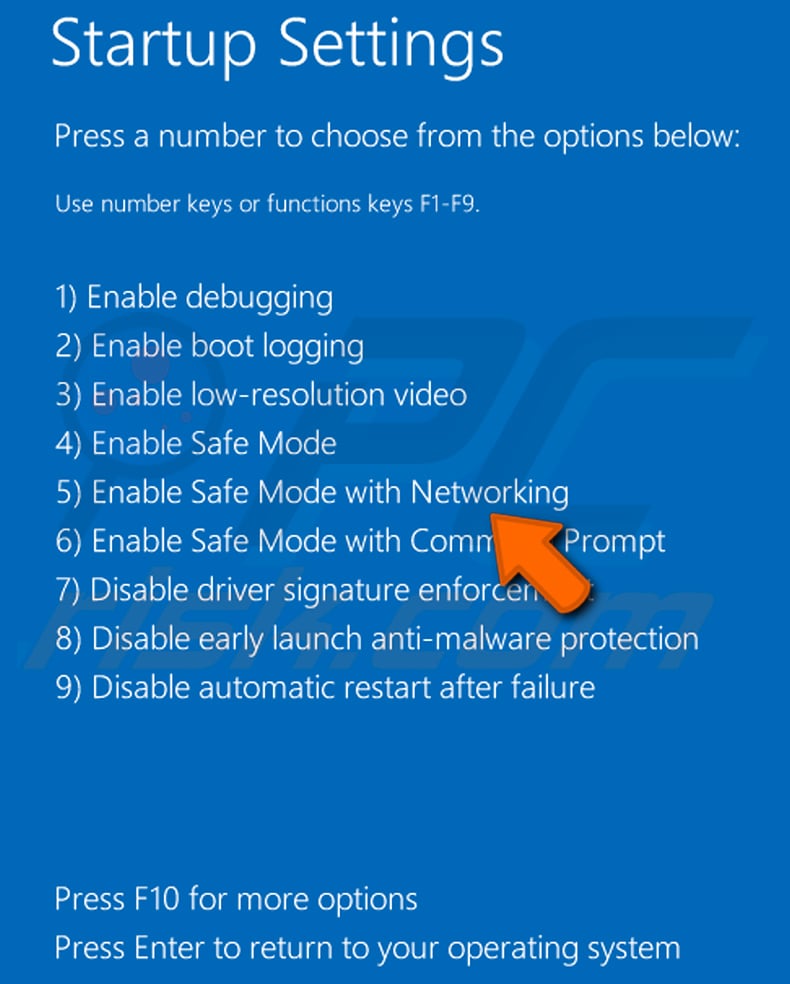
Video showing how to start Windows 8 in "Safe Mode with Networking":
Windows 10 users: Click the Windows logo and select the Power icon. In the opened menu click "Restart" while holding "Shift" button on your keyboard. In the "choose an option" window click on the "Troubleshoot", next select "Advanced options".
In the advanced options menu select "Startup Settings" and click on the "Restart" button. In the following window you should click the "F5" button on your keyboard. This will restart your operating system in safe mode with networking.
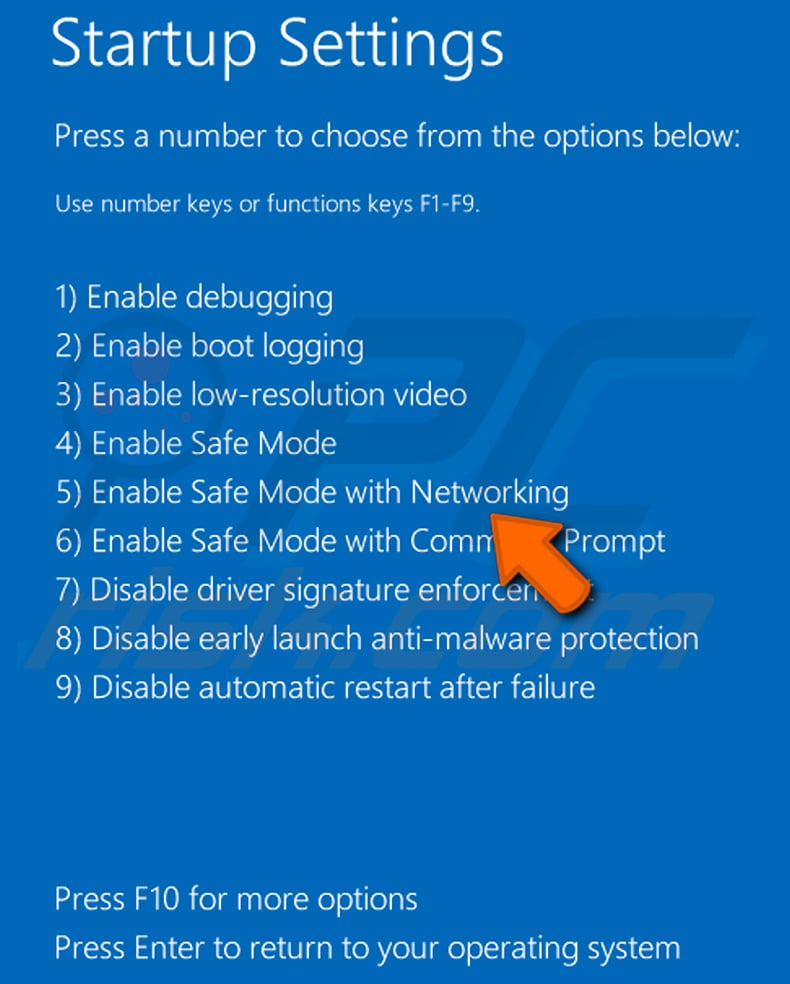
Video showing how to start Windows 10 in "Safe Mode with Networking":
 Extract the downloaded archive and run the Autoruns.exe file.
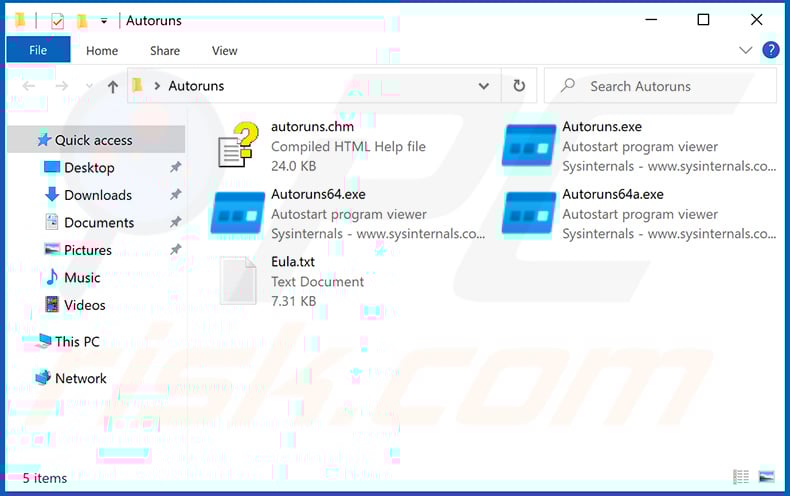
 In the Autoruns application, click "Options" at the top and uncheck "Hide Empty Locations" and "Hide Windows Entries" options. After this procedure, click the "Refresh" icon.
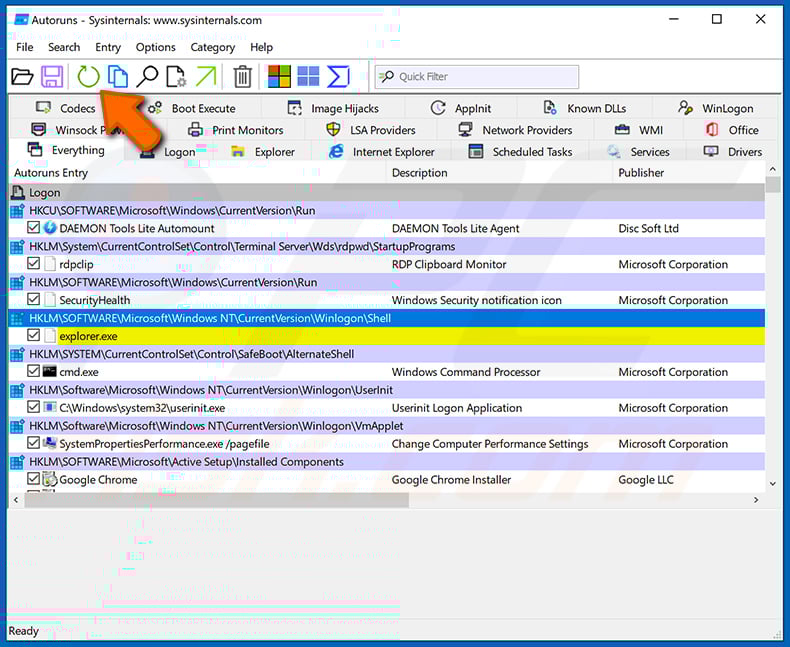
 Check the list provided by the Autoruns application and locate the malware file that you want to eliminate.
You should write down its full path and name. Note that some malware hides process names under legitimate Windows process names. At this stage, it is very important to avoid removing system files. After you locate the suspicious program you wish to remove, right click your mouse over its name and choose "Delete".
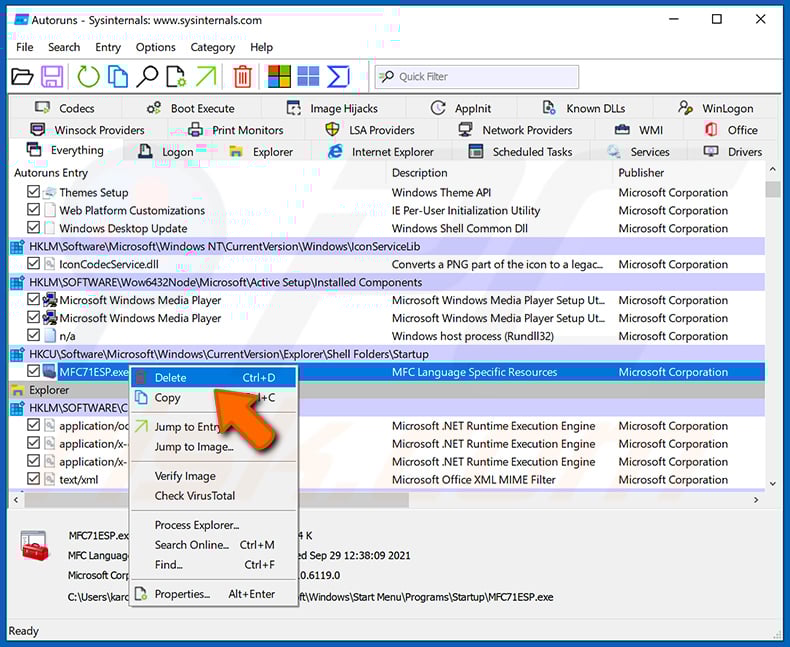
After removing the malware through the Autoruns application (this ensures that the malware will not run automatically on the next system startup), you should search for the malware name on your computer. Be sure to enable hidden files and folders before proceeding. If you find the filename of the malware, be sure to remove it.
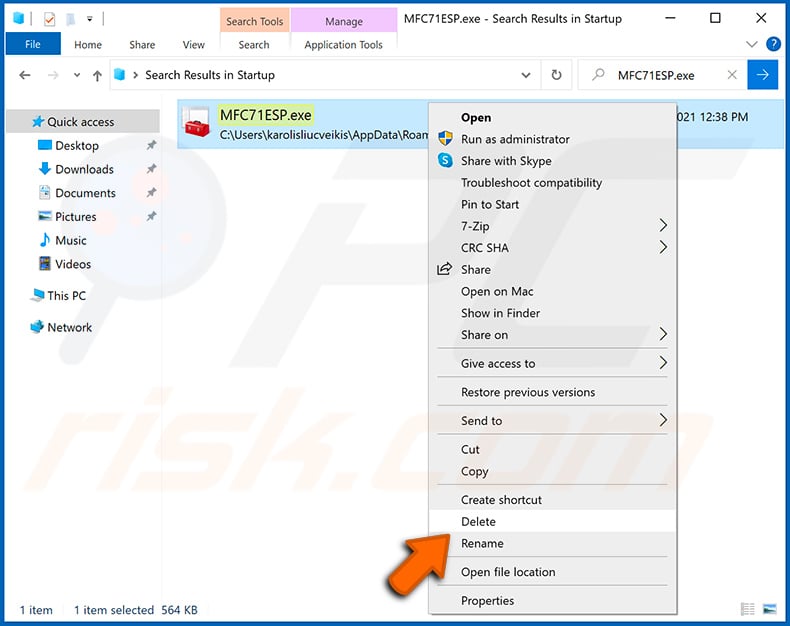
Reboot your computer in normal mode. Following these steps should remove any malware from your computer. Note that manual threat removal requires advanced computer skills. If you do not have these skills, leave malware removal to antivirus and anti-malware programs.
These steps might not work with advanced malware infections. As always it is best to prevent infection than try to remove malware later. To keep your computer safe, install the latest operating system updates and use antivirus software. To be sure your computer is free of malware infections, we recommend scanning it with Combo Cleaner Antivirus for Windows.
Frequently Asked Questions (FAQ)
My computer is infected with Banana RAT malware, should I format my storage device to get rid of it?
Formatting your storage device will remove Banana RAT, but it will also wipe every other file on the drive. A reputable security tool like Combo Cleaner should usually be tried first.
What are the biggest issues that Banana RAT malware can cause?
Banana RAT lets attackers control the infected machine in real time. The biggest risks are unauthorized bank transfers, theft of saved banking and crypto credentials, hijacked Pix payments, account takeover, and broader identity theft.
What is the purpose of Banana RAT malware?
The purpose of Banana RAT is to enable real-time online banking fraud against Brazilian financial institutions. Attackers use it to take over the victim's PC, drop fake bank or Windows Update overlays, and complete transfers from inside the legitimate banking session.
How did Banana RAT malware infiltrate my computer?
According to Trend Micro, Banana RAT has been spread to Brazilian users through WhatsApp messages and phishing links that deliver a batch file disguised as an NF-e electronic invoice. More broadly, threats of this kind also reach victims through phishing emails, fake download sites, pirated software, malvertising, and other social-engineering lures.
Will Combo Cleaner protect me from malware?
Yes. Combo Cleaner can detect and remove most known malware. Because trojans like Banana RAT use heavy obfuscation and hide deep in the system, running a full system scan is important to make sure nothing is missed.
Share:
 Facebook
 X.com
X.com
 LinkedIn
 Copy Link

Tomas Meskauskas
Expert security researcher, professional malware analyst
I am passionate about computer security and technology. I have an experience of over 10 years working in various companies related to computer technical issue solving and Internet security. I have been working as an author and editor for pcrisk.com since 2010. Follow me on Twitter and LinkedIn to stay informed about the latest online security threats.
PCrisk security portal is brought by a company RCS LT.
Joined forces of security researchers help educate computer users about the latest online security threats. More information about the company RCS LT.
Our malware removal guides are free. However, if you want to support us you can send us a donation.
DonatePCrisk security portal is brought by a company RCS LT.
Joined forces of security researchers help educate computer users about the latest online security threats. More information about the company RCS LT.
Our malware removal guides are free. However, if you want to support us you can send us a donation.
Donate
▼ Show Discussion