
How to remove Mistic Backdoor from the operating system
TrojanAlso Known As: Mistic backdoor malware

Get free scan and check if your device is infected.
Remove it nowTo use full-featured product, you have to purchase a license for Combo Cleaner. Seven days free trial available. Combo Cleaner is owned and operated by RCS LT, the parent company of PCRisk.com.
What kind of malware is Mistic Backdoor?
Mistic Backdoor is a stealthy backdoor deployed since April 2026 by a threat actor tracked as Woodgnat (also known as KongTuke). According to research by Security.com, it gives attackers persistent, hidden access to infected systems and executes code entirely in memory, leaving few traces on disk.
The malware is also tracked as MLTBackdoor by Zscaler. It operates through DLL sideloading - a technique where malicious components are run by hijacking a legitimate program. Woodgnat is a financially motivated initial-access broker linked to ransomware operations including Qilin, Interlock, Rhysida, Akira, 8Base, and Black Basta.
Distribution relies on evolving social-engineering methods. Early campaigns used ClickFix lures - fake error or CAPTCHA pages tricking users into pasting malicious scripts. Techniques have since evolved to FileFix and CrashFix approaches.
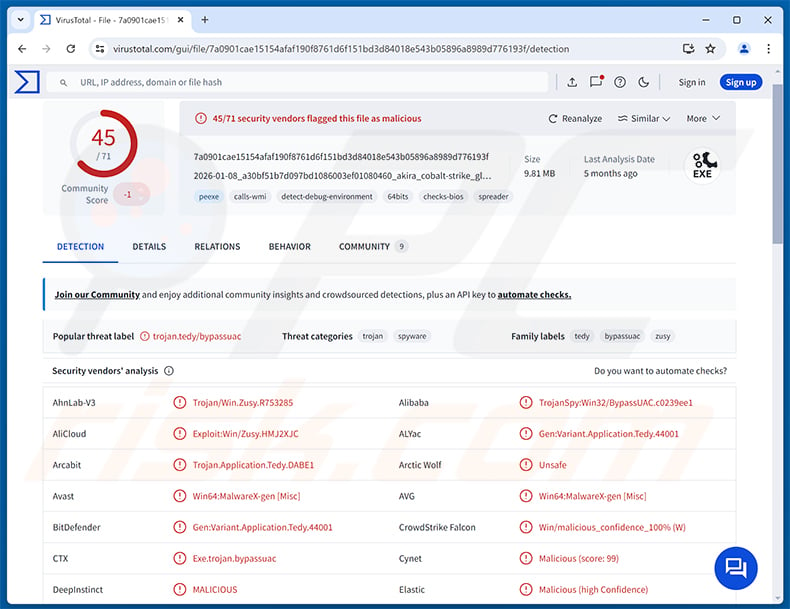
Mistic Backdoor overview
Once installed, Mistic Backdoor opens a covert command-and-control (C2) channel with the attacker's server. A key feature is that it executes code received from the C2 directly in memory, without writing any payload to disk. This makes file-based detection significantly harder.
The backdoor deploys via a legitimate executable called MpExtMs.exe, which sideloads two malicious DLL files. One hooks core Windows API functions to intercept how the program loads libraries. The other masquerades as a Microsoft endpoint-security component.
Mistic Backdoor's capabilities
Security.com's analysis shows Mistic Backdoor supports a range of remote commands. Operators can upload or download files, move, rename, or delete them, and create folders on the infected machine. The malware can also adjust how often it checks in with the C2 server.
Mistic Backdoor also includes a kill switch - an operator command that instructs the malware to delete itself from the infected system. This gives attackers a way to erase their presence once an operation is complete.
ModeloRAT - companion threat
Security.com's research also documents ModeloRAT, a Remote Access Trojan (RAT) written in Python and distributed as a portable WinPython package by the same Woodgnat operator.
ModeloRAT uses RC4-encrypted C2 communications with multiple failover servers and a domain-generation algorithm for reaching victims on non-enterprise networks. It can capture screenshots, steal credentials, and run extensive system reconnaissance using built-in Windows tools.
Data exfiltration across the broader campaign travels over HTTP using the Windows utility curl.exe. ModeloRAT is delivered through multi-stage PowerShell chains, compromised WordPress sites, and fake helpdesk conversations via Microsoft Teams.
Persistence and defense evasion
The Woodgnat campaign establishes persistence through several methods: Windows Registry Run keys disguised as legitimate remote-access software (AnyDesk, Splashtop, Comms), startup-folder shortcuts, VBScript launchers, and scheduled tasks.
Mistic Backdoor profiles the host for analysis tools and virtual-machine indicators before activating. In-memory execution prevents file-based detection. The campaign also abuses legitimate Windows utilities - curl, Reg.exe, Net.exe, Certutil, and WMIC - to blend into normal system activity.
| Name | Mistic backdoor malware |
| Threat Type | Backdoor, Trojan |
| Detection Names | Avast (Win64:MalwareX-gen [Drp]), Combo Cleaner (Gen:Variant.Loader.17), ESET-NOD32 (Win64/TrojanDownloader.Agent.DAB trojan), Kaspersky (UDS:Trojan.Win32.Loader.gen), Microsoft (Trojan:Win64/Havoc.MX!MTB), Full List (VirusTotal) |
| Symptoms | Backdoors are designed to stealthily infiltrate the victim's computer and remain silent, and thus no particular symptoms are clearly visible on an infected machine. |
| Distribution methods | Deceptive emails, compromised websites, social engineering, ClickFix. |
| Damage | Stolen passwords and banking information, identity theft, the victim's computer added to a botnet, additional infections, monetary loss. |
| Malware Removal (Windows) |
To eliminate possible malware infections, scan your computer with legitimate antivirus software. Our security researchers recommend using Combo Cleaner. Download Combo CleanerTo use full-featured product, you have to purchase a license for Combo Cleaner. 7 days free trial available. Combo Cleaner is owned and operated by RCS LT, the parent company of PCRisk.com. |
Conclusion
Mistic Backdoor gives attackers persistent, hidden access to infected systems. Its in-memory execution, self-deletion kill switch, and DLL-sideloading approach make it difficult to detect and remove.
The Woodgnat operator behind this backdoor is publicly linked to multiple ransomware groups, meaning Mistic Backdoor can serve as a foothold toward ransomware deployment, data theft, or broader network compromise. This threat should be removed from any infected system immediately.
More examples of backdoors are Beagle, NANOREMOTE, and Tropidoor.
How did Mistic Backdoor infiltrate my computer?
According to Security.com, Woodgnat uses evolving social-engineering techniques to deliver Mistic Backdoor. Early campaigns in 2025 used ClickFix lures - fake error messages or CAPTCHA pages prompting victims to paste malicious scripts into the Windows Run dialog or a PowerShell window.
Later techniques refined this approach. FileFix tricked users into entering commands in the Windows File Explorer address bar. CrashFix deliberately crashed the victim's browser, then presented a fake repair prompt. All three methods lead the target into running an attacker-supplied command.
Further delivery channels include compromised WordPress sites injected with malicious JavaScript and fake helpdesk pretexts sent through Microsoft Teams external chats. More broadly, threats like Mistic Backdoor also reach victims through phishing emails, malicious file attachments, and untrustworthy download channels.
How to avoid installation of malware?
Be cautious with unexpected emails, browser pop-ups, or messages asking you to paste commands, press key combinations, or run scripts. Download software only from official sources and avoid pirated content, key generators, and unofficial cracks. Keep the operating system and all applications up to date.
Avoid clicking suspicious advertisements or granting push-notification permissions to unfamiliar websites. Use a reputable security solution and run regular system scans. If you believe that your computer is already infected, we recommend running a scan with Combo Cleaner Antivirus for Windows to automatically eliminate infiltrated malware.
Instant automatic malware removal:
Manual threat removal might be a lengthy and complicated process that requires advanced IT skills. Combo Cleaner is a professional automatic malware removal tool that is recommended to get rid of malware. Download it by clicking the button below:
DOWNLOAD Combo CleanerBy downloading any software listed on this website you agree to our Privacy Policy and Terms of Use. To use full-featured product, you have to purchase a license for Combo Cleaner. 7 days free trial available. Combo Cleaner is owned and operated by RCS LT, the parent company of PCRisk.com.
Quick menu:
- What is Mistic Backdoor?
- STEP 1. Manual removal of Mistic Backdoor malware.
- STEP 2. Check if your computer is clean.
How to remove malware manually?
Manual malware removal is a complicated task - usually it is best to allow antivirus or anti-malware programs to do this automatically. To remove this malware we recommend using Combo Cleaner Antivirus for Windows.
If you wish to remove malware manually, the first step is to identify the name of the malware that you are trying to remove. Here is an example of a suspicious program running on a user's computer:
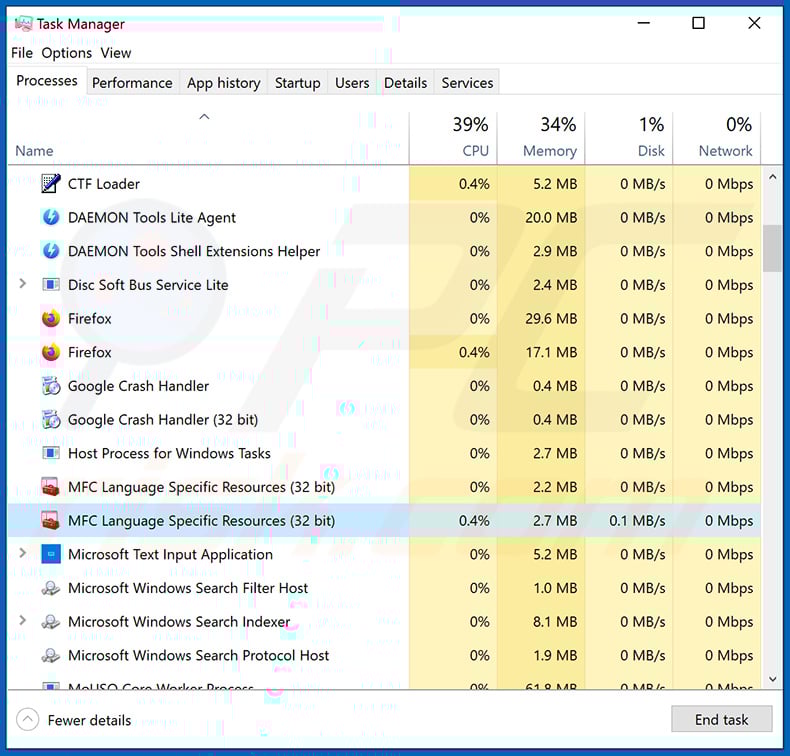
If you checked the list of programs running on your computer, for example, using task manager, and identified a program that looks suspicious, you should continue with these steps:
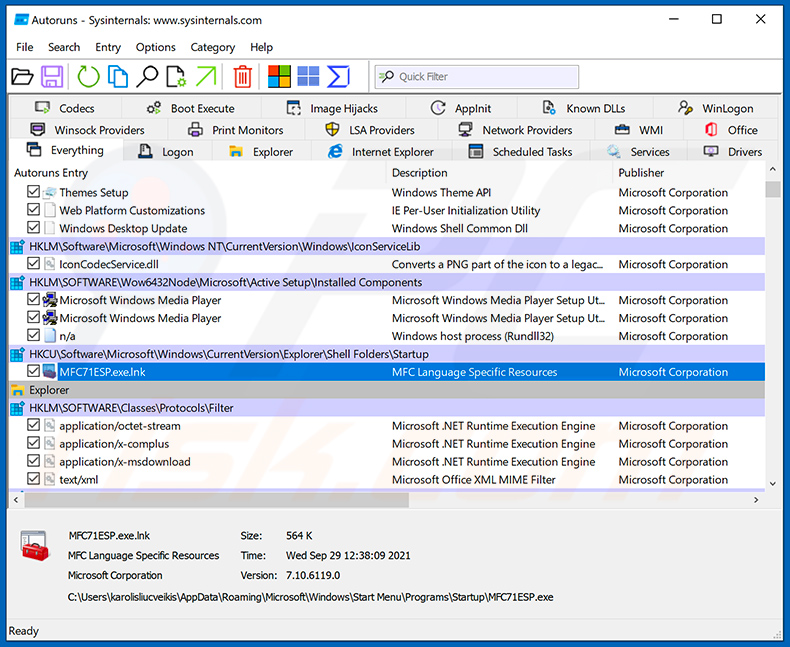
 Download a program called Autoruns. This program shows auto-start applications, Registry, and file system locations:
 Restart your computer into Safe Mode:
Windows XP and Windows 7 users: Start your computer in Safe Mode. Click Start, click Shut Down, click Restart, click OK. During your computer start process, press the F8 key on your keyboard multiple times until you see the Windows Advanced Option menu, and then select Safe Mode with Networking from the list.
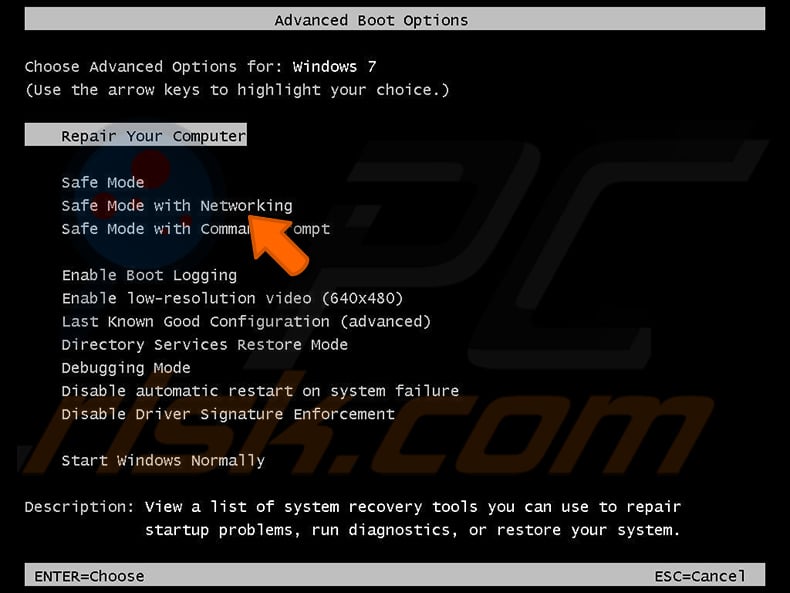
Video showing how to start Windows 7 in "Safe Mode with Networking":
Windows 8 users: Start Windows 8 is Safe Mode with Networking - Go to Windows 8 Start Screen, type Advanced, in the search results select Settings. Click Advanced startup options, in the opened "General PC Settings" window, select Advanced startup.
Click the "Restart now" button. Your computer will now restart into the "Advanced Startup options menu". Click the "Troubleshoot" button, and then click the "Advanced options" button. In the advanced option screen, click "Startup settings".
Click the "Restart" button. Your PC will restart into the Startup Settings screen. Press F5 to boot in Safe Mode with Networking.
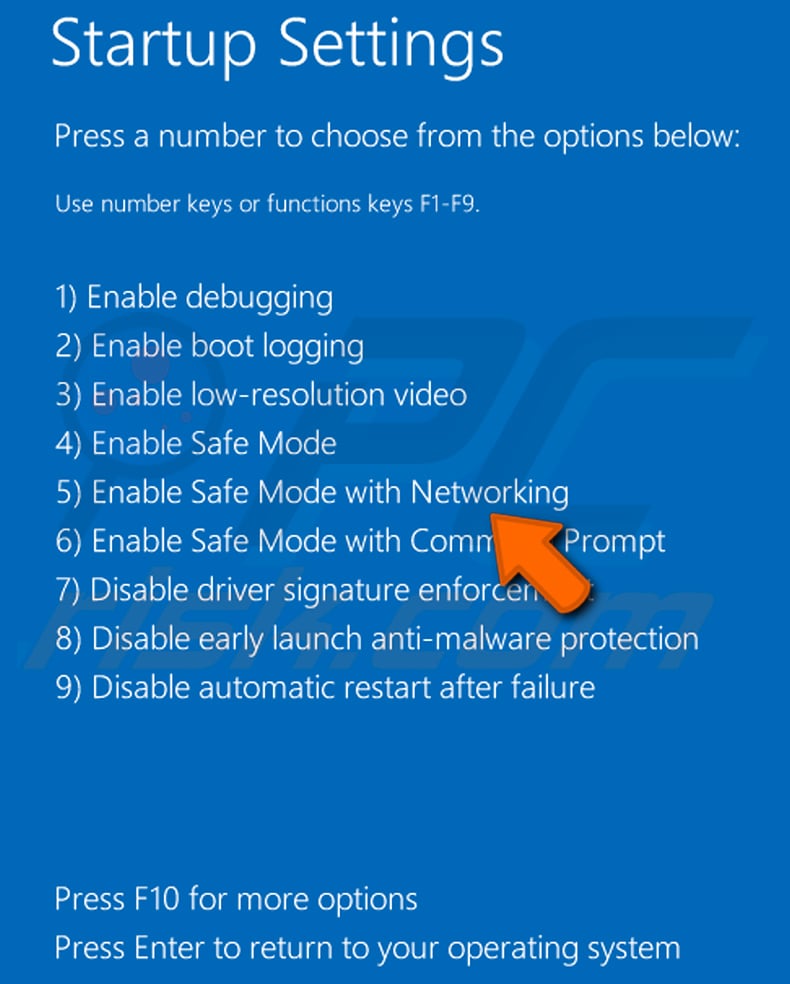
Video showing how to start Windows 8 in "Safe Mode with Networking":
Windows 10 users: Click the Windows logo and select the Power icon. In the opened menu click "Restart" while holding "Shift" button on your keyboard. In the "choose an option" window click on the "Troubleshoot", next select "Advanced options".
In the advanced options menu select "Startup Settings" and click on the "Restart" button. In the following window you should click the "F5" button on your keyboard. This will restart your operating system in safe mode with networking.
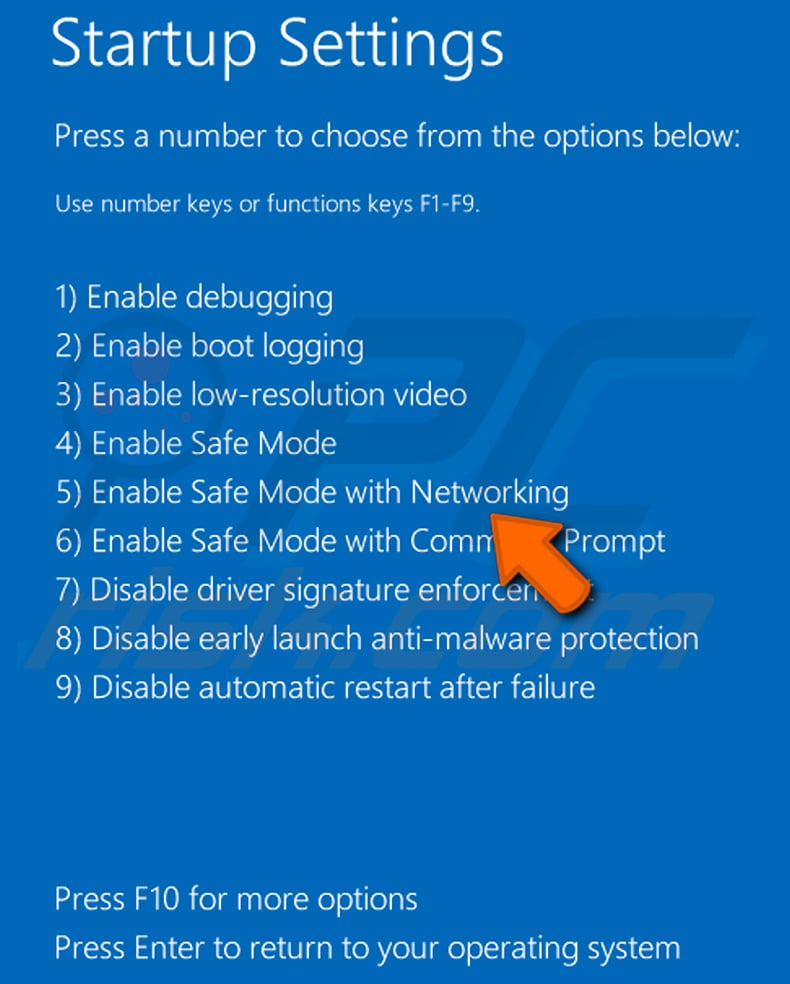
Video showing how to start Windows 10 in "Safe Mode with Networking":
 Extract the downloaded archive and run the Autoruns.exe file.
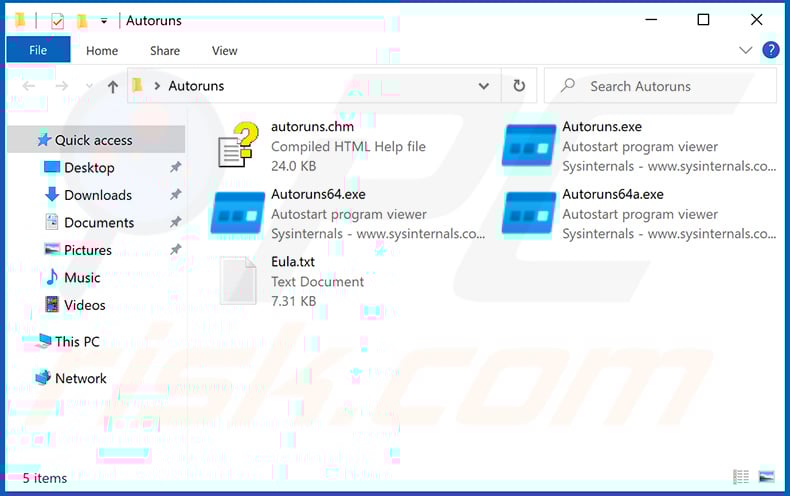
 In the Autoruns application, click "Options" at the top and uncheck "Hide Empty Locations" and "Hide Windows Entries" options. After this procedure, click the "Refresh" icon.
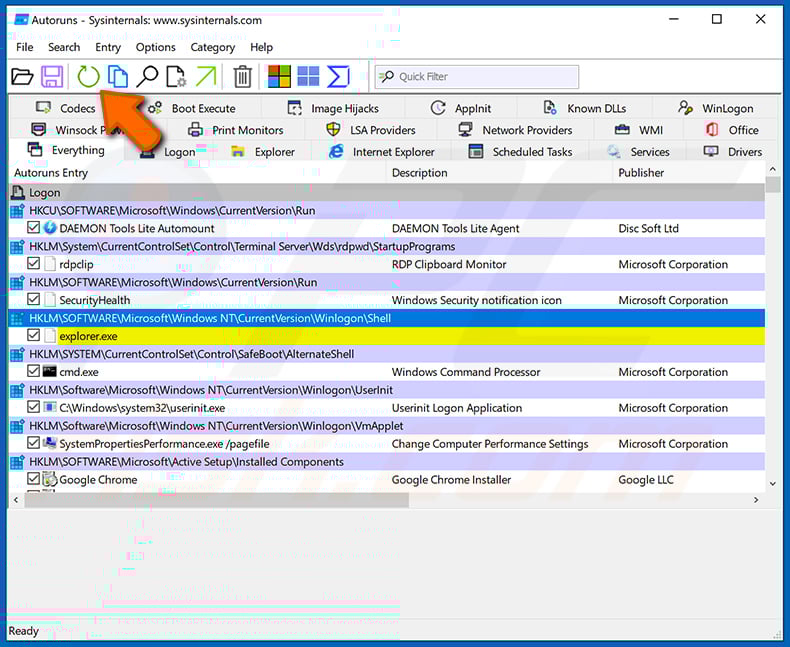
 Check the list provided by the Autoruns application and locate the malware file that you want to eliminate.
You should write down its full path and name. Note that some malware hides process names under legitimate Windows process names. At this stage, it is very important to avoid removing system files. After you locate the suspicious program you wish to remove, right click your mouse over its name and choose "Delete".
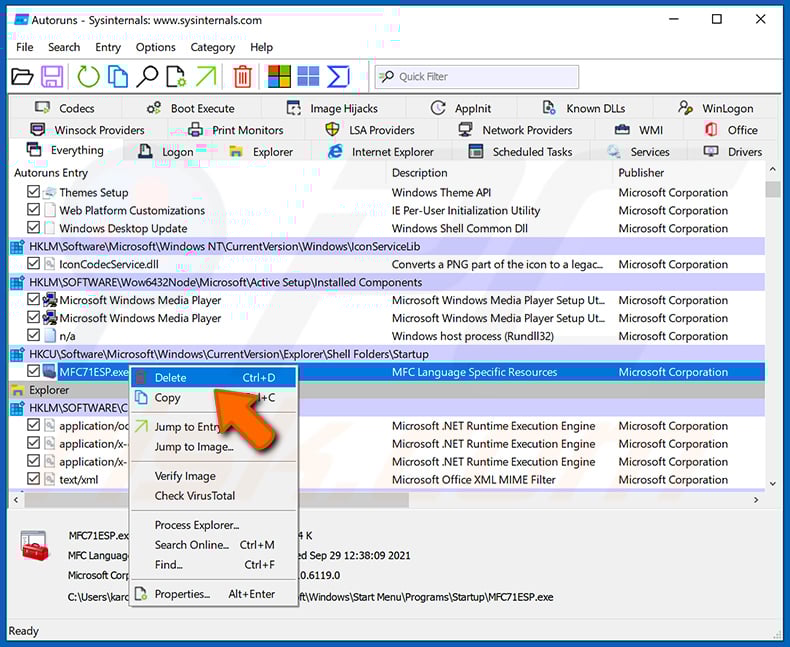
After removing the malware through the Autoruns application (this ensures that the malware will not run automatically on the next system startup), you should search for the malware name on your computer. Be sure to enable hidden files and folders before proceeding. If you find the filename of the malware, be sure to remove it.
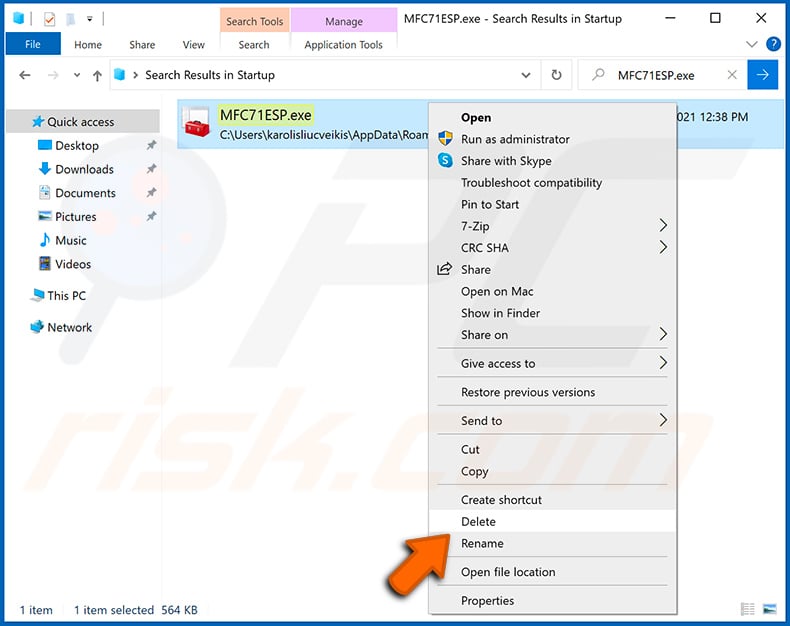
Reboot your computer in normal mode. Following these steps should remove any malware from your computer. Note that manual threat removal requires advanced computer skills. If you do not have these skills, leave malware removal to antivirus and anti-malware programs.
These steps might not work with advanced malware infections. As always it is best to prevent infection than try to remove malware later. To keep your computer safe, install the latest operating system updates and use antivirus software. To be sure your computer is free of malware infections, we recommend scanning it with Combo Cleaner Antivirus for Windows.
Frequently Asked Questions (FAQ)
My computer is infected with Mistic Backdoor malware, should I format my storage device to get rid of it?
Formatting will remove Mistic Backdoor but also wipes all data on the drive. A reputable security tool such as Combo Cleaner is a better first step - it can eliminate the threat without destroying your files.
What are the biggest issues that Mistic Backdoor malware can cause?
Mistic Backdoor provides attackers with persistent remote access and the ability to deploy additional malware, including ransomware. Downstream consequences include data theft, identity theft, and network-wide compromise.
What is the purpose of Mistic Backdoor malware?
Mistic Backdoor is designed to maintain covert access to infected systems, execute code in memory, manage files remotely, and serve as a foothold for further attacks - including ransomware deployment by the Woodgnat operator.
How did Mistic Backdoor malware infiltrate my computer?
Mistic Backdoor has been distributed through ClickFix, FileFix, and CrashFix social-engineering lures that trick victims into running PowerShell commands. Compromised WordPress sites and fake Microsoft Teams helpdesk messages are also part of the delivery chain.
Will Combo Cleaner protect me from malware?
Yes. Combo Cleaner can detect and remove most known malware. Because Mistic Backdoor uses in-memory execution to evade detection, running a full system scan is especially important to ensure the threat is fully removed.
Share:
 Facebook
 X.com
X.com
 LinkedIn
 Copy Link

Tomas Meskauskas
Expert security researcher, professional malware analyst
I am passionate about computer security and technology. I have an experience of over 10 years working in various companies related to computer technical issue solving and Internet security. I have been working as an author and editor for pcrisk.com since 2010. Follow me on Twitter and LinkedIn to stay informed about the latest online security threats.
PCrisk security portal is brought by a company RCS LT.
Joined forces of security researchers help educate computer users about the latest online security threats. More information about the company RCS LT.
Our malware removal guides are free. However, if you want to support us you can send us a donation.
DonatePCrisk security portal is brought by a company RCS LT.
Joined forces of security researchers help educate computer users about the latest online security threats. More information about the company RCS LT.
Our malware removal guides are free. However, if you want to support us you can send us a donation.
Donate
▼ Show Discussion