
How to remove adware that connects to overbridgenet.com
Also Known As: Ads by overbridgenet.com

Get free scan and check if your device is infected.
Remove it nowTo use full-featured product, you have to purchase a license for Combo Cleaner. Seven days free trial available. Combo Cleaner is owned and operated by RCS LT, the parent company of PCRisk.com.
What is overbridgenet.com?
Overbridgenet.com is a domain contacted in the background by an adware-type browser extension. We analyzed the campaign after it was documented by Qi'anxin Threat Intelligence Center, which named the extension responsible "Ghost Extension".
The extension adds sponsored shopping results to Google searches and quietly changes where links lead on online stores. Most people never see overbridgenet.com in their browser at all. In most cases, they learn of it only because an antivirus or DNS-filtering tool blocks a connection to it.
Overbridgenet.com in detail
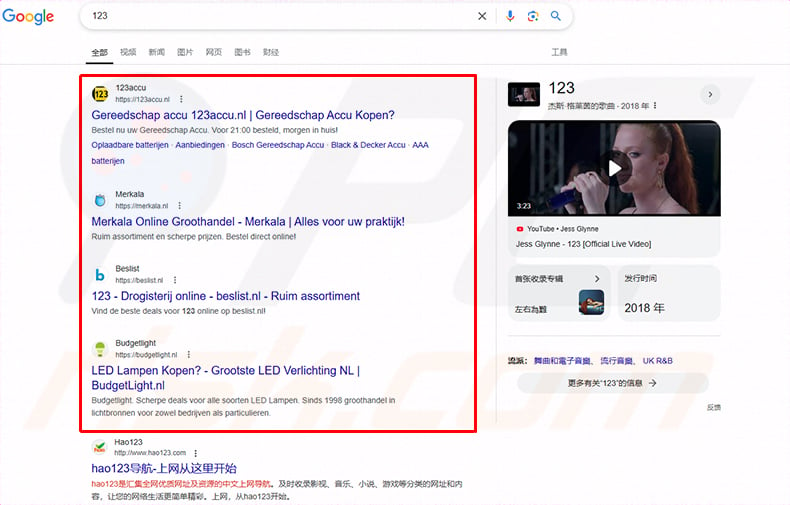
The extension injects extra code into Google search pages. It then places advertisements formatted to look like ordinary search results above the genuine ones. Qi'anxin observed several unfamiliar online stores pushed to the top of a simple search, ahead of the results the user was actually looking for.
A second script runs on other websites and records which pages the user visits. On shopping and travel sites, it changes where links point. The code looks specifically for Amazon product pages and Booking.com hotel pages, so a click that should open a chosen item may instead travel through the attackers' affiliate links.
This is where overbridgenet.com comes in. When the script needs a destination to send the user to, it contacts overbridgenet.com/jsv8/offer and receives a short JSON response. A value inside that response fills in the redirect address the extension then uses. An earlier address, overbridgenet.com/jsv2/offer_combo_v6, was in use between May 2021 and April 2023.
It is worth being precise about this: the domain does not host the malicious scripts themselves. Those are pulled from calnor.info and infird.com (other domains may be used as well). Overbridgenet.com only supplies instructions. During testing it returned nothing but a placeholder response, which suggests the operators decide who receives a live redirect address and when.
The domain is genuinely difficult to notice. It never appears in the address bar, and the script waits on a twenty-second timer before doing anything. It also skips search engines, social media, and adult sites entirely. On top of that, it sets a cookie named perf_dv6Tr4n that stops it from running again once triggered.
What users do notice are the results. Unfamiliar online stores appear above genuine Google results, and product or hotel links lead somewhere other than the intended destination. Browsing may also feel slower than usual, and pages can load incorrectly.
Beyond the advertising, the extension tracks activity across every site visited. Data of this kind (visited addresses, search terms, clicked links, IP addresses, and location details) is valuable to cybercriminals and can be sold on to third parties or misused in other ways.
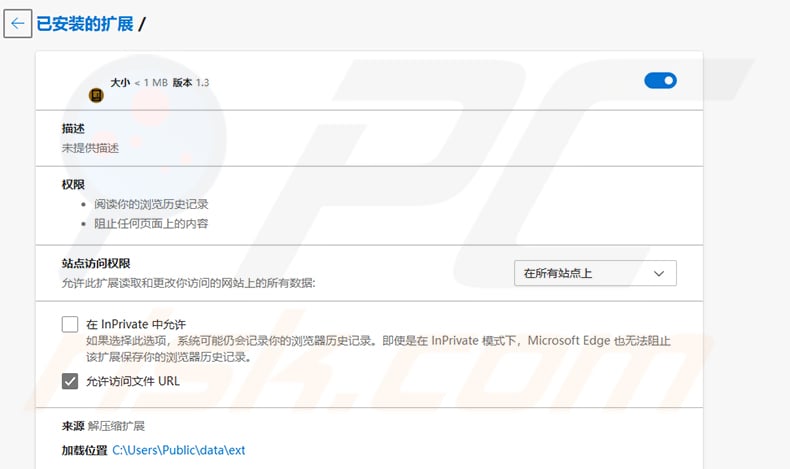
The campaign has been running since 2021 and has reached over a million devices worldwide. The extension itself looks unremarkable. It carries no description, asks for permission to read browsing history and block content on any page, and has access to all sites. In one observed case it was loaded from C:\Users\Public\data\ext rather than an official store.
To summarize, an extension communicating with overbridgenet.com can cost users money through hijacked purchases, expose them to unsafe websites, and create serious privacy problems. It should be removed as soon as it is found.
| Name | Ads by overbridgenet.com |
| Threat Type | Adware |
| Related Domains | calnor.info, infird.com, klymos.info, infirc.com, xerogala.com, svdred.com, cachedclr.com |
| Serving IP Address | 188.40.232.234 |
| Threat Status (overbridgenet[.]com) | PCrisk Website Scanner Results |
| Symptoms | Unfamiliar shopping sites appear above genuine search results, clicked product links open unintended websites, your computer becomes slower than normal, security software blocks connections to overbridgenet.com. |
| Distribution methods | Deceptive pop-up ads, free software installers (bundling), torrent file downloads. |
| Damage | Internet browser tracking (potential privacy issues), display of unwanted ads, redirects to dubious websites, loss of private information. |
| Malware Removal (Windows) |
To eliminate possible malware infections, scan your computer with legitimate antivirus software. Our security researchers recommend using Combo Cleaner. Download Combo CleanerTo use full-featured product, you have to purchase a license for Combo Cleaner. 7 days free trial available. Combo Cleaner is owned and operated by RCS LT, the parent company of PCRisk.com. |
Conclusion
Adware that operates as quietly as this one is easy to live with for months without realizing anything is wrong. The ads look like search results, the redirects look like ordinary page loads, and the domain doing the work stays out of sight. That combination is exactly what makes it worth removing promptly.
More adware examples are Ad Blocker Unlimited, Easy Online Templates, and Privacy Protector.
How did unwanted software install on my computer?
Adware is commonly included with free or questionable software. It is usually added when users accept the default setup instead of choosing "Custom", "Advanced", or similar options, which allow unwanted extras to be declined.
It can also arrive through misleading ads, pop-ups, or fake alerts on unsafe websites. Downloading files from untrusted sources, such as unofficial app stores, third-party downloaders, or peer-to-peer (P2P) networks, can lead to the same outcome.
In this particular case, the extension has been seen loaded from a folder on the system rather than from an official browser store. That points to another program placing it there, which usually means something unwanted was already installed beforehand.
How to avoid installation of unwanted applications?
Download software only from official sources such as vendor pages or recognized app stores. Avoid pirated software, cracks, and keygens. During installation, always choose "Custom" or "Advanced" setup and uncheck any bundled programs or extensions that were not asked for.
Ignore suspicious pop-ups and alerts encountered on questionable websites, and do not agree to receive notifications from dubious pages. It also helps to review the browser's extensions list now and then, since unwanted add-ons can sit there unnoticed.
If your computer is already infected with rogue applications, we recommend running a scan with Combo Cleaner Antivirus for Windows to automatically eliminate them.
Screenshot of the Ghost Extension (source: Qi'anxin Threat Intelligence Center):
Instant automatic malware removal:
Manual threat removal might be a lengthy and complicated process that requires advanced IT skills. Combo Cleaner is a professional automatic malware removal tool that is recommended to get rid of malware. Download it by clicking the button below:
DOWNLOAD Combo CleanerBy downloading any software listed on this website you agree to our Privacy Policy and Terms of Use. To use full-featured product, you have to purchase a license for Combo Cleaner. 7 days free trial available. Combo Cleaner is owned and operated by RCS LT, the parent company of PCRisk.com.
Quick menu:
- What is overbridgenet.com?
- STEP 1. Uninstall adware applications using Control Panel.
- STEP 2. Remove rogue plug-ins from Google Chrome.
- STEP 3. Remove adware-type extensions from Mozilla Firefox.
- STEP 4. Remove malicious extensions from Safari.
- STEP 5. Remove rogue plug-ins from Microsoft Edge.
Adware removal:
Windows 11 users:
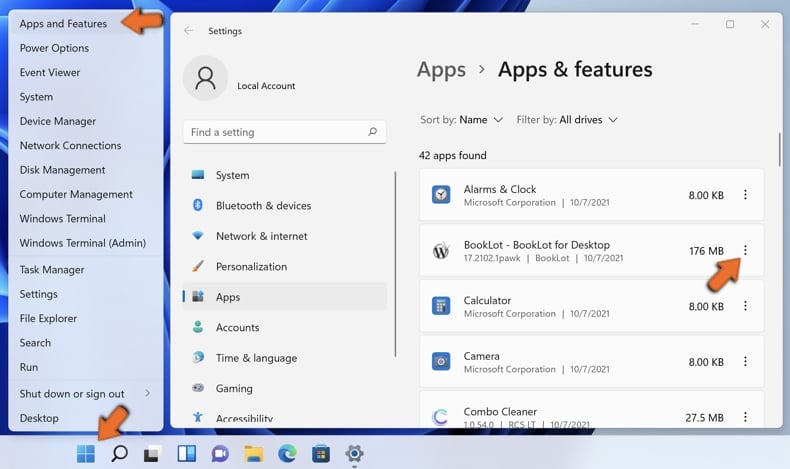
Right-click on the Start icon, select Apps and Features. In the opened window search for the application you want to uninstall, after locating it, click on the three vertical dots and select Uninstall.
Windows 10 users:
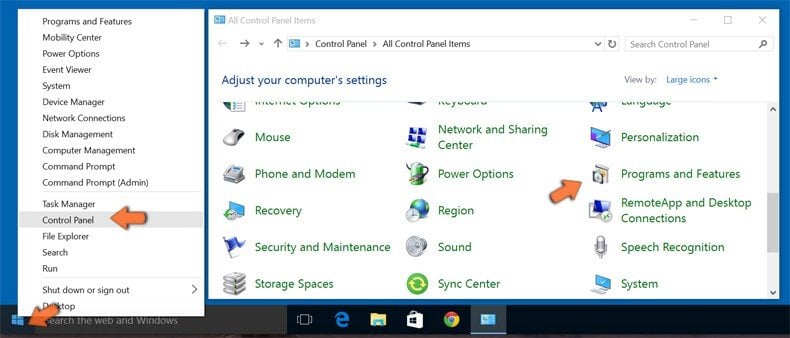
Right-click in the lower left corner of the screen, in the Quick Access Menu select Control Panel. In the opened window choose Programs and Features.
Windows 7 users:
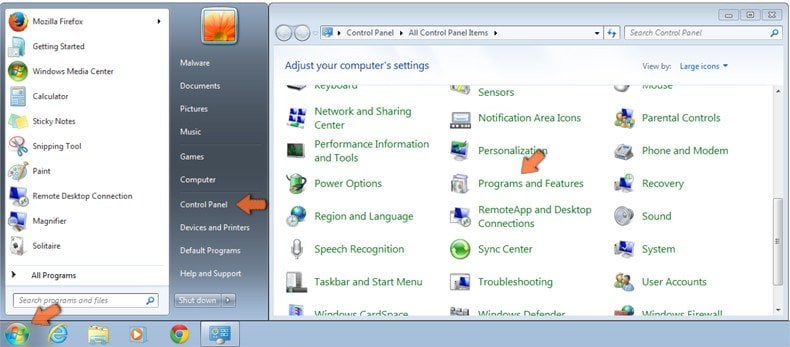
Click Start (Windows Logo at the bottom left corner of your desktop), choose Control Panel. Locate Programs and click Uninstall a program.
macOS (OSX) users:
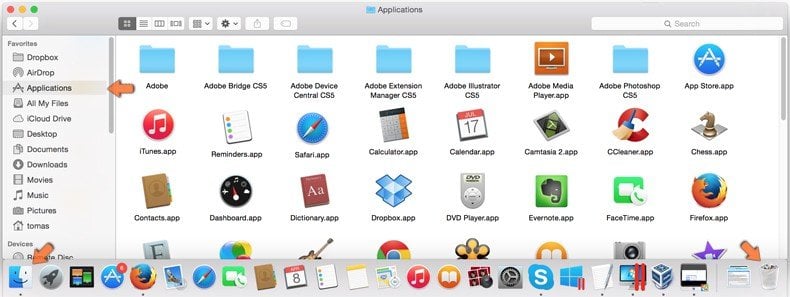
Click Finder, in the opened screen select Applications. Drag the app from the Applications folder to the Trash (located in your Dock), then right click the Trash icon and select Empty Trash.
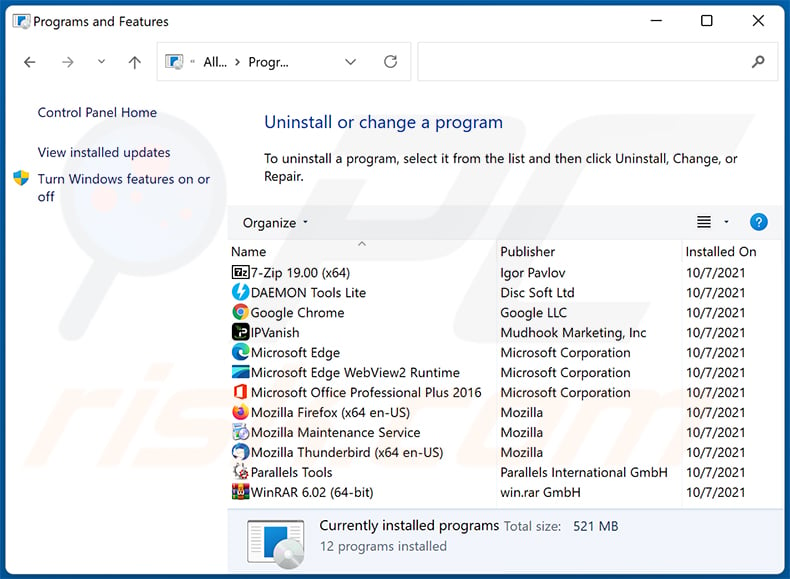
In the uninstall programs window, look for any unwanted applications, select these entries and click "Uninstall" or "Remove".
After uninstalling the unwanted application, scan your computer for any remaining unwanted components or possible malware infections. To scan your computer, use recommended malware removal software.
DOWNLOAD remover for malware infections
Combo Cleaner checks if your computer is infected with malware. To use full-featured product, you have to purchase a license for Combo Cleaner. 7 days free trial available. Combo Cleaner is owned and operated by RCS LT, the parent company of PCRisk.com.
Remove adware from Internet browsers:
Video showing how to remove unwanted browser add-ons:
 Remove malicious extensions from Google Chrome:
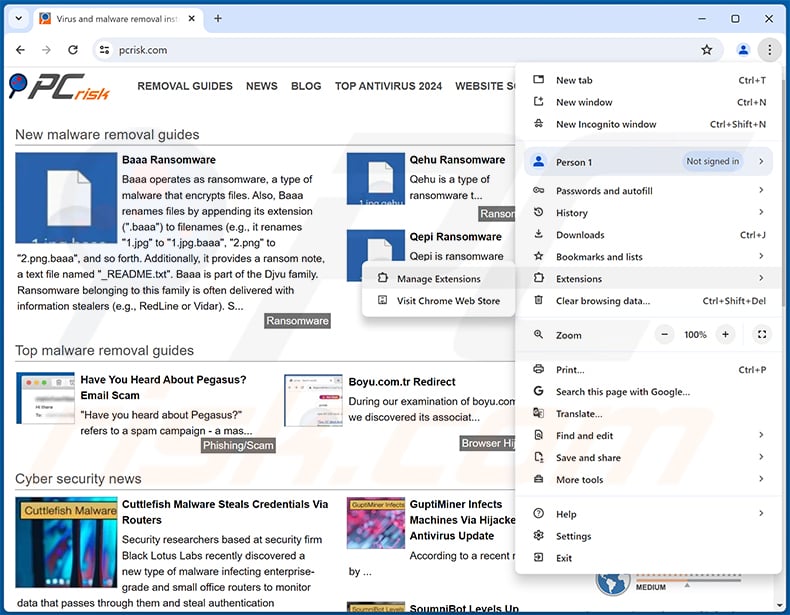
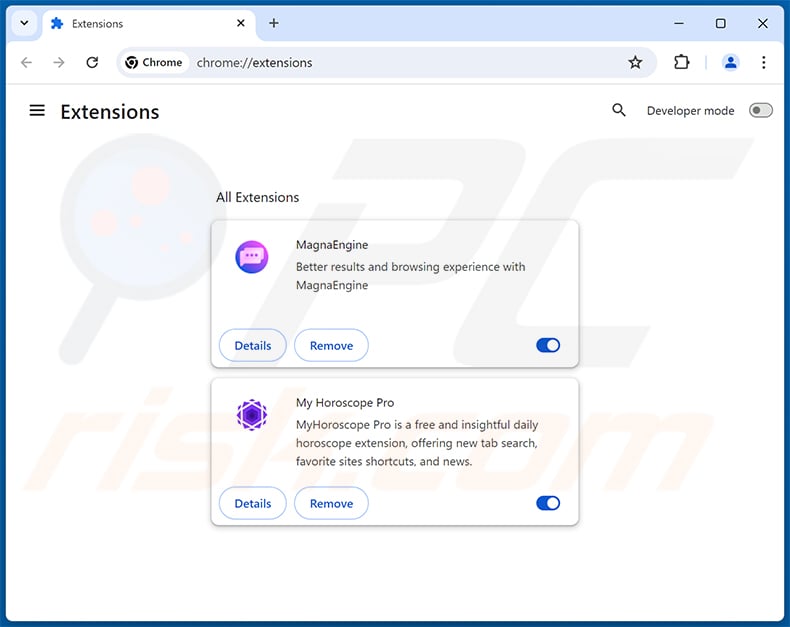
Click the Chrome menu icon  (at the top right corner of Google Chrome), select "Extensions" and click "Manage Extensions". Locate all recently-installed suspicious extensions, select these entries and click "Remove".
Optional method:
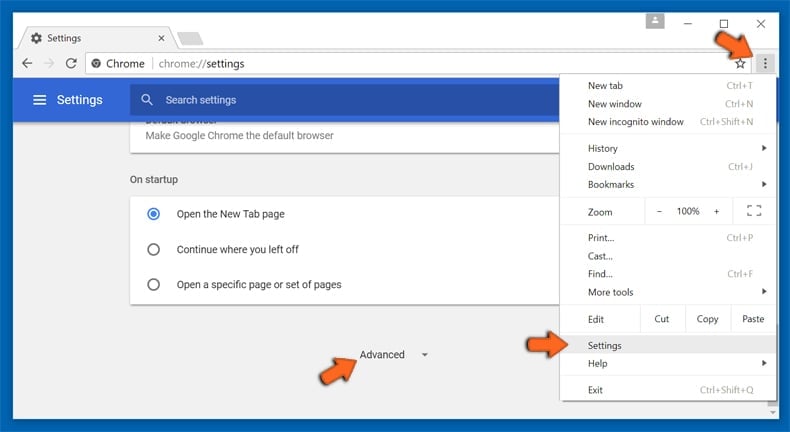
If you continue to have problems with removal of the ads by overbridgenet.com, reset your Google Chrome browser settings. Click the Chrome menu icon (at the top right corner of Google Chrome) and select Settings. Scroll down to the bottom of the screen. Click the Advanced… link.
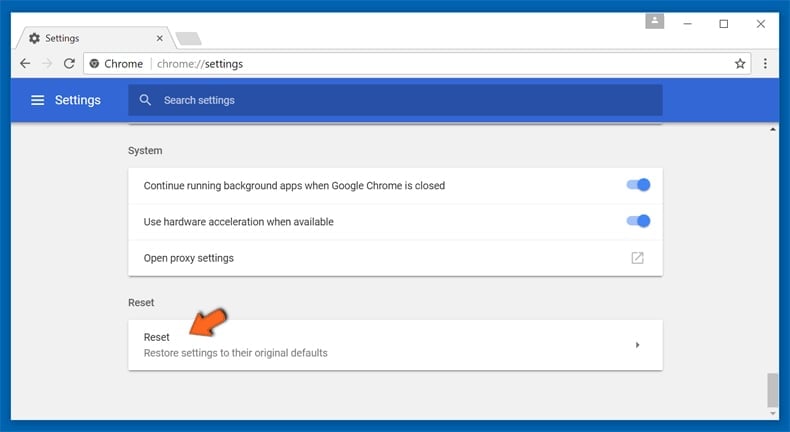
After scrolling to the bottom of the screen, click the Reset (Restore settings to their original defaults) button.
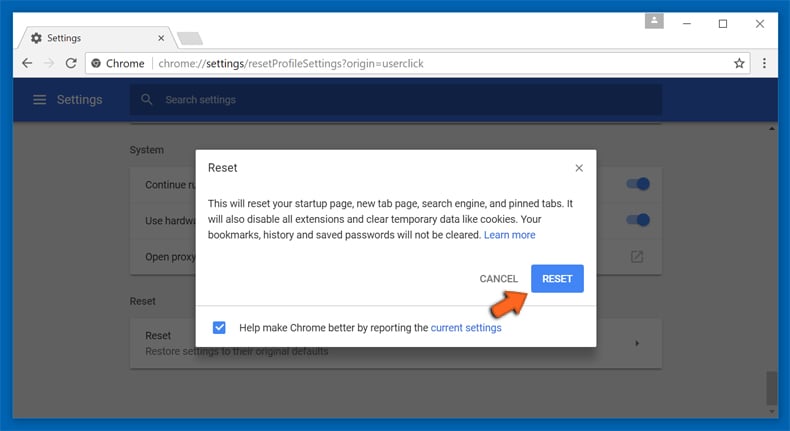
In the opened window, confirm that you wish to reset Google Chrome settings to default by clicking the Reset button.
 Remove malicious plug-ins from Mozilla Firefox:
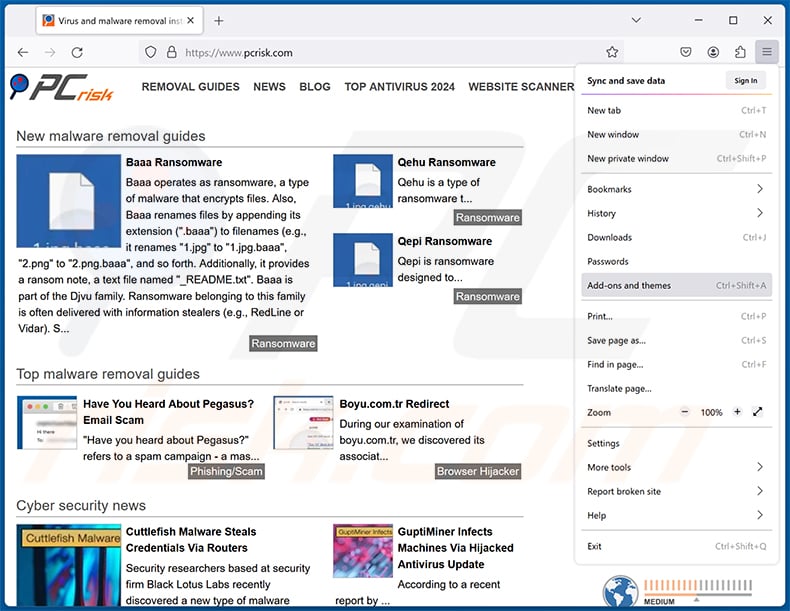
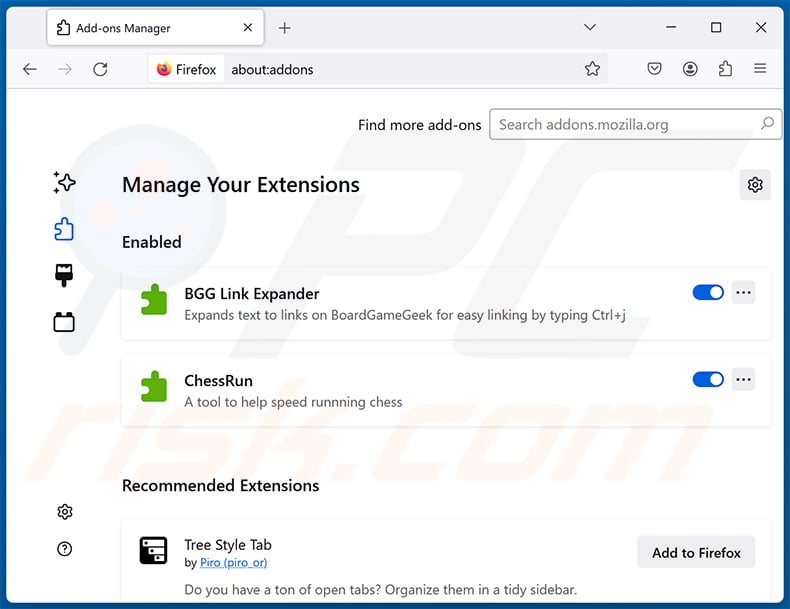
Click the Firefox menu  (at the top right corner of the main window), select "Add-ons and themes". Click "Extensions", in the opened window locate all recently-installed suspicious extensions, click on the three dots and then click "Remove".
Optional method:
Computer users who have problems with ads by overbridgenet.com removal can reset their Mozilla Firefox settings.
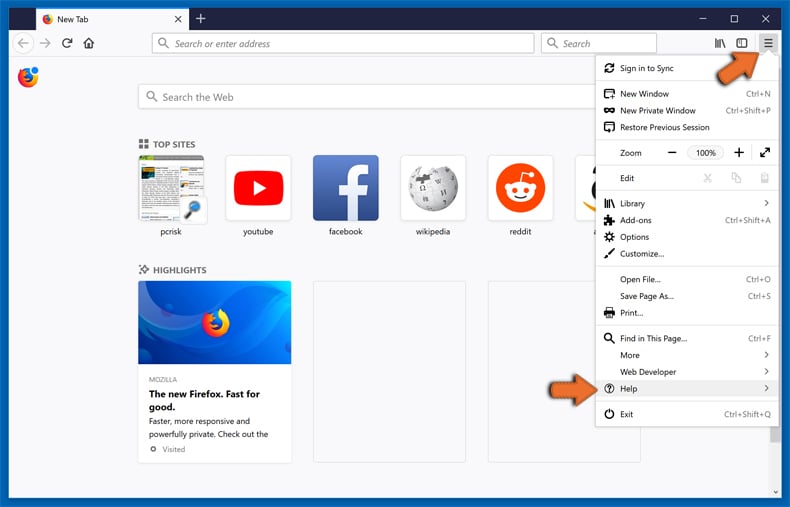
Open Mozilla Firefox, at the top right corner of the main window, click the Firefox menu, in the opened menu, click Help.
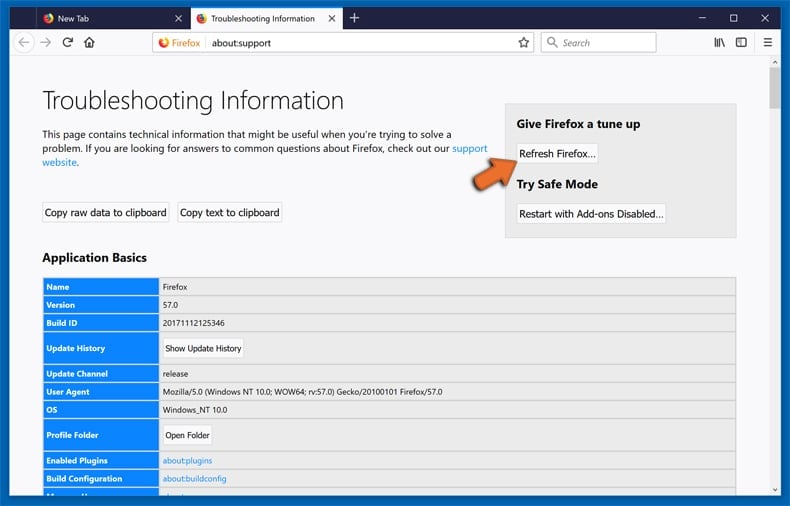
Select Troubleshooting Information.
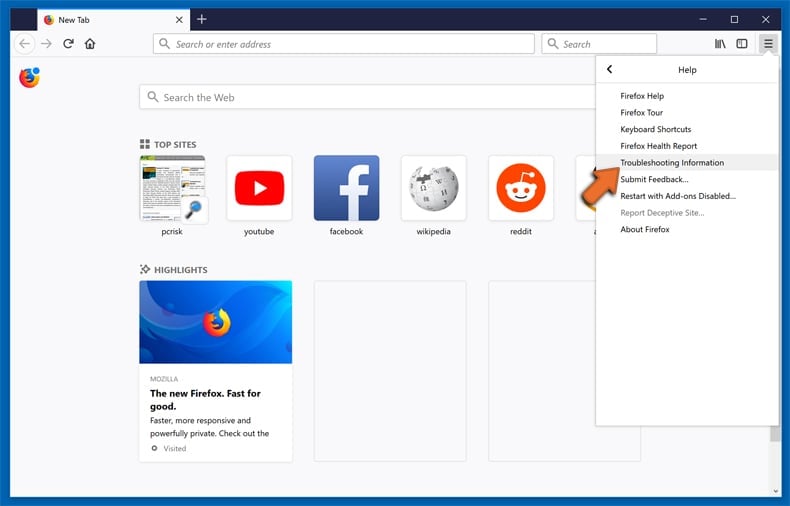
In the opened window, click the Refresh Firefox button.
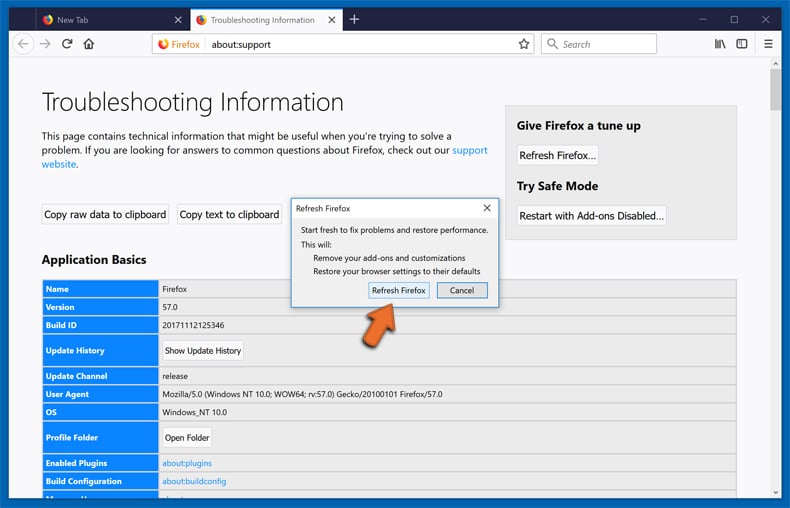
In the opened window, confirm that you wish to reset Mozilla Firefox settings to default by clicking the Refresh Firefox button.
Frequently Asked Questions (FAQ)
What harm can adware cause?
It can flood the browser with unwanted advertisements, send users to unsafe websites, slow the system down, and quietly gather information about browsing habits. In this case it can also cost money by rerouting shopping links away from the store the user actually chose.
What does adware do?
Adware displays unwanted ads, usually as pop-ups, banners, or coupons. Some varieties are subtler and blend their ads into pages the user already trusts, such as search results. Many also collect private data while doing so.
How do adware developers generate revenue?
Most of their income comes from affiliate programs, where a commission is earned for clicks, visits, sign-ups, or purchases they can claim credit for. Rewriting a shopping link so the purchase appears to come from them is one way of doing this.
Will Combo Cleaner remove overbridgenet.com adware?
Yes, Combo Cleaner will scan your computer and remove installed adware. Removing an extension by hand is not always enough, since the component that placed it there can remain on the system and simply add it back.
Share:
 Facebook
 X.com
X.com
 LinkedIn
 Copy Link

Tomas Meskauskas
Expert security researcher, professional malware analyst
I am passionate about computer security and technology. I have an experience of over 10 years working in various companies related to computer technical issue solving and Internet security. I have been working as an author and editor for pcrisk.com since 2010. Follow me on Twitter and LinkedIn to stay informed about the latest online security threats.
PCrisk security portal is brought by a company RCS LT.
Joined forces of security researchers help educate computer users about the latest online security threats. More information about the company RCS LT.
Our malware removal guides are free. However, if you want to support us you can send us a donation.
DonatePCrisk security portal is brought by a company RCS LT.
Joined forces of security researchers help educate computer users about the latest online security threats. More information about the company RCS LT.
Our malware removal guides are free. However, if you want to support us you can send us a donation.
Donate
▼ Show Discussion