
Twitch Enhanced Viewer | JeetBot Malicious Extension
Browser HijackerAlso Known As: Twitch Enhanced Viewer | JeetBot malicious add-on

Get free scan and check if your device is infected.
Remove it nowTo use full-featured product, you have to purchase a license for Combo Cleaner. Seven days free trial available. Combo Cleaner is owned and operated by RCS LT, the parent company of PCRisk.com.
What kind of extension is Twitch Enhanced Viewer | JeetBot?
Twitch Enhanced Viewer | JeetBot malicious extension is marketed as a browser extension that enhances the Twitch viewing experience. It promises features such as 1080p/2K streaming, ad blocking, and automatic channel point collection. According to research published by Socket, this extension secretly steals users' Twitch account credentials.
During our investigation, we found that Twitch Enhanced Viewer | JeetBot malicious extension intercepts users' Twitch login tokens and relays them to servers linked to a Russian bot service. The extension reached over 31,000 users across Chrome and Firefox before it was identified. Anyone who has this extension installed should remove it immediately.
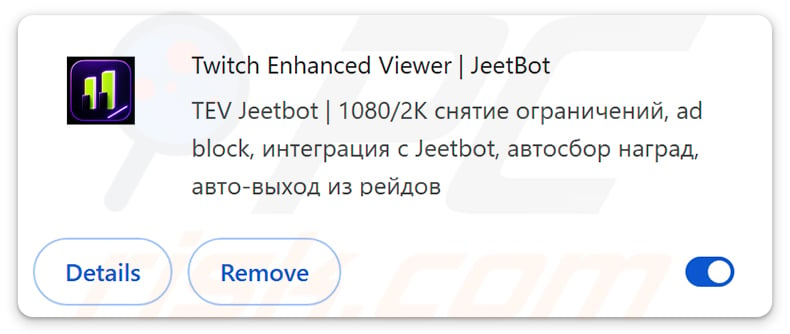
Twitch Enhanced Viewer | JeetBot malicious extension in detail
Twitch Enhanced Viewer | JeetBot malicious extension intercepts OAuth session tokens within the browser. These tokens act as login credentials - whoever holds them can access a user's Twitch account, including chat, private messages, and account settings, without needing a password.
When the extension captures a token, it passes it to a proxy server at enhanced.jeetbot.cc. From there, attackers can post in chat, read private whispers, and spend channel points on the victim's behalf. No password or second factor is required to carry out these actions.
The extension's privacy policy explicitly claimed it does not collect, store, or process any user data. That statement was false. The extension was built specifically to capture session tokens - the very data it claimed not to handle.
Researchers noted one particularly telling detail: accounts belonging to certain Russian streamers were deliberately excluded from the token-theft process. The operator's own community was spared, while all other users' credentials were exposed.
The stolen tokens were forwarded to servers with IP addresses 152.53.177.186 (netcup GmbH, Germany), 132.243.113.25, and 80.74.26.162 (CLODO Cloud). The extension's configuration was served from ext-styles.jeetbot.cc.
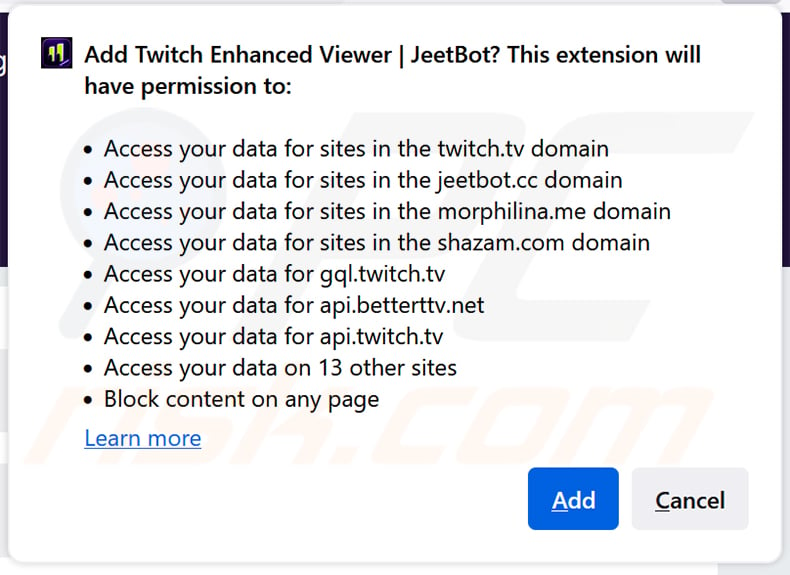
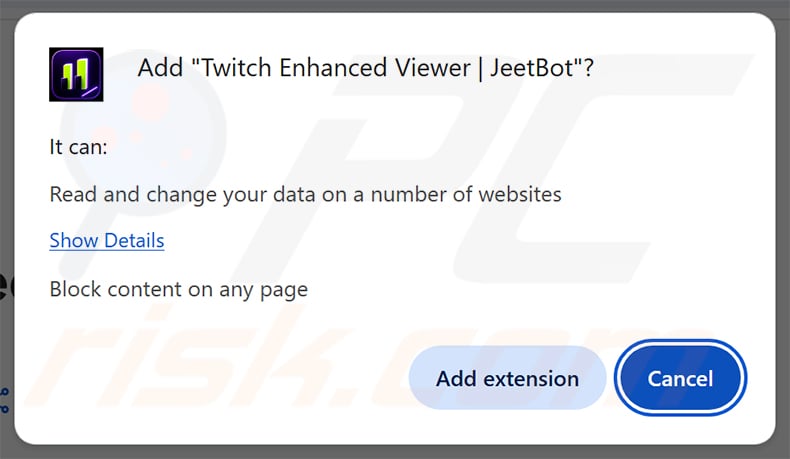
The extension also requested unusually broad permissions - access to data on twitch.tv, jeetbot.cc, and over a dozen additional domains. Such wide-reaching access goes far beyond what a legitimate streaming enhancement tool would need.
The risks posed by this extension are serious: account takeover, privacy violations, potential identity theft, and financial harm if stolen accounts are used for unauthorized transactions or fraudulent activity.
| Name | Twitch Enhanced Viewer | JeetBot malicious add-on |
| Threat Type | Malicious Browser Extension, Credential Stealer |
| Supposed Functionality | Twitch enhancement tool (ad blocking, HD streaming, region unlock, channel point automation) |
| Serving IP Address | 152.53.177.186 (netcup GmbH, Germany), 132.243.113.25, 80.74.26.162 (CLODO Cloud) |
| Symptoms | Unauthorized Twitch account activity, private messages read without consent, channel points spent by unknown parties, suspicious account behavior. |
| Distribution methods | Official browser extension stores (Chrome Web Store, Firefox Add-ons store), deceptive pop-up ads. |
| Damage | Stolen Twitch OAuth session tokens, account takeover, privacy breaches, loss of private information. |
| Malware Removal (Windows) |
To eliminate possible malware infections, scan your computer with legitimate antivirus software. Our security researchers recommend using Combo Cleaner. Download Combo CleanerTo use full-featured product, you have to purchase a license for Combo Cleaner. 7 days free trial available. Combo Cleaner is owned and operated by RCS LT, the parent company of PCRisk.com. |
Conclusion
Twitch Enhanced Viewer | JeetBot malicious extension is a credential-stealing browser extension disguised as a Twitch enhancement utility. It intercepts OAuth session tokens and sends them to attacker-controlled servers, enabling account hijacking without any password. Users who have this extension installed should remove it right away.
More examples of such malicious extensions are QuickLens - Search Screen with Google Lens, ShadyPanda, and Corporate Monitoring Tool.
How did unwanted software install on my computer?
This extension was distributed through official channels - the Chrome Web Store and Firefox Add-ons store. Users encountered it while searching for tools to improve their Twitch experience, such as quality unlockers, channel reward collectors, or ad-free viewing. Its legitimate-sounding name and stated feature list made it appear trustworthy.
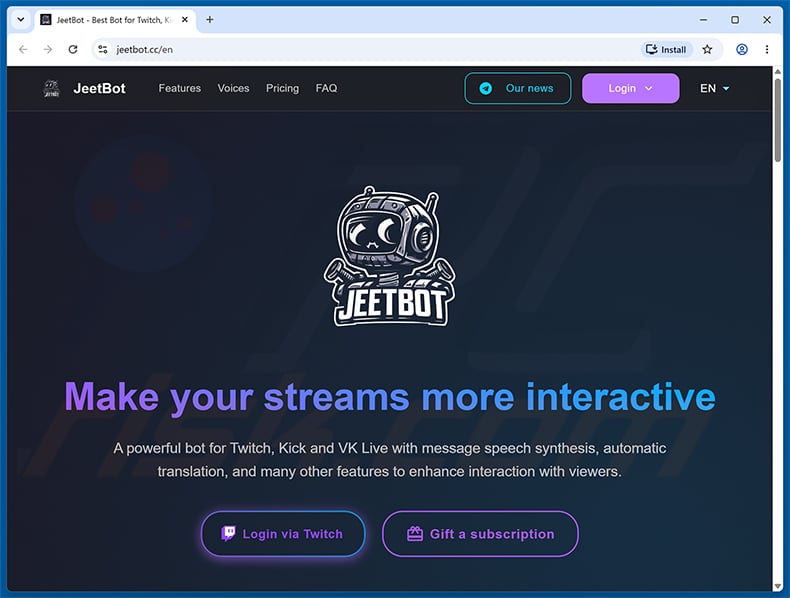
It may also have been promoted through the jeetbot.cc website and its associated community channels. Extensions spread through deceptive pop-ups or third-party download sites can carry hidden malicious components alongside any advertised functionality.
Rushing past an extension's install prompt without reviewing the permissions it requests is a common risk. An extension that demands access to data across dozens of unrelated websites warrants careful consideration before being accepted.
How to avoid installation of unwanted applications?
Only install browser extensions from official sources such as the Chrome Web Store or Firefox Add-ons store, and choose extensions from verified publishers with positive community reviews. Before clicking "Add", review the permissions the extension requests - access that seems excessive for the tool's stated purpose is a warning sign.
Ignore pop-up alerts or messages encouraging you to install extensions, especially those encountered on unfamiliar or questionable websites. Do not grant notification permissions to sites you do not trust, as such permissions can be used to push additional unwanted installs.
Keep your browser and operating system updated, and use reputable security software to catch threats before they cause harm. If your browser is already affected by Twitch Enhanced Viewer | JeetBot malicious extension or similar threats, we recommend running a scan with Combo Cleaner Antivirus for Windows to automatically eliminate them.
Twitch Enhanced Viewer | JeetBot malicious extension requesting permissions (Firefox):
Permissions requested by Twitch Enhanced Viewer | JeetBot malicious extension (Chrome):
Website promoting Twitch Enhanced Viewer | JeetBot malicious extension:
Instant automatic malware removal:
Manual threat removal might be a lengthy and complicated process that requires advanced IT skills. Combo Cleaner is a professional automatic malware removal tool that is recommended to get rid of malware. Download it by clicking the button below:
DOWNLOAD Combo CleanerBy downloading any software listed on this website you agree to our Privacy Policy and Terms of Use. To use full-featured product, you have to purchase a license for Combo Cleaner. 7 days free trial available. Combo Cleaner is owned and operated by RCS LT, the parent company of PCRisk.com.
Quick menu:
- What is Twitch Enhanced Viewer | JeetBot malicious extension?
- STEP 1. Uninstall unwanted applications using Control Panel.
- STEP 2. Remove rogue plug-ins from Google Chrome.
- STEP 3. Remove malicious extensions from Mozilla Firefox.
- STEP 4. Remove malicious extensions from Safari.
- STEP 5. Remove rogue plug-ins from Microsoft Edge.
Malicious extension removal:
Windows 11 users:
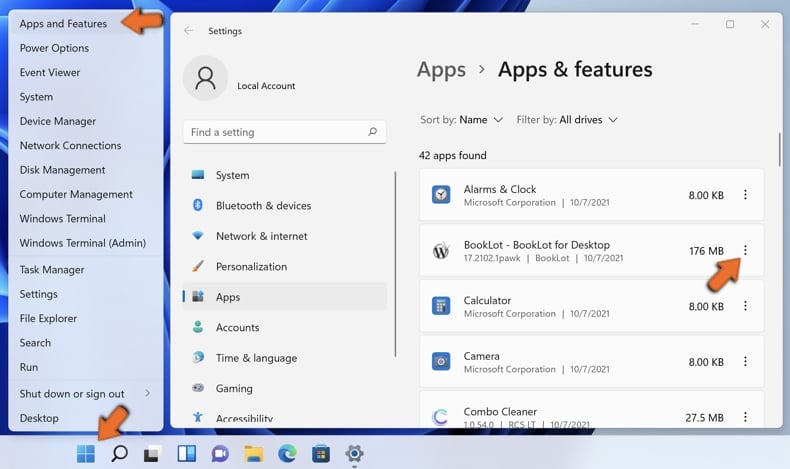
Right-click on the Start icon, select Apps and Features. In the opened window search for the application you want to uninstall, after locating it, click on the three vertical dots and select Uninstall.
Windows 10 users:
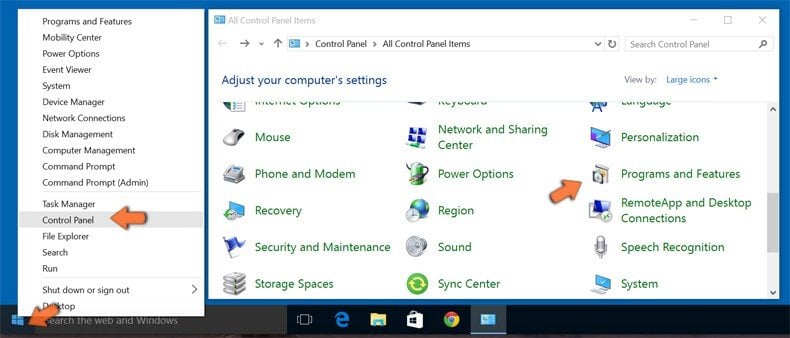
Right-click in the lower left corner of the screen, in the Quick Access Menu select Control Panel. In the opened window choose Programs and Features.
Windows 7 users:
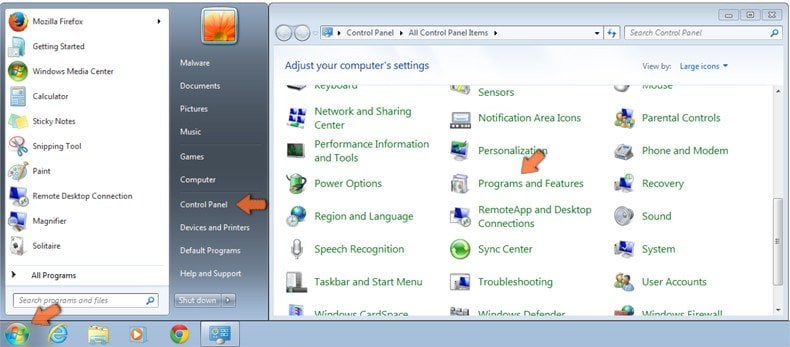
Click Start (Windows Logo at the bottom left corner of your desktop), choose Control Panel. Locate Programs and click Uninstall a program.
macOS (OSX) users:
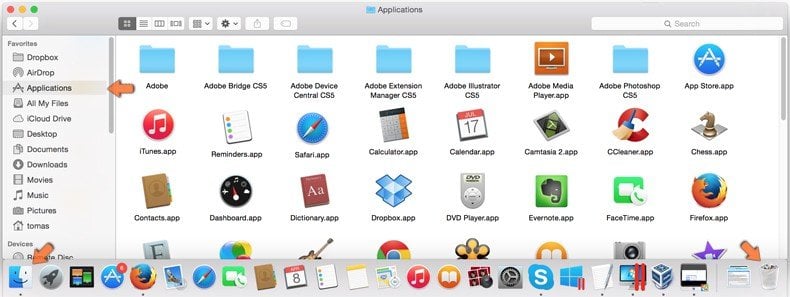
Click Finder, in the opened screen select Applications. Drag the app from the Applications folder to the Trash (located in your Dock), then right click the Trash icon and select Empty Trash.
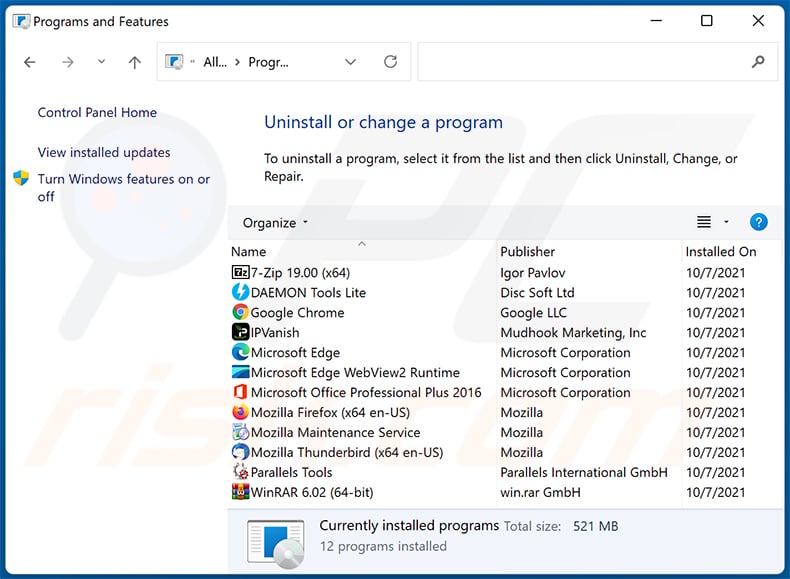
In the uninstall programs window, look for any unwanted applications, select these entries and click "Uninstall" or "Remove".
After uninstalling any unwanted applications, scan your computer for remaining unwanted components or possible malware infections. To scan your computer, use recommended malware removal software.
DOWNLOAD remover for malware infections
Combo Cleaner checks if your computer is infected with malware. To use full-featured product, you have to purchase a license for Combo Cleaner. 7 days free trial available. Combo Cleaner is owned and operated by RCS LT, the parent company of PCRisk.com.
Remove malicious extensions from Internet browsers:
Video showing how to remove unwanted browser add-ons:
 Remove malicious extensions from Google Chrome:
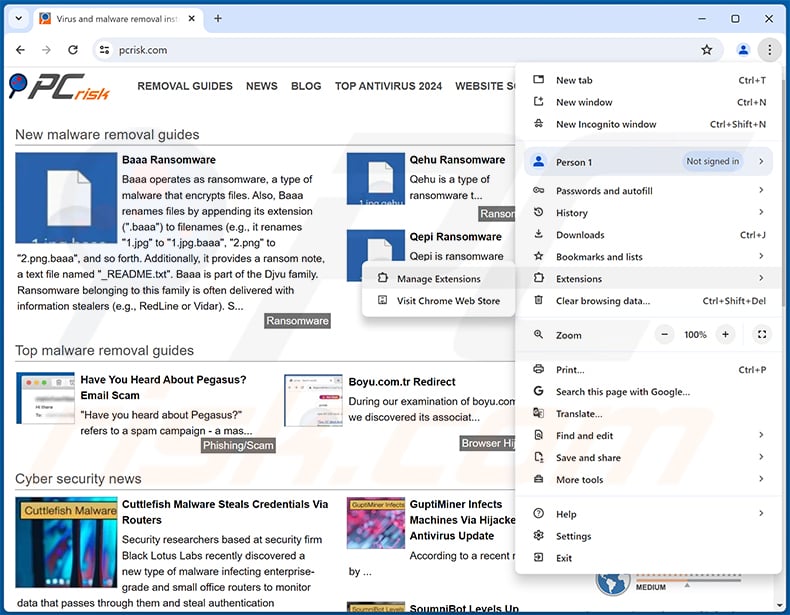
Click the Chrome menu icon  (at the top right corner of Google Chrome), select "Extensions" and click "Manage Extensions". Locate "Twitch Enhanced Viewer | JeetBot" or other suspicious extensions, select these entries and click "Remove".
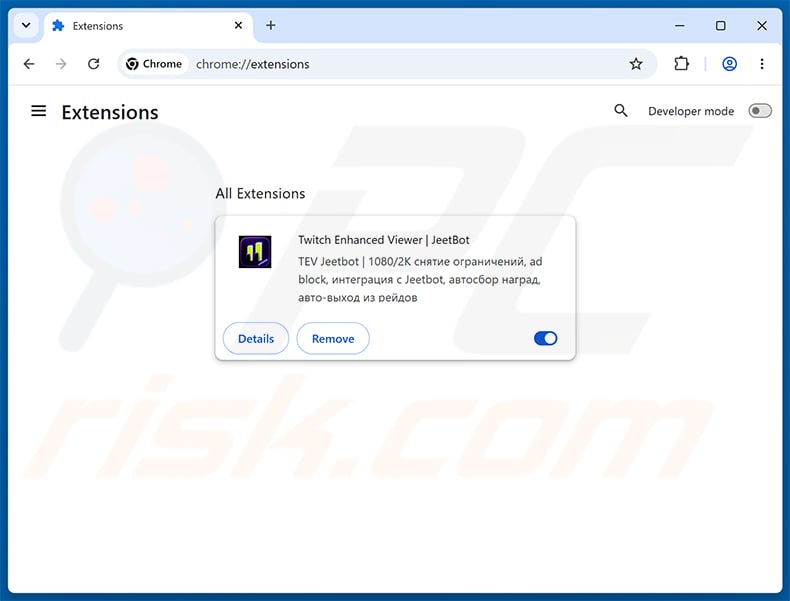
Optional method:
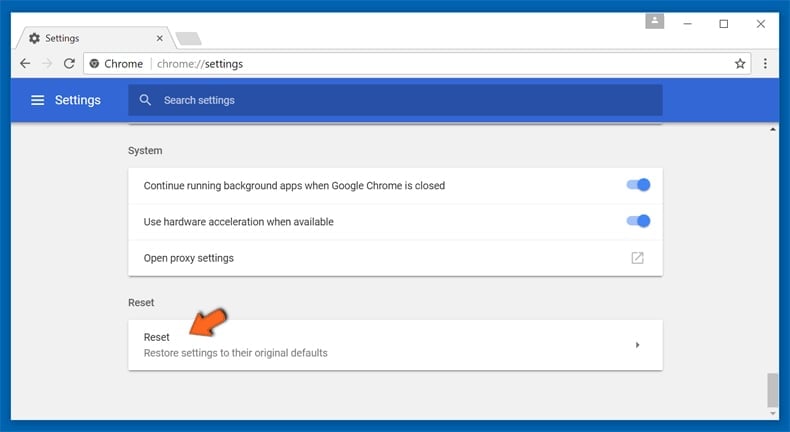
If you continue to have problems with removal of the twitch enhanced viewer | jeetbot malicious add-on, reset your Google Chrome browser settings. Click the Chrome menu icon (at the top right corner of Google Chrome) and select Settings. Scroll down to the bottom of the screen. Click the Advanced… link.
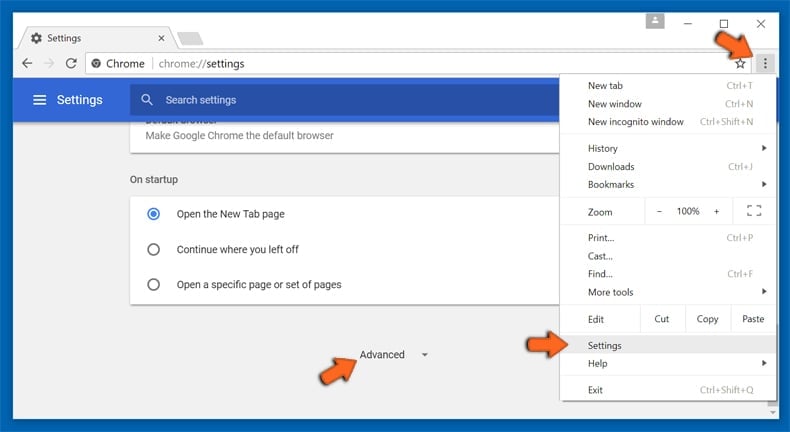
After scrolling to the bottom of the screen, click the Reset (Restore settings to their original defaults) button.
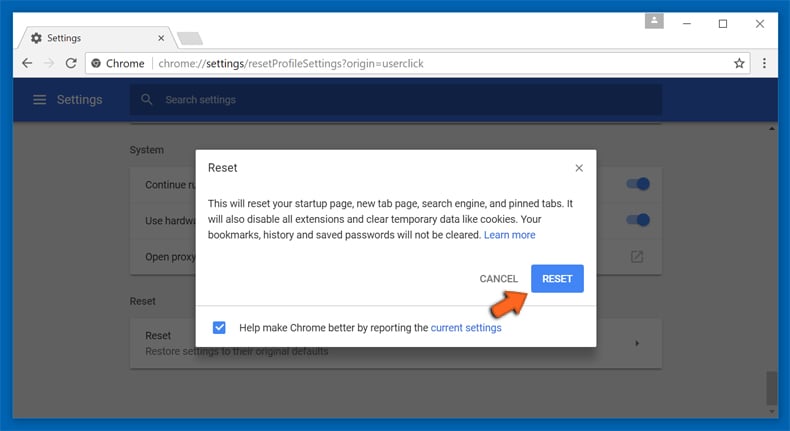
In the opened window, confirm that you wish to reset Google Chrome settings to default by clicking the Reset button.
 Remove malicious plug-ins from Mozilla Firefox:
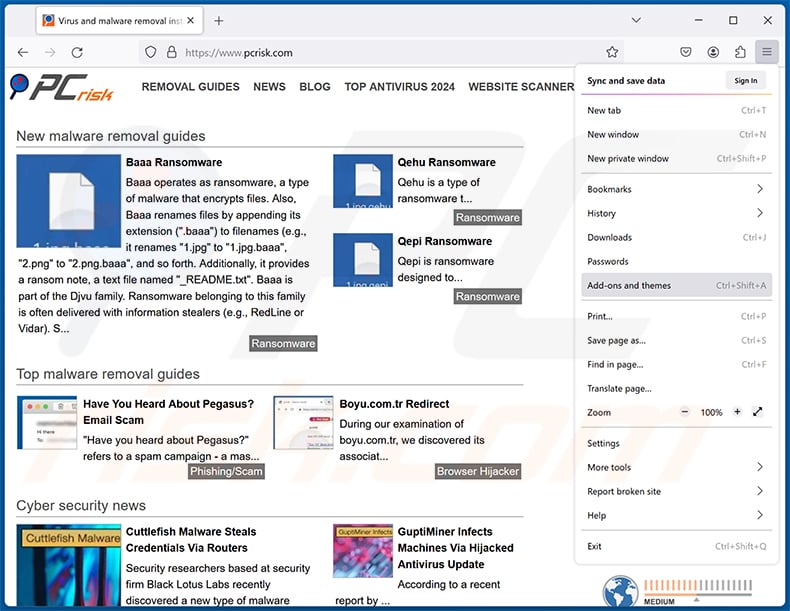
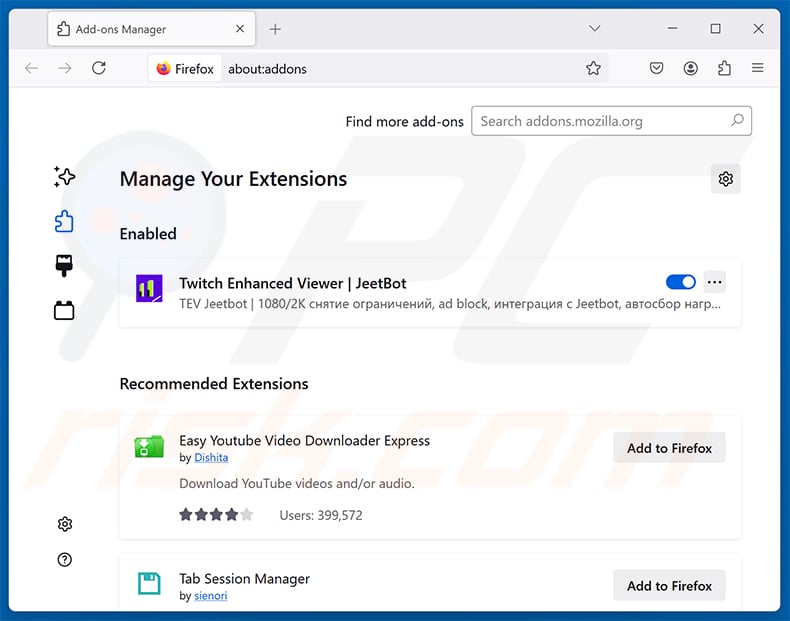
Click the Firefox menu  (at the top right corner of the main window), select "Add-ons and themes". Click "Extensions", in the opened window locate all recently-installed suspicious extensions, click on the three dots and then click "Remove".
Optional method:
Computer users who have problems with twitch enhanced viewer | jeetbot malicious add-on removal can reset their Mozilla Firefox settings.
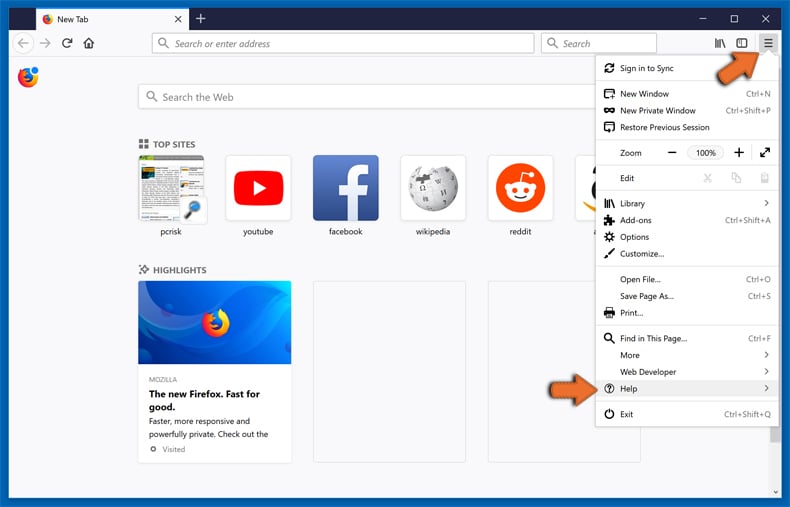
Open Mozilla Firefox, at the top right corner of the main window, click the Firefox menu, in the opened menu, click Help.
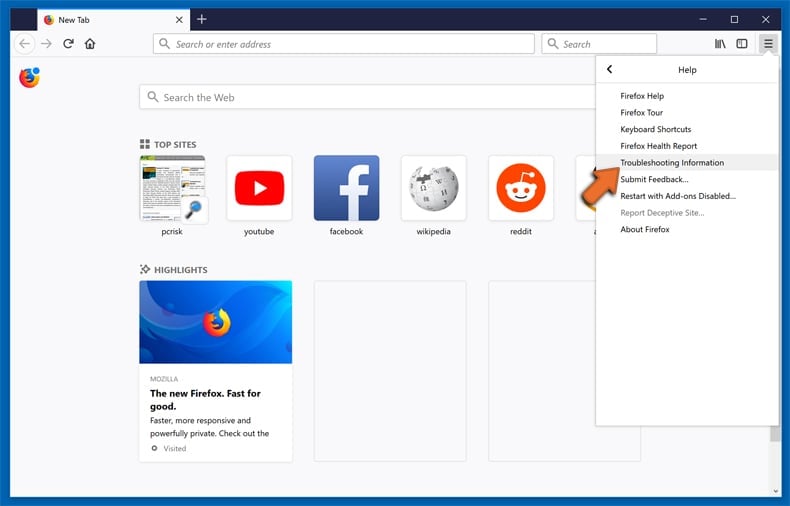
Select Troubleshooting Information.
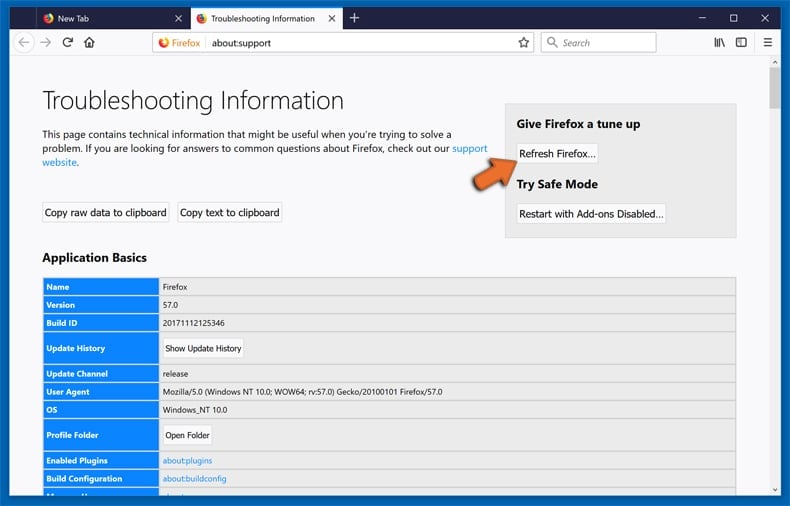
In the opened window, click the Refresh Firefox button.
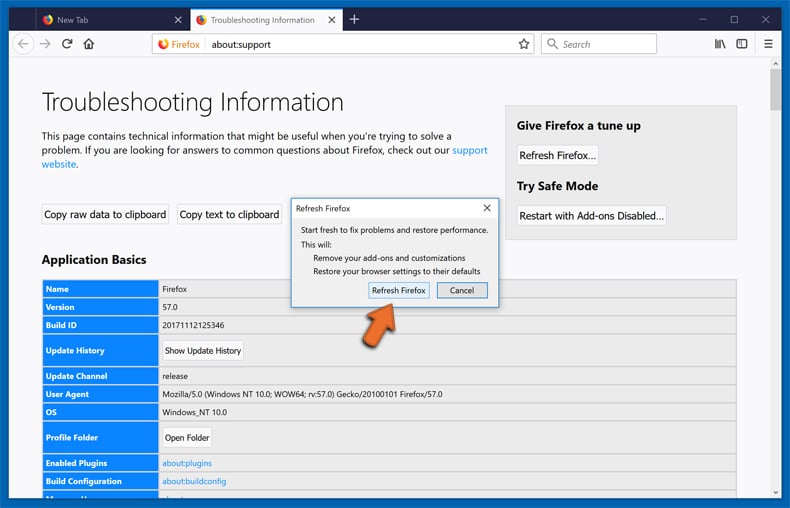
In the opened window, confirm that you wish to reset Mozilla Firefox settings to default by clicking the Refresh Firefox button.
 Remove malicious extensions from Safari:
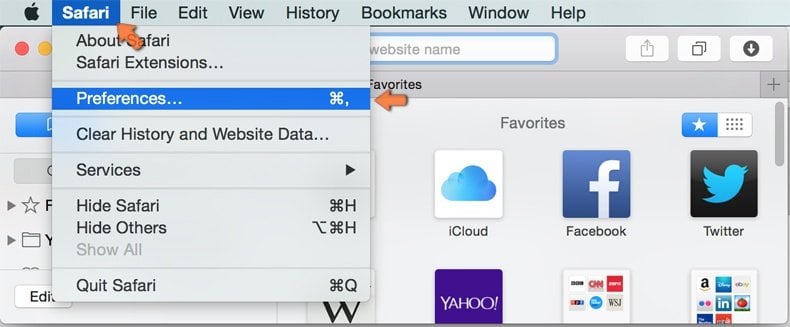
Make sure your Safari browser is active and click Safari menu, then select Preferences...
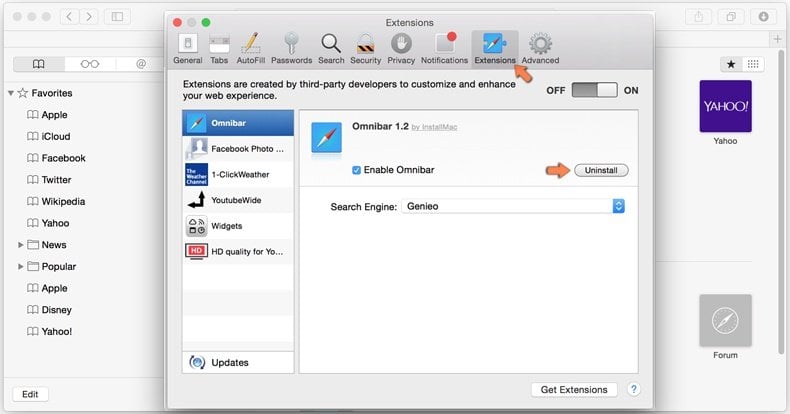
In the preferences window select the Extensions tab. Look for any recently installed suspicious extensions and uninstall them.
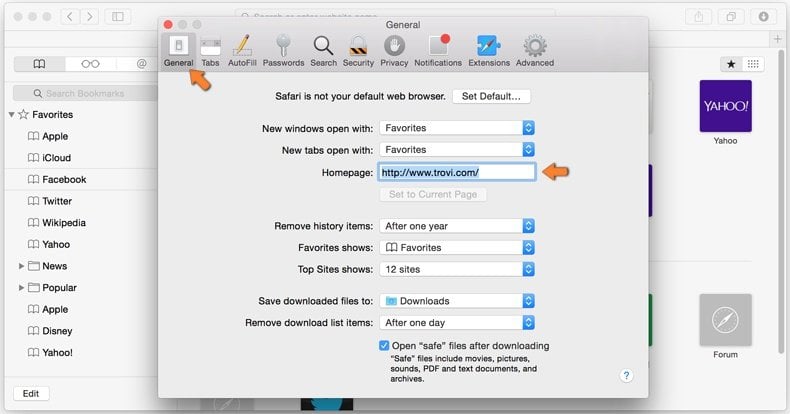
In the preferences window select General tab and make sure that your homepage is set to a preferred URL, if its altered by a browser hijacker - change it.
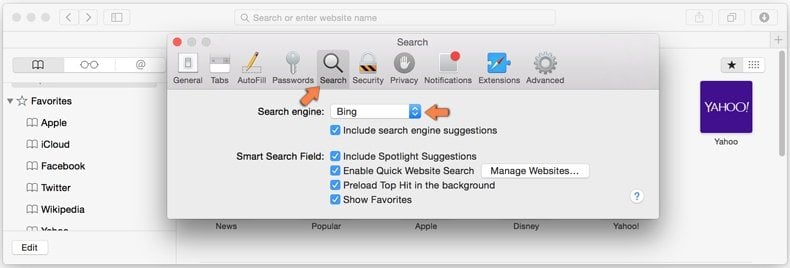
In the preferences window select Search tab and make sure that your preferred Internet search engine is selected.
Optional method:
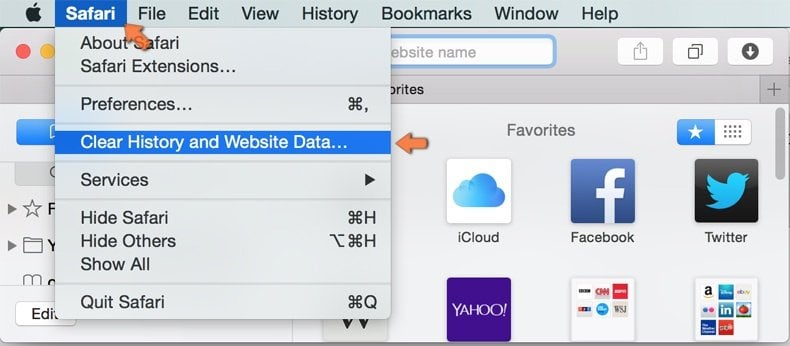
Make sure your Safari browser is active and click on Safari menu. From the drop down menu select Clear History and Website Data...
In the opened window select all history and click the Clear History button.
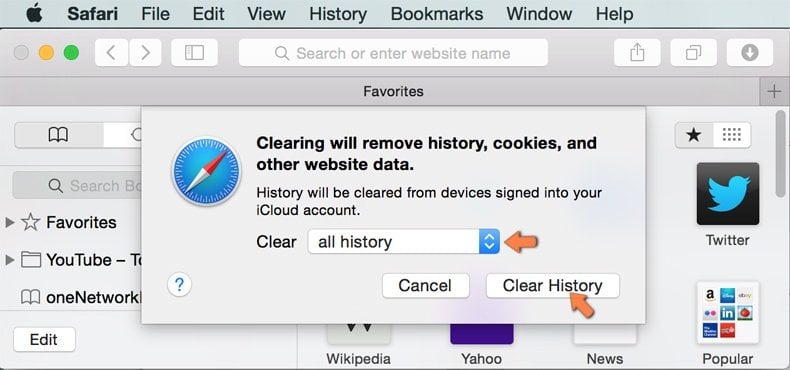
If you continue having problems with browser redirects and unwanted advertisements - Reset Safari.
 Remove malicious extensions from Microsoft Edge:
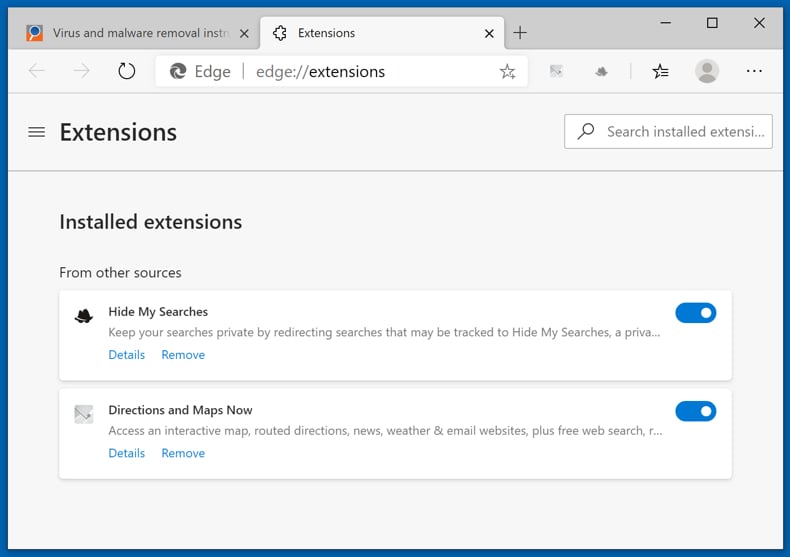
Click the Edge menu icon  (at the top right corner of Microsoft Edge), select "Extensions". Locate any recently-installed suspicious browser add-ons, and remove them.
Change your homepage and new tab settings:
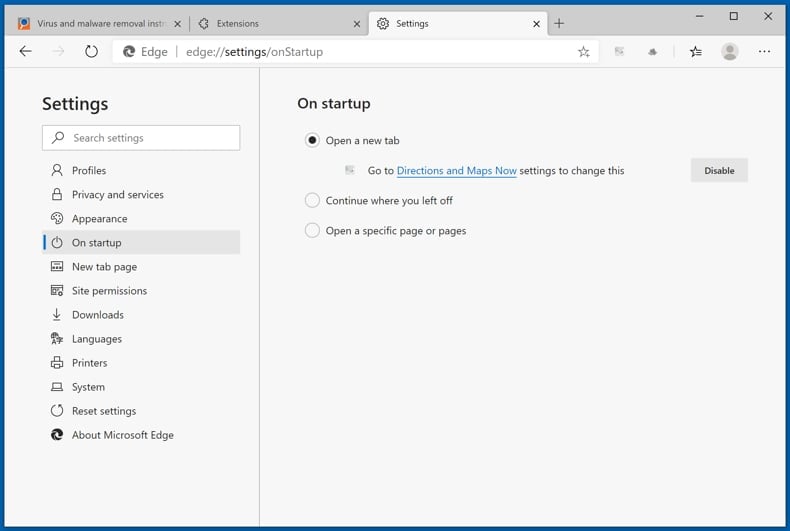
Click the Edge menu icon (at the top right corner of Microsoft Edge), select "Settings". In the "On startup" section look for the name of the browser hijacker and click "Disable".
Change your default Internet search engine:
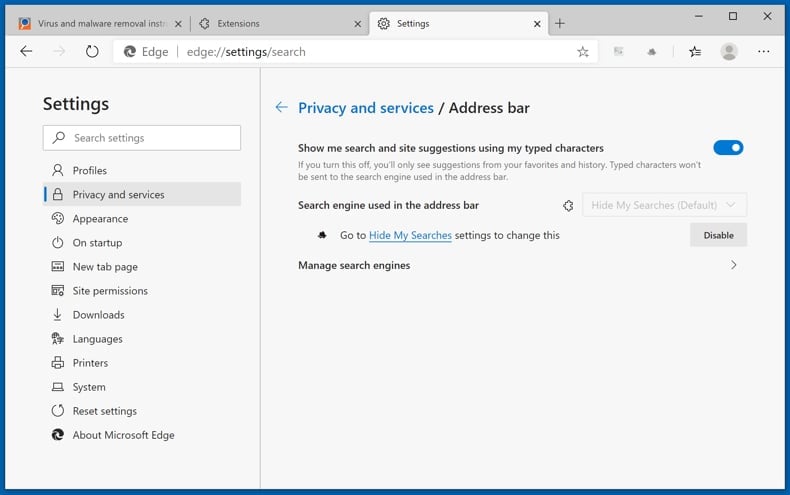
To change your default search engine in Microsoft Edge: Click the Edge menu icon (at the top right corner of Microsoft Edge), select "Privacy and services", scroll to bottom of the page and select "Address bar". In the "Search engines used in address bar" section look for the name of the unwanted Internet search engine, when located click the "Disable" button near it. Alternatively you can click on "Manage search engines", in the opened menu look for unwanted Internet search engine. Click on the puzzle icon  near it and select "Disable".
Optional method:
If you continue to have problems with removal of the twitch enhanced viewer | jeetbot malicious add-on, reset your Microsoft Edge browser settings. Click the Edge menu icon (at the top right corner of Microsoft Edge) and select Settings.
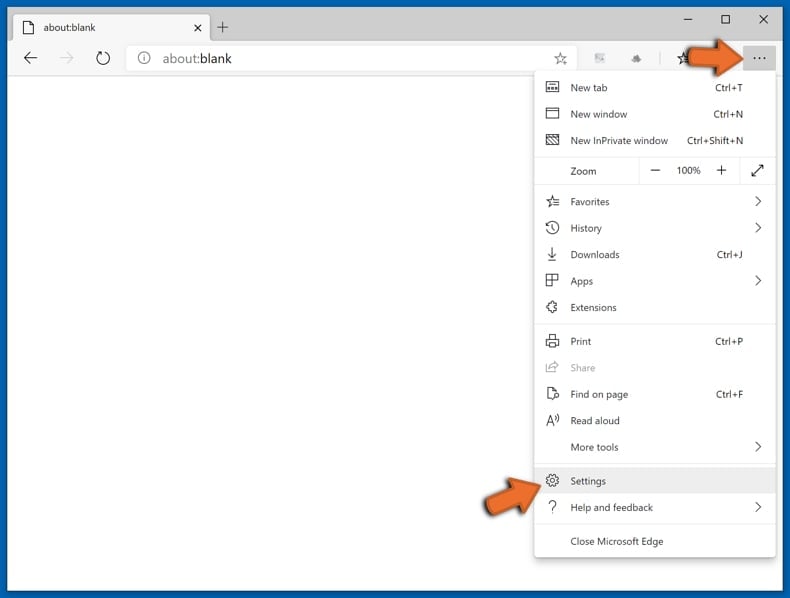
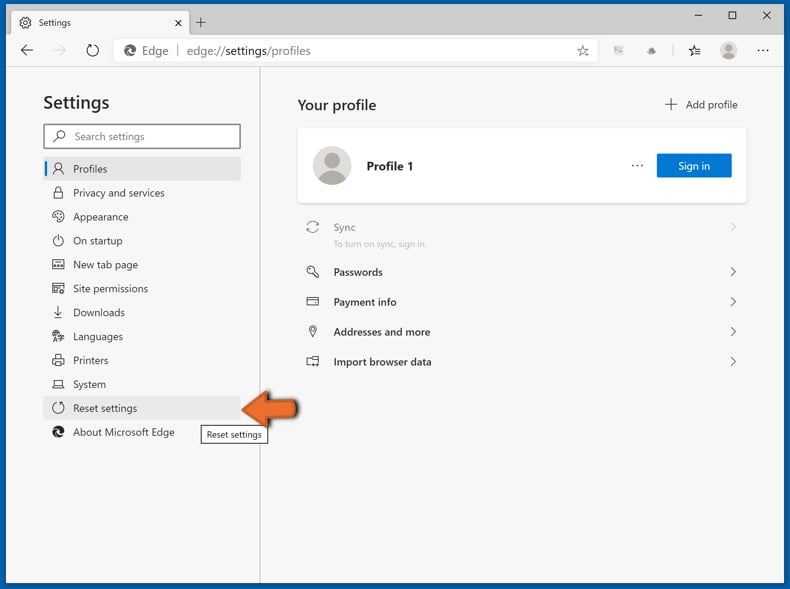
In the opened settings menu select Reset settings.
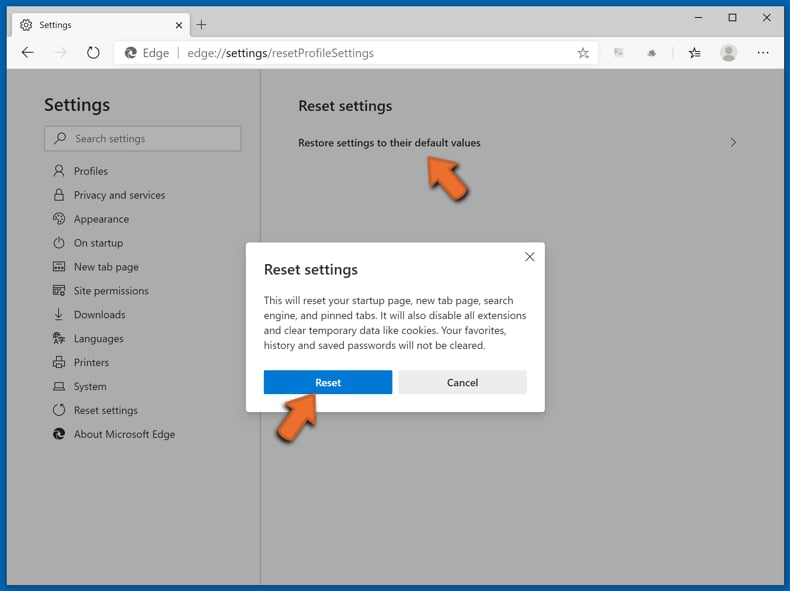
Select Restore settings to their default values. In the opened window, confirm that you wish to reset Microsoft Edge settings to default by clicking the Reset button.
- If this did not help, follow these alternative instructions explaining how to reset the Microsoft Edge browser.
Summary:
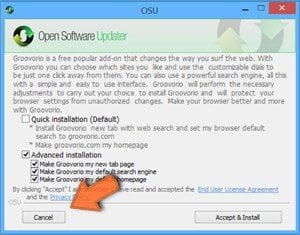 A browser hijacker is a type of adware infection that modifies Internet browser settings by assigning the homepage and default Internet search engine settings to some other (unwanted) website URL. Commonly, this type of adware infiltrates operating systems through free software downloads. If your download is managed by a download client, ensure that you decline offers to install advertised toolbars or applications that seek to change your homepage and default Internet search engine settings.
Post a comment:
If you have additional information on twitch enhanced viewer | jeetbot malicious add-on or it's removal please share your knowledge in the comments section below.
Frequently Asked Questions (FAQ)
What harm can a malicious extension like this cause?
A malicious extension with access to your browser session can steal login credentials, expose private messages, and enable account takeovers. In cases where stolen accounts are misused for purchases or fraud, it can also lead to financial loss.
What does this type of malicious extension do?
Extensions like this one intercept sensitive data such as session tokens and login credentials as users browse. The captured data is forwarded to attacker-controlled servers, where it can be used to hijack accounts, read private messages, or be sold to other threat actors.
How do the operators of this extension benefit?
The operators run a commercial Twitch bot service. Harvesting OAuth tokens from tens of thousands of users gives them direct account access, which can be exploited through affiliate programs, unauthorized channel point spending, or by selling stolen credentials to other parties.
Will Combo Cleaner remove Twitch Enhanced Viewer | JeetBot malicious extension?
Yes, Combo Cleaner can scan your browser and system, detect this malicious extension, and remove it. While browser-level removal is straightforward, a full scan ensures no related components or files remain on your system.
Share:
 Facebook
 X.com
X.com
 LinkedIn
 Copy Link

Tomas Meskauskas
Expert security researcher, professional malware analyst
I am passionate about computer security and technology. I have an experience of over 10 years working in various companies related to computer technical issue solving and Internet security. I have been working as an author and editor for pcrisk.com since 2010. Follow me on Twitter and LinkedIn to stay informed about the latest online security threats.
PCrisk security portal is brought by a company RCS LT.
Joined forces of security researchers help educate computer users about the latest online security threats. More information about the company RCS LT.
Our malware removal guides are free. However, if you want to support us you can send us a donation.
DonatePCrisk security portal is brought by a company RCS LT.
Joined forces of security researchers help educate computer users about the latest online security threats. More information about the company RCS LT.
Our malware removal guides are free. However, if you want to support us you can send us a donation.
Donate
▼ Show Discussion