
How to remove Traceguard malicious extension
TrojanAlso Known As: Traceguard — AI Web Security & Dev Agent data-stealing extension

Get free scan and check if your device is infected.
Remove it nowTo use full-featured product, you have to purchase a license for Combo Cleaner. Seven days free trial available. Combo Cleaner is owned and operated by RCS LT, the parent company of PCRisk.com.
What kind of extension is Traceguard?
Traceguard is a malicious Google Chrome extension that presents itself as "AI Web Security & Dev Agent". Its real purpose is to tamper with online banking. Our team classified it as a malicious extension and malware - it secretly redirects bank transfers to the attackers.
Traceguard is not added through the Chrome Web Store. It arrives via a Windows installer that forces Chrome to load the extension. Anyone who finds it in their browser should remove it immediately and review their recent bank transactions.
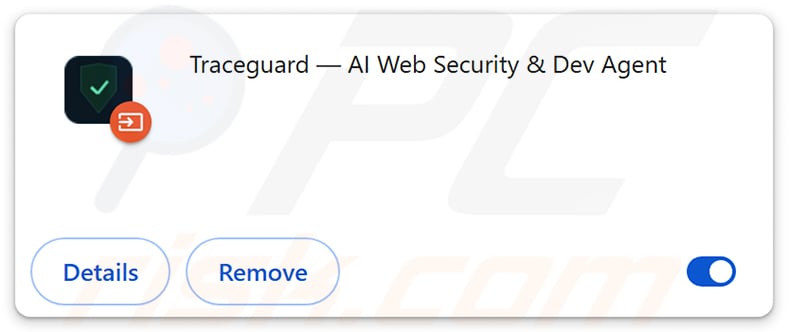
Traceguard in detail
Once active, Traceguard watches for bank-transfer forms. When the victim enters a payment, the extension quietly replaces the recipient's IBAN and the amount before the request is sent. It then restores the original details on screen, so the victim sees exactly what they typed while the bank receives the attackers' version.
Traceguard can also start payments of its own, including SEPA and SEPA Instant transfers. They are sent through the victim's active banking session, so the bank sees them as coming from the logged-in user. Instant transfers complete within seconds and are hard to reverse.
The extension also shows fake TAN prompts that look like a normal part of the banking site. In reality, they capture the one-time codes used for two-factor authentication (2FA), which the attackers can then use to approve fraudulent payments.
Traceguard is controlled through a panel whose configuration covers 1,249 bank websites across seven EU countries. The operators can switch which banks are targeted from the panel itself, without changing the extension. This makes the threat flexible and lets it be used against customers of many different banks.
The extension is delivered by a file named ATS_Installer.exe. Once launched, the installer copies itself to a folder named ChromeExtensionHost. It then starts with Windows via Run keys in the Windows Registry, scheduled tasks, and a watchdog process that restarts it if it is stopped.
Next, the installer rewrites Chrome shortcuts, closes all open browsers, and relaunches Chrome with the --load-extension option. This switch loads Traceguard straight from a local folder, bypassing the Chrome Web Store. Because the shortcuts are modified, the extension can come back every time Chrome is opened, even after it has been removed from the extensions page.
Malicious extensions loaded outside the Chrome Web Store often come with the "Managed by your organization" feature. Legitimate companies use it to set browser policies, but malware abuses it to block extension removal. If Chrome shows this message on a personal device, it is a strong sign of tampering.
In short, Traceguard can cause direct financial losses, expose banking sessions and security codes, and lead to serious privacy issues. Users who have done any online banking while this extension was present should contact their bank right away.
| Name | Traceguard — AI Web Security & Dev Agent data-stealing extension |
| Threat Type | Malicious extension, Banking malware |
| Supposed Functionality | AI web security and development assistant |
| Installer File Name | ATS_Installer.exe |
| Detection Names (ATS_Installer.exe) | Avast (Win32:Dh-A [Heur]), Combo Cleaner (Trojan.GenericKD.81739805), ESET-NOD32 (Win64/Agent.LKB Trojan), Kaspersky (Backdoor.Win32.Zegost.mublc), Microsoft (Trojan:Win32/Qwexlafiba!rfn), Full List Of Detections (VirusTotal) |
| Targets | 1,249 bank websites across seven EU countries |
| Symptoms | Unknown "Traceguard" extension in Chrome, Chrome closes and relaunches unexpectedly, unusual TAN/verification prompts during online banking, altered or unauthorized transfers on bank statements. |
| Distribution methods | Malicious Windows installer (ATS_Installer.exe), deceptive downloads, free software installers (bundling). |
| Damage | Monetary loss, unauthorized SEPA transfers, theft of 2FA/TAN codes, Internet browser tracking (potential privacy issues), loss of private information. |
| Malware Removal (Windows) |
To eliminate possible malware infections, scan your computer with legitimate antivirus software. Our security researchers recommend using Combo Cleaner. Download Combo CleanerTo use full-featured product, you have to purchase a license for Combo Cleaner. 7 days free trial available. Combo Cleaner is owned and operated by RCS LT, the parent company of PCRisk.com. |
Conclusion
Traceguard is a dangerous piece of malware. It redirects bank payments, creates transfers on its own, and steals security codes. Since its installer also rewrites Chrome shortcuts and sets up several ways to restart itself, removing the extension alone may not be enough - the whole system should be scanned. More examples of malicious extensions are Twitch Enhanced Viewer | JeetBot, QuickLens - Search Screen with Google Lens, and Corporate Monitoring Tool.
How did unwanted software install on my computer?
Traceguard is installed by running ATS_Installer.exe on Windows. Files like this are usually spread under false pretenses - disguised as useful tools, software updates, cracked programs, or attachments in phishing emails. Once the user opens the file, the rest of the process happens automatically in the background.
Malicious installers are also commonly found on unofficial download sites, peer-to-peer (P2P) networks, and third-party downloaders. Deceptive ads and fake download pages can push them as well, and some get bundled with free software that users install without checking the setup options.
How to avoid installation of unwanted applications?
Download software only from official websites and app stores. Avoid pirated programs, cracks, and key generators, and do not open executable files received via unexpected emails or messages. During installation, choose "Custom" or "Advanced" settings and decline any extra offers.
When banking online, always confirm the recipient and amount in your bank's mobile app or SMS confirmation, not only on the website. Be suspicious of extra TAN or code prompts that appear at unusual moments. Keep your operating system and browser updated and use reputable security software.
If your computer is already infected with Traceguard, we recommend running a scan with Combo Cleaner Antivirus for Windows to automatically eliminate this malicious extension.
Instant automatic malware removal:
Manual threat removal might be a lengthy and complicated process that requires advanced IT skills. Combo Cleaner is a professional automatic malware removal tool that is recommended to get rid of malware. Download it by clicking the button below:
DOWNLOAD Combo CleanerBy downloading any software listed on this website you agree to our Privacy Policy and Terms of Use. To use full-featured product, you have to purchase a license for Combo Cleaner. 7 days free trial available. Combo Cleaner is owned and operated by RCS LT, the parent company of PCRisk.com.
Quick menu:
- What is Traceguard?
- STEP 1. Uninstall suspicious applications using Control Panel.
- STEP 2. Remove rogue plug-ins from Google Chrome.
- STEP 3. Remove malicious extensions from Mozilla Firefox.
- STEP 4. Remove malicious extensions from Safari.
- STEP 5. Remove rogue plug-ins from Microsoft Edge.
Malicious extension removal:
Windows 11 users:
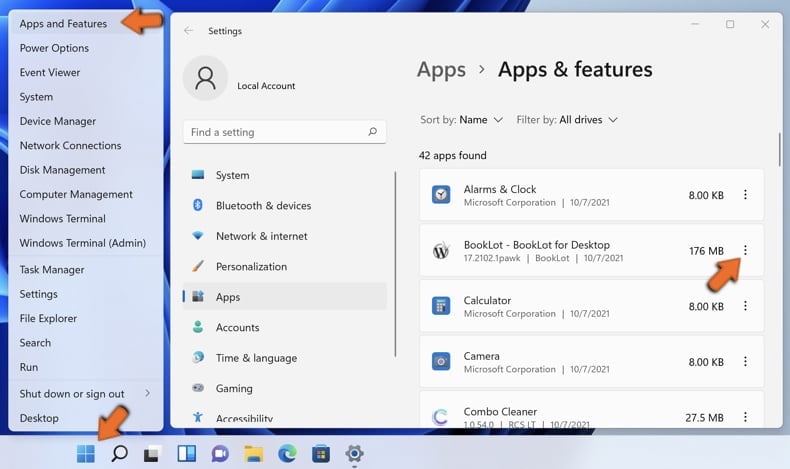
Right-click on the Start icon, select Apps and Features. In the opened window search for the application you want to uninstall, after locating it, click on the three vertical dots and select Uninstall.
Windows 10 users:
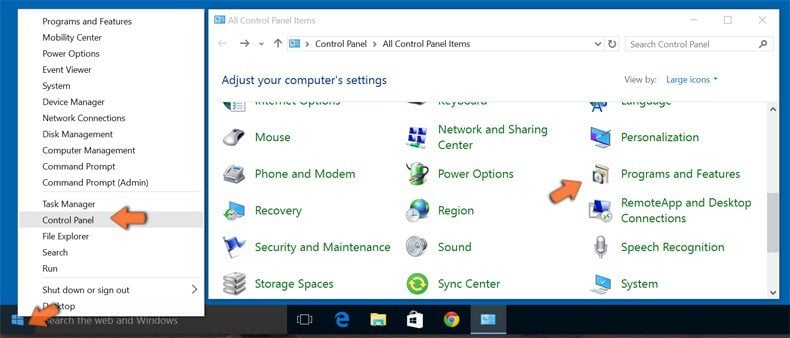
Right-click in the lower left corner of the screen, in the Quick Access Menu select Control Panel. In the opened window choose Programs and Features.
Windows 7 users:
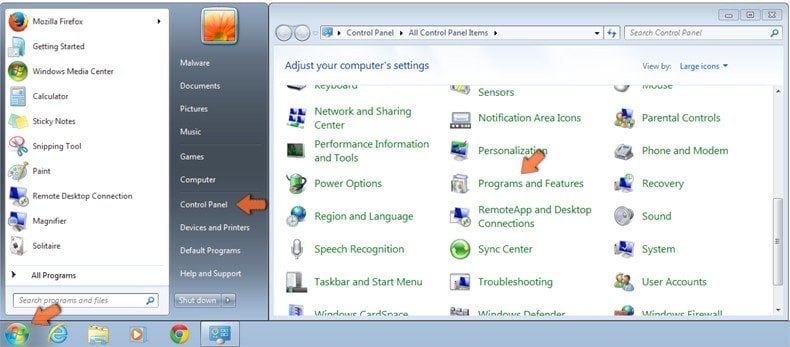
Click Start (Windows Logo at the bottom left corner of your desktop), choose Control Panel. Locate Programs and click Uninstall a program.
macOS (OSX) users:
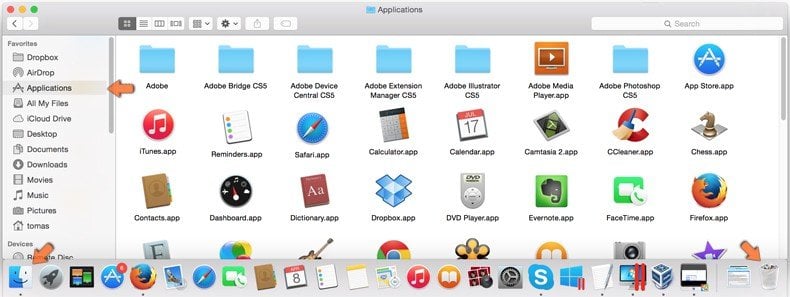
Click Finder, in the opened screen select Applications. Drag the app from the Applications folder to the Trash (located in your Dock), then right click the Trash icon and select Empty Trash.
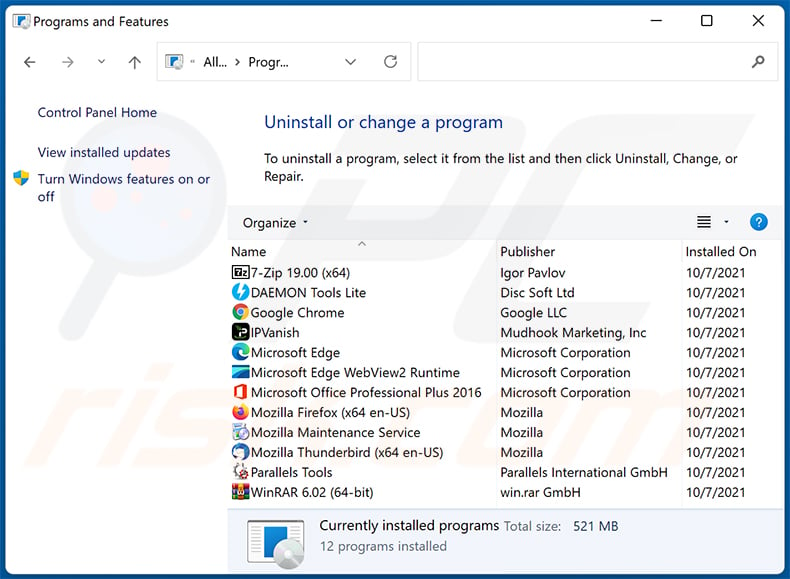
In the uninstall programs window, look for any unwanted applications, select these entries and click "Uninstall" or "Remove".
After uninstalling the unwanted application, scan your computer for any remaining unwanted components or possible malware infections. To scan your computer, use recommended malware removal software.
DOWNLOAD remover for malware infections
Combo Cleaner checks if your computer is infected with malware. To use full-featured product, you have to purchase a license for Combo Cleaner. 7 days free trial available. Combo Cleaner is owned and operated by RCS LT, the parent company of PCRisk.com.
Remove malicious extensions from Internet browsers:
Video showing how to remove unwanted browser add-ons:
 Remove malicious extensions from Google Chrome:
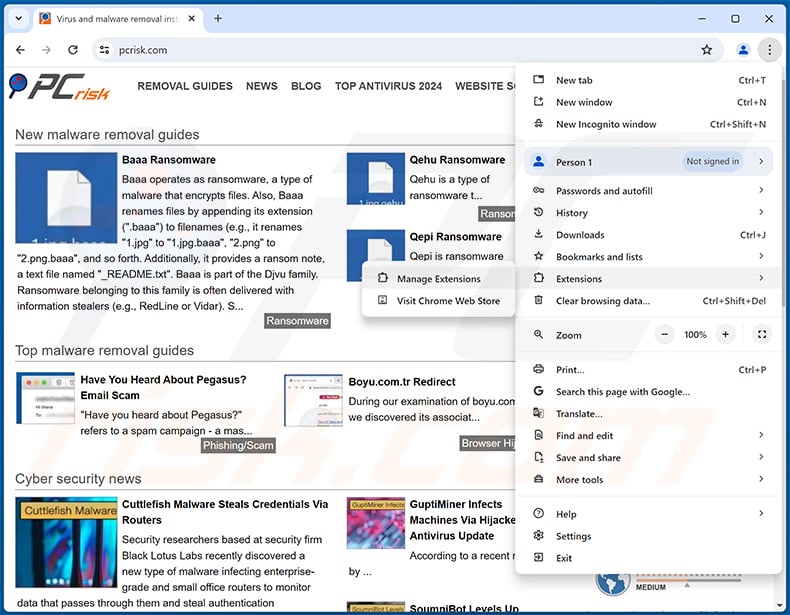
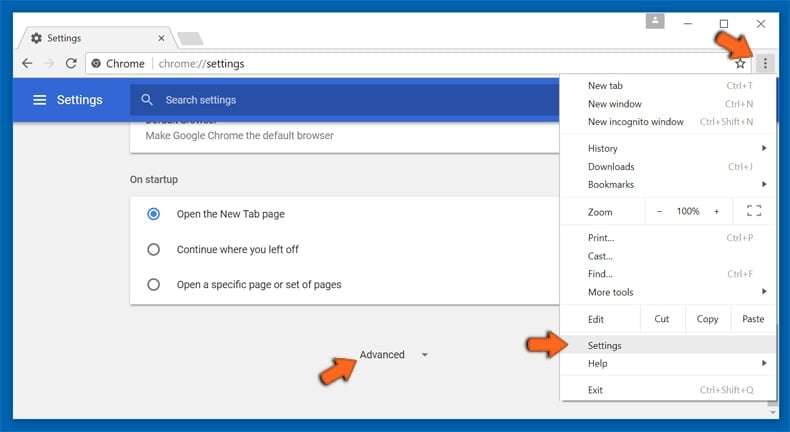
Click the Chrome menu icon  (at the top right corner of Google Chrome), select "Extensions" and click "Manage Extensions". Locate "Traceguard - AI Web Security & Dev Agent" or other suspicious extensions, select these entries and click "Remove".
Since Traceguard's installer modifies Chrome shortcuts, also right-click each Chrome shortcut (on the desktop, taskbar, and Start menu), select "Properties", and delete any --load-extension text from the "Target" field. Otherwise, the extension may load again the next time Chrome starts.
If the extension is locked (you see the "Your browser is managed by your organization" feature enabled) read this article for detailed removal instructions.
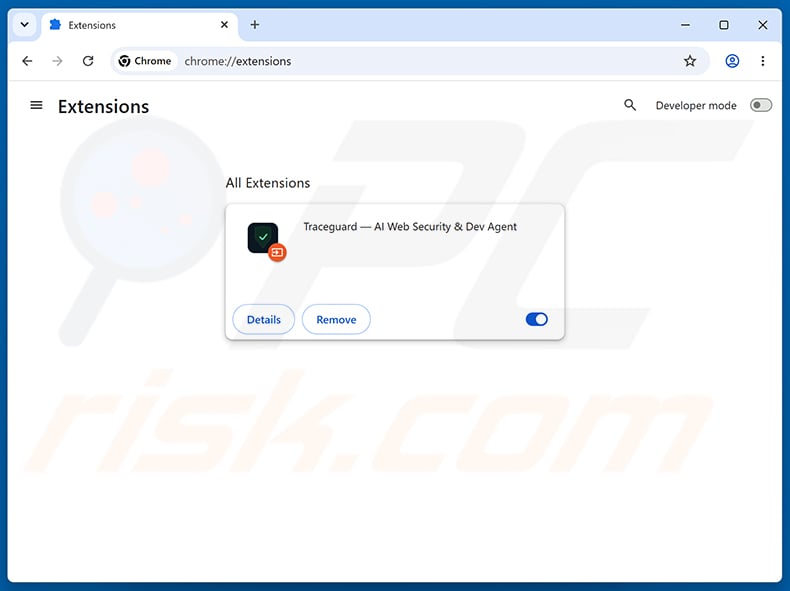
Optional method:
If you continue to have problems with removal of the traceguard — ai web security & dev agent data-stealing extension, reset your Google Chrome browser settings. Click the Chrome menu icon (at the top right corner of Google Chrome) and select Settings. Scroll down to the bottom of the screen. Click the Advanced… link.
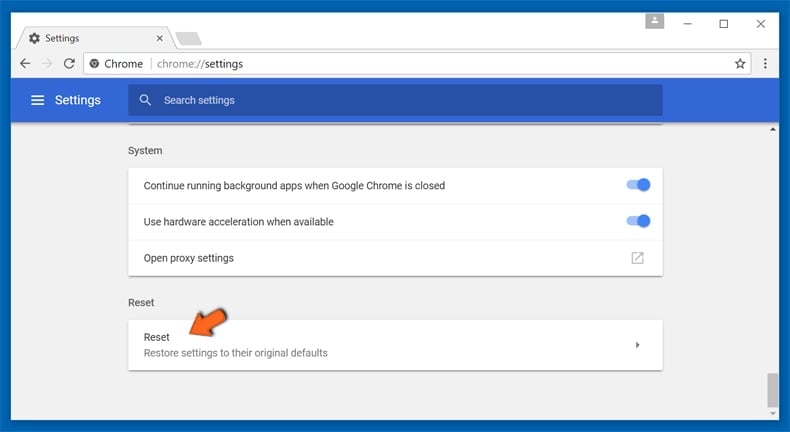
After scrolling to the bottom of the screen, click the Reset (Restore settings to their original defaults) button.
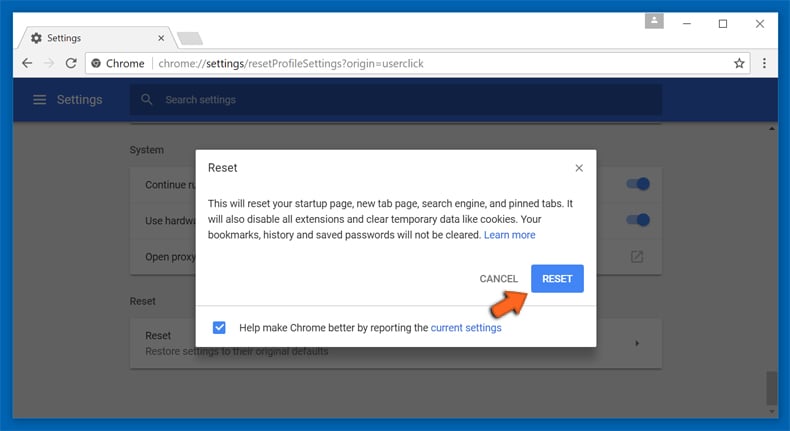
In the opened window, confirm that you wish to reset Google Chrome settings to default by clicking the Reset button.
 Remove malicious plug-ins from Mozilla Firefox:
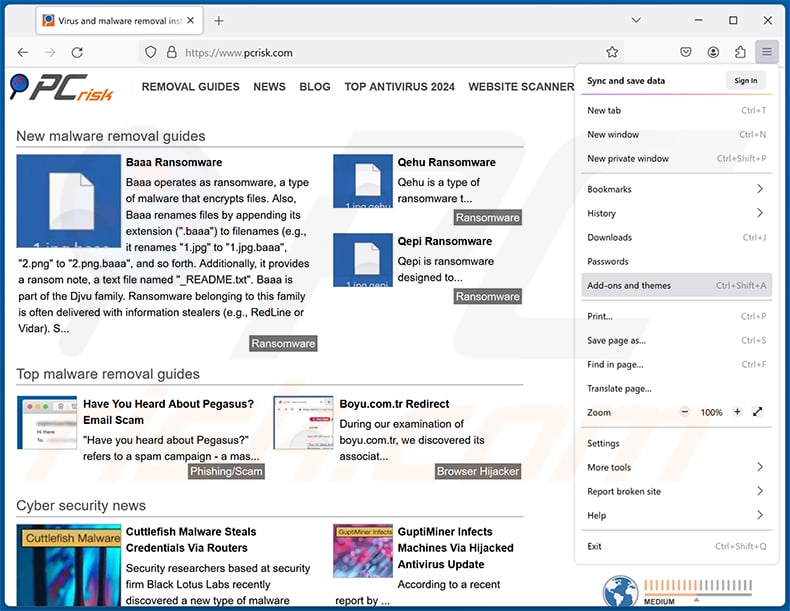
Click the Firefox menu  (at the top right corner of the main window), select "Add-ons and themes". Click "Extensions", in the opened window locate all recently-installed suspicious extensions, click on the three dots and then click "Remove".
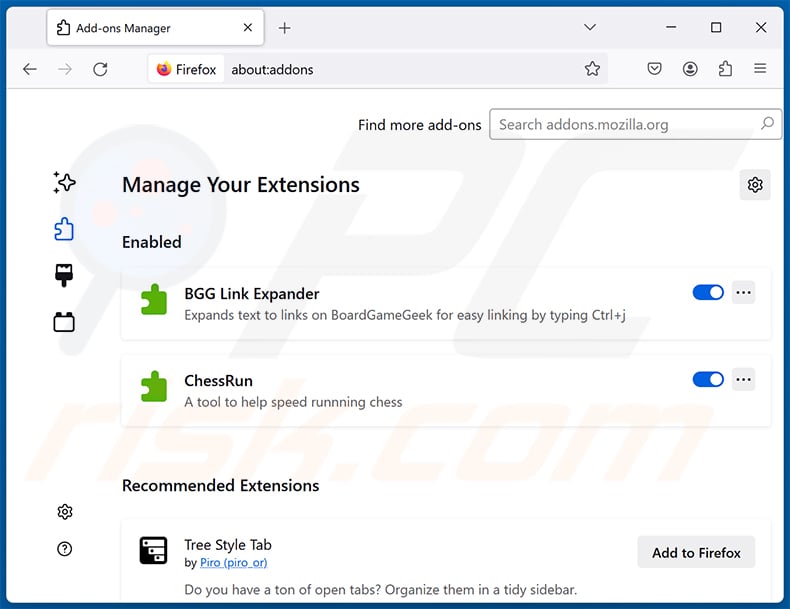
Optional method:
Computer users who have problems with traceguard — ai web security & dev agent data-stealing extension removal can reset their Mozilla Firefox settings.
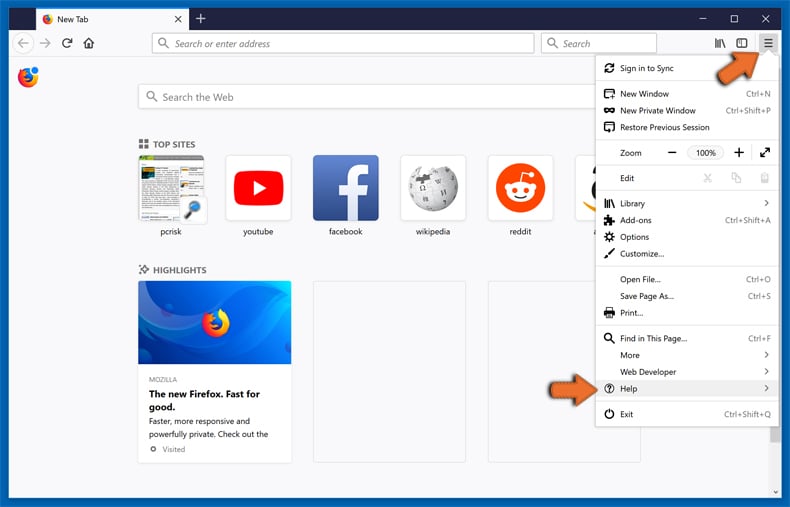
Open Mozilla Firefox, at the top right corner of the main window, click the Firefox menu, in the opened menu, click Help.
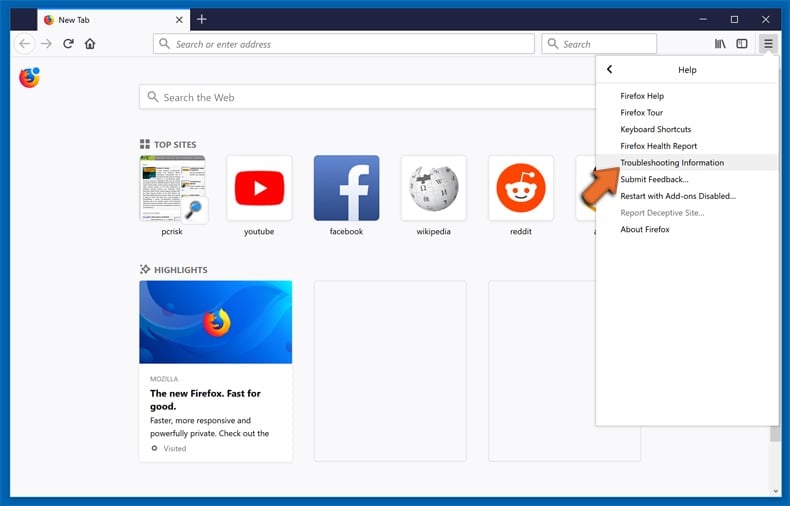
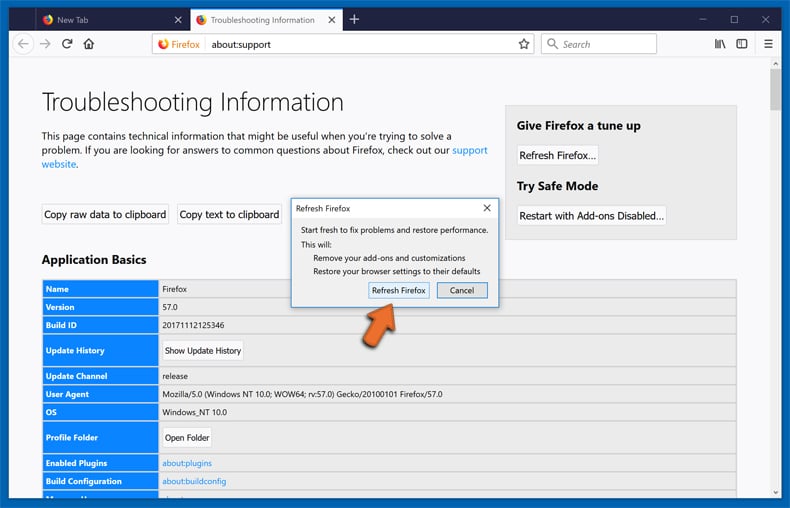
Select Troubleshooting Information.
In the opened window, click the Refresh Firefox button.
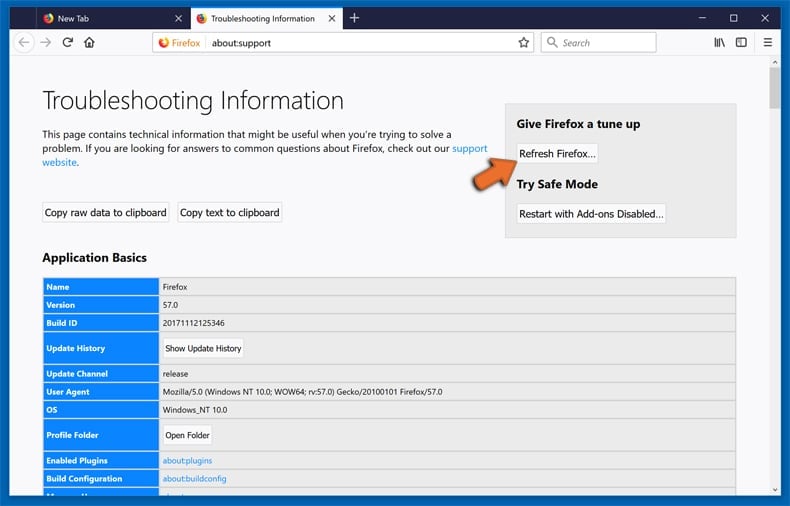
In the opened window, confirm that you wish to reset Mozilla Firefox settings to default by clicking the Refresh Firefox button.
 Remove malicious extensions from Safari:
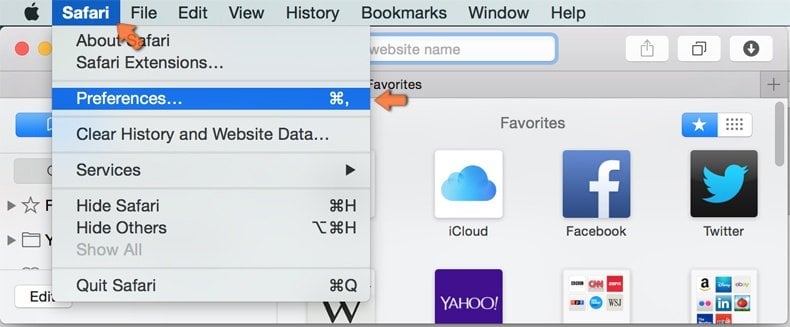
Make sure your Safari browser is active, click Safari menu, and select Preferences....
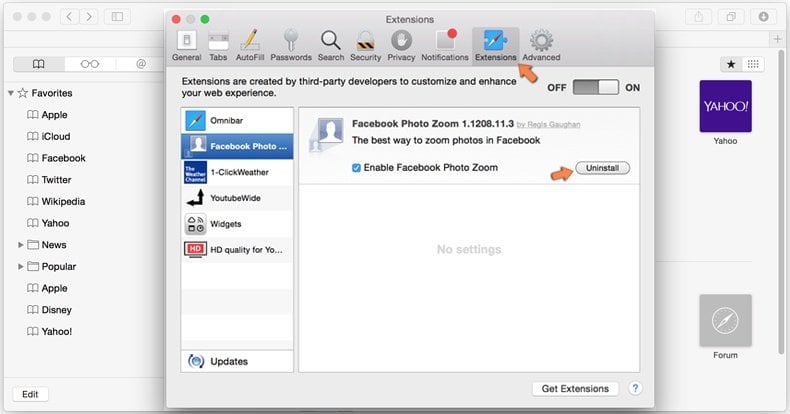
In the opened window click Extensions, locate any recently installed suspicious extension, select it and click Uninstall.
Optional method:
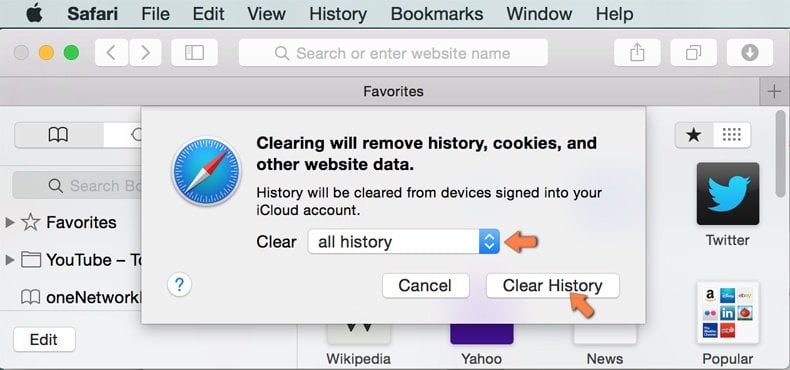
Make sure your Safari browser is active and click on Safari menu. From the drop down menu select Clear History and Website Data...
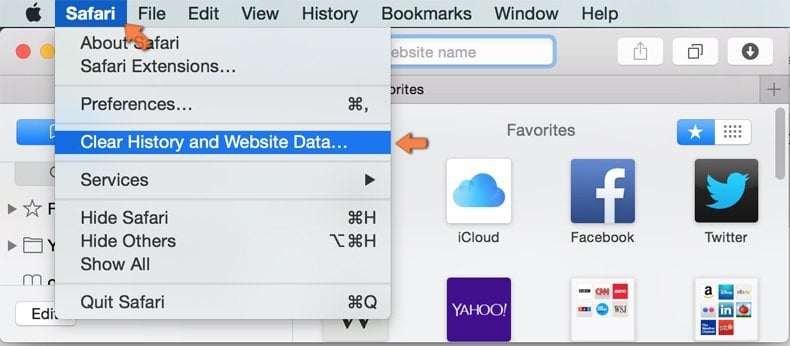
In the opened window select all history and click the Clear History button.
 Remove malicious extensions from Microsoft Edge:
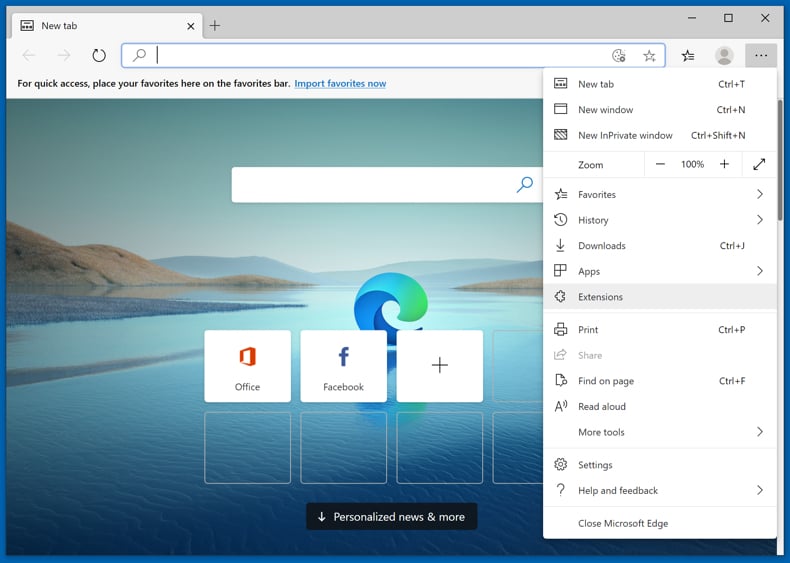
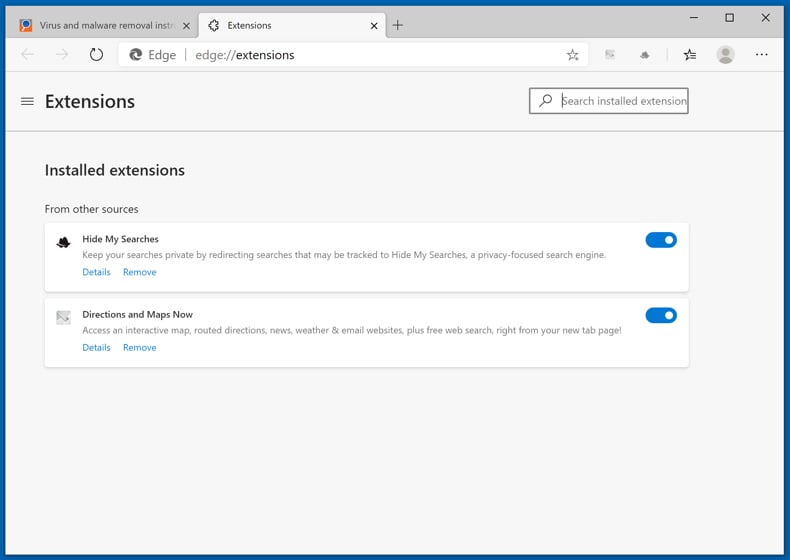
Click the Edge menu icon  (at the upper-right corner of Microsoft Edge), select "Extensions". Locate all recently-installed suspicious browser add-ons and click "Remove" below their names.
Optional method:
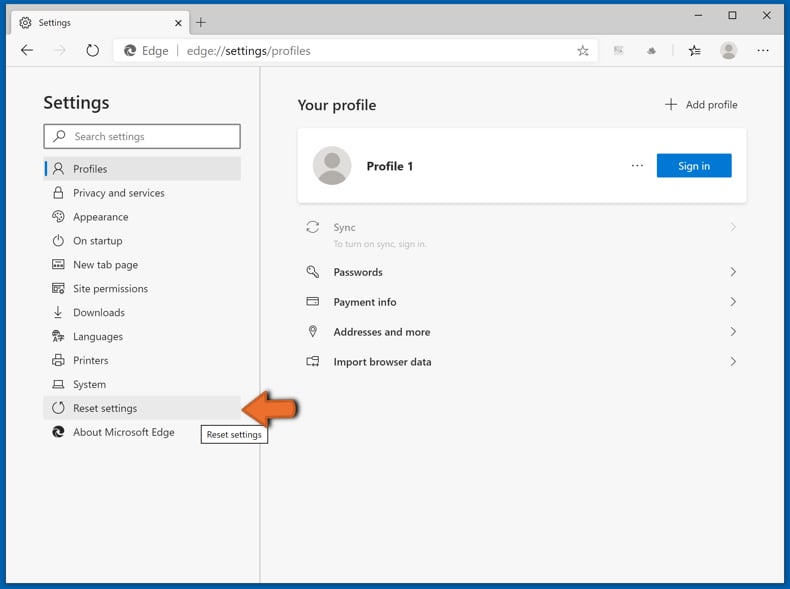
If you continue to have problems with removal of the traceguard — ai web security & dev agent data-stealing extension, reset your Microsoft Edge browser settings. Click the Edge menu icon (at the top right corner of Microsoft Edge) and select Settings.
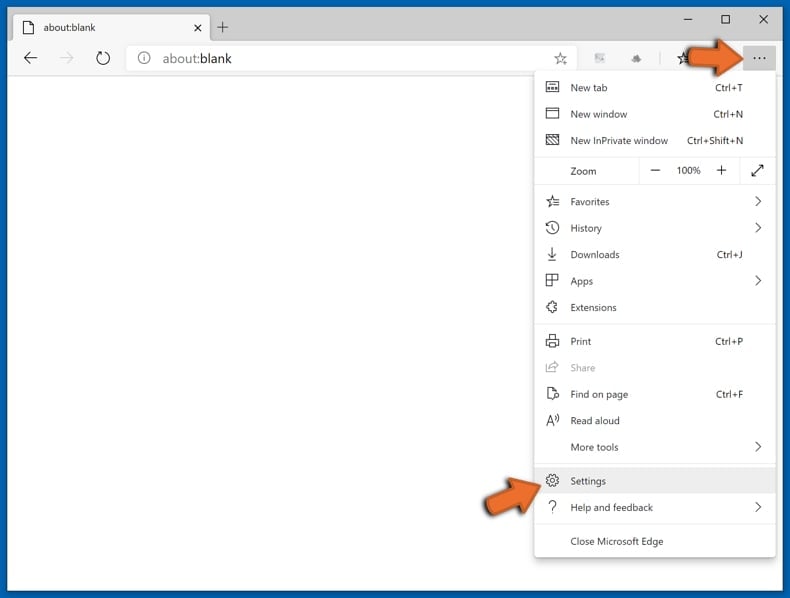
In the opened settings menu select Reset settings.
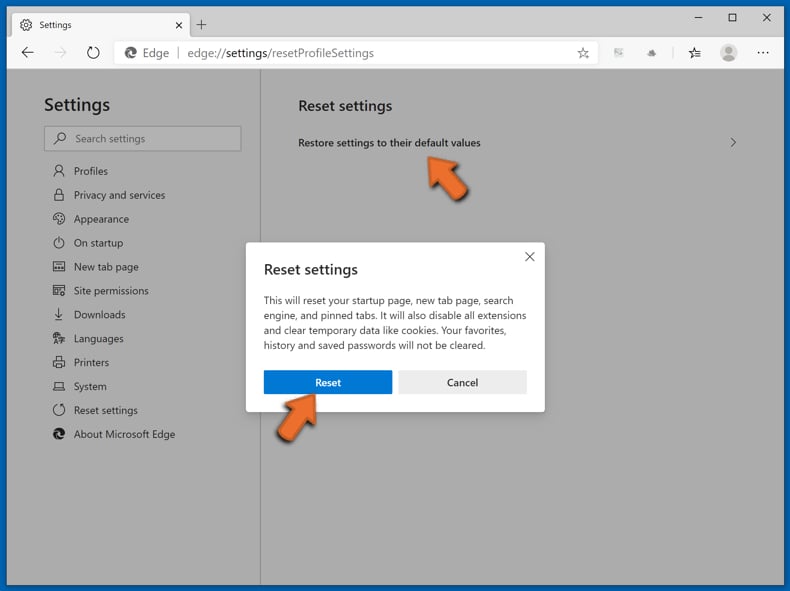
Select Restore settings to their default values. In the opened window, confirm that you wish to reset Microsoft Edge settings to default by clicking the Reset button.
- If this did not help, follow these alternative instructions explaining how to reset the Microsoft Edge browser.
Frequently Asked Questions (FAQ)
What harm can a malicious extension like Traceguard cause?
Traceguard can redirect bank transfers to the attackers, start unauthorized SEPA payments, and steal the one-time codes used to confirm transactions. The result can be direct financial losses that are difficult to recover.
What do malicious browser extensions do?
Malicious extensions abuse their access to the websites you visit. Depending on the type, they can read and change page content, steal passwords and cookies, track browsing activity, or perform actions in the browser without permission.
How did Traceguard get into my browser?
Traceguard is installed by a Windows file named ATS_Installer.exe. Once run, it rewrites Chrome shortcuts, closes the browser, and relaunches Chrome with the extension loaded from a local folder. The installer is likely spread through fake downloads, cracked software, or malicious email attachments.
Will Combo Cleaner remove Traceguard?
Yes, Combo Cleaner will scan your computer and remove malicious extensions and related files. This matters with Traceguard, since its installer sets up scheduled tasks, startup entries, and a watchdog process that manual removal of the extension alone will not clear.
Share:
 Facebook
 X.com
 LinkedIn
 Copy Link

Tomas Meskauskas
Expert security researcher, professional malware analyst
I am passionate about computer security and technology. I have an experience of over 10 years working in various companies related to computer technical issue solving and Internet security. I have been working as an author and editor for pcrisk.com since 2010. Follow me on Twitter and LinkedIn to stay informed about the latest online security threats.
PCrisk security portal is brought by a company RCS LT.
Joined forces of security researchers help educate computer users about the latest online security threats. More information about the company RCS LT.
Our malware removal guides are free. However, if you want to support us you can send us a donation.
DonatePCrisk security portal is brought by a company RCS LT.
Joined forces of security researchers help educate computer users about the latest online security threats. More information about the company RCS LT.
Our malware removal guides are free. However, if you want to support us you can send us a donation.
Donate
▼ Show Discussion