
We may earn commissions from products we recommend. Learn more.
How to opt out of Whitepages in 2026

How to opt out of Whitepages in 2026?
Whitepages is a people-search website that makes personal information easily accessible. A single profile may link your name to phone numbers, addresses, age range, relatives, associates, and property details. Some data is public, while additional records are available through paid services.
Consolidating this information in a single searchable profile increases privacy and security risks. Scammers may use personal information to make fraudulent communications more convincing. Publicly available addresses and family connections can also lead to harassment, stalking, doxxing, unwelcome contact, and identity-related fraud. People-search sites gather data from public records, social media profiles, and other data brokers. Most importantly, opting out does not always remove the original records or prevent information from reappearing.
This article explains how to manually remove your information from Whitepages, outlines steps to take if the standard process is unsuccessful, and explains how a data removal service can help reduce your exposure with other data brokers.
Opt out of Whitepages with Incogni
Table of Contents:
- Introduction
- What is Whitepages?
- How to manually remove your information from Whitepages?
- Common issues with manual removal and alternative opt-out routes
- How to automatically remove your information from Whitepages?
- Why should you remove your information from Whitepages?
- How to prevent data brokers from collecting more of your data?
- In closing
- Frequently Asked Questions (FAQ)
What is Whitepages?
Whitepages is an online directory and people-search service that enables users to find individuals by name, telephone number, or address. Depending on the record and service type, search results may include phone numbers, email addresses, addresses, age, relatives, associates, property details, and other public information. The company states its services help users contact individuals, verify identities, detect suspicious phone calls, prevent fraud, conduct background research, and enhance family safety.
Whitepages offers more than a digital phone directory. Modern people-search websites connect records from multiple sources and organize them by individual. The Federal Trade Commission (FTC) notes that these sites may buy information from other data brokers, collect details from public social media accounts, and compile federal, state, and local records. Sources include property records, voter registrations, professional licenses, driving records, court records, and records of births, marriages, divorces, and deaths.
This aggregation raises major privacy concerns. While individual details may exist in separate databases, combining them into a single searchable profile makes it much easier to identify, contact, profile, or target someone. To elaborate, a scammer with access to your previous address, age, relatives' names, and phone number can create a far more convincing story than one with only your email address. For example, an attacker might impersonate a bank, delivery company, utility provider, government office, family member, or debt collector. Privacy organizations and federal agencies warn that brokered information can facilitate scams, stalking, spying, and other harmful targeting. Location exposure is particularly serious for survivors of domestic violence, stalking victims, public officials, journalists, healthcare workers, teachers, law enforcement, online creators, and anyone involved in contentious disputes.
Profiles may also be inaccurate. Data brokers process large volumes of information from sources that update at different times. Therefore, listings may include outdated addresses, disconnected phone numbers, incorrect relatives, or information belonging to someone with a similar name. Inaccurate data can harm reputations or cause mistaken contact.
Removing your Whitepages profile does not erase all records about you. Whitepages may have obtained information from government records or other public databases. Opting out reduces accessibility by suppressing your profile on Whitepages, but it does not alter courthouse files, property records, voter databases, or documents held by public authorities. Data may also remain visible in reports related to relatives, neighbors, or associates.
Nevertheless, suppressing the listing is worthwhile. Privacy protection is often achieved by removing convenient access points rather than attempting to erase every trace of a person's existence. A determined researcher may still locate records elsewhere, but removing a consolidated Whitepages profile increases the effort required to collect them.
How to manually remove your information from Whitepages?
Manual removal is free and gives you direct control over your Whitepages listing. This method is best when you have identified specific profiles as yours. You will need the profile URL and a working telephone number for verification. Completing the form typically takes up to 15 minutes, and processing may take up to 72 hours after verification. It is pertinent to mention that the general advice for people-search and data broker websites is that information removal can take up to 5 business days.
Before you begin, use a separate email address for privacy requests and close unrelated browser tabs. Ensure you are on the official Whitepages website before entering information. Do not pay third-parties to access the standard Whitepages suppression form.
To manually remove your information from Whitepages, follow these steps (note that page layouts, wording, and verification requirements may change over time):
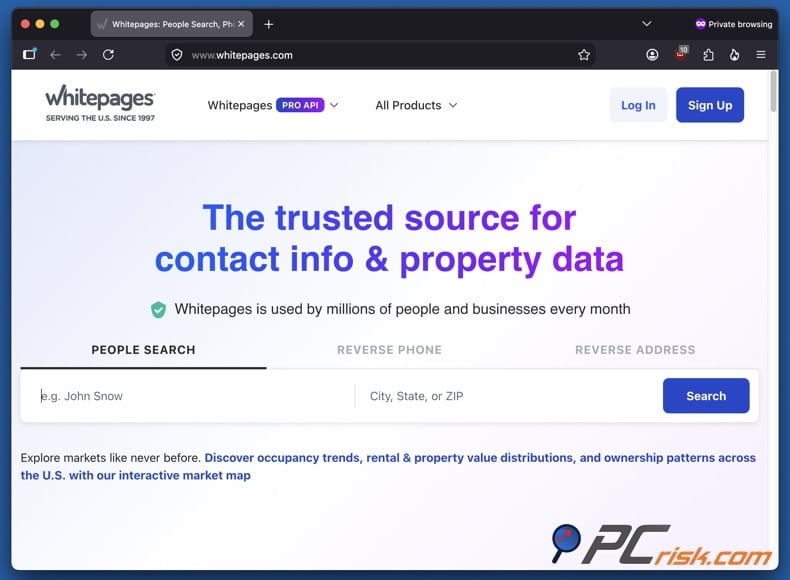
1. Open Whitepages and enter your first and last name. Add a city and state to narrow down the results if needed. If you have used other names, such as a previous surname, search for those as well.
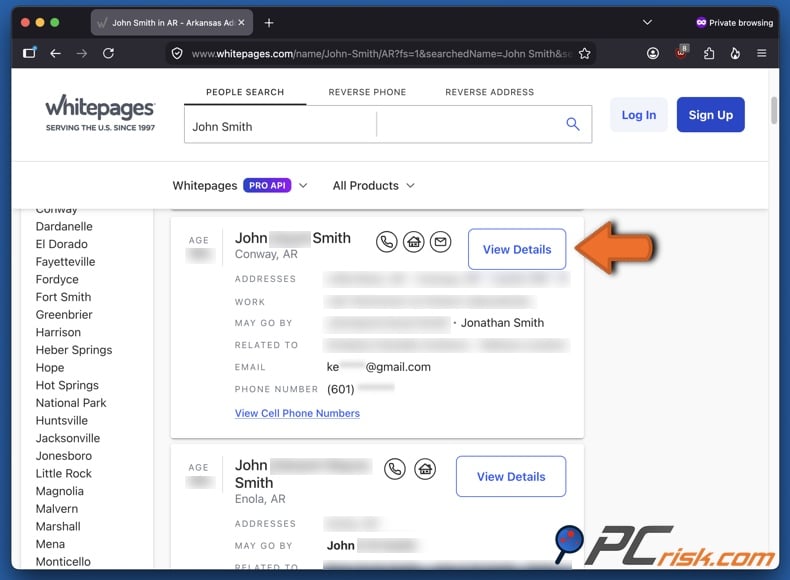
2. Review the results carefully and access your profile. Compare age range, locations, known relatives, and other details. Once you have located the profile that you are certain is yours, click "View Details". Note that suppressing another person's listing may cause complications.
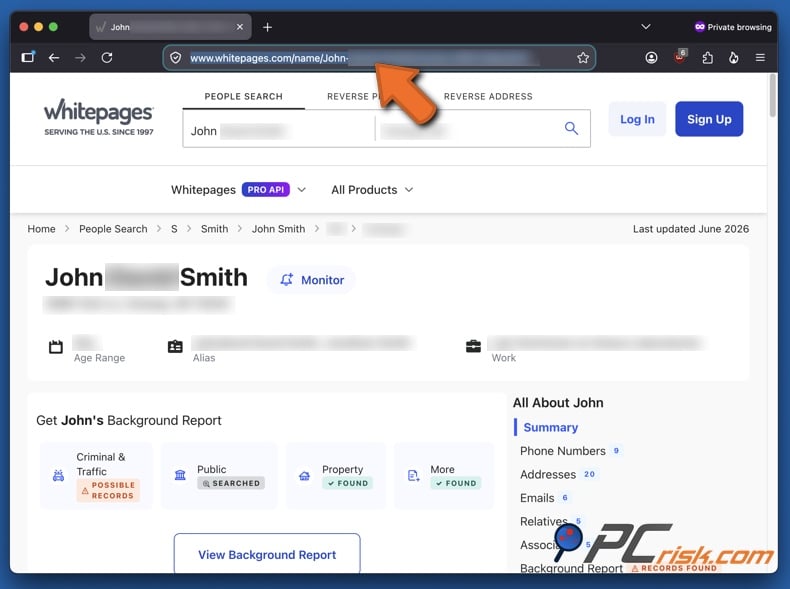
3. Copy the URL of your profile. Verify that his listing is yours and then copy the full address from your browser's address bar. Whitepages uses this URL to identify the record you want to suppress. Save the URL and the date of your submission in a document. This will help if you need to contact support. For multiple profiles, copy each URL separately. Whitepages does not currently offer a bulk-removal option through the standard form.
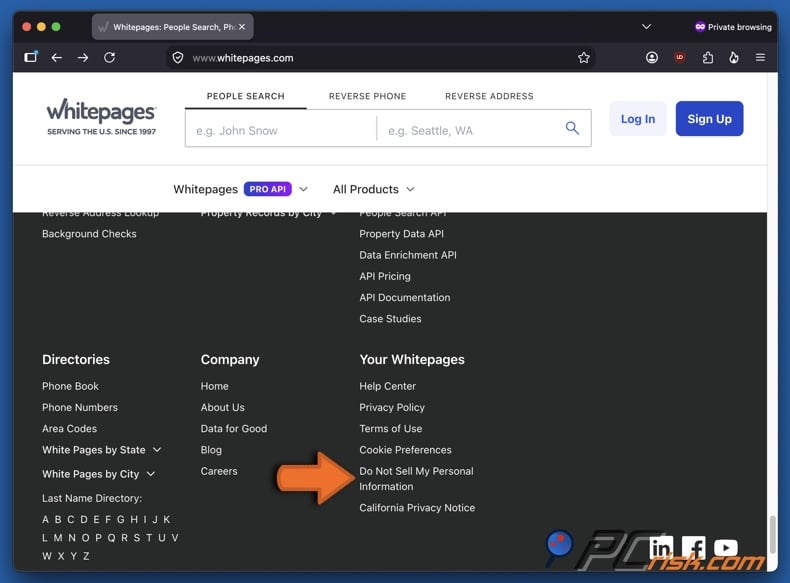
4. Open Whitepages' opt-out page. Currently, accessing the page requires you to scroll down Whitepages' homepage and click "Do Not Sell My Personal Information" in the "Your Whitepages" section. As mentioned, website layouts, buttons, exact wording, and other details can change. Generally, opt-out pages and suppression forms can be located in website footers, privacy sections, or help centers.
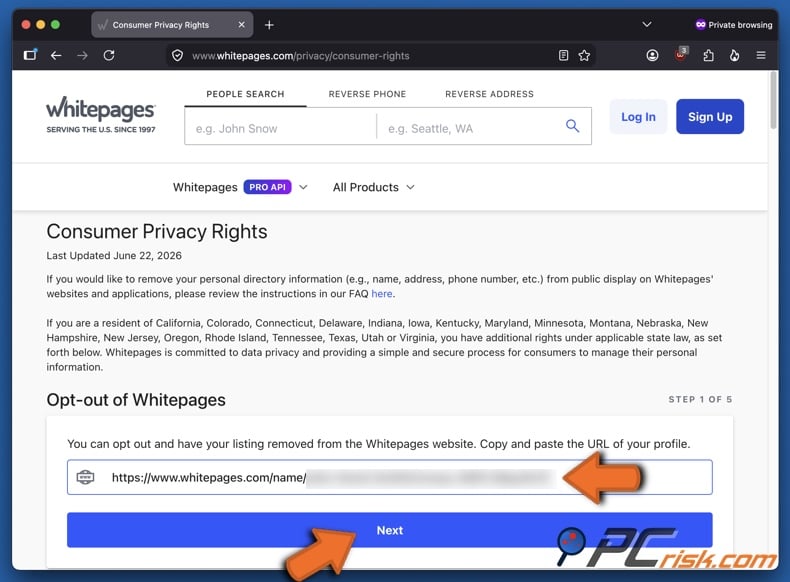
5. Paste your profile URL in the opt-out page. Paste the copied URL into the appropriate field and click "Next".
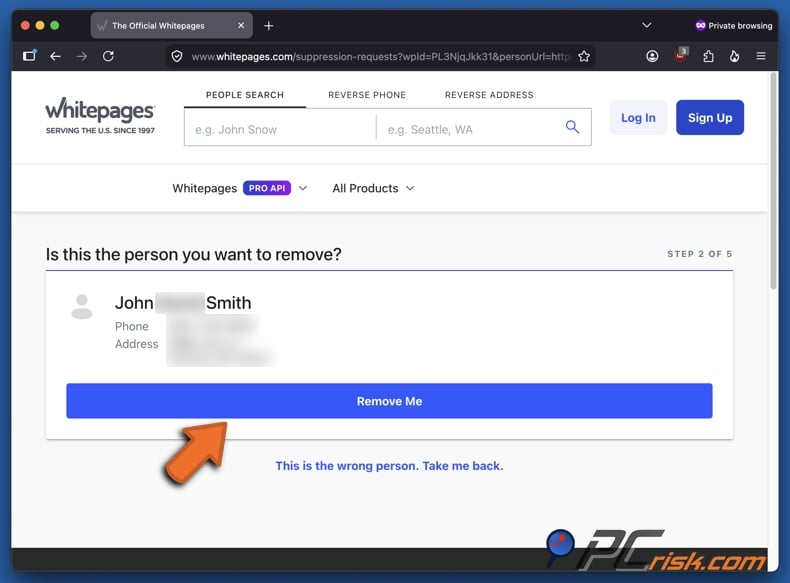
6. Confirm that the to-be-removed listing belongs to you. Whitepages should display the profile linked to the submitted URL. Review it to confirm it is correct, then click "Remove Me" or equivalent button. If the displayed details do not match you, stop and return to the search results to find the correct profile.
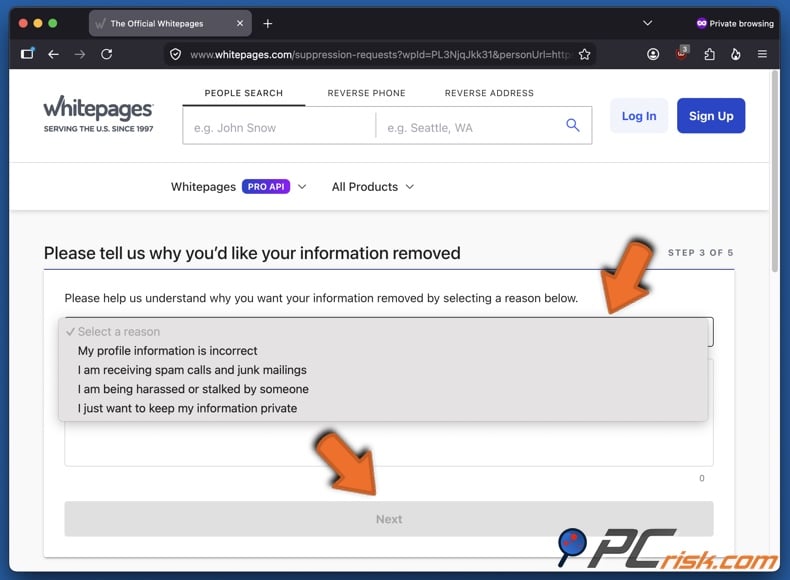
7. Select a reason for removal. Choose why you want the listing removed from the menu, such as incorrect information, spam, harassment/stalking, privacy, or another concern. You can expand on your reasoning in the text field below. Afterward, click "Next".
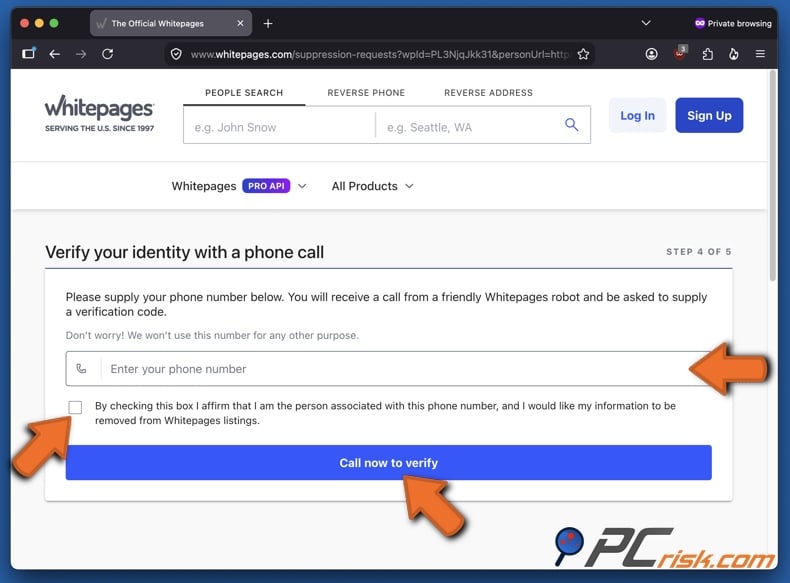
8. Enter a telephone number for verification. Provide an active phone number you control, mark the checkbox to affirm its ownership, and click "Call now to verify". The verification number does not need to be publicly listed in the profile, but it must be a number you can answer. The standard form does not currently offer an email alternative for verification.
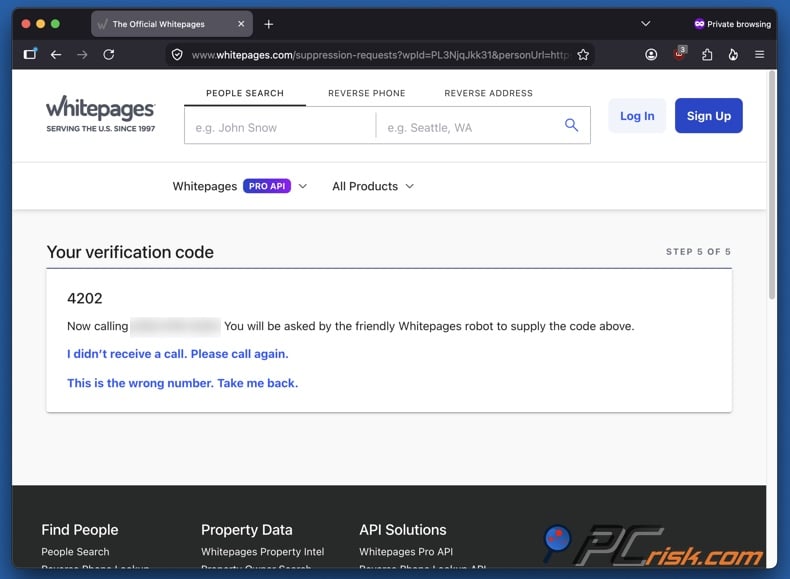
9. Answer the automated call and enter the verification code. Whitepages will display a code, which you will need to provide to the callbot. Follow the instructions until the system confirms your suppression request. If you use call-screening or spam-blocking, temporarily monitor blocked and unknown calls to ensure the verification call is not missed.
10. Check the listing after processing. Wait for processing, then search Whitepages again using your name, telephone number, address, and common name variations. Confirmed opt-outs are usually processed within 72 hours, though some listings may disappear sooner. Additionally, open the original profile URL to confirm the listing is no longer available. Keep a record of your request and set reminders to check after several weeks and periodically in the future.
Whitepages offers both standard public listings and paid access to additional information. Suppressing the standard profile usually removes the related Premium entry point as well. There is generally no separate Premium opt-out form. However, check both the free search result and any Premium preview after processing. Contact Whitepages support if a paid report teaser remains linked to your identity.
Do not assume that removal from Whitepages will immediately update all Google results. Search engines may continue to show outdated titles or snippets until the page is re-crawled. Google's "Results about you" feature can help you find and request removal of eligible results containing your home address, telephone number, or email address. Use the "Refresh outdated content" tool if the source page has already been removed or changed.
Common issues with manual removal and alternative opt-out routes
Manual removal from Whitepages may seem simple, but several issues can hinder a successful request. Some are unique to this service's URL and telephone verification process, while others are common across the data broker industry.
The profile URL is rejected: the suppression form may reject incomplete URLs, search-result addresses, or links from advertisements instead of the actual profile. Open the full profile, copy the complete address from your browser, and resubmit. Remove any tracking parameters if the URL includes a long suffix after the main address.
You cannot identify the correct listing: common names may yield many similar results. Refine your search by adding city, state, age, previous address, or phone number. Review known relatives and past locations before submitting a request. Repeat this process for each profile that belongs to you.
The telephone verification call does not arrive: spam filters, carrier call blocking, poor coverage, incorrect numbers, or temporary delays may prevent the automated call. Confirm your number, temporarily disable call screening, wait a few minutes, and request another call. Avoid submitting repeated requests in quick succession, as automated systems may deem them suspicious.
You do not want to provide your telephone number: this concern is understandable, as the goal is to reduce personal data exposure. However, Whitepages' standard suppression form requires telephone verification. If you prefer not to use this form, contact the privacy or support teams to ask about other verification options. Additional information may be needed to confirm your identity.
The listing remains after verification: wait for the stated processing period before escalating. Use a private browser or clear your cache, as cached data can make a removed listing appear active. Check the direct profile address, not just the Google snippet. If the profile is still visible after about 72 hours, contact Whitepages support with the URL, request date, and a brief description of the issue.
Only one of several profiles disappeared: Whitepages requires a separate request for each profile URL. Requests for one listing do not automatically cover duplicates, alternate spellings, maiden names, or records tied to previous locations. Search again and submit each matching profile individually.
A Premium preview remains visible: the suppression process should remove both the standard profile and the associated Premium entry. If the free record is gone but a paid-report preview remains, capture both URLs and submit them to Whitepages support. Do not purchase your own report just to check if it still exists.
Your data reappears: suppression is not always permanent. Profiles may return when public records change or people-search companies receive updated information. New addresses, phone accounts, property transactions, court filings, professional licenses, or updated broker feeds can trigger new profiles.
The profile is gone, but Google still shows it: Google Search operates independently. Removing the source listing does not immediately update search results. Use Google's "Refresh outdated content" tool if the page has been removed or no longer contains your information. For results that still display contact details, use "Results about you" or Google's personal information removal process.
The original record remains available elsewhere: suppression on Whitepages only applies to this website, not the original sources such as government agencies, courts, property offices, telephone providers, social networks, or other data brokers. Opting out of a people-search site does not remove information from public records.
If the standard opt-out form is unsuccessful, consider these alternative options:
Submit a Whitepages support request: use the privacy support portal and include the profile URL, your name, the date of the failed attempt, and a clear suppression request. Provide only the identification required.
Use the applicable consumer-rights form: California Privacy Protection Agency's (CPPA) Data Broker Registration provides a dedicated Whitepages California Consumer Privacy Act (CCPA) route for residents. Certain protected individuals can also submit deletion requests through Whitepages support. Privacy rights and verification requirements differ by jurisdiction, so use the form relevant to your residence.
Use California's DROP platform: eligible California residents can submit a request through the Delete Request and Opt-out Platform (DROP) to active registered data brokers. DROP began accepting submissions on January 1, 2026, and brokers became responsible for processing requests on August 1, 2026. The platform requires brokers to process deletion requests at least once every 45 days, subject to verification and legal exceptions.
Use a personal data removal service: paid services can manage requests across multiple brokers and monitor for reappearance of your information. Before subscribing, confirm whether Whitepages is included in standard coverage or requires a custom request. Coverage and plan features may change.
Always keep screenshots or notes of the profile, URL, submission date, verification result, and any messages with the people-search or data broker service. Documentation is helpful when following up with support or exercising your rights under privacy laws.
How to automatically remove your information from Whitepages?
Manually suppressing a single Whitepages profile is not complicated, but removing your data from multiple websites is more complex. Before choosing a personal data removal service, verify how many sites are covered, whether progress reports are offered, and how frequently rescans for reappearing information are performed.
We recommend Incogni for personal data removal; you can review our top five personal data removal service choices for 2026 by reading our dedicated article. Incogni is our top choice because it automates requests to over 420 data brokers, tracks progress, and repeats requests as needed. The dashboard lets users monitor request statuses without managing separate records for each broker.
Important note: as of Incogni's June 2026 guidance, Whitepages is not included in its standard automated coverage. To remove a Whitepages profile, you must use the Custom Removals feature available with the higher-tiered plans.
Opt out of Whitepages with Incogni
To automatically remove your information from Whitepages with Incogni, follow these steps:
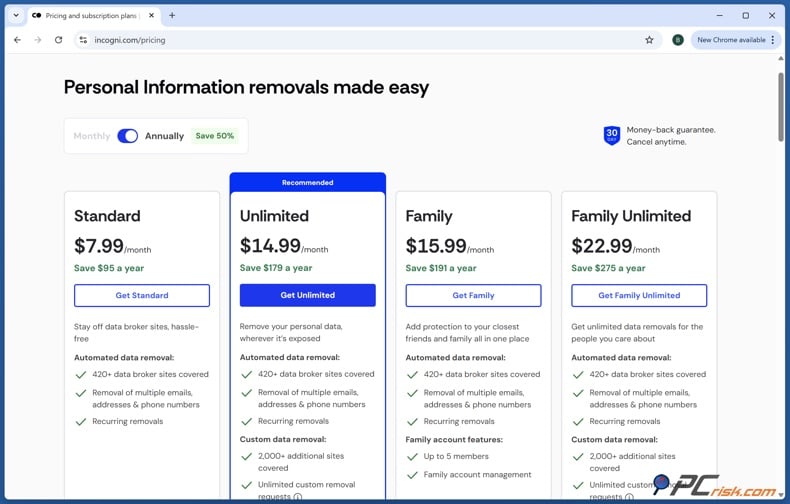
1. Create an Incogni account and select an appropriate plan. Standard plans cover recurring removals from the regular broker list, which currently does not include Whitepages. Hence, for this people-search website, you require Custom Data Removal, and it is included in the higher tiers, such as Unlimited.
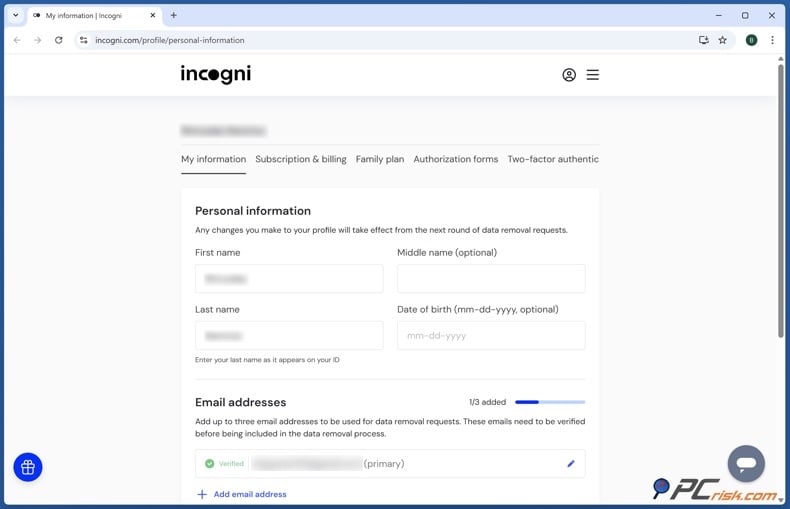
2. Enter the personal information needed for matching. Provide your name and contact information. These details help the removal service accurately identify your records among others with similar names. Carefully review your details before proceeding; inaccurate information may prevent correct profile matching.
3. Sign the authorization form. Incogni requires your authorization to submit privacy and removal requests on your behalf. Review the form, confirm your details, and sign it. Authorization is required because Incogni acts as your representative when communicating with data brokers.
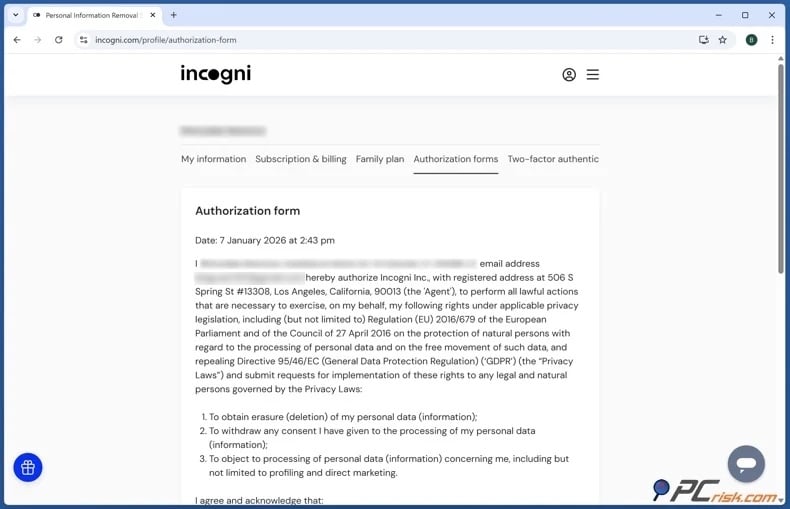
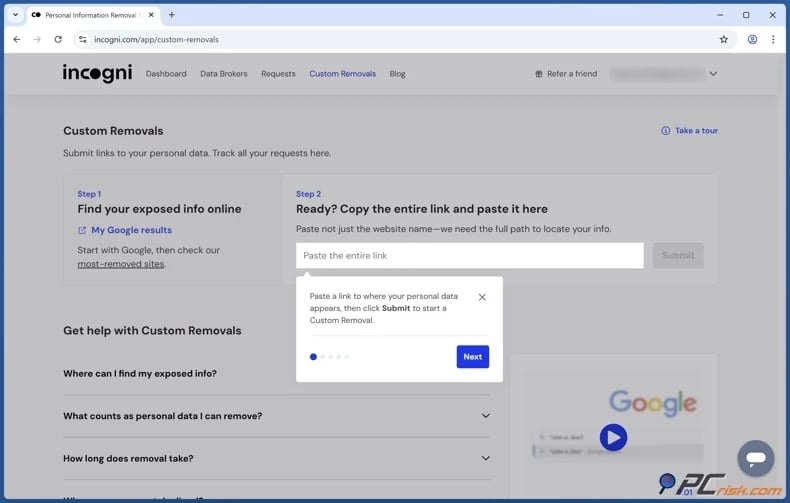
4. Locate your Whitepages profile, copy its URL, and submit a Custom Removal request with Incogni. Search Whitepages manually and open your listing. Confirm it using locations, relatives, phone numbers, or other details, then copy the full profile URL. Go to Incogni's Custom Removals section and paste the Whitepages profile URL. Include any requested context to help identify the exposure. Repeat this process for each separate Whitepages listing connected to you.
5. Monitor the requests in the dashboard. Incogni will show the request status as it is processed. Respond quickly if asked to confirm a profile or provide direct authentication to Whitepages. Some requests may take longer if the website requires extra identity verification or is slow to respond.
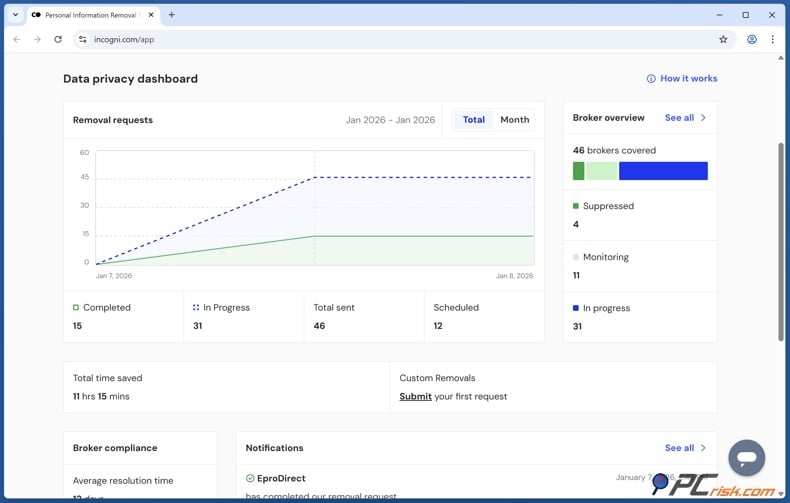
6. Keep recurring protection active. Incogni's standard broker-removal system rescans and sends new removal requests, as data brokers may recollect your information. Custom requests may necessitate further review; continue to check Whitepages directly. Remember that no removal service can guarantee permanent deletion of all public records or online copies.
Why should you remove your information from Whitepages?
Removing your Whitepages profile is not merely about avoiding advertisements or unwanted calls. It limits the verified information available to those who may try to manipulate, intimidate, impersonate, or locate you.
Most online fraud starts with limited data. An attacker may have only a name, email address, or phone number. A people-search profile can yield details that make their approach convincing. Previous addresses may be used as security questions, relatives' names can support family-emergency scams, and property information can help an attacker impersonate a contractor, utility company, mortgage provider, or local authority.
This solution reduces your attack surface. While you cannot remove every public record, you can make them harder to compile. Criminals face more obstacles when information is scattered across multiple sources rather than consolidated in one profile.
Whitepages exposure can also weaken account security. Many services still use knowledge-based verification questions about streets, relatives, vehicles, or former locations. These questions are less effective when answers are easily accessible through people-search databases. While removing a listing cannot fix weak authentication systems, it can reduce the number of available clues.
Doxxing and harassment are other concerns. A disagreement on social media, gaming platforms, marketplaces, dating services, or public forums can escalate if someone discovers your real name and address. Even without physical confrontation, an exposed address can result in threatening mail, fraudulent deliveries, false service calls, or attempts to contact your family or employer. For stalking and domestic abuse survivors, the risks are more severe. A profile that links a new address to relatives or associates has the potential to undermine efforts to relocate privately.
Professionals face distinct risks. Healthcare workers, teachers, journalists, judges, attorneys, business owners, executives, law enforcement, and customer-facing employees may encounter individuals who try to extend workplace disputes into their personal lives. Removing residential information supports maintaining a boundary between public duties and personal safety.
Incorrect information can also cause harm. An outdated profile may link you to a previous resident, unfamiliar phone number, incorrect age, or unrelated person. Strangers may assume this data is accurate because it appears in an organized report. Suppressing your profiles prevents the distribution of these errors.
There is cumulative risk as well. One profile may seem harmless, but multiple broker listings reinforce each other. Attackers can compare addresses, phone numbers, relatives, usernames, property records, and dates across websites. Removing your Whitepages profile does not eliminate the entire network, but it removes a major source and should be a piece of a more extensive cleanup effort.
The goal is not complete invisibility. For most people, total removal from the Internet is unrealistic. The practical aim is to prevent casual searchers and opportunistic attackers from easily obtaining a detailed profile. Each suppressed listing makes it less convenient for someone to misuse your information.
How to prevent data brokers from collecting more of your data?
No single setting can fully prevent data brokers from collecting information. Because many sources contribute to the data ecosystem, effective prevention requires multiple overlapping measures. The following are some actions you can take to limit your data accessibility:
Limit your social media visibility - set profiles to private when possible, and hide your phone number, email, birthdate, address, workplace, and family details from public view. Routinely review and remove old posts, tagged photos, check-ins, marketplace listings, and comments that disclose your location or habits.
Consistently check privacy settings - platforms may add features or change how profile fields, friend lists, search visibility, and location information are displayed, so keep reviewing your settings and service terms to choose the most privacy-preserving options.
Avoid sharing identifying information combinations - while one detail may not identify you, several together can. For example, a public username, hometown, employer, graduation year, and family photo may link an anonymous account to your real identity.
Use unique usernames for unrelated services - only reuse a distinctive handle across platforms if you intend to publicly associate those accounts.
Use secondary contact information for less-trusted services - create a separate email for newsletters, discounts, competitions, app registrations, and temporary purchases. Reserve your primary email for financial, medical, government, and important personal accounts.
Use a secondary or forwarding phone number - ensure the service is reliable and appropriate for account recovery before using it to protect your primary number.
Decline unnecessary marketing and data sharing - where possible when creating accounts, review privacy options and uncheck marketing consent, partner sharing, personalized advertising, and data enrichment.
Do not provide optional demographic information - if a retailer or platform requests your birthday, income, occupation, or family status without a clear reason, leave those fields blank.
Reject nonessential cookies - when possible, use cookie banner options to decline advertising, analytics, profiling, and cross-site tracking technologies.
Consistently clear cookies - this will remove stored identifiers, but does not erase records already held by a company. Browser privacy protections, tracker blocking, and isolated profiles can reduce future correlation.
Review mobile app permissions - remove access to location, contacts, photos, microphone, Bluetooth, and advertising identifiers if they are not essential to the application's main function. Delete unused apps.
Disable continuous background access for location-based apps - applications that require location permissions, such as ones used for navigation, do not always need continuous background access. Choose approximate location or "only while using the app" if these options meet your needs.
Delete inactive accounts - old shopping, forum, social, travel, fitness, entertainment, and other accounts can retain names, addresses, phone numbers, payment history, and behavioral information. Deactivating unused accounts reduces the number of organizations storing your data and the number of databases that may later be breached or shared. Before deleting an account, remove optional profile fields and saved payment details. Download any needed information, then follow the service's account deletion process instead of just uninstalling the app.
Limit public record exposure where allowed by law - certain information must remain public, but some jurisdictions offer confidentiality programs for stalking or domestic violence survivors, protected professionals, or other eligible individuals. Use such options when possible.
Keep up-to-date with available governmental protections - contact the relevant government office to learn about available protections. Do not rely on commercial sites for information about eligibility for official confidentiality programs.
Use a VPN for network privacy - a reputable VPN encrypts traffic between your devices and the VPN server and hides your home IP address from websites. This can reduce tracking based on network identifiers, especially on public Wi-Fi. VPNs are powerful privacy tools, but they have other benefits as well. These services may enable access to restricted content on managed networks (such as campuses, workplaces, hotels, etc.) and geo-restricted/geoblocked platforms. However, a VPN does not remove you from various records or prevent you from entering personal details on sites. You can read our top 2026 VPN review for more information.
Monitor search results - search your full name in quotation marks along with your city, phone number, email address, and previous addresses. Also check variations, maiden names, common misspellings, and old usernames.
Remove yourself from search results - where possible, use Google's "Results about you" to eliminate search results containing contact details. Where applicable, use the "Refresh outdated content" tool to update results after the source website removes or changes a page.
Opt out of other people-search services - Whitepages is only one data broker, so search multiple people-search websites and periodically check for new information. Remove or suppress discovered profiles. Note that each site likely has its own removal process.
Document your profiles - maintain a spreadsheet or document including the broker name, profile URL, opt-out submission date, verification method, expected completion date, and date last checked. This helps prevent duplicate work and identifies websites that repeatedly republish information.
Use eligible state privacy tools - for example, California residents can use DROP to submit a single deletion request to registered data brokers. Starting August 1, 2026, participating brokers must process requests on a recurring schedule, subject to statutory exceptions. This gives broader coverage than submitting separate CCPA requests to each broker.
Consider ongoing data removal - automated services can save time when contacting many brokers and monitoring resurfacing profiles. Before subscribing, compare broker lists, custom removal options, rescan frequency, reporting, identity verification requirements, and cancellation terms. Even with a paid service, periodically conduct your own searches. Automated matching may miss profiles with outdated, incomplete, or incorrect information.
Check our top personal data removal services
Reducing data broker exposure requires a continuous, multi-step strategy. Limit the personal information you share publicly, check privacy settings and app permissions, decline unnecessary tracking, delete unused accounts, and use secondary contact details for less-trusted services. Regularly search for your information, remove exposed results, opt out of people-search websites, and keep records of completed requests. Government privacy tools, VPNs, and automated removal services can offer added protection, though none provide complete coverage. Continuous action is necessary; keep monitoring and repeatedly remove profiles and listings, as personal data often resurfaces over time.
In closing
Opting out of Whitepages helps limit public access to your phone numbers, addresses, relatives, and other personal details. The free manual process requires you to find your profile, copy its URL, submit an opt-out request, and complete telephone verification. Afterward, review the original listing and search results to confirm suppression.
Removal does not erase government, court, property, or commercial records that may be the source of your information. It also does not guarantee the profile will not reappear. Updated public records and new broker feeds can cause listings to return, so routine monitoring is important.
Check our top personal data removal services
For greater protection, consider a data removal service. Incogni manages recurring requests across its broker network, while Whitepages requires a higher-tier Custom Removal request. Regardless of your approach, combine removal with stricter social media settings, reduced tracking, fewer inactive accounts, careful app permissions, and regular searches for exposed information.
Frequently Asked Questions (FAQ)
Is Whitepages legal?
Yes, people-search and public-record aggregation services are generally legal in the United States if they comply with privacy, consumer protection, data broker registration, and related laws. Whitepages appears in California's official data broker registry.
Is it dangerous to have my data on Whitepages?
Having your data on Whitepages can increase your risk of scams, social engineering, harassment, stalking, doxxing, impersonation, and unwanted contact. Risk level depends on the information displayed and your personal situation. Profiles that link home addresses with relatives, phone numbers, age, and past locations are particularly alarming.
Will opting out of Whitepages remove me from Google search?
Not necessarily, as Whitepages and Google operate independently. After Whitepages suppresses your profile, Google may still display outdated results until it updates its index. Use Google's "Refresh outdated content" tool if the removed or updated Whitepages page still appears, or use "Results about you" for eligible contact information.
Does removing myself from Whitepages remove the original public record?
No, suppressing a Whitepages profile only removes or hides the information on this website. It does not delete the original property record, court file, voter record, professional license, or other source. To change or restrict the original record, contact the responsible organization if a correction or confidentiality process is available.
How do I remove my data from Whitepages?
Locate your profile, copy its URL, submit an opt-out request on Whitepages, and complete the automated verification call. After processing, search again to confirm the listing has been removed.
How long does it take Whitepages to remove my data?
Verified profiles are usually suppressed within 72 hours. Requests made through support, email, or formal consumer-rights channels may take longer. Note that the general "rule" for people-search profile removal is that it can take up to five business days.
How is using Incogni different from manually removing my data from Whitepages?
Manual removal requires you to locate each profile, complete Whitepages' verification process, track your requests, and monitor for reappearance. Incogni automates removals for over 420 brokers and offers tracking through a dashboard. Whitepages is managed through Incogni's Custom Removals feature, which requires a higher-tiered plan.
Will my data come back to Whitepages after I opt out?
It is possible, as profiles may reappear when public records change, data providers update information, or new duplicate listings are created. Periodically search Whitepages using your name, addresses, and phone numbers, and submit another suppression request if needed.
Share:
 Facebook
 X.com
X.com
 LinkedIn
 Copy Link

Karolis Liucveikis
Experienced software engineer, passionate about behavioral analysis of malicious apps
Author and general operator of PCrisk's News and Removal Guides section. Co-researcher working alongside Tomas to discover the latest threats and global trends in the cyber security world. Karolis has experience of over 8 years working in this branch. He attended Kaunas University of Technology and graduated with a degree in Software Development in 2017. Extremely passionate about technical aspects and behavior of various malicious applications.
▼ Show Discussion