
We may earn commissions from products we recommend. Learn more.
How to opt out of Veripages | Easy guide

How to opt out of Veripages
People-search websites let strangers find personal information with just a name and location. Veripages is one of these sites. Depending on the records available, a Veripages profile might show addresses, phone numbers, relatives, job details, property information, and other personal data. These profiles are usually created by gathering information from public records, online sources, and other data brokers.

The good news is you can remove your information from Veripages for free. To do this, find your profile, submit its exact URL using Veripages' privacy control form, and confirm your request by email. If you prefer, a data removal service can do most of this for you. At PCrisk, we currently rate Incogni as our top data removal service, but there is a Veripages-specific limitation we'll explain below.
This guide covers how Veripages works, why removing your profile helps your privacy, how to opt out manually, how to use Incogni for managed removal, what to do if removal does not work, and how to keep track of your information online.
Opt out of Veripages with Incogni
Table of Contents:
- Introduction
- What is Veripages?
- Why it's a good idea to remove your data from Veripages
- Opt out of Veripages automatically
- Opt out of Veripages manually
- Common issues and alternative ways to opt out of Veripages
- Final recommendations
- Frequently asked questions (FAQs)
What is Veripages?
Veripages is a people-search site and data broker that lets anyone look up information about individuals online. Instead of searching multiple databases, these services consolidate details into a single profile. According to the current Veripages documentation, profiles can include home addresses, phone numbers, work history, relatives, social media profiles, schools, property details, email addresses, and more.
Veripages is not the only site that works this way. According to the US Federal Trade Commission, people-search websites are a type of data broker. They collect information by buying it from other brokers, pulling details from public social media, and gathering federal, state, and local government records. These public records might include property records, voter registration, professional licenses, court records, and some vital records.
When information from different sources is linked to one person, even a basic search can reveal much more than someone might expect. The FTC says people-search reports can connect a name or phone number to details like age, past addresses, property ownership, marital status, work or education history, relatives, and some civil or criminal records.
Keep in mind that a people-search profile is not always a completely accurate picture of someone. The data might be outdated, incomplete, or mixed up with information about someone with a similar name. Even old information can be a privacy risk, since it gives strangers more details to identify, contact, or look you up.
At PCrisk, we see people-search exposure as just one part of the bigger issue of personal data removal. In our 2026 review of data removal services, we focus on cutting down the amount of personal information available through data brokers and people-search sites, instead of assuming that removing one listing will erase your whole online presence.
It's important to note that opting out of Veripages only removes or hides your listing on their site. It does not erase the original records where that information came from. The FTC warns that opting out of a people-search service does not delete your details from government public records. So, your information might still be available elsewhere even after your Veripages page is gone.
Why it's a good idea to remove your data from Veripages
Taking down your Veripages profile mainly helps limit how much of your personal information is out there. There's rarely a good reason to make it easy for strangers to find your home address, phone number, relatives, or past locations all in one spot.
This exposure matters because personal information can be used for more than just identifying you. Scammers can use details from different sources to make fake messages seem real. Public information can also lead to unwanted calls, doxxing, impersonation, account-recovery abuse, and other targeted scams. In our PCrisk reviews, we assess risks such as identity theft, doxxing, fraud, scams, and unwanted messages when evaluating the value of reducing data-broker exposure.
For some people, the privacy risks are much more serious. The FTC notes that survivors of domestic violence or stalking have especially strong reasons to keep people-search sites from showing their home address or family details.
Taking down your listing also makes it harder for people to connect different pieces of information about you. An old address, a phone number, or a relative's name might not seem like much on their own. But when all these details are combined in one profile, they reveal a lot more about you.
However, opting out of Veripages is not a complete shield against identity theft or online harassment. Removing your data reduces your exposure, but it does not erase your information from every database, public record, social network, cached page, or other people-search site.
That's why we suggest seeing the Veripages opt-out as just one part of a bigger privacy effort. After you remove your listing, search for your name, phone number, email, and common name-and-location combinations on other people-search sites. The FTC also recommends checking these sites regularly and sending new opt-out requests if your information shows up again.
There's another reason to keep checking: people-search data can come back after you opt out. The FTC says that changes in public records can make your information reappear on these sites. Your details might also show up in reports about relatives, neighbors, or other people.
If you only have one Veripages profile and don't mind spending a few minutes, the manual method below is the easiest way. If your information is on many broker sites, automated or managed data-removal services can save you from doing the same work over and over.
Opt out of Veripages automatically
At PCrisk, we rate Incogni as the best personal data removal service for 2026. In our tests, its mix of automated removal requests, monitoring, status tracking, and custom removals was especially helpful for people who prefer not to contact data brokers themselves. Incogni's standard service covers hundreds of data brokers and people-search sites. Once you provide the required information and grant Incogni permission, it can send opt-out requests on your behalf.
Check our top personal data removal services list
However, there is an important point to note about Veripages.
At the time of writing in September 2026, Veripages does not appear by name in Incogni's published standard data-broker coverage list. We checked the current list and found no entry for "Veripages" or "VeriPages." Therefore, we would not recommend assuming that an ordinary Incogni Standard subscription will automatically remove a Veripages profile.
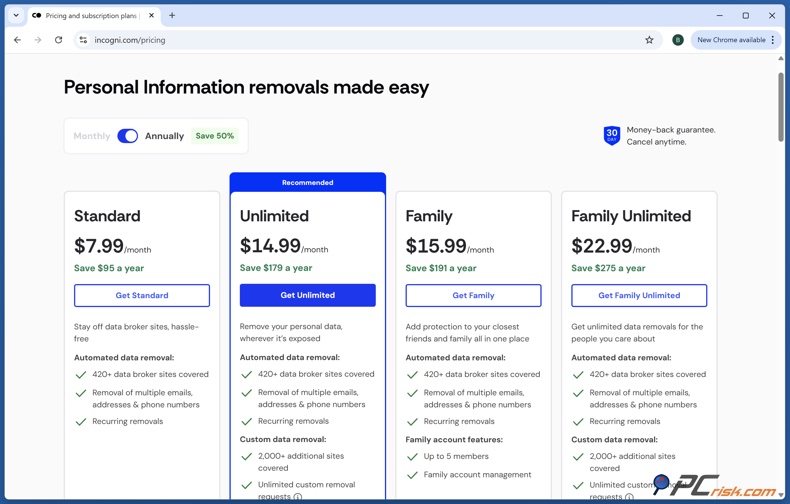
Instead, you should use Incogni's Custom Removals feature. This option is for websites not included in Incogni's usual automated coverage. It is available with Incogni Unlimited, Family Unlimited, and Incogni Protect plans. After you submit the right page, Incogni will handle the removal process for you.
Here is how we recommend using Incogni for Veripages:
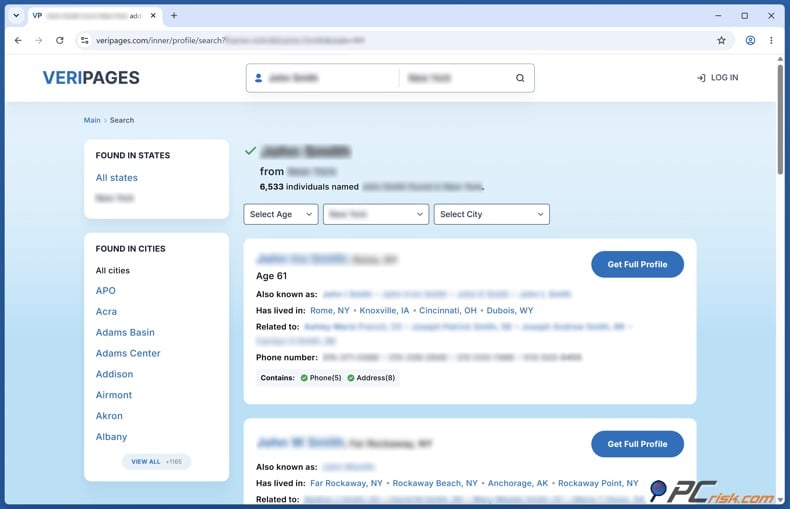
1. Start by finding your Veripages profile. Go to Veripages and search for your full name along with your city and state. Open the result that matches you and double-check the details to be sure it's your profile, not someone else's with a similar name. Veripages' current opt-out instructions use this same search process.
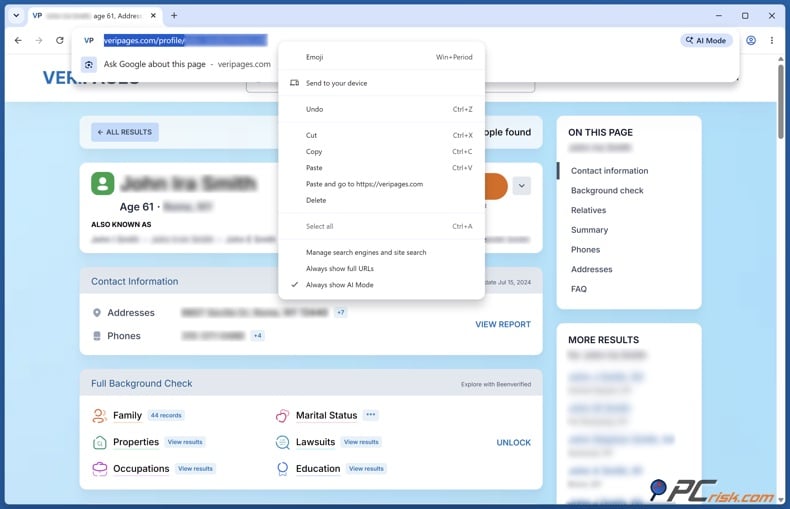
2. Copy the full URL of your Veripages profile. Don't copy the home page or a search results page. Incogni's Custom Removals process needs the exact link to the page with your personal information.
3. Create an Incogni account or sign in. To use custom removal, you'll need Unlimited, Family Unlimited, or Incogni Protect. Other plans do not have access to Custom Removals.
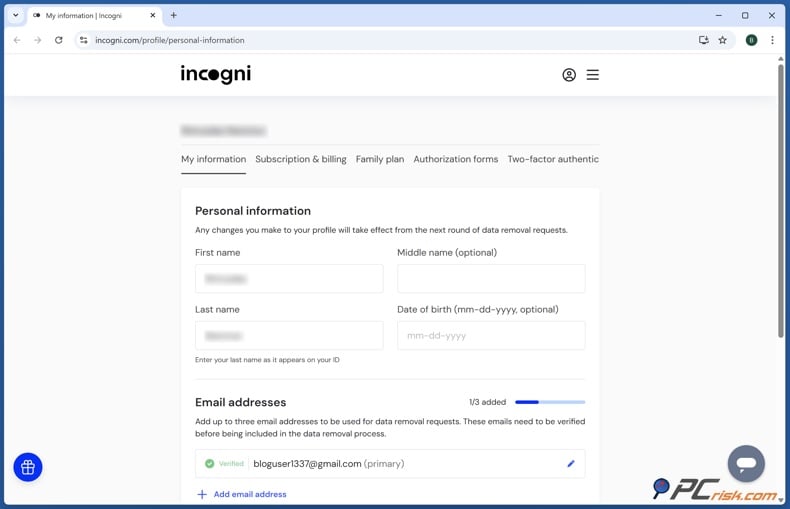
4. Fill out your Incogni profile with your personal details. Incogni may ask for your full name, any aliases, current and past addresses, email addresses, phone numbers, and date of birth. Providing this information helps them tell your records apart from others.
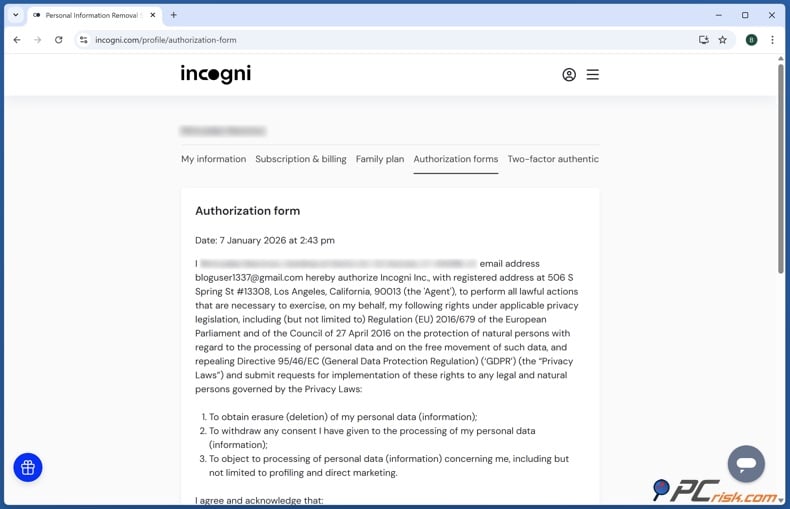
5. Finish Incogni's authorization process. You'll fill out an online form that lets Incogni send privacy and removal requests for you. This step is needed so they can contact data brokers on your behalf.
6. Go to the "Exposures" section in your Incogni dashboard and choose "Scanner results." If Incogni has already found your Veripages page, review it and click "Remove me" to request custom removal.
7. If Veripages does not show up, you can submit the URL yourself. In the scanner results, paste the exact Veripages profile link you copied earlier and send it as a Custom Removal request. Incogni asks users to provide the specific page with their information, not just the main site or a search result.
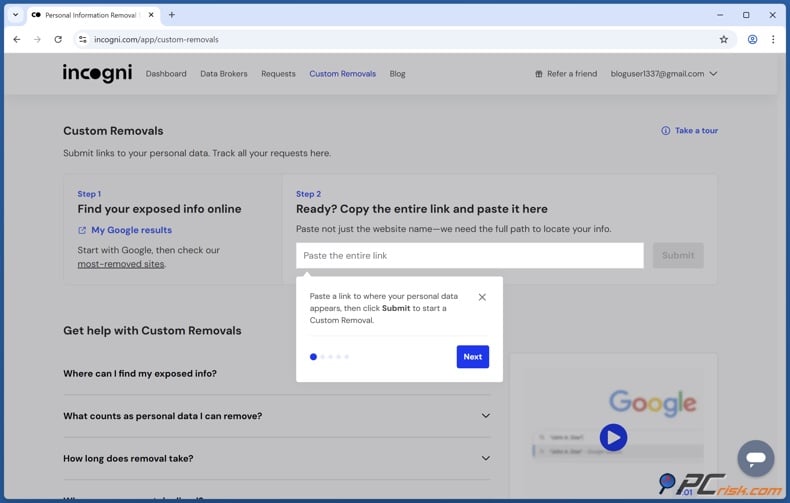
8. Keep an eye on the Custom Removals section. Your requests will show up in Incogni's dashboard, where you can track their progress. Incogni processes custom links in the order they are received and works through the removal list as quickly as possible.
9. Give yourself enough time for the process to finish. Incogni says most Custom Removal requests are handled in 7 to 30 days, but some sites may take up to 60 days. This is because Incogni's process can take longer than using Veripages' direct opt-out form.
This difference matters. Incogni can make things easier since its team manages your request, but for Veripages, Incogni uses a managed Custom Removal instead of its usual automated opt-out process.
If you only need to remove one Veripages page, you probably don't need to pay for a higher Incogni plan. The manual Veripages process is free. Incogni is more useful if you want to remove your info from many people-search sites and data brokers, or if you want ongoing monitoring instead of filling out opt-out forms yourself. The FTC also points out the difference between free do-it-yourself removal and paid services that handle opt-outs for you.
Opt out of Veripages manually
The manual Veripages opt-out is simple and free. As of September 11, 2026, Veripages uses an online privacy control form and then asks you to verify via email.
It's best to use a desktop browser or a device where you can easily copy the exact profile address.
Opt out of Veripages with Incogni
1. Go to Veripages and search for yourself. Type in your full name. If you can, add your city and state to narrow down the results. If there are people with similar names, double-check locations and other details before moving forward.
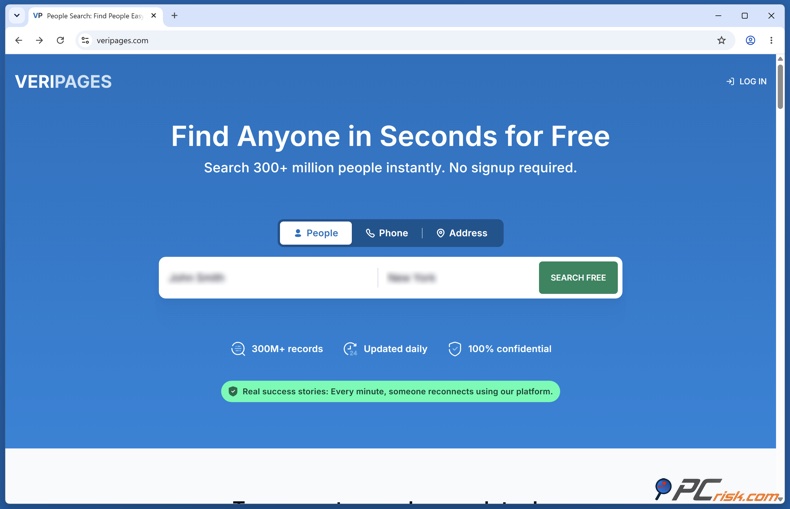
2. Open your full profile. Once you find the right result, click "View Full Profile." This opens the specific listing Veripages needs for your removal request.
3. Copy the profile's exact URL. Copy the full address from your browser's address bar while your profile is open. Save it somewhere, like in a text document or on your clipboard.
4. Do not copy only the Veripages home-page address. The opt-out process is tied to the profile you want removed.
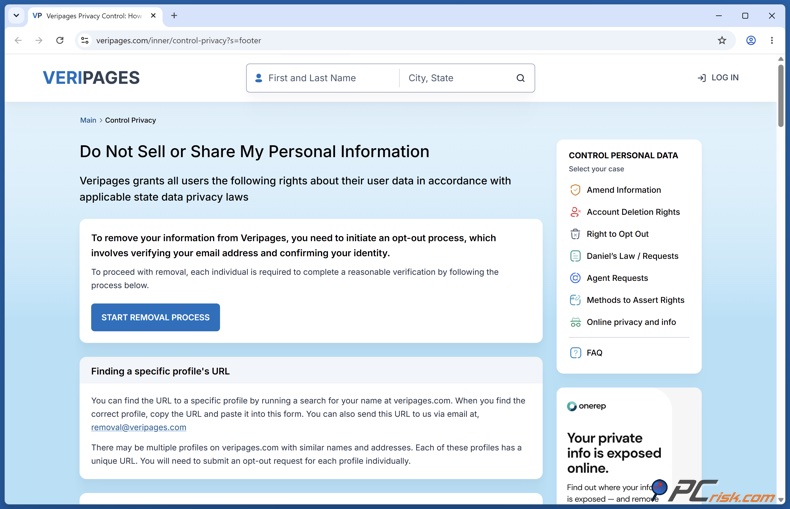
5. Open Veripages' Control Privacy page. The current primary opt-out page is the Control Privacy page found in the footer.
Both Veripages' current removal instructions and Optery's broker directory list this as the main privacy opt-out address.
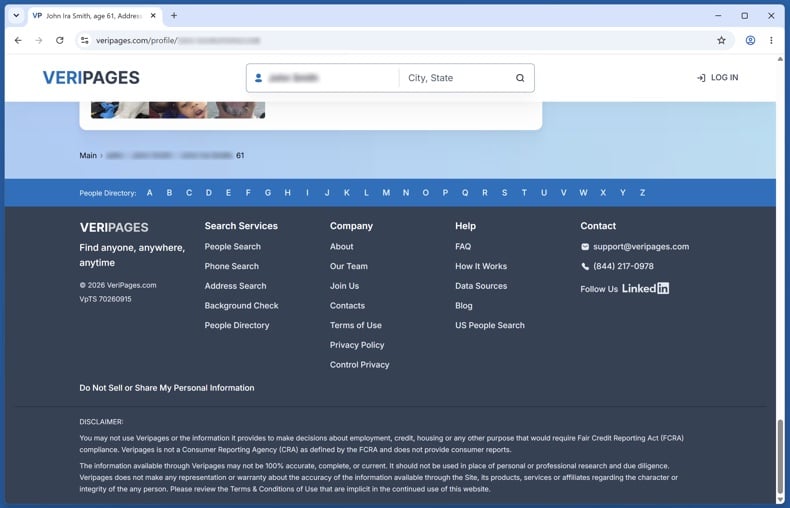
6. Paste your profile URL into the removal form. Paste the URL you copied earlier. The form will also ask for your full name and email address. Double-check everything before you submit.
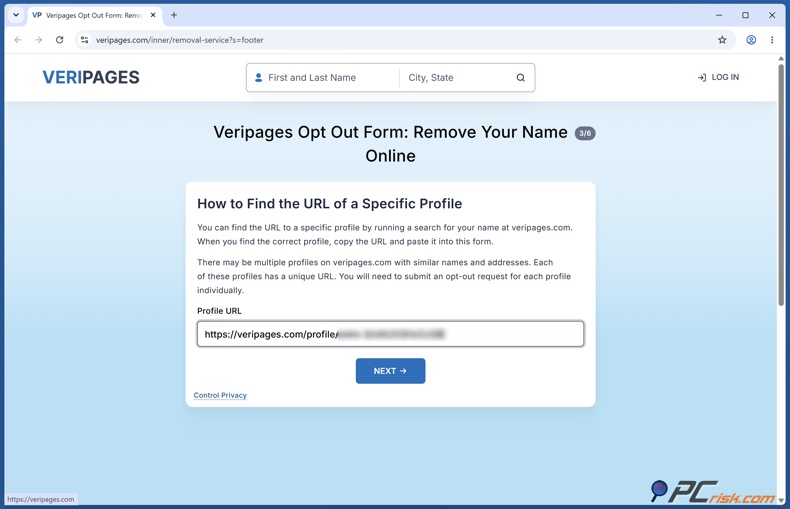
7. Select "Start Removal Process." Submitting the form begins the process, but this step alone does not complete the opt-out. Veripages uses email verification.
8. Check the email account you supplied. Look for the Veripages verification email. If you don't see it in your inbox, check your Spam, Junk, Promotions, or other folders. The current instructions warn that you may need to check your spam folder.
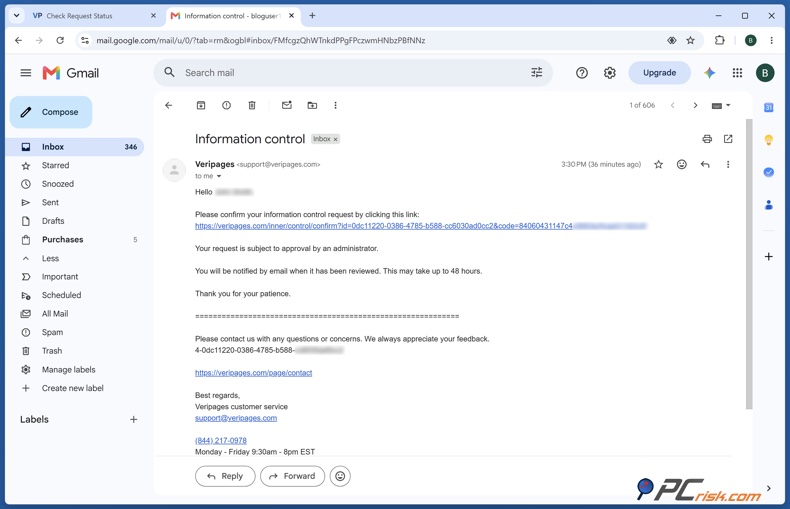
9. Open the Veripages verification link. Click the verification link in the email to confirm you want the profile removed. Don't skip this step, or your request might not go through.
10. Wait for the listing to disappear. Current advice says the removal should happen within a few days. One guide says Veripages usually removes the information within four days.
11. Search for yourself again after the waiting period. Go back to Veripages and do the search again. Don't just use an old browser tab, since it might show an outdated page. Start a new search to see if your listing is still there.
12. Repeat the process for any additional profiles. If there are several Veripages pages with your information, handle each profile URL one at a time. This is important if the records use different addresses, name versions, or locations.
13. Keep a record of the removal. Keep track of the date you submitted your request, the profile URL, and any confirmation emails. This will help you figure out whether a future listing is from an old, incomplete request or from your information being republished later.
For most people, the direct method works best when dealing only with Veripages. The form is free, the steps are simple, and removal usually happens faster than with Incogni Custom Removals.
Common issues and alternative ways to opt out of Veripages
Even though the Veripages removal process looks simple, some issues can stop your opt-out from working.
Check our top personal data removal services list
The verification email never arrives
Start by checking your Spam and Junk folders. You can also search your inbox for "Veripages." If you still do not see the email, double-check that you entered your email address correctly on the form and try submitting your request again. Remember, Veripages requires email verification to complete the opt-out, so just filling out the web form is not enough.
The opt-out form does not accept the profile information
Return to your Veripages profile and copy the full URL from your browser's address bar. Do not use a general search page or the Veripages homepage. The instructions require the exact URL of your profile.
You cannot find your profile
Try searching with different versions of your name and include both current and past cities or states where you have lived. People-search sites may have outdated information, so only using your most recent location might not find your profile. When you find a possible match, review it closely before requesting removal.
The listing is still online after several days
Wait about three to four days before worrying that something went wrong. If your information is still online after a week, make sure you clicked the email verification link. You can also reach out to Veripages at support@veripages.com, which is their privacy opt-out support address.
The profile disappears and later returns
Keep in mind that opting out does not guarantee your information is gone forever. The FTC warns that your details can show up again if public records change. They recommend checking people-search sites regularly and submitting another opt-out if new information appears.
Some of your information is still visible through another person's profile
Removing your own page may not eliminate every reference to you. The FTC notes that a person's information can still appear in reports connected with relatives, neighbors, or associates.
There are several Veripages profiles for you
Delete every profile that matches you. It helps to write down each profile URL before you begin, so you can later check that each one has been removed.
If you do not want to remove your information yourself, there are other options. Here, we only recommend services that are part of PCrisk's current personal data removal comparison.
Along with Incogni, our PCrisk list includes DeleteMe, Optery, Privacy Bee, and Aura. Each service has its own way of finding and removing your data. In our 2026 review, DeleteMe stands out for human help, Optery offers exposure reports and paid removal options, Privacy Bee covers many sites and provides ongoing monitoring, and Aura includes data removal as part of a broader security and identity protection package.
For Veripages specifically, Optery is the clearest alternative with explicitly documented current coverage. Its current data-broker directory identifies Veripages as a people-search site and lists it as covered by Optery's Ultimate tier.
Keep in mind that coverage can change. Before you buy a data-removal subscription just for one people-search site, check that the provider still covers it and see which subscription level you need.
This is especially important with Incogni. PCrisk still rates Incogni highly for its many standard removal targets and custom removal options, but Veripages is not on its current standard broker list. If you want to remove your Veripages profile, you will need to use Incogni's Custom Removals instead of the standard plan.
Final recommendations
If you just want to remove your Veripages listing, we suggest starting with the free manual opt-out. Find your profile, copy its exact URL, submit it on Veripages' Control Privacy page, and be sure to click the verification link in the email. Usually, your listing should disappear in a few days.
But do not stop with Veripages. If your information is on Veripages, it is likely on other people-search sites and data broker databases too. The FTC suggests checking these sites regularly, since opt-outs only apply to each site and your information can show up again.
If you only have a few listings, removing them yourself is usually worth it. But if your information appears in many places, handling each form, email, and deadline can take a lot of time. In that case, a removal service can help by managing most of the process for you.
Of all the services we have reviewed at PCrisk, Incogni is still our top pick for personal data removal in 2026, especially if you want wide coverage, tracking, and custom removals. For Veripages, though, you should use Incogni's Custom Removals feature instead of the standard broker-removal list.
If you want to try another provider, you can look at DeleteMe, Optery, Privacy Bee, or Aura. All are included in our PCrisk comparison. Of these, Optery clearly lists Veripages in its broker directory and covers it with the Ultimate plan.
Finally, remember what an opt-out can and cannot accomplish. Removing yourself from Veripages reduces the availability of your information on Veripages. It does not erase the underlying public records, guarantee that another data broker does not have the same information, or guarantee that a profile will never return. The FTC specifically warns about each of these limitations.
That is why we suggest a simple routine: regularly search for your name and contact details, opt out of unwanted people-search listings, adjust your social media privacy settings, and avoid sharing personal information unless necessary. If you have many exposures, consider using a trusted removal service that monitors for new or returning records.
The goal is not to disappear from the internet, which is not realistic. Instead, you want to limit how much personal information someone can easily find about you.
Opt out of Veripages with Incogni
Frequently asked questions (FAQs)
Is Veripages a legitimate and trustworthy website?
Veripages is a real people-search and data-broker website, not a scam pretending to help with removals. Data-broker directories list it as a people-search service, and several privacy organizations have documented its opt-out process.
However, being legitimate does not mean every profile is accurate or that sharing personal information is risk-free. People-search sites gather data from many sources, so records can be incomplete or outdated. We do not recommend using a people-search profile as the main source for important decisions.
How long does it take to complete the Veripages opt-out process?
Filling out the form usually takes just a few minutes once you find your profile. According to current instructions, your information should be removed within four days after you finish email verification.
If your profile is still online after about a week, check that you finished the email confirmation step. If you did, you may want to contact Veripages support.
Do I need to use a data removal service to opt out of Veripages?
No, you can opt out yourself for free. The FTC says you can usually remove your information from people-search sites on your own, and Veripages offers its own online privacy-control process.
A paid service is most helpful if you want to remove your information from many sites and do not want to handle each request yourself.
Will my personal information be permanently removed from Veripages?
You should not expect a Veripages opt-out to be permanent. People-search databases can get new or updated records over time. The FTC warns that your information may show up again if public records change, so it is a good idea to check back from time to time.
Is the Veripages opt-out free?
Yes, the manual process is free. You can find your listing, submit the profile URL using Veripages' privacy-control form, and confirm the request by email yourself.
What should we do if there are multiple Veripages profiles under the same name?
First, figure out which profiles really belong to you. Do not ask for removal just because someone else has the same name. Check the locations and other details to be sure.
If more than one listing is yours, submit each profile URL for removal and keep a record of which ones you sent. Since Veripages uses the profile URL, having a list will help you check later.
Share:
 Facebook
 X.com
X.com
 LinkedIn
 Copy Link

Rimvydas Iliavicius
Researcher, author
Rimvydas is a researcher with over four years of experience in the cybersecurity industry. He attended Kaunas University of Technology and graduated with a Master's degree in Translation and Localization of Technical texts. His interests in computers and technology led him to become a versatile author in the IT industry. At PCrisk, he's responsible for writing in-depth how-to articles for Microsoft Windows.
▼ Show Discussion