
We may earn commissions from products we recommend. Learn more.
Trust badges: real ones vs. pictures

Trust badges: real ones vs. pictures
Imagine a shopper visiting your online store for the first time. A shield, a padlock graphic, or a "secure checkout" label catches their eye. These familiar symbols may offer reassurance, but what supports the message? Who issued the badge? What was checked, and when? Can the shopper verify the results? The value of a security trust badge lies in the evidence behind it.
Weak website trust signals can influence a potential shopper's decision to buy. In Baymard's 2025 survey of 1,026 US respondents, 19% reported abandoning a checkout in the previous three months because they did not trust the site with their credit card information. As a result, store owners need to give visitors a reason to feel confident about sharing their payment details.
With the PCrisk Trust Badge, we give shoppers access to a public report showing your website's latest security scan results.
In this guide, we explain what different trust badges communicate, how to distinguish verifiable security badges from unsupported claims, and what paid security monitoring offers. We also cover what a badge can and cannot prove, and how to add and display the PCrisk Trust Badge on your store.
Table of Contents:
- Introduction
- What are trust badges, and what do they actually mean?
- When trust badges are only pictures
- How the PCrisk Trust Badge works
- Why pay for a security trust badge?
- What the PCrisk Trust Badge shows and what it cannot guarantee
- How to add and display the PCrisk Trust Badge
- Other verifiable security badges on the market
- In closing
- Frequently asked questions (FAQs)
What are trust badges, and what do they actually mean?
A trust badge (also known as a trust seal or trustmark) is used to make a specific claim about a website, business, or the purchasing experience. Some relate to security checks or business accreditation, others identify accepted payment methods, and some relate to store policies.
A badge's value depends on the claim it makes and the evidence supporting it. An independently issued badge should have an identifiable provider and a status visitors can verify. A merchant-created icon can also provide useful information when it accurately summarizes a shipping policy, return period, or other commitment.
Shoppers naturally trust well-known brands, but they need extra reassurance when buying from a new store. Rather than relying on security badges they might not recognize, focus on providing clear, easily verifiable proof.
Common types of trust badges
Different badges answer different questions. Understanding their purpose helps you choose the right ones for your store.
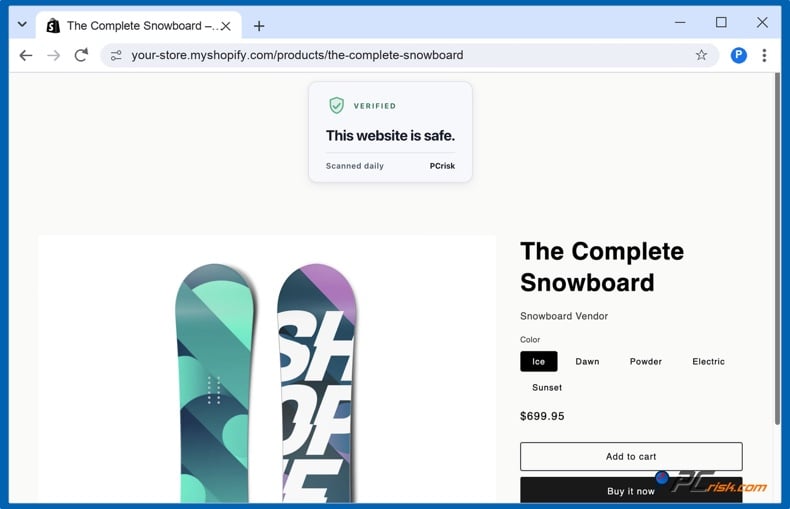
Security monitoring badges: Trust badges such as the PCrisk Trust Badge connect visitors with the results of recurring checks for malware, phishing, and other website threats.
SSL/TLS certificate seals: Seals from providers such as DigiCert let visitors inspect certificate and validation information. HTTPS protects data in transit, but an encrypted connection does not establish a seller's legitimacy. As the FTC explains, scam websites can use encryption too. A padlock graphic placed on a page is not sufficient evidence of either security or legitimacy.
Payment badges: Displaying logos such as Visa, Mastercard, PayPal, and Apple Pay lets customers know how to pay. However, while these logos show convenience, they don't mean a site has been checked for security.
Policy badges: These highlight the merchant's promises (e.g., free shipping, 30-day returns, money-back guarantee etc.) Each badge should be linked to the relevant terms, which will set out the conditions for eligibility, timeframes, costs, and exclusions.
Business accreditation and verification badges: These indicate that the business has met the issuer's specific criteria. BBB accreditation concerns standards of business conduct. B Corp Certification focuses on social, environmental, and governance impact. You should check the issuer's records to see what exactly they have assessed and whether the accreditation is still current.
Shopping experience badges: Google's Top Quality Store badge is based on the shopping experience with the merchant. The criteria used include shipping times, return policy, website quality, and customer reviews. It's entirely about the shopping experience and should not be used as a malware scan or as a guarantee of the merchant's reliability.
Review and media badges: Review widgets can take users directly to customer reviews on Trustpilot. The Google Customer Reviews badge indicates participation in the program and can display a store rating when one is available. A platform logo alone does not necessarily mean every review is from a real customer. For the "As seen in" press logos, we'd recommend linking to the original coverage and accurately reflecting what the publication said.
Where they are used
Trust badges are commonly displayed where shoppers make purchasing decisions. Choose a location that makes relevant payment, policy, or security information easy to find.
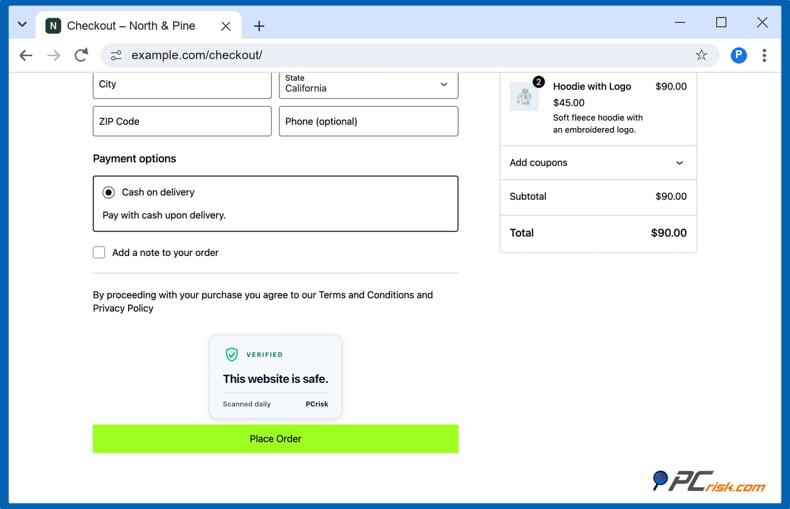
- Cart and checkout pages: Display relevant payment and security information where possible.
- Product pages: Put your return terms or your security verification link right next to the 'Add to Cart' button.
- Website footers: Make sure your badges and any supporting policy/verification links are easy to find throughout your store.
The idea behind trust badges is straightforward: while shoppers can't inspect your servers, call your references, or verify your business license, they may consider your site trustworthy because it has a trust badge that gives them peace of mind. The trust badge communicates that someone runs checks on this site.
When trust badges are only pictures
Adding a shield or a "secure checkout" label can make your store look reassuring. However, a shopper who has never bought from you may want more than a convincing graphic. If your badge provides no way to verify its claim, you are asking that customer to take your word for it. A security badge should give shoppers access to evidence that supports their confidence in your store.
The problem with image-only security badges
An unsupported security image may leave a cautious shopper's concerns unanswered. For your store, the potential drawbacks include:
- They can be copied: A security provider's logo can be downloaded and displayed without permission, including on fraudulent websites. The image alone does not demonstrate that the provider has assessed your store or authorized you to display its seal.
- They leave your claims unsupported: A generic "secure" graphic does not tell customers who checked your website, what was assessed, or when the check took place. Without supporting information, it offers little to a visitor who wants to understand the basis for your security claim.
- They can create doubts when clicked: A shopper may click a security badge expecting to learn more. If nothing happens, or the link provides no information about your store, that opportunity to reassure them is lost. The missing information may also raise questions about whether the badge represents a genuine service.
- They can damage your credibility: A badge that suggests some form of independent endorsement that your store isn't actually entitled to can cause customers to doubt everything else you're claiming. We'd recommend that you display only badges you're authorized to use and make it clear what each badge means.
This doesn't mean every static image is misleading. A genuine seal can be used with static artwork if its status is independently verifiable. Payment logos and shipping/return icons can also be used to convey useful information if they accurately represent your service and your policies. The issue is with the security claim that customers have no way of checking.
Before you pick a badge provider, check what exactly it's assessing and look at the verification details that are available to the customer. Make sure the provider has a record for your site with the appropriate status, date, and supporting details. Ensure that any verification link takes you to the legitimate issuer and that it's for your domain. A clickable badge is useful only if the link you're taken to actually confirms the claim that's being made on your store.
Here is how we make your store's security scan results accessible to shoppers through the PCrisk Trust Badge.
How the PCrisk Trust Badge works
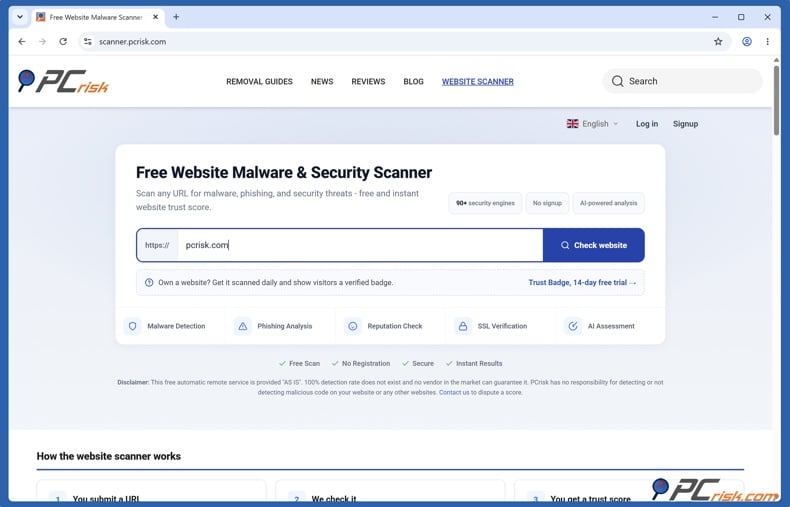
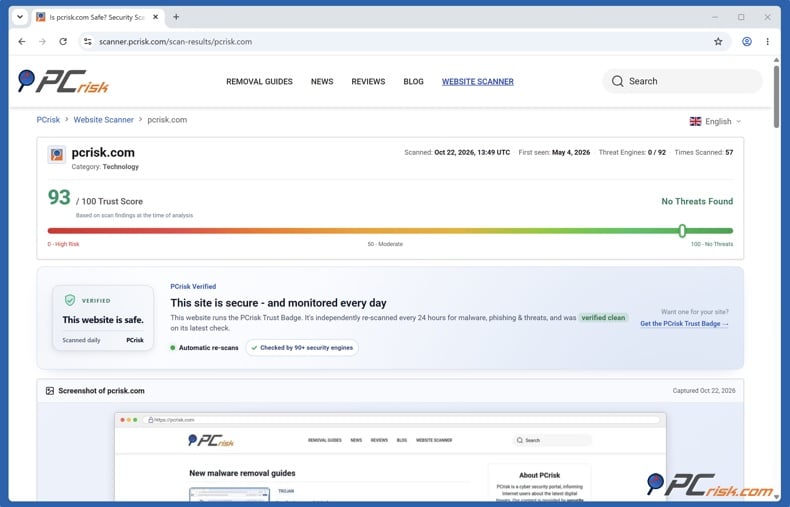
The PCrisk Trust Badge combines automatic website security checks with a public report your customers can inspect. Powered by our PCrisk Website Scanner, it helps you monitor your store and show visitors what its latest external security assessment found.
What we check
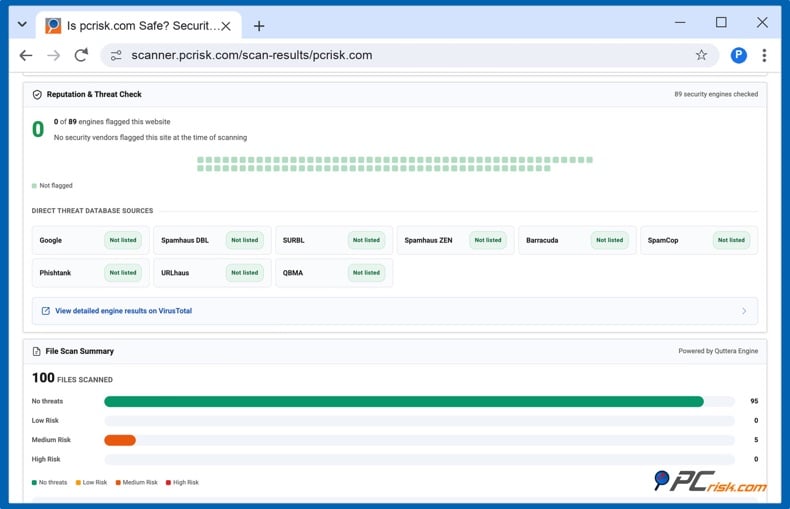
Our scanner examines publicly accessible website content and the resources it loads. We check the website's URL against more than 90 antivirus and URL-reputation engines, plus 10 threat databases. We also analyze page code and embedded resources for suspicious content, check the SSL/TLS certificate, and gather domain and hosting information.
The findings are combined into a trust score from 0 to 100, an overall verdict, and a detailed report. You can review individual detections, file scan findings, and potentially concerning external links to understand the information behind the assessment.
How often we check
Paid Trust Badge plans include automatic scans every 24 hours. The recurring scans will help you monitor changes to your site's content, scripts, and security reputation without having to run a scan manually each time.
Each report reflects the findings from the latest completed check. Daily monitoring is a scheduled service, and your website's condition can change between scans.
What visitors can see
Customers can click the badge to open your website's public report on scanner.pcrisk.com. They can review the domain, latest scan date and time, trust score, and supporting findings.
Because we host the report, visitors can inspect the assessment directly with the provider performing the checks.
What you receive
When a scan produces a security alert, we'll send an email with the findings and guidance to help you investigate. You can then pass that on to your developer or your hosting provider to work out what they should do. The service reports potential issues; resolving them is a separate step.
Badge visibility is governed by the most recent assessment. You need an active subscription, and your site must have a latest trust score of 70/100 or above in order to be eligible for the badge. If the score drops below that level, the badge will simply disappear. It will reappear once the next assessment meets the threshold again (provided you still have an active subscription, of course).
The display threshold reflects the overall assessment, so we recommend reviewing the detailed findings alongside the score.
Why pay for a security trust badge?
A security trust badge is worth paying for when the service behind it saves you routine work and gives customers useful evidence. With the PCrisk Trust Badge, your subscription provides recurring website checks, alerts about potential issues, and a public report that shoppers can inspect.
Spend less time on the regular checks. Running a store is all about juggling orders, product updates and customer queries. With our paid plans your site is scanned every 24 hours so you don't have to go out and manually trigger each one. You receive a regular external assessment to review alongside your existing website maintenance.
Get useful information when something needs attention. If a scan generates a security alert, we'll email you the results (including what was found and where). That gives you a place to start with your investigation.
Give the cautious shopper something they can check. You've put in the time and effort to get people into your store, but a new customer may still be looking for some reassurance prior to making a purchase. Our badge takes you to a public report hosted by PCrisk where the shopper can see the latest scan time and results. You can also provide that report when responding to a customer's security query, giving them access to the assessment that underpins your claim.
Your subscription gives you daily monitoring and a public badge which is linked to your website's scan report. The value of the badge is in the assessment that underpins it and in the fact that your customers can go and look at the findings. Your site also has to meet our display requirements in order to be eligible for the badge. Just buying a plan doesn't automatically qualify a site for the badge.
A verifiable badge might go some way to assuring visitors and we'd recommend testing its placement and measuring the impact on conversion. It should be one of a number of confidence building factors that you already have in place through your policies, your service and your simple checkout.
What the PCrisk Trust Badge shows and what it cannot guarantee
The PCrisk Trust Badge gives visitors access to a dated external security assessment of your website. Its meaning depends on the checks performed and the information available when that assessment was completed.
What it shows
- Findings from the latest scan: The report will contain your site, the scan time, the overall assessment and any detections reported. Eligibility to show the badge doesn't necessarily mean that every security source has reported zero detections.
- A verifiable record: Customers can inspect the report hosted by PCrisk and review the details supporting the assessment.
What it cannot guarantee
- Complete safety: Automated external checks can miss threats and do not establish that a website has no vulnerabilities.
- Protection between scans: Your website can change after a check. Scheduled monitoring does not provide continuous protection.
- Merchant identity or reliable service: The security assessment does not independently verify your business's legal identity or guarantee that you will fulfill orders or honor refunds.
- Financial protection against a compromise: The PCrisk Trust Badge is not a warranty against hacking or a promise to reimburse losses resulting from a compromised website.
How to add and display the PCrisk Trust Badge
We offer several ways to add the PCrisk Trust Badge to your website. Choose the installation method for your platform, then select its appearance and placement.
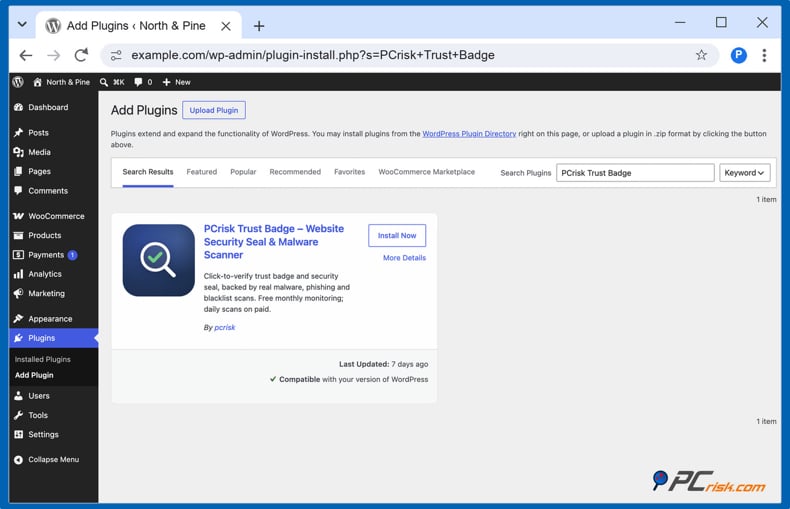
For WordPress and WooCommerce: Open Plugins > Add New in your WordPress dashboard and search for PCrisk Trust Badge. Install and activate the plugin, then open its settings and connect your website. Choose a paid badge plan or the available 14-day trial to enable the public badge. After you activate the plugin and connect your website, the free plan provides monthly monitoring without a public badge.
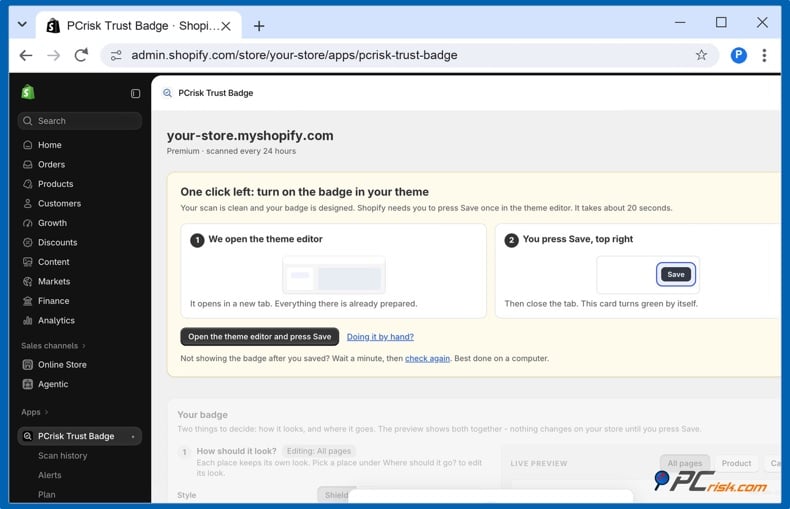
For Shopify: Install the PCrisk Trust Badge app from the Shopify App Store and open it to carry out your first scan. Select Premium and either go ahead with the subscription or trial via Shopify. Choose the look and position of the badge in the app and save your settings. Use the app's button to open your theme editor, ensure the badge is enabled and then click Save to apply it to your store.
For other website platforms: add your domain to your PCrisk account and select a plan for the PCrisk Trust Badge. Use the dashboard designer to generate your code snippet and then paste the entire snippet into your website's supported custom code area (your platform must allow for custom JavaScript). For an inline badge you just simply place the badge container where you want it. A floating badge will stay in the corner of your screen that you have selected (it may briefly hide to avoid covering any controls or overlays).
Choose a visible, suitable location. Take a look at the design, size, and color scheme prior to saving. WordPress allows placement within the content, in the footer, and in a floating corner, with additional WooCommerce options available on the product, cart, and checkout pages. On Shopify, you can place the badge above or below the "Add to cart "button and above the checkout button in the cart.
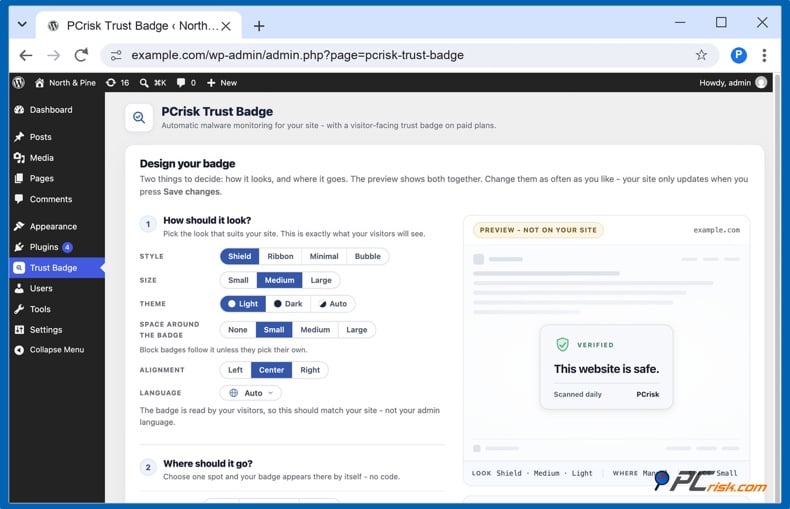
Check the visitor experience. Allow the first scan to finish and confirm that your account shows the badge as active. As noted previously, its display depends on the latest scan meeting our requirements. Open your website on a computer and a phone, check that the badge does not cover any important controls, and click it to confirm the report matches your domain.
For platform-specific instructions and troubleshooting, visit our PCrisk Trust Badge installation guide.
Other verifiable security badges on the market
The PCrisk Trust Badge is not the only seal a visitor can click to check. Here is how the main ones compare.
| Badge | Checks for malware | Shows the last check date | Hides on a problem | Price from |
| Security-scan badges | ||||
| TrustedSite | ✅ | ❌ | ✅ | Free* or $39 a month |
| SiteLock | ✅ | ✅ | ✅ after 72 hours | $19.99 a month |
| Trust Guard | ✅ | ✅ | ➖ flags the failed check | $97 a month |
| PCrisk Trust Badge | ✅ | ✅ | ✅ below score 70 | €16.95 a month** |
| Certificate seals (come with an SSL certificate) | ||||
| DigiCert Smart Seal | ➖ some plans | ➖ if turned on | ➖ on expiry | $40 a month*** |
| Sectigo Trust Seal | ❌ | ❌ | ❌ | $110 a year*** |
| GlobalSign Secure Site Seal | ❌ | ❌ | ➖ shows status | $249 a year*** |
| SSL.com seal | ❌ | ❌ | ➖ shows status | $36.75 a year*** |
✅ yes ➖ partly ❌ no. Prices from each provider's own site, November 2026.
* Up to 500 visits a month. ** After a 14-day trial; Shopify app $19 a month. *** Cheapest certificate that includes the seal.
Security-scan badges show what an outside check found on the site. Certificate seals confirm who owns the SSL certificate; they don't check the site itself.
Whichever you choose, click your badge in a private window. The page that opens should be on the provider's own domain, name your domain and show when it was last checked.
In closing
Verifiable trust signals help the customer make a more informed decision about an online store they don't know. A professional-looking website, good content, and the right logos can go a long way to creating that initial impression of trust. A security trust badge is more useful when customers can verify who issued it, what was assessed, and when the assessment took place.
The PCrisk Trust Badge makes that information available. We scan your site every 24 hours and link the badge to a public, dated report that visitors can go to and view the latest security findings. For the site owner, this is a way of combining ongoing monitoring with a tangible way of demonstrating to potential customers that security checks are being carried out.
For owners who want to give visitors something concrete to verify, regular checks and accessible results provide a clear reason to invest in a security trust badge. Make your website's latest security findings easier to inspect and support customer confidence through transparency.
Frequently asked questions (FAQs)
Do trust badges work?
Yes, trust badges can help reassure the shopper, particularly for a new or unfamiliar store. A shopper who doesn't already know the store may be more concerned about entering their details so trust badges in that situation can be very useful.
For a security badge, you need verifiable evidence for the shopper to have something tangible to go on. We recommend choosing a security badge that links to a dated report about your website, hosted by the provider performing the checks. A badge in no way guarantees you'll see an uplift in sales, so we'd recommend you test the placement and measure the impact on your own store.
Can a free badge actually be of any use?
Yes, a free badge can be useful in assuring the shopper that the claim it represents is genuine and verifiable. Who issued it? What claim does it make? Is the verification record in question applicable to your site? The substance of the evidence behind the badge is far more important than the badge itself.
Our free PCrisk monitoring plan includes monthly scans. Upgrading to a paid plan increases the frequency to daily checks and adds the public PCrisk Trust Badge, which links shoppers to your website's latest scan report.
How many trust badges should my store have?
We'd suggest starting with a single verifiable security badge (backed by regular external scans and a dated public report). Pick a service that will automatically hide the badge when the latest results no longer meet its criteria for display. Add further badges only if they provide something different and useful. Payment and policy type badges (e.g., accepted cards, return policy) should be accurate to what you actually offer. It's all about the quality of the information presented rather than the number of badges. Don't go in and fill the page with a lot of redundant seals, particularly on the mobile version.
Can decorative badges provide any real value?
Yes. Decorative badges can help shoppers notice useful information, such as accepted payment methods, shipping offers, or return terms. They can also make a checkout page feel more reassuring. Baymard's research has found that even invented security symbols can influence shoppers' perception of security, although that perception does not establish actual protection.
Their real value is in clear, accurate communication. A "30 day returns" badge for instance can be a very useful way of communicating a real policy and can be linked to the actual terms. A "secure" shield on the other hand does nothing to demonstrate that any security checks have actually been carried out. We would recommend using decorative badges to support useful information and to back up any security claims with evidence which the visitor can look at.
Share:
 Facebook
 X.com
 LinkedIn
 Copy Link