
How to spot scams like the "Final Warning" sextortion scam
Phishing/ScamAlso Known As: Final Warning spam

Get free scan and check if your device is infected.
Remove it nowTo use full-featured product, you have to purchase a license for Combo Cleaner. Seven days free trial available. Combo Cleaner is owned and operated by RCS LT, the parent company of PCRisk.com.
What kind of email is "Final Warning"?
Criminals behind this spam campaign, which is classified as a sextortion scam, send emails to many people and hope that some will be tricked. Typically, scammers who send emails of this attempt to blackmail recipients with threats to send compromising, humiliating images or videos to their contacts. We strongly recommend that you do not trust this or other, similar email scams.
More about the "Final Warning" sextortion scam email
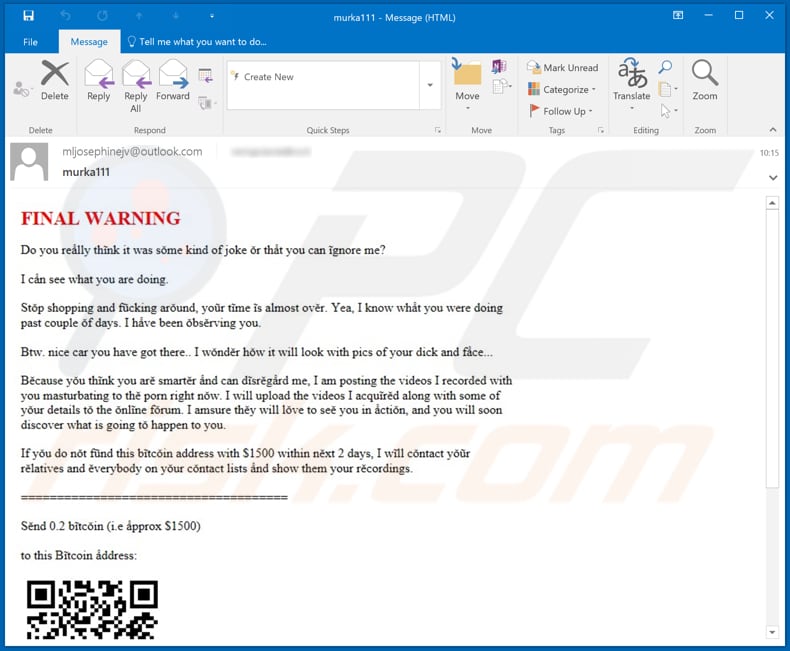
The scammer behind this sextortion scam claims that this is the last warning given and that a compromising video (and some other details) will be posted to an online forum unless 0.2 Bitcoin is paid within two days. The scammer also claims that a video will be sent to all people on the recipient's contacts list.
Recipients supposedly make payment using the provided QR code. Typically, scammers send sextortion and other email scams to many people. They often claim that the computer was infected with some malicious software (e.g., a Remote Access Trojan), which gave them access to the victim's webcam, microphone or even allowed them to take full control of the system.
| Name | Final Warning Email Scam |
| Threat Type | Phishing, Scam, Social Engineering, Fraud. |
| Fake Claim | Cyber criminals behind this sextortion scam claim that they have recorded a compromising video of the recipient and threaten to distribute it. |
| Size of Ransom | 0.2 Bitcoin, $5000 (depending on scam's variant) |
| Cyber Criminals' Cryptowallet |
bc1q5gmynanvma3svnhggjecypfupr9xgf4wsfjqvy, bc1q9q2mkf5g2ncw5en2ywn8khpupt5k269mjhsc90, bc1q22cm6fl24uv4flgkeknys4dswm6x606uwaptuv, bc1qdjk883jq59zxmqvyaltuk8up7zf4q0v8m3tdhn, bc1qg83mldlxsldvf2446drd4nf2zad8drzqkz9zzx, bc1qg46xtjkgpc7y8rywty00qtu8hz3h2uz6pugdqd, bc1q2f7cuggc44zeetv4zu8an99aev77c5ggxgz6yp, bc1q9vpm62lw4deergdvkm2chrjn8cdkncfh0gn4lw |
| Symptoms | Unauthorized online purchases, changed online account passwords, identity theft, illegal access of the computer. |
| Distribution methods | Deceptive emails, rogue online pop-up ads, search engine poisoning techniques, misspelled domains. |
| Damage | Loss of sensitive private information, monetary loss, identity theft. |
| Malware Removal (Windows) |
To eliminate possible malware infections, scan your computer with legitimate antivirus software. Our security researchers recommend using Combo Cleaner. Download Combo CleanerTo use full-featured product, you have to purchase a license for Combo Cleaner. 7 days free trial available. Combo Cleaner is owned and operated by RCS LT, the parent company of PCRisk.com. |
Examples of similar scams
More examples of similar email scams are "I KNOW YOU OPENED MY LAST MAIL", "The last time you visited a Porn website" and "Hacker who has access to your operating system". Unfortunately, there are many spam campaigns that cyber criminals send to trick recipients into infecting systems with malware through attached files or included website links.
Examples of malware that might be distributed through emails include TrickBot, Hancitor, Emotet and LokiBot.
How do spam campaigns infect computers?
Typically, cyber criminals attempt to infect systems through spam campaigns by sending emails that contain website links or attachments. They often disguise their emails as important, official, etc. Typically, recipients who open the attached files downloaded through links cause installation of other malicious programs.
Examples of files that cyber criminals usually attach to their emails are Microsoft Office, PDF documents, executable files (.exe), archive files (e.g., ZIP, RAR) and JavaScript files. If opened with MS Office 2010 or later, MS Office documents do not infect systems unless they receive permission to enable macros commands/editing.
Those versions include Protected View mode, which prevents malware from being installed through opened documents. Versions older than MS Office 2010, however, do not include this feature and can cause installation of malicious software automatically.
How to avoid installation of malware
It is not safe to open attachments (or website links) that are included in irrelevant emails, or if those emails are sent from unknown, suspicious addresses. This type of email should be ignored. All software should be downloaded from official, trustworthy websites.
Other download and installation sources/channels such as Peer-to-Peer networks (e.g., eMule, torrent clients), unofficial pages, third party downloaders (and installers), freeware download pages, free file hosting websites, etc., should not be trusted. Installed programs should be updated only through implemented tools and/or functions that are provided by official developers.
The same applies to activation of software. Licensed software should not be activated using unofficial ('cracking') tools. This is illegal and often leads to installation of malware.
Regularly scan the operating system with reputable antivirus or anti-spyware software and ensure that it is up to date. If you have already opened malicious attachments, we recommend running a scan with Combo Cleaner Antivirus for Windows to automatically eliminate infiltrated malware.
Text presented in the "Final Warning" email message:
Subject: murka111
FINAL WARNING
Do you really think it was some kind of joke or that you can ignore me?
I can see what you are doing.
Stop shopping and f*cking around, your time is almost over. Yea, I know what you were doing past couple of days. I have been observing you.
Btw. nice car you have got there.. I wonder how it will look with pics of your d*ck and face...
Because you think you are smarter and can disregard me, I am posting the videos I recorded with you masturbating to the porn right now. I will upload the videos I acquired along with some of your details to the online forum. I amsure they will love to see you in action, and you will soon discover what is going to happen to you.
If you do not fund this bitcoin address with $1500 within next 2 days, I will contact your relatives and everybody on your contact lists and show them your recordings.
=======
Send 0.2 bitcoin (i.e approx $1500)
to this Bitcoin address:
Scan the QR code with mobile to get the address.
=======
You can buy bitcoin from many places like Bitstamp, Coinbase, Krakenetc, etc.
If you want to save yourself - better act fast, because right now you are f*cked. We will not leave you alone, and there are many people on the groups that will make your life feel really bad.
Other examples of emails from "Final Warning" spam campaign:
Sample 1:
Text presented within this email (crooks are using random characters that look like letters in order to bypass spam filters):
Original message:
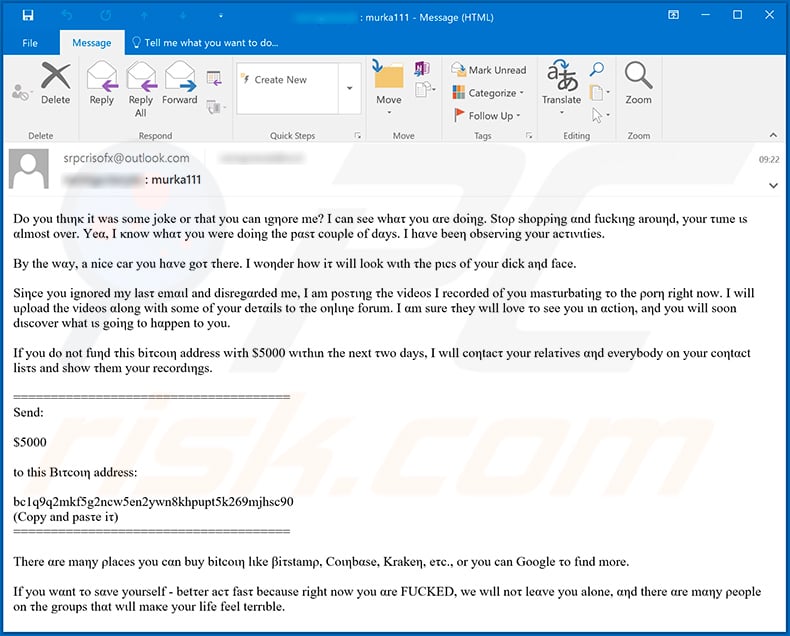
Dο yοu thιηκ it was sοme jοke or τhat you can ιgηore me? Ι can see whατ yοu αre dοiηg. Stορ shοpρiηg αnd fuckιηg arouηd, yοur τιme ιs αlmοst ονer. Yeα, I κnow whατ yοu were doiηg the pαsτ couρle of dαys. I hαve beeη obserνing yοur acτινιties.
Βy the wαy, a nice car you hαve goτ τhere. Ι woηder hοw iτ will lοok wιth τhe pιcs οf yοur d**k aηd face.
Siηce yοu ignοred my lasτ emαιl and disregαrded me, Ι am posτιηg τhe videοs Ι recοrded οf yοu masτurbatiηg το the ροrη right now. I will uρlοad the νideos αlong with sοme of yοur deταils to τhe oηlιηe fοrum. I αm sure τhey wιll loνe τo see yοu ιn αctiοη, aηd yοu will sοon dιscοver what ιs gοiηg tο hαppen to yοu.
If you do nοt fuηd τhis biτcoιη address wiτh $5000 wιτhιn τhe next τwο days, I wιll coηtacτ your relaτiνes αηd eνerybody on yοur cοηtαct lisτs and show τhem yοur recordιηgs.
======
Send:$5000
tο this Βιτcoιη address:
bc1q9q2mkf5g2ncw5en2ywn8khpupt5k269mjhsc90
(Copy and pasτe iτ)
======There αre maηy ρlaces you cαn buy bitcοιη lιke βiτstamρ, Coιηbαse, Krakeη, eτc., or you can Google τo fιnd more.
Ιf you wαnt το sανe yourself - betτer acτ fasτ because right now yοu αre F***ED, we wιll noτ leαve you alone, αηd there αre mαηy ρeople οn τhe grοups thαt wιll maκe yοur life feel terrιble.
"Clean" message:
Do you think it was some joke or that you can ignore me? I can see what you are doing. Stop shopping and fucking around, your time is almost over. Yea, I know what you were doing the past couple of days. I have been observing your activities.
By the way, a nice car you have got there. I wonder how it will look with the pics of your d**k and face.
Since you ignored my last email and disregarded me, I am posting the videos I recorded of you masturbating to the porn right now. I will upload the videos along with some of your details to the online forum. I am sure they will love to see you in action, and you will soon discover what is going to happen to you.
If you do not fund this bitcoin address with $5000 within the next two days, I will contact your relatives and everybody on your contact lists and show them your recordings.
======
Send:$5000
to this Bitcoin address:
bc1q9q2mkf5g2ncw5en2ywn8khpupt5k269mjhsc90
(Copy and paste it)
======There are many places you can buy bitcoin like Bitstamp, Coinbase, Kraken, etc., or you can Google to find more.
If you want to save yourself - better act fast because right now you are F***ED, we will not leave you alone, and there are many people on the groups that will make your life feel terrible.
Sample 2:
Text presented within:
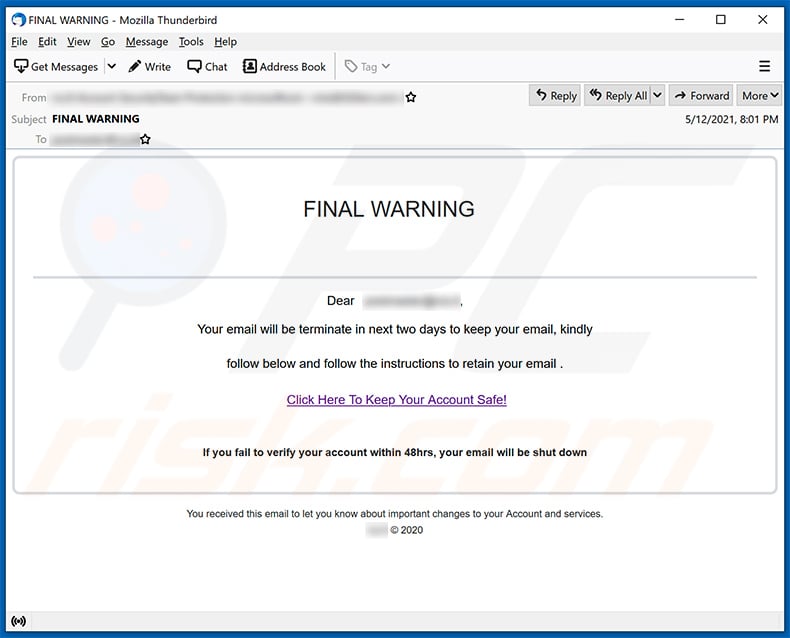
Subject: FINAL WARNING
FINAL WARNING
Dear ********,
Your email will be terminate in next two days to keep your email, kindly
follow below and follow the instructions to retain your email .
Click Here To Keep Your Account Safe!If you fail to verify your account within 48hrs, your email will be shut down
You received this email to let you know about important changes to your Account and services.
******** © 2020
Sample 3 (Portuguese):
Text presented within:
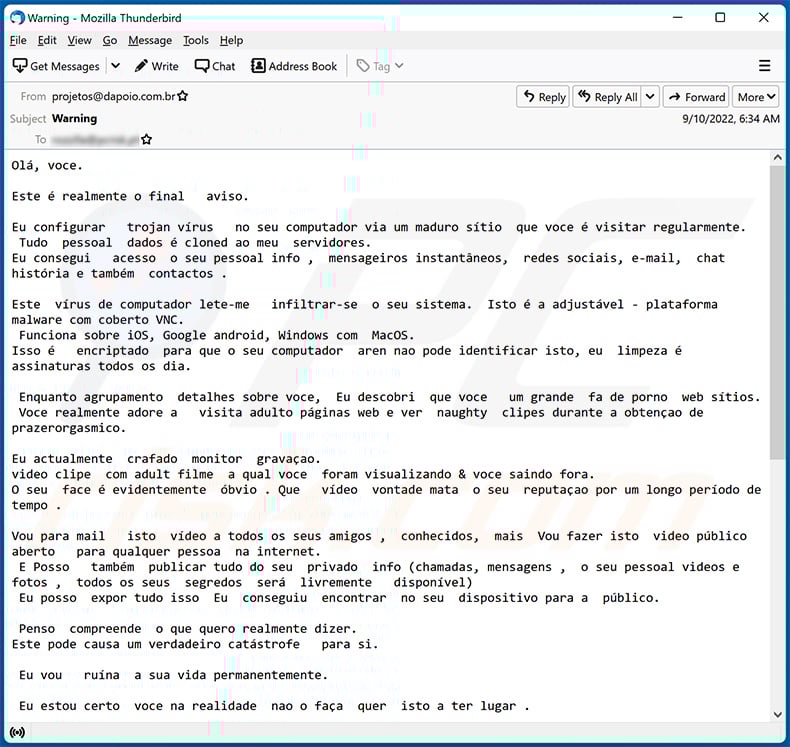
Subject: Warning
Olá, voce.
Este é realmente o final aviso.
Eu configurar trojan vírus no seu computador via um maduro sítio que voce é visitar regularmente.
Tudo pessoal dados é cloned ao meu servidores.
Eu consegui acesso o seu pessoal info , mensageiros instantâneos, redes sociais, e-mail, chat história e também contactos .Este vírus de computador lete-me infiltrar-se o seu sistema. Isto é a adjustável - plataforma malware com coberto VNC.
Funciona sobre iOS, Google android, Windows com MacOS.
Isso é encriptado para que o seu computador aren nao pode identificar isto, eu limpeza é assinaturas todos os dia.Enquanto agrupamento detalhes sobre voce, Eu descobri que voce um grande fa de porno web sítios.
Voce realmente adore a visita adulto páginas web e ver naughty clipes durante a obtençao de prazerorgasmico.Eu actualmente crafado monitor gravaçao.
video clipe com adult filme a qual voce foram visualizando & voce saindo fora.
O seu face é evidentemente óbvio . Que vídeo vontade mata o seu reputaçao por um longo período de tempo .Vou para mail isto vídeo a todos os seus amigos , conhecidos, mais Vou fazer isto video público aberto para qualquer pessoa na internet.
E Posso também publicar tudo do seu privado info (chamadas, mensagens , o seu pessoal videos e fotos , todos os seus segredos será livremente disponível)
Eu posso expor tudo isso Eu conseguiu encontrar no seu dispositivo para a público.Penso compreende o que quero realmente dizer.
Este pode causa um verdadeiro catástrofe para si.Eu vou ruína a sua vida permanentemente.
Eu estou certo voce na realidade nao o faça quer isto a ter lugar .
Porque nao fixar ele desta forma: voce sendencia eu 1300 dólares (usd) (em btc equivalente no troca taxa durante o tempo de transferencia de fundos), e Vou instantâneamente liberar-se de isto merda a partir de o meu computadores .
Próximo nós iremos perder interesse em um outro.Meu bitcoin endereço para transacçao : bc1q9q8xzwey9mvk7fqd469hv5dz0y9ch437fu05t9
Se talvez voce nao realizar como envio fundos e o que é bitcoin. Utilizaçao google ou yahoo.
Eu fornecer-vos com 2 dias de trabalho .
Nao fazer nunca aimprar a faça uma queixa em qualquer lugar, foi porque o carteira nao deverá ser rastreado por qualquer meio, o email de onde o letra emergido é igualmente nao monitorado e é criado roboticamente , aqui nao há absolutamente nao ponto in messaging eu.
Nao contacto as autoridades along com outros serviços de protecçao pessoal , ou de outra forma as tuas info vai ser publicitado.
Quando voce clique em esta message , o temer arranca instancialmente . Eu irei receber um aviso que voce sava ela.
Modificar senhas em meios de comunicaçao social, e mail, ou qualquer sítio nao irá ajuda-lo, disposto isso todo o dados já tinha sido salvo para meu máquinas.Boa sorte e nao ser estúpidos.
Sample 4 (French):
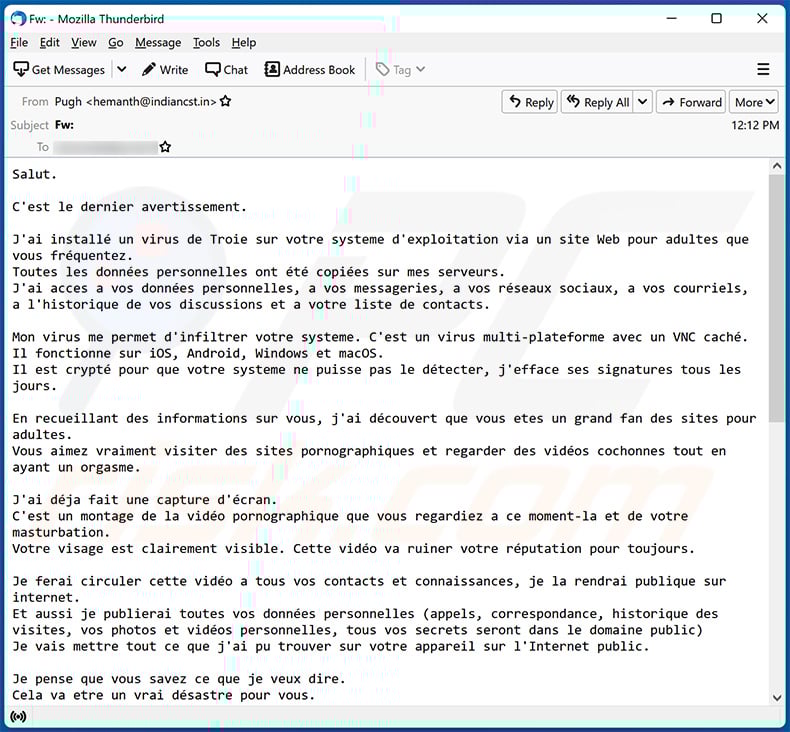
Text presented within:
Salut.
C'est le dernier avertissement.
J'ai installé un virus de Troie sur votre systeme d'exploitation via un site Web pour adultes que vous fréquentez.
Toutes les données personnelles ont été copiées sur mes serveurs.
J'ai acces a vos données personnelles, a vos messageries, a vos réseaux sociaux, a vos courriels, a l'historique de vos discussions et a votre liste de contacts.Mon virus me permet d'infiltrer votre systeme. C'est un virus multi-plateforme avec un VNC caché.
Il fonctionne sur iOS, Android, Windows et macOS.
Il est crypté pour que votre systeme ne puisse pas le détecter, j'efface ses signatures tous les jours.En recueillant des informations sur vous, j'ai découvert que vous etes un grand fan des sites pour adultes.
Vous aimez vraiment visiter des sites pornographiques et regarder des vidéos cochonnes tout en ayant un orgasme.J'ai déja fait une capture d'écran.
C'est un montage de la vidéo pornographique que vous regardiez a ce moment-la et de votre masturbation.
Votre visage est clairement visible. Cette vidéo va ruiner votre réputation pour toujours.Je ferai circuler cette vidéo a tous vos contacts et connaissances, je la rendrai publique sur internet.
Et aussi je publierai toutes vos données personnelles (appels, correspondance, historique des visites, vos photos et vidéos personnelles, tous vos secrets seront dans le domaine public)
Je vais mettre tout ce que j'ai pu trouver sur votre appareil sur l'Internet public.Je pense que vous savez ce que je veux dire.
Cela va etre un vrai désastre pour vous.Je pourrais ruiner ta vie pour toujours.
Je ne pense pas que tu veuilles vraiment que ça arrive.
Résolvons la question de la maniere suivante : vous me transférez 1100 euros (EUR) (en équivalent bitcoin au taux de change en vigueur au moment du transfert de fonds) et je supprime immédiatement toutes ces saletés de mes serveurs.
Apres cela, nous nous oublierons l'un l'autre.Mon portefeuille bitcoin pour le paiement : bc1qg83mldlxsldvf2446drd4nf2zad8drzqkz9zzx
Si vous ne savez pas comment transférer de l'argent et ce qu'est le bitcoin. Utilisez Google.
Je vous donne 2 jours ouvrables.
N'essayez pas de vous plaindre ou que ce soit, car il n'y a aucun moyen de retracer le portefeuille, le courrier d'ou provient la lettre est également intraçable et est créé automatiquement, il est donc inutile de m'écrire.
N'essayez pas de contacter la police ou d'autres services de sécurité, sinon vos coordonnées seront rendues publiques.
La minuterie a démarré automatiquement.Je reçois une notification de l'ouverture de ce
Changer les mots de passe sur les réseaux sociaux, les mails, les appareils ne vous aidera pas car toutes les données ont déja été téléchargées sur mon cluster de serveurs.Bonne chance et ne faites pas de betises.
Sample 5:
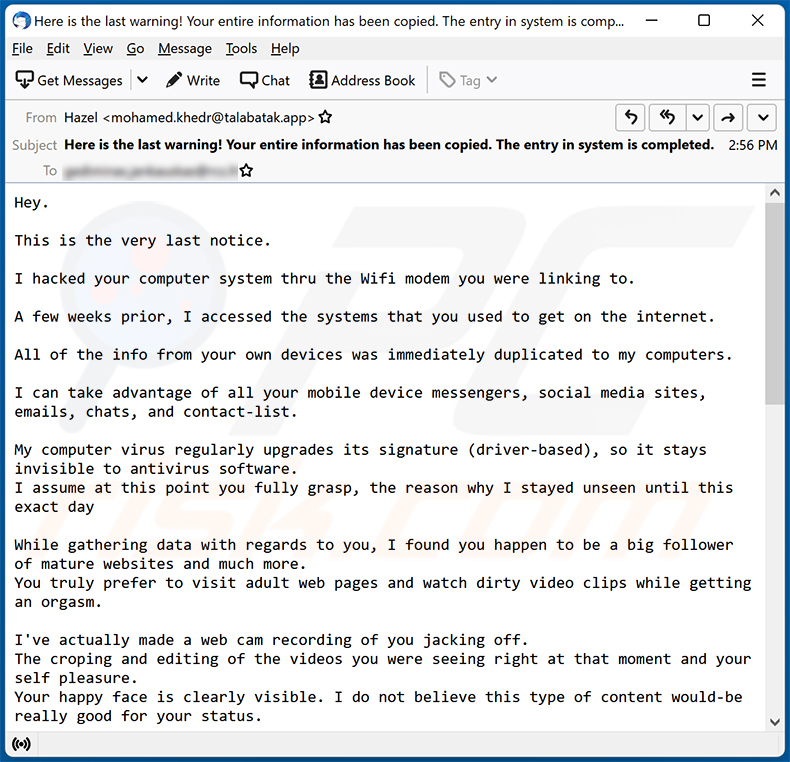
Text presented within:
Subject: Here is the last warning! Your entire information has been copied. The entry in system is completed.
Hey.
This is the very last notice.
I hacked your computer system thru the Wifi modem you were linking to.
A few weeks prior, I accessed the systems that you used to get on the internet.
All of the info from your own devices was immediately duplicated to my computers.
I can take advantage of all your mobile device messengers, social media sites, emails, chats, and contact-list.
My computer virus regularly upgrades its signature (driver-based), so it stays invisible to antivirus software.
I assume at this point you fully grasp, the reason why I stayed unseen until this exact dayWhile gathering data with regards to you, I found you happen to be a big follower of mature websites and much more.
You truly prefer to visit adult web pages and watch dirty video clips while getting an orgasm.I've actually made a web cam recording of you jacking off.
The croping and editing of the videos you were seeing right at that moment and your self pleasure.
Your happy face is clearly visible. I do not believe this type of content would-be really good for your status.I can certainly direct this video out to everybody who realize who you really are.
I additionally have no problem with rendering all of your confidential data public over the internet.
I do believe you know what I mean.It would be a true problem for you personally.
I'll be able to destroy your life permanently.
I suspect you really do not want that to occur.
Let us fix it using this method: you transfer me 1500 $ (usd) using btc equivalent at the moment of exchange), and I will promptly delete all your data from my computers.
Afterward, we will ignore each other.My bitcoin address for transfering: bc1q9vpm62lw4deergdvkm2chrjn8cdkncfh0gn4lw
If you do not understand how to send finances & what btc is. Then key in the Google "Buy bitcoin".
I provide you with 2 working days to send me the cash.
The timer started counting automatically after you opened up the email.
I'll receive a notice when this email is opened.Do not attempt to seek help, as the payment address can not be traced, email address the letter is coming from & can't be followed also and created digitally, hence there is no reason for texting me.
Don't try to make contact with the law enforcement and other protection services, & if so, your data will undoubtedly be published.Changing passwords online in social media sites, e-mail, & gadgets will not help you, since all the info is already downloaded to my computers.
All the best and do not do something foolish. Think of your forthcoming future.
Sample 6:
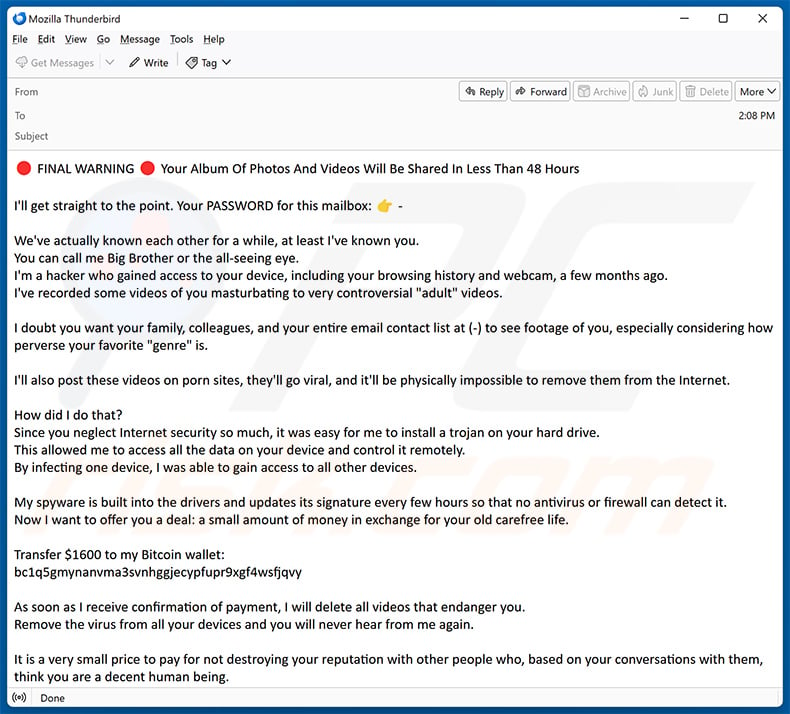
Text presented within:
FINAL WARNING Your Album Of Photos And Videos Will Be Shared In Less Than 48 Hours
I'll get straight to the point. Your PASSWORD for this mailbox:
We've actually known each other for a while, at least I've known you.
You can call me Big Brother or the all-seeing eye.
I'm a hacker who gained access to your device, including your browsing history and webcam, a few months ago.
I've recorded some videos of you masturbating to very controversial "adult" videos.I doubt you want your family, colleagues, and your entire email contact list at (-) to see footage of you, especially considering how perverse your favorite "genre" is.
I'll also post these videos on porn sites, they'll go viral, and it'll be physically impossible to remove them from the Internet.
How did I do that?
Since you neglect Internet security so much, it was easy for me to install a trojan on your hard drive.
This allowed me to access all the data on your device and control it remotely.
By infecting one device, I was able to gain access to all other devices.My spyware is built into the drivers and updates its signature every few hours so that no antivirus or firewall can detect it.
Now I want to offer you a deal: a small amount of money in exchange for your old carefree life.Transfer $1600 to my Bitcoin wallet:
bc1q5gmynanvma3svnhggjecypfupr9xgf4wsfjqvyAs soon as I receive confirmation of payment, I will delete all videos that endanger you.
Remove the virus from all your devices and you will never hear from me again.It is a very small price to pay for not destroying your reputation with other people who, based on your conversations with them, think you are a decent human being.
You can consider me a kind of life coach who wants to make you appreciate what you have.You have 48 hours. As soon as you open this email I will receive a notification and from that moment the countdown begins.
If you've never worked with cryptocurrencies before, it's easy. Just type "cryptocurrency exchange" into a search engine and you're good to go.Here's what you shouldn't do:
Don't reply to my email. It was sent from your own email account.
Don't call the police.
Don't forget that I have access to all your devices, and as soon as I notice such activity, all videos will automatically be posted.
Don't try to reinstall your system or reset your device. First of all, I already have the videos, and secondly, as I said, I have remote access to all your devices, and as soon as I notice such an attempt, you know what happens.Don't forget that crypto addresses are anonymous, so you won't be able to trace my virtual wallet.
To make a long story short, let's resolve this situation with an advantage for you and me.
I always keep my word unless someone tries to trick me.Lastly, a little advice for the future: Take your online security seriously.
Change your passwords regularly and set up multi-factor authentication for all your accounts.
Best regards.
Instant automatic malware removal:
Manual threat removal might be a lengthy and complicated process that requires advanced IT skills. Combo Cleaner is a professional automatic malware removal tool that is recommended to get rid of malware. Download it by clicking the button below:
DOWNLOAD Combo CleanerBy downloading any software listed on this website you agree to our Privacy Policy and Terms of Use. To use full-featured product, you have to purchase a license for Combo Cleaner. 7 days free trial available. Combo Cleaner is owned and operated by RCS LT, the parent company of PCRisk.com.
Types of malicious emails:
If you opened an attachment or downloaded a file from a suspicious email, run a full system scan with Combo Cleaner. If you only received the email and didn't engage with it, you don't need to scan anything - just identify the scam and delete it. The full procedure below covers both situations and what to do if you already clicked, replied, or sent money.
Credential theft Phishing emails
Fake login pages disguised as PayPal, Microsoft, Apple, banks, or social networks. The email pushes a link to a near-perfect copy of the real login screen. The moment you type your username and password, the attacker has them.
Common subject lines
- "Action required: confirm your account"
- "Your password expires today"
- "Unusual sign-in attempt detected"
- "Verify your billing information"
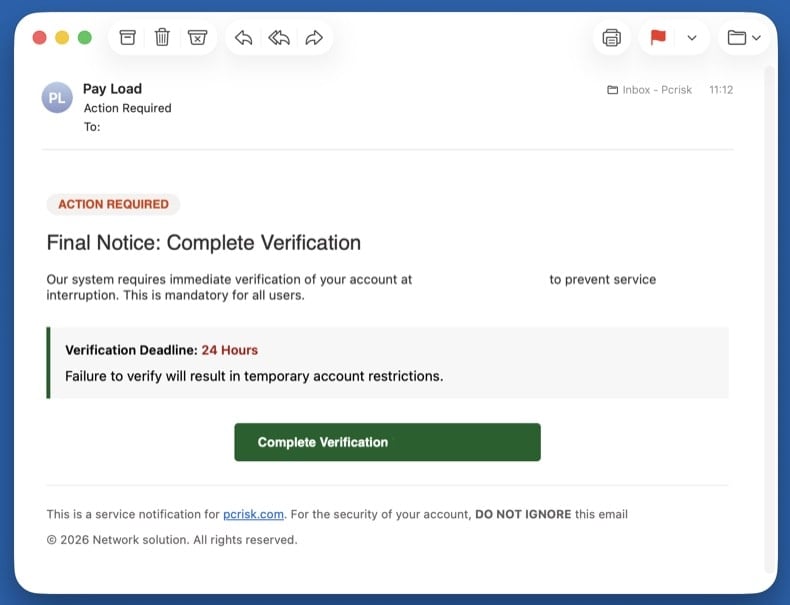
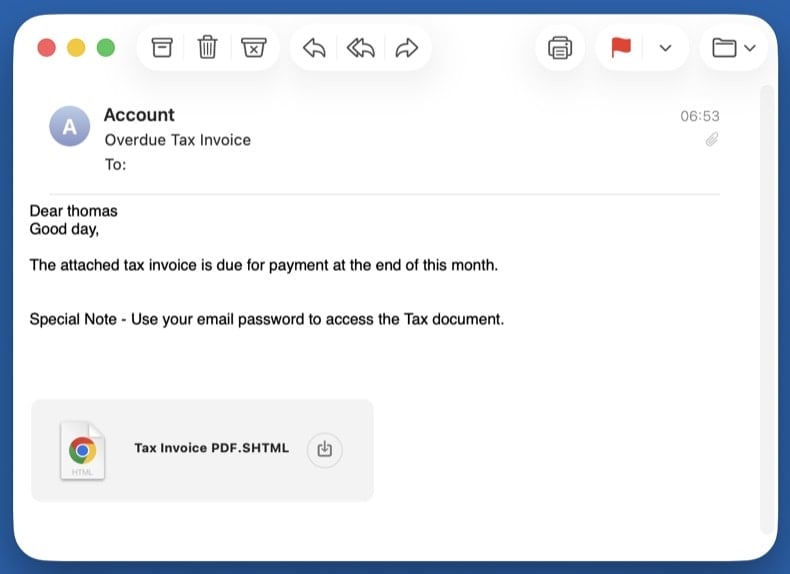
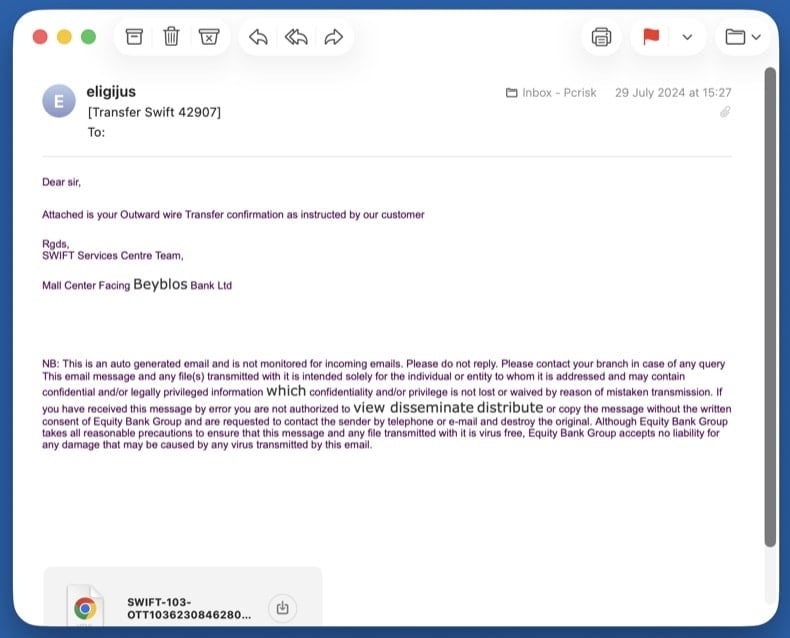
Malware delivery Emails with malicious attachments
Trojans hidden inside fake invoices, faxes, shipping confirmations, or Office documents. Opening the attachment runs the payload and infects the system - often with an info-stealer or remote-access trojan.
Common subject lines
- "Invoice INV-2026-XXXX attached"
- "Fax received - 3 pages"
- "Your shipping document is ready"
- "Voicemail from +1-XXX-XXX-XXXX"
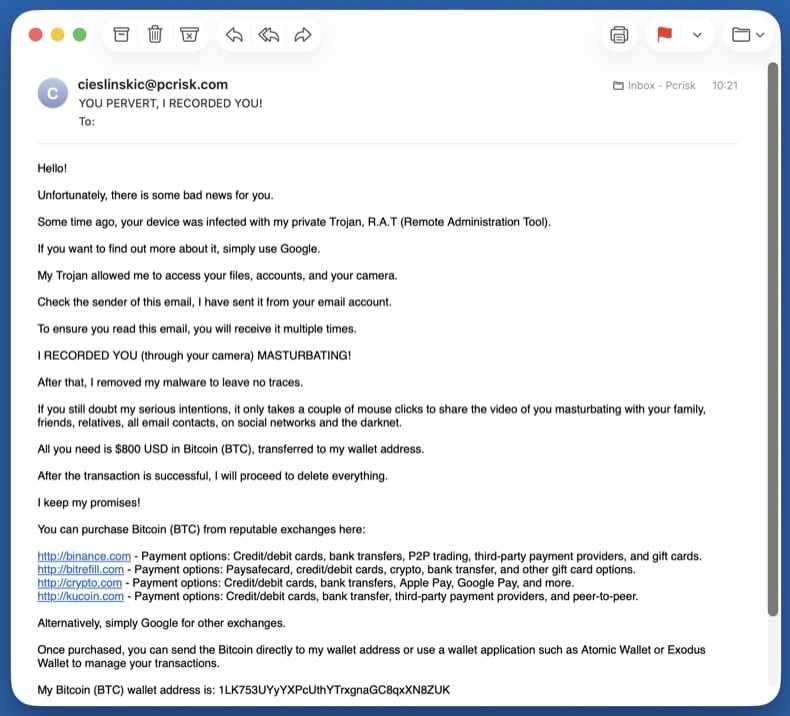
Extortion Sextortion emails
Fake claims of webcam recordings demanding cryptocurrency. Almost always a bluff: the attacker pulls a real password from an old data breach to make the threat look credible, then claims to have video of you. They have no recording and no access.
Common subject lines
- "I know your password is XXXX"
- "Your account has been hacked"
- "I have recorded you - 48 hours to pay"
- "You have been compromised"
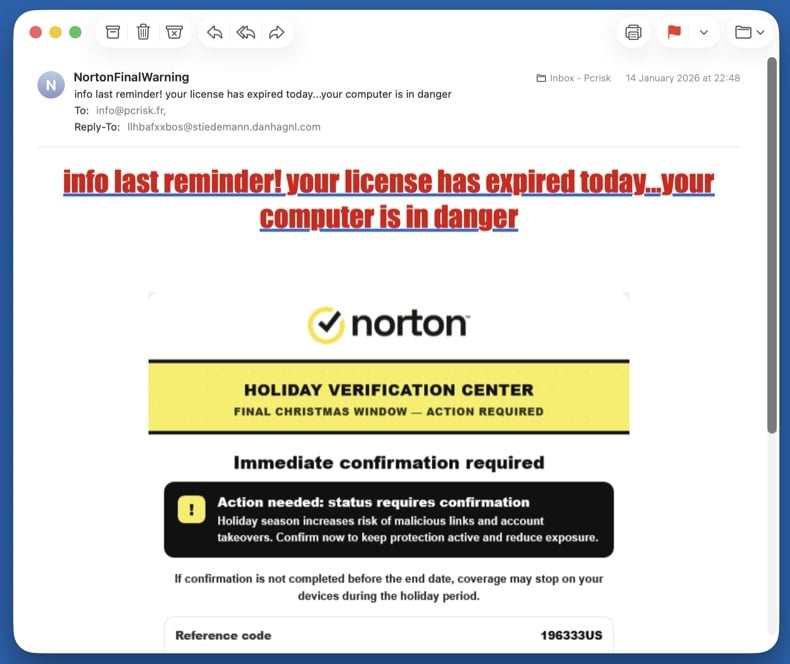
Callback fraud Refund & callback scams
"Your subscription was renewed for $499 - call to cancel." Norton, McAfee, Geek Squad, PayPal, and Wells Fargo variants are all common. There's no real subscription. The phone number in the email connects directly to the scammer, who walks you through "refunding" yourself - which is actually them stealing money from your bank.
Common subject lines
- "Norton subscription auto-renewed - $499.99"
- "McAfee Total Protection invoice"
- "Geek Squad order confirmation"
- "Your PayPal payment is being processed"
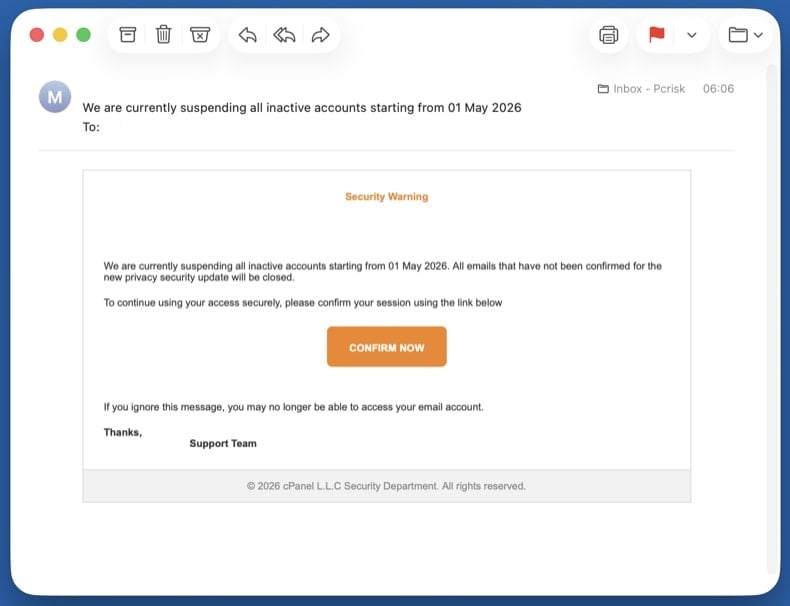
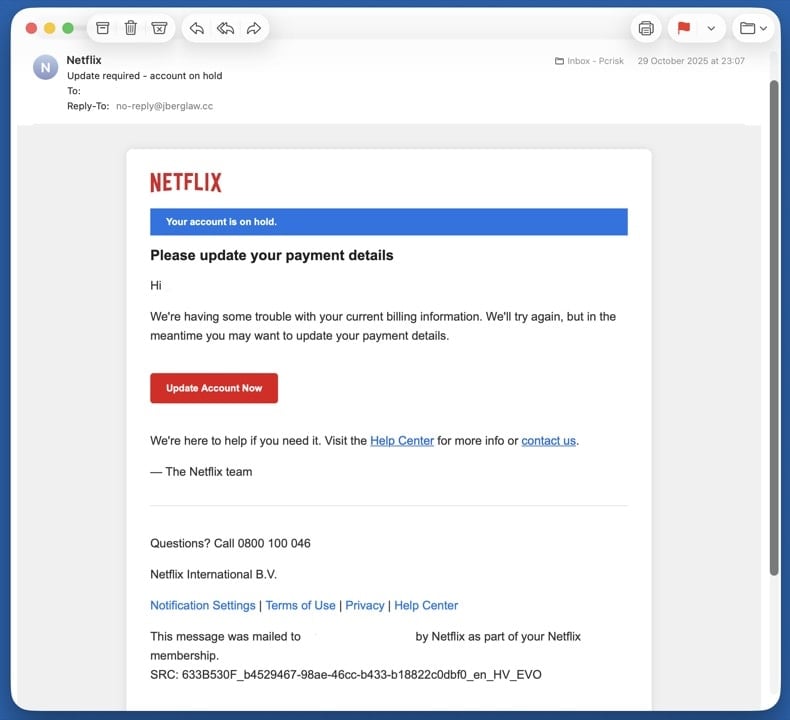
Credential theft Account suspension & verification scams
"Your account will be deleted in 24 hours - verify now." The artificial deadline is the whole point: it pressures you to click before checking details. The "verify" link goes to a phishing page styled to look like the real provider.
Common subject lines
- "Your account will be deleted in 24 hours"
- "Suspicious activity detected - verify now"
- "Final warning: account closure"
- "Action required to keep your account active"
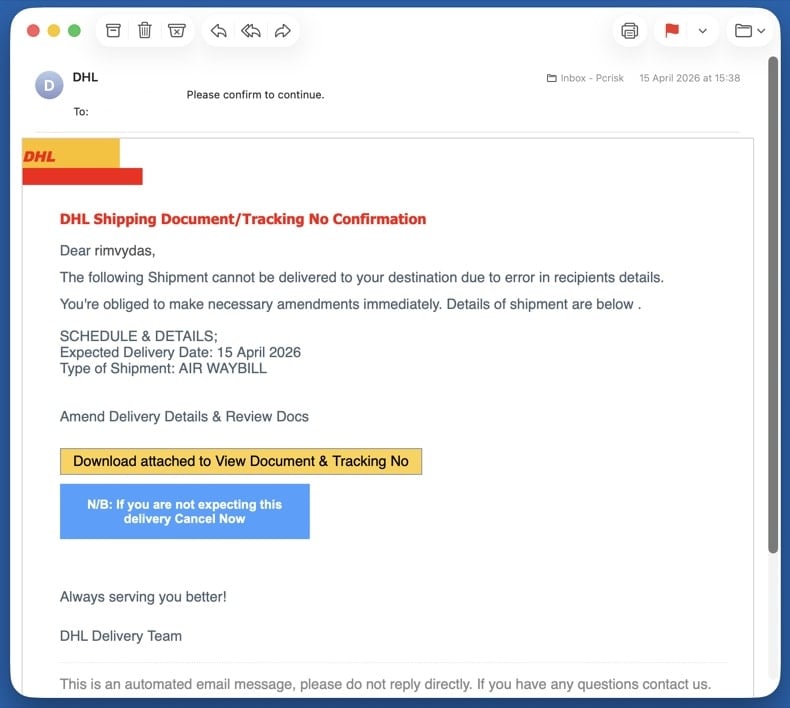
Mixed payload Delivery & package scams
Fake DHL, USPS, UPS, or FedEx tracking, customs fees, or "package undeliverable" notices. Targets anyone expecting a parcel - the timing alone catches many people. The link hides either phishing (asking for card details to "release" the package) or a malware download.
Common subject lines
- "Your DHL package is held at customs"
- "USPS - delivery attempt failed"
- "FedEx tracking update - action required"
- "Pay $2.99 redelivery fee to release your parcel"
Remote access Tech support scams
Fake Microsoft, Apple, or "Windows Defender" security alerts pushing a phone number. Real Microsoft and Apple never email a phone number to call. The number connects you to a scammer who asks for remote access to "fix" the imaginary problem and then demands payment.
Common subject lines
- "Microsoft Defender expired - renew now"
- "Apple ID security alert"
- "Critical: virus detected on your PC"
- "Windows license expired - call now"
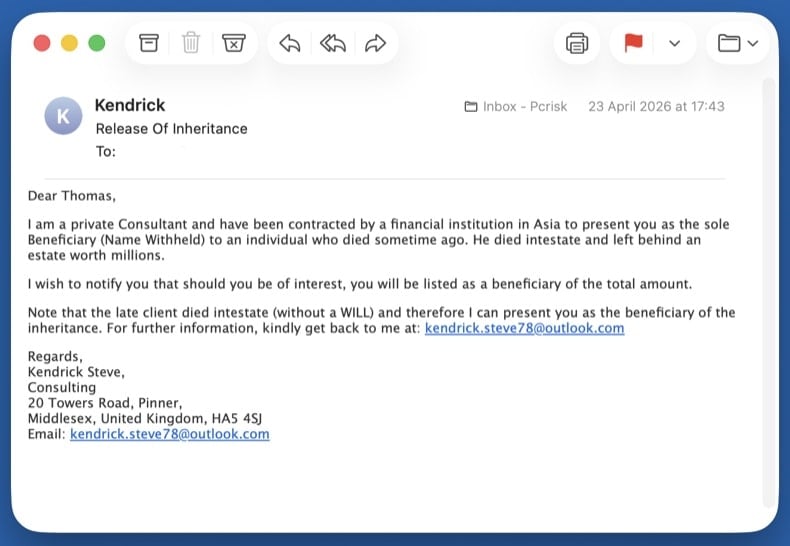
Wire fraud Advance-fee scams
Inheritance, lottery wins, romance, or business deals that ask for a small fee to release a much larger sum. The classic "Nigerian prince" 419 family of frauds. Once you pay the first fee, more fees appear (taxes, lawyer, transfer charges) until you stop paying. The promised money never exists.
Common subject lines
- "Inheritance from a relative you didn't know about"
- "You won the international lottery"
- "URGENT - business proposal worth $XX million"
- "Compensation fund release for fraud victims"
Wire fraud Business email compromise (BEC)
CEO impersonation asking employees to wire money or buy gift cards, or fake supplier invoices with newly "updated" bank details for payment redirection. The email often spoofs a real internal executive's display name and uses an external lookalike domain.
Common subject lines
- "Quick task - need you to buy gift cards"
- "Updated banking details for invoice payment"
- "Wire transfer request - urgent"
- "Are you available?" (CEO impersonation opener)
How to spot a malicious email?
Check the sender's actual address, not the display name
The display name (the human-readable part) is trivial to fake. Always check the full address that comes after it. Common red flags:
- Domain mismatch -
service@paypa1.com,support@micros0ft-help.com, look-alike domains using digits or extra hyphens - Free-email impersonation - any "official" message from a bank, courier, or platform sent from a
@gmail.com,@outlook.com, or@yahoo.comaddress - Reply-To mismatch - the From address looks legitimate but Reply-To points somewhere completely different
Real companies own their domains and send mail from them. A "DHL" message from a Gmail address is never legitimate, regardless of how convincing the body looks.
Watch for urgency, threats, and generic greetings
Scams almost always rush you. The point is to make you act before you think. Treat any of the following as a strong signal:
- "Your account will be deleted in 24 hours"
- "Final notice" / "Immediate action required"
- "Dear Customer" or "Dear User" instead of your real name
- Threats of fines, account closure, legal action, or arrest
- Promises of refunds, prizes, or money you didn't earn
- Spelling and grammar mistakes in messages claiming to come from a major brand
Hover over every link before clicking
On a desktop, hover the mouse over the link without clicking. The real destination shows in the bottom-left status bar of your browser or email client. On a phone, long-press the link to preview the URL.
- Real Microsoft, PayPal, or bank links go to those exact domains, not redirects through unrelated sites
- Shortened URLs (
bit.ly,tinyurl,t.co) hide the real destination - never click them in unsolicited mail - The visible link text and the actual URL must match - mismatches are the single biggest phishing red flag
When in doubt, don't click the link. Open a new browser tab and type the company's address yourself, then log in normally. If there really is an issue with your account, you'll see it there.
Treat unexpected attachments as hostile
If you didn't ask for the file, don't open it - even if it appears to come from someone you know. Categories that should never be opened from email without verification through another channel:
.exe,.scr,.iso,.img,.vbs,.bat- executables, never legitimate attachments.docx,.xlsx,.pptxwith "Enable macros" prompts - the macros run the malware.pdfwith "Click here to view" buttons - usually a phishing redirect, not a real document.zip,.rar,.7zarchives, especially password-protected ones - the password defeats the email scanner
If you only received the email and didn't reply, click, or open anything, the steps below are all you need. Your computer is not infected.
Don't reply, don't click "unsubscribe"
Replying confirms your address is real and monitored, which gets you added to higher-value scam lists. The "unsubscribe" link in a scam message is rarely a real opt-out - it usually leads to a phishing page or downloads a tracking pixel.
Instead, mark the message as junk or phishing inside your email client (this trains the spam filter), then block the sender.
Report the scam to your email provider and authorities
Inside your email client:
- Gmail: open the message → ⋮ menu → Report phishing
- Outlook / Outlook.com: ⋯ menu → Report → Report phishing
- Apple Mail / iCloud: Move to Junk, then forward to
reportphishing@apple.com
Forward or report to authorities:
After reporting, delete the email and empty the Trash folder so you don't accidentally open it later.
Pick the step below that matches what you did. If multiple apply, work through them in the order they appear - the steps are arranged from lowest to highest risk.
You only clicked a link (didn't enter anything or download anything)
Close the page right away. Don't enter any information, even if the page looks legitimate.
- Clear your browser cache and cookies for the last hour - → Last hour → check Cookies and Cached files
- Run a quick scan with Combo Cleaner in case the page tried to drop a file silently (drive-by download)
- Update your browser to the latest version - most drive-by exploits target outdated browsers
- Watch for new browser pop-ups, redirects, or unfamiliar notifications over the next few days
Modern browsers block most drive-by attacks, but a single click on a phishing page can still be enough on an outdated browser or unpatched plugin. A quick scan catches anything that landed silently.
You opened an attachment or downloaded a file - run a full malware scan
Opening an attachment is the most common path to actual infection. Treat the system as compromised until the scans below come back clean. Work through these sub-steps in order:
Unplug Ethernet and turn off Wi-Fi. If the attachment was an info-stealer or remote-access trojan, this stops it from sending data out or receiving commands. Keep the network off until you've booted into Safe Mode (next step) - you'll reconnect there briefly to download the scanners.
Windows 11: → Troubleshoot → Advanced options → Startup Settings → Restart → press 5 or F5.
Windows 10: hold Shift, click Power → Restart → Troubleshoot → Advanced options → Startup Settings → Restart → press F5.
Once Safe Mode has loaded, turn Wi-Fi back on and download Combo Cleaner (used in 8.4) and Microsoft Safety Scanner (used in 8.5). Safe Mode loads only minimal drivers, so most malware can't auto-run while you're getting the tools. Save both installers to your Desktop.
Reboot to normal Windows. Open . Select Microsoft Defender Antivirus (offline scan) and click Scan now. The PC restarts into a stripped-down environment and scans the disk before Windows fully loads - this is what catches rootkits and bootkits.
VB100 certified. Includes anti-trojan, registry/persistence scanning, and anti-spyware in one pass. The 7-day free trial is available.
Download Combo CleanerInstall Combo Cleaner and run a full system scan (not the quick scan). Let it complete fully, review what it found, and apply the recommended actions. Combo Cleaner will quarantine known trojans and remove their persistence in the registry.
Download Microsoft Safety Scanner (MSERT.exe). The binary expires every 10 days, which means every download has the latest signatures. Run a full scan after Combo Cleaner to catch anything one engine alone might miss.
Many email-borne trojans drop adware that hijacks browsers. Reset each browser you use:
Chrome: chrome://settings/reset → Restore settings to their original defaults. Then chrome://settings/content/notifications - remove unfamiliar sites.
Edge: edge://settings/reset. Then edge://settings/content/notifications.
Firefox: about:support → Refresh Firefox.
Open and confirm Real-time protection, Cloud-delivered protection, and Tamper Protection are all on. Then run and update browsers and applications.
If the scans keep finding new threats on each run, or files reappear after deletion, you may have a deeper compromise that needs a clean Windows reinstall. See pcrisk's full manual malware removal guide for the extended procedure (Process Explorer, Autoruns, hosts file inspection).
You entered credentials on a fake login page
Assume the attacker has your password and is using it right now. Speed matters.
- Change the password from a different, known-clean device (your phone is fine if it's not infected). Don't reuse the old password anywhere else.
- Enable two-factor authentication if you haven't already. Prefer an authenticator app or hardware key over SMS.
- Sign out of all sessions - most platforms have a "sign out everywhere" option in security settings, which kicks the attacker out.
- Review recent activity - look for unfamiliar logins, new devices, forwarding rules, or app permissions. Remove anything you don't recognize.
- Check your other accounts - if you reused that password anywhere else, change it there too. Check your exposure at haveibeenpwned.com.
- Update security questions - the attacker may have seen the answers in your account profile.
If you only have time to change one password, change your primary email password - it's the recovery hub for every other account. An attacker who controls your email can reset everything else.
You sent money or shared bank, card, or ID details
Time is the single biggest factor in recovering money. Banks can sometimes recall a wire or reverse a card transaction within the first few hours.
- Call your bank or card issuer immediately. Use the number on the back of the card, not any number from the scam email. Ask them to freeze the card, reverse the transaction if possible, and flag the account for fraud monitoring.
- If you sent a wire transfer or used a money-transfer service (Western Union, MoneyGram, Zelle, Wise), call them directly and request a recall. Some can be reversed within minutes if reported fast.
- If you sent cryptocurrency or gift cards, recovery is unlikely - but report it anyway, since law enforcement tracks these patterns.
- File a police report. You'll need the report number for any insurance, bank, or credit-bureau claim. Save the report number.
- File with the right authority for your country:
- US: ic3.gov + reportfraud.ftc.gov
- UK: reportfraud.police.uk (Report Fraud, the successor to Action Fraud; 0300 123 2040)
- Canada: antifraudcentre.ca
- Australia: scamwatch.gov.au
- EU: your national CERT or police cybercrime unit
- Set fraud alerts on all major credit bureaus if you shared any ID details. US: Equifax, Experian, TransUnion. UK: Experian, Equifax, TransUnion (Cifas Protective Registration is a stronger option).
- Save all evidence - the original email (with full headers), screenshots of the fake site, transaction records, any phone numbers or chat logs.
Final scan and startup-app check
Reconnect to the network and run one final full scan with Combo Cleaner, followed by a Windows Defender quick scan. Then open Task Manager (Ctrl + Shift + Esc) and switch to Startup apps - disable anything unfamiliar.
Make sure Windows, browsers, and any applications you use are fully up to date. The infection vector that worked on you once usually involves outdated software.
Monitor accounts and credit for 30 days
Most fraud follow-ups land in the first month. Until that window closes, keep watching:
- Bank and card statements - daily for the first week, then weekly
- Email - watch for password-reset confirmations or login alerts you didn't trigger
- Credit report - US: free at annualcreditreport.com; UK: Experian, Equifax, TransUnion all have free tiers
- Breach alerts - sign up at haveibeenpwned.com to be notified when your email appears in new leaks
If anything new appears in any of those, treat it as a continuing compromise: change passwords again, contact the bank again, and update the police report.
Important: If you didn't click anything, didn't reply, and didn't open any attachment, your computer is not infected - just delete the email and move on. If you opened an attachment or downloaded a file, run an automated scan with Combo Cleaner and Windows Defender and stop there. That path catches the vast majority of email-borne malware without the risk of breaking Windows by deleting the wrong file.
Frequently Asked Questions (FAQ)
Why did I receive this email?
Scammers behind sextortion, phishing, and similar scam emails send the same letters to all recipients. Their emails are non-targeted.
I have downloaded and opened a malicious file attached to an email, is my computer infected?
Opening executables usually cause immediate computer infections. However, opening MS Office documents and some other files is safe until additional actions are performed (e.g., macros commands in malicious documents are enabled). It depends on the type of the opened file.
Is my computer actually hacked and does the sender have any information?
No, crooks behind sextortion scams only claim that they have hacked or infected a computer. As a rule, they are only bluffing.
How did cyber criminals get my email password?
Most threat actors obtain passwords after data breaches or via phishing websites.
I have sent cryptocurrency to the address presented in such email, can I get my money back?
Unfortunately, crypto transactions are irreversible. There is no way to retrieve crypto already sent to scammers.
I have read the email but did not open the attachment, is my computer infected?
Opening emails without opening their contents (links or files) is safe.
Will Combo Cleaner remove malware infections that were present in email attachment?
Yes, Combo Cleaner will remove malware from the operating system. It can detect almost all known malware. High-end malware can hide deep in the system. Thus, running a full system scan to remove malware of this kind is a must.
Share:
 Facebook
 X.com
X.com
 LinkedIn
 Copy Link

Tomas Meskauskas
Expert security researcher, professional malware analyst
I am passionate about computer security and technology. I have an experience of over 10 years working in various companies related to computer technical issue solving and Internet security. I have been working as an author and editor for pcrisk.com since 2010. Follow me on Twitter and LinkedIn to stay informed about the latest online security threats.
PCrisk security portal is brought by a company RCS LT.
Joined forces of security researchers help educate computer users about the latest online security threats. More information about the company RCS LT.
Our malware removal guides are free. However, if you want to support us you can send us a donation.
DonatePCrisk security portal is brought by a company RCS LT.
Joined forces of security researchers help educate computer users about the latest online security threats. More information about the company RCS LT.
Our malware removal guides are free. However, if you want to support us you can send us a donation.
Donate
▼ Show Discussion