
How to get rid of Google Notes Crypto Clipper malware
TrojanAlso Known As: Google Notes Crypto Clipper extension

Get free scan and check if your device is infected.
Remove it nowTo use full-featured product, you have to purchase a license for Combo Cleaner. Seven days free trial available. Combo Cleaner is owned and operated by RCS LT, the parent company of PCRisk.com.
What kind of extension is Google Notes Crypto Clipper?
Google Notes Crypto Clipper is a malicious browser extension that pretends to be a simple note-taking tool called "Google Notes." According to research by McAfee Labs, the extension actually works as a clipper, a type of malware that quietly rewrites cryptocurrency wallet addresses copied to the clipboard so that payments end up in an attacker's wallet instead of the intended recipient. Because of this financial-theft behavior, our team classifies it as dangerous malware rather than ordinary adware.
Unlike typical adware, Google Notes Crypto Clipper does not show pop-ups or banner ads. It works quietly in the background while a genuinely functional notes feature keeps up appearances. It reaches victims through unsigned installers, often bundled with cracked or pirated software, and anyone who finds it installed should remove it immediately to avoid losing cryptocurrency.
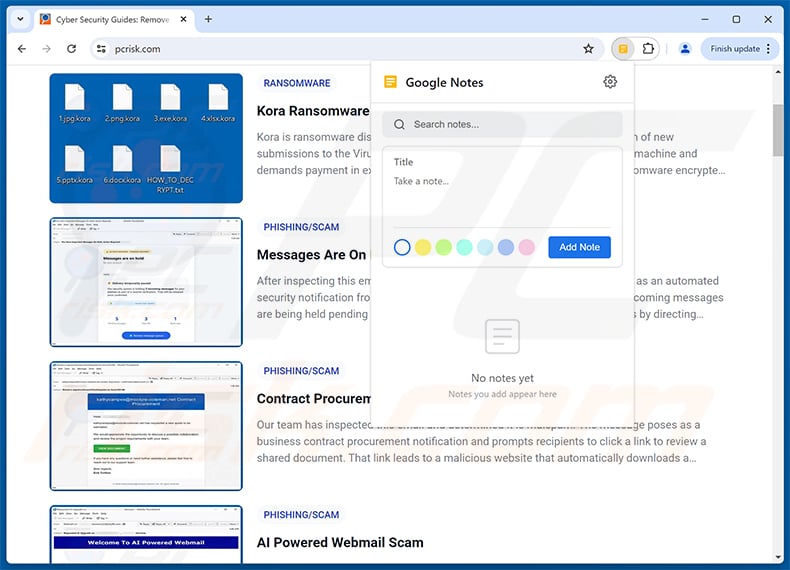
Google Notes Crypto Clipper in detail
Once installed, Google Notes Crypto Clipper monitors the Windows and browser clipboard for anything resembling a cryptocurrency wallet address. Using pattern matching, it recognizes Bitcoin, Ethereum, Bitcoin Cash, Ripple, Dash, and Solana addresses, among others. When a match is found, it quietly swaps the copied address for one controlled by the attacker before the victim pastes it into a transaction.
For most of these currencies, the extension sends the original address to an attacker-run server and receives a unique replacement tied specifically to that address, meaning the same input always returns the same swapped address. Solana is the exception - every Solana address currently resolves to a single attacker wallet, suggesting that part of the operation is less developed. If the attacker's server cannot be reached, hardcoded fallback addresses keep the theft working anyway.
Rather than relying on a fixed command-and-control server that researchers could quickly block, the extension queries a public Ethereum smart contract and decodes its response to learn where its current server is. This technique, known as EtherHiding, lets the attacker change infrastructure at any time simply by updating a value on the blockchain. At the time of research, this method pointed to the domains zebregts.com and devops-offensive.cc.
To get onto a victim's computer without appearing in the Chrome Web Store, the installer forcibly closes any running Chrome, Edge, Brave, or Opera windows, then directly edits the browser's protected configuration files to register the extension as though it had been installed normally. It recalculates the security values browsers use to detect tampering, letting the fake extension load without triggering the usual "installed by an unknown source" warning.
Once active, Google Notes Crypto Clipper requests permissions that have nothing to do with taking notes: access to every website visited, browsing history, and full read and write access to the clipboard. It also avoids acting on known blockchain-explorer websites, so a victim checking their own wallet balance is less likely to notice anything wrong.
Because cryptocurrency transfers usually cannot be reversed, even a single successful clipboard swap can mean permanent financial loss. Anyone who finds Google Notes Crypto Clipper, or an unfamiliar extension calling itself "Google Notes," installed in their browser should remove it right away and review any recent crypto transactions with caution.
| Name | Google Notes Crypto Clipper extension |
| Threat Type | Clipper, Crypto Stealer, Trojan |
| Supposed Functionality | Note-taking browser extension |
| Detection Names (BaseZipInstaller.exe) | Avast (Win64:MalwareX-gen [Misc]), Combo Cleaner (Gen:Variant.MSILHeracles.254752), ESET-NOD32 (Generik.CILPWRR Trojan), Kaspersky (HEUR:Trojan.MSIL.Agent.gen), Microsoft (Trojan:Win32/Malgent), Full List Of Detections (VirusTotal) |
| Symptoms | Clippers are designed to stealthily infiltrate the victim's computer and remain silent, and thus no particular symptoms are clearly visible on an infected machine. |
| Distribution methods | Unsigned installers, software 'cracks' and pirated content, bundled downloads. |
| Damage | Monetary loss through stolen cryptocurrency, identity theft, stolen credentials. |
| Cybercriminals' Cryptowallet Addresses | 3JvDBvKbS6YYMKjV3R9e9Zfd67f467fNLy, 1BbhVBxpniuZuAL1gGZnEMdQhmz9JGWpyT, 3AcPNVh7NyESwX3ECymy3rkdH4Ke2c26Tj, 1BVTrB47erypG3tevi1U9Fv6BbNUBEiuiX |
| Malware Removal (Windows) |
To eliminate possible malware infections, scan your computer with legitimate antivirus software. Our security researchers recommend using Combo Cleaner. Download Combo CleanerTo use full-featured product, you have to purchase a license for Combo Cleaner. 7 days free trial available. Combo Cleaner is owned and operated by RCS LT, the parent company of PCRisk.com. |
Conclusion
Google Notes Crypto Clipper is a dangerous browser extension disguised as a harmless notes app. Its only real purpose is to intercept cryptocurrency transactions and redirect funds to the attacker's wallets. Because blockchain transactions cannot typically be undone, victims risk permanent financial loss, so the extension should be removed as soon as it is found.
More examples of clippers are Atlas, Laplas, and Paradies.
How did Google Notes Crypto Clipper install on my computer?
Google Notes Crypto Clipper spreads through unsigned installer programs rather than the Chrome Web Store or other official extension stores. According to McAfee Labs, these installers are commonly distributed alongside cracked or pirated versions of paid software, a popular lure for users looking to avoid paying for legitimate programs.
When executed, the installer closes any open Chrome, Edge, Brave, or Opera windows and directly modifies the browser's configuration files to add the extension, bypassing the checks that would normally block an unofficial extension from loading. The installer then deletes itself, leaving little trace of how the extension got there.
More broadly, threats like this reach victims through trojanized downloads, freeware bundling, torrent sites, and deceptive "free software" offers found through search engines.
How to avoid installation of unwanted applications?
Before confirming any cryptocurrency transaction, carefully check the first and last six characters of the recipient's wallet address against the original source, ideally on a separate device. This simple habit defeats the vast majority of clipper attacks. Only install browser extensions from the official Chrome Web Store, Microsoft Edge Add-ons store, or equivalent, and treat any extension you don't remember installing as suspicious.
Review the permissions granted to every extension already installed in your browser. A note-taking tool has no legitimate reason to request access to every website you visit, your browsing history, or your clipboard. Avoid downloading unsigned executables from unofficial sources, particularly free or cracked versions of paid software. If your computer is already infected, we recommend running a scan with Combo Cleaner Antivirus for Windows to automatically eliminate it.
Instant automatic malware removal:
Manual threat removal might be a lengthy and complicated process that requires advanced IT skills. Combo Cleaner is a professional automatic malware removal tool that is recommended to get rid of malware. Download it by clicking the button below:
DOWNLOAD Combo CleanerBy downloading any software listed on this website you agree to our Privacy Policy and Terms of Use. To use full-featured product, you have to purchase a license for Combo Cleaner. 7 days free trial available. Combo Cleaner is owned and operated by RCS LT, the parent company of PCRisk.com.
Quick menu:
- What is Google Notes Crypto Clipper?
- STEP 1. Uninstall malicious applications using Control Panel.
- STEP 2. Remove rogue plug-ins from Google Chrome.
- STEP 3. Remove malicious add-ons from Mozilla Firefox.
- STEP 4. Remove malicious extensions from Safari.
- STEP 5. Remove rogue extensions from Microsoft Edge.
Adware removal:
Windows 11 users:
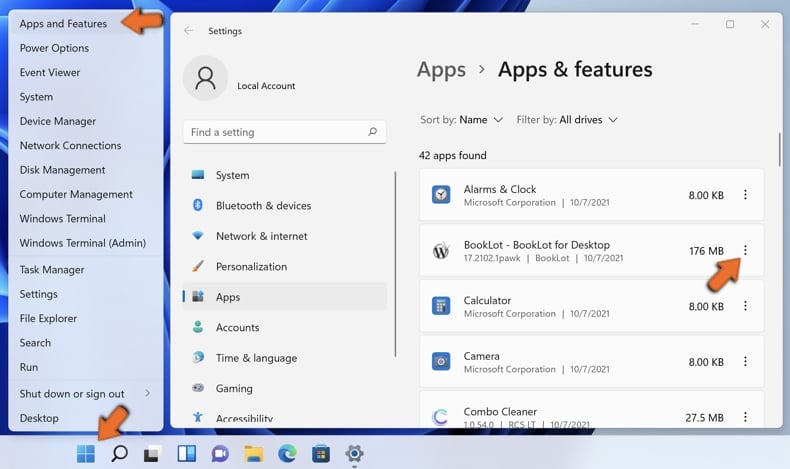
Right-click on the Start icon, select Apps and Features. In the opened window search for the application you want to uninstall, after locating it, click on the three vertical dots and select Uninstall.
Windows 10 users:
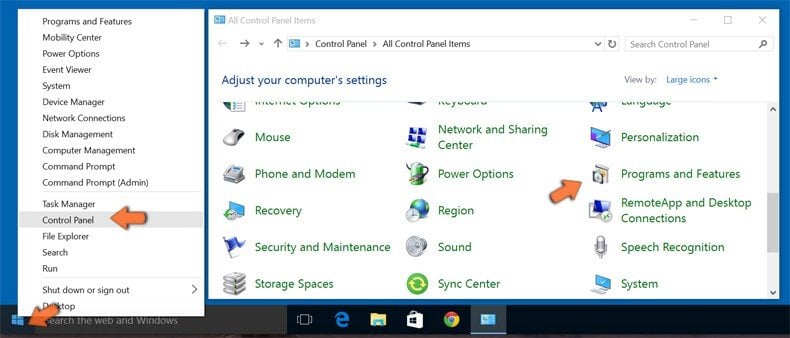
Right-click in the lower left corner of the screen, in the Quick Access Menu select Control Panel. In the opened window choose Programs and Features.
Windows 7 users:
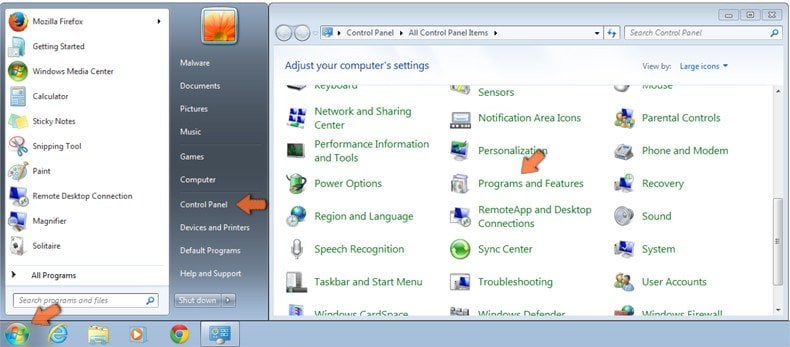
Click Start (Windows Logo at the bottom left corner of your desktop), choose Control Panel. Locate Programs and click Uninstall a program.
macOS (OSX) users:
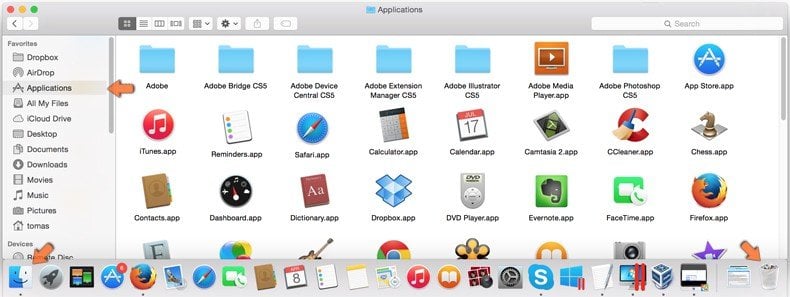
Click Finder, in the opened screen select Applications. Drag the app from the Applications folder to the Trash (located in your Dock), then right click the Trash icon and select Empty Trash.
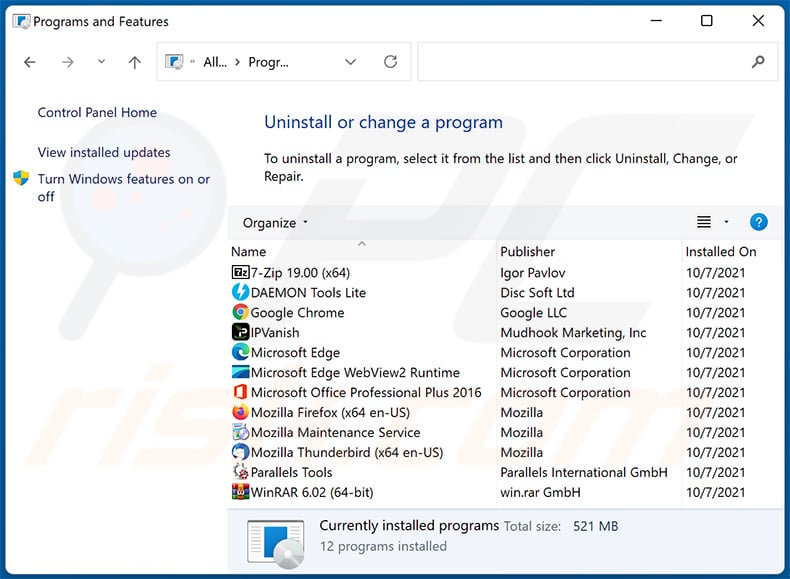
In the uninstall programs window, look for any unwanted applications, select these entries and click "Uninstall" or "Remove".
After uninstalling the unwanted application, scan your computer for any remaining unwanted components or possible malware infections. To scan your computer, use recommended malware removal software.
DOWNLOAD remover for malware infections
Combo Cleaner checks if your computer is infected with malware. To use full-featured product, you have to purchase a license for Combo Cleaner. 7 days free trial available. Combo Cleaner is owned and operated by RCS LT, the parent company of PCRisk.com.
Remove malicious extensions from Internet browsers:
Video showing how to remove unwanted browser add-ons:
 Remove malicious extensions from Google Chrome:
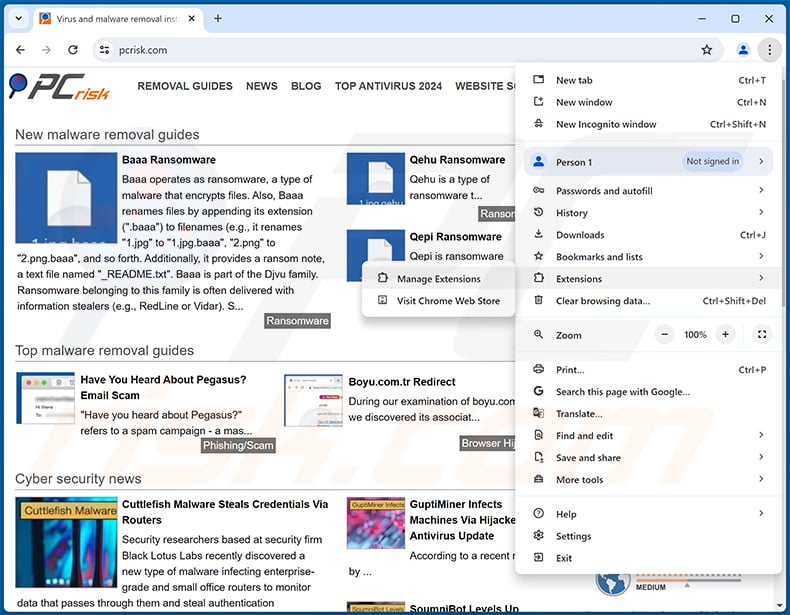
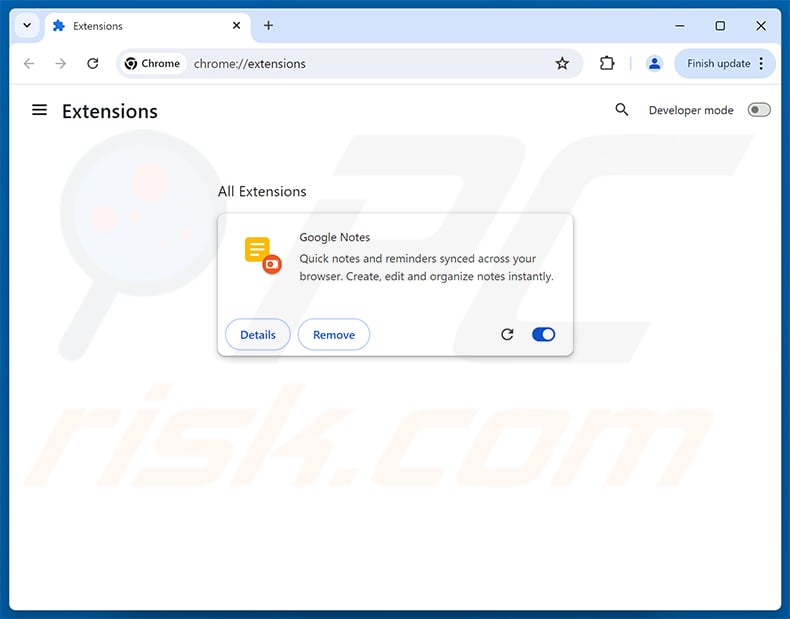
Click the Chrome menu icon  (at the top right corner of Google Chrome), select "Extensions" and click "Manage Extensions". Locate "Google Notes Crypto Clipper" (it may appear under the name "Google Notes") or other suspicious extensions, select these entries and click "Remove".
Optional method:
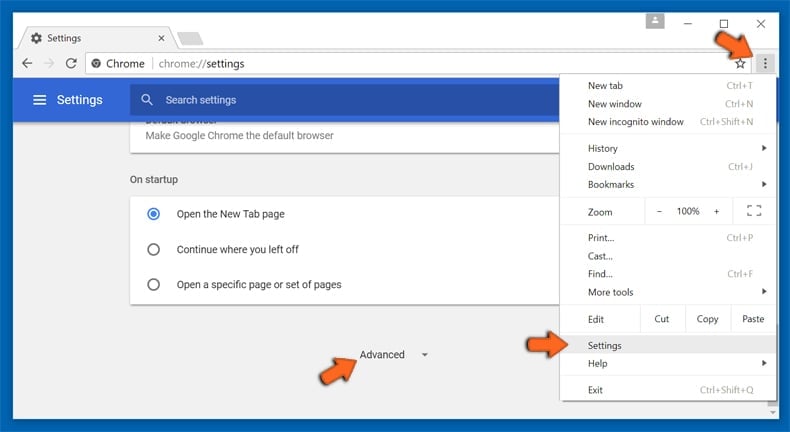
If you continue to have problems with removal of the google notes crypto clipper extension, reset your Google Chrome browser settings. Click the Chrome menu icon (at the top right corner of Google Chrome) and select Settings. Scroll down to the bottom of the screen. Click the Advanced… link.
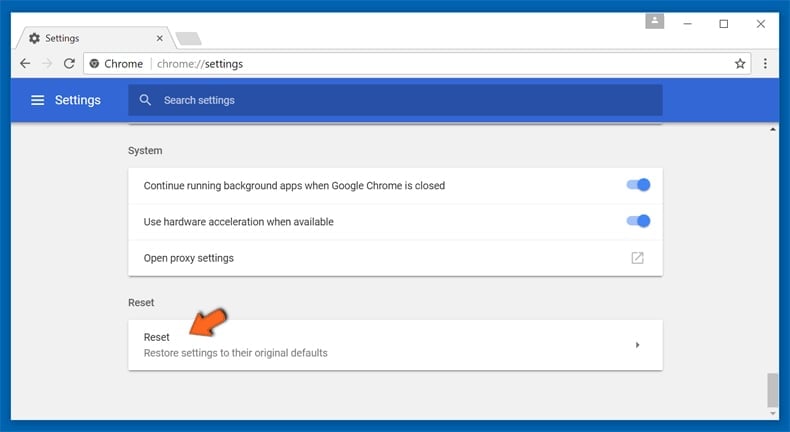
After scrolling to the bottom of the screen, click the Reset (Restore settings to their original defaults) button.
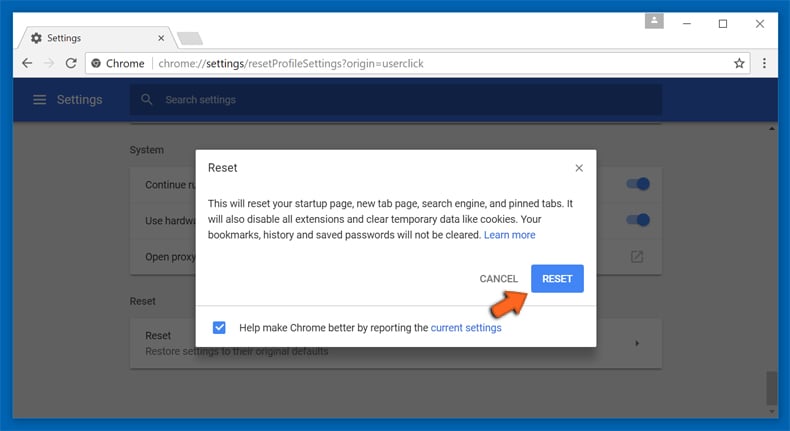
In the opened window, confirm that you wish to reset Google Chrome settings to default by clicking the Reset button.
 Remove malicious plug-ins from Mozilla Firefox:
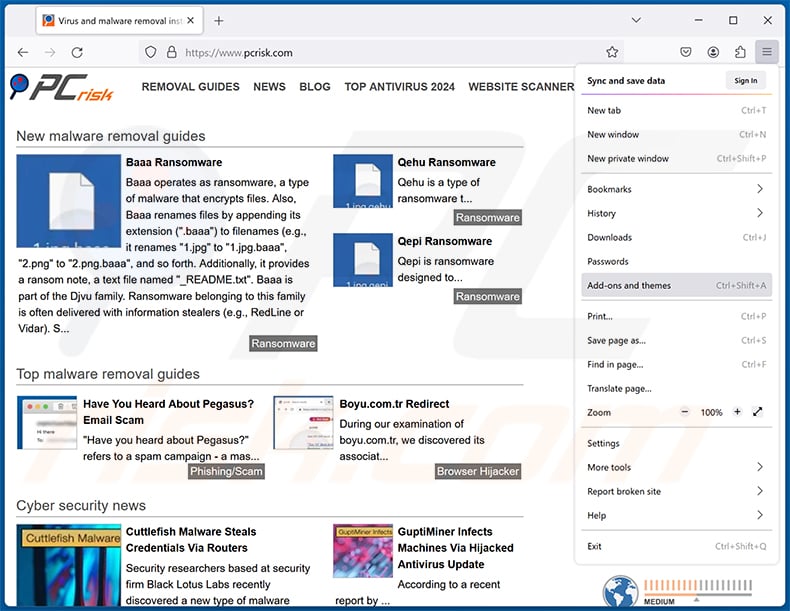
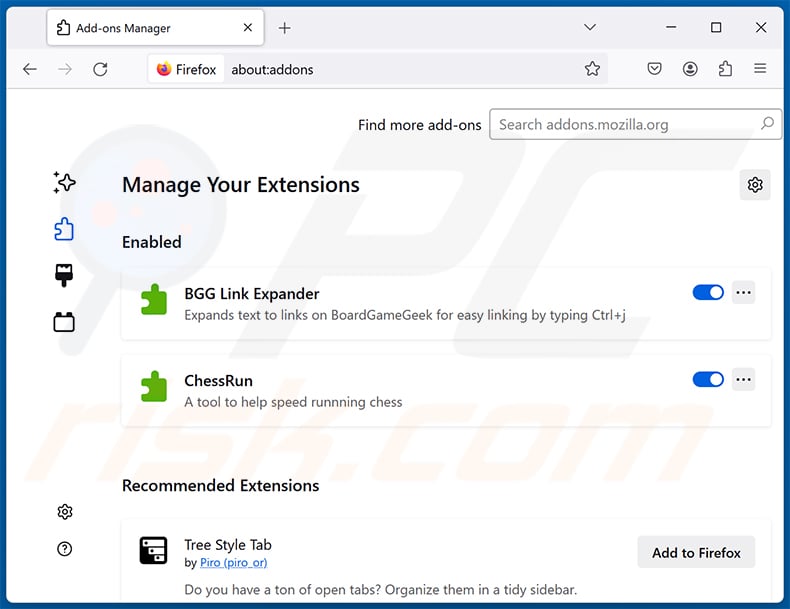
Click the Firefox menu  (at the top right corner of the main window), select "Add-ons and themes". Click "Extensions", in the opened window locate all recently-installed suspicious extensions, click on the three dots and then click "Remove".
Optional method:
Computer users who have problems with google notes crypto clipper extension removal can reset their Mozilla Firefox settings.
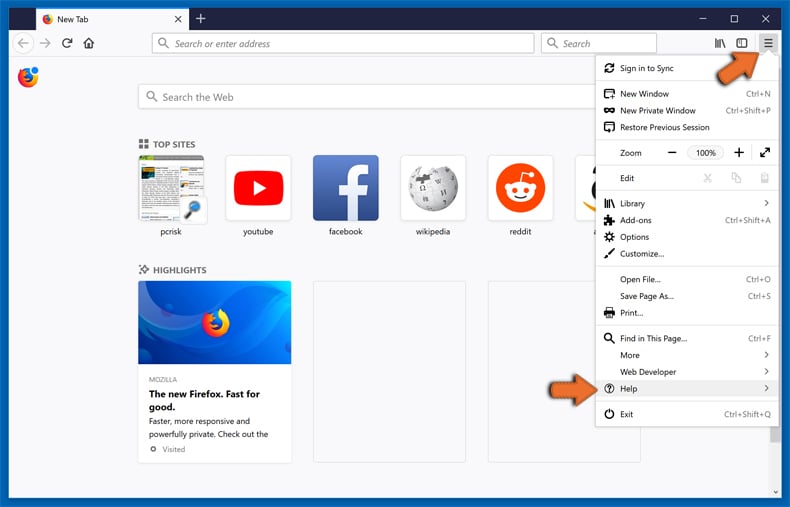
Open Mozilla Firefox, at the top right corner of the main window, click the Firefox menu, in the opened menu, click Help.
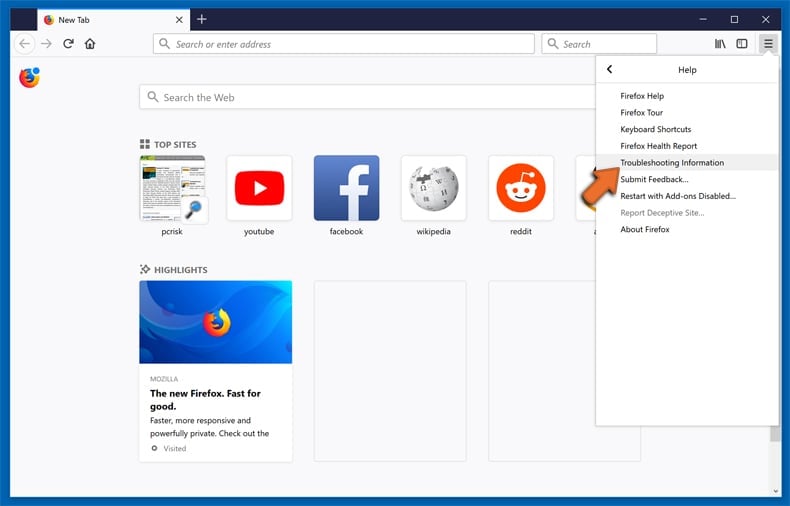
Select Troubleshooting Information.
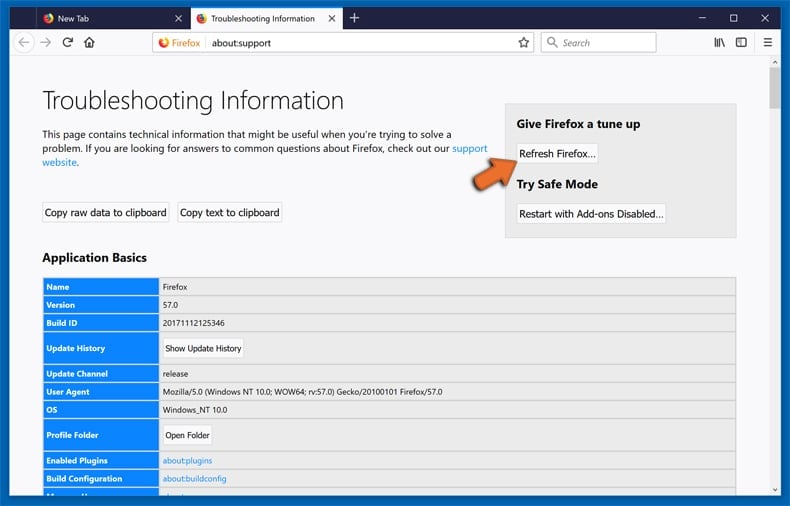
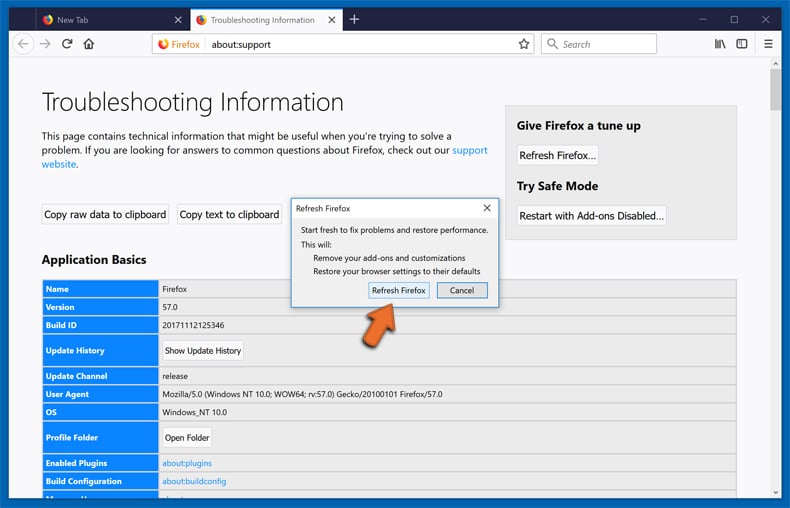
In the opened window, click the Refresh Firefox button.
In the opened window, confirm that you wish to reset Mozilla Firefox settings to default by clicking the Refresh Firefox button.
 Remove malicious extensions from Safari:
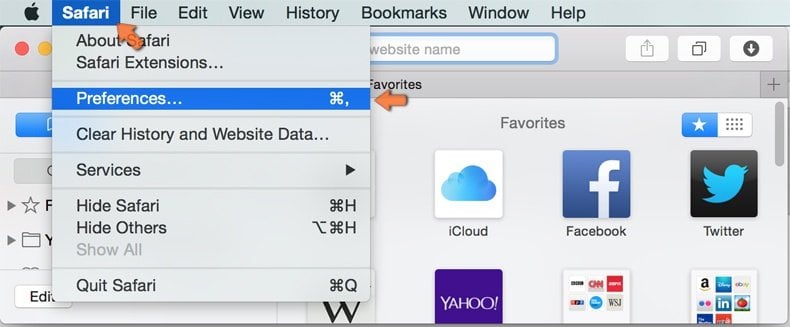
Make sure your Safari browser is active, click Safari menu, and select Preferences....
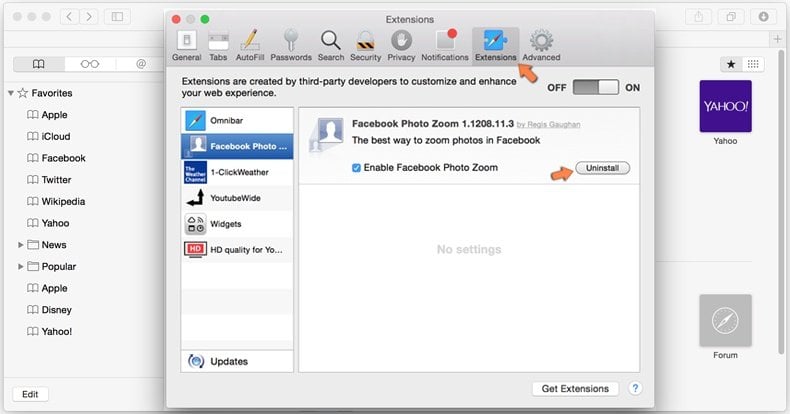
In the opened window click Extensions, locate any recently installed suspicious extension, select it and click Uninstall.
Optional method:
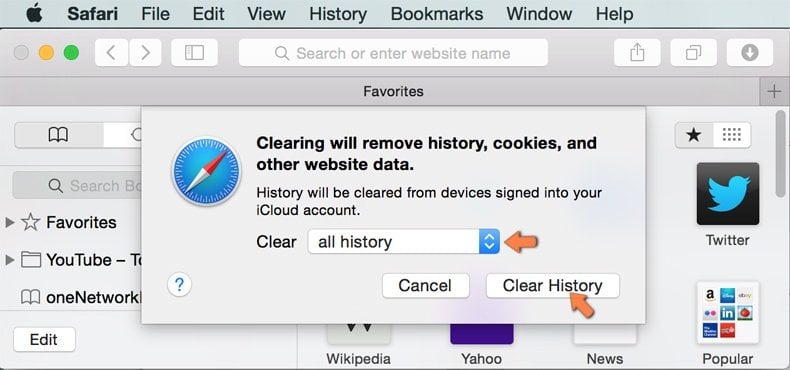
Make sure your Safari browser is active and click on Safari menu. From the drop down menu select Clear History and Website Data...
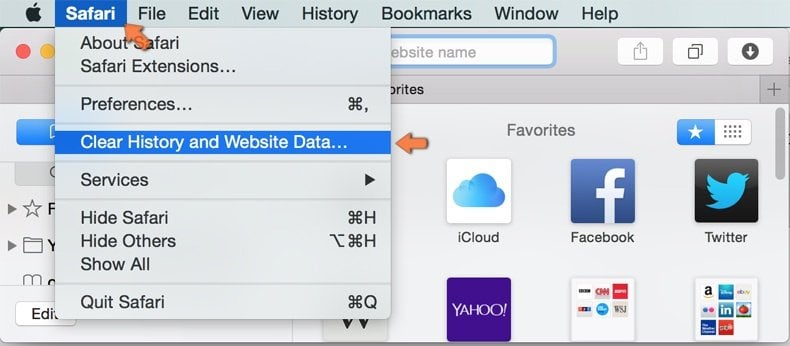
In the opened window select all history and click the Clear History button.
 Remove malicious extensions from Microsoft Edge:
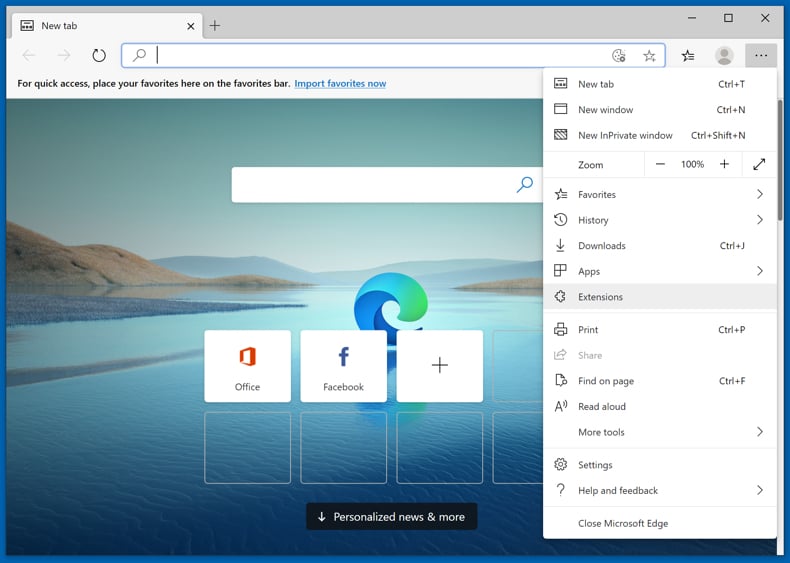
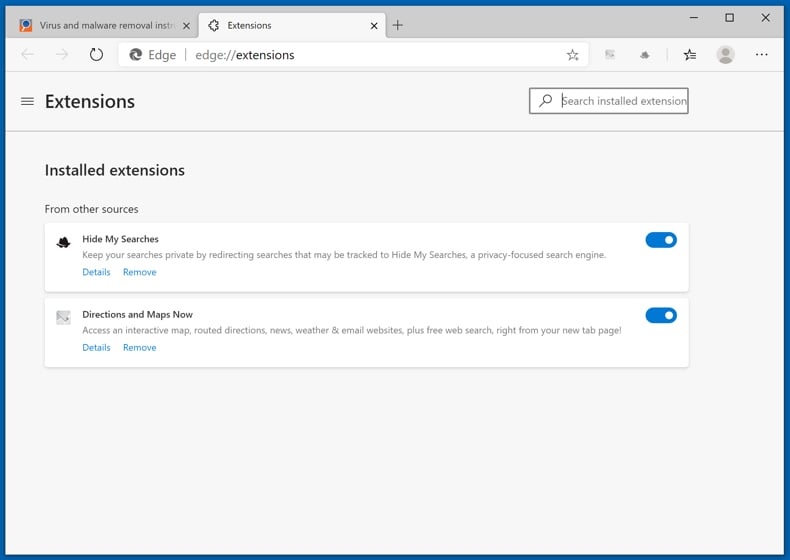
Click the Edge menu icon  (at the upper-right corner of Microsoft Edge), select "Extensions". Locate all recently-installed suspicious browser add-ons and click "Remove" below their names.
Optional method:
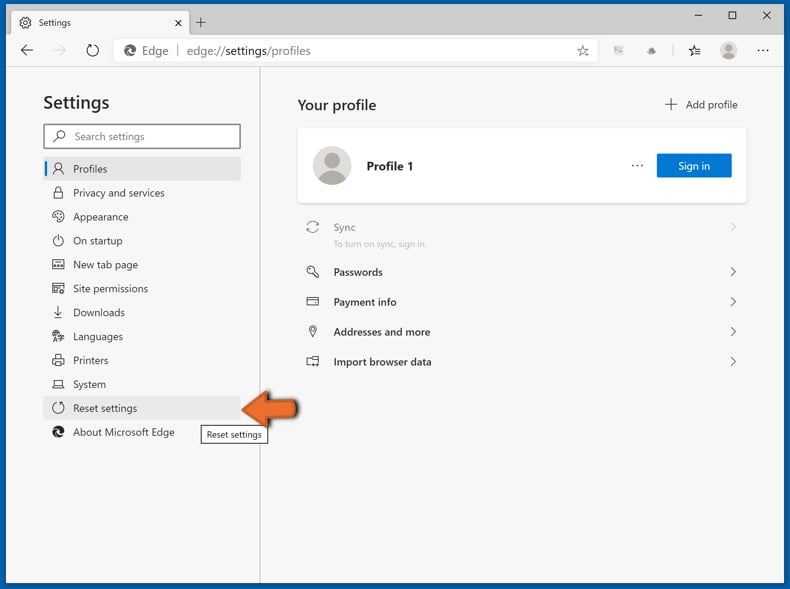
If you continue to have problems with removal of the google notes crypto clipper extension, reset your Microsoft Edge browser settings. Click the Edge menu icon (at the top right corner of Microsoft Edge) and select Settings.
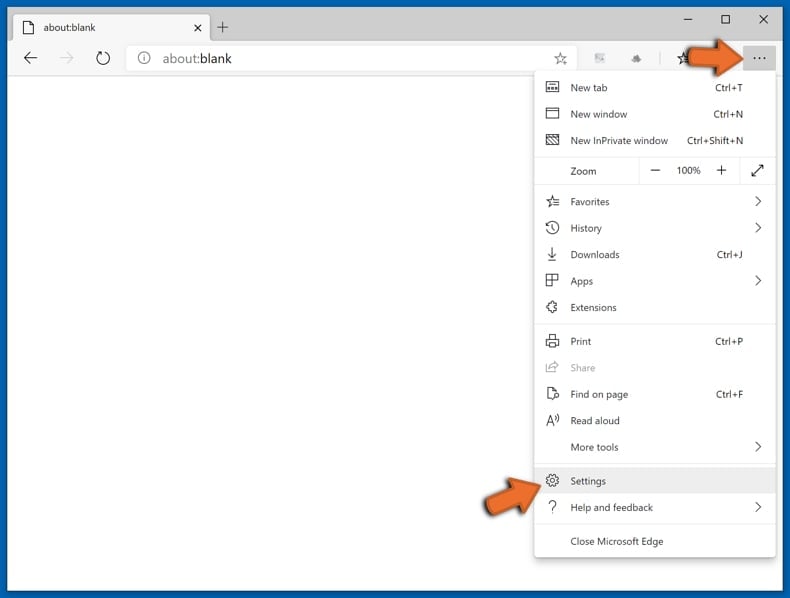
In the opened settings menu select Reset settings.
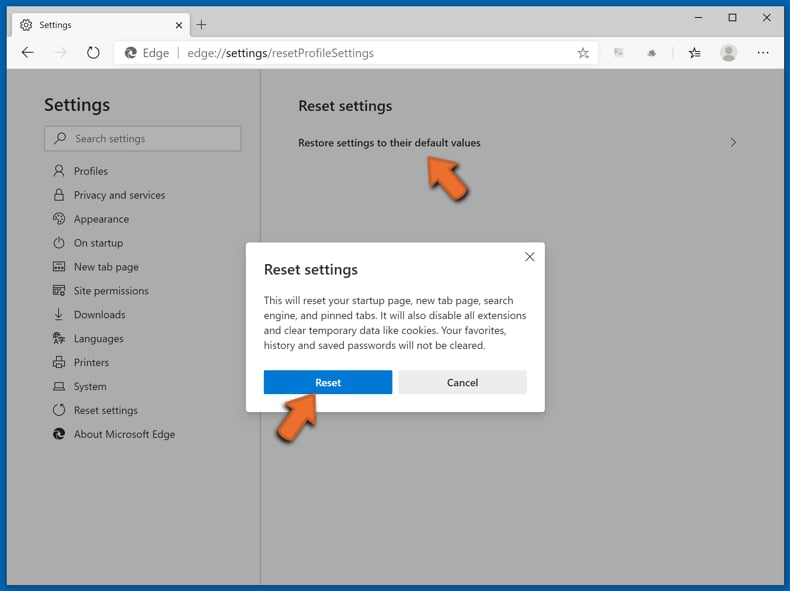
Select Restore settings to their default values. In the opened window, confirm that you wish to reset Microsoft Edge settings to default by clicking the Reset button.
- If this did not help, follow these alternative instructions explaining how to reset the Microsoft Edge browser.
Frequently Asked Questions (FAQ)
What are the biggest issues that Google Notes Crypto Clipper can cause?
Google Notes Crypto Clipper can silently redirect cryptocurrency payments to an attacker's wallet, resulting in permanent financial loss. It also has permission to read and inject content into every website visited, along with browsing history, without the kind of scrutiny a store-approved extension would face.
What is the purpose of Google Notes Crypto Clipper?
Its purpose is to intercept cryptocurrency wallet addresses copied to the clipboard and replace them with addresses controlled by the attacker, redirecting victims' funds without their knowledge.
How did Google Notes Crypto Clipper infiltrate my computer?
Google Notes Crypto Clipper has been observed spreading through unsigned installers, often bundled with cracked or pirated software. Threats of this kind can also reach victims via freeware bundling, torrent downloads, and deceptive "free software" offers.
Will Combo Cleaner protect me from malware?
Yes. Combo Cleaner can detect and remove most known malware, including clippers like this one. Because advanced threats can hide deep inside a system, running a full scan is recommended to make sure nothing is missed.
Share:
 Facebook
 X.com
X.com
 LinkedIn
 Copy Link

Tomas Meskauskas
Expert security researcher, professional malware analyst
I am passionate about computer security and technology. I have an experience of over 10 years working in various companies related to computer technical issue solving and Internet security. I have been working as an author and editor for pcrisk.com since 2010. Follow me on Twitter and LinkedIn to stay informed about the latest online security threats.
PCrisk security portal is brought by a company RCS LT.
Joined forces of security researchers help educate computer users about the latest online security threats. More information about the company RCS LT.
Our malware removal guides are free. However, if you want to support us you can send us a donation.
DonatePCrisk security portal is brought by a company RCS LT.
Joined forces of security researchers help educate computer users about the latest online security threats. More information about the company RCS LT.
Our malware removal guides are free. However, if you want to support us you can send us a donation.
Donate
▼ Show Discussion