
How to remove SparroWocky backdoor from the operating system
TrojanAlso Known As: SparroWocky remote access trojan

Get free scan and check if your device is infected.
Remove it nowTo use full-featured product, you have to purchase a license for Combo Cleaner. Seven days free trial available. Combo Cleaner is owned and operated by RCS LT, the parent company of PCRisk.com.
What kind of malware is SparroWocky Backdoor?
SparroWocky is a backdoor written in C++ and deployed by FamousSparrow, a China-aligned cyberespionage group. It establishes covert, persistent access to infected computers and lets operators run commands, transfer files, capture screenshots, and route network traffic through compromised machines.
According to research published by ESET, SparroWocky emerged in August 2025 as a successor to FamousSparrow's previous SparrowDoor implant. The group has been conducting cyberespionage operations since at least 2019.
The campaign has focused heavily on government organizations across Latin America. Targeted countries include Argentina, Ecuador, Guatemala, Honduras, Panama, Peru, Puerto Rico, and Venezuela. The group appears to be collecting intelligence related to U.S. diplomatic pressure affecting Chinese economic interests in the region.
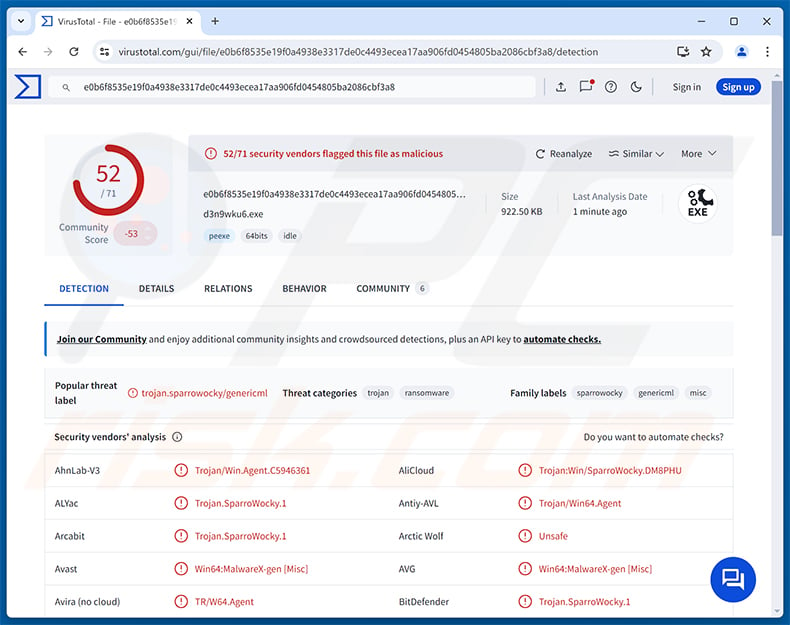
SparroWocky Backdoor overview
SparroWocky communicates with its command and control (C2) server over TLS-encrypted connections, using port 443 or 8080. The malware supports direct connections, HTTP proxies with Negotiate/Basic authentication, and SOCKS5 proxy tunneling with optional credentials.
Each command message is encrypted with RC4 using a fresh key per transmission, making traffic inspection difficult. ESET identified at least 18 C2 server addresses in use, hosted across multiple providers including LightNode, Kaopu Cloud, and Cogent Communications.
The backdoor is delivered using a three-part loader that relies on DLL side-loading. A legitimate executable, a malicious DLL, and an encrypted payload file work together. The DLL decrypts the payload and maps it directly into memory, so the backdoor itself is never written to disk as a recognizable file.
SparroWocky Backdoor capabilities
SparroWocky supports over 30 distinct commands. It can execute shell commands and arbitrary programs, upload and download files, copy, move, rename, and delete files, and enumerate drives, directories, and active user sessions on the machine.
Screenshots are captured every 500 milliseconds. To limit the amount of data sent, only the portions of the screen that changed between captures are transmitted to the attacker. The backdoor can also launch processes under a different logged-in user's session and load Beacon Object Files (BOFs) directly in memory to extend its functionality.
A TCP proxy module lets attackers route their own network traffic through the compromised machine. SparroWocky also collects system data - hostname, username, domain name, IP addresses, and Windows version - and reports that information to the operator upon connecting.
Persistence and defense evasion
SparroWocky establishes persistence in one of two ways depending on its privilege level. It can install itself as a Windows service named ProcAuditManager, or it can add a Windows Registry run key named SnapCart under HKLM or HKCU.
To hide from security software, the malware uses SilentMoonwalk, a technique that forges fake call stacks. This causes monitored Windows API calls to appear as if they originate from legitimate system threads rather than from malicious code, deceiving security monitoring tools.
SparroWocky also hooks the Windows thread creation function using the MinHook library, redirecting execution through a legitimate Windows function to disguise each thread's true purpose. Dynamic API resolution means function names are resolved at runtime using a custom hashing algorithm, so no recognizable imports appear in the malware's own code.
When operators are done with a target, the malware can remove its own persistence entries and delete associated files using an executed batch script, covering its tracks on exit.
| Name | SparroWocky remote access trojan |
| Threat Type | Backdoor, Trojan |
| Detection Names | Avast (Win64:MalwareX-gen [Misc]), Combo Cleaner (Trojan.SparroWocky.1), ESET-NOD32 (Win64/Agent.ASW Trojan), Kaspersky (UDS:Trojan.Win32.GenericML.xnet), Microsoft (Trojan:Win64/SparroWocky.DA!MTB), Full List (VirusTotal) |
| Symptoms | Backdoors are designed to stealthily infiltrate the victim's computer and remain silent, and thus no particular symptoms are clearly visible on an infected machine. |
| Distribution methods | Exploited server vulnerabilities, DLL side-loading, targeted attacks. |
| Damage | Stolen passwords and banking information, identity theft, the victim's computer added to a botnet, additional infections, monetary loss, account hijacking. |
| Malware Removal (Windows) |
To eliminate possible malware infections, scan your computer with legitimate antivirus software. Our security researchers recommend using Combo Cleaner. Download Combo CleanerTo use full-featured product, you have to purchase a license for Combo Cleaner. 7 days free trial available. Combo Cleaner is owned and operated by RCS LT, the parent company of PCRisk.com. |
Conclusion
SparroWocky Backdoor is a sophisticated threat used in state-linked espionage campaigns. It gives attackers full remote control over infected machines, supports extensive file and surveillance operations, and employs advanced techniques to avoid detection and analysis.
Victims face risks including unauthorized surveillance, long-term compromise of sensitive systems, exfiltration of confidential data, and deployment of additional malware. Any system found to be infected should be remediated immediately. More examples of backdoors are Mistic, Beagle, and NANOREMOTE.
How did SparroWocky Backdoor infiltrate my computer?
As documented by BleepingComputer, FamousSparrow gained initial access by exploiting known vulnerabilities in publicly accessible Microsoft Exchange servers, specifically ProxyLogon flaws present in unpatched installations.
Once inside, the attackers deployed SparroWocky using DLL side-loading. A legitimate executable is placed alongside a malicious DLL and an encrypted payload file. Running the executable causes the DLL to load, which decrypts and maps the backdoor payload into memory without writing it to disk.
More broadly, sophisticated backdoors like SparroWocky can also arrive through targeted phishing emails, compromised remote access services, and malicious software installers. Keeping all server-facing software patched and updated is the most direct way to reduce exposure to this class of attack.
How to avoid installation of malware?
Exercise caution with unexpected emails and messages, particularly those carrying attachments or links. Download software only from official vendor websites and trusted sources. Avoid cracks, key generators, and pirated content, as these are common vehicles for malware distribution.
Keep your operating system and all installed applications up to date, as many attacks rely on unpatched vulnerabilities. Use reputable security software and run regular scans to catch threats early. If you believe that your computer is already infected, we recommend running a scan with Combo Cleaner Antivirus for Windows to automatically eliminate infiltrated malware.
Instant automatic malware removal:
Manual threat removal might be a lengthy and complicated process that requires advanced IT skills. Combo Cleaner is a professional automatic malware removal tool that is recommended to get rid of malware. Download it by clicking the button below:
DOWNLOAD Combo CleanerBy downloading any software listed on this website you agree to our Privacy Policy and Terms of Use. To use full-featured product, you have to purchase a license for Combo Cleaner. 7 days free trial available. Combo Cleaner is owned and operated by RCS LT, the parent company of PCRisk.com.
Quick menu:
- What is SparroWocky Backdoor?
- STEP 1. Manual removal of SparroWocky Backdoor malware.
- STEP 2. Check if your computer is clean.
How to remove malware manually?
Manual malware removal is a complicated task - usually it is best to allow antivirus or anti-malware programs to do this automatically. To remove this malware we recommend using Combo Cleaner Antivirus for Windows.
If you wish to remove malware manually, the first step is to identify the name of the malware that you are trying to remove. Here is an example of a suspicious program running on a user's computer:
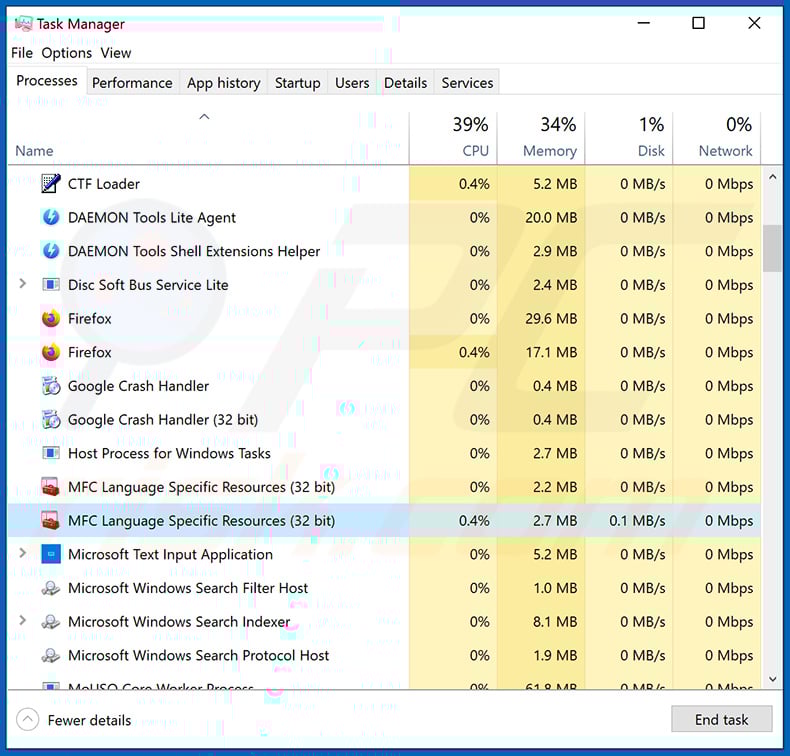
If you checked the list of programs running on your computer, for example, using task manager, and identified a program that looks suspicious, you should continue with these steps:
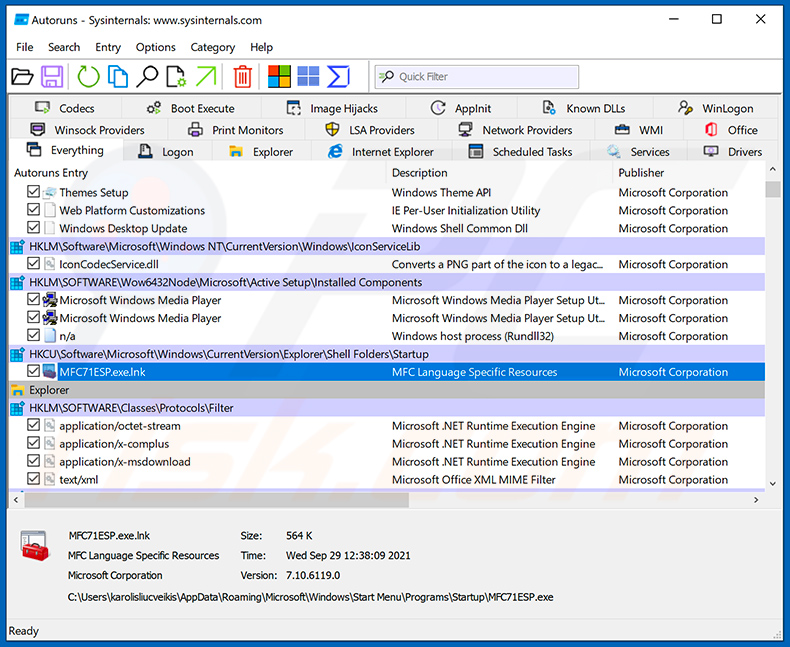
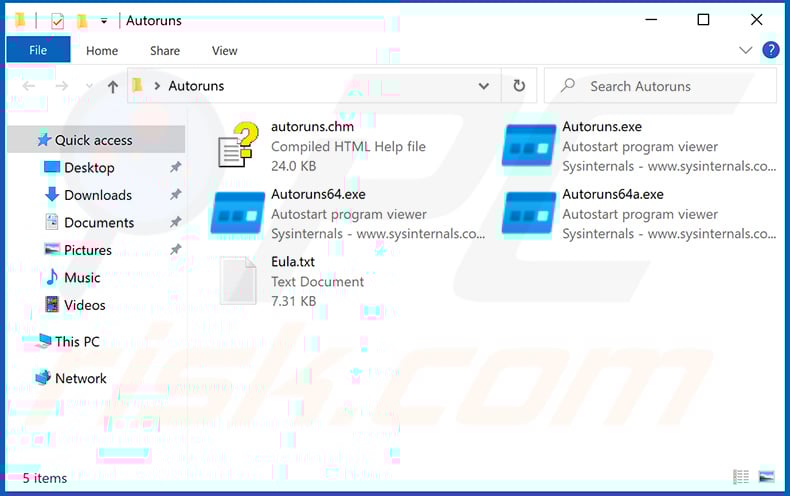
 Download a program called Autoruns. This program shows auto-start applications, Registry, and file system locations:
 Restart your computer into Safe Mode:
Windows XP and Windows 7 users: Start your computer in Safe Mode. Click Start, click Shut Down, click Restart, click OK. During your computer start process, press the F8 key on your keyboard multiple times until you see the Windows Advanced Option menu, and then select Safe Mode with Networking from the list.
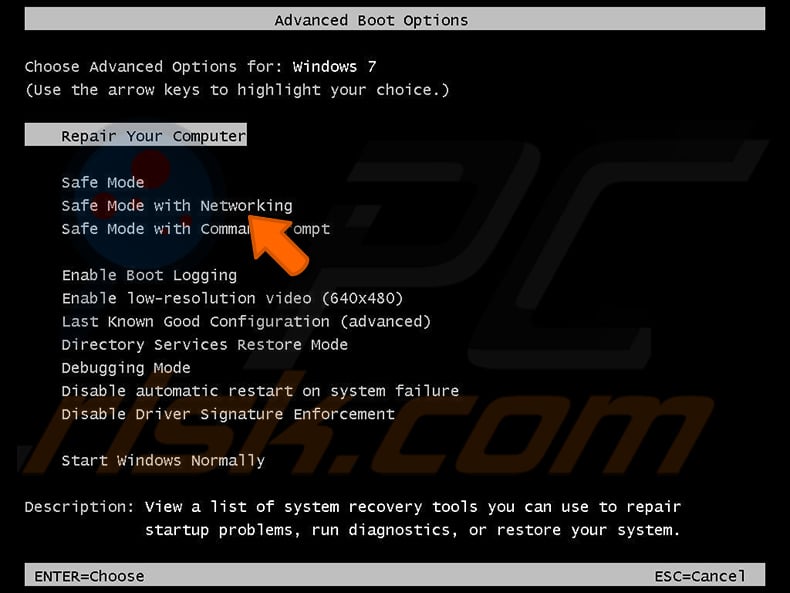
Video showing how to start Windows 7 in "Safe Mode with Networking":
Windows 8 users: Start Windows 8 is Safe Mode with Networking - Go to Windows 8 Start Screen, type Advanced, in the search results select Settings. Click Advanced startup options, in the opened "General PC Settings" window, select Advanced startup.
Click the "Restart now" button. Your computer will now restart into the "Advanced Startup options menu". Click the "Troubleshoot" button, and then click the "Advanced options" button. In the advanced option screen, click "Startup settings".
Click the "Restart" button. Your PC will restart into the Startup Settings screen. Press F5 to boot in Safe Mode with Networking.
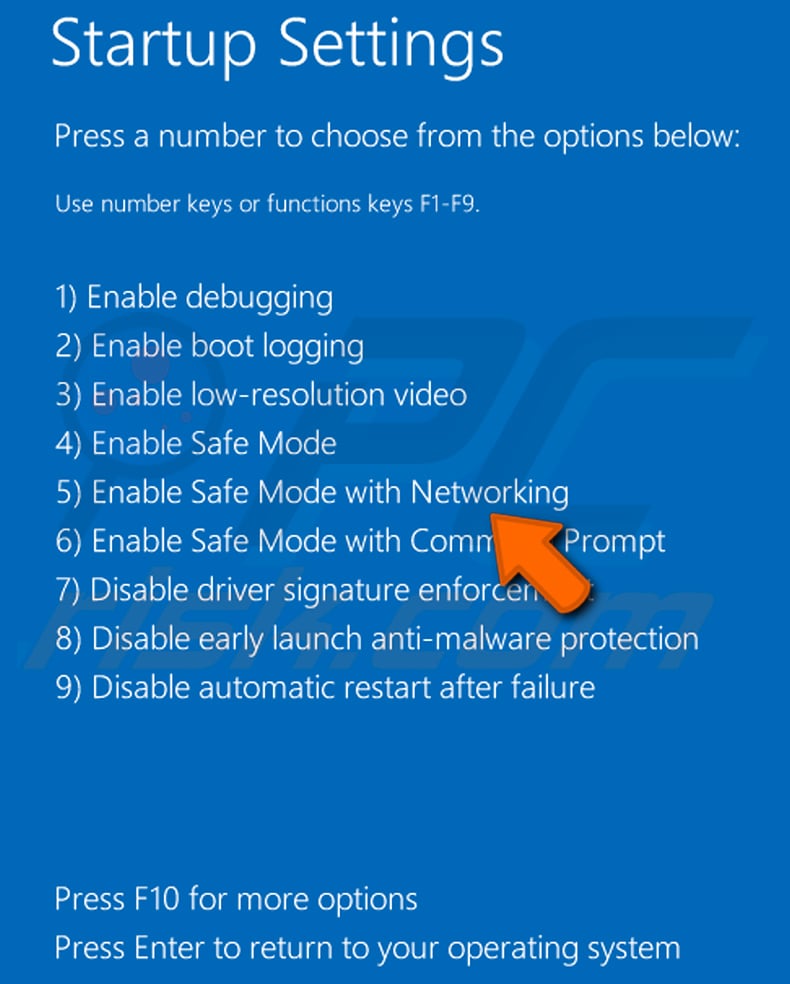
Video showing how to start Windows 8 in "Safe Mode with Networking":
Windows 10 users: Click the Windows logo and select the Power icon. In the opened menu click "Restart" while holding "Shift" button on your keyboard. In the "choose an option" window click on the "Troubleshoot", next select "Advanced options".
In the advanced options menu select "Startup Settings" and click on the "Restart" button. In the following window you should click the "F5" button on your keyboard. This will restart your operating system in safe mode with networking.
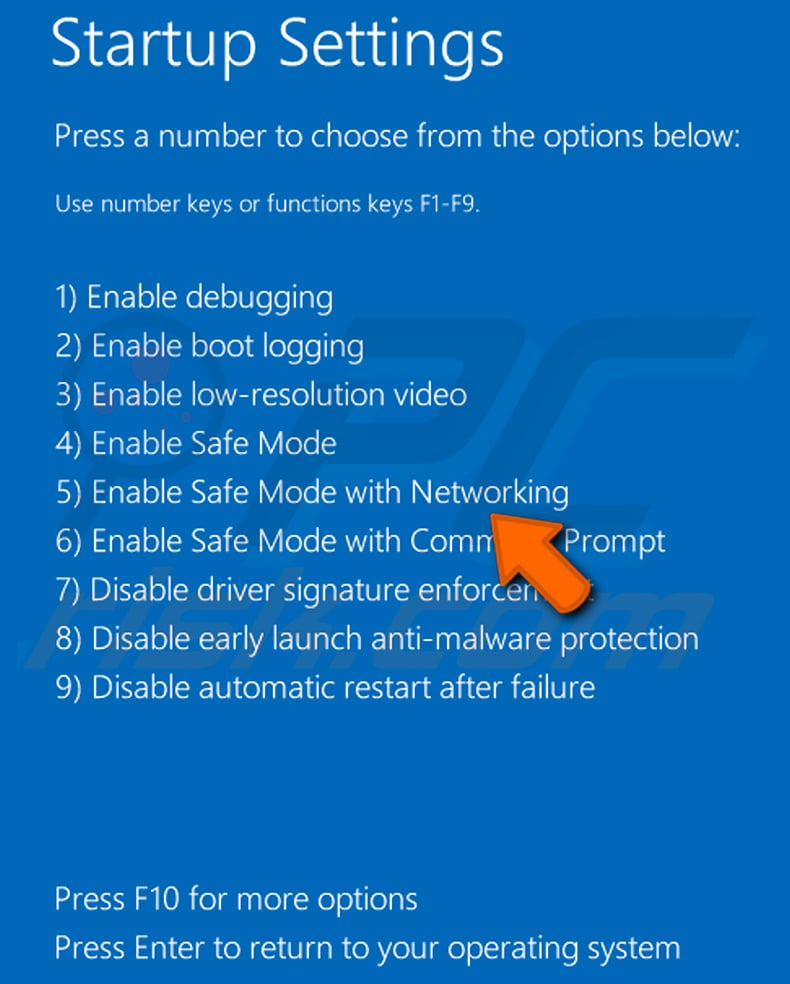
Video showing how to start Windows 10 in "Safe Mode with Networking":
 Extract the downloaded archive and run the Autoruns.exe file.
 In the Autoruns application, click "Options" at the top and uncheck "Hide Empty Locations" and "Hide Windows Entries" options. After this procedure, click the "Refresh" icon.
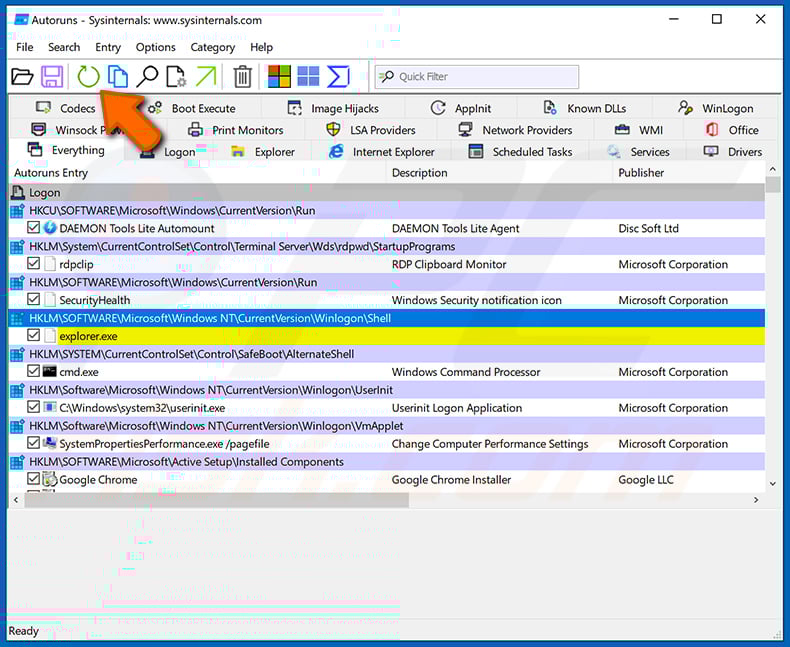
 Check the list provided by the Autoruns application and locate the malware file that you want to eliminate.
You should write down its full path and name. Note that some malware hides process names under legitimate Windows process names. At this stage, it is very important to avoid removing system files. After you locate the suspicious program you wish to remove, right click your mouse over its name and choose "Delete".
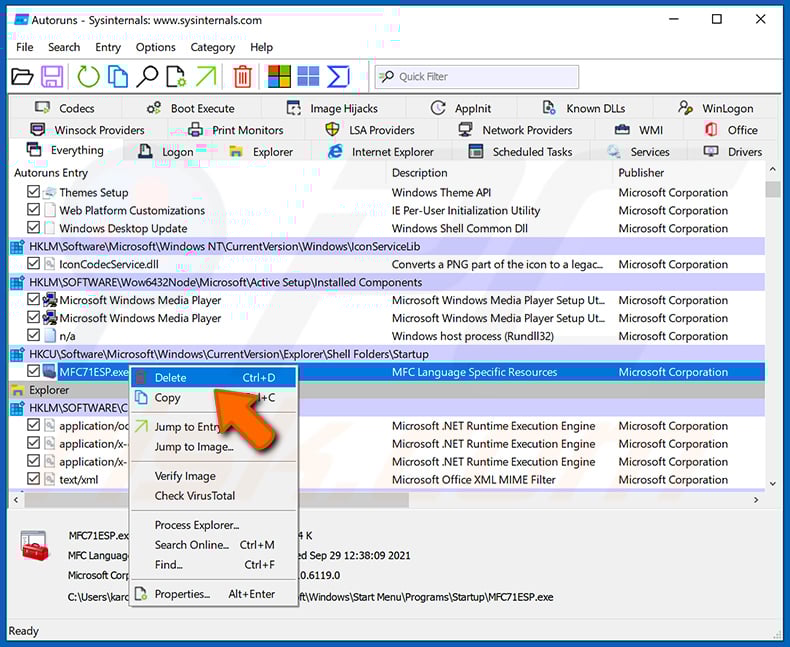
After removing the malware through the Autoruns application (this ensures that the malware will not run automatically on the next system startup), you should search for the malware name on your computer. Be sure to enable hidden files and folders before proceeding. If you find the filename of the malware, be sure to remove it.
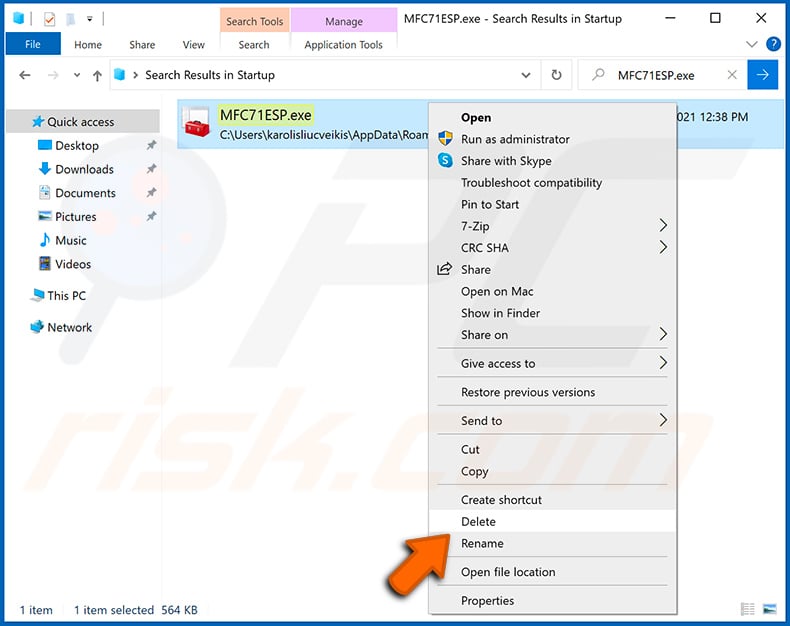
Reboot your computer in normal mode. Following these steps should remove any malware from your computer. Note that manual threat removal requires advanced computer skills. If you do not have these skills, leave malware removal to antivirus and anti-malware programs.
These steps might not work with advanced malware infections. As always it is best to prevent infection than try to remove malware later. To keep your computer safe, install the latest operating system updates and use antivirus software. To be sure your computer is free of malware infections, we recommend scanning it with Combo Cleaner Antivirus for Windows.
Frequently Asked Questions (FAQ)
My computer is infected with SparroWocky Backdoor malware, should I format my storage device to get rid of it?
Formatting the drive will remove SparroWocky Backdoor but will also erase every file stored on it. Running a trusted security tool such as Combo Cleaner is usually the better first step, as it can eliminate the infection without destroying your data.
What are the biggest issues that SparroWocky Backdoor malware can cause?
SparroWocky Backdoor gives attackers full remote control over an infected machine. They can exfiltrate files, run commands, monitor activity through screenshots, and deploy additional malware - all without the victim's knowledge.
The downstream consequences include prolonged system compromise, loss of sensitive or confidential data, and potential account takeover.
What is the purpose of SparroWocky Backdoor malware?
SparroWocky Backdoor is designed for espionage. Its operators use it to maintain persistent, covert access to infected systems so they can issue commands, exfiltrate files, capture screenshots, and conduct long-term surveillance of targeted organizations.
How did SparroWocky Backdoor malware infiltrate my computer?
The primary documented vector for SparroWocky Backdoor is exploitation of ProxyLogon vulnerabilities in unpatched Microsoft Exchange servers. After gaining access, attackers deploy the backdoor using a DLL side-loading technique.
More broadly, backdoors of this kind can also be delivered through phishing emails, compromised remote access services, or malicious software installers.
Will Combo Cleaner protect me from malware?
Yes, Combo Cleaner can detect and remove most known malware, including backdoors like SparroWocky. Running a full system scan is recommended to ensure no components of the infection remain on the system.
Share:
 Facebook
 X.com
X.com
 LinkedIn
 Copy Link

Tomas Meskauskas
Expert security researcher, professional malware analyst
I am passionate about computer security and technology. I have an experience of over 10 years working in various companies related to computer technical issue solving and Internet security. I have been working as an author and editor for pcrisk.com since 2010. Follow me on Twitter and LinkedIn to stay informed about the latest online security threats.
PCrisk security portal is brought by a company RCS LT.
Joined forces of security researchers help educate computer users about the latest online security threats. More information about the company RCS LT.
Our malware removal guides are free. However, if you want to support us you can send us a donation.
DonatePCrisk security portal is brought by a company RCS LT.
Joined forces of security researchers help educate computer users about the latest online security threats. More information about the company RCS LT.
Our malware removal guides are free. However, if you want to support us you can send us a donation.
Donate
▼ Show Discussion