

Get free scan and check if your device is infected.
Remove it nowTo use full-featured product, you have to purchase a license for Combo Cleaner. Seven days free trial available. Combo Cleaner is owned and operated by RCS LT, the parent company of PCRisk.com.
What kind of malware is Amnesia?
Amnesia is the name of a malicious program. There are two variants of this malware – for Windows and Android operating systems. The program aims to extract various types of sensitive data from infected machines – thus, it is classed as a stealer.
However, Amnesia also exhibits RAT (Remote Access Trojan) capabilities by allowing attackers to control victims' devices directly. Additionally, the program functions as a keylogger, cryptominer, and clipper.
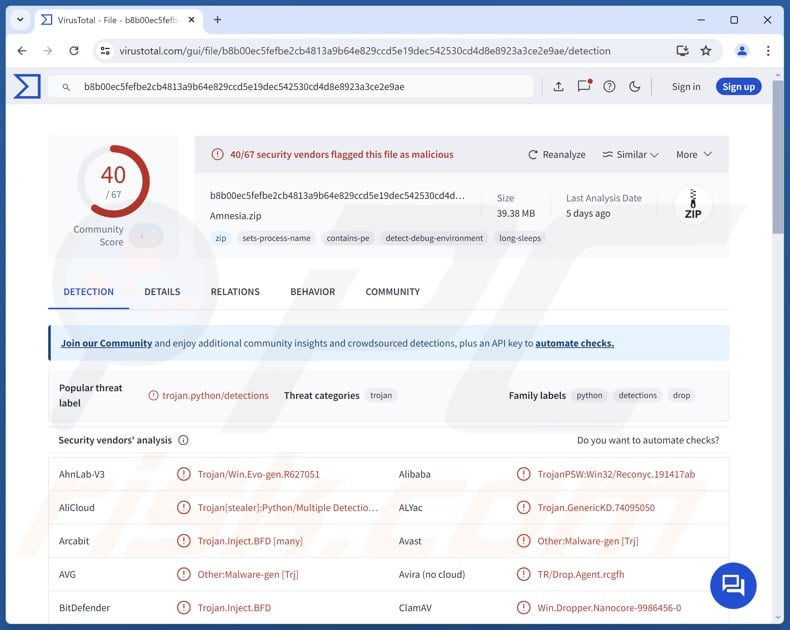
Amnesia malware overview
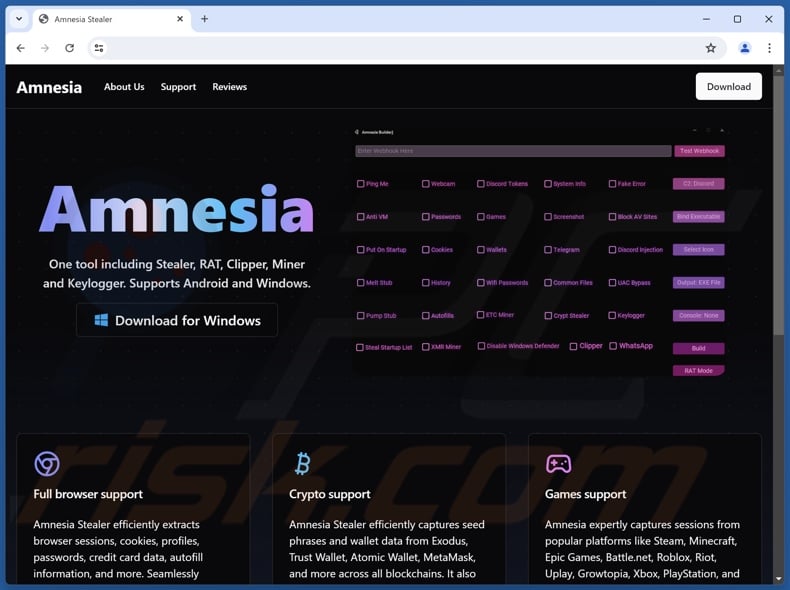
According to Amnesia's promotional material, it is a multi-functional malicious program. It has anti-detection capabilities, including detection when launched on virtual machines, disabling Microsoft Defender Antivirus, and evading other anti-virus software.
Amnesia uses persistence-ensuring mechanisms, such as automatically starting upon system reboot. After successful infiltration, this program begins its operations by collecting relevant device data.
As a stealer, Amnesia gathers a variety of vulnerable information. From several of the most popular browsers, it can extract browsing histories, Internet cookies, auto-fills (usernames, etc.), stored passwords, saved credit/debit card numbers, and so on.
The malware targets sessions and other data associated with gaming-related platforms/software, including Battle.net, Epic Games, Growtopia, Minecraft, PlayStation, Riot, Roblox, Steam, Uplay, Xbox, etc. The stealer collects Wi-Fi network passwords as well.
Messengers are likewise among Amnesia's targets, e.g., Discord (including tokens and injection), Telegram, and WhatsApp. Additionally, the program seeks to steal cryptocurrency wallets – Atomic, Binance, Coinbase, Exodus, MetaMask, Trust, and many others.
Amnesia also has some spyware features, specifically – taking desktop screenshots and snapshots through the device's cameras. It functions as a file grabber, which means that the malware can exfiltrate (download) system and personal files.
As mentioned in the introduction, Amnesia can operate as a RAT (Remote Access Trojan). These trojans enable attackers to gain remote access/control over compromised systems.
Since the stealer can function as a keylogger, this allows it to record keystrokes (typed information). Another functionality of this malware is crypto-mining, i.e., abusing system resources to generate cryptocurrency. Amnesia can mine Monero (XMR) and Ethereum Classic (ETC) cryptocurrencies.
Furthermore, this program can operate as a clipper – by replacing cryptowallet addresses copied into the clipboard (copy-paste buffer) to reroute outgoing transactions.
To summarize, the presence of software like Amnesia on devices can result in data loss and hardware damage (due to crypto-mining), severe privacy issues, financial losses, and identity theft.
| Name | Amnesia malware |
| Threat Type | Trojan, RAT (Remote Access Trojan), stealer, password-stealing virus, spyware, grabber, clipper, cryptocurrency miner (cryptominer). |
| Detection Names (Windows) | Avast (Other:Malware-gen [Trj]), Combo Cleaner (Trojan.Inject.BFD), ESET-NOD32 (Multiple Detections), Kaspersky (Trojan.Win32.Reconyc.pqzf), Sophos (Mal/Generic-S), Full List Of Detections (VirusTotal) |
| Detection Names (Android) | Avast (Win64:Malware-gen), Combo Cleaner (Trojan.GenericKD.74095050), ESET-NOD32 (Multiple Detections), Kaspersky (HEUR:Trojan-Spy.AndroidOS.FakeApp.cq), Sophos (Mal/Generic-S), Full List Of Detections (VirusTotal) |
| Symptoms | Trojans are designed to stealthily infiltrate the victim's computer and remain silent, and thus no particular symptoms are clearly visible on an infected machine. |
| Distribution methods | Infected email attachments, malicious online advertisements, social engineering, software 'cracks'. |
| Damage | Stolen passwords and banking information, identity theft, the victim's computer added to a botnet. |
| Malware Removal (Windows) |
To eliminate possible malware infections, scan your computer with legitimate antivirus software. Our security researchers recommend using Combo Cleaner. Download Combo CleanerTo use full-featured product, you have to purchase a license for Combo Cleaner. 7 days free trial available. Combo Cleaner is owned and operated by RCS LT, the parent company of PCRisk.com. |
Stealer-type malware examples
We have written about countless malicious programs; BlackNote, Crystal, Vilsa, Can, Flesh, and Ailurophile are just some of our latest articles on stealers.
Data-stealing malware can target a wide variety of information or only specific details. These capabilities are prevalent in various malware types, and stealers are often used in combination with other malicious programs.
However, regardless of how malware operates – its presence on a system endangers device integrity and user safety. Therefore, it is paramount to eliminate all threats immediately upon detection.
How did Amnesia infiltrate my computer?
At the time of writing, Amnesia's developers are promoting this stealer online. Hence, how it is distributed depends on the cyber criminals using it (i.e., proliferation/infection techniques may differ between attacks). Generally, malware is spread by relying on phishing and social engineering.
Malicious programs are commonly disguised as or bundled with ordinary software/media files. They come in various formats, e.g., archives (ZIP, RAR, etc.), executables (.exe, .run, etc.), documents (Microsoft Office, Microsoft OneNote, PDF, etc.), JavaScript, and so on. Merely opening an infectious file can be enough to initiate malware download/installation.
Widespread malware distribution methods include: drive-by (stealthy/deceptive) downloads, backdoor/loader-type trojans, malicious attachments or links in spam emails/messages, online scams, dubious download channels (e.g., freeware and third-party sites, Peer-to-Peer sharing networks, etc.), illegal software activation tools ("cracks"), pirated content, and fake updates.
Some malicious programs can self-proliferate via local networks and removable storage devices (e.g., USB flash drives, external hard drives, etc.).
How to avoid installation of malware?
We recommend downloading only from official and trustworthy sources. Additionally, all programs must be activated and updated using legitimate functions/tools, as those acquired from third-parties may contain malware.
Another recommendation is to be careful while browsing since fake and malicious online content usually appears genuine and innocuous. Incoming emails and other messages must be approached with caution. Attachments or links present in suspect mail must not be opened, as they can be virulent.
We must stress the importance of having a dependable anti-virus installed and kept up-to-date. Security software must be used to run regular system scans and to remove detected threats and issues. If you believe that your computer is already infected, we recommend running a scan with Combo Cleaner Antivirus for Windows to automatically eliminate infiltrated malware.
Screenshot of Amnesia malware promoted online:
Update August 14, 2026 - Jamf Threat Labs has identified a macOS variant of AmnesiaStealer, a Rust-based infostealer distributed through counterfeit GitHub download pages using a ClickFix-style lure - visitors are instructed to copy a Base64-encoded command and paste it into the macOS Terminal to trigger the infection.
Beyond standard data theft, this macOS variant includes a live browser hijacking module that leverages the Chrome DevTools Protocol to allow attackers to remotely pilot Chromium-based browsers - simulating key presses, clicks, scrolling, and navigation while streaming a live view of the session. Sixteen Chromium-family browsers are targeted, including Chrome, Brave, Arc, Microsoft Edge, Opera, and Vivaldi.
On infected Macs, the malware establishes persistence by installing a root-level LaunchDaemon disguised as a legitimate Apple crash-reporting process. (source: thehackernews.com).
Instant automatic malware removal:
Manual threat removal might be a lengthy and complicated process that requires advanced IT skills. Combo Cleaner is a professional automatic malware removal tool that is recommended to get rid of malware. Download it by clicking the button below:
DOWNLOAD Combo CleanerBy downloading any software listed on this website you agree to our Privacy Policy and Terms of Use. To use full-featured product, you have to purchase a license for Combo Cleaner. 7 days free trial available. Combo Cleaner is owned and operated by RCS LT, the parent company of PCRisk.com.
Quick menu:
- What is Amnesia?
- STEP 1. Manual removal of Amnesia malware.
- STEP 2. Check if your computer is clean.
How to remove malware manually?
Manual malware removal is a complicated task - usually it is best to allow antivirus or anti-malware programs to do this automatically. To remove this malware we recommend using Combo Cleaner Antivirus for Windows.
If you wish to remove malware manually, the first step is to identify the name of the malware that you are trying to remove. Here is an example of a suspicious program running on a user's computer:
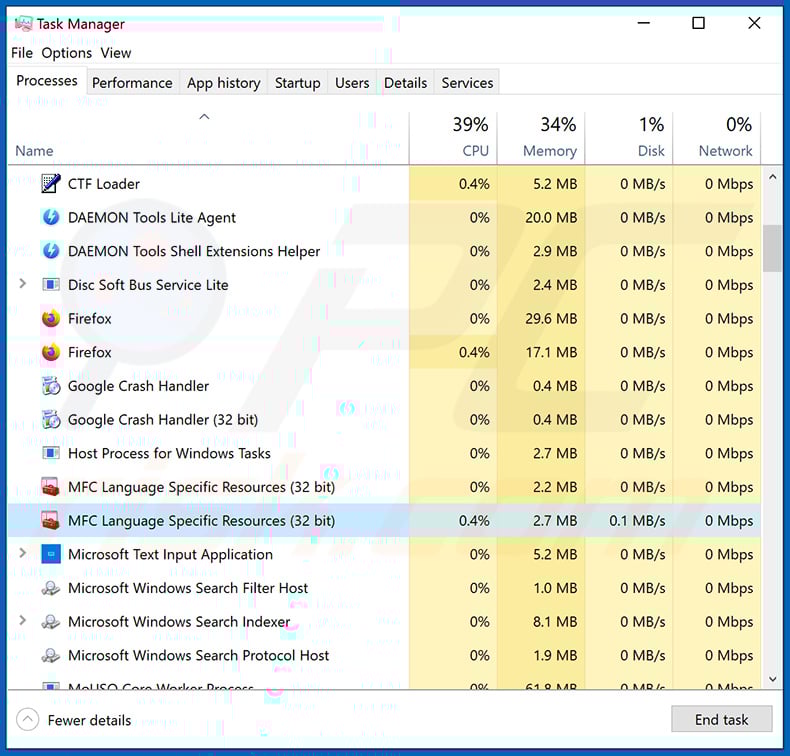
If you checked the list of programs running on your computer, for example, using task manager, and identified a program that looks suspicious, you should continue with these steps:
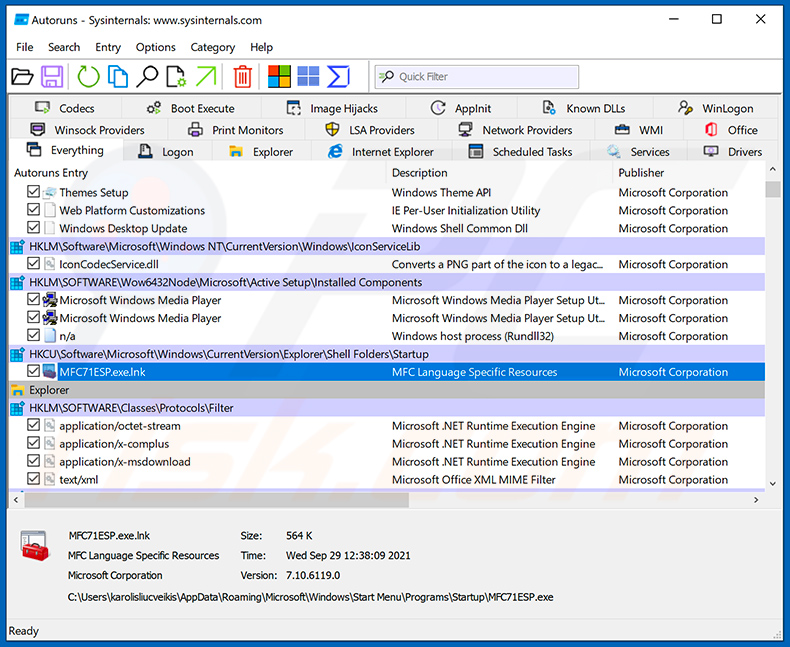
 Download a program called Autoruns. This program shows auto-start applications, Registry, and file system locations:
 Restart your computer into Safe Mode:
Windows XP and Windows 7 users: Start your computer in Safe Mode. Click Start, click Shut Down, click Restart, click OK. During your computer start process, press the F8 key on your keyboard multiple times until you see the Windows Advanced Option menu, and then select Safe Mode with Networking from the list.
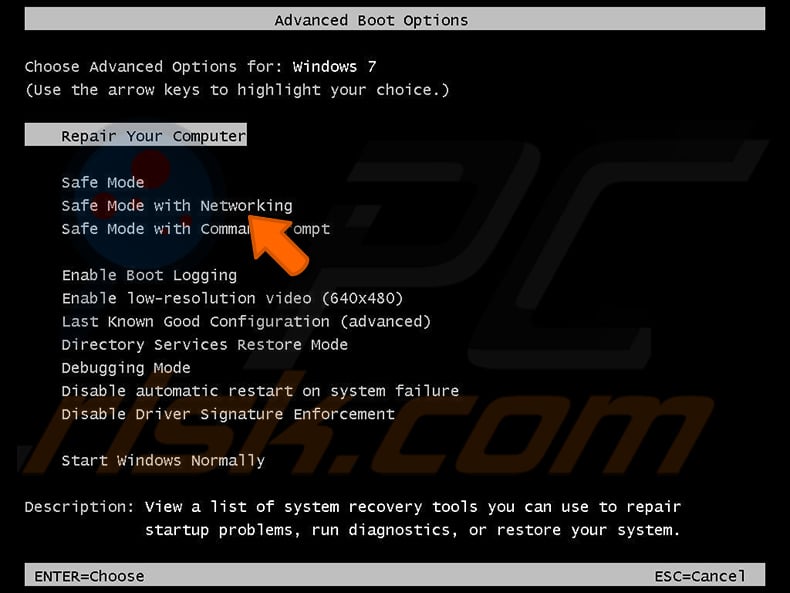
Video showing how to start Windows 7 in "Safe Mode with Networking":
Windows 8 users: Start Windows 8 is Safe Mode with Networking - Go to Windows 8 Start Screen, type Advanced, in the search results select Settings. Click Advanced startup options, in the opened "General PC Settings" window, select Advanced startup.
Click the "Restart now" button. Your computer will now restart into the "Advanced Startup options menu". Click the "Troubleshoot" button, and then click the "Advanced options" button. In the advanced option screen, click "Startup settings".
Click the "Restart" button. Your PC will restart into the Startup Settings screen. Press F5 to boot in Safe Mode with Networking.
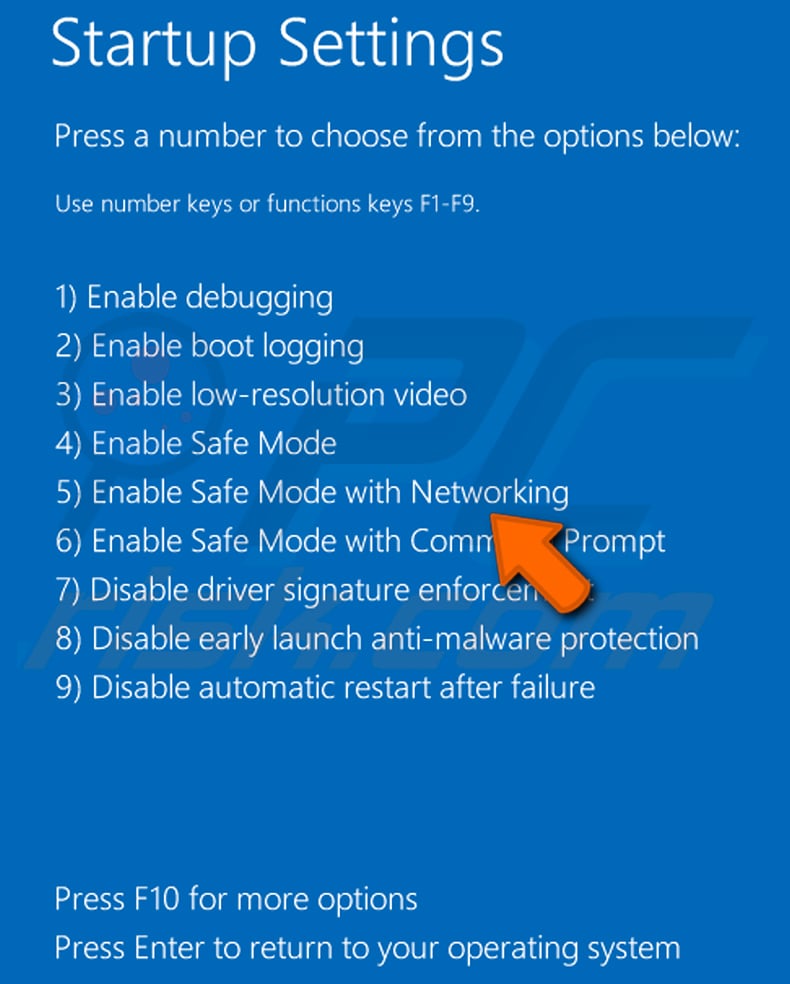
Video showing how to start Windows 8 in "Safe Mode with Networking":
Windows 10 users: Click the Windows logo and select the Power icon. In the opened menu click "Restart" while holding "Shift" button on your keyboard. In the "choose an option" window click on the "Troubleshoot", next select "Advanced options".
In the advanced options menu select "Startup Settings" and click on the "Restart" button. In the following window you should click the "F5" button on your keyboard. This will restart your operating system in safe mode with networking.
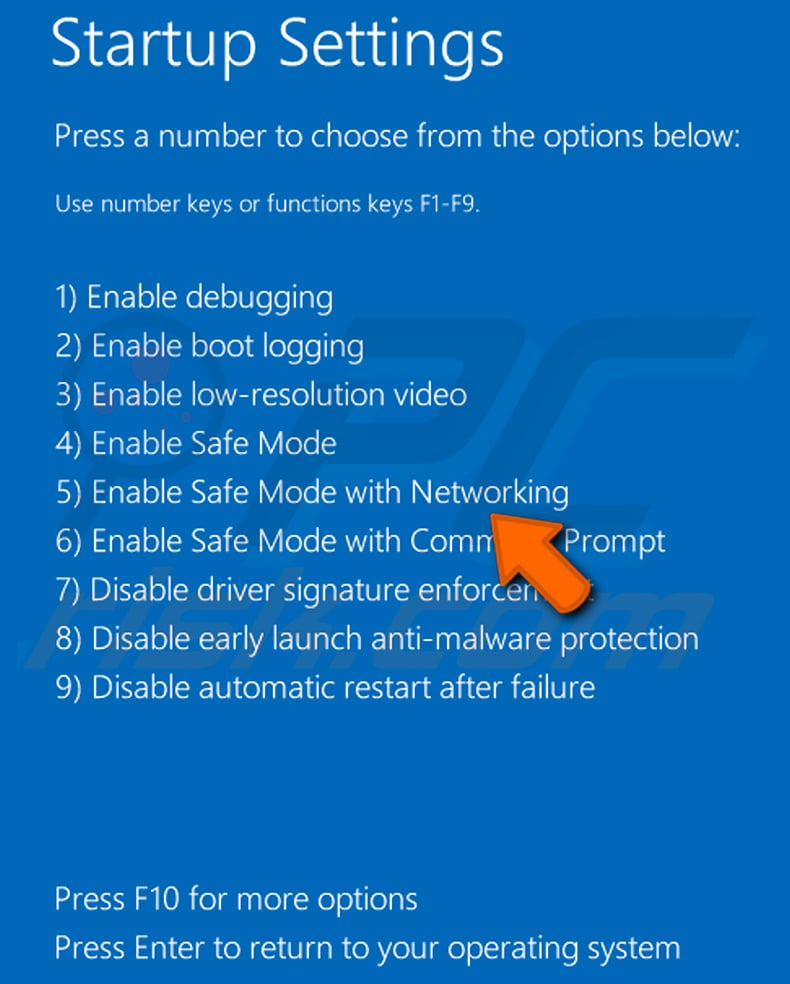
Video showing how to start Windows 10 in "Safe Mode with Networking":
 Extract the downloaded archive and run the Autoruns.exe file.
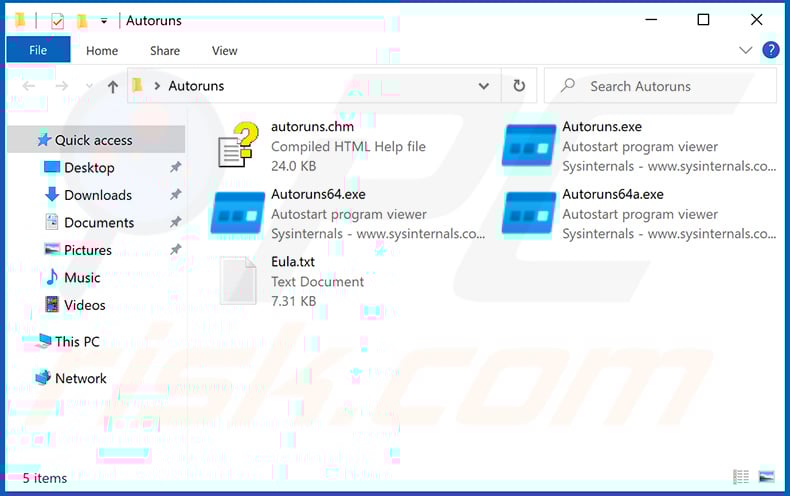
 In the Autoruns application, click "Options" at the top and uncheck "Hide Empty Locations" and "Hide Windows Entries" options. After this procedure, click the "Refresh" icon.
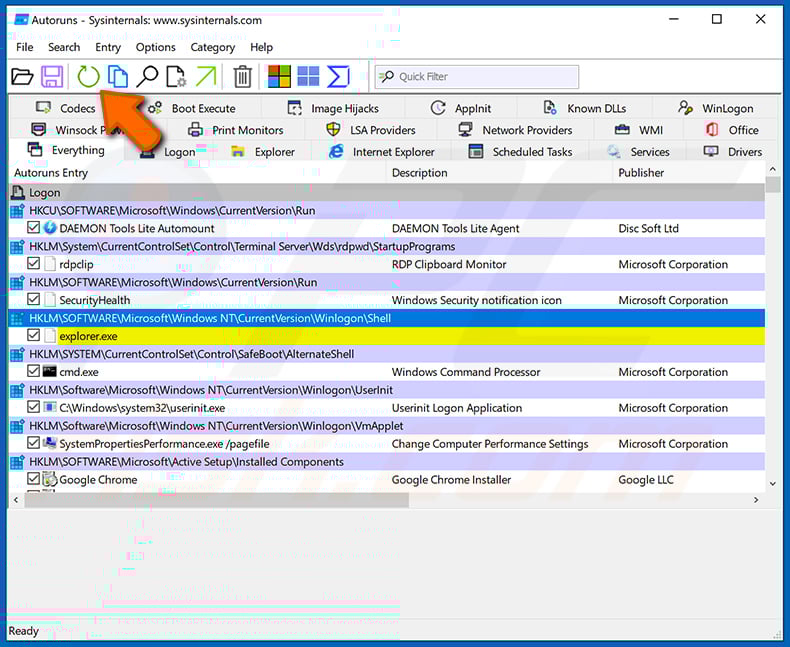
 Check the list provided by the Autoruns application and locate the malware file that you want to eliminate.
You should write down its full path and name. Note that some malware hides process names under legitimate Windows process names. At this stage, it is very important to avoid removing system files. After you locate the suspicious program you wish to remove, right click your mouse over its name and choose "Delete".
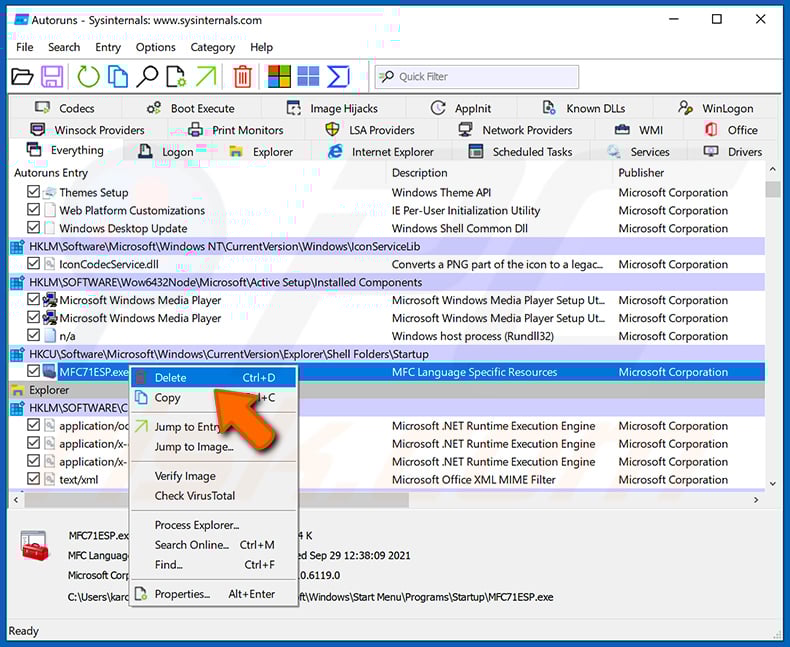
After removing the malware through the Autoruns application (this ensures that the malware will not run automatically on the next system startup), you should search for the malware name on your computer. Be sure to enable hidden files and folders before proceeding. If you find the filename of the malware, be sure to remove it.
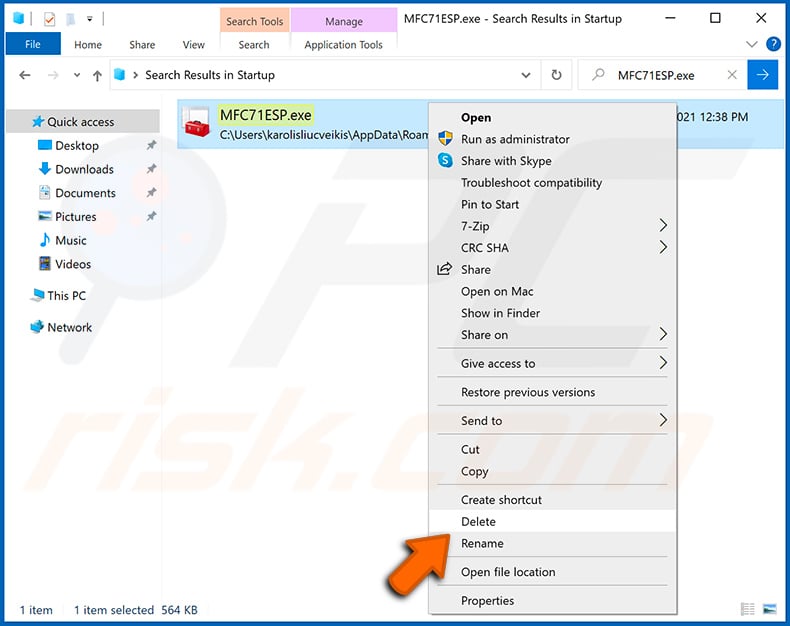
Reboot your computer in normal mode. Following these steps should remove any malware from your computer. Note that manual threat removal requires advanced computer skills. If you do not have these skills, leave malware removal to antivirus and anti-malware programs.
These steps might not work with advanced malware infections. As always it is best to prevent infection than try to remove malware later. To keep your computer safe, install the latest operating system updates and use antivirus software. To be sure your computer is free of malware infections, we recommend scanning it with Combo Cleaner Antivirus for Windows.
Frequently Asked Questions (FAQ)
My computer is infected with Amnesia malware, should I format my storage device to get rid of it?
Most malicious programs can be removed without resorting to formatting.
What are the biggest issues that Amnesia malware can cause?
Malware can pose a variety of severe threats, depending on its capabilities and the attackers' goals. Amnesia has many functions; it can function as a data stealer, file grabber, RAT (enable remote control over devices), cryptominer (generate cryptocurrency by abusing system resources), and clipper (replace clipboard content to reroute cryptocurrency transactions). Infections of this kind can result in serious privacy issues, data loss, hardware damage, financial losses, and identity theft.
What is the purpose of Amnesia malware?
Malware is primarily used for profit. However, cyber criminals may also use it to amuse themselves, carry out personal vendettas, disrupt processes (e.g., websites, services, companies, etc.), engage in hacktivism, and launch politically/geopolitically motivated attacks.
How did Amnesia malware infiltrate my computer?
Malware is mainly spread via trojans, drive-by downloads, untrustworthy download sources (e.g., freeware and third-party sites, P2P sharing networks, etc.), spam mail, online scams, malvertising, pirated software/media, illegal activation tools ("cracks"), and fake updates. Furthermore, some malicious programs can self-proliferate through local networks and removable storage devices.
Will Combo Cleaner protect me from malware?
Yes, Combo Cleaner can detect and remove practically all known malware infections. Keep in mind that performing a complete system scan is crucial since high-end malicious programs usually hide deep within systems.
Share:
 Facebook
 X.com
X.com
 LinkedIn
 Copy Link

Tomas Meskauskas
Expert security researcher, professional malware analyst
I am passionate about computer security and technology. I have an experience of over 10 years working in various companies related to computer technical issue solving and Internet security. I have been working as an author and editor for pcrisk.com since 2010. Follow me on Twitter and LinkedIn to stay informed about the latest online security threats.
PCrisk security portal is brought by a company RCS LT.
Joined forces of security researchers help educate computer users about the latest online security threats. More information about the company RCS LT.
Our malware removal guides are free. However, if you want to support us you can send us a donation.
DonatePCrisk security portal is brought by a company RCS LT.
Joined forces of security researchers help educate computer users about the latest online security threats. More information about the company RCS LT.
Our malware removal guides are free. However, if you want to support us you can send us a donation.
Donate
▼ Show Discussion