
We may earn commissions from products we recommend. Learn more.
What Is Torrenting? Is It Safe and Is It Legal?

What Is Torrenting? Is It Safe and Is It Legal?
Torrenting is one of those internet technologies that seems simple but has complex real-world effects. On paper, it's just a way to share files more efficiently. In practice, it often comes with privacy risks, malware-infected downloads, ISP warnings, and copyright issues. This blend of being a "useful tool" and facing "common abuse" is why torrenting always brings up two questions: Is it safe? Is it legal?
This guide explains torrenting in simple terms. It focuses on security, explains how torrenting works, shows what your internet connection looks like while torrenting, explains why many people recommend using a VPN for privacy, and outlines how legal risks vary based on what you download and where you live.
Disclaimer: PCrisk.com does not promote, encourage, or support the use of torrenting to obtain copyrighted material without permission. This article is for educational purposes and to raise general awareness about online safety. Laws vary by location, and readers are responsible for following local regulations and respecting intellectual property rights.
Start torrenting with NordVPNSpecial deal30-day money-back guarantee→
Table of Contents:
- Introduction
- What Is Torrenting?
- How to Torrent Using a VPN
- Best VPNs for Torrenting
- Torrenting Without a VPN
- Safety and Risk
- Legality and Consequences
- Frequently Asked Questions (FAQ)
What Is Torrenting?
Torrenting is the process of downloading and uploading data using a peer-to-peer (P2P) protocol, most commonly BitTorrent. Instead of downloading a file from a single web server, as in the traditional "direct download" model, a torrent client can download different parts of the same file from many people simultaneously. It can also share the parts it already has with others. This "many-to-many" model is the main concept: the more peers involved, the less burden on any single source, and the easier it is to share large files widely.
How torrenting actually works
A BitTorrent download typically starts with one of two things:
- A .torrent file, sometimes known as a "metainfo" file, contains metadata that describes what is being shared and how to find peers.
- A magnet link contains enough information, especially an "info hash," for your client to find the torrent's metadata directly from the network. This means you don't need to download the .torrent file first.
From there, the process usually looks like this:
Your torrent client identifies target content using an info hash or metadata from the torrent's "info" dictionary.
Your client discovers peers through one or more discovery mechanisms, such as:
- Trackers, which are servers that coordinate peer lists.
- DHT, or Distributed Hash Table, is a decentralized system in which peers help each other locate resources. This method is often referred to as "trackerless" discovery.
- PEX, or Peer Exchange, allows connected peers to share information about others to improve swarm awareness.
Your client downloads the file in segments. Each segment can be verified for integrity using piece hashes in the torrent metadata, making torrenting resilient to random corruption.
While downloading, your client also uploads acquired segments to other peers automatically until you stop the torrent or exit the client. This upload process is essential to torrent functionality.
Our top recommendation for streaming and privacy. NordVPN consistently leads our tests with fast speeds, reliable geo-unblocking, and a strict no-logs policy.
- ✔ Unblocks geo-restricted streaming services reliably
- ✔ 202+ locations across 111 countries
- ✔ 30-day money-back guarantee · Special deal available
Key torrenting terms you'll see everywhere
Torrenting discussions use specific terminology. Understanding these terms clarifies technical, privacy, and legal aspects.
Swarm: The complete network of peers participating in a torrent, including anyone with all or part of the target data.
Peer: An individual participant in the swarm. Your system becomes a peer when you use a torrent client.
Seeder: A peer with the complete content (100%) who uploads it to others. Seeding does not guarantee legality or safety, as malicious torrents may also be seeded.
Leecher: A peer is still downloading content (less than 100%). Some communities use "leecher" neutrally, while others use it negatively to refer to users who download but contribute little upload bandwidth.
Tracker: A service that helps peers find each other by providing lists of peers for a torrent. While alternatives like DHT exist, trackers remain widely used.
DHT ("trackerless" peer discovery): BitTorrent's DHT distributes peer contact information, allowing peers to find each other without a central tracker. In DHT-based discovery, your client communicates with other nodes to locate peers linked to a specific info hash.
Magnet link: A link format that identifies content by cryptographic hash rather than a specific location or URL. Magnet links are popular because they do not require a central host to maintain .torrent files.
What torrenting is and what it isn't
Torrenting is a distribution method, not a type of content. Users can torrent both legal content (such as open-source software, public domain archives, or Creative Commons-licensed media) and unauthorized copies of copyrighted works. The technology itself does not determine legality; users and applicable copyright laws do.
Torrenting's decentralized, peer-driven nature creates unique privacy considerations. Unlike many streaming or direct-download methods, torrenting can expose your IP address to other peers and may generate logs on your device, ISP, tracker operator, monitoring entities, and potentially your VPN provider.
How to Torrent Using a VPN
A VPN helps protect your privacy while torrenting by masking your IP address and encrypting your traffic. However, it does not grant permission to break the law or provide complete protection against malware. Consider it one component of a comprehensive security approach.
The following guide uses NordVPN as an example, as it is PCrisk's top-rated VPN for 2026.
Step-by-step setup for torrenting with a VPN
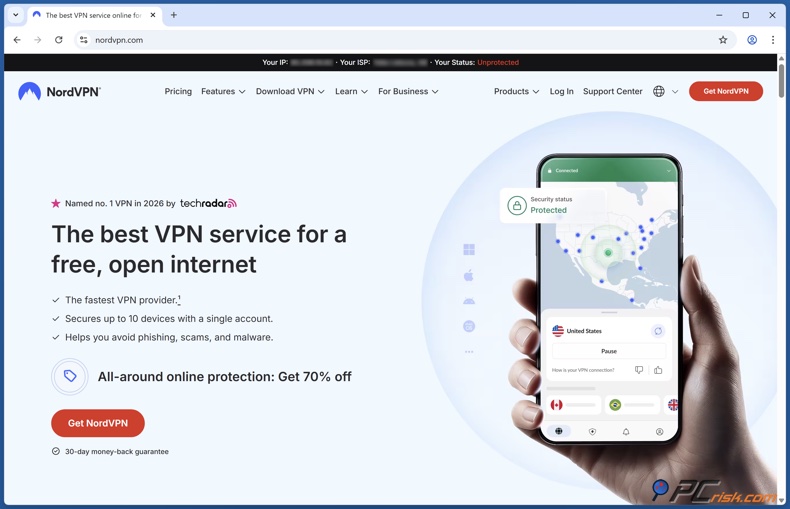
1. Pick a reputable VPN provider with servers in many countries. For 2026, we recommend NordVPN for its fast performance, strong security features, and large server network. With servers worldwide, it's easy to connect through a location where Pornhub is accessible.
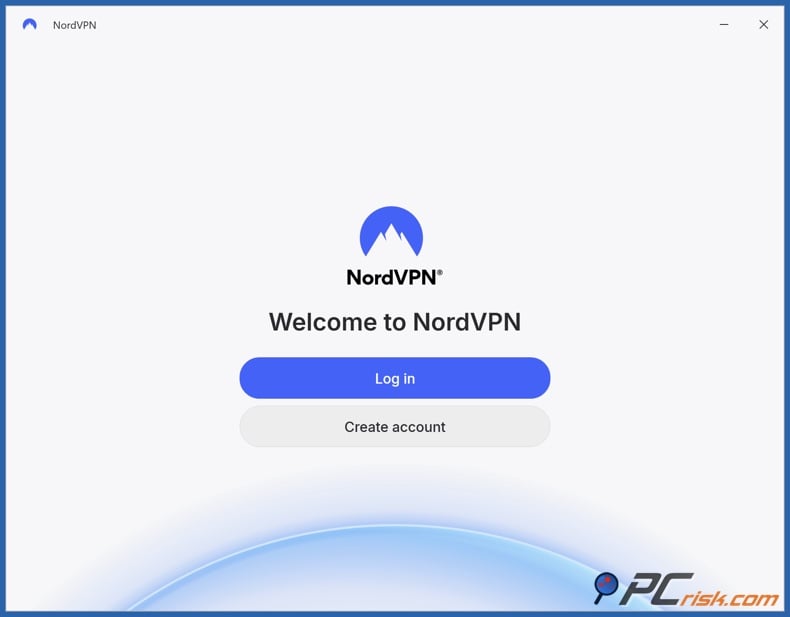
2. Install the VPN and sign in. On Windows 10/11, the standard process is: install the NordVPN app, open it, and log in through your Nord Account. Nord's own documentation walks through the login flow and initial setup steps for Windows.
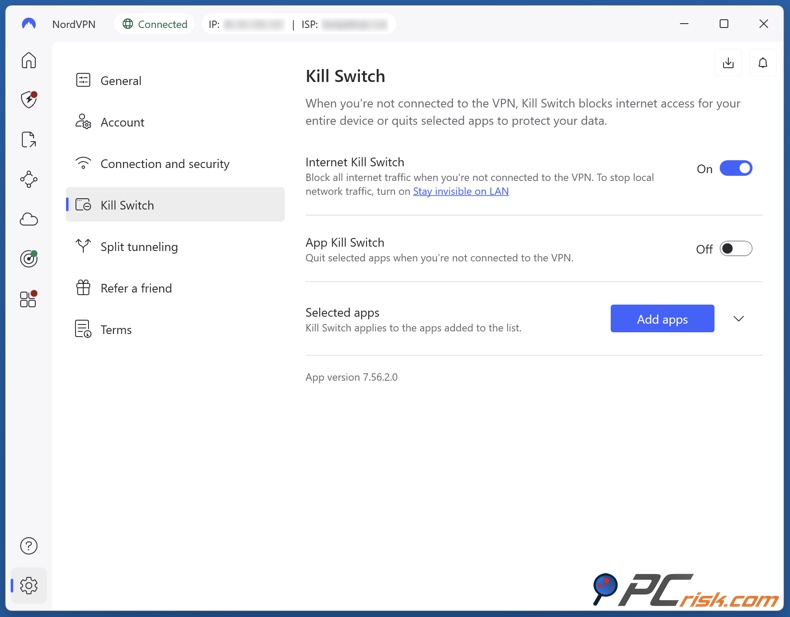
3. Turn on a kill switch before you torrent. A kill switch prevents your device from sending traffic outside the VPN tunnel if the VPN disconnects. NordVPN's documentation explains that this feature blocks "unprotected" internet access when traffic is not routed through a VPN server. This setting is especially important for long downloads, which are common with torrents.
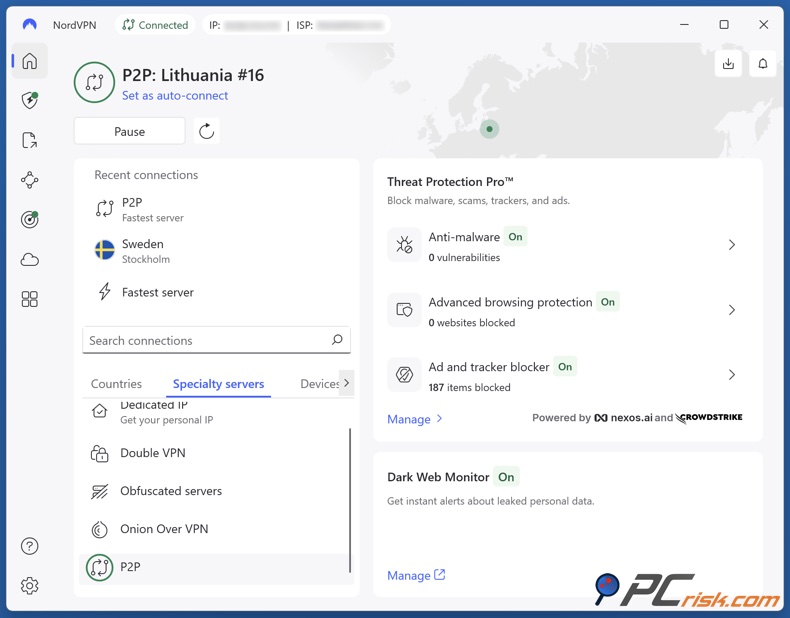
4. Use P2P-optimized servers where supported. NordVPN offers specialty servers, including P2P servers designed for fast and secure file sharing. Their support documentation explains how to connect to these servers using the "Specialty servers" list in the app.
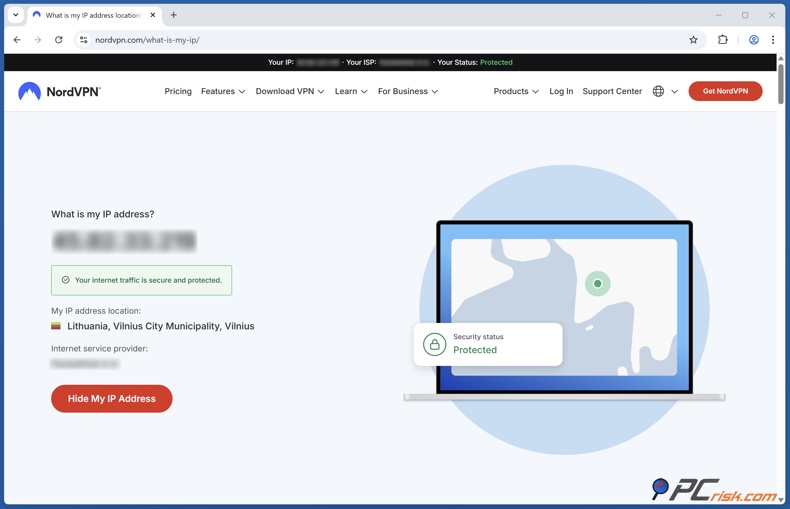
5. Confirm you are protected (IP and DNS leak basics). Before opening your torrent client, confirm that you are connected to the VPN. Check that your public IP address has changed. DNS leaks are another privacy risk; NordVPN provides guidance on preventing DNS leaks and recommends using their encrypted DNS servers. Regularly validating your connection helps prevent accidental exposure.
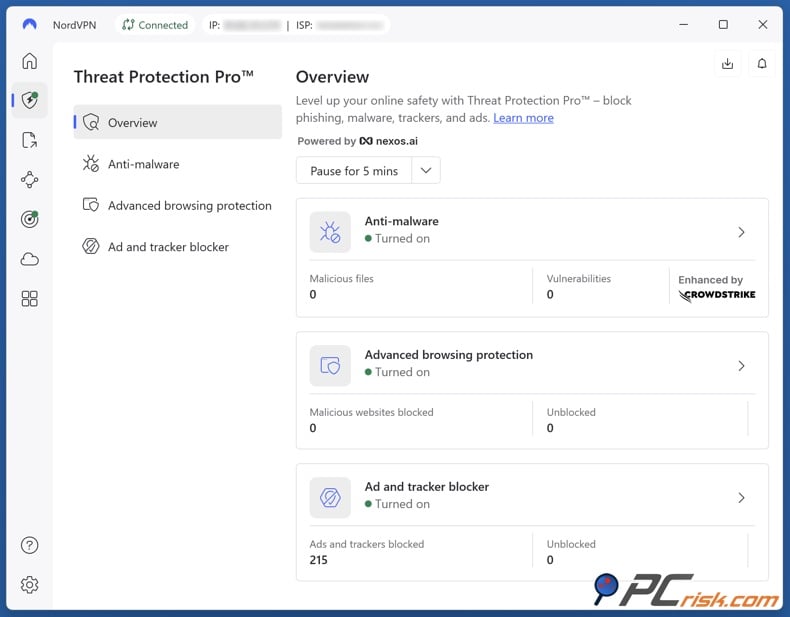
6. Enable protection features that reduce accidental exposure. Some VPN apps offer additional features such as tracker blocking, malicious domain blocking, or download scanning. NordVPN's Threat Protection and Threat Protection Pro can block unsafe domains and trackers, depending on your plan and platform. While these tools do not replace antivirus software, they help reduce risks from malicious ads and unsafe sites.
7. Configure your torrent client responsibly. At this stage, open your torrent client, such as qBittorrent, Deluge, Transmission, or another legitimate option. Torrenting requires a client to connect to the BitTorrent network and peers.
From a security standpoint, the most important behaviors are:
- Keep the VPN connected throughout the session (including seeding).
- Torrent only legal content, such as open-source software, public domain media, or files you have rights to.
- Avoid downloading suspicious executables or installers from torrents unless you can verify their authenticity.
8. Add a second safety mechanism - bind the torrent app to the VPN interface (optional but recommended when available). Some BitTorrent clients allow you to bind the client to the VPN's network interface, which prevents the client from using your regular connection if the VPN disconnects. Proton VPN's documentation notes that binding restricts torrent traffic to the VPN interface and is a valuable security feature. This concept applies regardless of your VPN provider and offers an extra layer of protection beyond a standard kill switch.
9. Start a legal torrent and monitor what happens. When you add a .torrent file or magnet link, your client joins the swarm and begins downloading. Using legal torrents, such as those provided by Linux distributions like Ubuntu, allows you to test your setup without legal risk.
Best VPNs for Torrenting
PCrisk ranks VPNs using a security-first approach, evaluating encryption standards, leak protection, and kill switch reliability. Real-world performance testing includes high-bandwidth activities such as large downloads and, where possible, torrenting.
1. NordVPN - NordVPN is well-suited for users seeking a mainstream VPN with torrent-friendly features, including P2P server categories, a kill switch, and built-in leak protection. Its modern protocols support sustained data transfers, and its privacy tools are designed to minimize accidental exposure.
The primary limitation of torrenting is the lack of port forwarding, which some advanced users prefer to maximize inbound connectivity and seeding performance. For most everyday torrenting, especially legal use, this is not significant, but it may affect those seeking optimal seeding ratios.
2. Surfshark - Surfshark is often chosen for its ease of use and unlimited device policy, which benefits users with multiple devices or households. For torrenting, its support for modern protocols, kill switch availability, and P2P-friendly approach are key advantages.
Surfshark does not offer port forwarding, which may be important for advanced seeding. While additional features, such as ad and tracker blocking or multi-hop options, add value, some privacy routing features can reduce torrent speeds.
3. Mullvad - Privacy-focused users frequently recommend Mullvad because it requires minimal personal information and is designed to reduce identity exposure. For torrenting, Mullvad's simplicity is an advantage, offering fewer marketing-driven add-ons and a straightforward set of VPN fundamentals.
However, Mullvad no longer offers port forwarding, and its server network is smaller than those of major competitors. While adequate for most users, power users seeking a wider server selection or specific streaming features may find it limiting.
4. Proton VPN - Proton VPN is a security-focused service with a strong privacy commitment and open-source applications. For torrenting, Proton VPN stands out by offering port forwarding on paid plans in specific environments, typically on dedicated P2P servers. Port forwarding can improve peer connectivity and seeding performance, which is valuable for users concerned with ratios or consistent inbound connections.
A key limitation is that P2P may be restricted to designated servers, requiring users to select specific server groups for torrenting. The free plan is generally not intended for extensive P2P use.
5. ExpressVPN - ExpressVPN is often selected for its simplicity, stability, and fast protocol options. For torrenting, users can typically connect, enable kill-switch protection, and begin torrenting without selecting a specific server category.
A standard limitation is the lack of user-facing port forwarding, as ExpressVPN's standard plan does not include it. If port forwarding is essential, Proton VPN is a more suitable option among these top five.
Torrenting Without a VPN
Torrenting without a VPN is not automatically unsafe, but it is inherently more exposed, even when torrenting legal content. Torrenting is designed to connect your client to other peers, and peer discovery mechanisms rely on sharing peer contact information so clients can exchange pieces efficiently. The network functions because peers can find and communicate with each other.
Top VPN ReviewsExclusive dealsExpert-tested · hands-on reviews→
What other people can see when you torrent without a VPN?
In a typical torrent swarm, other peers can see:
- A peer IP address (yours) and a port, used for connectivity.
- Evidence that a given IP participated in a swarm associated with a specific info hash over a certain time window (depending on the monitoring method).
This visibility is one reason torrenting is frequently mentioned in discussions of copyright enforcement: monitoring entities can join swarms, log IP addresses, and then (in some jurisdictions and circumstances) attempt to connect those IPs to subscriber identities via ISPs or legal processes.
What your ISP can see
Without a VPN, your ISP generally has a direct view of your connection metadata and can often infer that BitTorrent traffic is occurring (even if content details are not always visible due to encryption and modern transport choices). The most consequential part is that your home IP address is the one participating in the swarm, which is exactly what ISP-forwarded notices and identification efforts tend to rely on.
Even if your goal is legal torrenting, using a VPN remains a reasonable privacy decision because torrenting's default design exposes your IP address to many unknown parties in the swarm. Whether this is worthwhile depends on your threat model and tolerance for tracking exposure.
Safety and Risk
The question of whether torrenting is safe does not have a simple yes-or-no answer. Torrenting is best understood as a tool that changes your exposure profile:
- It can be safe when used to download reputable, verified content from trustworthy publishers.
- Torrenting becomes risky when used to download unknown files from unverified uploaders, especially in ecosystems where malicious actors target users seeking free software, games, or newly released media.
The major safety dimensions emphasized are privacy exposure, malware risk, and operational mistakes.
What are the benefits of using torrents?
Torrenting offers legitimate advantages that explain its continued use:
Efficient distribution at scale. BitTorrent was designed so that when multiple downloads happen at once, downloaders upload to each other, making distribution scalable without one source bearing the entire bandwidth cost. This is particularly useful for large files and popular releases.
Resilience and availability. Because content is shared by many peers, a torrent can remain downloadable even if one host goes offline, especially when there are enough seeders.
Integrity verification. Torrent metadata includes piece hashes that allow clients to detect corruption and re-download bad pieces, which can be an operational advantage compared to some direct-download scenarios.
Common for legitimate publishing. Many reputable organizations publish torrents for legal distribution, often for open-source software and public archives, because torrents reduce hosting costs and download bottlenecks.
The privacy risk most people underestimate
Torrenting can be privacy-invasive because peer discovery and connections may expose your IP address to other participants. For example, DHT is designed to store and retrieve peer contact information in a distributed manner and is built into many major BitTorrent clients.
A VPN can reduce exposure to random peers by substituting your visible IP with the VPN server's IP, but it does not make you invisible. VPN providers can still see some connection-level information, and privacy depends on provider practices, technical controls, and whether the VPN leaks your true IP via DNS, WebRTC, or disconnections.
Malware is the biggest torrenting safety problem in 2026
From a security standpoint, the riskiest torrenting pattern is not downloading files in general, but downloading untrusted content from torrent ecosystems that are often used to distribute pirated software and early-release media. Threat actors target these audiences by using social engineering; for example, offering a crack, keygen, player, launcher, or codec pack as a pretext to trick users into running malware.
Multiple security research and reporting sources have documented malware campaigns leveraging torrents or pirated software demand:
- Kaspersky has reported malware distribution through game torrents, including cryptominer campaigns delivered via torrent downloads.
- Kaspersky has also described threats that spread via malicious torrent files as part of broader campaigns targeting users.
- Zscaler has described campaigns that imitate pirated software distribution sites to deliver info-stealers.
- ESET has discussed how "black hats" misuse torrent ecosystems to distribute malware, including ransomware, by seeding files in torrent networks.
Beyond targeted campaigns, there is a broader structural issue: pirated software is repeatedly identified as a malware delivery channel across multiple contexts, including peer-to-peer distribution, because attackers can bundle trojans or adware into installers or activation tools.
Common torrenting mistakes that increase risk
Even users who know to avoid obvious executable files can be affected because attackers exploit habits and impatience. The following mistakes are common in malware cases associated with torrents:
Running "helper" executables. Fake "video players," "download managers," and "installers" are frequently used as lures. A recent example reported in security coverage involved a fake torrent package that included a disguised launcher and delivered credential-stealing malware, illustrating how realistic the packaging can look.
Ignoring file verification. Torrent integrity checks confirm that the pieces match the torrent's metadata, not that the torrent itself is legitimate. Criminals can publish a torrent whose metadata corresponds perfectly to a malicious file. The integrity mechanism is valuable, but it does not replace trust.
Assuming a VPN equals complete safety. A VPN improves privacy exposure, but it does not stop malware and does not guarantee you will not leak traffic if settings are incorrect or a kill switch fails.
How to protect yourself when torrenting
Torrenting safety relies on layered controls. If you implement only one measure, it should be to avoid running unknown executables from torrent downloads. However, strong safety typically requires multiple layers.
Use torrents for legal, reputable content whenever possible. Official torrents from reputable publishers are the lowest-risk use case for torrents.
Use a VPN with leak protection and a kill switch. We evaluate VPNs by testing for IP/DNS/WebRTC leaks and by simulating dropouts to see if the kill switch blocks traffic. Those are the features that matter for torrent privacy.
Bind your torrent client to the VPN interface. This prevents silent fallback to your ISP connection if the VPN drops. This is not a legal strategy; it is a privacy-control measure designed to reduce accidental exposure.
Keep your system patched and your security software up to date. Many torrent-driven infections rely on users executing files, not on exotic zero-day exploits - so preventing execution, detecting known malware, and blocking malicious domains remain effective defensive layers.
Scan downloads before opening them. Our own security product, Combo Cleaner, is positioned as an anti-malware and web protection solution with real-time protection, on-demand scanning, and web browsing protection, features that directly help block malicious payloads from risky download sources.
Back up important data. If torrenting leads to a ransomware incident, backups are often what separate a minor inconvenience from a data loss disaster. Even security suites with ransomware defenses are not perfect substitutes for backups.
When you download torrents, you might come across fake installers, hidden malware, or dangerous download pages. Combo Cleaner helps keep you safe by scanning your downloads in real time and blocking scams, phishing, and harmful websites.
A VPN encrypts your traffic — but your device still needs protection against malware and ransomware. Combo Cleaner adds the missing layer of defense.
Download Combo CleanerAntivirusDetect & remove malware threats→Public vs. private trackers
A private tracker restricts access (often by membership) and may enforce sharing rules by maintaining user statistics and upload requirements. The BitTorrent standardization documents describe "private torrents" as torrents marked with a private flag, intended to limit peer discovery to the private tracker and prevent discovery via mechanisms like DHT or PEX that would subvert the tracker's access control.
In summary, private trackers can reduce some spam and improve consistency, but they are not a universal safety guarantee. Malware can still be distributed anywhere users are willing to run downloaded files.
Torrenting v. streaming
Streaming typically delivers media from a server to a client for near real-time playback, rather than downloading an entire file first. Multiple definitions describe streaming as real-time or near-real-time delivery of media packets for immediate consumption.
From a risk standpoint, torrenting usually involves more explicit peer-to-peer exposure, as your client connects to many peers and often uploads, while streaming is more commonly a client-server interaction. This does not mean streaming is automatically legal or safe; it depends on the source. However, the architecture changes the privacy footprint and malware risk profile.
Tips for torrenting
Torrenting tips that keep the focus on safety and legitimacy:
- Prefer official torrents from reputable organizations when possible.
- Avoid torrents that require you to run "installers," "cracks," "keygens," or suspicious "players."
- Use a VPN kill switch and confirm leak protection before starting the torrent client.
- Keep security software and OS updates current, and scan downloads before opening.
Legality and Consequences
Torrenting legality depends on two core things:
- What you are downloading/uploading (authorized vs. unauthorized copyrighted content).
- Which laws apply to you (country, ISP policies, and how enforcement works locally).
Is torrenting legal?
Torrenting as a technology is not inherently illegal. Many legitimate publishers distribute software and public collections over BitTorrent.
The legal risk arises when torrenting involves reproducing or distributing copyrighted works without permission. In United States law, copyright owners have exclusive rights that include reproduction and distribution, and violating those exclusive rights can constitute infringement.
A complication specific to torrents is that torrenting often includes uploading while downloading. The UK government explicitly notes that peer-to-peer software will usually share portions of material from your computer with others while it is being downloaded, because that's central to how such networks operate. This makes torrenting legally different (in many cases) from passive consumption models because it may involve making the work available to others.
In the European Union context, EU copyright rules include exclusive rights such as reproduction and communication/making available to the public, and EU-level directives harmonize these rights across Member States (with local implementation differences).
Is torrenting safe and legal in the "gray areas"?
Some users assume that "it's online, so it's all the same." Legally, it isn't.
- Public domain content is generally lawful to share and download (subject to local rules and accurate classification).
- Creative Commons or otherwise explicitly licensed content may be legal to torrent, but you must follow the license conditions.
- Commercial entertainment and paid software distributed without authorization are commonly high-risk categories for infringement disputes. That's also where malware risk is often highest, because attackers target high-demand "free" downloads.
What if I get caught torrenting?
Being "caught" can mean different things in different places. Common outcomes include:
ISP warnings or forwarded notices. In the UK, official guidance explains that users may receive a letter if a copyright owner believes someone has used their connection to share copyrighted material via peer-to-peer networks.
Civil claims and settlement demands. Rights holders may attempt to identify subscribers behind IP addresses and pursue claims or settlements. Discussions of P2P enforcement often focus on how subscriber identification is obtained via ISP-held data, and how rights holders balance enforcement with privacy considerations.
Legal escalation and subpoenas in some jurisdictions. In the U.S., the DMCA includes subpoena mechanisms in certain contexts, and U.S. copyright resources describe how online enforcement frameworks operate. The practical reality is that enforcement is uneven, but the legal tools exist.
Damages exposure (U.S. context). Some U.S. compliance guidance notes that infringement can expose users to significant civil damages and, in some cases, criminal consequences - illustrating why "it's just downloading" can be a costly assumption.
If you receive an ISP notice or similar warning, the safety-first response is to stop the activity that triggered it (especially if it involves unauthorized material), secure your devices (because torrent ecosystems are high-risk for malware), and consider qualified legal advice if the matter escalates into formal legal claims.
Frequently Asked Questions (FAQ)
Will I face legal issues for torrenting?
Potentially, yes, but it depends on what you torrent and where you live. Torrenting technology is used for legitimate distribution, but unauthorized downloading and uploading of copyrighted content can create liability. In the U.S., copyright owners have exclusive rights, including reproduction and distribution, and violating those rights can constitute infringement.
Torrenting also differs from many other consumption models because it often involves both uploading and downloading. Official UK guidance points out that peer-to-peer software usually shares portions of the material from your computer while you download. That upload behavior is central to the system, and a major reason torrenting disputes often focus on "sharing," not just "viewing."
What are the ways I can use torrents legally?
Legal torrenting is straightforward when you focus on authorized sources. Common lawful uses include:
Downloading official torrents for Linux distributions and other open-source software (some publishers provide torrent links specifically to reduce server load).
Downloading public-domain and open-licensed content distributed via BitTorrent by large digital archives, including millions of items made available through torrent distribution.
Downloading Creative Commons-licensed works, where the license permits redistribution, and you comply with the license terms.
When in doubt, the safest approach is to use torrents that are posted by the rightsholder or by reputable organizations that clearly explain what they're distributing and why.
Where do people get torrents?
From a technical standpoint, torrents are obtained through:
Official publisher pages that provide .torrent files or magnet links (common for open-source releases and large data sets).
Public archives that publish torrents for legal distribution.
Indexing sites and communities that catalog torrents (quality varies widely, and many are associated with unauthorized content). For safety reasons, it's better to prioritize reputable, authorized sources because torrent ecosystems are frequently abused to distribute malware and scams.
Can I get malware from a torrent download?
Yes. Torrent-related malware infections are common enough that multiple security organizations have documented threats delivered through torrent ecosystems, including campaigns that distribute cryptominers and other malware via game torrents and malicious torrent packages.
The highest-risk pattern is downloading "cracked" software, key generators, or suspicious installers, because attackers can bundle malware into what appears to be a free version of a paid product. Security research has repeatedly described threat campaigns that mimic piracy distribution to deliver info-stealers.
To protect yourself, you should scan downloads before opening them, keep your system updated, and avoid running unknown executables from torrent packages. For users who want an additional defensive layer, PCrisk's Combo Cleaner is positioned as an anti-malware and web protection solution that includes real-time protection and on-demand scanning, directly relevant to blocking malicious downloads and websites associated with risky file sources.
Share:
 Facebook
 X.com
X.com
 LinkedIn
 Copy Link

Rimvydas Iliavicius
Researcher, author
Rimvydas is a researcher with over four years of experience in the cybersecurity industry. He attended Kaunas University of Technology and graduated with a Master's degree in Translation and Localization of Technical texts. His interests in computers and technology led him to become a versatile author in the IT industry. At PCrisk, he's responsible for writing in-depth how-to articles for Microsoft Windows.
▼ Show Discussion