
We may earn commissions from products we recommend. Learn more.
How to access Peacock TV in Canada in 2026 with a VPN

How to access Peacock TV in Canada in 2026 with a VPN
Peacock TV is a subscription-based video on-demand streaming platform owned by NBCUniversal (via Comcast). It offers a variety of entertainment and live programming, including TV series, movies, originals, sports, and news.
Peacock TV is intended for viewers in the United States and certain US territories. Hence, if you try to access Peacock from Canada, you will encounter a regional block. The main workaround is changing your apparent location by using a VPN (Virtual Private Network) service. This article covers Peacock TV's geoblocking and how you can use a VPN to make it appear like you are browsing from the US.
Disclaimer: PCRisk does not promote or encourage the violation of streaming platforms' terms of service. This information is provided for educational purposes to help users understand geo-restrictions, privacy tools, and practical troubleshooting. Always follow local laws and use any method described at your own risk.
Watch Peacock TV with NordVPNSpecial deal30-day money-back guarantee→
Table of Contents:
- Introduction
- Peacock TV and geoblocking
- How to access Peacock TV in Canada?
- How to pay for Peacock TV in Canada?
- Accessing Peacock TV in Canada with a VPN
- Best VPNs to access Peacock TV in 2026
- Can you use a free VPN to access Peacock TV in Canada?
- Common issues and solutions when accessing Peacock TV with a VPN
- Is using a VPN to access Peacock TV in Canada legal?
- Peacock TV alternatives available in Canada
- In closing
- Frequently Asked Questions (FAQ)
Peacock TV and geoblocking
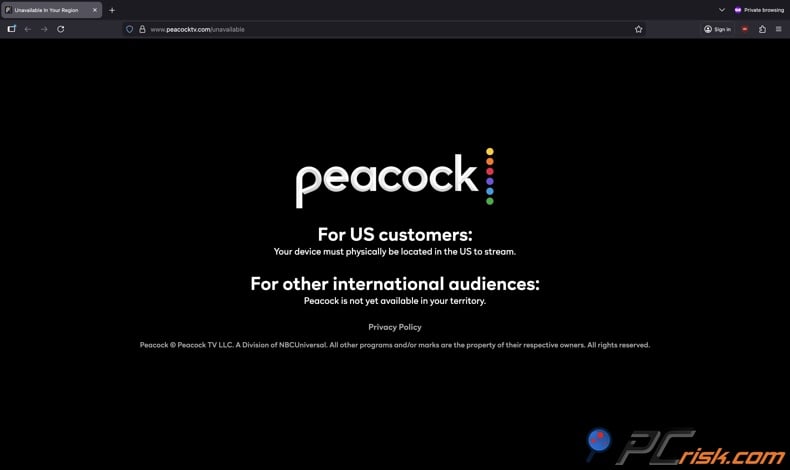
Peacock TV is a streaming service available in the United States and US territories, including Puerto Rico, American Samoa, Northern Mariana Islands, Guam, and the US Virgin Islands. Accessing this service from any different location presents the visitor with a message stating that Peacock is "For US customers: Your device must be physically located in the US to stream./ For other international audiences: Peacock is not yet available in your territory".
Peacock TV being built for a US audience means its rights, distribution agreements, and monetization model are structured around US licensing. The streaming platform is unavailable elsewhere, and this type of restriction is commonly referred to as geoblocking. In simple terms, geoblocking limits access to content depending on where the user's connection appears to be located (primarily based on their IP address).
It is standard for streaming platforms like Peacock TV to geoblock their services, and this is predominantly due to licensing. Streaming services must have the rights to every piece of content and the rights to distribute it in specific regions. Hence, if a platform does not have the rights for a location - it typically makes its services unavailable by blocking access.
The same applies to Peacock TV. As a streaming provider, it is obligated to enforce where its service is offered. That is why Peacock is inaccessible in most countries, including Canada, and why the platform checks visitor locations before permitting them to stream.
Our top recommendation for streaming and privacy. NordVPN consistently leads our tests with fast speeds, reliable geo-unblocking, and a strict no-logs policy.
- ✔ Unblocks geo-restricted streaming services reliably
- ✔ 202+ locations across 111 countries
- ✔ 30-day money-back guarantee · Special deal available
How to access Peacock TV in Canada?
From Canada, Peacock TV is generally inaccessible. If you attempt to access it, the platform will let you know that it is not available in your region and only users who are physically present in the US can stream content.
VPN (Virtual Private Network) services are often used to go around geoblocks. These tools encrypt user connections and route their Internet traffic through remote servers - this changes users' apparent locations. Hence, Peacock TV may be led to perceive a visitor's connection as originating from the US when they are connected to a US-based server via a VPN service.
However, it should be noted that streaming platforms are proactive in blocking VPN use. Peacock and other services may restrict access if they detect presumed VPN-facilitated traffic. Thus, by using a VPN to bypass geoblocks and geo-restrictions, you may encounter messages stating that a VPN connection has been identified. Therefore, using a VPN to access Peacock TV might require some trial and error with service selection, server choice, and device-stored location data removal.
How to pay for Peacock TV in Canada?
Solving Peacock TV's geoblock is but one snag in streaming on this platform from Canada. The other barrier is paying for a subscription. Peacock has several payment methods, including major credit and debit cards, PayPal, and billing through certain third-parties. However, as a US service, its supported payment options are not geared towards international customers.
Even if Peacock TV is successfully accessed from Canada, purchasing a subscription may become an issue. Details in the billing information, app store region, or account could signal to the platform that a user is located outside the US. This could result in failure to subscribe or a subscription/account suspension.
Below are the payment methods accepted by Peacock TV:
Debit/credit card - per Peacock TV's payment method guide, the service accepts cards issued by major banks (e.g., Mastercard, Visa, Discover, American Express). However, having a card from an accepted issuer may not be enough, as whether it is approved can depend on the billing profile, which could include details revealing the owner's location. If a card (with sufficient funds) is declined, it is likely due to how the platform validates account eligibility and region.
PayPal - this payment method may be a simpler choice for users from Canada. In some cases, the billing profile of PayPal accounts is less revealing than that of a debit/credit card. However, whether it will be accepted may still depend on how Peacock and PayPal process the transaction and what account region details are required.
In-app purchases on supported devices - a payment method facilitated via third-party providers, such as Google Play, Apple, Roku, or Xfinity. However, this option may come with a different set of issues: each provider can have their own rules that vary by country, region, and payment method. Hence, users may not be able to find, download, or otherwise subscribe to Peacock unless they fit the necessary criteria (like the region where the service is officially offered). In other words, the problem may be with the third-party rather than Peacock billing.
Peacock gift cards - prepaid digital cards bought directly from the Peacock website. Gift cards can be paid for using a debit/credit card, PayPal, or Google Pay. Generally, this method is often utilized by users accessing otherwise geoblocked services when direct billing is difficult. Issues may arise as platforms are aware of this and may present additional hurdles with gift card purchase and redemption.
Important note: acceptable payment methods may change. Also be mindful of scams, such as third-party providers not mentioned in official sources, "services" that claim to buy Peacock gift cards on your behalf, and similar. Remember that by falling victim to a scam, you may not only experience a financial loss, but you could also lose access to your Peacock account or even experience serious privacy issues.
Accessing Peacock TV in Canada with a VPN
A VPN (Virtual Private Network) is an overlay network that extends private networks across public ones by utilizing network virtualization as well as encryption and tunneling protocols. In a practical sense, VPNs are strong privacy tools that can change users' apparent locations, encrypt their connections, and reduce the information visible to visited websites and ISPs (Internet Service Providers).
VPNs are commonly used to bypass restrictions and blocks based on geolocation, including those on Peacock TV. Essentially, these services route users' Internet traffic through their own servers - hence, visited sites are presented with an IP address provided by the VPN rather than the visitor's own.
It is noteworthy that streaming platforms may rely on additional information to determine visitors' locations; more information on this can be found in the "Common issues and solutions when accessing Peacock TV with a VPN" section of this article.
How to watch Peacock TV in Canada with a VPN:
1. Choose a reliable VPN provider. You are much more likely to successfully access Peacock TV and other geoblocked services if you choose a reputable VPN provider with an extensive global network and high speeds. An emphasis on privacy - such as a strong no-long policy - is crucial as well. If your goal is to browse US-specific websites/services, it is essential to pick a VPN with a network of servers located in the US. We recommend our Top Choice of 2026 - NordVPN.
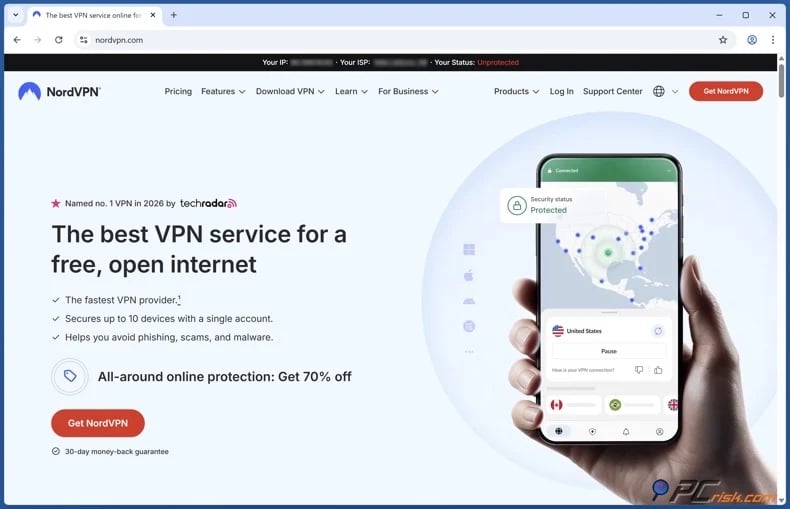
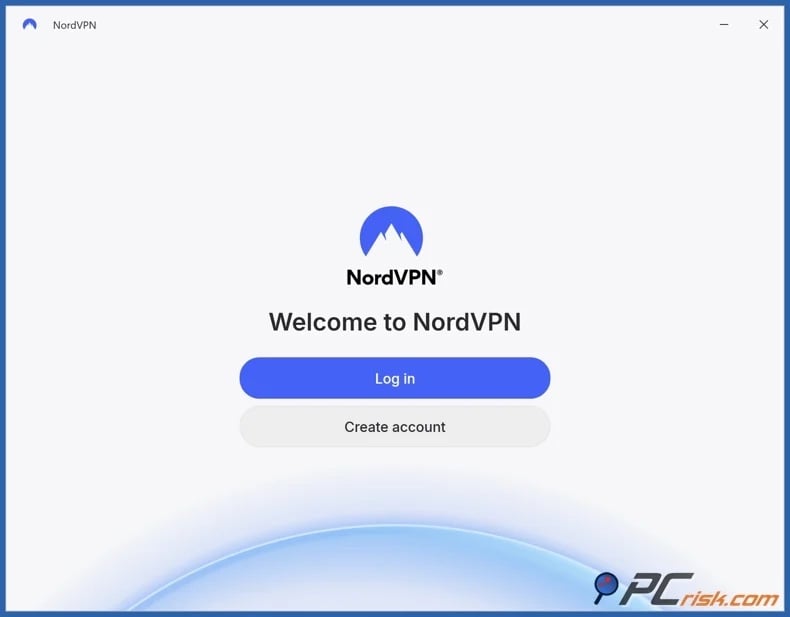
2. Download/Install the VPN and sign in. Major VPN service applications are compatible with various platforms, including Windows, macOS, Android, and iOS. Some even have options for smart TVs and/or streaming devices.
3. Connect to a US server. The Peacock TV service is US-only (plus certain territories) - hence, users seeking to access it from Canada need a US exit location. Should Peacock remain unavailable, it could be because it has blocked specific server IP ranges due to suspected VPN association. In this case, connect to a different server located in the US (switch to another city or server cluster).
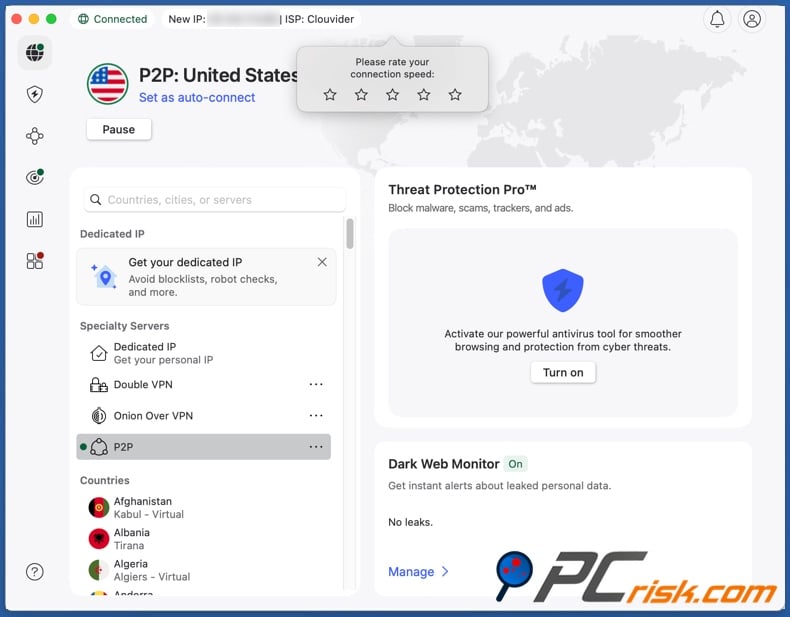
4. Open Peacock TV and begin streaming. If you continue experiencing issues, it could be because location signals are stored in the app data or Internet cookies. Clear the cache/cookies and restart the application. It may be helpful to start a private browsing session.
Streaming Peacock on a TV that does not support VPNs:
Watching Peacock on a smart TV or streaming stick that is incompatible with VPNs requires configuring your router. This solution will change the apparent location of your entire home network to the US and cover all connected devices.
However, this is more time-consuming than setting up a VPN directly on the device you wish to stream on. In case Peacock blocks the VPN-provided IP address - that will block all devices connected to that router. Connecting to a different server will take longer than doing so on a single VPN-supported device.
Best VPNs to access Peacock TV in 2026
There are four key aspects to consider when choosing a VPN: reliability, server coverage, speed, and security. Watching Peacock TV from Canada requires a VPN service that can reliably ensure access to major streaming platforms, has a broad enough network to provide ample alternative servers, and can handle heavy traffic without crashing or causing buffering issues when streaming.
Based on these criteria and our in-house testing, we have identified our top five VPN picks for 2026. For an in-depth review and comparison of performance, features, and pricing - check out our dedicated Top Five VPN list.
1. NordVPN
Our top 2026 pick - NordVPN is ideal for streaming due to its large global server network and consistently fast speeds. Both factors are essential for bypassing geoblocks and engaging in high-bandwidth activities (like watching Peacock TV). NordVPN is a powerful privacy tool with its AES-256 encryption and audited no-logs policy.
2. Surfshark
Our second choice - Surfshark offers unlimited device connections for a reasonable price. Many users prefer to stream on multiple devices and this provider has not set a number limitation for connected devices. Likewise, Surfshark has a broad server network and the speeds necessary for streaming.
3. Mullvad VPN
Mullvad - privacy-focused and minimalistic. The privacy provided by this service is unrivaled. Its no-logs policy has been independently audited, registration does not require disclosing personal details (not even an email address), and it offers anonymous payment options. While Mullvad has the speeds required for streaming, it is not the perfect choice due to its comparatively small network. This can become an issue when attempting to connect to an alternative server in the same region.
4. Proton VPN
Proton VPN - security and transparency oriented. This provider offers strong encryption and transparent and audited policies. Proton VPN has an unlimited data plan that is free. However, the paid plans are far better for streaming Peacock due to the broader server selection available.
5. ExpressVPN
ExpressVPN - easy-to-use premium option. While pricier than its competitors, this service offers speeds, an extensive global server network, and a host of other features. ExpressVPN apps have an intuitive design, which can be incredibly helpful for streaming when it may be necessary to quickly switch US servers, swap protocols, or reinstall applications.
No VPN can guarantee uninterrupted access to a streaming service. Streaming platforms continuously block IP ranges used by VPNs, and VPN providers are constantly updating their servers to keep one step ahead. Therefore, it is crucial to choose a VPN with a variety of server options, rapid server switching, and responsive customer support.
Can you use a free VPN to access Peacock TV in Canada?
There are many free VPN services, even free plans offered by established providers. However, these services are not a great option for streaming and accessing a website/platform available only in a single region.
Top VPN ReviewsExclusive dealsExpert-tested · hands-on reviews→
The first limitation is structural - free plans often have data limits, fewer server locations, and slower speeds. To elaborate on the impact, streaming can quickly exhaust the allowed data, there are fewer options for changing servers, and buffering/loading issues can be constant.
The second limitation is detection - it is common for streaming services to block exit nodes that get a lot of traffic. Free VPN servers are typically shared by many users and are more likely to be flagged by platforms like Peacock TV.
The third limitation is privacy and security risk - free VPN services do not generate revenue by selling subscriptions, but maintaining the infrastructure requires funds. Hence, some free VPNs resort to injecting ads, and rogue advertising networks often promote deceptive and malicious content, including scams and malware. These tools can also be bundled with other software, such as PUAs or adware. Free VPN services may monetize private user data. Additionally, they often have weak security practices that can lead to failed encryption and data leaks.
In summary, free VPNs commonly fall short in terms of reliability, network variety, speed, and privacy. There are reputable providers, such as Proton VPN, that have free plans with significant transparency. However, these options have limitations that seriously hinder activities like streaming.
Common issues and solutions when accessing Peacock TV with a VPN
In many instances, streaming services like Peacock TV actively try to block visitors who use VPNs and similar tools. These platforms can seek various indicators to block users from restricted regions. Hence, even with a correctly configured VPN, visitors may still encounter invalid region or suspected VPN usage alerts or other issues.
The following are some of the common issues and solutions for accessing Peacock TV from Canada.
Repeated Peacock is "For US customers: Your device must be physically located in the US to stream./ For other international audiences: Peacock is not yet available in your territory" message or VPN/proxy error:
- You must be connected to a server based in the US to access Peacock TV. Ensure that your VPN is actively connected to the correct region.
- The VPN server you are connected to has been blocked by Peacock TV. Switch to a different US server (ideally to another city). Refresh Peacock.
- Peacock TV may be remembering your actual location. Streaming platforms can store identifiers that reveal users' geolocations when they attempt access without using a VPN. Clear cookies and cache to remove any revealing data stored. Using a private window may help as well.
- Your setup may be leaking DNS requests or exposing other location indicators. Check whether your VPN provider has guides for running a DNS leak test, and switch servers if streaming fails.
- Peacock may be detecting VPN-associated behavior, such as rapid server changes. Keep your setup consistent and avoid quickly switching servers. Refresh Peacock TV before trying again.
Slow playback or buffering issues:
- The server you are connected to may be too far away. Connect to one that is closer, such as a northern US city close to the border with Canada.
- Some protocols have better performance on certain networks. If available, try a different protocol in your VPN app.
- Generic connectivity problems (unrelated to a VPN) can cause streaming issues. Check the stability of your baseline Internet connection. Note that some speed loss is expected with VPN usage, as they encrypt and route your traffic.
Device or app glitches:
- Peacock itself recommends common maintenance steps such as clearing cache/data and reinstalling the app when playback issues occur. These steps can also help when the app gets stuck in a loop of region errors.
If you have already tried the basic solutions and failed to fix an issue, the difference between a high-quality VPN service and a mediocre one becomes evident. The former offers faster IP rotation, more server options, and reliable customer support that can guide you through problems with accessing specific streaming services.
Is using a VPN to access Peacock TV in Canada legal?
In Canada, using a VPN is generally legal, and many reputable sources confirm that using one is completely lawful. However, despite the legality of these tools, that does not mean that streaming services or other platform allow their use.
Peacock TV is a US-only service; its terms and availability pages emphasize that those who wish to stream it must be physically located in the US. Using tools to access this platform from outside territories may violate the Terms of Service (ToS), which can lead to account restriction or termination.
Furthermore, while bypassing geo-restrictions and geoblocks is in a legal "grey area", legal implications are not impossible. The risk may come from ToS breaches or copyright infringement.
As of the time of writing, there are no Canadian laws explicitly banning VPN usage. Generally, these services are treated as lawful privacy tools. The bigger risk for most users is contractual, as they may violate the streaming service's ToS, and the provider can respond by blocking VPN traffic or penalizing the account.
Important note: laws can change, and it is imperative to keep up-to-date with current law.
Peacock TV alternatives available in Canada
Accessing Peacock TV from Canada necessitates the use of tools like VPNs to work around the platform's geoblocks. If you would rather avoid VPN troubleshooting entirely, there are many streaming options available in Canada.
Crave - is a major Canadian subscription platform. It has an extensive catalog that includes content associated with HBO, Max Originals, Showtime, and STARZ.
CBC Gem - is a streaming platform offering CBC (Canadian Broadcasting Corporation) programming and a broad selection of international content.
Sportsnet+ - is a live sports streaming service in Canada covering various major leagues (e.g., NHL, NBA, WNBA, UFC, etc.).
TSN+ - is a digital streaming service offering additional sports coverage in Canada, including exclusive live sports and enhanced feeds.
Global mainstream streaming platforms are available in Canada, including Netflix, Disney+, Amazon Prime Video, Apple TV+, and Paramount+. While none serve Peacock's exact library - like NBC programming combined with US sports coverage - they have vast catalogs that can serve as an alternative source of entertainment. Remember that while these streaming services are available, certain content might not be available in Canada due to licensing.
In closing
Peacock TV is a streaming service that is only available in the United States, which means that if you are trying to access it from Canada - you will encounter unavailability messaging. The platform needs a US location signal to allow streaming its content.
VPNs are commonly used to get around this geo-restriction. These tools can mask your location by routing your Internet traffic through a server in the US. However, this is not a flawless solution. Peacock has methods to detect and block VPN traffic, and if the service checks your billing information - paying for a subscription can become a hassle all on its own.
If you want to watch Peacock TV regardless, look for a reliable paid VPN that offers multiple US-based servers and fast speeds. It also helps to take a few extra steps, like clearing your cookies and changing servers - to increase your chances of success.
And if you would rather not deal with these potential issues, there are plenty of Canadian streaming services and popular international platforms available. We always recommend keeping up-to-date with the latest information, evaluating all alternatives, and selecting reliable and reputable tools.
Frequently Asked Questions (FAQ)
Why can't I watch Peacock TV in Canada?
Peacock TV is only available in the United States and select US territories. The requirement is for customers to be physically located in the US, and the streaming service is not yet accessible in other regions.
How can I watch Peacock TV in Canada?
VPNs are a common workaround for accessing Peacock TV from Canada. VPNs work by allowing users to connect to servers located elsewhere (such as the US), which can change the IP address that websites perceive. The success largely depends on Peacock's ability to detect and block the VPN connection.
Why are certain streaming platforms or their content geoblocked?
Streaming rights are usually negotiated by region, and geoblocking is the measure used to ensure access only from locations where licensing has been obtained.
What if I do not want to use a VPN to access Peacock TV in Canada?
If you are looking for streaming options that do not require a VPN, there are other services available in Canada - including Crave, CBC Gem, Sportsnet+, Netflix, Amazon Prime Video, and so on.
Share:
 Facebook
 X.com
X.com
 LinkedIn
 Copy Link

Karolis Liucveikis
Experienced software engineer, passionate about behavioral analysis of malicious apps
Author and general operator of PCrisk's News and Removal Guides section. Co-researcher working alongside Tomas to discover the latest threats and global trends in the cyber security world. Karolis has experience of over 8 years working in this branch. He attended Kaunas University of Technology and graduated with a degree in Software Development in 2017. Extremely passionate about technical aspects and behavior of various malicious applications.
▼ Show Discussion