
We may earn commissions from products we recommend. Learn more.
Are Porn Websites Safe? How to Watch Porn Securely

Are Porn Websites Safe? How to Watch Porn Securely
Porn websites get a lot of visitors, and many adults use them often. However, just because they are popular does not mean they are safe. These sites have big audiences, lots of ads, and handle sensitive information. This mix attracts both real businesses and people looking to scam or take advantage of users.

This article breaks down what “safe” means for adult websites, highlights the main security and privacy risks, and shares ways to protect yourself with multiple layers of defense. A VPN can help, but it is not a full solution. Your safety also depends on your choices, the permissions you allow, and the information you share.
Disclaimer: PCrisk.com does not promote, encourage, or endorse bypassing age-verification systems or other access controls. This guide is published strictly for cybersecurity and privacy education. Always follow the laws in your jurisdiction and the rules of the platforms you use.
Watch Porn securely with NordVPNSpecial deal30-day money-back guarantee→
Table of Contents:
- Introduction
- Are Porn Websites Safe?
- Common Porn Site Security Risks
- Known Cybersecurity Incidents Involving Porn Sites
- How to Browse Porn Securely With a VPN
- Best VPNs for Watching Porn Privately and Securely
- Additional Safety Measures for Adult Websites
- Wrapping Up
- Frequently Asked Questions (FAQ)
Are Porn Websites Safe?
Porn websites are not always unsafe, but they are riskier than regular sites like news, shopping, or government pages. You likely will not get a virus just by visiting, but adult sites usually have more aggressive ads, more redirects, more scam pop-ups, and collect more data about visitors.
There are three separate “safety” questions that matter:
First, device safety: Can visiting the site lead to malware, unwanted software, or your account being hacked? The biggest risks usually do not come from the video player itself, but from things around it, like bad ads, fake download buttons, and pop-ups that pretend your device needs an update or has a virus.
Second, privacy safety: What personal information can be collected or guessed when you visit? Tracking is a real problem on adult sites. Studies show that many porn sites use third-party cookies and fingerprinting to follow users. Another big study found that most sites leak user data to others, and many can reveal or suggest private details about your interests. So even “free” adult content can be riskier for your privacy than most people think.
Third, reputation and personal safety: Problems from adult browsing can be more serious than other online risks because they can be used for blackmail or embarrassment. Sextortion and blackmail emails often try to scare you by threatening to reveal your habits, even if the person does not really have any proof.
So, are porn websites safe? Well-known sites are generally safer than unknown ones filled with pop-ups. Still, even popular sites are not good for privacy and may have third-party ads or trackers. The safest approach is to treat adult browsing as high-risk and use smart privacy habits, such as avoiding ads, not downloading files, and not granting permissions.
Our top recommendation for streaming and privacy. NordVPN consistently leads our tests with fast speeds, reliable geo-unblocking, and a strict no-logs policy.
- ✔ Unblocks geo-restricted streaming services reliably
- ✔ 202+ locations across 111 countries
- ✔ 30-day money-back guarantee · Special deal available
Common Porn Site Security Risks
Here are the most common risks users face when browsing adult sites. Not every site has these problems, but they happen often enough that you should be ready for them.
Malvertising and malicious redirects
Malvertising occurs when online ads are used to spread malware or trick people into scams, sometimes with little or no user action. Adult sites often use ad networks with fewer protections, which means you are more likely to see aggressive or harmful ads, like endless redirects, fake buttons, fake “Play” overlays, and scareware pop-ups.
Fake “your device is infected” pop-ups and scareware
Scareware pages try to make you panic with messages like “Your system is infected,” “Your antivirus expired,” or “Update required.” The goal is usually to get you to download something bad, pay for fake support, or give away personal or payment information. PCrisk has found many pop-up scams that use fear to trick people into installing malware or calling fake help numbers.
Fake updates and “download to continue” traps
A common trick on adult sites is a fake message telling you to install a “video codec,” “browser update,” or “player update.” Modern scams are often more advanced than the old fake Flash updates. Some even copy the look of real system messages or update screens to try to steal your passwords or install malware.
Browser notification permission abuse (“Allow notifications” scams)
Many bad pages try to trick you into turning on push notifications. If you click “Allow,” the site can send you scam alerts that look like system warnings, subscription confirmations, or security messages. These often lead to phishing pages or malware downloads. This type of scam is well-known.
Phishing pages and credential theft
Phishing does not only happen in email. On porn sites, it can show up as fake login pages, fake “premium” offers, fake “verify your account” messages, and prompts asking for your email, password, or credit card details. If you use the same password in more than one place, one stolen login can let someone access your other accounts.
Excessive tracking, profiling, and “sensitive data leakage”
Adult browsing is especially sensitive because the sites you visit can reveal private interests or information about your identity. Research shows that third-party tracking is common on porn sites, which can leak sensitive details to others. This is not just about ads; it also affects what data brokers and advertisers can learn about you, especially if your identity is linked through logins, cookies, or device fingerprinting.
Data breaches and leaked account details
If you create accounts on adult sites, you are trusting them to keep your sensitive information safe. But data breaches happen every year, even outside the adult industry. The more sensitive the data, the greater the personal risk if it leaks. Adult browsing can also be exposed if your email or password is leaked and attackers use that to send convincing sextortion messages.
Sextortion and blackmail scams
A common scam says that someone recorded you through your webcam while you watched porn and will send the video to your contacts unless you pay. Authorities and security experts warn that most of these are just scare tactics that use fake or old data to seem real.
Unwanted software and adware installed “accidentally”
Not every problem is a full malware infection. Many people get adware or unwanted programs after clicking misleading prompts, fake download buttons, or bundled installers. These can cause redirects, annoying ads, and tracking that invades your privacy.
Known Cybersecurity Incidents Involving Porn Sites
The risks of using adult websites are real. These sites have experienced major data breaches, exposed databases, malicious ads, and third-party data leaks. The biggest threats often come from ad networks, analytics tools, poor data handling, or hacked site code, not just the videos themselves.
One well-known example is the 2016 FriendFinder Network breach. It exposed over 412 million accounts from sites like AdultFriendFinder, Penthouse, and Stripshow. The leaked data included usernames, email addresses, and passwords. Some deleted accounts were still part of the breach. This case showed how a breach on adult sites can quickly cause privacy problems, blackmail, and issues with reused passwords.
In 2020, CAM4 reportedly exposed 10.88 billion records due to a misconfigured ElasticSearch database. The leaked information included names, sexual orientation, emails, chat transcripts, payment logs, IP addresses, device data, and password hashes. Even though this was called a data exposure, not a confirmed hack, it was a strong reminder that weak security on adult sites can lead to serious privacy risks.
Adult websites have also been used to spread malware. In 2015, Malwarebytes reported several incidents involving major sites like xHamster, Pornhub, YouPorn, and XTube. Sometimes, bad ads from third-party networks sent visitors to exploit kits. In another case, Malwarebytes found that XTube had malicious code that redirected users to the Neutrino exploit kit. These incidents show that on adult sites, the biggest technical risks often come from ads, hidden scripts, or hacked site infrastructure.
A more recent case happened in December 2025, when Pornhub said that someone got unauthorized access to some analytics data for certain Premium users. Later reports gave different reasons for the breach, either from Mixpanel’s systems or from credentials linked to Pornhub’s parent company. The main lesson is that even analytics and activity logs can be very sensitive if exposed, especially on adult sites where browsing history can reveal personal interests that users want to keep private.
If you think a malicious redirect, fake update, tricky notification, or suspicious download has put your system at risk, Combo Cleaner is a good extra layer of protection. Combo Cleaner offers real-time malware protection, web browsing protection, anti-ransomware features, and anti-adware or PUP detection. These tools are helpful for threats often found on risky porn-site ads and redirects. They can help protect your computer and privacy by blocking dangerous pages, warning about suspicious downloads, and removing unwanted software before it causes harm.
A VPN encrypts your traffic — but your device still needs protection against malware and ransomware. Combo Cleaner adds the missing layer of defense.
Download Combo CleanerAntivirusDetect & remove malware threats→How to Browse Porn Securely With a VPN
A VPN is a useful tool for keeping your adult browsing private. It scrambles your internet traffic, keeps you safer on public Wi-Fi, and hides your real IP address from websites. However, a VPN is not a complete solution. It will not protect you from phishing if you share your login details, block malware if you download unsafe files, or keep you anonymous if you log into accounts that show your identity. A VPN also will not get around age-verification rules, and PCrisk.com does not support using a VPN to bypass age checks.
Follow these steps to set up NordVPN, which is our top VPN pick for 2026, on your device and make your adult browsing more secure.
1. Choose the right plan for you. Think about what you need most: basic VPN privacy, which encrypts your connection and hides your IP, or a full security package that also blocks ads and trackers, protects against harmful sites, and scans downloads. If you want NordVPN’s threat-blocking features on Windows, check that your plan includes them before signing up.
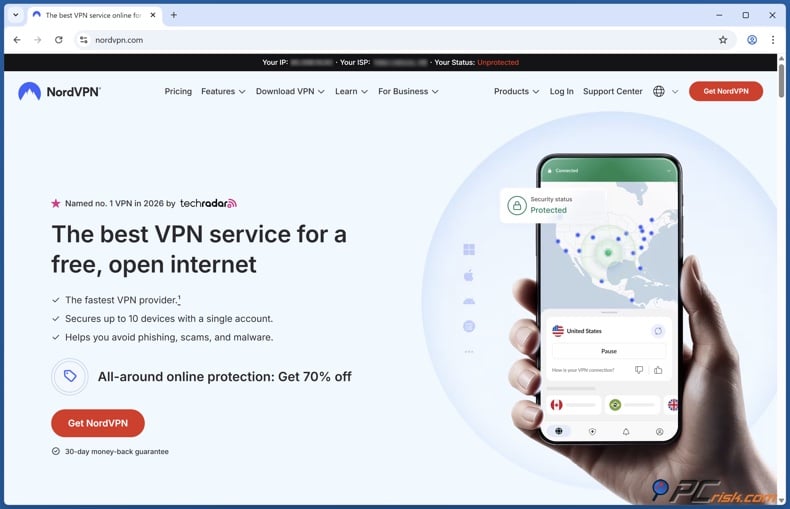
2. Download the official NordVPN installer. Download NordVPN directly from the official NordVPN website or your Nord Account download page. Avoid using third-party sites or installers from pop-ups or ads.
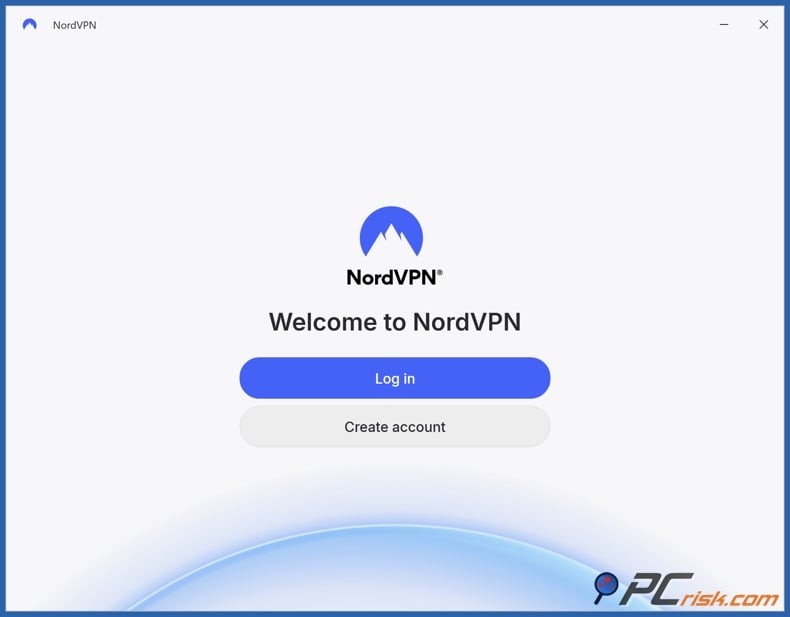
3. Install NordVPN and log in to your account. Start the installer and allow any Windows prompts. Click Install, and when it finishes, click Launch NordVPN. If the installer does not work, right-click it and choose Run as administrator. Open NordVPN and click Log In. Finish the login process in your browser. If Windows asks whether the browser should open NordVPN to complete logging in, click Allow so the app can confirm your identity.
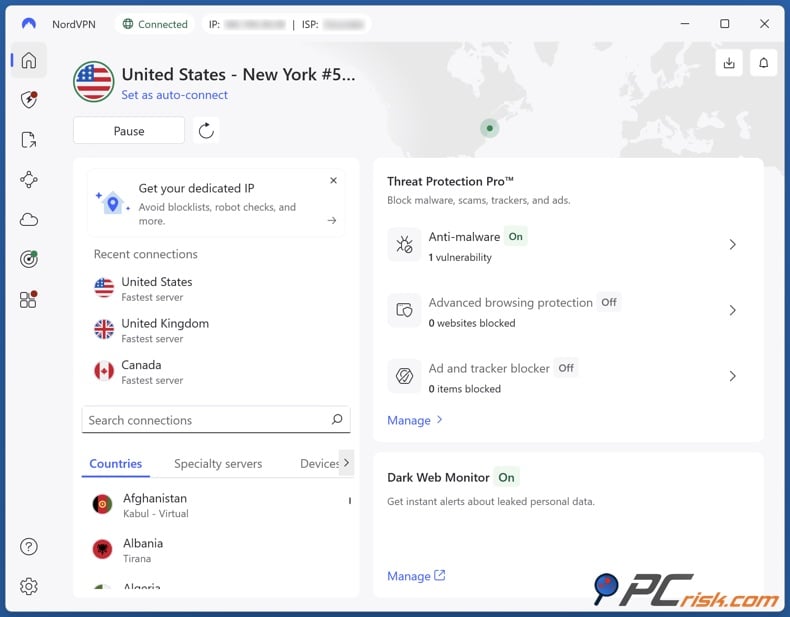
4. Connect with one click. Click Secure my connection and wait until you see Connected. This usually selects a fast, nearby server for you automatically.
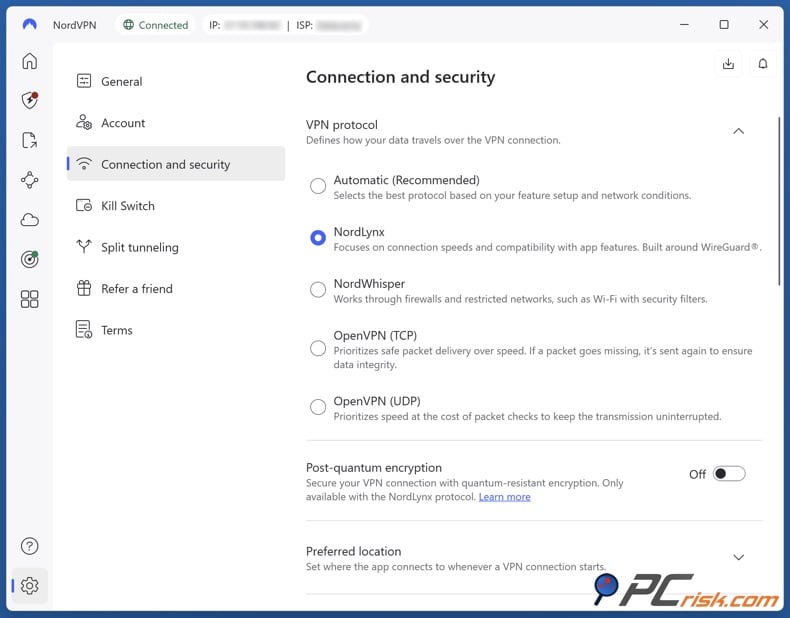
5. Switch protocol to NordLynx (WireGuard-based). In NordVPN, click the gear icon in the lower-left corner, go to Connection and security, and select the VPN protocol drop-down. Select NordLynx. This option usually gives you better speed and stability, helping to prevent disconnects and leaks.
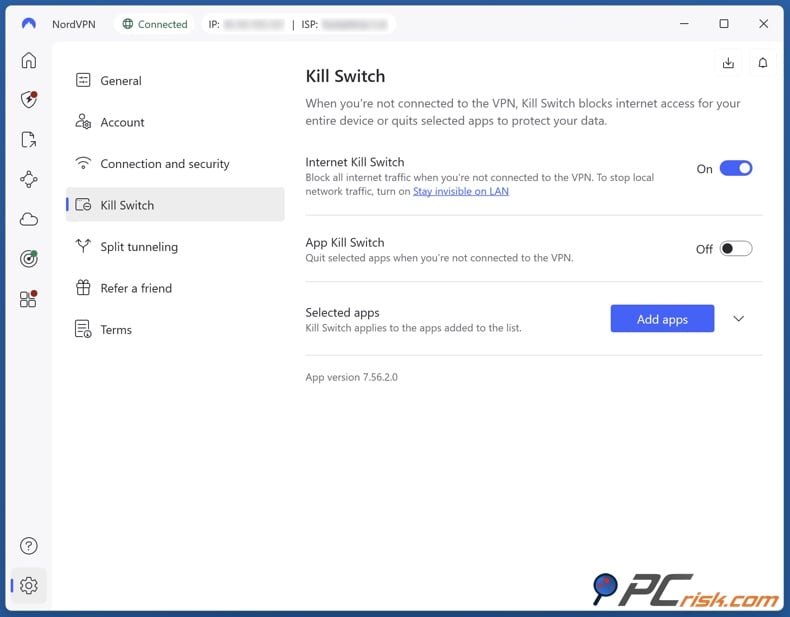
6. Enable the Kill Switch (Internet + optional App Kill Switch). In NordVPN, go to Settings, then Kill Switch, and turn on the Internet Kill Switch. This will block all internet access if the VPN disconnects. It is optional, but recommended, to turn on the App Kill Switch and add the browser you use for adult browsing.
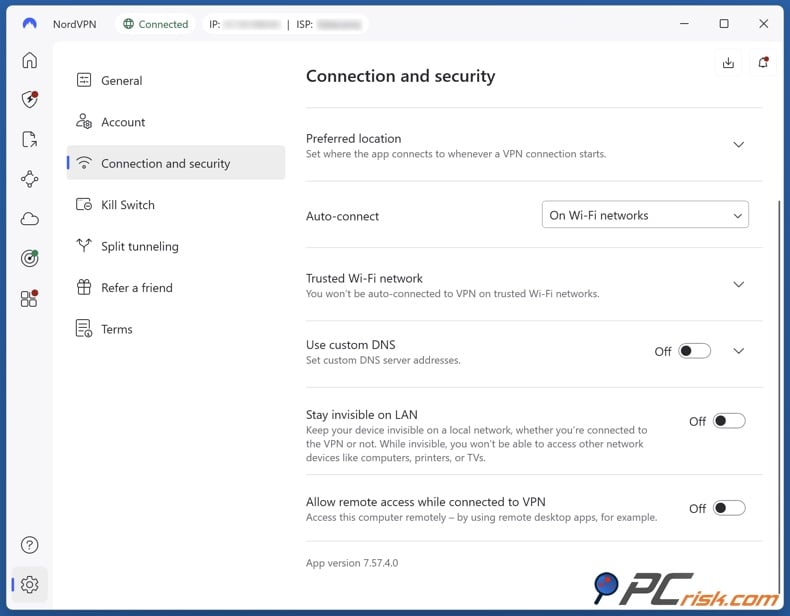
7. Enable Auto-connect on untrusted Wi‑Fi. In NordVPN, go to Settings, then Connection and security, and find Auto-connect. Choose On Wi-Fi networks if you use a laptop, or On all networks for the best protection. If the app suggests a country, stick with it for the best automatic speed. If you want to connect through a specific country, choose Custom.
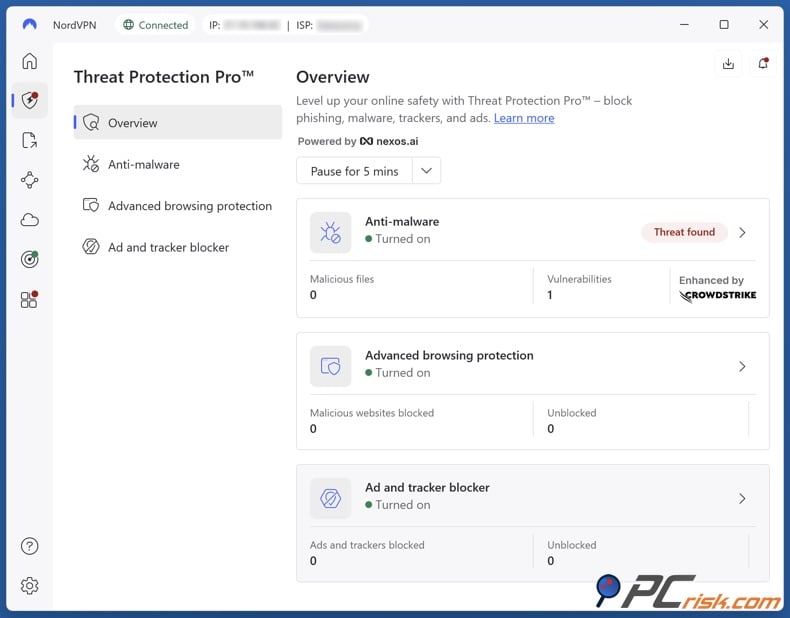
8. Turn on Threat Protection Pro and enable the most relevant modules. Open the Threat Protection Pro section in NordVPN, usually shown with a shield icon on the left menu, and turn it on. For adult browsing, the most important modules are usually:
- Ad blocker (reduces deceptive ad overlays and ad-driven redirects)
- Tracker blocker (reduces third-party tracking)
- Malicious website blocker (blocks known scam or malware pages). If your plan includes anti-malware or vulnerability protection, turn those on as well. If a trusted site stops working, try turning off just one module instead of disabling everything.
9. Choose a nearby server for speed and fewer disconnects. For most people, it is best to let NordVPN pick the nearest server with Secure my connection. If you want to choose a server yourself, use the search bar or country list and select a location close to you. Faster, more stable connections mean fewer reloads and less exposure to ads.
10. Verify that your VPN is actually working (IP + DNS + WebRTC). Take a couple of minutes to check your setup. This is one of the most important steps in this guide.
- Disconnect NordVPN and search “what is my IP.” Note the address.
- Connect NordVPN and make sure your public IP address changes.
- Run a DNS leak test (search for “DNS leak test”) while you are connected. Your ISP’s DNS servers should not appear.
- Run a WebRTC leak test (search for “WebRTC leak test”). If your real IP address shows up, adjust your browser’s privacy settings or try a VPN browser extension that helps prevent WebRTC leaks.
11. Use a separate browser profile for adult browsing. Create a separate browser profile just for adult browsing and keep it separate from your regular profile.
- Don’t sign into your main browser-sync account in that profile.
- Keep extensions minimal and trusted.
- Clear cookies/site data regularly (or on exit, if the browser supports it).
12. Deny risky permissions by default. In your dedicated profile, block notifications and turn off camera and microphone access unless you need them. Keep pop-up and redirect blocking on. If a site asks you to enable notifications or install an update to continue, just close the page.
13. Test your real workflow once, then keep it consistent. The safest routine is simple: connect to the VPN first, check that you are protected, and then start browsing. Most mistakes happen when people start browsing before connecting to the VPN.
14. Use a quick pre-session checklist. Before you start any sensitive session, make sure you are connected, the Kill Switch is on, Auto-connect is enabled, Threat Protection is on, your dedicated browser profile is selected, and notifications are blocked.
Best VPNs for Watching Porn Privately and Securely
The list below follows PCrisk’s “top 5 picks for 2026” from its VPN review hub and uses the server counts and country coverage described in the reviews.
A quick note on objectivity: even excellent VPNs won’t instantly make adult browsing “safe.” They reduce exposure to ISP visibility, local network snooping, and some kinds of tracking, but they don’t eliminate scams, trackers, or risky user decisions. PCrisk explicitly frames VPNs as a single layer within a broader security posture.
NordVPN - NordVPN is a strong “default choice” for privacy-focused adult browsing because it pairs a large server network with security features that directly target the adult-site threat landscape (ads, trackers, malicious domains, and leak protection). PCrisk’s NordVPN review describes it as having over 9,100 servers across 167 countries as of 2026, with a kill switch and DNS/IP leak protections, and support for up to 10 devices per account.
- Pros: Big network for finding fast servers; strong leak protection and kill switch; extra features like Double VPN and Threat Protection that can reduce exposure to malicious ads and domains; broad platform support.
- Cons: Like many premium VPNs, it’s not the cheapest month-to-month; some advanced features can be plan-dependent, and you still need layered protections beyond the VPN (because a VPN alone does not stop all scams).
Surfshark - Surfshark stands out for households and multi-device users because it allows unlimited device connections while still providing strong geographic coverage. PCrisk’s Surfshark review reports 4,500+ servers across 100 countries and highlights leak-test results (no DNS/IP leaks detected during testing).
- Pros: Unlimited simultaneous devices; broad “country spread” for traveling; multi-hop options; strong leak-test results in PCrisk’s review.
- Cons: As with most subscription VPNs, renewal and billing complaints appear in user-feedback summaries, and, like every VPN, it won’t protect you if you click scam prompts or install shady downloads.
ExpressVPN - ExpressVPN is a premium option known for polished apps and strong performance. PCrisk’s ExpressVPN review describes 3,000+ servers across 105+ countries and notes reliability during long sessions, plus support for up to 8 simultaneous devices.
- Pros: Strong usability and stability; broad country coverage; good performance characteristics and a mature approach to infrastructure (PCrisk notes RAM-only server design claims and multiple audits referenced in their review).
- Cons: Typically more expensive than many competitors; and while it includes tracker/malicious-domain blocking features, you still need good browsing habits and permission discipline on adult sites.
Proton VPN - Proton VPN is a strong option for users who prioritize transparency and a privacy-centric culture. PCrisk’s Proton VPN review says that, as of 2026, it operates 18,700+ servers in 134+ countries and includes features such as a kill switch and “Always-On” mode.
- Pros: Very large server network and broad coverage; strong security posture in PCrisk’s testing (satisfactory leak results); privacy-centered positioning and open-source transparency claims referenced in PCrisk’s review.
- Cons: Some premium features (streaming support, P2P) are plan-dependent, and, as with any VPN, you must still mitigate adult-site tracking using browser isolation and permission control.
Mullvad - Mullvad is widely regarded as a privacy-first service, and PCrisk’s review emphasizes that orientation - an anonymous account model, strong security, and a straightforward pricing approach. PCrisk reports that Mullvad operates roughly 580 servers across 50 countries and supports five simultaneous connections.
- Pros: Privacy-focused sign-up design; strong security fundamentals and leak protection; flat, simple pricing model; excellent performance on nearby servers in PCrisk’s tests.
- Cons: PCrisk flags weaker streaming unblocking relative to competitors; smaller country footprint than the largest VPN providers; no live chat support, and fewer “extra” features compared to mainstream suites.
Additional Safety Measures for Adult Websites
A VPN helps, but safer adult browsing is really about using several layers of protection. Here is what that means in practice.
Top VPN ReviewsExclusive dealsExpert-tested · hands-on reviews→
Use browser security features that warn you about dangerous sites and downloads
Modern browsers can warn you about unsafe sites and risky downloads. For example, Chrome’s Safe Browsing helps protect users from malware, phishing, and other dangerous pages, and it has an “Enhanced” protection mode for better detection. These warnings are important because adult browsing often includes misleading download prompts.
Block pop-ups and lock down site permissions
Pop-ups and redirects are common ways for scammers to reach users. Microsoft explains how to block pop-ups and redirects in Edge and gives guidance on managing notification permissions for each site. On Apple devices, Safari offers per-site settings and controls for notifications and other website behaviors.
At a minimum, adult browsing should be done with a “deny by default” philosophy for:
- Notifications (do not allow)
- Camera/microphone access (deny unless you have a clear, legitimate reason)
- Location permissions (deny)
- Downloads (avoid entirely on adult sites)
These controls also help lower the risk from notification scams, which are a known threat.
Never download “players,” “codecs,” “updates,” or “verification apps” from adult pages
If you see a message telling you to install software to watch a video, treat it as suspicious. Security researchers have found fake adult sites and fake update screens used to spread malware and steal information.
Separate adult browsing from your everyday identity
If you use the same browser profile for adult sites and personal accounts like email, social media, or shopping, it is easier for tracking systems to link your activities. Research shows that third-party tracking is common on adult sites, including cookies and fingerprinting. A good solution is to use a separate browser profile or a different browser for adult browsing, and avoid logging in to personal accounts.
Use strong passwords and resist sextortion pressure
Sextortion emails rely on fear, urgency, and shame. Security organizations and consumer safety groups warn that many “we recorded you” emails are scams and advise users not to pay, not to respond, and to strengthen account security by changing passwords and enabling multi-factor authentication.
Be realistic about what “privacy” means
Even with a VPN, websites can still identify you if:
- You log into an account tied to your email/name
- You reuse usernames across platforms
- You provide payment info
- You allow tracking cookies and persistent identifiers to accumulate
A VPN primarily reduces your exposure to local network monitoring and ISP surveillance, but it does not erase your presence on the web. PCrisk makes it clear that VPNs are just one part of a broader security strategy.
Are Porn Websites Safe if You Use Incognito Mode?
Incognito, or private browsing, is often misunderstood. It mainly helps with privacy on your own device. For example, it reduces what gets saved in your browsing history after you close the window. Google explains that after you close incognito windows, the browser does not keep a record of the sites you visited in that session, but downloads and bookmarks can still remain.
However, private mode does not hide what you do from the wider network. Mozilla explains that private mode can keep your browsing private on your device, but it will not stop your ISP, school, or employer from seeing where you have been online.
So, incognito mode is helpful if you mainly want to keep your browsing history private from others who use your computer. But it does not protect you from:
- Malicious ads and redirects
- Notification scams (unless you refuse permissions)
- Trackers and third-party scripts are collecting data during the session
- ISP-level visibility of the domains you visit (unless you use a VPN or other encrypted tunnel)
Wrapping Up
You can browse adult websites more safely, but it takes more caution and stronger privacy habits than most people use every day. The biggest problems usually come from bad ads, fake pop-ups, notification scams, phishing, and tracking, not just from watching a video.
A good VPN can improve your privacy by encrypting your traffic and hiding it from your ISP and local networks. It can also add stability and leak protection if you set it up with features like a kill switch, modern protocols, and threat blocking. But a VPN is just one part of safe browsing and not a reason to take risks or ignore age checks.
Frequently Asked Questions (FAQ)
Is it safe to watch adult content in Incognito mode?
Incognito mode is mainly about local privacy (reducing what gets saved on the device after you close the window). It does not make you anonymous, does not hide your activity from your ISP or employer, and does not protect you from malware or phishing.
If your goal is to reduce tracking, scams, and ISP visibility, you will need stronger measures such as a reputable VPN, strict permission controls, and safer browsing defaults.
Can my ISP see what videos I watch?
Private browsing does not stop ISP visibility. Mozilla and Google both explain that private/incognito modes don’t make you invisible to your internet provider.
With a VPN, your ISP typically sees that you are connected to a VPN service, but it should not see the specific websites or videos you access through the encrypted tunnel. VPNs prevent your ISP from seeing the specific websites you visit.
Can porn websites give you viruses just by visiting?
On a fully updated browser and OS, a single-page visit is less likely to “instantly infect” you than it used to be. The bigger risk is what surrounds the content: malicious ads, redirect chains, fake download buttons, and social-engineering pop-ups. Malwarebytes explains how malvertising can distribute malware and scams, and how it can sometimes trigger with little to no interaction.
If you see prompts to “update,” “scan,” “download,” or “allow notifications,” treat them as red flags and close the page.
Are paid porn sites safer than free ones?
Often, yes, mainly because paid sites can reduce reliance on aggressive ads, which is where many scams and malvertising start. A security-industry guide says that paid sites tend to be safer and strongly warns users not to click ads and not to download porn.
However, paid does not automatically mean private. Paid sites can still track user behavior, and account or payment data creates new risks if the provider has weak security.
Can porn sites still track me if I use a VPN?
Yes. A VPN mainly changes your IP address and encrypts traffic between you and the VPN server. Tracking can still happen via cookies, device fingerprinting, logins, and third-party scripts. Large-scale research shows that tracking and data leakage to third parties on porn sites can be extensive.
If you want to reduce tracking, combine a VPN with browser isolation (separate profile), strict cookie settings, and ad/tracker blocking where possible.
What should I do if I clicked “Allow notifications” on an adult site?
Remove the site’s notification permission immediately. PCrisk provides browser-specific steps to find the suspicious site in your “Allowed notifications” list and block or remove it.
After that, consider running a malware scan and reviewing installed browser extensions, as some notification spam is often paired with adware or unwanted extensions. We recommend using Combo Cleaner to scan and remove any malware and malicious notifications from your deviece. Microsoft also recommends running malware scans and checking extensions if pop-ups persist.
How can I tell if a porn pop-up is fake?
Treat these as high-likelihood scams: pop-ups that claim you have “18 viruses,” that your device is “locked,” that you must call a phone number, or that you must install something to continue. PCrisk documents numerous examples of “pornographic virus alert” scams that impersonate security warnings and push users toward calling scammers or installing unwanted tools.
A safe response is to close the tab or browser window. Do not interact with the pop-up, do not call the number, and do not download anything.
Share:
 Facebook
 X.com
X.com
 LinkedIn
 Copy Link

Rimvydas Iliavicius
Researcher, author
Rimvydas is a researcher with over four years of experience in the cybersecurity industry. He attended Kaunas University of Technology and graduated with a Master's degree in Translation and Localization of Technical texts. His interests in computers and technology led him to become a versatile author in the IT industry. At PCrisk, he's responsible for writing in-depth how-to articles for Microsoft Windows.
▼ Show Discussion