

Get free scan and check if your device is infected.
Remove it nowTo use full-featured product, you have to purchase a license for Combo Cleaner. Seven days free trial available. Combo Cleaner is owned and operated by RCS LT, the parent company of PCRisk.com.
What kind of malware is HYFLOCK?
HYFLOCK is ransomware that we discovered while examining malware samples submitted to the VirusTotal platform. Like other ransomware, it encrypts files on the victim's computer, making them inaccessible, and demands payment in exchange for decryption.
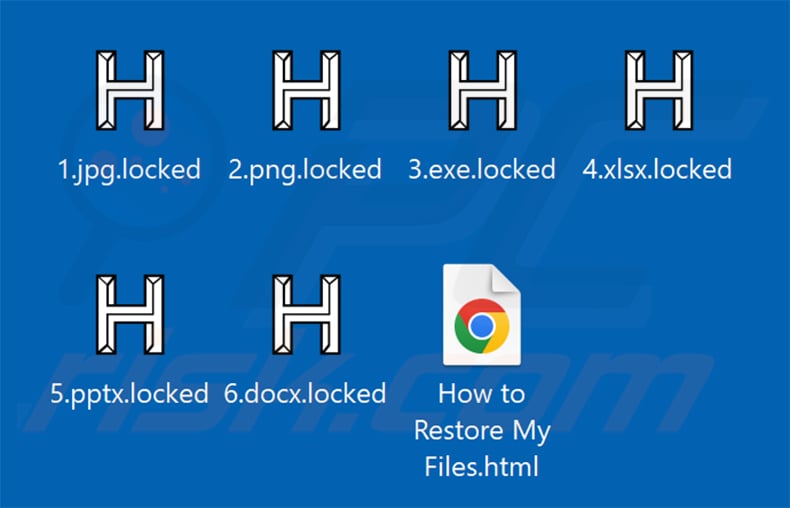
On our test machine, HYFLOCK appended the ".locked" extension to every encrypted file. A file originally named "1.jpg" became "1.jpg.locked", "2.png" became "2.png.locked", and so on. After completing encryption, it dropped a ransom note in an HTML file named "How to Restore My Files.html".
Screenshot of files encrypted by HYFLOCK ransomware:
HYFLOCK ransom note overview
The ransom note is an HTML file named "How to Restore My Files.html". It informs victims that their files were locked using HC-128 encryption and that only the attackers possess the decryption key needed to restore access.
To contact the attackers, victims are told to install the qTox messaging client alongside Tor Browser, add the attackers' Tox contact ID, and send a message containing their unique Victim ID. The note provides step-by-step installation instructions for Windows, Linux, and macOS.
The note also warns victims not to attempt self-decryption, not to modify or delete encrypted files, not to use third-party recovery tools, and not to reboot their system. Contact within 48 hours is strongly urged, with the implication that delays risk permanent data loss.
HYFLOCK ransomware overview
In most ransomware attacks, restoring encrypted files without the attacker's cooperation is not possible. Exceptions exist only in cases where the ransomware was coded with serious flaws that make the encryption breakable.
Even if victims pay the ransom, there is no guarantee of receiving working decryption software. Cybercriminals routinely collect payment and disappear without delivering anything. For this reason, we strongly advise against paying.
Removing HYFLOCK from an infected system is important to stop further damage, but removal alone cannot restore already-encrypted files. The most reliable recovery option is restoring files from a backup created before the infection struck.
Backups should be stored in at least two separate locations - such as an offline storage device and a remote server - so that a single attack cannot destroy all copies at once.
Ransomware in general
We have analyzed thousands of ransomware programs over the years. The core goal never changes: lock files and charge for their return. The main differences between strains are the symmetric or asymmetric encryption algorithms they use and the size of the ransom demanded.
Additional ransomware examples are SUCKS 2 SUCK, TuakTOX, and BL4CK SP1D3R.
How did ransomware infect my computer?
Ransomware most commonly arrives through phishing emails. These messages carry malicious attachments - such as Microsoft Office documents, archives, or executables - or links that lead to sites silently dropping malware onto the visitor's machine.
Trojans are another common delivery method. They can install ransomware quietly after establishing access to a system. Fake software updates, malicious advertisements, and pirated software also regularly serve as distribution channels.
Downloading software from unofficial sources - peer-to-peer networks, free hosting platforms, or third-party file-sharing sites - significantly raises infection risk. Use only official developer websites and trusted app stores to obtain software, and avoid cracks and unofficial activation tools altogether.
| Name | HYFLOCK virus |
| Threat Type | Ransomware, Crypto Virus, Files locker |
| Encrypted Files Extension | .locked |
| Ransom Demanding Message | How to Restore My Files.html |
| Free Decryptor Available? | No |
| Cybercriminal Contact | qTox (contact ID provided in the ransom note) |
| Detection Names | Avast (Win64:MalwareX-gen [Ransom]), Combo Cleaner (Gen:Variant.Mikey.188834), ESET-NOD32 (Win64/TrojanDropper.Agent.XG Trojan), Kaspersky (VHO:Trojan-PSW.Win32.Greedy.gen), Microsoft (Trojan:Win32/Sonbokli.A!cl), Full List Of Detections (VirusTotal) |
| Symptoms | Cannot open files stored on your computer, previously functional files now have a different extension (for example, my.docx.locked). A ransom demand message is displayed on your desktop. Cybercriminals demand payment of a ransom (usually in bitcoins) to unlock your files. |
| Distribution methods | Infected email attachments (macros), torrent websites, malicious ads. |
| Damage | All files are encrypted and cannot be opened without paying a ransom. Additional password-stealing trojans and malware infections can be installed together with a ransomware infection. |
| Malware Removal (Windows) |
To eliminate possible malware infections, scan your computer with legitimate antivirus software. Our security researchers recommend using Combo Cleaner. Download Combo CleanerTo use full-featured product, you have to purchase a license for Combo Cleaner. 7 days free trial available. Combo Cleaner is owned and operated by RCS LT, the parent company of PCRisk.com. |
How to protect yourself from ransomware infections?
Exercise caution when browsing the web and handling email. Only open attachments or follow links if you are confident the sender is legitimate. Download software exclusively from official websites or trusted app stores, never from third-party sources.
Keep software and operating systems updated using official built-in tools, and avoid activation patches or key generators from unofficial sites. If your computer is already infected with HYFLOCK, we recommend running a scan with Combo Cleaner Antivirus for Windows to automatically eliminate this ransomware.
Appearance of HYFLOCK's HTML ransom note ("How to Restore My Files.html"):
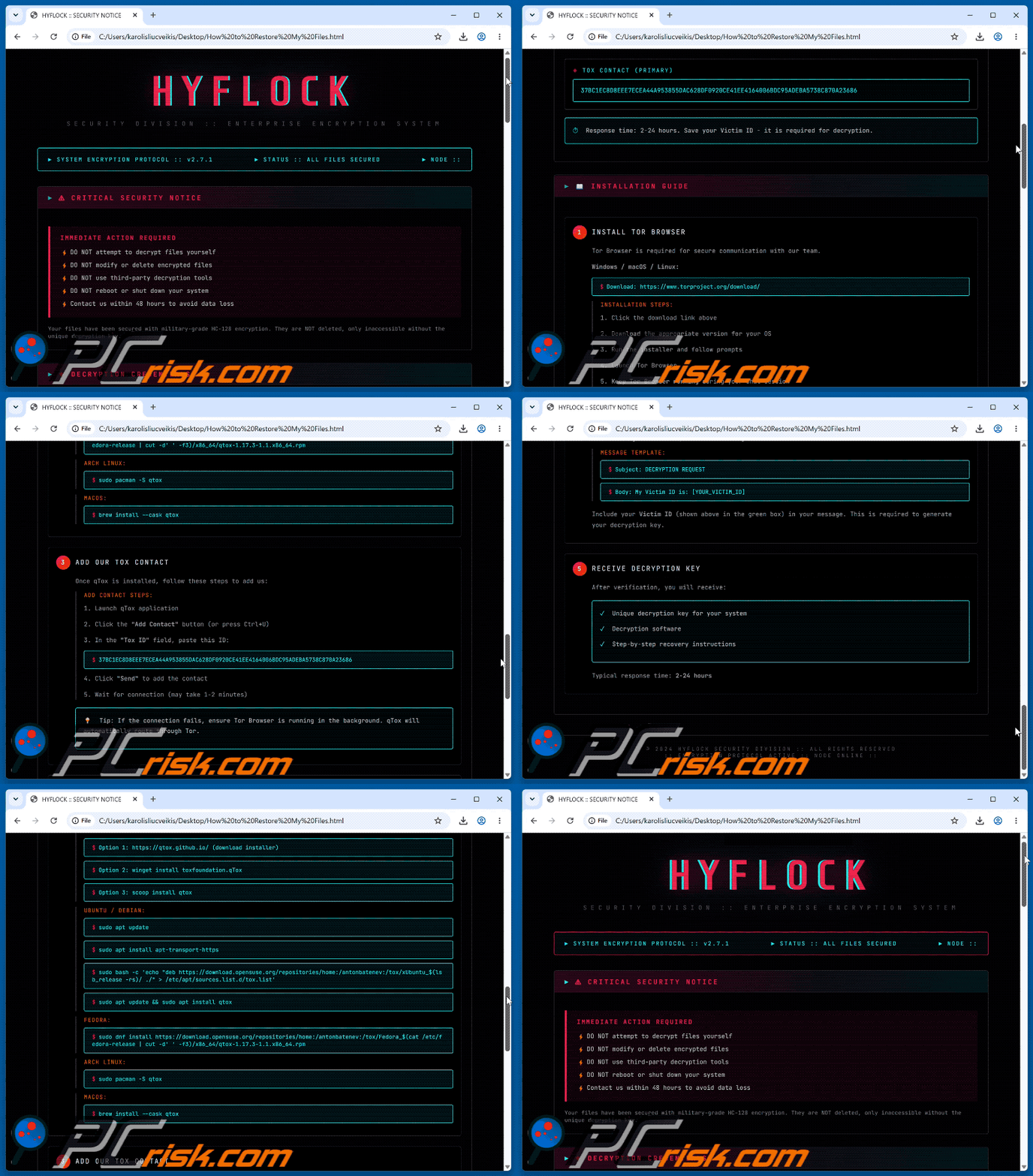
Text presented in this ransom note:
HYFLOCK
Security Division :: Enterprise Encryption System
► SYSTEM ENCRYPTION PROTOCOL :: v2.7.1
► STATUS :: ALL FILES SECURED
► NODE ::⚠ CRITICAL SECURITY NOTICE
IMMEDIATE ACTION REQUIRED
DO NOT attempt to decrypt files yourself
DO NOT modify or delete encrypted files
DO NOT use third-party decryption tools
DO NOT reboot or shut down your system
Contact us within 48 hours to avoid data lossYour files have been secured with military-grade HC-128 encryption. They are NOT deleted, only inaccessible without the unique decryption key.
◈ DECRYPTION CREDENTIALS
TOX CONTACT (PRIMARY)
[-]
⏱ Response time: 2-24 hours. Save your Victim ID - it is required for decryption.
Share:
 Facebook
 X.com
X.com
 LinkedIn
 Copy Link

Tomas Meskauskas
Expert security researcher, professional malware analyst
I am passionate about computer security and technology. I have an experience of over 10 years working in various companies related to computer technical issue solving and Internet security. I have been working as an author and editor for pcrisk.com since 2010. Follow me on Twitter and LinkedIn to stay informed about the latest online security threats.
PCrisk security portal is brought by a company RCS LT.
Joined forces of security researchers help educate computer users about the latest online security threats. More information about the company RCS LT.
Our malware removal guides are free. However, if you want to support us you can send us a donation.
DonatePCrisk security portal is brought by a company RCS LT.
Joined forces of security researchers help educate computer users about the latest online security threats. More information about the company RCS LT.
Our malware removal guides are free. However, if you want to support us you can send us a donation.
Donate
▼ Show Discussion