
We may earn commissions from products we recommend. Learn more.
How to Buy TikTok Coins Cheapest in 2026

How to Buy Cheap TikTok Coins in 2026
When it comes to showing your love for your favorite TikTok creators, the app's virtual gifts are an excellent way to do so. These gifts are paid for by TikTok Coins, the platform's in-app currency. However, the cost of TikTok Coins can add up, especially if you're a regular tipper to your favorite creators, who can have live streams. In fact, TikTok Coin prices vary by user location, just like any online store. Therefore, TikTok users who pay top dollar for this relatively expensive currency seek ways to buy it more cheaply.
Get TikTok coins cheaper with NordVPNSpecial deal30-day money-back guarantee→
Table of Contents:
- Introduction
- Detailed Guide on How to Recharge TikTok Coins at the Cheapest Price Using a VPN
- Why TikTok Coin Prices Change By Country
- The Best VPNs to Buy TikTok Coins for Cheap
- Cheap TikTok Coins Country Guide for 2026
- Why Are TikTok Coins Cheaper on the Website?
- What Are the Benefits of Buying Coins on TikTok?
- What Payment Methods TikTok Supports?
- Can Free VPNs Help You Save When You Recharge TikTok Coins?
- What if TikTok Detects My VPN?
- Legitimate Ways To Get TikTok Coins Free
- In Closing
- Frequently Asked Questions (FAQ)
This is possible because the price of TikTok Coins is set by the platform based on the country where they're purchased, and people who buy them through the mobile app pay much more due to app store commissions. As a result, TikTok users have started to find ways to cut back on these costs. In 2026, they can look forward to using a 2-pronged strategy to get TikTok Coins at a much lower price.
They can use the official TikTok website to avoid app store markups and install a VPN, which will enable them to change their location to areas with significantly lower prices virtually. In this article, we will explain why TikTok coin prices differ across locations, recommend the most reliable VPNs, provide a guide to getting TikTok Coins cheaper with a VPN, show a range of coin prices across different countries, and answer frequently asked questions.
Our top recommendation for streaming and privacy. NordVPN consistently leads our tests with fast speeds, reliable geo-unblocking, and a strict no-logs policy.
- ✔ Unblocks geo-restricted streaming services reliably
- ✔ 202+ locations across 111 countries
- ✔ 30-day money-back guarantee · Special deal available
Detailed Guide on How to Recharge TikTok Coins at the Cheapest Price Using a VPN
When trying to buy TikTok coins at the best price, you'll want to use a VPN to access the TikTok coin purchase page from a country where the coins are cheaper, and NordVPN is one of the top VPN services to do so. Connecting to a US-based server, for example, will make TikTok think you’re based there, and, as of 2026, the US has one of the lowest prices for TikTok Coins, which we'll be using as our reference.
Here's a step-by-step guide to recharging your TikTok coins at the lowest price:
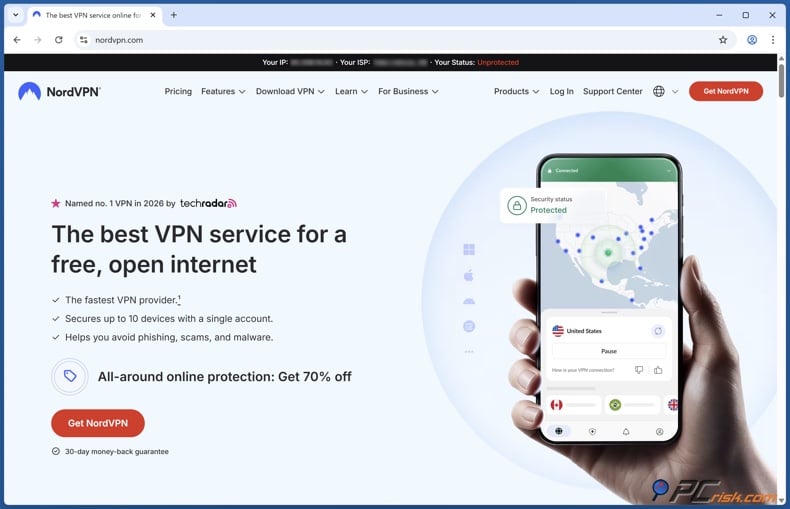
1. Choose and install a reputable VPN: Speaking of getting TikTok Coins, you'll need to find a VPN provider that has servers in countries where the Coins are cheap, and one such option is NordVPN. With a massive network of servers, NordVPN has consistently proven its ability to bypass region restrictions and is a popular go-to VPN for its effectiveness. You'll need to download the VPN app for your device, available on Windows, macOS, Android, iOS, and more. And sign up or log in.
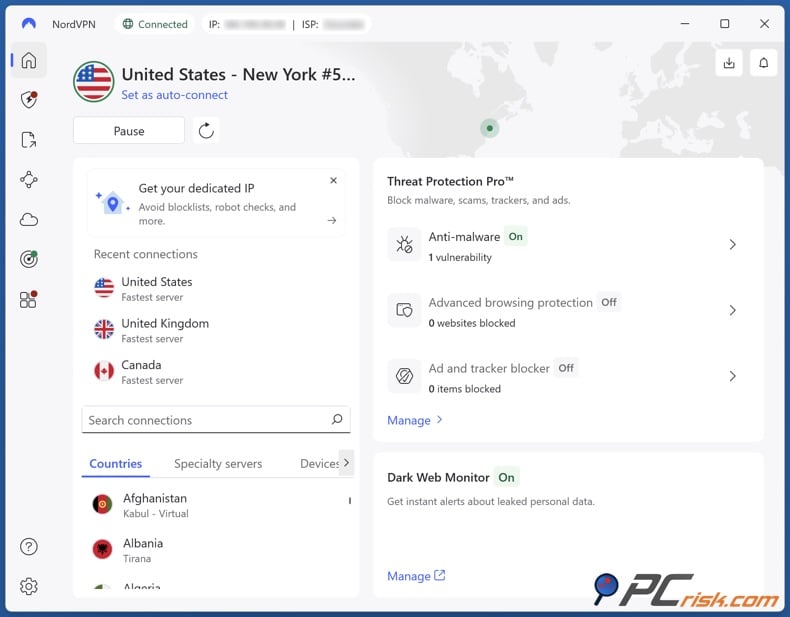
2. Connect to a server in a low-cost region: Try connecting to a VPN server in a country where the coin prices are relatively low. For example, you can try the US, Brazil, or Canada. Once you've connected to a server in one of these countries, your IP address will appear as if you are browsing from there.
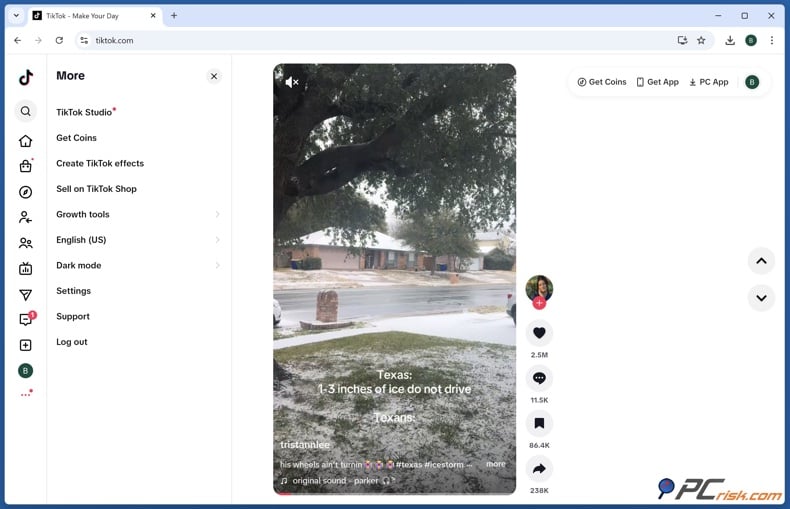
3. Access TikTok via the website: You don't need to open the TikTok mobile app when you want to purchase TikTok coins. Just go to the official TikTok website, tiktok.com, and log in to your TikTok account. Purchasing coins on the website is crucial, as TikTok offers lower prices there than in-app purchases.
4. Navigate to the Coins purchase page: When on the TikTok website, you can click on your profile icon or the menu, and then navigate to "Get Coins". This will take you to the TikTok Coins purchase page, where you can view the different bundles. If, for any reason, the coin purchase page doesn’t appear or doesn't show bundles, check your browser's cache and clear it, or try opening the page in an incognito window and reloading it while still connected to a VPN.
5. Select a coin package and recharge: You'll see a variety of options, with preset packs and the ability to customise on the website. 700 or 7000 coins are standard. When using a VPN server in a different country, prices are displayed in the local currency and are lower; for example, US prices are lower.
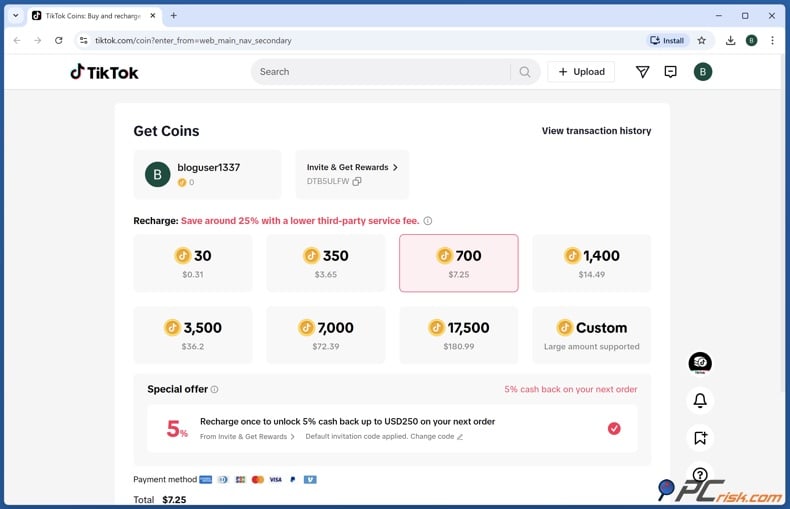
6. Complete the payment: You can select a payment method, with credit/debit cards and PayPal being the most common options (we'll go over the rest of the supported payment methods later). When you enter your payment details confirming the purchase, the transaction will be processed in the currency and at the price for the region you're connected to, so if you're connected to a US server, you'll be charged in USD at the US rate, which can be much lower.
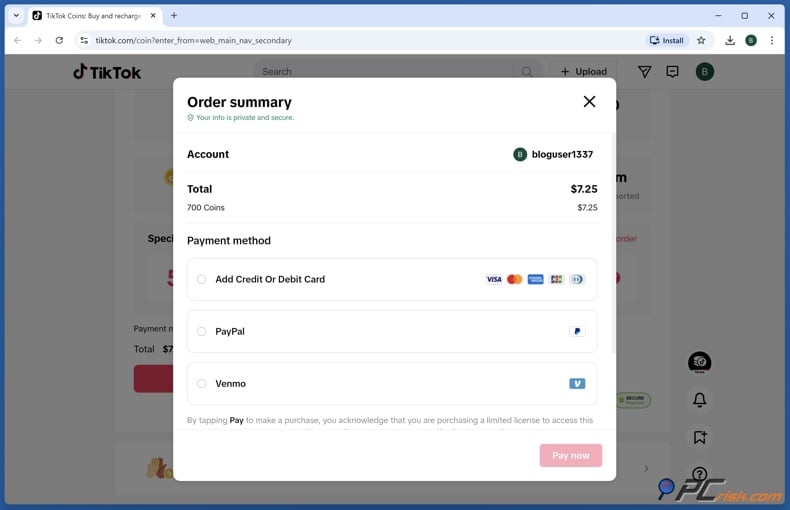
7. Disconnect the VPN (optional): You can safely turn off your VPN when you've bought the TikTok coins. The coins will be credited to your TikTok account, and you can start sending them to your favourite creators right away.
When purchasing TikTok coins, you can use the TikTok website and also utilise a VPN to access a lower price for your coins. Purchasing from the website and using a VPN can cut down the cost of buying coins and frequently knocks off 20-50% off the price differences for TikTok coins across countries, and a VPN is basically exploiting those differences to your advantage.
Why TikTok Coin Prices Change By Country
You'll see that the price isn't the same everywhere when sending TikTok coins to someone.
People in some countries pay less or more for the same number of coins, and it's not just your imagination. There are several key reasons why TikTok Coin prices vary from country to country:
Local Purchasing Power: In relation to TikTok's currency, coins, the company adjusts prices based on regional economic conditions and the average income of the area you're in. Countries with lower average incomes or currencies that aren't very strong tend to see TikTok’s coins priced lower, so people in those areas can still send gifts to each other. Wealthier places, however, may see higher prices for the same coin bundles.
Currency Exchange Rates: Concerning pricing on TikTok, the value of a local currency relative to the US dollar (TikTok’s base currency) can cause price differences. TikTok often adjusts its prices in line with fluctuating exchange rates, and when a currency takes a hit, the company may opt to retain a lower nominal cost so that, when it's converted to USD, it's still appealing.
Regional Pricing Strategies: As for TikTok, the company, like many others in the tech space, uses regional pricing to get users hooked. They can offer a promotional deal or hold prices down in specific countries to entice new sign-ups and get people spending. TikTok often keeps its coin prices low in areas where it is facing stiff competition from other apps.
Taxes and Fees: Speaking of the cost of digital goods on TikTok, tax laws and regulations vary by country. Sometimes this leads to a discrepancy in the price you see in-app. In some regions, the listed coin prices on TikTok may include Value Added Tax (VAT) or other taxes, and in others, TikTok might exclude these costs until checkout, or digital goods may not be subject to tax, so the price you see is higher or lower, respectively, but not shown.
TikTok Initiatives and Rewards: On TikTok, it's worth noting that the platform has localised initiatives such as the Creator Fund and special promotional events, which can affect coin prices. In markets where TikTok heavily promotes creator monetisation, like the US, parts of Europe, and Asia, they've basically cut the cost of their coins to get people buying and supporting their creators. Cheaper coins encourage users to spend more and invest in their favourite creators, which is what fuels TikTok’s growth.
Regarding TikTok coins, their prices vary by country. The reasons behind this are a combination of economic conditions, currency fluctuations, platform strategies, and regulations, which create unique scenarios in each nation. From the consumer's perspective, this presents an opportunity: knowing the price of TikTok coins in different countries and using a VPN to simulate being in a different region, you can take advantage of lower prices in an entirely legitimate and secure way.
The Best VPNs to Buy TikTok Coins for Cheap
Not all VPNs are equally effective when it comes to unlocking better TikTok Coin prices. A good VPN for buying TikTok Coins should offer a wide range of server locations, lightning-fast, stable connections, and robust security to outsmart TikTok's systems.
Based on expert reviews and our own testing, here are the top 5 VPNs for buying TikTok Coins at a lower cost (each with a brief overview):
1. NordVPN – Top overall choice for 2026. A reliable and fast VPN is key to getting the best prices on coins. NordVPN has made a name for itself with its 9,100+ servers across 167 countries, including over 3,000 in the US. It lets you easily connect to areas with the lowest TikTok Coin prices. With top-notch encryption and a strict no-logs policy, your privacy is a top priority, particularly on TikTok. The Obfuscated Servers feature of NordVPN, which conceals VPN traffic, can outsmart TikTok and won’t raise any suspicions. Plus, the high-speed connection protocols, NordLynx, make for a smooth purchase.
2. Surfshark – Best budget-friendly VPN. When it comes to a VPN that is both affordable and feature-rich, Surfshark is an excellent option. Surfshark has servers in nearly every TikTok hotspot around the globe, with a huge number in the US, Europe, and Asia. Offering one of the lowest price tags among top-rated VPNs. It’s powered by the fast WireGuard protocol, has top-grade AES-256 encryption, and includes a neat feature called CleanWeb that eliminates ads and malware. We tested Surfshark and found that it could get us onto TikTok’s coin page using several different servers without being blocked, at a very low cost, making Surfshark an attractive choice.
3. Mullvad VPN – Ultimate privacy and anonymity. Among highly regarded VPNs favored by privacy enthusiasts, it does not require your email address; you only need a randomly assigned number supplied by Mullvad VPN. Well-known for its large network, Mullvad has servers in over 50 countries, including the US and Europe, and may not have as many locations as some of its competitors, but it’s stable, clear-cut in its policies, and gets you a US or any other cheap-region IP address for TikTok coin purchases. Unfussy and basic, it doesn't have any of the bells and whistles that other VPNs offer, but it does what it says it will do, and does it securely.
4. Proton VPN – High security with a free plan option. Proton VPN is a Swiss-based option known for its high security and transparency, developed by the team behind ProtonMail. Proton VPN’s free version is quite generous, with no data limits. The Proton Plus plan gives you access to servers in over 134 countries, which is essentially what you'd want for TikTok. Proton VPN performed well in our tests for getting to TikTok’s coin page. Its top priority is user privacy and safety, so if you're careful and want a VPN guided by a moral compass that even lets you test it out for free, Proton VPN is a fantastic option and ensures that your connection to TikTok is rock-solid, secure, and private.
5. ExpressVPN – Premium performance and ease of use. ExpressVPN stands out for its decade-long commitment to prioritizing user privacy and its high speeds. Spanning 105 countries, ExpressVPN’s coverage is second to none, and its proprietary Lightway protocol has been tweaked to be as quick as a bullet, so you can effortlessly load TikTok and finalize purchases. ExpressVPN is slightly pricier than some competitors, but if budget is not a problem, it’s a tried-and-true way to ensure your TikTok coins are dispensed without any glitches.
When looking to purchase TikTok Coins, these VPNs proved effective in allowing us to access and buy the coins from different regions. Coming with a 30-day money-back guarantee, they are risk-free, so you can buy any one of them to change your TikTok purchase region and save money on coins, all while staying safe online. Next up, we'll take a look at a country-by-country price guide for TikTok Coins.
Cheap TikTok Coins Country Guide for 2026
TikTok coin prices can differ dramatically across countries. To give you a clear picture of the savings, here’s a comparison table of TikTok Coin costs in various regions. We list approximate prices for 30, 700, and 7000 coins on the website in each country’s local currency, along with the equivalent in US dollars. This will help you identify which countries offer the best deals on coins in 2026:
| Country | 30 coins | 700 coins | 7000 coins |
| United States | $0.31 | $7.25 | $72.39 |
| Argentina | US$0.31 | US$7.25 | US$72.39 |
| Canada | CA$0.45 (~$0.32) | CA$10.25 (~$7.37) | CA$102.45 (~$73.67) |
| Brazil | R$1.79 (~$0.33) | R$41.75 (~$7.74) | R$417.19 (~$77.30) |
| United Kingdom | £0.30 (~$0.40) | £6.65 (~$8.93) | £66.25 (~$88.94) |
| Malaysia | RM 1.45 (~$0.35) | RM 33.49 (~$8.27) | RM 334.85 (~$82.64) |
| Mexico | MX$ 6.85 (~$0.37) | MX$ 155.55 (~$8.74) | MX$ 1555.49 (~$87.39) |
| Philippines | ₱20.65 (~$0.35) | ₱485.00 (~$8.16) | ₱4819.00 (~$81.06) |
| Singapore | S$0.46 (~$0.35) | S$10.39 (~$8.06) | S$103.79 (~$80.53) |
| South Korea | ₩520 (~$0.35) | ₩12,200 (~$8.29) | ₩121,100 (~$82.30) |
| Thailand | ฿11.10 (~$0.34) | ฿255.00 (~$8.11) | ฿2509.00 (~$79.76) |
| Turkey | ₺41.78 (~$1.00 - for 70) | ₺419.00 (~$9.70) | ₺4179.00 (~$96.75) |
| Vietnam | ₫9,800 (~$0.37) | ₫226,800 (~$8.63) | ₫2,267,100 (~$86.30) |
| Sweden | kr 0.35 (~$0.40) | kr 85.65 (~$9.30) | kr 856.35 (~$93.02) |
| Netherlands | €0.33 (~$0.39) | €7.65 (~$8.90) | €76.05 (~$88.47) |
Note: You're looking at a base price of around $0.0104 per coin in the US when purchasing TikTok coins on the TikTok website. However, these prices are approximate and taken from early 2026 data. TikTok often bundles its coins, leading to small fluctuations in currency, which can cause prices to vary. Depending on the country, the available coin pack sizes may differ. Like 70 coins, 700 coins, and so on, and in those cases, we've provided a rough estimate by splitting the price of the largest available pack.
No matter where you're located, when using TikTok, you'll notice that the price of coins is 25-30% lower when you buy them through the website. TikTok set it up this way to encourage users to purchase coins through their own site, avoiding the surcharges from Apple’s App Store or Google Play. In the next section, we’ll dive deeper into this web vs. app price difference.
Why Are TikTok Coins Cheaper on the Website?
Phone users are paying far more than they think when buying TikTok coins. Third-party payment processors, such as Apple and Google, charge TikTok up to a 30% cut, and the company then passes this extra cost onto its users. However, when users buy coins on the official TikTok website, they avoid Apple/Google commissions, and TikTok can charge them about 25% less.
A screen will often appear asking you to "try recharging on tiktok.com", hinting that buying coins on the app is not the best option, as the app store takes a 30% commission. Coming to the website instead will lead to roughly 25-30% lower prices.
There are a few reasons behind this strategy:
Avoiding App Store Fees: Both Apple's App Store and Google Play Store are taking a cut of the revenue, which is 30% for the App Store and 30% for Google Play, when you're making in-app purchases on TikTok. But TikTok gets around these charges by inviting you to buy coins via their website, tiktok.com/coin, and they even spell out that you can avoid the service fee by doing so.
Popular Payment Methods: You'll be able to add credit card payments, PayPal, and more, which isn't allowed in the Apple and Google Play stores, when you're using TikTok on the website. This convenience is another incentive for users to use the website, and it doesn’t hurt that those methods come with lower processing costs than app store billing.
Encouraging Larger Purchases: The official website offers the option to customise the amount, with packages up to 7000 or 17500 coins at a time, which isn't possible in the app. These larger packs come with a small discount, and because there isn't a charge from the app store, they save on the price per coin. Heavy users who buy lots of coins may be steered to buy through the website, so they can cut down on their expenses and boost their spending over time.
What Are the Benefits of Buying Coins on TikTok?
You might wonder why people buy TikTok Coins at all. These Coins actually unlock a unique and engaging aspect of the TikTok experience. Here are some key benefits of purchasing and using TikTok Coins:
Supporting Your Favorite Creators: When you send virtual gifts to your favorite TikTok creators, you're essentially throwing them a lifeline. It's not just a kind gesture; it's a way to financially support them and a direct thank-you for the entertainment they've given you. When sending TikTok Coins, which are used to buy those virtual gifts, the creators get a share of the value, in the form of Diamonds, which they can then convert to cash, and the money you send them enables them to keep on creating more content.
Access to Special Content or Recognition: Some of them offer exclusive interactions, such as a shout-out, an answer to your question, or an on-screen acknowledgment, when you send a gift to a TikTok creator. Some also run Q&A sessions or special live moments that can only be triggered by people who send a gift. Buying TikTok coins is a great way to participate in these interactive moments and to get noticed by high-profile TikTokers.
Enhanced Community Engagement: Your username will be visible to the streamer and other viewers, which could spark a conversation, make you more visible, and get you more involved in the community. TikTok coins let you actively engage, turning passive watching into a more interactive experience.
Personal Enjoyment and Expression: There is an undeniable sense of joy in the animations and elements, like roses, hearts, and concerts, that add a burst of excitement to live streams when sending TikTok gifts. Users experience deep personal satisfaction when sending a creator a gift or jumping into a popular gifting challenge. They feel they're part of the content in real time. Buying TikTok coins gives users the currency needed to send these expressive gifts.
Building a Supportive Culture: When you buy coins and gift them to your favourite TikTok creators, you're becoming part of their support network, and this system of gifting encourages those creators to produce even more content and interact with their fans. Creators feel valued, pump out more content, and the whole community becomes much more lively. In other words, purchasing coins isn’t just a one-off transaction. It’s being a part of TikTok’s creator economy and community spirit.
The benefits for you, as a viewer, are clear: more interaction, greater enjoyment, and recognition. For the creators you're supporting, a steady stream of financial and motivational boost. If you’re a regular TikTok user, coins can add richness to your experience on the app. As we have been discussing, there is no need to break the bank to get the coins you need. Using the right strategies will see you on your way to the coin wallet that sets you up to be an ultimate TikTok user.
What Payment Methods TikTok Supports?
TikTok offers multiple payment options to accommodate users worldwide. When you go to buy TikTok Coins (especially on the website), you’ll generally be able to choose from the following payment methods:
Credit or Debit Cards: TikTok accepts major credit cards, including Visa, Mastercard, American Express, and Maestro. Debit cards bearing the Visa or MasterCard logo usually work as well. You simply enter your card details on the checkout page, just as you would for any online purchase. The transaction is processed securely via TikTok’s payment gateway.
PayPal: When checking out on TikTok, you can use PayPal if you don't feel comfortable entering your card details or if you have a balance on an online account. If you go the PayPal route, you can log in to your PayPal account and complete the purchase. This is a convenient option for many, given PayPal’s widespread use and buyer protection features.
Mobile Wallets (App Purchases): When buying coins through the mobile app on an iOS or Android device, you'll be able to use the native mobile payment systems. Coming from an iPhone? You'll be able to use Apple Pay to buy coins through the App Store. Android users, you'll be able to use Google Pay, or if your carrier allows it, direct carrier billing. These payments will be linked to the payment methods you've set up on your Apple or Google account.
Gift Cards and Balance: An iTunes gift card linked to your Apple ID, or a Google Play gift card, can be used to fund your purchase when you're able to buy TikTok Coins in certain areas using the app. For example, an iTunes gift card redeemed to your Apple ID can fund an in-app coin purchase. Similarly, Google Play gift card balance or credits can be used. (Keep in mind, though, that using these still means you’re paying the higher in-app price; they’re just alternative funding sources.)
Other Regional Methods: If you're in a country where TikTok has localised payment methods, you'll see a variety of popular payment options, such as bank transfers, e-wallets, or third-party services. Examples of these e-wallets include GCash in some Asian countries and Paytm in India, when TikTok was available there. If you're in a region that has these options, they will be displayed on the checkout page for in-app purchases.
You'll notice that the usual payment options are Visa/Mastercard, and PayPal. These cover the majority of users. TikTok employs top-notch encryption to secure these transactions, so you're completely covered. Make sure to check you're on the real TikTok website when entering your payment information. Look for the padlock symbol in your browser and confirm the URL is tiktok.com/coin to avoid any scams.
Before you enter your payment details, check that the offer is real and not a phishing page or a harmful download. Combo Cleaner scans your device for malware in real time and helps protect you from phishing and infected websites as you browse. Download it now to add extra security before buying TikTok Coins.
A VPN encrypts your traffic — but your device still needs protection against malware and ransomware. Combo Cleaner adds the missing layer of defense.
Download Combo CleanerAntivirusDetect & remove malware threats→Can Free VPNs Help You Save When You Recharge TikTok Coins?
When it comes to changing your location for TikTok coin purchases, using a free VPN is a tempting option, especially since it won't cost you anything. But in the end, it's not advisable to go down the free VPN route for this purpose. Although a free VPN might allow you to connect to another country, several drawbacks and risks can render the whole operation useless.
Top VPN ReviewsExclusive dealsExpert-tested · hands-on reviews→
Limited Server Options: Free VPN services often have few server locations, and the ones they do have are frequently congested and located in places you don't need. Coming across a free VPN with servers in the US or any other penny-pinching region is unlikely. Even if they claim to have a location in a particular country, there's no guarantee it'll allow you to access TikTok's buy page.
Detection and Reliability Issues: TikTok's systems will likely detect and block it when using a free VPN to purchase coins on TikTok. Free VPNs have thousands of users sharing the same IP addresses, so they're more likely to be flagged by websites. If TikTok discovers that you're using a VPN, they'll either block the coin purchase or show you prices for your real location, neither of which is what you want. Free VPNs have a nasty habit of disconnecting and slowing speeds, and can completely disrupt the purchase process. A dropped VPN connection in the middle of a transaction would be, at best, a real nuisance and, at worst, lead to a payment error.
Security and Privacy Risks: Be aware that many free VPNs compromise your privacy and make money by logging your browsing history, injecting ads, or even distributing malware. Finding a reputable free VPN is unlikely, and since your TikTok account and payment information are at stake, a questionable free VPN can be dangerous.
Data Limits and Speeds: The amount of data you can consume per day or month is limited, and since buying coins doesn't use up much data, a paid VPN might be your best option. Slow speeds, a characteristic of free VPNs, will not only be a nuisance but can also make the TikTok website completely unresponsive.
To save money on TikTok Coins, we wouldn't recommend relying on a free VPN, as the meager cost of a reputable paid VPN is more than justified for a seamless, secure experience. If you can't afford a paid VPN, a premium VPN free trial is an option to consider.
Some of the top VPN providers offer 7-day free trials or money-back guarantees. We would recommend using NordVPN's 30-day money-back guarantee or Surfshark's trial to get a good number of coins and decide whether you want to keep the subscription.
Free VPNs are too risky and unreliable, and you may not get the low prices you're looking for when buying TikTok coins. Investing in a reputable VPN, even for a short period, will give you a headache-free experience and potentially put you in a much better financial situation.
What if TikTok Detects My VPN?
The platform may try to detect VPN usage when you use TikTok. If you’re connected through a VPN, TikTok may notice, for example, if it sees something out of the ordinary with your IP address or location. If this happens, you might see prices for local products instead of the prices you expected, or even a message that stops you from buying. Don’t get stressed, there are ways to avoid or sort out VPN detection, and here are the top tips to prevent TikTok from throwing up obstacles to buying cheaper coins.
Switch to a Different Server: Your VPN server may be the issue if you're experiencing TikTok issues and don't see the expected coin prices. Disconnecting and reconnecting to a different VPN server in the same country, or attempting to access TikTok from a different city, can be an effective way to resolve this issue. With a VPN provider like NordVPN, which has a large number of US servers, if one server isn't working, another one probably will. And getting a brand-new IP address can frequently sort out the problem.
Enable VPN Obfuscation: Top VPNs like NordVPN and ExpressVPN come with an obfuscated servers option, also known as stealth mode. This clever feature masks your VPN traffic, making it virtually impossible for TikTok to detect that you're using one. If you're looking to buy TikTok coins, use your VPN's settings to enable obfuscation or hook up to a stealth server.
Clear Cookies and Cache: The app might be reading the remaining data from your browser or app when you visit TikTok. It could determine your real location using cookies, saved files, or even HTML5 geolocation in your browser. Before heading to tiktok.com with a VPN, clear out your browser's cookies and cache, and consider opening a private or incognito browsing window. This will ensure TikTok can only see the VPN-provided IP-based location, not any old location hints stored in your browser.
Update VPN Protocol or App: It's possible the app's firewall doesn't recognize OpenVPN, WireGuard, or IKEv2 protocols when using a VPN to access TikTok. If your VPN app allows it, try switching protocols (for example, from UDP to TCP, or to the provider’s proprietary protocol). Ensuring your VPN is up to date is also a good idea, as VPN providers continuously tweak their technology to evade detection.
Check for IP Leaks: When using a VPN, your real IP address may be leaked through DNS requests or other methods. A good way to check for this is to run an online IP leak test while connected to your VPN. If the test reveals any leaks, you can activate your VPN's DNS leak protection or install its browser extension, which can effectively sandbox your web traffic.
Try a Different VPN Provider: When TikTok is consistently blocking your VPN, it may be that the VPN service's IP range has become well-known to the platform, and providers such as NordVPN and Surfshark are, as a rule, quite effective but if one doesn't get through, you can try another from our top 5, and a different VPN may have unblocked IPs.
Use a Dedicated IP Address: Some VPN services offer a dedicated IP add-on (an IP address that you use exclusively, instead of sharing with others). TikTok is far less likely to detect a dedicated IP as a VPN because it’s not associated with hundreds of other VPN users’ traffic. If you're planning to frequently buy TikTok coins, getting a dedicated IP from your VPN provider in a region that doesn’t charge much can all but eliminate the problem.
Contact Customer Support: A reputable VPN provider will often have the know-how to help you out when you're unable to access TikTok due to a VPN or streaming block. If you run into a snag, don't hesitate to contact your VPN's support team, which may be able to recommend a specific server or set of settings that work with TikTok. They may say something like “try our New York #1234 server for TikTok”, and who knows, they may even have other tricks up their sleeve.
To avoid detection by their VPN system, you can follow the guidelines and get a paid, reputable VPN. They have far more advanced technology and support. Using a free VPN to access TikTok is not recommended, though. They're far less likely to beat TikTok’s system. In most cases, TikTok won't suspend or penalise your account if you use a VPN. All they care about is controlling regional content and prices, so the only consequence is that you won’t be able to buy anything until you mix things up.
Legitimate Ways To Get TikTok Coins Free
Regarding TikTok Coins, buying them is one option, but getting them for free is even better, albeit not always easy to find. Coming across a website that promises free TikTok Coins, however, is not something you should take advantage of. Any such website is likely to be a scam and may install malware or hack your account. However, there are legitimate ways to earn TikTok Coins, or points equivalent to them.
TikTok Rewards Program (Referral Codes): Users can invite friends to join the platform by sending them a code when TikTok runs its referral program. If the friend signs up and then meets the requirements (watching a set amount of videos), both the inviter and the new user will receive a reward. The rewards, however, are not necessarily coins; they could be points or virtual credit that can be turned into coins or cashed out. You'll find the ongoing referral programs and available rewards in TikTok's "Rewards" or "Earn Points" section, which is usually accessible from the user's profile menu.
Participate in Official Events and Challenges: When TikTok hosts its in-app events, contests, or challenges, you'll have a chance to win some TikTok Coins. For example, TikTok might have a hashtag challenge where top videos win coin prizes, or a live streaming event where viewers get random coin drops. The more you participate, the more likely you are to earn some free coins from TikTok itself.
Live Streaming as a Creator: And you've got at least 1,000 followers, you can receive gifts from viewers, and as a content creator, those gifts show up as Diamonds in your balance when you can host a TikTok live stream. Diamonds can't be converted back to coins, but you can sell them out for real money, and that's basically the monetary equivalent of getting coins for free from your fans, who are sending them to you as a sign of appreciation. Coming from a different perspective, as a live streamer, you’re getting money in, rather than spending it all out, and you can use that cash to buy more coins if you need them.
Engage in Promotions or Bundles: Keep an eye out for bonus coin bundles and promotions. The app sometimes offers special deals where you can buy a certain amount of coins and get several extra coins thrown in, for example, "Buy 500 coins, get 50 free." When checking the coin purchase page, watch out for promotional banners or limited-time offers. These deals, although still costing you money, increase the value of the coins you get; it's essentially getting some free coins.
TikTok Gift Card Giveaways: In some parts of the world, you can buy gift cards that can be converted into platform currency (coins). Legitimate giveaways and contests run by TikTok influencers or community events also hand out these gift cards as prizes. If you follow TikTok-related forums, events, or live streams, you'll occasionally come across a free TikTok coin voucher or a gift code. Just make sure that the source is reliable, official contests, verified TikTok creators, and their giveaways are usually the way to go; anything else could be a scam.
Earn Coins from Other Users: Surprisingly, viewers can sometimes earn coins during specific interactive live sessions. For example, a host might do a fun game where they “gift back” coins to random viewers (using the coins they’ve earned). Or a group of fellow viewers could pool together to reward a random participant in a live session. These are community-driven and not an official feature, but being an active member of TikTok’s lives and communities can lead to someone gifting you coins or even a coin-funded gift.
Any method that promises to produce them out of thin air or asks for your account information in exchange for coins isn't legitimate. The approaches mentioned above are all based on TikTok’s official programs or user contributions, and won’t make you an instant millionaire, but they will give you a slight, legitimate boost. You could use these tactics to befriend someone in a high-coin-earning position who can send you coins. Combining these methods with buying coins cheaply via a VPN will allow you to gift and engage on TikTok for minimal cost.
In Closing
TikTok is more than just a fun app - it’s a place where real money is exchanged for virtual currencies and gifts. If you're into supporting your favorite creators, TikTok Coins are basically the fuel that powers that support. Choosing the most affordable option for those coins makes sense, and 2026 presents TikTok users with a wealth of opportunities to do exactly that.
VPNs can be used to trick the app into thinking you're in a different country, allowing you to take advantage of the lowest regional prices and avoid the rip-off markups in app stores. The results are clear-cut: you get to keep more of your money in your pocket, still get the same number of coins, which you can then splurge on sending to content creators, joining in on community activities, and generally enhancing your TikTok experience. Investing in a top-notch VPN also gives you more control over your online privacy and security; this is basically a two-for-one deal.
Buying TikTok Coins at a lower price with a VPN is a clever tactic worth considering for anyone serious about TikTok. Just stick to legitimate methods, like official website purchases, well-known VPNs, and TikTok’s own reward programs, and steer clear of any quick fixes that sound too good to be true.
Frequently Asked Questions (FAQ)
Where to buy cheap TikTok coins?
When buying TikTok coins, the official TikTok website at tiktok.com/coin is the way to go, and using a VPN to connect from a country with lower coin prices, such as the US, can knock off up to 25% of the cost compared to in-app purchases. The website is the cheapest place to buy TikTok coins because you avoid app store fees. Don’t fall for third-party websites that claim to sell cheap coins, because they’re probably scams, and will leave you with nothing. Stick with TikTok’s own platform and the VPN trick to save money.
What is the cheapest VPN for TikTok Coins?
Surfshark is one of the cheapest and most reliable options out there, and it's proven very effective in this area when shopping for a VPN that can get you TikTok coins at a reduced price. Coming in at around $2 a month, when its sales kick in, Surfshark is basically the go-to VPN for anyone who wants to get TikTok coins at a steal.
It has a massive global network of servers covering all the countries required for TikTok and offers very robust security features. A perfect combination for a low-cost VPN that gives you access to significantly lower coin prices. Some VPNs cost even less, but they can't quite match Surfshark's performance or global server coverage.
If you're willing to spend a bit more, then NordVPN is also a very popular, high-performance VPN that knocks it out of the park for TikTok, but, in terms of sheer value for money, Surfshark is still your best bet.
What country has the cheapest TikTok Coins?
The United States has the lowest prices for buying TikTok Coins in 2026. At roughly $0.0105 per coin, or just over one cent, 700 coins will set you back $7.25. Argentina and the US are neck and neck in terms of pricing when converted to USD. Canada, Brazil, and Japan also offer relatively low rates. However, if you're in a European country such as the UK, Germany, etc., or Turkey, you'll have to cough up a bit more for the same number of coins. It's a good idea to check the current prices on the TikTok coin page, but connecting to a US server is the cheapest option.
Why are TikTok coins so expensive?
The markups in the app can be off-putting, coming in at 30% above the website price due to Apple and Google store fees. This makes the coin packages feel more expensive. When buying through the app, you pay an extra cost: 100 coins set you back about $1.50, but around $1.05 on the website. That means each coin is about a penny or more, and high-value gifts require thousands of coins – so costs add up quickly.
Regional pricing is another thing to consider: some countries have been given higher fixed prices by TikTok to account for currency differences or purchasing power, which means coins feel even more expensive. From a value perspective, bear in mind that when you send coins to a creator, they'll only get half of that value; the other half goes to TikTok. Some people feel coins are expensive because they need to buy a massive number of them to make a real difference in the creator's earnings, especially after TikTok takes its cut.
Share:
 Facebook
 X.com
X.com
 LinkedIn
 Copy Link

Rimvydas Iliavicius
Researcher, author
Rimvydas is a researcher with over four years of experience in the cybersecurity industry. He attended Kaunas University of Technology and graduated with a Master's degree in Translation and Localization of Technical texts. His interests in computers and technology led him to become a versatile author in the IT industry. At PCrisk, he's responsible for writing in-depth how-to articles for Microsoft Windows.
▼ Show Discussion