
We may earn commissions from products we recommend. Learn more.
How to access Hulu in Canada in 2026 with a VPN

How to access Hulu in Canada in 2026 with a VPN?
Hulu has become a favorite streaming platform for many, thanks to its vast selection of on-demand movies, TV shows, and a growing collection of original content. However, if you are in Canada, you might run into some hurdles since the standalone Hulu service (hulu.com) is only available in the United States and a few US territories.
Though you can see Hulu branding on Disney+ in Canada, it is not the same as subscribing to Hulu.com. While the Disney+ Hulu tile offers some content, you will not get the full Hulu experience like you would in the US.
Canada is not unique in this Hulu exclusion; Hulu's geo-restrictions affect other countries as well. Streaming rights are negotiated on a country-by-country basis. This article explains Hulu's geoblocking and covers how Canadians can access the platform using a VPN (Virtual Private Network).
Disclaimer: PCRisk does not promote or encourage the violation of streaming platforms' terms of service. This information is provided for educational purposes to help users understand geo-restrictions, privacy tools, and practical troubleshooting. Always follow local laws and use any method described at your own risk.
Watch Hulu in Canada with NordVPNSpecial deal30-day money-back guarantee→
Table of Contents:
- Introduction
- Hulu and geoblocking
- Where is Hulu accessible?
- How to access Hulu in Canada?
- How to pay for Hulu in Canada?
- Accessing Hulu in Canada with a VPN
- Best VPNs to access Hulu in 2026
- Common issues and solutions when accessing Hulu with a VPN
- Is using a VPN to access Hulu in Canada legal?
- Hulu alternatives available in Canada
- In closing
- Frequently Asked Questions (FAQ)
Hulu and geoblocking
Hulu was built primarily for viewers in the US, and this streaming platform has consistently used geolocation checks to ensure availability only in regions where it is licensed to operate. Hulu verifies your approximate location by your IP address. However, it might also use additional methods, such as checking your device settings or location services.
The main reason why you cannot watch Hulu in Canada is licensing. Streaming libraries comprise thousands of separate contracts, and the rights to a show or movie are often split across countries, platforms, and timeframes. For example, a title that US-based users can stream on Hulu may be licensed to an entirely different broadcaster or streaming provider in Canada. This is standard practice for streaming platforms - if they do not have the rights to distribute certain content in a specific region (like Canada), they geoblock access.
In 2026, there is an important distinction - while the standalone Hulu service (hulu.com) remains US-focused, the Hulu brand has expanded internationally inside Disney+. In many markets, including Canada, Hulu has replaced the Star hub in Disney+. This may be confusing, as you can see "Hulu" inside Disney+ Canada, yet you will remain unable to use the separate Hulu subscription service.
Our top recommendation for streaming and privacy. NordVPN consistently leads our tests with fast speeds, reliable geo-unblocking, and a strict no-logs policy.
- ✔ Unblocks geo-restricted streaming services reliably
- ✔ 202+ locations across 111 countries
- ✔ 30-day money-back guarantee · Special deal available
Where is Hulu accessible?
Hulu is a US-based service, and the Subscriber Agreement states that the Hulu service is only available in the US and certain US territories. Hence, users located elsewhere cannot access this streaming platform unless it has made its service available and has distribution rights in their region. However, there is a difference between Hulu.com, Hulu as part of Disney+, and Hulu Japan.
Where Hulu is accessible:
- United States and certain US territories - standalone Hulu service (hulu.com).
- Japan - a separate service (Hulu Japan) that is generally limited to Japan.
- Multiple regions (including Canada) - as part of Disney+ (not interchangeable with standalone Hulu).
How to access Hulu in Canada?
If you are in Canada and hoping to access Hulu.com, you are likely to run into some issues since it is not officially available there. When Hulu detects that you are connecting from Canada, you can expect to see messages about geo-restrictions or encounter playback blocks.
VPNs are a commonly used workaround. These services can mask the origins of users' connections by routing them through servers in different countries. Thus, VPN services may effectively change the IP address that Hulu sees.
Changing the perceived location is key to streaming geoblocked content. When you connect to a VPN that provides you with a US-based IP address, Hulu is more likely to treat you as an in-region viewer and allow access.
It is worth mentioning that Hulu undertakes active measures to detect and block VPNs. Therefore, results may vary depending on several factors: the VPN provider, the connected server, and whether the device is unintentionally sharing its actual location.
How to pay for Hulu in Canada?
Paying for a Hulu subscription might be an even bigger hurdle than accessing the platform itself. According to Hulu's Help Center, the subscription is intended for a single US household and requires a US-issued form of payment upon signing up.
As of early 2026, the Help Center lists these mainstream payment options for billed accounts:
- US-based debit/credit cards (issued by a US bank or financial institution, but excluding government-issued cards).
- PayPal
- Hulu gift cards (redeemed at hulu.com/gift).
Important note on Hulu gift cards: some third-party billed subscribers cannot apply gift cards to their accounts (with exceptions such as Amazon or Roku).
Important note on third-party billing: the Help Center states that "new and returning subscribers are no longer able to sign up and pay for Hulu through Apple, Google, or Amazon". Typically, for existing third-party billed Hulu subscriptions - payment must be managed via the third-party rather than through Hulu directly.
Remember that the approved payment methods may change. We also strongly advise against using supposed "payment workaround" services, as they are likely to be scams. Attempting to use such "services" may not only result in financial loss but also lead to account recovery problems.
Before you try any payment workaround, check that the site is safe and not a scam, phishing attempt, or source of harmful downloads. Combo Cleaner can help by blocking scams, phishing, rogue websites, and dangerous downloads. Its real-time anti-malware scanner also checks files as you download them. For extra protection, consider downloading it before you enter payment details or install anything.
A VPN encrypts your traffic — but your device still needs protection against malware and ransomware. Combo Cleaner adds the missing layer of defense.
Download Combo CleanerAntivirusDetect & remove malware threats→
Accessing Hulu in Canada with a VPN
VPNs are the most reliable tools for accessing Hulu from Canada. They operate by changing your apparent connection, which is the cause of Hulu's geoblocks in the first place. Basically, when you connect to a VPN server located in the US, Hulu is presented with a US-based IP address, rather than your real Canadian one.
Top VPN ReviewsExclusive dealsExpert-tested · hands-on reviews→
Accessing Hulu from Canada is no different in how bypassing geoblocks works in general. The crucial steps are the same: pick a reliable VPN service, connect to an unrestricted/unblocked region, and ensure that your actual location is not being revealed by cached data or location settings.
Note that Hulu is particularly proactive in blocking access for users suspected of using a VPN. If the streaming platform detects a VPN or an anonymous proxy server, it may restrict access and request that any service interfering with geographic location verification be disabled. More information on how to approach this scenario can be found in the "Common issues and solutions when accessing Hulu with a VPN" section of this article.
If you do not already have the Hulu app, you may encounter issues when attempting to download it from Canada. First, follow the steps provided below on how to set up your VPN. You might then also need to change your device settings or those associated with the account of the download source you are using (such as the Google Play Store or Apple's App Store), before proceeding with downloading the Hulu application. More details below.
How to watch Hulu in Canada with a VPN:
1. Choose a reliable VPN provider. Watching Hulu (and streaming in general) necessitates a significant amount of bandwidth; hence, select a VPN known for high speeds and a consistent capability of bypassing geoblocks and geo-restrictions. Lower-tier VPNs are unlikely to provide what is necessary, as it is probable that their overused IP ranges will be blocked by Hulu. We recommend our top-rated VPN of 2026 - NordVPN - for its vast global server network and privacy policies.
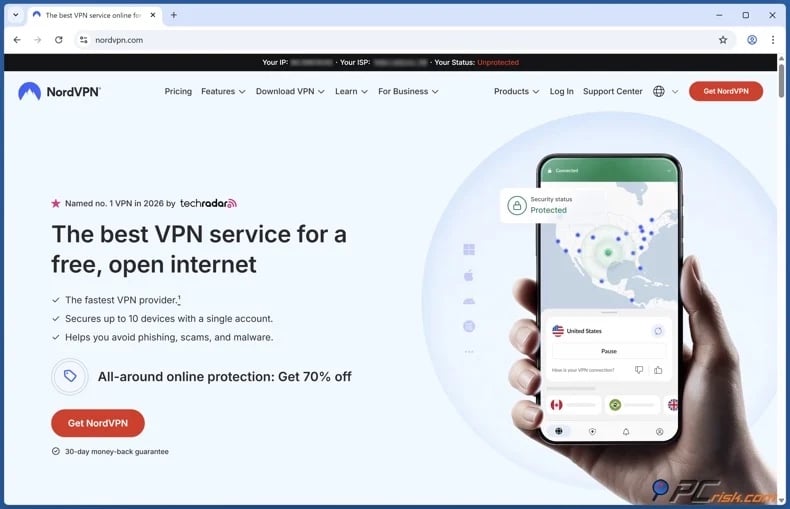
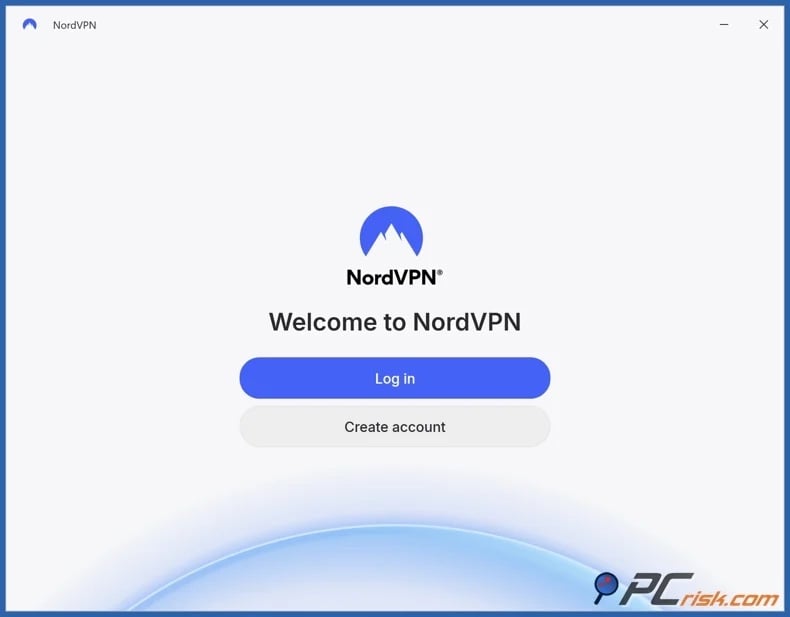
2. Install the VPN app and sign in. Use the VPN's official app on the device you plan to stream Hulu on. Most major VPN services support multiple platforms (Windows, Android, macOS, iOS, and other streaming hardware).
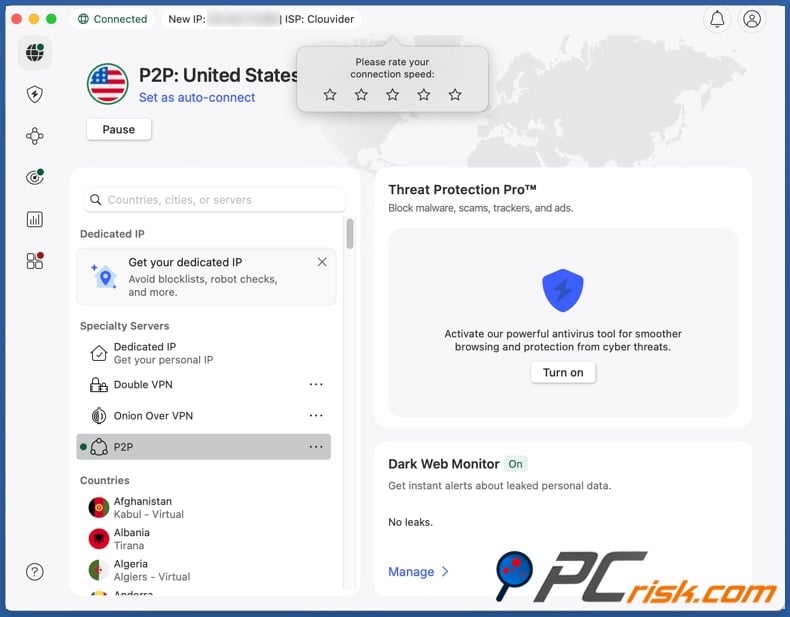
3. Connect to a US server. This is a crucial step; if you select a server that is outside the US - Hulu will remain unavailable. If Hulu blocks a particular server, switch to another US server (try a different city or server cluster).
4. Refresh your Hulu session and start streaming. If you previously attempted to open Hulu from Canada without a VPN, the streaming platform may have stored location signals in Internet cookies or app data. Clear the site data (browser cookies/cache) or restart the application before trying again. Using a private browsing window may be of help as well.
Recommendation for VPN-unsupported TV streaming:
If you want to watch Hulu on a smart TV or a streaming stick that does not support VPN apps, configuring the VPN on your router is the solution. Doing so will make the whole home network appear to be located in the US, thereby eliminating the need for the TV to support VPN applications. Likewise, it will be useful if you wish to cover multiple devices at once.
However, troubleshooting is more complicated with this approach. When Hulu blocks an IP address associated with a VPN, this affects every device on that router until the server is changed. Hence, running a VPN directly on the device used for streaming is simpler because a server swap only takes seconds.
Downloading the Hulu app:
If you cannot download the Hulu application due to your location, follow the steps below.
Google Play Store:
1. Use your VPN to connect to a US-based server.
2. Open Google Play.
3. Access your account settings and set your location as the US (you may be required to enter information such as a US address and telephone number; online generators may help with this, but be wary of sketchy services).
4. Refresh Google Play.
5. Search the Hulu app and proceed with the download.
Apple App Store:
1. Use your VPN to connect to a US-based server.
2. Access your iOS device settings.
3. Select "Profile".
4. Select "Media & Purchases", afterward choose "View Account". You may be required to verify your identity by providing your passcode or by using Touch ID.
5. Select "Country/Region" and choose "Change Country or Region", then set it to the US.
6. Enter a US address and telephone number (online generators may help with this, but be wary of sketchy services) and confirm changes.
7. Open the App Store, find the Hulu app, and download it.
Best VPNs to access Hulu in 2026
When it comes to accessing Hulu, there are a few things to keep in mind. You will need a service that offers fast speeds and stable servers in the US. It is also important to choose a provider that has a good history of working with big streaming platforms and can handle significant traffic without crashing.
Based on our hands-on testing, we have narrowed down our top five picks for Hulu streaming in 2026:
1. NordVPN: our Top Choice for 2026. NordVPN is perfect for streaming due to its speed and a network comprising over 9,100 servers. It provides more alternatives, should a particular IP address be flagged by Hulu. Not only is NordVPN excellent for streaming, but it also offers robust security features, including AES-256 encryption and a strict no-logs policy.
2. Surfshark: unlimited device connections for an affordable price. Surfshark stands out for value and is ideal for multi-device households. This service is great for streaming, as indicated by its performance track record and broad server network.
3. Mullvad: privacy first. Mullvad is a VPN that places privacy as its core value. The service seeks to minimize personal data collection; registration does not even require sharing personal information or an email address. However, Mullvad has a smaller network - thus, streaming may involve more trial-and-error with server selection.
4. Proton VPN: transparency and security. Proton VPN has a strong no-logs policy that has undergone external reviews. Notably, this service provides a free plan with fewer servers but without data limitations. The paid plans make Proton VPN ideal for streaming, thanks to its global network of over 18,700 servers.
5. ExpressVPN: fast and easy to use. ExpressVPN has a broad network and the speeds required to provide quality streaming. Additionally, this service's applications have a straightforward design that makes them easy to navigate and use. ExpressVPN is somewhat more expensive than many of its competitors, but it is a good investment.
Remember that even high-quality VPNs may be blocked by Hulu; hence, no VPN service can guarantee consistent access without any issue.
Common issues and solutions when accessing Hulu with a VPN
Even if you follow all the setup steps correctly, you may still experience issues with watching Hulu. The key problem is that Hulu not only blocks specific countries, but it also restricts access from known VPN and proxy services. Therefore, if a server gets flagged - you are likely to encounter an invalid region message or an alert that you may be using a VPN.
Below are the most common issues that Canadians might run into and their potential solutions:
Hulu continues to state it is not available in your location
This usually happens because of one of three reasons:
- You are connected to the wrong country (not the US).
- The US server you chose is already blocked by Hulu.
- Your browser or app still has cached location data (likely from when you tried to access Hulu from Canada without a VPN).
Solutions:
- Switch to a different US server (ideally a different city).
- Clear cookies and cache, and try again (starting a private browsing session may help).
- Restart the Hulu app (force close on mobile).
Error code 16 ("invalid region") errors
- Error 16 is linked to region-detection problems. Hulu's own troubleshooting guide on this error recommends checking network configurations and settings, which may be interfering with the app's location detection.
Solutions:
- Check whether the VPN connection is active and connected to a server in the US.
- Disable any additional proxy settings or profiles that might conflict with the VPN.
- Try using a different network (e.g., switch from Wi-Fi to mobile data) to rule out ISP-level oddities.
Location services and GPS conflicts on mobile
- On mobile devices, Hulu can use location service permissions to aid with region detection. However, if you have not permitted Hulu to access location services (or if your device's other settings strongly contradict the IP address), you may experience repeated errors.
Solutions:
- Ensure location permissions are enabled for Hulu where appropriate.
- If you are testing VPN servers, keep your setup consistent - do not quickly change locations with GPS and Wi-Fi scanning enabled, as that can give conflicting signals.
Streaming quality is poor or constantly buffering
- VPN services often come with a reduction in speed because your traffic is encrypted and being routed farther.
Solutions:
- Connect to a VPN server in the US that is closer to your physical location (e.g., a northern US city closer to the Canadian border).
- Try another protocol in your VPN app (if available); some protocols perform better on certain networks.
- Check whether your baseline Internet connection is stable. General connectivity problems (unrelated to a VPN) can also cause Hulu playback issues.
Hulu Live TV location restrictions and "home" rules
If you are trying to use Hulu + Live TV from Canada, expect more friction than with basic on-demand Hulu.
Hulu Live TV has home network requirements and location-based channel restrictions. Hulu's Help Desk states that you can change your Home network no more than four times in a rolling twelve-month period. This can affect users even within the US; hence, VPN usage may complicate matters further.
Practical takeaway:
It is best to avoid Live TV if you want to keep things simple. Live TV introduces additional checks that may constantly clash with VPNs. Watching on-demand Hulu content is simpler than wrangling Live TV with a VPN.
Is using a VPN to access Hulu in Canada legal?
VPN usage is legal in Canada. VPNs are widely used for privacy and security, including legitimate business and remote access use cases. The Canadian Centre for Cyber Security describes VPNs as secure connections that allow protected data transfer, which reflects the mainstream status of this technology.
However, whether it is legal to use a VPN to access Hulu (or another geoblocked service) from Canada is more complex. The key points are as follows:
- Using a VPN is legal in Canada.
- Using a VPN does not override Hulu's Terms of Service (ToS). Hence, if a user agreement notes regional access restrictions, bypassing them can be a violation of the ToS. Breaking a platform's ToS is rarely a punishable offense in the criminal sense.
As of the time of writing, there is no current Canadian law that specifically criminalizes using a VPN as a workaround for accessing geoblocked content (including Hulu). However, it is situated in a legal gray zone, which could be treated as a contractual issue (ToS violation) and even extend to copyright infringement.
While Canadians can generally use VPN services freely, Hulu is free to block VPN traffic and enforce its own rules. Hence, users may encounter account issues like declined payments or streaming errors. However, it must be emphasized that laws can change, so we strongly advise keeping up-to-date with current law.
Hulu alternatives available in Canada
It is noteworthy that while the standalone Hulu service (hulu.com) is inaccessible in Canada without a tool like a VPN, some Hulu content is available. In late 2025, The Walt Disney Company officially brought the Hulu brand to the international stage by incorporating it into Disney+. Thus, its Star hub was replaced by Hulu as the general entertainment brand of Disney+ worldwide (including in Canada). Therefore, certain titles associated with Hulu may be available to users in Canada through Disney+ without the necessity of using a VPN service.
Beyond Disney+, there are many streaming options available in Canada. For example, there are Canada-based services that may cover your needs:
- Crave - a Canadian streaming platform owned by Bell Media, which has an extensive catalog (encompassing content associated with HBO, Max Originals, STARZ, and Showtime) for Canadian audiences.
- CBC Gem - a streaming service tied to the Canadian Broadcasting Corporation (CBC), offering a broad selection of Canadian and international programming.
- Sportsnet+ - Canada's premier live sports streaming service (covering the NHL, NBA, WNBA, MLB, UFC, etc.).
- TSN+ - a digital streaming service announced by Bell Media that offers additional sports coverage, such as exclusive live sports and enhanced feeds, in Canada.
Furthermore, users in Canada can access various mainstream global platforms, including Netflix, Amazon Prime Video, Paramount+, and Apple TV+. Note that while major streaming platforms are generally accessible in Canada, some content may be unavailable due to regional licensing restrictions.
In closing
Hulu is a streaming service intended for US audiences and, as such, is inaccessible in Canada. Therefore, if you open the platform from Canada without using a tool to mask your location, Hulu will typically resort to geoblocking.
Users in Canada seeking the standalone Hulu experience need a reputable VPN to aid them in this endeavor. VPN services are the most practical solutions for dealing with blocks and restrictions based on geographic location. Likewise, VPNs are powerful privacy tools that strengthen user security.
Another issue with Hulu's availability in Canada is billing. This streaming platform only accepts US-linked payment methods and has minimal options with little wriggle room.
To summarize, streaming Hulu from Canada may be complex. Users should maintain realistic expectations regarding troubleshooting a variety of potential issues. Hulu is notorious for constant vigilance concerning VPN usage, and Live TV adds another layer of home-network rules that exacerbate the matter. Therefore, we advise you to always stay informed, consider all alternatives and their drawbacks, and choose reputable tools.
Frequently Asked Questions (FAQ)
Why can't I watch Hulu in Canada?
Hulu is intended for US customers and geoblocks its service in other territories, including Canada. So, when Hulu detects a Canadian connection, it immediately blocks access.
How can I watch Hulu in Canada?
The most common method is using a VPN to connect to a US server, thus masking that the connection is originating from Canada. Hulu may continue blocking access, so it may also be necessary to change servers or to clear the app data or cookies.
Why are certain streaming platforms or their content geoblocked?
Licensing is negotiated by region. This means that platforms may have streaming rights in one country but not in another, so they block access where they are not licensed (e.g., to avoid issues with copyright holders or local law).
What if I do not want to use a VPN to access Hulu in Canada?
If you do not want to use a VPN to watch Hulu in Canada, consider available Hulu-associated services or other alternatives. Some of the same titles may be accessible through the Hulu-branded hub of Disney+, which is available in Canada. Local services, such as Crave or CBC Gem, as well as global platforms like Netflix and Amazon Prime Video - could serve as alternatives.
Share:
 Facebook
 X.com
X.com
 LinkedIn
 Copy Link

Karolis Liucveikis
Experienced software engineer, passionate about behavioral analysis of malicious apps
Author and general operator of PCrisk's News and Removal Guides section. Co-researcher working alongside Tomas to discover the latest threats and global trends in the cyber security world. Karolis has experience of over 8 years working in this branch. He attended Kaunas University of Technology and graduated with a degree in Software Development in 2017. Extremely passionate about technical aspects and behavior of various malicious applications.
▼ Show Discussion