
We may earn commissions from products we recommend. Learn more.
How to access BBC iPlayer in the US in 2026 with a VPN

How to access BBC iPlayer in the US in 2026 with a VPN?
BBC iPlayer is the online streaming service of the BBC (British Broadcasting Corporation). The iPlayer service provides live BBC channels, catch-up on missed series, and box sets (curated collections of TV programs, radio broadcasts, and musical performances). BBC iPlayer is intended for viewers in the United Kingdom and requires a valid UK TV Licence.
If you are based in the United States and try to access BBC iPlayer, you will find that it is unavailable. This article explains BBC iPlayer's geoblocking and provides a guide on how to bypass geo-restrictions using a VPN service.
Disclaimer: PCRisk does not promote or encourage the violation of streaming platforms' terms of service. This information is provided for educational purposes to help users understand geo-restrictions, privacy tools, and practical troubleshooting. Always follow local laws and use any method described at your own risk.
Watch BBC iPlayer in the US with NordVPNSpecial deal30-day money-back guarantee→
Table of Contents:
- Introduction
- BBC iPlayer and geoblocking
- How to access BBC iPlayer in the US?
- Accessing BBC iPlayer in the US with a VPN
- Best VPNs to access BBC iPlayer in 2026
- Can you use a free VPN to access BBC iPlayer in the US?
- Common issues and solutions when accessing BBC iPlayer with a VPN
- Is using a VPN to access BBC iPlayer in the US legal?
- BBC iPlayer alternatives available in the US
- In closing
- Frequently Asked Questions (FAQ)
BBC iPlayer and geoblocking
BBC iPlayer is designed as a UK-first platform. To enjoy all the content on iPlayer, users need a valid TV Licence. Unlike many other subscription services, BBC iPlayer is not available for streaming globally. At the time of writing, users outside the UK cannot stream or download programs. However, previously downloaded content remains accessible for a limited time.
Watching BBC iPlayer in the US (or other regions) requires some workarounds, as its availability is restricted by location checks. The restrictions are mainly due to streaming rights and distribution deals, which are typically negotiated on a country-by-country basis. This type of restriction is commonly called geoblocking.
Usually, streaming services enforce geoblocking by checking visitors' IP addresses, which indicate their connections' approximate regions. In 2026, geoblocking often relies on additional information and not just IP addresses. Streaming platforms can also store location signals in browser cookies or app data, and some services check device settings or location services (particularly on mobile devices).
Our top recommendation for streaming and privacy. NordVPN consistently leads our tests with fast speeds, reliable geo-unblocking, and a strict no-logs policy.
- ✔ Unblocks geo-restricted streaming services reliably
- ✔ 202+ locations across 111 countries
- ✔ 30-day money-back guarantee · Special deal available
How to access BBC iPlayer in the US?
If you attempt to access BBC iPlayer from the US, you are likely to encounter the following message stating that: "Sorry, BBC iPlayer isn't available in your region./ It looks like you're outside of the UK. BBC iPlayer is only available in the UK. If you are using a proxy or VPN, please turn off any of these services and try again".
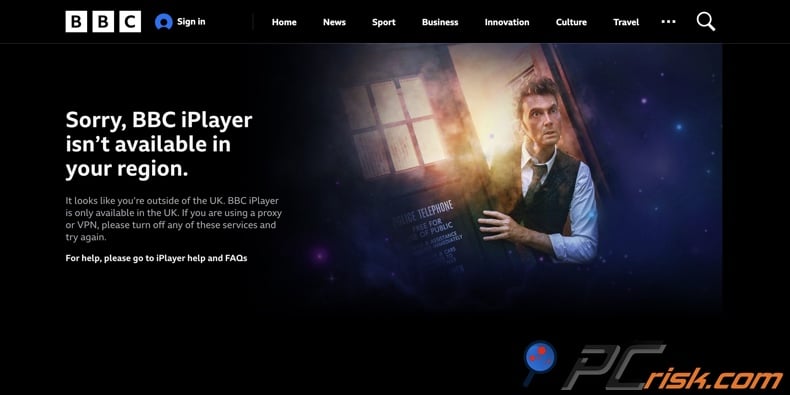
When you are using a standard Internet connection in the US, regardless of whether it is a home connection or a mobile network, BBC iPlayer detects your US IP address. Therefore, the streaming service assumes that you are not located in the UK and prevents you from streaming.
Accessing BBC iPlayer in the US requires bypassing its geoblock. A VPN (Virtual Private Network) is a highly effective tool for changing your visible location online. In simple terms, a VPN encrypts your Internet traffic and routes it through a remote server, thus changing the IP address that the websites you visit see. Hence, if you use a VPN to connect to a UK-based server (provided there are no other conflicting signals) - BBC iPlayer will perceive you as a visitor from the UK.
Watching BBC iPlayer requires a valid UK TV licence. This licence covers the entire household, so just one applies to all the TVs, computers, tablets, and phones at the same address. Currently, when setting up or logging into your BBC iPlayer account, you will be asked to confirm that you have it ("I have a TV Licence. Watch Now" / "I don't have a TV Licence."). You will not need to enter your licence number during the sign-up process, but you will be required to provide a UK postcode. Postcodes can be found online, but be careful with online generators since they may be hosted on dubious sites.
Accessing BBC iPlayer in the US with a VPN
If you are looking to watch BBC iPlayer while in the US - in most cases, the best bet is using a trustworthy VPN (Virtual Private Network) service. VPNs operate by (typically encrypting and) routing users' Internet traffic through remote servers, thus changing their apparent locations.
Streaming is bandwidth-intensive, so you need a service that offers strong speeds and multiple UK server options. This is important because BBC iPlayer is known to block IP addresses associated with VPNs, and having flexible choices can help you to avoid those restrictions.
How to watch BBC iPlayer in the US with a VPN:
1. Pick a reliable VPN provider. Reputable services are more likely to bypass geoblocking and handle bandwidth-heavy activities such as streaming. Hence, when choosing a VPN, prioritize a track record of streaming access, a large server network (with multiple UK servers), high speed, and robust privacy features. We recommend NordVPN - our Top 2026 VPN Choice.
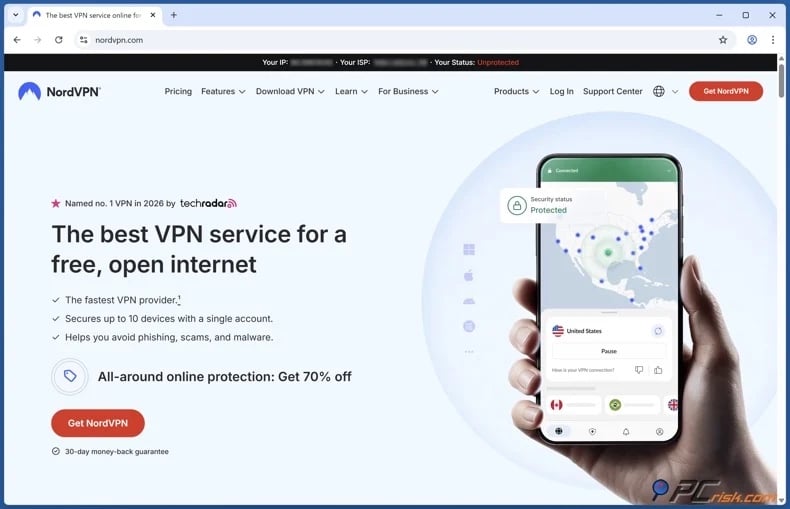
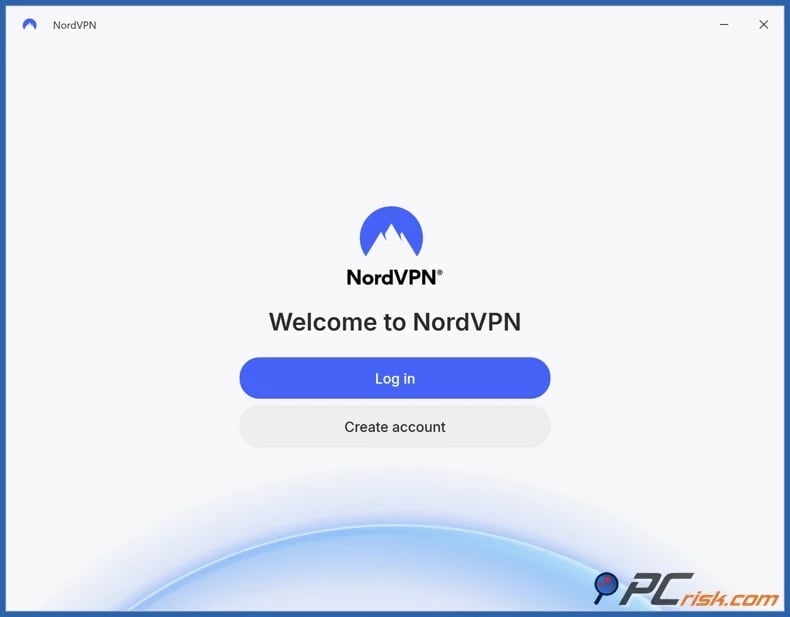
2. Download/Install the VPN app and sign in on the device you plan to stream on (Windows, macOS, Android, iOS, etc.). Major providers typically support multiple platforms.
3. Connect to a server in the United Kingdom. If BBC iPlayer remains blocked, switch to another UK server (ideally, a different city or server cluster).
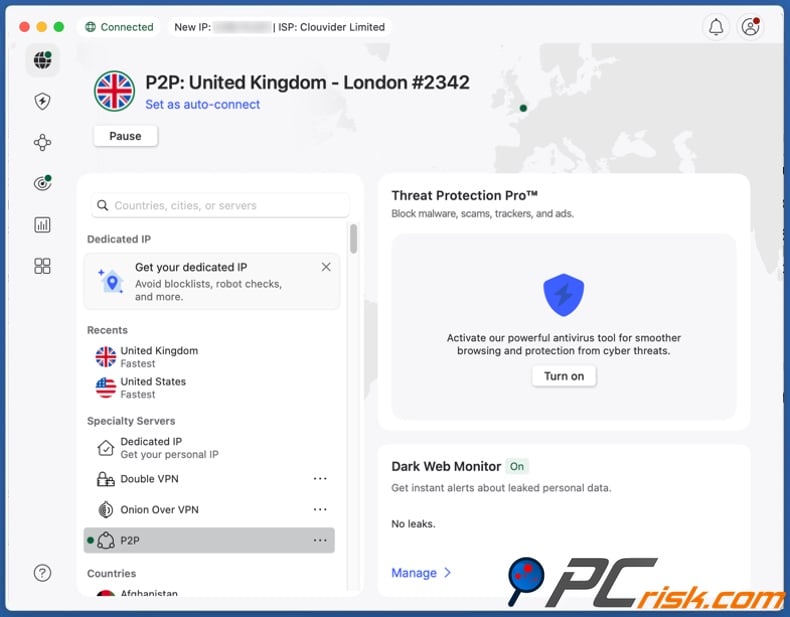
4. Access BBC iPlayer and begin streaming. If you continue experiencing issues, it could be because the streaming service has stored location signs - so clear cookies, cache, or app data. Using a private browsing window may help. Restarting or even reinstalling an app could fix the problem. More information on solutions for common VPN issues can be found in the dedicated section of this article.
Watching BBC iPlayer on a VPN-unsupported smart TV or streaming stick:
If your TV or streaming device does not support VPN apps, a common recommendation is to set up the VPN directly on your router. With this setup, when your router connects to a UK VPN server, every device on your home network will have access to the same UK IP address.
However, it is noteworthy that configuring a VPN on your router can be trickier to troubleshoot. Should BBC iPlayer block the UK server IP that your router is using, all the connected devices will be impacted until you switch to a different server.
UK TV licence:
To watch BBC iPlayer, you need a valid UK TV licence. When you log in, you will need to confirm you have a licence, but you will not have to enter your licence number. Instead, the platform asks for your UK postcode and to select a simple declaration that you are licensed. Since postcodes are public information, they can be easily found online.
Best VPNs to access BBC iPlayer in 2026
When it comes to streaming on BBC iPlayer and other platforms, picking a trustworthy VPN is key. The focus should be on speed, stability, and a good variety of servers. Fast connections are crucial since streaming, especially in HD or 4K, can consume a significant amount of bandwidth.
Additionally, it is essential to choose a VPN that has servers in the countries where your favorite streaming services operate (UK for BBC iPlayer) - that way, you can connect to the correct region easily.
Select providers that frequently update their IP addresses and have a solid track record of working well with mainstream platforms. Strong privacy features are paramount - hence, check for things like a no-logs policy and modern encryption to keep your streaming both secure and reliable.
The following are our Top Five VPN Choices for 2026 (detailed comparisons are available in our dedicated article):
1. NordVPN
NordVPN - our top choice. This services combines fast speeds, a vast server network, and reliable access to streaming platforms (including BBC iPlayer). It also provides practical features that help prevent accidental IP leaks, such as a "kill switch". One NordVPN subscription can cover up to ten devices.
2. Surfshark
Surfshark - affordability and unlimited device coverage. This service is budget-friendly and allows for unlimited device connections, which make it highly advantageous for larger households. Surfshark also includes core safety features, such as a "kill switch" and leak protection in its broader privacy toolset.
3. Mullvad VPN
Mullvad - unrivaled privacy. Its design is geared towards privacy and security. Mullvad has an independently audited no-logs policy, account registration requiring no personally identifiable information (not even an email), and anonymous payment options. However, this service is not ideal for streaming due to its comparatively smaller server network.
4. Proton VPN
Proton VPN - transparency and security. This service prioritizes transparent policies and strong security features. Proton VPN offers a free plan - uncommon for major providers. However, its paid tiers are a better choice for streaming. Although the free plan does not limit data, its server network is smaller.
5. ExpressVPN
ExpressVPN - easy-to-use premium service. It boasts robust security features, including RAM-only servers. ExpreeVPN has a large server network, reliable speeds, user-friendly application design, and a host of other functionalities. However, this VPN is an investment since it is the comparatively pricier option.
It must be emphasized that no VPN service can guarantee uninterrupted access to BBC iPlayer. VPN providers must continuously rotate and refresh their servers, as streaming platforms can be incredibly proactive in their efforts to block VPN IP ranges. Therefore, choosing a provider that puts significant effort into server maintenance and rotation is essential.
Can you use a free VPN to access BBC iPlayer in the US?
While free VPNs are available, they are unlikely to be able to provide all that is necessary for streaming BBC iPlayer. These VPNs usually come with service limitations and potential security/safety problems:
Top VPN ReviewsExclusive dealsExpert-tested · hands-on reviews→
Smaller server networks - the servers may be too few for bypassing geo-restrictions or fail to provide enough alternatives when certain servers get blocked by websites/platforms.
Overcrowded servers - with a large number of users connected to the same server, it is likely to result in speed issues (pages failing to load, video buffering, etc.). Additionally, overused servers are more likely to get flagged by websites/platforms.
Speed throttling - when a VPN provider intentionally slows down the communication speed, it will result in a diminished browsing experience (e.g., poor video quality, video buffering, gaming lags, page loading issues, slow downloads, etc.).
Data caps - these limitations (per day, week, month) can be reached incredibly quickly when engaging in bandwidth-heavy activities like streaming, downloading large files, and so on.
Potential lack of encryption - unencrypted Internet traffic may be easily perceptible to visited websites/platforms or the user's ISP (Internet Service Provider), and pose other security risks.
Potential data collection - private user data may be monetized by the VPN provider and sold to third-parties, thus exposing them to a host of serious threats.
Potential security flaws - may expose users' browsing activity and open them up to system infection and privacy threats.
Potential software bundling - free VPNs may be bundled (packed together) with unwanted or possibly malicious software. Bundled installation setups can be another monetization technique, but it could be done without the VPN developer's permission when hosted on third-party download sources.
If you’re streaming from another country, you don’t want to deal with fake VPN installers, harmful browser add-ons, or scam download pages. Combo Cleaner protects your device by scanning downloads in real time, blocking scams and phishing sites, and removing dangerous browser extensions that cause redirects, ads, or tracking.
A VPN encrypts your traffic — but your device still needs protection against malware and ransomware. Combo Cleaner adds the missing layer of defense.
Download Combo CleanerAntivirusDetect & remove malware threats→If you are intent on using a free VPN service - look for a no-cost plan from reputable providers, instead of an obscure "unlimited free VPN." We recommend Proton VPN - but remember that its free plan offers a smaller server selection. Keep your expectations realistic - free services may struggle to consistently unblock the BBC iPlayer streaming platform.
Common issues and solutions when accessing BBC iPlayer with a VPN
Even when using a reliable VPN, BBC iPlayer can still refuse to play content. This typically occurs for two reasons: you are sending incorrect location signals (due to using the wrong server location, cached data, or GPS conflicts) or the platform has blocked the IP address associated with your chosen VPN.
Below are the most common issues and practical fixes:
BBC iPlayer continues to show the "Sorry, BBC iPlayer isn't available in your region." message
Potential reasons:
- You are connected to a server outside the UK (a common occurrence with "quick connect" features).
- The UK server you picked is already blocked by BBC iPlayer.
- Your browser/app still contains location-linked data from prior access attempts.
Solutions:
- Manually select a United Kingdom server and connect.
- Connect to a different UK server (try another city or server cluster).
- Clear cookies and cache, delete app data, restart the app, or start a private browsing session before retrying.
BBC iPlayer is detecting VPN usage
BBC iPlayer may restrict VPN IP ranges. Major streaming services actively target VPN-associated IPs, and even high-quality VPN servers can get blocked.
Solutions:
- Change UK servers first.
- Check for updates available for your VPN app. VPN providers may ship updates that aid with streaming access countermeasures.
- Check your VPN's help pages or ask support which UK servers currently work with BBC iPlayer (some providers maintain internal lists).
Location services and GPS issues on mobile
On mobile devices, location permissions and GPS may conflict with the IP address provided by your VPN. Some streaming platforms do not rely solely on IPs but also factor in device location services.
Solutions:
- Disable location services (at least for the iPlayer app) and retry.
- Avoid quickly changing VPN servers while GPS and Wi-Fi scanning are enabled; inconsistent signals may trigger repeated region errors.
DNS leaks and other "hidden" location signals
If DNS requests leak outside the VPN tunnel, a streaming platform may flag you even though your apparent IP address is based in the UK. If streaming fails continuously, leak checks are recommended.
Solutions:
- Enable DNS leak protection (if your VPN offers it) and use the VPN provider's DNS settings when available.
- Try a different protocol (if your VPN offers alternatives) to see whether there's any stability improvement.
- Enable the "kill switch" feature (if your VPN offers it) so that potential connection drops would not expose your actual IP address.
Continuous buffering or low video quality
Potential reasons:
- Some speed reduction is expected with VPN usage, as the Internet traffic is (typically) encrypted and routed.
- Overcrowded server
- Slow base connection
Solutions:
- Connect to another UK server (if your VPN provider indicates how "busy" a server is, choose one that is less crowded).
- Try a different protocol (if your VPN offers it).
- Test your connection without the VPN to rule out local Wi-Fi or ISP instability.
Device does not support VPN apps
Some smart TVs and streaming sticks are incompatible with VPNs.
Solutions:
- Cast/Mirror the screen of a VPN-supported device (e.g., laptop, smartphone, etc.) to the TV.
- Set up the VPN on your router, which will cover all connected devices but be more difficult to troubleshoot.
- Stream on a VPN-supported device.
It is pertinent to mention that most major VPN services provide reliable customer support, which may be able to resolve the issues you encounter when streaming BBC iPlayer.
Is using a VPN to access BBC iPlayer in the US legal?
VPNs are legal to use in the US. However, this does not change a website's Terms of Service (ToS). In many instances, streaming platforms specifically state that streaming geo-restricted content with a VPN violates ToS. Streaming services can and do block VPN traffic when it is detected.
Concerning BBC iPlayer, UK guidance requires viewers to be covered by a TV Licence, and it is unavailable while abroad. In other words, if you are located in the US and use a VPN to "spoof" a UK location - it does not change BBC iPlayer's rules. The VPN service only alters how the streaming platform sees your location.
As of the time of writing, there is no current US law that criminalizes the use of VPNs to bypass geoblocks. Breaking ToS can result in the platform restricting or penalizing the account. Copyright issues could be a consideration, although currently the law is focused on distributors rather than individual viewers. However, remember that laws can change, and we strongly advise keeping up-to-date with current law.
BBC iPlayer alternatives available in the US
BBC iPlayer is not the only source of UK entertainment. If you would rather not deal with BBC iPlayer's geoblocking, you can try streaming services that are available in the US:
BritBox - a subscription service positioned around British content for US viewers. This platform provides a large British catalog, ad-free streaming, multi-device viewing, BBC Select documentary content (separate service available in certain BritBox plans), and other features.
Acorn TV - another US-available service offering mysteries, dramas, and comedies from Britain and other locales. This platform also provides ad-free streaming, multi-device viewing, and a catalog including classic titles and exclusive originals.
Mainstream streaming services available in the US can carry UK content, which may satisfy your viewing needs without geo-restriction workarounds. Platforms that currently have this content in their libraries include Netflix, Hulu, Amazon Prime Video, Apple TV+, and HBO Max. Note that catalogues and their availability may change (licensing is not only region-specific but may also be timed).
In closing
BBC iPlayer is a mainstream platform for UK viewers, offering a broad range of content. However, it is heavily geoblocked and cannot be watched without a bypass tool outside the UK. If you want to access BBC iPlayer from the US, a trustworthy VPN service with strong UK server coverage, good speeds, and strong privacy policies - is the best tool for this endeavor.
To summarize, keep informed, consider all alternatives, choose reliable tools, and stay safe.
Frequently Asked Questions (FAQ)
Why can't I watch BBC iPlayer in US?
BBC iPlayer is a UK-only streaming service, and that is why it is inaccessible from abroad (including the US). When you try to stream from the US, you are likely run into a block.
How can I watch BBC iPlayer in US?
BBC iPlayer is generally inaccessible from the US, unless you use a tool such as a VPN. VPN services can provide you a different IP address by routing your Internet traffic through a server based in the UK. Thus, streaming platforms can be led into perceiving your connection as originating from the UK.
Why are certain streaming platforms or their content geoblocked?
Geoblocking comes down to streaming rights, which are often negotiated by region. Streaming platforms engage in location checks to enforce these rules and may even block IPs linked to VPNs to prevent restriction bypasses.
What if I do not want to use a VPN to access BBC iPlayer in US?
If you do not want the hassle of bypassing BBC iPlayer's geoblocks, consider alternatives like BritBox or Acorn TV - which host UK content. You can also explore mainstream platforms like Netflix or Amazon Prime Video, which have included UK entertainment in their libraries.
Share:
 Facebook
 X.com
X.com
 LinkedIn
 Copy Link

Karolis Liucveikis
Experienced software engineer, passionate about behavioral analysis of malicious apps
Author and general operator of PCrisk's News and Removal Guides section. Co-researcher working alongside Tomas to discover the latest threats and global trends in the cyber security world. Karolis has experience of over 8 years working in this branch. He attended Kaunas University of Technology and graduated with a degree in Software Development in 2017. Extremely passionate about technical aspects and behavior of various malicious applications.
▼ Show Discussion