
We may earn commissions from products we recommend. Learn more.
How to access Twitch at school or work in 2026 with a VPN

How to access Twitch at school or work in 2026 with a VPN?
Twitch is one of the most popular platforms for live-streaming gameplay, esports, and creator content. However, schools and workplaces often block it because video consumes significant bandwidth, chat is difficult to moderate at scale, and the platform can distract from productivity.
This article details why Twitch is often inaccessible on managed networks, when and where broader restrictions may apply, and how a VPN (Virtual Private Network) service may help access the platform.
Disclaimer: PCrisk does not promote, encourage, or endorse bypassing network restrictions, violating school or workplace rules, or breaking local laws. Always follow an institution's acceptable-use policies and local regulations. Use any methods described at your own risk.
Access Twitch with NordVPNSpecial deal30-day money-back guarantee→
Table of Contents:
- Introduction
- Why can't I access Twitch at school or work?
- Can Twitch be inaccessible for other reasons?
- How to access Twitch?
- Accessing Twitch with a VPN in 2026
- Best VPNs to access Twitch
- Can you use a free VPN to access Twitch?
- Common issues and solutions when accessing Twitch with a VPN
- How to access Twitch without a VPN?
- Is using a VPN to access Twitch legal?
- In closing
- Frequently Asked Questions (FAQ)
Twitch is an interactive live-streaming platform that enables real-time engagement between viewers and creators. Although it is best known for gaming, Twitch features entertainment, esports, music, and other live content. The platform offers continuous video and live chat.
If Twitch is blocked in schools, universities, workplaces, and similar institutions - it is usually due to intentional restrictions set by the network owner, and not an issue with Twitch itself. In these environments, content access is typically controlled by acceptable use policies. On a technical level, measures like web filters, DNS filtering, firewall rules, proxy policies, or device management are utilized to block access.
The rationale behind blocking Twitch can be varied, but the most frequent reasons include:
Bandwidth management - live video streaming requires substantial bandwidth, and Twitch sessions are often lengthy. Viewing at 720p resolution can consume anywhere between 0.8 and 1.5 GB per hour, while 1080p may require from 1.3 to 4.5 GB per hour (note that the exact data usage depends on stream quality and settings). Hence, on shared networks, even a limited number of viewers can significantly reduce overall network performance.
Productivity and focus - live streams present a significant distraction in classrooms, libraries, laboratories, front desks, offices, and similar environments. Implementing a platform-wide block is more effective than enforcing individual rules.
Security and policy risk - live-streaming platforms are not inherently malicious, but they are frequently used in attack chains, particularly through social engineering. Exposure to inappropriate content, harassment, and the challenges of moderating large-scale live chat are other concerns. Some institutions choose to limit access to certain categories rather than block the platform outright.
In summary, if Twitch functions as expected on your home but not on campus/office Wi-Fi - the network is likely filtering the platform intentionally, and it is not actually down.
Can Twitch be inaccessible for other reasons?
Although Twitch is typically available in most regions, access may be restricted by geoblocking, temporary ISP (Internet Service Provider) restrictions, or broader country-level filtering.
Twitch geoblocking overview
Twitch provides geoblocking features for live streams, allowing content to be restricted to specific countries. These limitations may arise from local laws, rights agreements, or platform policies. Hence, Twitch may load, but certain streams or content types could remain inaccessible.
However, there are also regions where this platform was restricted at the national or ISP level. Some of these blocks were due to temporary enforcement actions, while others remained active for extended periods of time.
Countries where Twitch has been blocked or restricted:
China - reporting indicates that Twitch was blocked in September 2018, and the app was removed from Apple's local App Store. Generally, the restriction is attributed to China's censorship program (referred to as the "Great Firewall"), which is overseen by authorities such as the Cyberspace Administration of China (CAC).
India - some networks temporarily restricted access to Twitch in September 2020 during the Indian Premier League (IPL) matches. It is most probable that this decision was made to limit unauthorized streaming of the sporting event. These restrictions were applied by ISPs under pressure from authorities, such as the Department of Telecommunications (DoT); it was not a nationwide block.
Iran - reporting in July 2022 indicated that Twitch was blocked in Iran as part of broader Internet filtering measures. These types of controls are typically enforced by authorities like the Supreme Council of Cyberspace, although Twitch's blocking is not always listed in official sources. Hence, access to the platform may vary over time.
North Korea - Twitch and most foreign platforms are effectively inaccessible. Internet access is tightly controlled by the state, and most of the population cannot access the global Internet.
Russia - reports indicate that service disruptions to Twitch were experienced by some users in April 2018. This was likely due to widespread IP blocking by the Federal Service for Supervision of Communications, Information Technology and Mass Media (Roskomnadzor, RKN), which was targeting multiple services at the time. These disruptions were temporary and not specific to Twitch, and access was restored.
Slovakia - ISP-enforced gambling-related restrictions made Twitch unavailable in June 2021. According to reporting, the likely reasoning was tied to local gambling regulations overseen by the Gambling Regulatory Authority (Úrad pre reguláciu hazardných hier). The disruption appears to have resulted from ISP-level measures rather than a direct order targeting the platform, and access has since been restored.
South Korea - Twitch ceased operation effective February 27, 2024. The reason cited was high network usage fees. Hence, the platform was not blocked by the government or other entities, but rather by Twitch factoring in regulatory and cost factors.
Turkey - the National Lottery Administration (Millî Piyango İdaresi, MPI) ordered Twitch to be blocked, and this was executed by the Information and Communication Technologies Authority (Bilgi Teknolojileri ve İletişim Kurumu, BTK) in February 2024. Reporting suggests that the block could have been motivated by gambling-related streams, and it was later lifted.
How to access Twitch?
How you can access Twitch depends on why the platform is inaccessible - such as whether it is due to a network-level restriction or location-based filtering (country filtering, geoblocking). The following are some potential solutions for restoring access to Twitch:
Switch networks - if Twitch is blocked on your school or workplace Wi-Fi, try connecting to a different network, such as your home Wi-Fi or a personal hotspot. If Twitch works on the new network, the restriction is specific to the original network.
Switch to mobile data - using mobile data can bypass restrictive Wi-Fi filters. However, as mentioned previously, streaming Twitch uses significant data. Usage can range anywhere between 0.8 and 4.5 GB per hour, depending on certain settings and stream quality. Hence, mobile data is more suitable as a temporary solution. If you want to mitigate this, disable autoplay, choose a lower video resolution, and enable data alerts to avoid exceeding your plan.
Use a VPN - these services are the most practical long-term solution for accessing Twitch on restricted networks. VPNs change how your traffic is routed, and it is typically encrypted during transit. Encryption complicates the extent to which the network and your ISP can observe your browsing activity. As the traffic is routed through a server operated by the VPN provider, visited websites usually see the server's IP address instead of your own.
Our top recommendation for streaming and privacy. NordVPN consistently leads our tests with fast speeds, reliable geo-unblocking, and a strict no-logs policy.
- ✔ Unblocks geo-restricted streaming services reliably
- ✔ 202+ locations across 111 countries
- ✔ 30-day money-back guarantee · Special deal available
Therefore, VPNs can enhance your security on public Wi-Fi and may allow you to bypass censorship and access geoblocked content. However, VPNs have limitations. Some schools and workplaces block VPN traffic, and certain countries restrict or disrupt VPN protocols. If restrictions are based on additional factors and not just IP addresses (such as identity verification), a VPN may not be able to grant you access.
VPNs are useful for privacy, but they do not replace dedicated security software. Security tools are still necessary, as platforms like Twitch can be used in social engineering attacks. Malicious links in chat, stream descriptions, or promoted content may try to trick users into visiting phishing websites or downloading harmful files. We recommend using Combo Cleaner to protect your device from malware, adware, and other unwanted software.
A VPN encrypts your traffic — but your device still needs protection against malware and ransomware. Combo Cleaner adds the missing layer of defense.
Download Combo CleanerAntivirusDetect & remove malware threats→Accessing Twitch with a VPN in 2026
In many instances, if Twitch is inaccessible on a school or workplace network, a VPN (Virtual Private Network) can restore access. VPN services function by routing Internet traffic through servers managed by the provider, typically while encrypting the connection in the process. Thus, using such a tool can enable users to bypass restrictions by connecting through a server located outside the restricted environment or location. Similarly, VPNs can facilitate access to other platforms blocked by local filters or ISP policies.
The standard VPN setup process is a four-step process:
1. Select a reputable VPN provider. Consider the service's track record for performance and reliability. We recommend NordVPN - our Top VPN Choice of 2026. Streaming requires not just speed but also stability to avoid buffering, quality drops, and repeated disconnections. A large server network is desirable for bypassing IP-based geoblocks and having plenty of alternatives when an IP range gets flagged. Remember that VPN privacy policies are critical, as unclear or unverified policies defeat the purpose of using this service as a privacy tool.
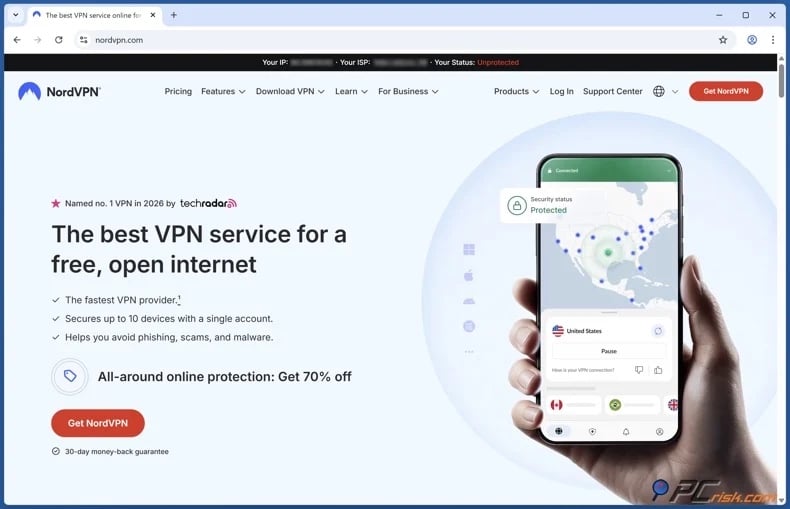
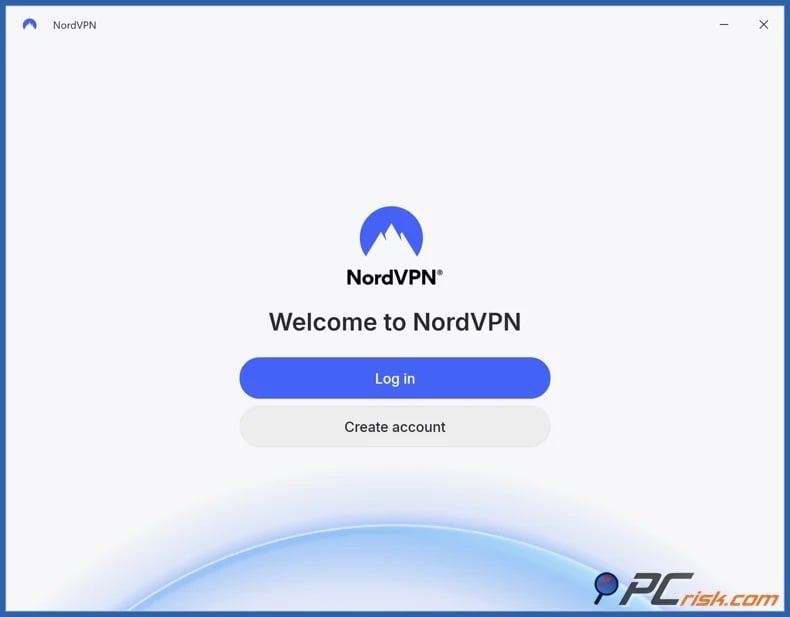
2. Download and install the VPN app, and sign in. Most major VPNs are compatible with various devices, including Windows, macOS, Android, iOS, and streaming hardware.
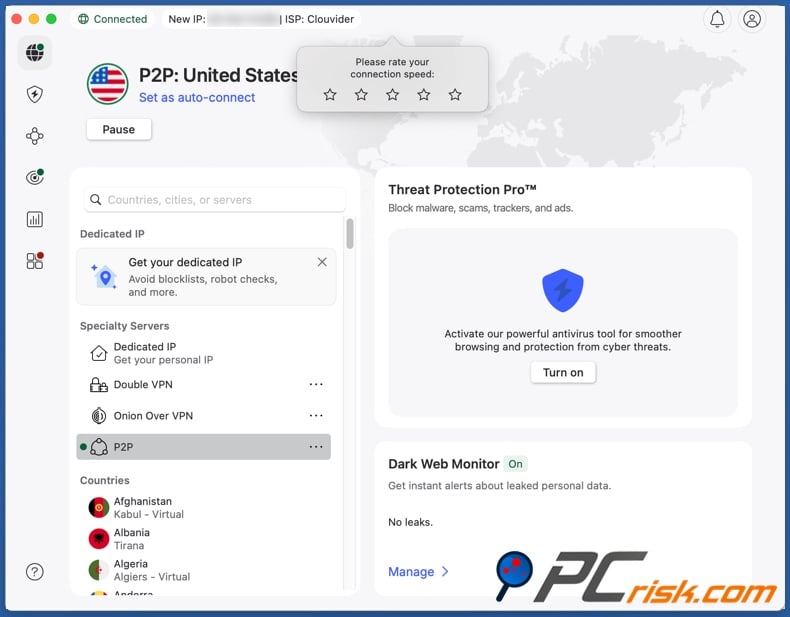
3. Connect to a server that suits your needs. If Twitch is blocked on your school or workplace Wi-Fi, select a nearby server for optimal speed (preferably within the same country). However, if Twitch is restricted or certain content is geoblocked in your region, connect to a server in a country where the platform/content is available.
4. Open Twitch and start browsing. Note that if you have accessed Twitch before connecting to the VPN, your browser or app may retain previous location data and cached sessions. Clear your browser's cookies and cache, or fully restart the app, before testing access again.
It is important to set realistic expectations: while a VPN can often bypass network restrictions, no VPN can guarantee uninterrupted, continuous access across all networks and in every country. Some environments actively detect and block VPN protocols, and certain platforms may rate-limit or challenge suspected VPN traffic.
Best VPNs to access Twitch
When selecting a VPN provider for streaming Twitch, focus on these three priorities:
Stable performance - live-streaming requires high speed, low latency, and a stable connection. Reliable VPNs deliver consistent speeds and minimal latency to reduce buffering, maintain stream quality, and avoid interruptions.
Broad server network - access to many server locations provides flexibility. If a server is slow, overcrowded, or restricted - it is easy to switch to another one.
User-friendly apps and troubleshooting features - select a VPN with intuitive apps and built-in tools for easy connection management. Features such as automatic server selection, protocol switching, and quick reconnect options help resolve issues quickly without technical expertise.
Privacy and security features - a VPN should offer strong encryption and essential protections to secure your data. Features like a "kill switch", DNS-leak protection, and modern protocols help prevent your real IP address from being exposed if the connection drops. These safeguards are especially important on public or shared networks, where traffic may be monitored. In addition to providing access, they protect your log-in credentials, browsing activity, and overall online privacy when using Twitch or other platforms.
Below are our top five VPN choices for 2026 (for an in-depth comparison of these services, check out our dedicated article):
1. NordVPN
NordVPN is our top pick; it is a balanced choice offering a strong performance and a large server network comprising 9,000+ servers in over 200 countries. A broad network is critical, as it allows access to nearby servers for better speed and alternative options if certain IP ranges are congested or blocked.
2. Surfshark
Surfshark is well-suited for households with multiple devices. An unlimited-device policy is beneficial if you wish to watch Twitch on your phone, tablet, laptop, or other devices. Strong server coverage also enables quick switching if the streaming performance falters.
3. Mullvad VPN
Mullvad VPN is the most privacy-focused option. Notable features include an audited no-logs policy, no personal data requirement upon registration (not even an email address), and anonymous payment methods. However, Mullvad VPN's server coverage is smaller than many major competitors' networks.
4. Proton VPN
Proton VPN provides strong security and offers a functional free plan. This plan has no data caps, but does provide fewer servers than the paid tiers. Proton's free plan is a practical option for testing if a VPN resolves your Twitch access issues before committing to a paid plan. As a long-term streaming solution, the paid plans offer better coverage and performance.
5. ExpressVPN
ExpressVPN is a premium choice known for its polished, user-friendly app. It is ideal if you prefer a straightforward experience with minimal configuration. When accessing Twitch, this option could have fewer interruptions and require less troubleshooting when switching networks.
Can you use a free VPN to access Twitch?
Free VPNs may suffice for bypassing basic filtering at school or work, but they have consequential limitations. Twitch streaming requires stable performance; otherwise, you may experience buffering, poor video quality, and recurring disconnections.
Below are the most important limitations and risks associated with free VPN services:
Privacy and security concerns - free VPNs typically require alternative revenue sources to maintain servers, bandwidth, etc. Many generate revenue through aggressive advertising, data collection, or traffic monetization. Free VPNs may include tracking components as well. These services are more likely to have weak security that may be insufficient for preventing data leaks. Hence, using such a VPN can endanger your privacy and safety.
Performance limitations - free VPN services usually offer fewer server locations and are heavily used. This can result in overcrowded servers, slower connection speeds, higher latency, and inconsistent performance. On live-streaming platforms like Twitch, these limitations are particularly noticeable. Streams may have long loading times, constantly drop to lower resolutions, or frequently buffer during playback. Switching to a different server when it gets too crowded or blocked may become an issue with limited server availability.
Data and speed limitations - free VPNs often have data limits, which can be quickly exhausted when engaging in bandwidth-heavy activities like streaming Twitch. Speed restrictions are also incredibly prevalent for network load management purposes, and can further impact stream quality.
Absent features - free VPNs often provide only basic functionality, with many essential protections limited or missing. Weaker or outdated encryption can reduce the VPN's effectiveness, even defeat the very purpose of using a VPN as a privacy tool. Key safety features like a "kill switch" that prevents your real IP from being exposed if the VPN connection drops, and DNS-leak protection that keeps your browsing requests hidden from your ISP - are typically unavailable or poorly implemented in free services. Accessing networks with advanced filtering or blocking may require specialized features like obfuscation ("stealth" mode) or alternative routing. These are usually reserved for paid tiers, making free VPN plans less effective in restrictive environments.
If you choose to use a free VPN, select a free plan from a reputable provider instead of a supposedly "forever free" app from an unknown and unverified developer. We recommend the free plan of Proton VPN. Note that free services commonly have limitations, and Proton VPN's free plan is not an exception - it provides a smaller server network and fewer features compared to its paid tiers.
Common issues and solutions when accessing Twitch with a VPN
Issues with accessing Twitch or other platforms with a VPN are not uncommon. Even with a perfectly set-up VPN, various challenges and problems may still arise. Below are the most common Twitch-related access issues and their potential solutions:
Twitch does not load with a VPN - your school or workplace may be blocking VPN traffic as well as Twitch, or the VPN server's IP range may be filtered.
Potential solutions:
- Switch VPN servers (start with another server in the same country).
- (If available) Change the VPN protocol.
- (If available) Enable obfuscation or stealth mode.
- Try a different network (such as mobile data) to determine if the Wi-Fi is broadly blocking VPNs.
Twitch streams buffer frequently - this often indicates network congestion, long distances, or unstable routing. Live video requires consistency, not just high speeds.
Potential solutions:
- Connect to a VPN server that is geographically closer.
- (If indicated) Select a less crowded VPN server.
- Manually reduce stream quality (e.g., from 1080p to 720p) to decrease bandwidth usage.
Streams display "not available" messaging or behave as though you are in the wrong region - the stream may be geoblocked or subject to Twitch's country-based controls. Stored data may also include location signals that conflict with your new IP-based location.
Potential solutions:
- Switch to a VPN server located in a country where the stream is accessible.
- Restart the Twitch app or clear your browser's cookies and cache to eliminate conflicting location signals.
Stream works, but chat or other features do not - this could be caused by partial filtering, DNS conflicts, or network interference.
Potential solutions:
- Restart the app or sign out - sign in.
- Temporarily disable network tools (such as ad blockers or custom DNS apps) to check for conflicts.
- Connect to a different VPN server.
VPN disconnects, and Twitch stops working - connection issues typically indicate a safety and stability concern.
Potential solutions:
- (If available) Enable the "kill switch" feature to prevent traffic leaks when the VPN connection drops.
- (If available) Enable the "always-on" VPN feature, especially on your mobile devices.
- Connect to a closer server to avoid multi-hop modes when streaming.
Furthermore, reputable VPN providers offer reliable and quick support. Therefore, if the fixes listed above do not resolve the issues you experience when accessing Twitch with a VPN, contact your VPN's official support.
Top VPN ReviewsExclusive dealsExpert-tested · hands-on reviews→
How to access Twitch without a VPN?
Open (web-based) proxies and the Tor browser are two alternatives to VPNs. While they may be sufficient in certain instances, both have significant limitations in performance, reliability, and security for Twitch streaming.
Open (web-based) proxy
Open (web-based) proxies act as intermediaries between your device and visited websites by routing traffic through third-party servers. They are easy to access and use, and require minimal setup. Hence, open proxies are convenient for basic use.
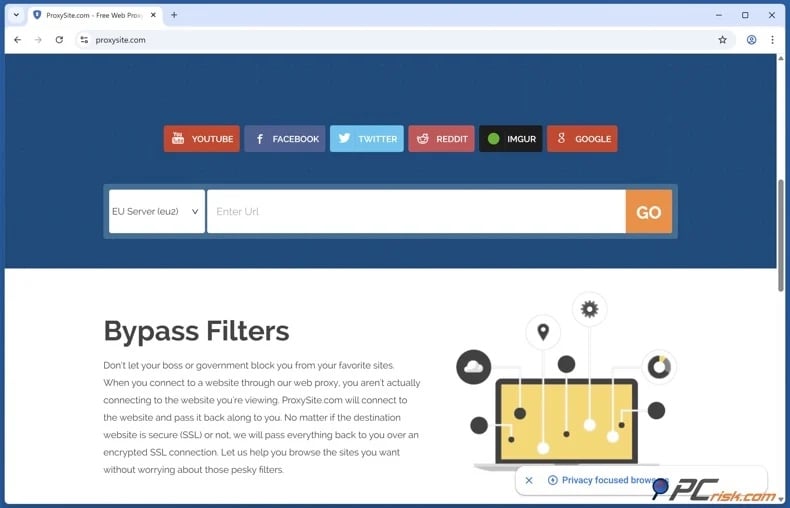
However, most do not encrypt traffic and can expose your data to potential interception or modification. Open proxies are often abused, leading to poor IP reputations and frequent blocking by platforms. They are also vulnerable to cyber criminal activity, including the risk of user activity logging and malicious content distribution. Using an open proxy to stream Twitch is far from ideal, as these services typically have limited bandwidth, high latency, and unstable connections - thus, making them unsuitable for reliable live-streaming.
Tor browser
The Tor browser is designed to enhance anonymity. It routes your connection through multiple relays. Each Tor circuit passes through several nodes, so no single relay is aware of both the user's origin and destination site. The browser obscures your traffic's origin but significantly reduces speed and increases latency.
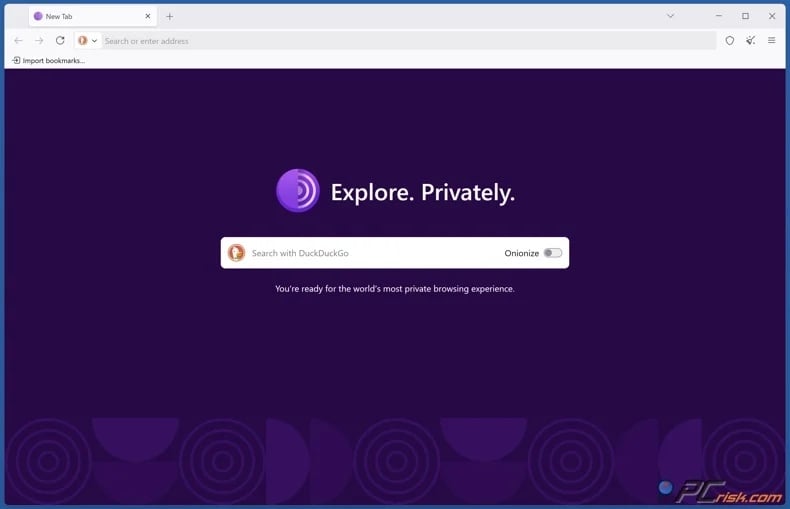
Tor is not suitable for high-bandwidth activities, such as video streaming. When using this browser to access Twitch, you may find that the streams buffer, drop in quality, or fail to load. Many websites, including streaming platforms, can detect Tor exit node traffic and may block or restrict access. Users may also face CAPTCHA challenges or extra verification steps. Additionally, if traffic leaving the Tor network is not encrypted with HTTPS, sensitive data may be exposed and potentially abused.
Both options involve trade-offs and are not interchangeable with VPNs. Open proxies are convenient but lack security and reliability. Tor offers strong anonymity but poorer usability and speed. A trustworthy VPN is a far more reliable choice for streaming Twitch. VPN services provide better performance, encryption, and stability. Therefore, open proxies and Tor browsers are ill-suited as long-term solutions for live-streaming.
Is using a VPN to access Twitch legal?
In many countries, VPN use is legal and widespread. VPNs serve as essential privacy and security tools; they are often used for remote work and to secure public Wi-Fi connections.
However, some countries restrict, require state-approved licensing, and even criminalize VPN use. Some examples include China and Iran - where unauthorized VPN use is targeted, and Russia - where many VPN services are blocked, and authorities actively restrict access to noncompliant services.
There are also countries that do not ban VPNs outright but penalize specific uses, such as in the United Arab Emirates (UAE) - where using IP masking for unlawful activities (such as gambling) can carry fines and even imprisonment. North Korea, Turkmenistan, and Belarus are also commonly listed as countries with strict VPN restrictions, while in countries such as Iraq and Oman, regulations and enforcement vary, including intermittent restrictions or penalties for misuse.
It must be emphasized that even if VPN usage is legal in a region, using these tools does not remove legal accountability. Illegal activities remain illegal. Furthermore, utilizing a VPN to access restricted content at school or work may violate present policies and result in disciplinary action. What is more, always remember that laws regarding VPNs can change. Therefore, we strongly advise keeping up-to-date with local laws.
In closing
If Twitch is blocked at school or work, this is typically due to intentional network restrictions for bandwidth management, productivity, or security. Switching networks or using mobile data can help identify the cause, but be aware that streaming on mobile data can be costly due to high data usage.
The most reliable solution for restoring access is using a VPN. These services encrypt your traffic and reroute it through the provider's servers, thus they may bypass basic network filters. To ensure the best browsing and streaming experience, choose a reputable provider that offers stability, speed, broad server coverage, adequate safeguards, and strong privacy policies.
Keep in mind that VPNs may not work in all locations, and their legality depends on your country. Therefore, comply with applicable regulations and laws, use these tools responsibly, and prioritize your safety in restrictive environments.
Frequently Asked Questions (FAQ)
Why can't I access Twitch at school or work?
Managed networks often intentionally restrict access to live-streaming and social platforms like Twitch to minimize distractions, conserve bandwidth, and mitigate security risks.
Can I access Twitch with a VPN?
In many cases, yes. A VPN encrypts and routes your Internet traffic, and this may enable you to bypass local network restrictions. However, some institutions and countries are proactive in blocking VPN usage.
Can I access Twitch without a VPN?
In some instances, yes. Accessing Twitch may be possible through mobile data or an alternative network. Open (web-based) proxies or the Tor browser can also be used, but these methods are generally slower and less reliable for live-streaming compared to reputable VPN services.
Is it legal to access Twitch with a VPN?
VPN usage is legal in many countries, but it is restricted or regulated in some. Using a VPN does not exempt individuals from legal responsibilities. These tools may violate institutional policies, even in countries and regions where VPN usage is permitted by law.
Share:
 Facebook
 X.com
X.com
 LinkedIn
 Copy Link

Karolis Liucveikis
Experienced software engineer, passionate about behavioral analysis of malicious apps
Author and general operator of PCrisk's News and Removal Guides section. Co-researcher working alongside Tomas to discover the latest threats and global trends in the cyber security world. Karolis has experience of over 8 years working in this branch. He attended Kaunas University of Technology and graduated with a degree in Software Development in 2017. Extremely passionate about technical aspects and behavior of various malicious applications.
▼ Show Discussion