
We may earn commissions from products we recommend. Learn more.
How to watch YouTube TV in 2026 with a VPN

How to watch YouTube TV in 2026 with a VPN?
YouTube TV is a leading live TV streaming service for US viewers, offering national channels, local networks, sports, on-demand content, and unlimited cloud DVR. It serves as a cable replacement across phones, computers, streaming devices, and smart TVs. However, YouTube TV is officially limited to the US, and it is inaccessible while traveling internationally. This restriction can be frustrating for travelers, expats, and anyone wishing to watch from abroad.
This article outlines how YouTube TV geoblocking operates and why users should consider using a VPN (Virtual Private Network) service. These tools give users the best chance at bypassing YouTube TV's geoblocking. However, no VPN can guarantee access; Google's help pages state that YouTube TV playback will not work when connected to a VPN or proxy.
Disclaimer: PCrisk.com does not promote, encourage, or endorse bypassing geoblocks/geo-restrictions or violating streaming platforms' terms of service. This information is provided for educational purposes to help users understand geo-restrictions, privacy tools, and practical troubleshooting. Always follow local laws and use any method described at your own risk.
Watch YouTube TV with NordVPNSpecial deal30-day money-back guarantee→
Table of Contents:
- Introduction
- YouTube TV and geoblocking
- How to watch YouTube TV outside the US?
- Watch YouTube TV with a VPN in 2026
- Best VPNs to watch YouTube TV
- Can you use a free VPN to watch YouTube TV?
- Common issues and solutions when accessing YouTube TV with a VPN
- Is using a VPN to access YouTube TV legal?
- In closing
- Frequently Asked Questions (FAQ)
YouTube TV and geoblocking
YouTube TV is Google's US-exclusive live TV streaming platform, offering over 100 broadcast, cable, and regional sports channels, along with optional premium add-ons. Membership includes national and local networks, on-demand programming, and unlimited cloud DVR storage (recording/storing live TV content for later viewing). These features make YouTube TV a comprehensive cable replacement rather than a basic video app.
YouTube TV is subject to strict geoblocking due to its live TV model. Unlike standard on-demand platforms that assign catalogs by country, YouTube TV must manage local affiliates, market-specific sports rights, and home-area channel access. Google states that viewing and recording options depend on your home area, sign-up requires a home ZIP code, and you may be asked to verify your location through device permissions. Hence, your current location determines available programs and networks. Travelers receive local channels from their present location rather than ongoing access to all markets.
Restrictions are even stricter outside the US. While traveling domestically, you can use the service, but programming will vary by location. International access to live or recorded programs is not permitted. Geoblocking is a core part of YouTube TV's system for verifying location, distributing local channels, and enforcing market access.
Location rules also apply within the US. Google advises frequent travelers to use YouTube TV in their home area at least once every three months to maintain access to local networks. You cannot change your home area if you have already changed it twice in the past year or if you are not physically present in the new area. This indicates that YouTube TV uses more than just IP addresses, cross-checking home area, playback location, and location permissions to determine viewing access. Therefore, YouTube TV's geoblocking is more rigorous than services that only change content libraries by country.
How to watch YouTube TV outside the US?
If you are outside the US, official access to YouTube TV is unavailable. International travelers and users based outside the US cannot stream live or recorded content. Without a location workaround, you cannot access the service abroad as you would in the US.
VPNs (Virtual Private Networks) are a common workaround for accessing geoblocked content. A VPN routes your Internet traffic through a server in another location and encrypts the connection between your device and the VPN provider. Due to this, your visible IP address is changed, and it makes your local network traffic more secure. Hence, VPNs are also useful for privacy, securing your browsing on public Wi-Fi, and accessing restricted content/services on managed networks.
Our top recommendation for streaming and privacy. NordVPN consistently leads our tests with fast speeds, reliable geo-unblocking, and a strict no-logs policy.
- ✔ Unblocks geo-restricted streaming services reliably
- ✔ 202+ locations across 111 countries
- ✔ 30-day money-back guarantee · Special deal available
YouTube TV's appeal as a live TV streaming platform is evident. Connecting to a US-based VPN server can mask your traffic as though it is originating from the US. Additionally, a VPN is helpful on networks at schools, workplaces, hotels, or airports that block certain traffic or monitor browsing more closely than home networks. In these situations, a reputable VPN can enhance privacy and increase your chances of accessing US services that might otherwise block non-US IP addresses.
However, YouTube TV is proactive in VPN usage detection and blocking efforts. Another complication is that Google states YouTube TV may request device location permissions, require playback verification through a phone at tv.youtube.com/verify, and restrict how often you can change your home area. Google requires a valid payment method at sign-up, and the service is only available in approved markets. If you attempt access from abroad, a VPN is only one part of the process. You still need an active account, a supported device, and account details that comply with YouTube TV's US-based location requirements. Therefore, troubleshooting is likely when using a VPN to access YouTube TV. Even premium providers may deliver inconsistent results.
Watch YouTube TV with a VPN in 2026
YouTube TV is licensed for the United States, and access to the service depends on location checks, including IP address, account details, and payment information. Using a VPN to connect through a server located in the US may help you bypass YouTube TV's IP-based geolocation by masking your IP address.
In 2026, setting up a VPN is typically a straightforward process:
1. Choose a reputable VPN provider. When selecting your service, look for a VPN with a large US server network. You will also need high and stable speeds, as they are crucial for a smooth streaming experience. Strong privacy features must not be ignored, as they are what make VPNs powerful privacy tools. We recommend NordVPN - our Top 2026 VPN Choice.
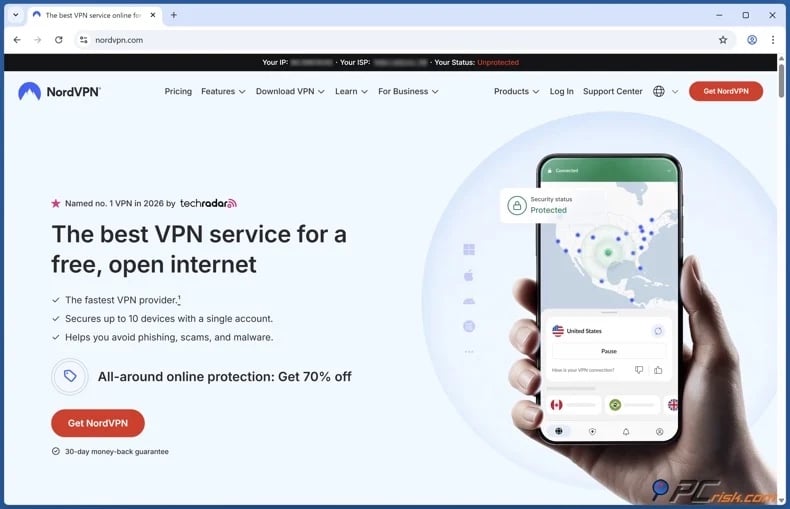
2. Download/Install the VPN application and sign in. Apps from major providers are usually compatible with multiple platforms (Windows, macOS, iOS, Android, streaming hardware, etc.).
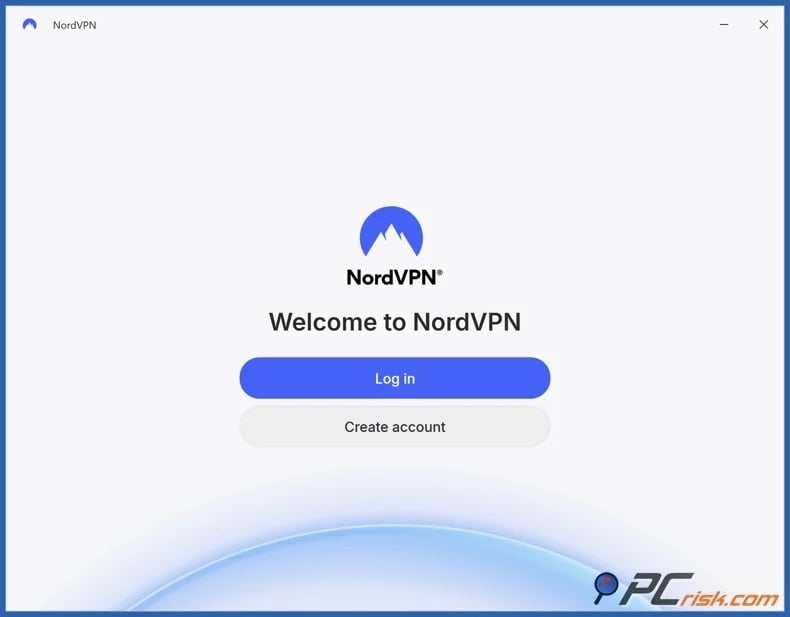
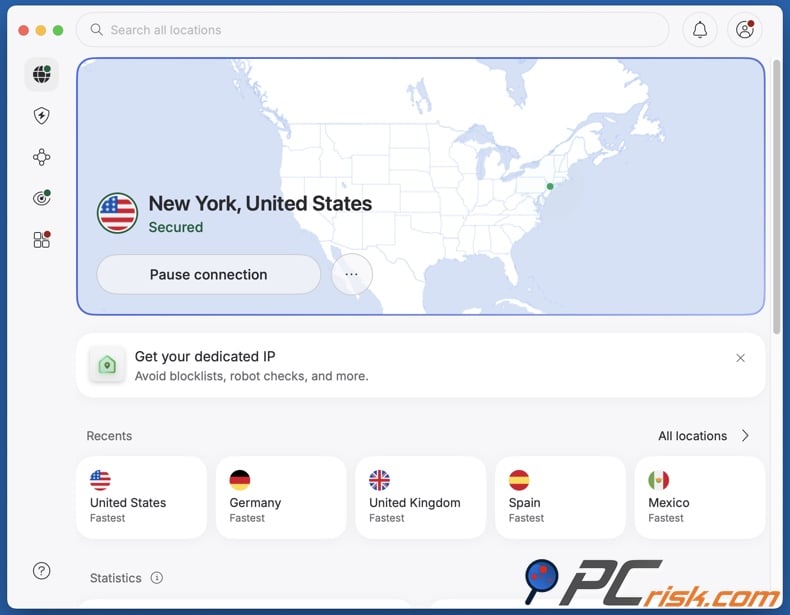
3. Connect to a server in the US. Note that the content available on YouTube TV can have regional differences. If you are looking for specific local channels, regional sports, or other locale-specific content - connect to the appropriate server.
4. Change your "Home area" settings to match. Open the settings for YouTube TV, select "Area", and click "Update home area". Change these settings to the same area as the VPN server you have connected to. It is noteworthy that the home area can only be changed twice a year.
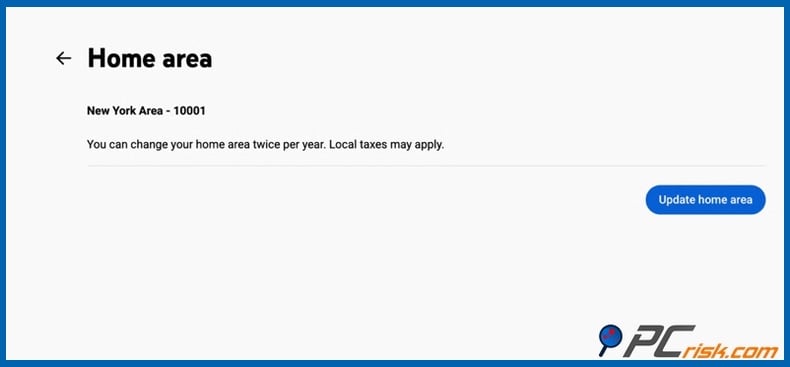
5. Open YouTube TV and begin streaming. Ensure that no potential location signals are conflicting with your new location; clear cookies/cache, especially if you have previously attempted to access YouTube TV without the VPN. If issues continue, check out the "Common issues and solutions when accessing YouTube TV with a VPN" section of this article.
Setting up a VPN on a smart TV:
If your smart TV supports VPN apps - simply install your VPN application, connect to an appropriate server, and launch YouTube TV. If your smart TV does not support VPN apps - you can configure the VPN at the router level or share a connection from a supported device.
A router-level setup ensures all devices use the VPN connection, but troubleshooting is more complex because switching servers or adjusting settings affects the entire network. Native VPN applications are generally easier to manage and adjust in real time.
Payment and account limitations
Even with VPN access, payment remains a significant challenge. YouTube TV may require:
- a valid U.S. billing address
- region-compatible payment methods
- periodic location verification
If these requirements are not met, your subscription may be declined or your account restricted.
We strongly advise against using third-party services that offer to create or pay for accounts on your behalf. These services are often unreliable and may expose you to scams, account theft, or fraudulent transactions.
It must be stressed that a VPN does not guarantee access to YouTube TV. The platform may detect VPN usage, enforce location checks, or restrict accounts that do not meet its requirements. Availability may also change as licensing and enforcement policies evolve. In summary, a VPN may help you access YouTube TV from outside its supported region, but success depends on server quality, account compliance, and payment verification.
It must be emphasized that a VPN does not replace dedicated security software. Visiting unfamiliar websites or unofficial platforms can expose users to malicious advertisements, phishing pages, fake verification prompts, and deceptive download links. Combo Cleaner addresses these risks by blocking harmful sites, identifying suspicious files, and detecting malware. While no solution offers complete protection, using a VPN alongside reliable security software greatly enhances your security on and offline.
A VPN encrypts your traffic — but your device still needs protection against malware and ransomware. Combo Cleaner adds the missing layer of defense.
Download Combo CleanerAntivirusDetect & remove malware threats→Best VPNs to watch YouTube TV
For accessing geo-restricted YouTube TV, your VPN should have extensive US server coverage for reliable regional access and fast, stable speeds to support uninterrupted live streaming. Look for consistent performance, reliable apps, and essential security features such as DNS leak protection and a kill switch. Additionally, prioritize strong privacy measures, including a strict no-logs policy, modern encryption, and a proven record of protecting user data.
Below are our top five VPN picks for 2026 (for an in-depth comparison, check out our dedicated article):
1. NordVPN
NordVPN is our top choice. Its fast speeds, audited no-logs policy, extensive server network, user-friendly apps, and reliable support - make it the strongest overall choice. NordVPN supports Android TV, Amazon Fire devices, Apple TV, router installation, and SmartDNS - thus offering broad big-screen setup flexibility. It also allows up to ten simultaneous device connections per account, which is helpful for testing YouTube TV across multiple devices.
2. Surfshark
Surfshark stands out with its unlimited device policy and comprehensive feature set. Due to this, the VPN is ideal for households and multi-device users. Surfshark's GPS Override on Android is notable, as it can make GPS-enabled apps register your location as the VPN server's. Since YouTube TV may require device-based location verification, this gives Surfshark a practical advantage.
3. Mullvad VPN
Mullvad is the leading choice for privacy. The VPN offers anonymous account creation, a strict no-logging policy, and a straightforward, marketing-free approach. Pricing is simple, and accounts are created with a generated number, avoiding data-heavy sign-ups. Mullvad suits users who prioritize privacy over smart TV features or advanced streaming tools. It is less ideal for users seeking to bypass geoblocks and geo-restrictions in general, as its server coverage is smaller than its competitors.
4. Proton VPN
Proton VPN is the best option for those seeking strong paid streaming features and a reliable free tier. Proton's audited no-logs policy and open-source applications further strengthen its privacy credentials. The free plan is best suited for testing or privacy needs, while for regular streaming - including YouTube TV - the paid tiers are the choice.
5. ExpressVPN
ExpressVPN is the choice for convenience. It provides a polished, stable, and excellent streaming performance. ExpressVPN emphasizes global server coverage, smart TV compatibility, router support, and MediaStreamer for devices that do not support VPN apps.
Can you use a free VPN to watch YouTube TV?
While you can use a free VPN, these services are generally unsuitable for YouTube TV. Google states that YouTube TV will not stream when connected to a VPN or proxy, and free services have a far higher chance of detection and blocking. Free VPNs are at a disadvantage compared to paid options because their servers are often crowded, limited, or already flagged.
The following are some of the primary limitations and risks associated with free VPNs:
Limited server options: free VPNs typically offer fewer locations, and the connections are less stable. This does not align well with YouTube TV, which relies on home-area and current-location checks. Additionally, limited server coverage can make bypassing geoblocks and geo-restrictions difficult or outright impossible.
Streaming and speed limitations: most free VPNs deprioritize streaming. In some instances, streaming is only available on paid plans, and free users must upgrade to access video content. Free servers also tend to have more users, which can reduce speed. While this may suffice for browsing, it is unsuitable for live TV services that require stable, uninterrupted playback.
Privacy and security risks: some free VPN apps share user information with third-parties, redirect traffic, or monetize users through advertising. Lack of adequate security protocols is another concern. Hence, these free tools undermine the privacy benefits of using a VPN.
If you prefer a free VPN, we recommend the free plan from Proton VPN. It offers no data cap, no ads, and no credit card required. However, streaming typically necessitates a paid plan, so the free plan is best suited as a low-risk privacy tool rather than a dependable solution for YouTube TV.
Common issues and solutions when accessing YouTube TV with a VPN
YouTube TV's use of market-based live TV rights and current-location checks makes VPN issues more persistent than with typical on-demand streaming apps. Factors such as location permissions, home-area rules, cache, playback-area verification, and VPN or proxy detection can all impact access.
Below are some of the most common issues and their solutions:
YouTube TV claims to detect a VPN or proxy - this messaging indicates that streaming is blocked, as Google does not allow access while connected to a VPN or proxy.
Potential solutions:
- Connect to a different US server and retry.
- Clear cookies or app cache before relaunching.
- Test in a browser if the app fails, or vice versa.
- Contact your VPN's support for current troubleshooting advice.
Home area or playback area mismatch - may occur because YouTube TV uses both home-area and current-location verification. Additionally, the service may request device location permissions or mobile verification.
Potential solutions:
- Check whether your account's home area matches the intended US market.
- On TV, complete the mobile verification flow at Google's requested page.
- Remember that the home area can only be changed twice in 12 months, and your connection must originate from the new area to change it.
Local channels are wrong, missing, or not recordable - often occurs when the service perceives you as outside your normal home area.
Potential solutions:
- Update the current playback area in the app settings.
- Sign in from your home area at least once every three months if you are a frequent traveler.
YouTube TV works on one device but not on the TV - TV platforms vary a lot in functional VPN setup.
Potential solutions:
- If your TV supports it, use a native VPN app (e.g., Android TV, Fire TV, Apple TV, etc.).
- If your TV does not support native VPN apps, set up the VPN at the router level (e.g., Samsung, LG, Roku, consoles, etc.).
- If your TV does not support native VPN apps, use a VPN-supported streaming box.
- Keep TV firmware up-to-date.
Buffering, poor quality, or unstable playback - live TV is less forgiving than ordinary browsing. Server load, long-distance routing, and weak overall speed can exacerbate these issues.
Potential solutions:
- Check your base Internet connection.
- Connect to a different US server.
- If possible, use a wired connection or stronger Wi-Fi.
- Pause other bandwidth-intensive activities on the network (e.g., downloads, background apps, simultaneous streams, etc.).
- If the issue occurs on the TV, test the setup on another device (laptop, phone, etc.) to check whether it is a TV-related problem.
Top VPN ReviewsExclusive dealsExpert-tested · hands-on reviews→
It is pertinent to mention that reputable VPN services offer quality support, including comprehensive documentation, router guides, and live chat. Therefore, trustworthy services may enable you to quickly resolve your YouTube TV access issues.
Is using a VPN to access YouTube TV legal?
VPN use is legal in many countries. In countries where these tools are lawful and widely utilized, the primary concern for YouTube TV users is platform enforcement rather than criminal law. It must also be mentioned that illegal activities remain illegal, and a VPN does not make them legal. There are countries with strict jurisdictions that impose legal bans, licensing requirements, and technical blocking on VPN technology.
The following are some examples of countries that impose VPN restrictions:
China - VPN controls are enforced under cybersecurity regulations, which were notably strengthened following the 2017 Cybersecurity Law. Only government-approved VPN providers are permitted, and authorities regularly block unauthorized services through the "Great Firewall". Enforcement measures target providers and may go after users as well.
Iran - authorities have long restricted VPN usage, with enforcement intensifying during periods of protest and political unrest (e.g., 2019-2024 periods). Unlicensed VPN services are deemed illegal, and the government promotes state-controlled alternatives while actively attempting to block foreign VPN endpoints.
Turkmenistan - the government operates a highly centralized Internet system in which VPNs and other circumvention tools are broadly blocked. Reports indicate the use of deep packet inspection (DPI) and active monitoring, resulting in limited and unstable access to external networks.
Russia - since 2017 (Federal Law No. 276-FZ) and especially after 2022, regulators have required VPN providers to block access to prohibited websites. Authorities have subsequently blocked hundreds of VPN services and protocols as part of broader efforts to establish a more controlled "sovereign Internet".
Belarus - restrictions on anonymization tools were introduced through amendments to media and telecommunications laws in the mid-2010s. More aggressive blocking and filtering have been reported during and after the 2020-2021 protests, with VPN services periodically disrupted or rendered inaccessible.
India - VPNs remain legal; however, a 2022 directive from the Indian Computer Emergency Response Team (CERT-In) requires providers to retain user data, including IP addresses, for up to five years. As a result, some privacy-focused VPN providers have withdrawn physical servers or adjusted their operations.
The key point is that while VPN use is generally legal in most locations, it does not supersede local laws or platform policies. According to Google’s help documentation, YouTube TV is intended for US users and may not stream if a VPN or proxy is detected. Therefore, even where VPNs are permitted, using one to access YouTube TV might result in playback errors, location checks, or account restrictions. Remember that laws can change, and it is important to keep informed of local law. While a high-quality VPN gives you the best chances of accessing YouTube TV from outside the US, no service guarantees continuous and uninterrupted access.
In closing
YouTube TV is a leading live TV platform in the United States, but it enforces strict location controls. Google specifies that the service is for use within the US, restricts access outside the country, and may block playback if VPN or proxy connections are detected. Hence, there is no guaranteed way to access YouTube TV from abroad. However, VPNs remain the most effective option for accessing geoblocked services like YouTube TV.
Connecting to a US-based server via a VPN can make it appear as though you are in a supported region. VPNs also offer other benefits, including encrypted connections, protection on public or managed networks, and reduced tracking. To summarize, use a reputable VPN with strong US server coverage, stable speeds, and reliable device compatibility.
Frequently Asked Questions (FAQ)
Why can't I access YouTube TV?
YouTube TV is a US-only service. It cannot be accessed outside the permitted territory or while traveling internationally.
How can I bypass YouTube TV geoblocking?
Many users try using a VPN connected to a US server, which changes the visible IP address and encrypts traffic. However, access is not guaranteed since YouTube TV verifies home area, playback location, and location permissions.
Is it legal to access YouTube TV with a VPN?
While VPN use is legal in many countries, not all uses are permitted. Using a VPN does not remove legal responsibility and may violate YouTube TV's terms of service.
Share:
 Facebook
 X.com
X.com
 LinkedIn
 Copy Link

Karolis Liucveikis
Experienced software engineer, passionate about behavioral analysis of malicious apps
Author and general operator of PCrisk's News and Removal Guides section. Co-researcher working alongside Tomas to discover the latest threats and global trends in the cyber security world. Karolis has experience of over 8 years working in this branch. He attended Kaunas University of Technology and graduated with a degree in Software Development in 2017. Extremely passionate about technical aspects and behavior of various malicious applications.
▼ Show Discussion