
How to get around a Telegram ban in 2026

How to get around the Telegram ban in 2026
At PCrisk, we often see the same thing happen: a platform gets blocked, slowed down, removed from app stores, or targeted by local network filters. Regular users are left unsure whether the service is down, whether their internet provider is involved, or whether their country has introduced new censorship measures. Telegram is a clear example because bans are not always complete shutdowns. In some places, the app is fully blocked. In others, it might be temporarily suspended, partly restricted, or harder to access due to app store removals, slower speeds, or advanced filtering.
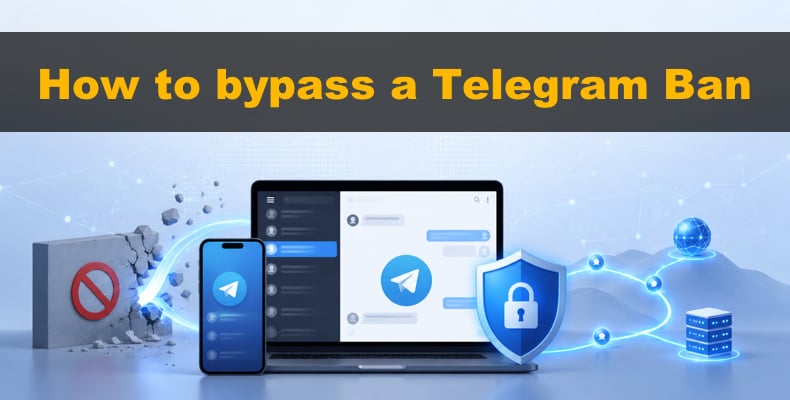
For us, the main question is not just "Is Telegram banned?" but also "What kind of block is it?" This matters because the best way around the block depends on the type of restriction. If the app still works but direct connections are filtered, a Telegram MTProto proxy might be enough. If you need more privacy, full device coverage, better app store access, or stronger protection against strict network controls, a VPN is usually a better option. There is no single answer for every situation, which is why we separate quick fixes from long-term solutions.
Disclaimer: At PCrisk, we do not encourage breaking national laws to use Telegram. Our goal is to focus on security and privacy, and to help readers understand their technical options when services are blocked or slowed. If using Telegram is illegal where you are, or if your school, workplace, or another institution bans bypass tools, you should follow those rules.
 Our top-rated VPN
4.5/5 in our review. Our top pick of the year: almost no slowdown in our speed tests, and it unblocked Netflix, BBC iPlayer and Disney+ without trouble.
Table of Contents:
- Introduction
- Where Telegram is banned
- How to get around a Telegram ban
- How to set up a Telegram MTProto proxy
- How to set up a VPN for Telegram
- Best VPNs for unblocking Telegram
- How we test VPNs and what to look for
- Conclusion
- Frequently asked questions (FAQs)
Where Telegram is banned
India is the latest country to block Telegram. On June 16, 2026, authorities temporarily banned the app until June 22, citing its use in cheating and fraud during the NEET medical exam retest. Reuters said the block used emergency powers under India's IT law, and a Delhi court upheld it on June 19 after Telegram challenged the decision. India stands out because it shows how quickly a large country can go from issuing takedown requests to a full nationwide ban, even affecting app stores.
China is a well-known example of long-term Telegram restrictions. Reuters reported in 2024 that people in China need proxy tools like a VPN to get past the Great Firewall and use Telegram. This means you cannot rely on normal access from a standard Chinese internet connection. If you are in mainland China, you will likely need circumvention tools to access Telegram.
Iran has also blocked Telegram for a long time. Reuters reported in 2018 that the judiciary banned the app for national security reasons, making it part of Iran's wider censorship system. In 2026, Reuters said Iran kept strict controls on international internet access, and only some users could get around the restrictions with advanced VPNs during blackouts. So, in Iran, the problem is not just with Telegram - sometimes the whole internet can become unstable or heavily filtered during political crises.
Vietnam blocked Telegram more recently. In May 2025, Reuters reported that the technology ministry told telecom companies to block the app, saying Telegram did not cooperate over criminal activity. This is important because it was a clear government order, not just a rumor or technical issue. For people in Vietnam, Telegram access is now unreliable, even if it sometimes works on certain networks.
Russia's situation is more complex, but it is still relevant. Telegram was blocked and later unblocked in the past, but in 2026, new restrictions appeared. Reuters reported in February that Roskomnadzor limited Telegram's voice and video calls and considered more action. By March, Russia was restricting Telegram and blocking many VPNs. In June, Reuters said Russian authorities were also blocking foreign apps like Telegram as part of stricter censorship. The main point is that while Russia's approach is different from India's or China's, Telegram access there is once again under pressure and can become unreliable at any time.
It's not accurate to say every country is simply 'banned' or 'not banned' when it comes to Telegram. Sometimes the app is blocked everywhere, sometimes only certain features are limited, and sometimes it's just removed from app stores before network access is cut off. Some bans last only a few days but still affect millions. This detail matters because the best workaround for a slow or unstable connection might not work if Telegram is removed from app stores or if the network is actively blocking VPNs.
How to get around a Telegram ban
The two best ways to get Telegram working again are using Telegram’s built-in proxy support, especially MTProto, and using a VPN. Telegram’s official guides explain that MTProxy helps users get around internet censorship by hiding Telegram’s IP and disguising traffic. That’s why starting with an MTProto proxy is often the quickest fix when Telegram is blocked.
A proxy is often the fastest solution. You just add a server, port, and secret to Telegram, turn it on, and if the proxy works, Telegram should connect in seconds. It’s simple, built into the app, and doesn’t affect your whole device. This makes proxies great for people who just want to send messages, follow channels, or get basic access without changing their entire network.
A VPN is usually a better long-term fix. For example, NordVPN says its Windows app protects your whole device, and its NordWhisper feature is made for tough networks like those at schools, offices, airports, hotels, or filtered Wi-Fi. A VPN covers Telegram, app stores, browsers, and other blocked services all at once, not just one app.


Here’s a simple way to approach Telegram blocks. If Telegram is just filtered, try an MTProto proxy first. If the network is stricter, keeps disconnecting VPNs, or blocks normal VPN traffic, switch to a VPN with a stealth mode like NordWhisper or obfuscated servers. If Telegram is also missing from local app stores, a VPN is even more useful because it helps you access Telegram and download or update the app.
There are some common mistakes to avoid. First, don’t trust every free proxy just because it’s fast- Telegram warns to only use proxies from sources you trust. Second, not all VPNs work well on restricted networks. PCrisk’s VPN tests focus on stealth features and usability under censorship because some VPNs fail in blocked areas. Third, don’t wait for a crisis to set things up. If blocks are already happening, it’s much better to have your backup options ready ahead of time.
How to set up a Telegram MTProto proxy
Telegram officially supports proxies on both desktop and mobile apps, including SOCKS5 and MTProto. For unblocking Telegram, MTProto is usually the better option because it helps bypass censorship by hiding Telegram's IP and disguising traffic. If your goal is to get Telegram working again, this is often the simplest and quickest method.
Windows desktop setup
To set up on Windows, open Telegram Desktop, go to Settings>Advanced>Connection Type. Select custom proxy, click Add Proxy, and choose MTProto. Enter the server, port, and secret exactly as given by your proxy provider. Save and enable the proxy. When connected, Telegram shows a shield icon at the top of your chat list to confirm the proxy is active.
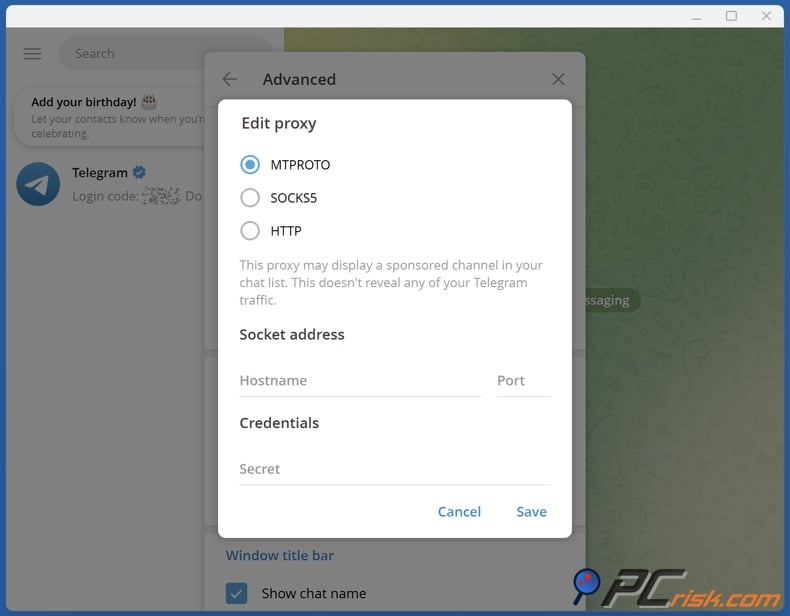
We suggest adding at least one backup proxy after the main setup. Telegram lets you enable "Auto-Switch Proxies," which will automatically switch to another proxy if your current one disconnects. This is helpful in places with unstable censorship, since public proxies can go offline or slow down without notice.
The main challenge is finding a trustworthy proxy source, not just following the setup steps. Telegram warns against using proxies from untrusted sources or friends. We agree. Free proxies might restore access, but they can disappear, slow down, or be run by unknown operators. MTProto is helpful, but you should always be careful about who provides your proxy.
Android setup
For Android, go to Settings, then Data and Storage, and then Proxy Settings at the bottom. Add a new proxy, select MTProto, and enter the server, port, and secret. Save it and make sure the proxy is enabled. If it connects, Telegram will use the proxy for its traffic and show a shield icon when active.
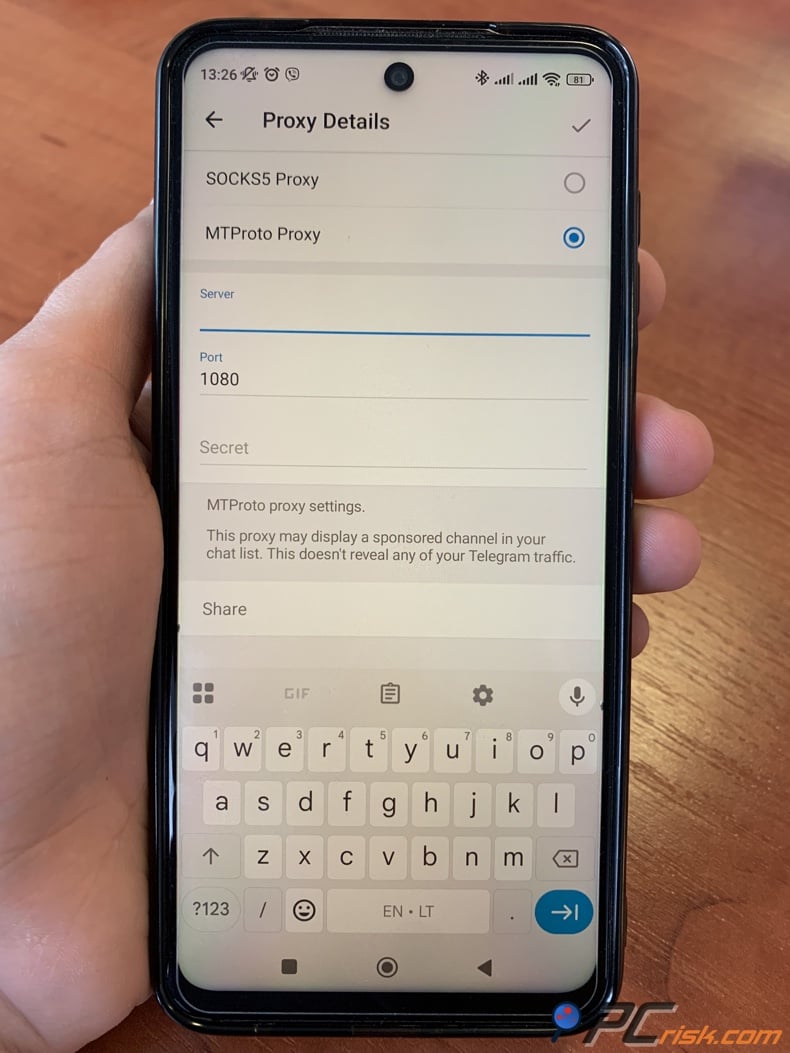
If the first proxy does not work on Android, it does not mean Telegram is broken. Public MTProto proxies often fail. We recommend trying another trusted proxy instead of repeatedly toggling mobile data or restarting the app. If several proxies do not work, it is time to try a VPN instead.
iPhone and iPad setup
On iOS, go to Settings>Data and Storage>Proxy. Add a new proxy, choose MTProto, and enter the server, port, and secret. Save and enable it, then check for the shield icon in Telegram to confirm the connection. Most users can finish this setup in under a minute if they have the proxy details ready.
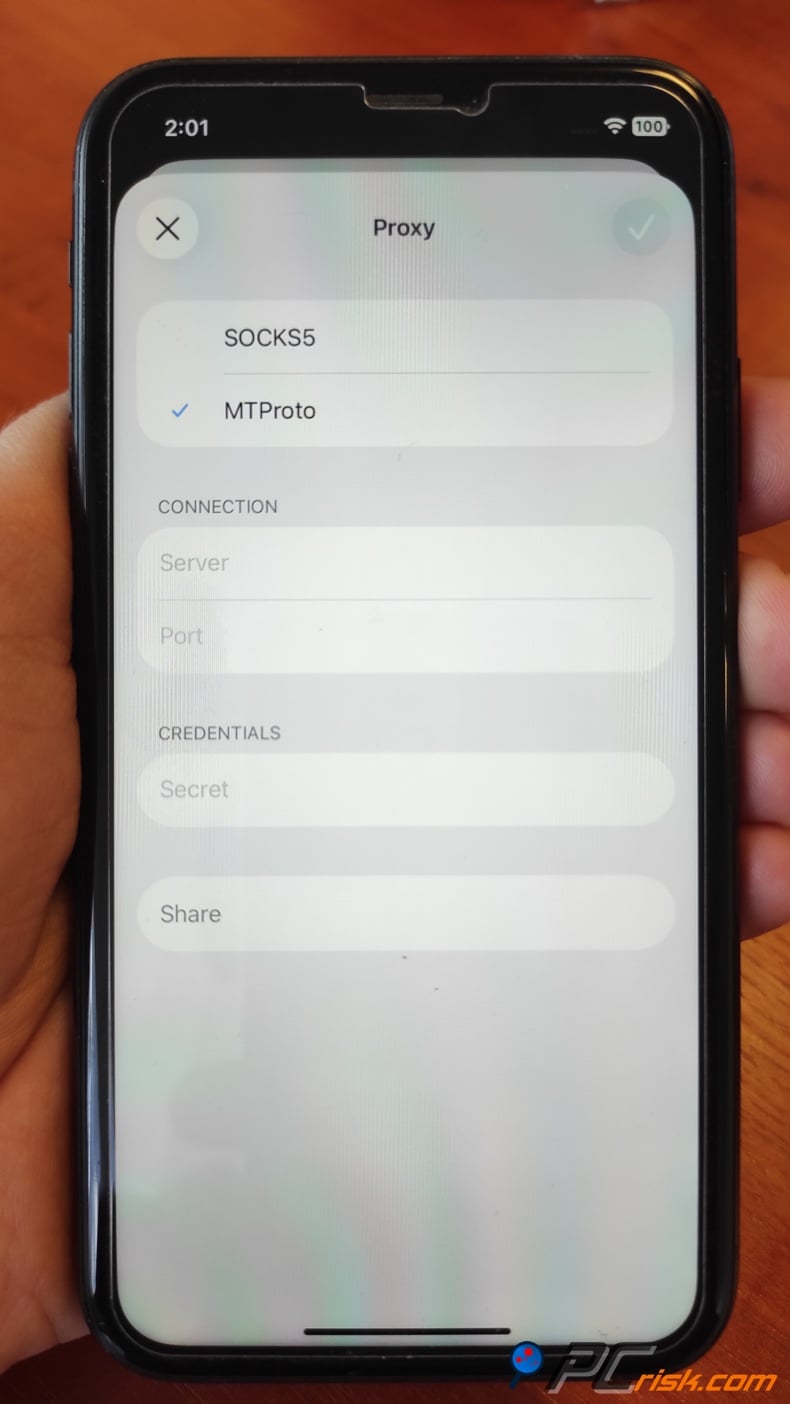
The main issue with iPhones is that proxies can be unreliable, slow, or stop working at any time. We see MTProto on iOS as a quick tool for getting around Telegram blocks, especially where Telegram is filtered, but not as the best privacy solution overall. If you want to protect Safari, other apps, or app store access, a VPN is a better choice.
What are the benefits of using a proxy for Telegram
The main benefit is how quickly you can set up a proxy. Telegram supports proxies directly, so you do not need another app. MTProxy was made to help users reach Telegram under censorship. If you just want Telegram to work again, a proxy is less intrusive than using a VPN for your whole device.
There can be a privacy benefit too. Since the proxy is set up inside Telegram, it only affects the app, not your whole device. For users who want a simple workaround and trust their proxy source, this might be enough. Still, a proxy does not offer the same protection as a strong VPN on a risky network.
Using a free proxy for Telegram
A free Telegram proxy is appealing because it is free and can quickly restore access. This is helpful during sudden blocks, especially if you just need to read messages or check updates. Some people also like free proxies because they do not require installing a VPN and can be changed easily.
The downsides make us careful. Telegram says to use only trusted proxy sources. Free public proxies can vanish, work poorly, or be overloaded. They also do not protect your whole device as a VPN does. We see free proxies as good for emergencies, but not for reliable long-term use.
How to set up a VPN for Telegram
While a proxy offers a quick fix, a VPN is a more complete solution. A VPN helps with Telegram, browser access, app store problems, and overall privacy on restricted networks. For this guide, we use NordVPN because we rank it highest, because it did well in our reviews, and its documentation highlights features for tough local networks.
Desktop setup with NordVPN
Download the NordVPN app, run the installer, sign in to your Nord Account, and click "Secure my connection" to connect right away. The app protects your entire device when connected. This is one reason we recommend a VPN over a proxy, especially if the network is restrictive or you need more than just Telegram.
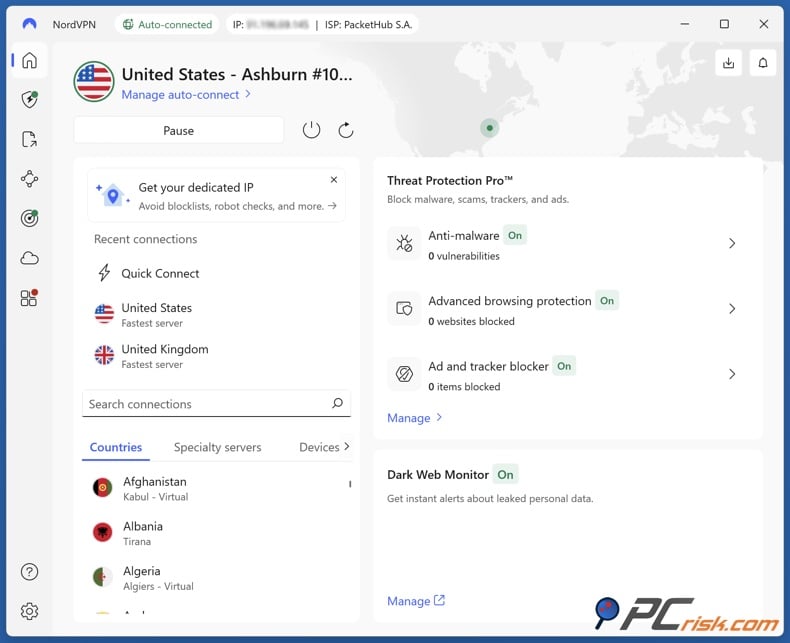
If you are on a filtered school, campus, or similar network and the first connection does not work, try changing the protocol. NordVPN says you can go to Settings, then Connection and security, then Protocol, and choose NordWhisper. NordWhisper is built for restrictive networks, such as those on campuses or in offices. Try this protocol first on heavily filtered Wi-Fi where regular VPN traffic might be blocked.
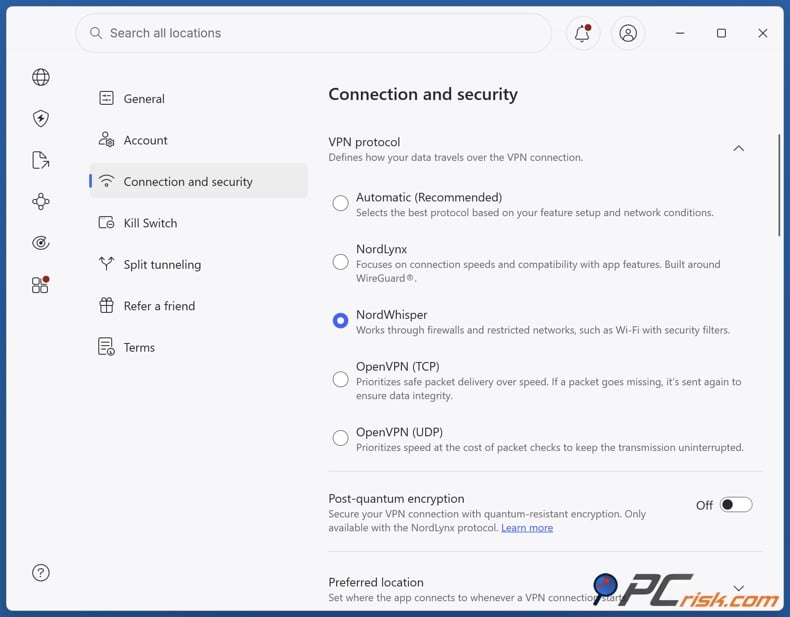
If NordWhisper does not connect, change the protocol to OpenVPN TCP or OpenVPN UDP, then use NordVPN's obfuscated servers. Obfuscated servers hide your VPN traffic. On Windows, switch to OpenVPN, go to Specialty servers, and select Obfuscated Servers. This setup is helpful when a network tries to block or detect VPN use.
After you connect, open Telegram as usual. Often, this is all you need. If Telegram is still slow, disconnect and reconnect to a server in a nearby country with less filtering, since distance affects speed. Our tests show that closer servers usually maintain higher speeds, so we recommend starting with local or regional servers before trying distant ones.
Android setup with NordVPN
On Android, install NordVPN from your app store, open it, log in, and tap "Secure my connection" to connect to the fastest server. You can also swipe up to see the Countries list or use the search icon to pick a specific location. This flexibility helps with Telegram, since changing your country or city can sometimes bypass regional filters.
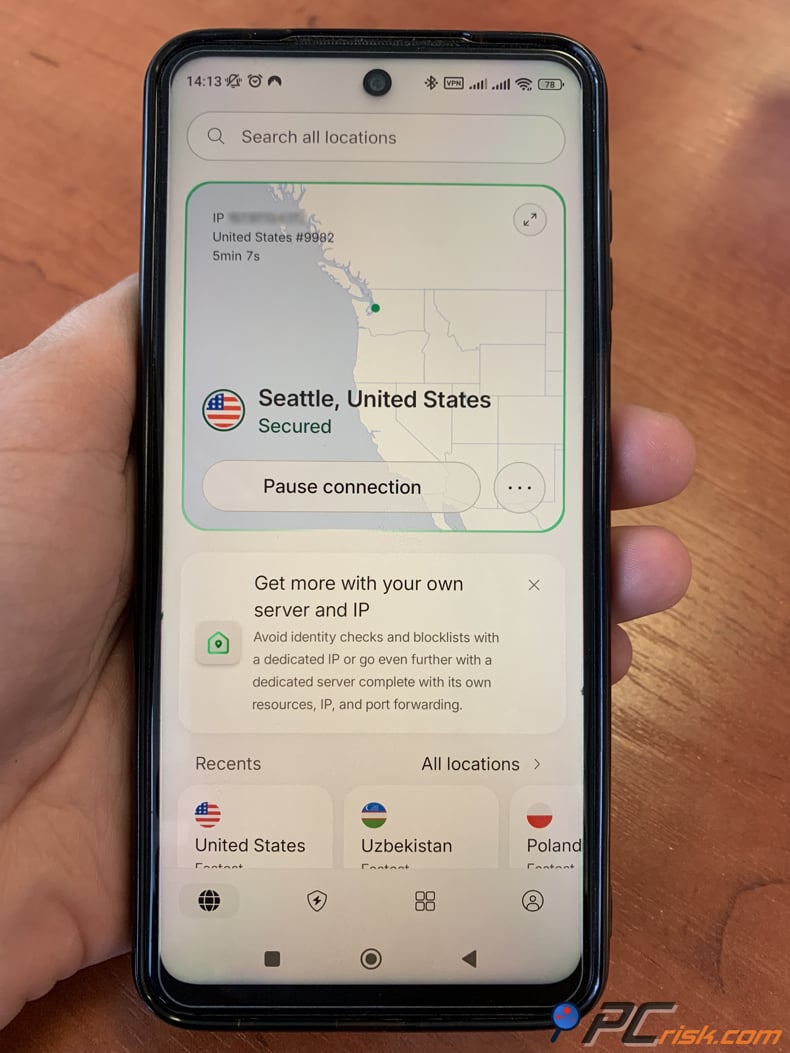
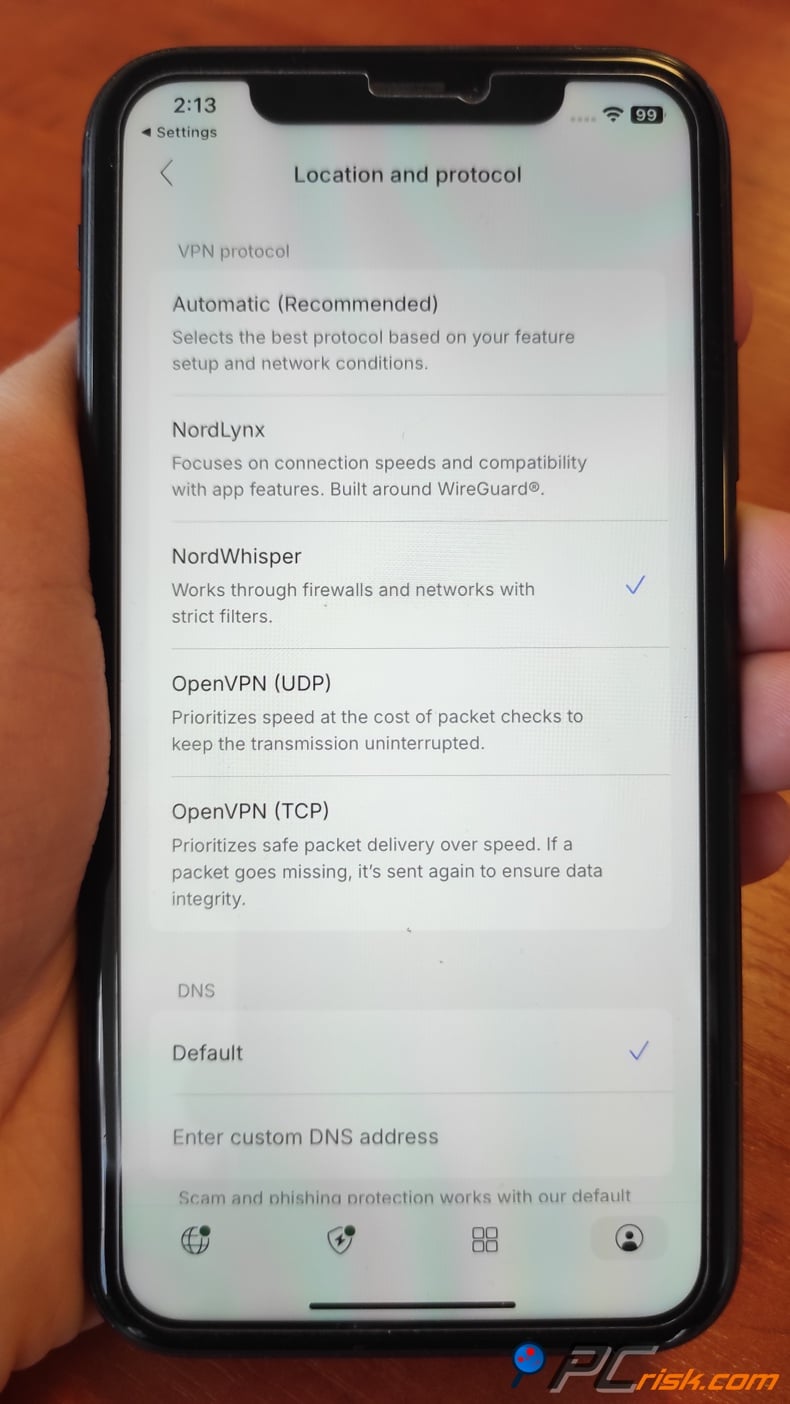
If the network is restrictive, open your profile, go to Settings, and change the protocol. NordWhisper is available on Android and is meant for tough local networks. If needed, you can also switch to OpenVPN and use obfuscated servers from the Specialty Servers section. This is important on mobile too, since public Wi-Fi and campus networks often have stricter filtering than home internet.
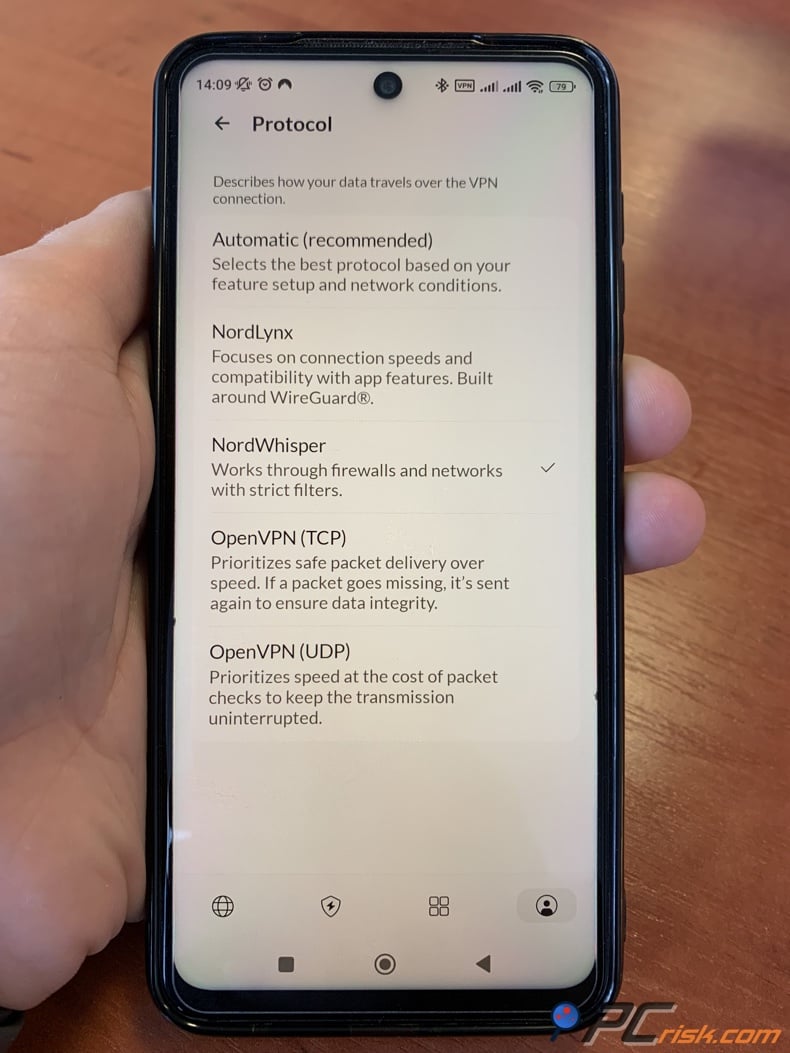
iPhone and iPad setup with NordVPN
On iOS, download NordVPN from the App Store, open it, log in, and tap "Secure my connection" to connect to the best server. The first time you connect, iOS will ask for permission to add VPN setting - allow this to finish setup. When the map pin turns green and the app says you are secured, your device is using the VPN.
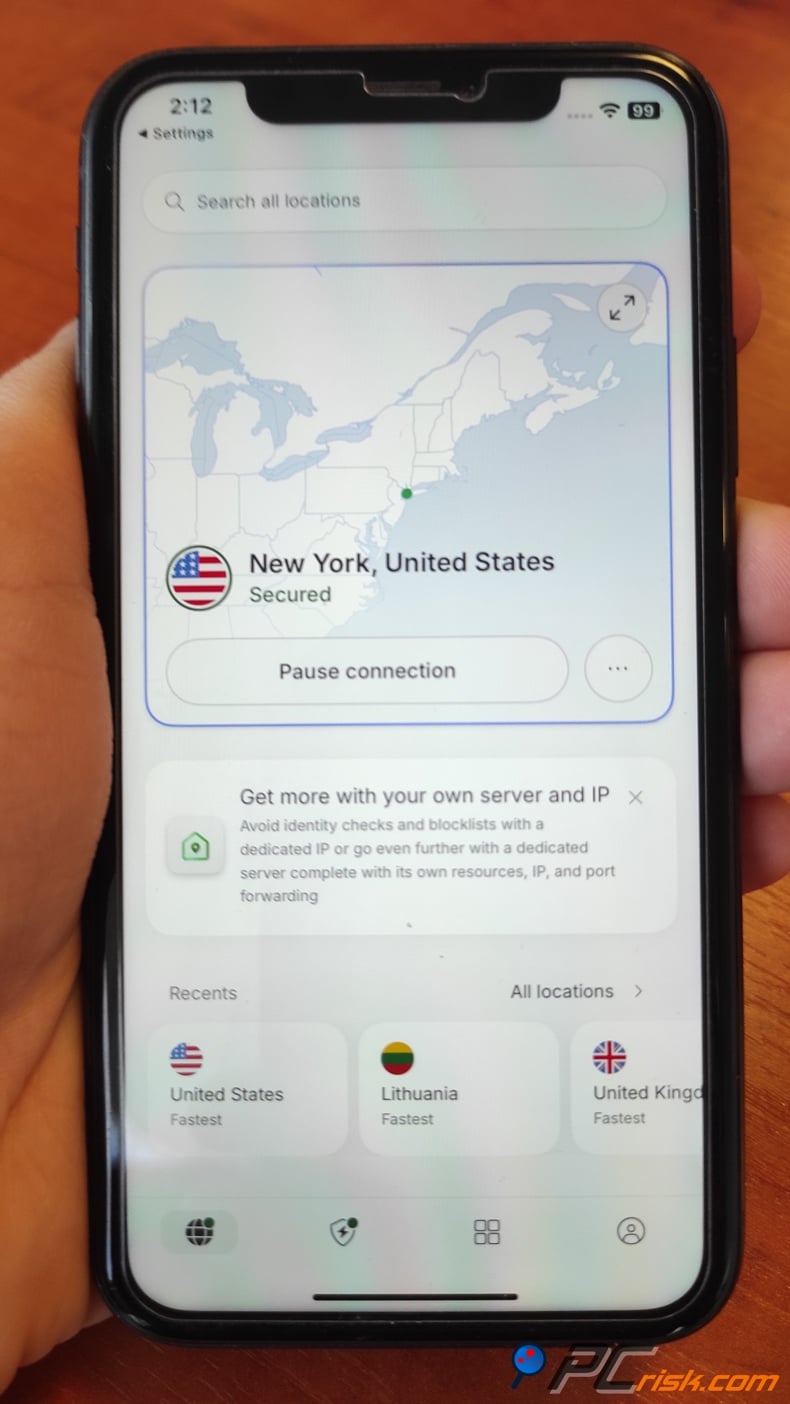
If Telegram is still blocked or the network is clearly restrictive, tap the profile icon, go to Settings, then Location and protocol, and switch to NordWhisper or another supported protocol. For more stealth, switch to OpenVPN and use obfuscated servers from Specialty Servers. This is the best order for filtered iPhone connections: try auto connect first, then NordWhisper, then obfuscated servers.
What are the benefits of using a VPN for Telegram
The main benefit is coverage. Unlike a Telegram proxy, a VPN protects your whole device when it is on. This means that Telegram, browsers, app stores, and other apps are all covered in one go. If your issue extends beyond Telegram, a VPN lets you avoid having to fix the same problem in each app separately.
Another benefit is better privacy and stronger security features. PCrisk's tests focus on encryption quality, kill switches, DNS and IP leak protection, and how well the VPN works if the network fails. These are standard VPN strengths, not typical of free proxies. That is why we usually recommend a trusted VPN when readers want the best tool, not just a quick fix.
A third benefit is reliability on tough networks. NordVPN offers NordWhisper for restrictive environments and obfuscated servers to hide VPN traffic. This does not guarantee it will work everywhere, but it gives you more options when simple solutions fail. A basic public proxy usually does not offer this flexibility.
If you are testing new proxies or VPNs to restore Telegram, we suggest adding one more layer of protection first. Combo Cleaner can help you scan for malware, block phishing and malicious websites, and clean up unwanted files or apps that may slow your device down.
 Made by RCS LT, the company behind PCrisk
- Detect malware already on the device
- Block phishing pages once you open them
- Remove adware or browser hijackers
- Scans for free and shows what it finds
- Removes it with a licence, 7-day free trial
- Blocks scam and phishing sites in the browser (Windows)
Best VPNs for unblocking Telegram
At PCrisk, we keep our Telegram recommendations focused and practical. The five services below are all featured on our VPN review page, and that's the list we're using here. For Telegram, we look for reliability, resistance to censorship, ease of use on both mobile and desktop, privacy, and enough flexibility if a standard connection doesn't work.


NordVPN is our top pick for unblocking Telegram. We rate it as the best VPN overall in 2026, thanks to its fast speeds, verified no-logs policy, reliable apps, and helpful specialty features. For Telegram, we especially like its easy-to-use apps, fast connections, support for up to ten devices, and access to NordWhisper and obfuscated servers for tougher networks. This makes it a solid choice for both beginners and those facing strict censorship.
The benefits are clear: strong security and privacy, fast speeds, reliable streaming and unblocking, and user-friendly apps with a kill switch and extra tools. The downsides are higher prices for short-term plans, no unlimited free version, and missing features like split tunneling on iOS and macOS. Still, NordVPN is the most balanced option for Telegram on our list.
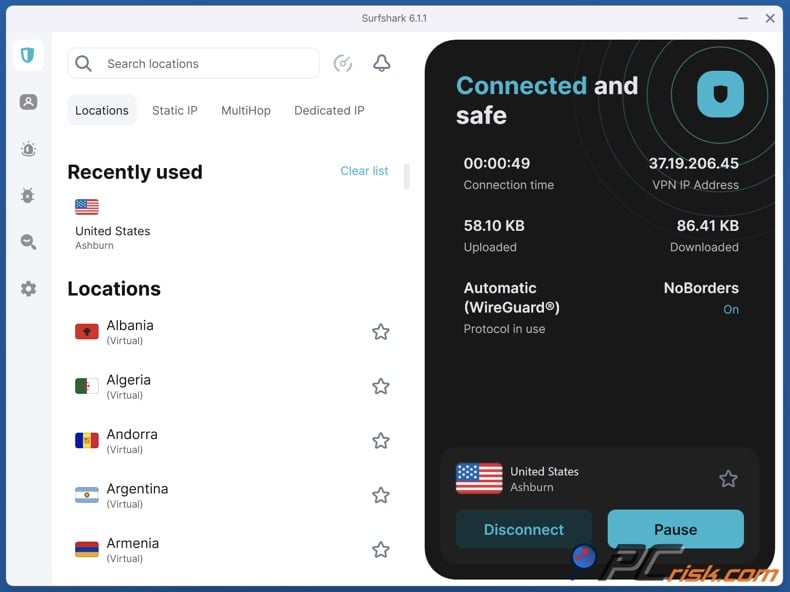
Surfshark is the best value for users who want to unblock Telegram on many devices. We give it high marks for its price, unlimited connections, strong WireGuard speeds, and features like MultiHop, CleanWeb, split tunneling, and a kill switch with Everlink recovery. If you want Telegram on your phone, tablet, laptop, and a family member's device, Surfshark is a great choice.
Surfshark's main strengths are its affordable long-term plans, unlimited device support, and strong overall performance. The downsides are higher renewal prices, no free plan, and some missing features on iOS and Linux. For Telegram, Surfshark is a great pick for budget-conscious users who still want a full-featured, high-performing VPN.
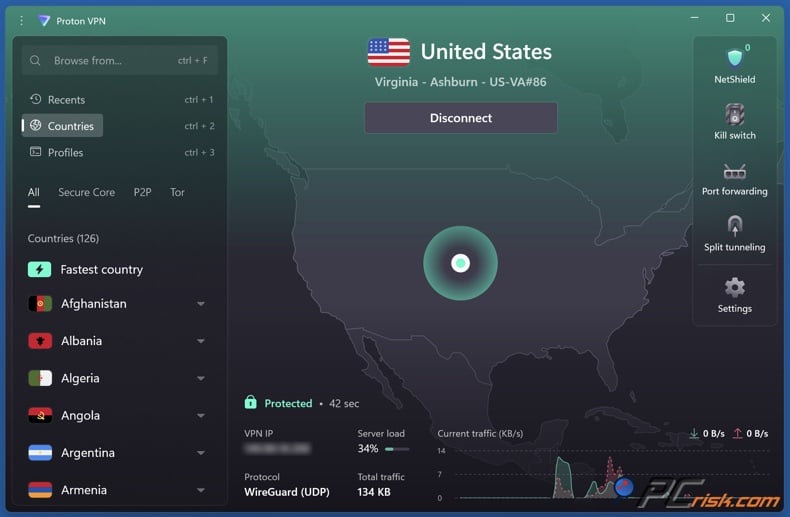
Proton VPN is one of the best choices for Telegram if privacy is your top concern. Its main strengths are its Swiss origin, open-source apps, audited no-logs policy, Secure Core multi-hop, NetShield blocking, and a strong free plan. The free plan is especially useful for Telegram, since many people look for a quick solution in emergencies. Proton offers a trustworthy starting point for those users.
Proton VPN offers strong privacy, a wide range of features, and one of the best free VPN plans, with no data limits or ads. The downsides are higher long-term costs, good but not always the best performance, and slower support compared to some competitors. We recommend Proton for Telegram if privacy is your main concern, especially if you want a reliable free option instead of using unknown proxies.
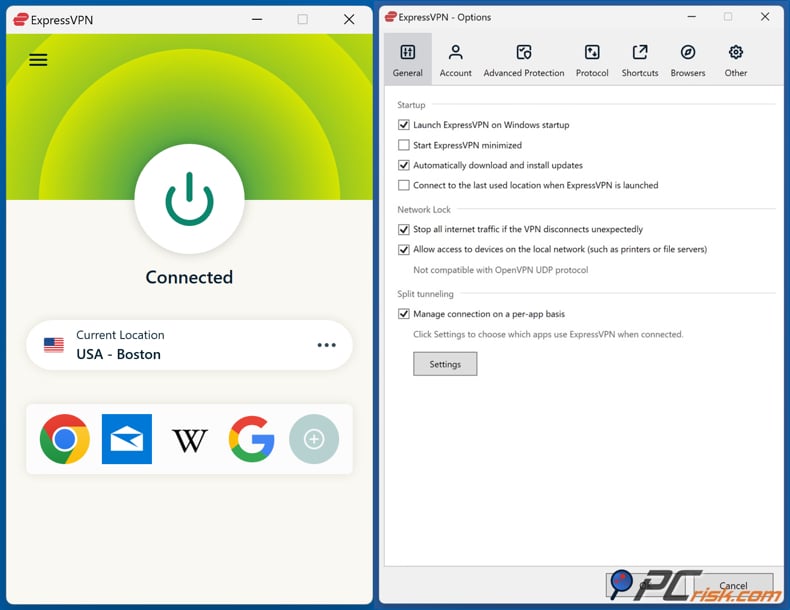
ExpressVPN is one of the easiest premium VPNs to recommend for people who aren't very technical. We can highlight its strong security, verified no-logs policy, RAM-only servers, steady speeds, and easy-to-use apps. It also uses the Lightway protocol, which is built for fast and reliable connections. For Telegram, this means you get simple apps, good support, and steady performance without much setup.
ExpressVPN offers fast, reliable connections, a simple design across devices, and a strong privacy reputation. The downsides are its price, fewer advanced features than some rivals, and shorter plan options. For Telegram, it may not be as flexible as NordVPN or as free as Proton, but it's a great choice if you want something simple and dependable for everyday use.
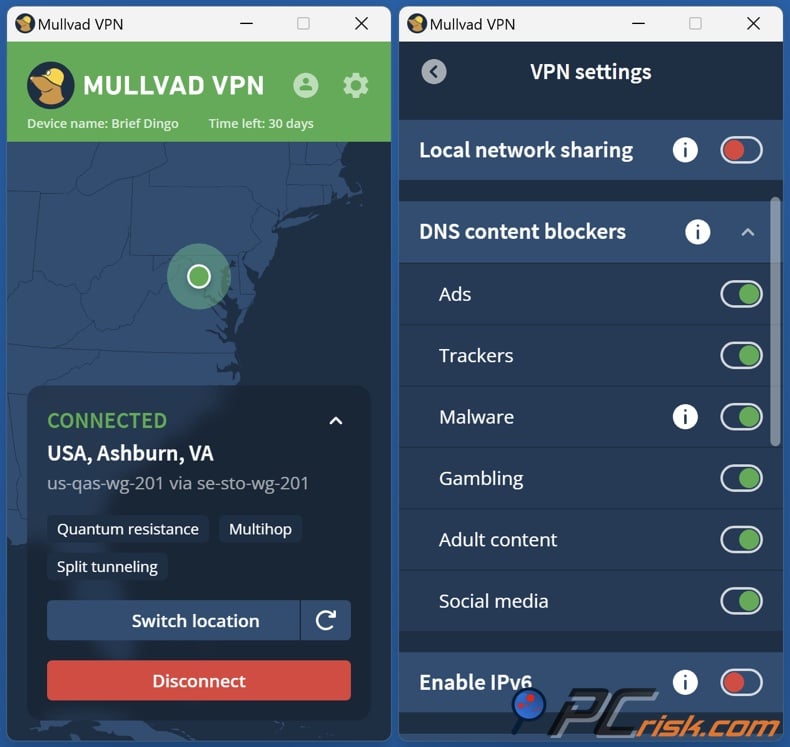
Mullvad VPN is the top choice for privacy-focused users. We can highlight its anonymous sign-up, strict no-logs policy, open-source apps, strong encryption, and steady performance. If you want to keep your identity private and prefer a simple, privacy-first VPN instead of a feature-heavy one, Mullvad is a strong option. For Telegram, it's best for advanced users who know what they need and don't care about extra features.
We rank Mullvad lower for Telegram, not because it's weak, but because it's more limited. We point to its smaller server network, lack of live chat, lack of special discounts, and less effective unblocking for mainstream services. These don't take away from its strengths, but they make Mullvad a more specialized choice. We recommend it for experienced users who want strong privacy and simple pricing, not for those who need lots of features for tough Telegram blocks.
How we test VPNs and what to look for
Our VPN testing process is why we feel confident making these recommendations. We start by checking security, since that's most important. We review encryption, handshake and authentication methods, DNS, IP, and WebRTC leaks, and how the kill switch works during network problems. We also look at features such as provider-controlled DNS and RAM-only servers. If a VPN leaks when the network is unstable, it's not good enough, no matter how nice its price looks.
Speed is the next key factor. We check how fast each VPN is without protection, then test servers at different distances and times of day, averaging the results. We also compare how different protocols perform across real-world tasks like HD and 4K streaming, large downloads, torrenting, and activities that require low latency. For Telegram, this matters because a VPN that connects but makes voice notes slow isn't a real solution.
We also test streaming and geo-unblocking, which is more important for Telegram than it might seem. We check if VPNs can access region-locked services and work in places with heavy censorship, including using stealth or obfuscated modes when available. The same features that help a VPN get around streaming blocks often help restore access to messaging apps like Telegram under strict filters.
Usability is also very important. We look at how easy it is to install, sign up, use the apps on desktop and mobile, switch servers, and set up auto-connect. We also check if advanced settings are easy to understand. In a block situation, you don't want a VPN that's hard to figure out. You want one that helps you quickly find the right protocol, server, and settings.
When picking a VPN for Telegram, we focus on a few key features. We look for strong, modern protocols, a kill switch, no leaks, a trustworthy no-logs policy, good apps for both mobile and desktop, and, if possible, stealth tools for tough networks. NordWhisper and obfuscated servers are good examples, as they're made for the kinds of filtered networks that can block Telegram. A wide range of servers and good local options also help keep speeds up.
We also think it's important to be realistic about free VPNs. Free options can help, but they usually don't offer all the features. Of the VPNs on PCrisk's list, Proton VPN stands out because its free plan has no data limits or ads, but it's limited to one device, a few countries, and doesn't support streaming or P2P. This makes it useful for basic Telegram access, but it's not the same as a strong paid plan. NordVPN and Surfshark don't have permanent free versions, though NordVPN does offer trials and money-back guarantees depending on where you buy.
Our advice on free VPNs is straightforward. They can be a good emergency option, especially if the alternative is a random free proxy. But if you rely on Telegram for work, family, or daily use, we don't recommend making a free VPN your long-term solution. In those cases, a reliable paid VPN is usually worth it for better stability, support, and security.
Conclusion
If you want a quick answer, here it is: the fastest way to try getting Telegram back is usually with an MTProto proxy. For a more complete solution, a VPN is better. We see proxies as good for quick fixes, while VPNs are the best choice when you need privacy, reliability, app store access, and full-device protection.
If you want the most reliable option, NordVPN is our top pick. We rank it first, and for Telegram it offers what matters most: strong performance, polished apps, solid privacy, and extra connection options like NordWhisper and obfuscated servers for tough networks. If you want the easiest and most complete solution, start here.
Our top pick of the year: almost no slowdown in our speed tests, and it unblocked Netflix, BBC iPlayer and Disney+ without trouble. $3.39/mo on the 2-year plan or $4.99/mo on the 1-year plan, 30-day money-back guarantee. Compare all three
Surfshark is the best value if price and device count are your main concerns. Proton VPN is the top choice if you want strong privacy and a trustworthy free option. ExpressVPN is great for those who want something simple and reliable. Mullvad is best for users who care most about anonymity and open-source transparency. All of these are good options - the right one depends on whether you care most about cost, simplicity, free access, or privacy.
One last thing: Telegram bans are not all the same. As of June 19, 2026, India's block is a temporary nationwide suspension because of the NEET exam, while China, Iran, Vietnam, and Russia each have their own ongoing restrictions or censorship. That's why we don't suggest a single solution for everyone. Start with the simplest tool that fits your situation, move up if needed, and always keep legality, trust, and privacy in mind.
Frequently asked questions (FAQs)
What is the best way to unblock Telegram quickly?
If you want the quickest way to check, try using a Telegram MTProto proxy first. Telegram apps support proxies, and MTProxy was made to help users connect when Telegram is blocked. If that does not work, or if you want more privacy and protection for your whole device, use a VPN instead.
Is an MTProto proxy better than a VPN?
Usually, an MTProto proxy is not better than a VPN, but it can be useful for certain situations. It is often quicker to set up and works well if you only need Telegram. A VPN is better overall because it protects your whole device and offers more options for tough networks. Proxies are good for quick fixes, while VPNs are better for long-term use.
Which VPN is best for Telegram?
We recommend NordVPN as our top pick. We ranked it first overall in 2026. For Telegram, it offers fast speeds, easy-to-use apps, coverage for up to ten devices, verified privacy claims, and helpful features for tough networks like NordWhisper and obfuscated servers.
Can I use a free VPN for Telegram?
Yes, you can use a free VPN for Telegram, but keep your expectations realistic. Proton VPN is the best free option because it has no data caps or ads. However, the free plan only works on one device, in a few countries, and does not allow streaming or P2P. For occasional or emergency use, this might be enough. For reliable daily access, paid VPNs are still safer.
Are free Telegram proxies safe?
Sometimes free Telegram proxies are safe, but not always. Telegram clearly says to only use proxies from sources you trust, and that advice is important. A free public proxy might work today but disappear tomorrow, or it could be run by someone you do not know. We see free proxies as tools for emergencies, not for regular use.
Will a VPN slow Telegram down?
Yes, a VPN usually slows Telegram down a bit, but the best VPNs keep this slowdown small. We found that encryption and routing do reduce speed, but top VPNs are built to limit this effect. They usually work well for messaging, calls, and media. Using servers close to you and good protocols helps keep things fast.
What should I do if NordVPN does not connect on a filtered network?
First, try changing the protocol. NordVPN suggests using NordWhisper for networks with strong restrictions. If that does not help, switch to OpenVPN and use obfuscated servers from the Specialty Servers section. This step-by-step approach often works best on networks that block regular VPN traffic.
Can I use Telegram Web instead of the app during a ban?
Sometimes you can use Telegram Web instead of the app, but it depends on how the block works. If the network blocks Telegram domains or routes, the web version might also be blocked. A proxy or VPN is usually more reliable because it solves the connection problem, not just the app format. For example, during India's June 2026 block, app store removals and ISP actions showed that bans can go beyond just blocking the app download.
What should I choose first, proxy or VPN?
If you want the fastest fix just for Telegram and have a trusted MTProto proxy, start with a proxy. If you care about privacy, want to protect your whole device, or think the network is very restricted, start with a VPN. In short, use a proxy for speed and a VPN for stronger protection.
Share:
 Facebook
 X.com
X.com
 LinkedIn
 Copy Link

Rimvydas Iliavicius
Researcher, author
Rimvydas is a researcher with over four years of experience in the cybersecurity industry. He attended Kaunas University of Technology and graduated with a Master's degree in Translation and Localization of Technical texts. His interests in computers and technology led him to become a versatile author in the IT industry. At PCrisk, he's responsible for writing in-depth how-to articles for Microsoft Windows.
▼ Show Discussion