
We may earn commissions from products we recommend. Learn more.
How to bypass speed throttling by T-Mobile in 2026 with a VPN

How to bypass speed throttling by T-Mobile in 2026 with a VPN?
T-Mobile is a leading provider in the US mobile market and serves as more than just a phone carrier for many customers. It is an essential connection for work, streaming, navigation, banking, messaging, gaming, and home Internet. Hence, network speed and privacy are critical. When users experience slowdowns, reduced video quality, buffering, or unexpected restrictions, it is reasonable to question whether their connection is being managed, deprioritized, or limited.
A reputable VPN can assist in some of these scenarios. While it will not improve every slow T-Mobile connection or bypass plan limits and weak signal coverage, it can encrypt your traffic, make it harder to identify specific apps or services in transit, and enhance privacy between your device and the network.
Disclaimer: PCrisk.com does not promote, encourage, or endorse bypassing lawful network management, violating terms of service, or using VPNs to conceal illegal activity. This article is for informational and educational purposes to help users understand VPNs, ISP privacy concerns, network troubleshooting, and online security. Always follow applicable laws and use any method described at your own risk.
Bypass T-Mobile throttling with NordVPNSpecial deal30-day money-back guarantee→
Table of Contents:
- Introduction
- T-Mobile speed throttling and privacy concerns
- How can a VPN help with T-Mobile?
- Setting up a VPN in 2026
- Best VPNs for T-Mobile
- Can you use a free VPN to help with T-Mobile speed throttling?
- Common VPN issues and solutions with T-Mobile
- Is using a VPN to help with T-Mobile speed throttling legal?
- In closing
- Frequently Asked Questions (FAQ)
T-Mobile speed throttling and privacy concerns
T-Mobile is a leading US wireless carrier that also offers home Internet and broadband services. As a result, one provider may manage a user's smartphone, hotspot, and home Internet traffic. Given the volume of daily activity on its network, traffic management, video optimization, account prioritization, and advertising data collection have become increasingly significant.
The term "speed throttling" is often used broadly, which can cause confusion. Some users apply it to any slowdown, while technically it refers to a provider intentionally reducing speeds for specific traffic, applications, destinations, or accounts after certain triggers. T-Mobile states it uses disclosed network management practices, including heavy-user prioritization and video optimization. Its policy notes that heavy data users on many plans may be deprioritized during network traffic congestion, resulting in slower speeds.
T-Mobile's disclosures clarify its official position. Most T-Mobile-branded plans classify customers as "Heavy Data Users" after reaching a plan-specific threshold, typically 50 or 100 GB per billing cycle. These users may then be deprioritized during congestion. For T-Mobile Home Internet, customers exceeding 1.2 TB in a billing cycle are prioritized last.
Video management is also relevant. T-Mobile's network management page states it uses streaming video optimization, delivering SD-quality streams up to 2.5 Mbps on the cellular network. A support page explains that HD streaming can be enabled for devices on plans with video optimization. Therefore, some users who perceive "throttling" may actually be experiencing plan-based video optimization or account defaults.
Users have reported what they describe as throttling, chiefly regarding video performance, older unlimited plans, hotspot use, and slowdowns after data thresholds. While not every complaint is user error, not all slowdowns are intentional throttling. Wireless performance can be influenced by signal quality, congestion, tower load, routing, device conditions, and plan rules. This complexity stresses the necessity of exact language.
Privacy concerns are well-documented, as T-Mobile outlines them in its privacy materials. The current privacy notice states that T-Mobile collects and uses data for advertising and analytics, which may include app usage, browsing activity, precise location, purchase information, mobile advertising IDs, and CPNI (Customer Proprietary Network Information) for users opted into certain programs. It also notes that "Internet or other electronic network activity information" may include browsing history, search history, phone usage data, and interactions with websites, applications, or advertisements.
T-Mobile offers privacy controls through its Privacy Dashboard, allowing customers to manage preferences for advertising, analytics, marketing, data sharing, and "Do Not Sell or Share My Personal Information". However, these controls do not eliminate the core concern - as an intermediary between users and the Internet, T-Mobile's policies confirm that significant data may be collected, analyzed, and sometimes shared, depending on user settings and consent.
This combination of disclosed traffic management and significant data collection leads many T-Mobile customers to consider VPNs. Some seek to test whether encrypted traffic affects service performance, while others aim to keep their browsing activity private from their carrier.
How can a VPN help with T-Mobile?
A VPN, or Virtual Private Network, establishes an encrypted tunnel between your device and a VPN server. Rather than sending Internet traffic directly through your carrier in a readable format, the data is first encrypted. Through this process, your IP address is hidden, and your traffic is protected from ISPs (Internet Service Providers) and other third-parties. Technically, T-Mobile continues to see your VPN connection and data volume, but it is much more difficult to identify specific websites, applications, or services within the tunnel.
This is relevant to speed throttling because a VPN is able to help when slowdowns result from traffic identification. These services may improve Internet speed if an ISP is throttling specific types of traffic, since encryption prevents the provider from easily identifying and slowing it down. In other words, if a network targets streaming, gaming, downloading, or app-specific patterns - a VPN can make selective throttling more difficult.
Our top recommendation for streaming and privacy. NordVPN consistently leads our tests with fast speeds, reliable geo-unblocking, and a strict no-logs policy.
- ✔ Unblocks geo-restricted streaming services reliably
- ✔ 202+ locations across 111 countries
- ✔ 30-day money-back guarantee · Special deal available
However, VPNs have limitations. These tools do not increase the maximum speed of your T-Mobile plan, improve weak signals, or resolve tower congestion. It also does not override T-Mobile's account-level prioritization or threshold-based policies, since the carrier can still monitor your total data usage and apply heavy-user rules during congestion. If your slowdown is due to data thresholds, poor coverage, or network congestion - a VPN is unlikely to help.
A VPN is incredibly beneficial for privacy. T-Mobile's privacy notice states that the company may collect various types of activity and usage information for advertising, analytics, and service-related purposes. A VPN limits visibility by consolidating your browsing into an encrypted connection to the VPN server, rather than exposing a detailed record of the sites and services you use in real time. While it does not make you anonymous or guarantee the trustworthiness of the VPN provider, it does significantly reduce the carrier's access to your browsing activity.
Modern VPNs offer benefits beyond carrier-related privacy. They protect your traffic on public Wi-Fi, reduce location-based profiling, hide your home or mobile IP address from visited websites, and enable access to geoblocked, geo-restricted, or filtered content when permitted by law and platform rules. These advantages apply not only to T-Mobile, but also to school, hotel, airport, office, and other managed networks that filter traffic.
For T-Mobile users, the main benefit of a VPN is privacy, with throttling prevention as a secondary advantage. A VPN can help with issues involving traffic recognition, DNS behavior, or inefficient routing, but it cannot improve a poor connection. Understanding the difference is essential for using a VPN effectively rather than expecting it to solve all connectivity problems.
However, a VPN should not be confused with dedicated security software. The former encrypts Internet connections and hides IPs, but it does not detect malware, remove unwanted applications, block all phishing scams, or protect accounts with compromised passwords. We recommend using a reputable VPN together with Combo Cleaner to protect your devices. Combo Cleaner offers real-time protection, blocks malicious websites, scans for suspicious files and applications, and removes malware and potentially unwanted software.
A VPN encrypts your traffic — but your device still needs protection against malware and ransomware. Combo Cleaner adds the missing layer of defense.
Download Combo CleanerAntivirusDetect & remove malware threats→Setting up a VPN in 2026
Setting up a VPN in 2026 is relatively easy. Most reputable providers support Windows, macOS, iOS, Android, Linux, smart TVs, streaming hardware, and routers. T-Mobile users should look for a fast provider with strong privacy practices, many US servers, a kill switch, leak protection, and modern protocols.
1. Choose a reputable VPN provider. We recommend NordVPN - our Top 2026 VPN Choice. This VPN has reliable apps, fast speeds, a wide network of servers, a strong privacy stance, router support, and modern protocols.
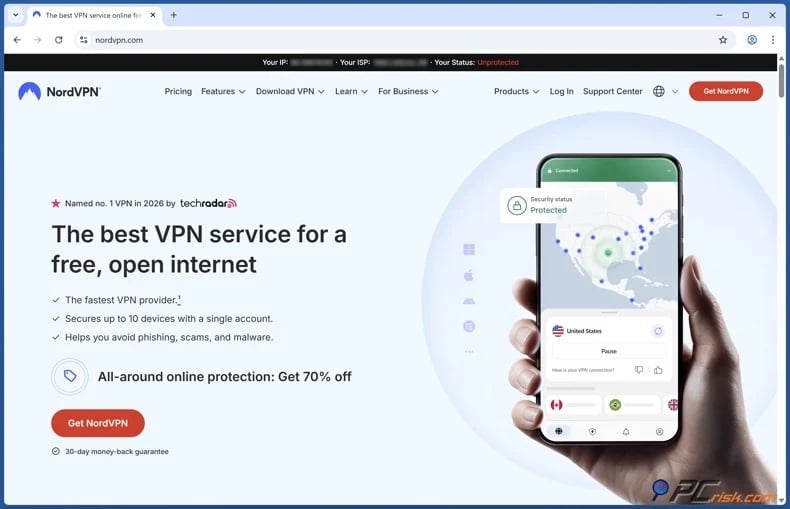
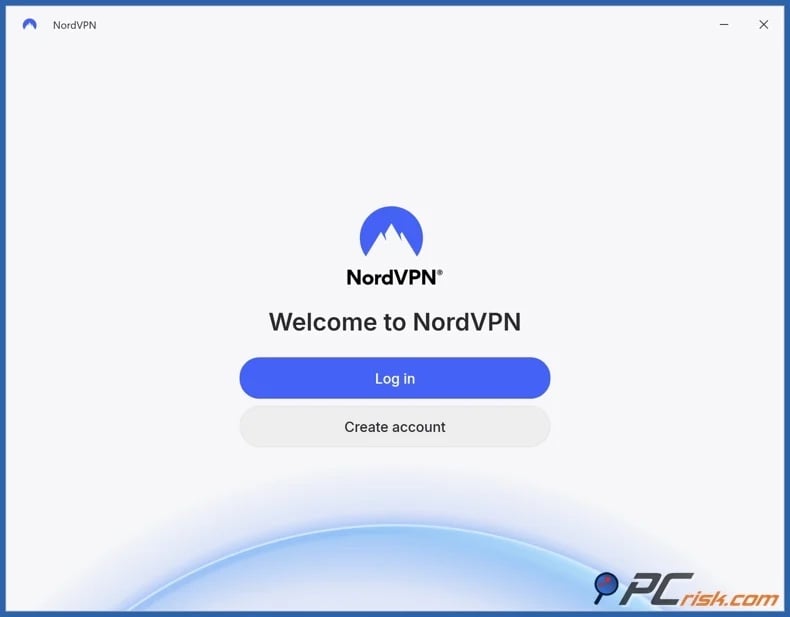
2. Install the VPN application and sign in. Most VPN services have user-friendly apps for major platforms, so setup usually involves downloading the app, logging in, granting permissions, and allowing the app to configure the secure tunnel automatically.
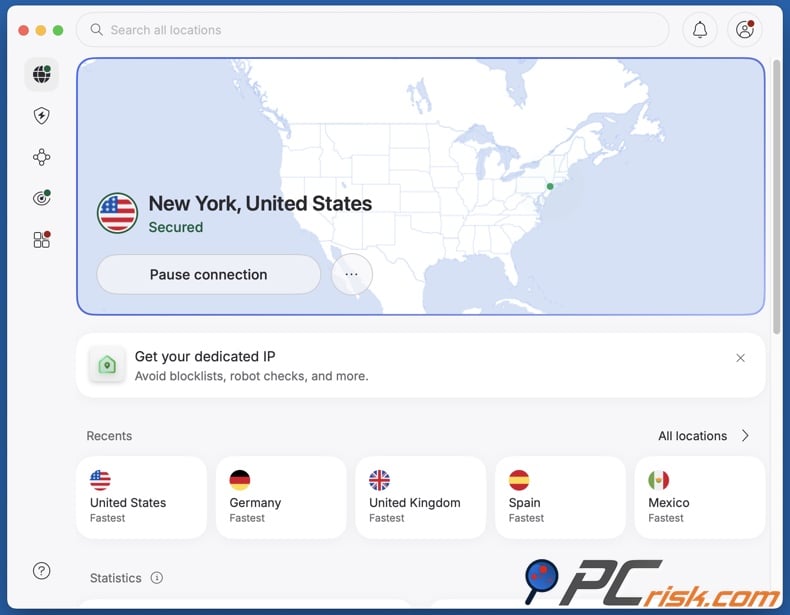
3. Enable core protections and connect to a nearby server. Before connecting, activate the kill switch, review auto-connect settings, and use the VPN's recommended protocol. For better performance or to test for throttling, choose a server close to your actual location. Distant servers are more likely to present you with some speed loss and latency.
4. Test the connection before and after connecting to the VPN. When testing a specific service, compare performance with and without it under identical conditions. If you have speed throttling concerns, test the activities that have raised them (e.g., streaming, downloading, gaming, etc.).
Router setup
Consider a router setup if you want to protect all devices on your T-Mobile Home Internet connection. This type of setup is also relevant for covering devices that do not support VPN applications, such as certain smart TVs and consoles.
General router setup workflow:
- Confirm that your router supports VPN client configurations. Many ISP-issued routers lack proper VPN support, and most do not offer this feature by default.
- If your current router is limited, use a compatible third-party router rather than attempting an unsupported setup. This strategy is often the most reliable for full-network VPN protection.
- Follow the provider's model-specific instructions closely. Router configuration depends on firmware and manufacturer, so official guides are essential. Reputable VPNs typically offer separate guides for different router families.
- Exercise caution when installing or replacing router firmware. Installing new software for compatibility can be challenging and may cause the router to malfunction if done incorrectly. Unless you are experienced, it is safer to use supported hardware and follow official instructions.
- After setup, test streaming, gaming, and browsing on multiple devices. If your router is underpowered, router-level VPN may slow speeds more than app-based VPN on newer phones or laptops. In this case, use the router for general coverage and app-based VPN for performance-sensitive tasks. Note that this is based on practical experience with encryption overhead and consumer router limitations, not a T-Mobile-specific rule.
Best VPNs for T-Mobile
The best VPNs for T-Mobile minimize speed loss, enhance privacy between device and carrier, and provide tools for restrictive or selective networks. The following five services are our top 2026 choices for T-Mobile users (for an in-depth comparison, check out our dedicated article):
1. NordVPN is the best overall choice. It is PCrisk's top-rated VPN for 2026. NordVPN has a broad server network, excellent speeds, and a strong privacy stance. It offers robust router support and uses NordLynx for fast, mobile-friendly connections. For T-Mobile users, this means lower VPN overhead, improved privacy, and reduced risk of selective traffic recognition. NordVPN is our top recommendation for solid performance with minimal configuration.
2. Surfshark is the best value for larger households. It stands out for allowing unlimited simultaneous connections - hence, it is perfect for multiple T-Mobile devices. The NoBorders feature helps when networks interfere with VPN usage. For families or multi-device users on T-Mobile Home Internet, Surfshark is often the most cost-effective solution.
3. Mullvad VPN is the privacy-focused minimalist option. It offers a flat monthly rate, strong privacy credentials, and anti-censorship tools for restrictive environments. This VPN is ideal for users whose priority is privacy rather than streaming convenience. Mullvad VPN is the choice for privacy-focused T-Mobile users.
4. Proton VPN offers privacy and transparency. This VPN is notable for its functional fee plan that has no data limit and includes Stealth. This is valuable for T-Mobile users who want to test VPN benefits before subscribing. Proton VPN also supports router connections on all plans, making it a strong choice for router users.
5. ExpressVPN is the premium option for simplicity. It excels in fast setup, user-friendly apps, comprehensive support documentation, and Lightway, which is designed for speed and reliability. ExpressVPN also provides extensive router and device setup resources, making it ideal for broad T-Mobile home coverage with minimal technical effort.
Can you use a free VPN to help with T-Mobile speed throttling?
A free VPN may help determine if encrypted traffic affects connection behavior, but most free VPNs are not a reliable long-term solution for T-Mobile speed throttling or privacy concerns. When trying to distinguish between carrier traffic management and general network issues - weak or overloaded free services can make results less clear.
Top VPN ReviewsExclusive dealsExpert-tested · hands-on reviews→
Below are some of the key limitations and risks associated with free VPNs:
Slower speeds and crowded servers - free VPNs typically have limited server networks and experience higher congestion, which can create additional bottlenecks and further worsen T-Mobile connection quality.
Weak privacy or questionable data practices - VPNs transfer trust from the ISP to the VPN provider, and many free and commercial VPNs have questionable security and privacy policies. While not all free VPNs are problematic, it is important to be cautious about which providers handle your traffic.
Data collection and deceptive behavior - some VPNs are not transparent regarding data collection or traffic handling. This concern is particularly relevant for low-quality free services that may monetize user data and even pose privacy risks.
Fewer advanced tools - many free services lack essential features, such as kill switches, router support, anti-censorship modes, advanced protocols, and reliable customer support. These features are crucial when troubleshooting mobile or home Internet connections.
Poor streaming and limited server choice - free VPNs typically provide fewer server locations and limited options, making it more difficult to test routing changes or consistently access region-restricted services.
If you choose to try a free option, Proton VPN's free plan is our recommendation. This tier has no data limits, no ads, and does not log user activity. Current materials also indicate that Stealth is available on all plans, including Free. Hence, Proton VPN is a safer choice than most free VPN apps or browser extensions.
Common VPN issues and solutions with T-Mobile
Even reputable VPN services can encounter challenges. It is important to differentiate between typical VPN overhead and problems caused by coverage limitations, network traffic congestion, or restrictions. Most reputable providers offer thorough guides and support to help users resolve common issues efficiently.
Before changing advanced settings, compare the connection with and without the VPN under similar conditions. Test the same website, download, application, or speed-testing service while using the same device and network. This can help determine whether the VPN, T-Mobile connection, device, or accessed service is responsible.
Below are some of the most common issues and potential solutions:
The VPN is slower than expected - often caused by connecting to a distant server, using a slower protocol, weak local reception, or typical T-Mobile congestion and prioritization. While a VPN can help with selective shaping, poor server selection may still reduce speed.
Solutions:
- Switch to a closer US server.
- If available, try a modern or specialized VPN protocol.
- If possible, test different networks to isolate whether the issue is T-Mobile-specific.
- Temporarily disable multi-hop, obfuscation, or enhanced privacy features to determine whether they are reducing performance.
- Test another server and compare the connection at different times of day.
- On mobile, restart the VPN session and toggle airplane mode to refresh the mobile connection.
The VPN connects, but the connection does not become faster - the slowdown may be caused by poor signal quality, local congestion, plan-level deprioritization, an exhausted high-speed data allowance, or a limitation affecting all traffic. A VPN cannot conceal the total amount of data used or restore network capacity during congestion.
Solutions:
- Compare speed tests with and without the VPN.
- Check your T-Mobile plan, current data use, and any applicable high-speed or priority-data allowances.
- Test another location, device, or network connection.
The VPN will not connect through T-Mobile - can happen when a network is restrictive, the app may require different protocol settings, standard servers may be detected or blocked, temporary routing problems, or firewall interference. A VPN may also work on one T-Mobile connection, such as mobile data, but fail on another, such as T-Mobile Home Internet or a hotspot.
Solutions:
- Switch to a different VPN server.
- If available, change VPN protocols (some protocols work better on certain networks).
- Restart the VPN application, router, gateway, or device.
- Check for VPN app and operating system updates, if available - implement them.
- If standard connections fail, try the provider's obfuscation or restrictive-network mode (e.g., Surfshark's NoBorders, Proton's Stealth, Mullvad's anti-censorship settings, etc.).
Websites or applications continue to detect the VPN - some services maintain lists of known VPN IP addresses and may block or challenge connections from them. Cookies, cached sessions, account history, browser permissions, GPS data, and regional account settings can also reveal information that does not match the VPN location.
Solutions:
- Clear browser cookies or restart the accessed app.
- Open the website in a private browsing window.
- Switch to another server in the target country.
- Confirm that the VPN server location matches the country selected in the service account.
- If possible, use a VPN provider with stronger unblocking performance and wider server selection.
- Keep expectations reasonable because detection methods change constantly.
Downloads are slow or repeatedly interrupted - large file downloads, cloud backups, software updates, and Peer-to-Peer transfers can perform poorly when the VPN server is overloaded or far away. Some VPN providers also restrict Peer-to-Peer activity to particular servers. A kill switch may interrupt a download completely if the VPN tunnel briefly disconnects.
Solutions:
- Switch to a nearby server that supports the required type of traffic.
- If available, try another VPN protocol.
- If applicable, pause other bandwidth-intensive activities.
- If available, use a dedicated Peer-to-Peer server.
- When appropriate, use a download manager that supports resuming interrupted files.
Online games, calls, or remote work applications have high latency - a VPN can increase ping because traffic must travel through an additional server. This can affect services that depend on rapid responses, even when the measured download speed remains high.
Solutions:
- Switch to a server nearest to your physical location or the app's server location.
- Avoid multi-hop connections and unnecessary obfuscation.
- If applicable, close background downloads and cloud synchronization tools.
- If available with your VPN, consider split tunneling.
Some applications stop working when the VPN is enabled - banking apps, email services, workplace systems, payment platforms, and websites with fraud-prevention controls may reject shared VPN addresses or request additional verification. Local devices, such as printers, network storage, and smart home equipment may also become unavailable if the VPN blocks access to the local network.
Solutions:
- Switch to another VPN server.
- If possible, temporarily exclude the affected app through split tunneling.
- Enable local network access in the VPN if you have to reach printers or other devices on the same network.
- Do not disable security warnings or fraud controls merely to force an app to work through a VPN.
The connection stops when the VPN disconnects - often caused by the kill switch rather than a failure of T-Mobile service. A kill switch intentionally blocks Internet traffic when the encrypted tunnel drops so that the device does not silently reconnect without VPN protection.
Solutions:
- Reconnect to another VPN server.
- If available, try a different VPN protocol.
- Restart the app if the kill switch remains active after the VPN closes.
- Temporarily disable the kill switch for troubleshooting (note that this will use the regular T-Mobile connection).
The VPN disconnects when the device sleeps or changes networks - battery-saving features may stop VPN applications from running in the background. Connections may also drop when a device moves between Wi-Fi, mobile data, a hotspot, and areas with weak coverage.
Solutions:
- Where appropriate, allow background activity for the VPN app.
- Where appropriate, disable battery optimization.
- If available with your VPN, enable auto-connect or always-on.
- Check for VPN app and operating system updates, if available - implement them.
- If available, use a VPN protocol designed to handle network changes reliably.
T-Mobile Home Internet performs differently with a VPN - home Internet performance can vary according to gateway placement, tower capacity, signal conditions, congestion, and the VPN protocol. Running a VPN on every device may also produce different results from configuring the VPN directly on a compatible router.
Solutions:
- Place the T-Mobile gateway where it receives the strongest signal.
- Restart the gateway.
- If applicable, test Wi-Fi and wired connections.
- Switch to a different VPN server.
- If available, try a different VPN protocol.
- When using a VPN router, confirm that the hardware has enough processing power to encrypt traffic at the required speed.
Hotspot or tethered devices remain slow - tethering may be subject to separate plan allowances, prioritization, or speed limitations. In addition, a VPN running on the phone does not always route connected hotspot devices through the same encrypted tunnel.
Solutions:
- Check the hotspot terms and allowance included in your T-Mobile plan.
- Where possible, install the VPN app directly on the connected device.
- For multiple devices, consider a compatible travel router or VPN-enabled router.
The VPN does not provide the expected level of privacy - a VPN changes the public IP address and encrypts traffic between the device and the VPN server, but it does not automatically conceal GPS data, advertising identifiers, browser fingerprints, account activity, cookies, or information voluntarily shared with sites. It also transfers a degree of trust from the ISP to the VPN provider.
Solutions:
- If available, enable the VPN's kill switch.
- If available, enable the VPN's DNS leak protection.
- Check the public IP and DNS servers after connecting.
- Review app permissions, browser privacy settings, and account information.
- If possible, choose a VPN provider with a clear privacy stance, independent audits, and a strong record of securing user data.
The VPN interferes with IPv6, DNS, or local network access - an incorrectly configured VPN may allow DNS or IPv6 traffic to bypass the encrypted tunnel. In other cases, strict leak protection may prevent access to local devices, custom DNS services, or business networks.
Solutions:
- If available, use the VPN's built-in leak protection and test for IP, DNS, and IPv6 leaks.
- Avoid manually changing DNS settings except when necessary.
- Restore the VPN app's default networking settings if problems began after a configuration change.
- Contact VPN support if the recommended settings still produce leaks or connectivity problems.
When issues continue, quality support is a key benefit of a paid VPN. Reputable providers offer more than encryption; they provide stable applications, up-to-date protocols, router instructions, and reliable support for unexpected situations involving T-Mobile, your device, or streaming services.
Is using a VPN to help with T-Mobile speed throttling legal?
VPN usage is legal in the United States. VPNs are common security tools used by businesses, remote workers, travelers, journalists, and consumers wanting privacy or safer public Wi-Fi connections. Despite some misconceptions, VPNs are not inherently suspicious.
The legality of speed throttling in the US is complex. In January 2025, a US appeals court overturned the FCC's 2024 net neutrality rules. Consequently, there is currently no generally applicable nationwide FCC (Federal Communications Commission) rule prohibiting broadband providers from blocking or throttling lawful Internet traffic, although state laws and other consumer-protection requirements may still apply. However, carriers must accurately disclose their network-management practices and avoid making misleading claims about their services. In 2019, AT&T agreed to pay $60 million to settle FTC (Federal Trade Commission) allegations that it did not properly disclose significant speed reductions for customers with "unlimited" data plans.
For T-Mobile users, using a VPN for privacy, safer browsing, or troubleshooting is generally lawful in the US. However, a VPN does not legalize unlawful conduct or override contracts, platform rules, or provider policies. Activities such as copyright infringement, fraud, hacking, and harassment remain illegal regardless of VPN use. Therefore, stay informed, keep up-to-date with current laws, use reputable tools, and practice safe browsing.
In closing
T-Mobile users may experience slowdowns due to weak coverage, network congestion, plan thresholds, video optimization, and other management practices that can resemble throttling. T-Mobile's policy pages confirm the use of data prioritization and video optimization. Its privacy materials state that usage, device, and advertising data may be collected based on user settings and consent. These factors accentuate the importance of evaluating both connection quality and online privacy.
A VPN will not resolve every slowdown, but it can be a practical addition to a T-Mobile connection in 2026. By encrypting your connection, a VPN may limit traffic-specific management, reduce the browsing activity visible to the carrier, and enhance privacy on both mobile and home Internet. To achieve the best results, select a reputable VPN with fast servers, modern protocols, strong leak protection, a kill switch, and a clear, independently audited privacy policy.
Frequently Asked Questions (FAQ)
Is speed throttling legal?
Speed throttling can be legal if it is clearly disclosed as part of network management or plan terms. Legal risks arise when throttling practices are deceptive, misleading, or not properly disclosed.
Does T-Mobile throttle speed?
T-Mobile states that its network management includes heavy-user prioritization and video optimization. These practices may result in slower speeds during network congestion or when plan thresholds are reached.
How can I bypass T-Mobile speed throttling?
A reputable VPN may help if speed reductions are related to specific traffic types or routing. It enhances privacy by encrypting your connection as well. However, a VPN will not resolve issues caused by poor signal, network congestion, or account-level limits.
Is using a VPN for T-Mobile legal?
Yes. VPNs are legal in the US, and using one with T-Mobile for privacy, public Wi-Fi security, work, or troubleshooting is generally permitted. However, a VPN does not make illegal activities lawful.
Share:
 Facebook
 X.com
X.com
 LinkedIn
 Copy Link

Karolis Liucveikis
Experienced software engineer, passionate about behavioral analysis of malicious apps
Author and general operator of PCrisk's News and Removal Guides section. Co-researcher working alongside Tomas to discover the latest threats and global trends in the cyber security world. Karolis has experience of over 8 years working in this branch. He attended Kaunas University of Technology and graduated with a degree in Software Development in 2017. Extremely passionate about technical aspects and behavior of various malicious applications.
▼ Show Discussion