
We may earn commissions from products we recommend. Learn more.
How to change your TikTok location in 2026 | Easy Guide

How to change your TikTok location in 2026
In 2026, changing your TikTok location takes more than just turning on a VPN. TikTok’s help pages explain that the app uses your SIM card, IP address, device settings, language, location, time zone, and your activity to figure out your country or region. They also say your interactions are often more important than these other details. So, a VPN can help, but it’s only part of the solution.
At PCrisk, we think changing your TikTok location is about privacy, convenience, and adjusting what the app shows you. A good VPN can change the IP address TikTok sees, protect you on public Wi-Fi, and let you view content from other countries. But for the best results, you should also use TikTok’s region settings, language options, feed preferences, and location permissions. In this guide, we explain why people change their TikTok location, how to do so with a VPN, which VPNs we recommend, and the limits in 2026.
 Our top-rated VPN
4.5/5 in our review. Our top pick of the year: almost no slowdown in our speed tests, and it unblocked Netflix, BBC iPlayer and Disney+ without trouble.
Table of Contents:
- Introduction
- Reasons to change your TikTok location in 2026
- Can I change TikTok location with a VPN?
- How to change TikTok location with a VPN in 2026
- Best VPNs for changing TikTok location
- How We Test VPNs
- Will TikTok work with a VPN?
- Can I use a free VPN to change TikTok location?
- Is it legal to change my location on TikTok?
- Alternative ways to change TikTok's location
- Wrapping up
- Frequently asked questions (FAQs)
Reasons to change your TikTok location in 2026
There are plenty of good reasons to change your TikTok location, and most of them aren't about trying to fool the app. Some people want to see trends, creators, or search results from another country. Others are traveling and want a smoother experience on hotel, airport, or cafe Wi-Fi. Creators, marketers, and researchers might want to compare trends in different regions, see how content changes between markets, or check local recommendations elsewhere. This is important because TikTok says your location can affect your For You feed, Following, LIVE, Search, comments, notifications, account suggestions, and the Nearby feed.
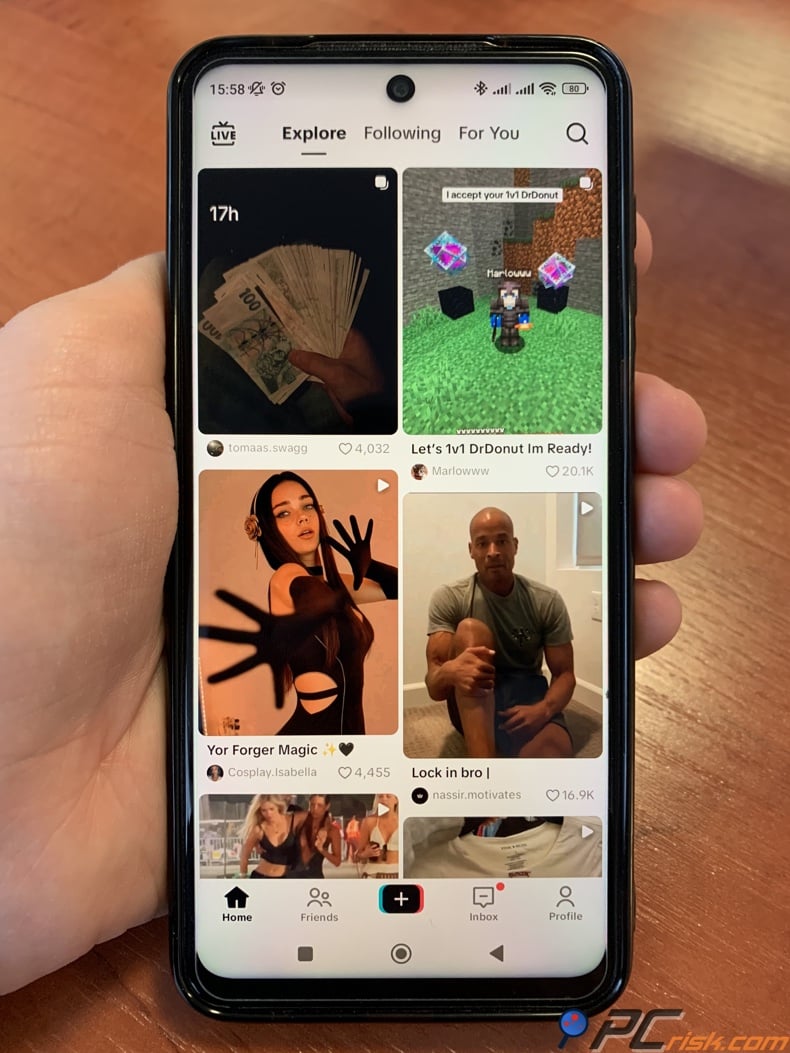
For creators, location is important for more than just entertainment. TikTok's help pages explain that some terms, policies, and features change depending on your region, and some monetization tools only work if your account is registered in the right place. So, changing your location can be about market research or checking which features are available, not just about watching videos from another country. If you want to see local shopping trends, how creators in a region write captions, or which businesses show up in local recommendations, your location really matters.
The Nearby feed is another strong example of why users care about location. TikTok describes it as a personalized feed of local content, including travel, events, food, and services. The company says it determines the approximate location for that feed using device or network data, such as your SIM card and IP address, and in regions where Location Services is available, it may also use GPS information if the setting is on. In other words, TikTok itself openly acknowledges that local discovery is tied to where the app thinks you are.
It is also important to have realistic expectations. Changing your location for browsing or research is not the same as changing your legal residency, payout eligibility, or business status. TikTok says that to change your account region, you may need to have been in the new country and active on TikTok, meet the minimum age there, and settle any rewards from your old region. This shows that your TikTok region is more than just a simple setting.
Can I change TikTok location with a VPN?
Yes, in most cases, you can influence TikTok's location with a VPN because it changes the IP address the app and TikTok's servers see. TikTok's help pages specifically state that it may determine your account's country or region using your SIM card region or IP address, and that it can estimate your approximate location from network information such as your SIM region, IP address, and system settings when full Location Services are not available or are turned off. That makes a VPN one of the most direct and effective ways to change part of your location footprint.
But a VPN doesn’t change everything. TikTok says its recommendations also depend on your language, location, time zone, device type, and other details, and your interactions often matter more than your location. If you connect to a new country but keep liking creators from your home country, your feed may not change right away. A VPN is the strongest tool for changing your location, but it won’t instantly update all your recommendations or account settings.
How to change TikTok location with a VPN in 2026
For this guide, we use NordVPN. PCrisk rates it as the top VPN for 2026, highlighting its fast speeds, reliable access to major video platforms, good mobile experience, and wide range of features. These strengths are important for TikTok because a VPN needs to do more than just change your IP address. It should also load videos quickly, reconnect smoothly, and stay stable while you scroll, search, or watch LIVE content.


Step-by-step instructions with NordVPN
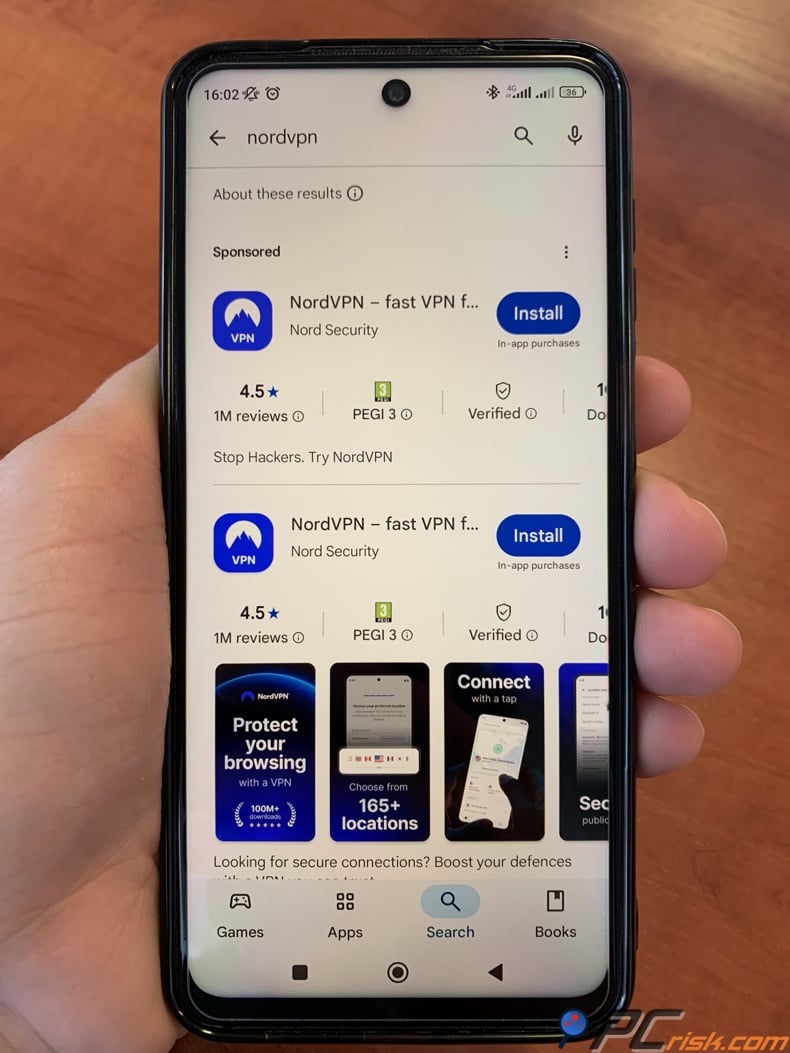
1. Install NordVPN on the device you actually use for TikTok. Nord's app is available on major mobile, desktop, and TV platforms, and its official setup guides walk through downloading, installing, and signing in. If TikTok mostly lives on your phone, do the location change on that same phone instead of assuming your laptop settings will carry over.
2. Choose your target country before you connect. Decide what you want from the change. If you want local recommendations, pick the country you want to see content from. If you want to keep your home-country experience while traveling, connect to your home region. Picking your country first helps you match other settings, like language and feed preferences, to your goal. TikTok also says that region changes can be a real account setting in some cases, not just something happening in the background.
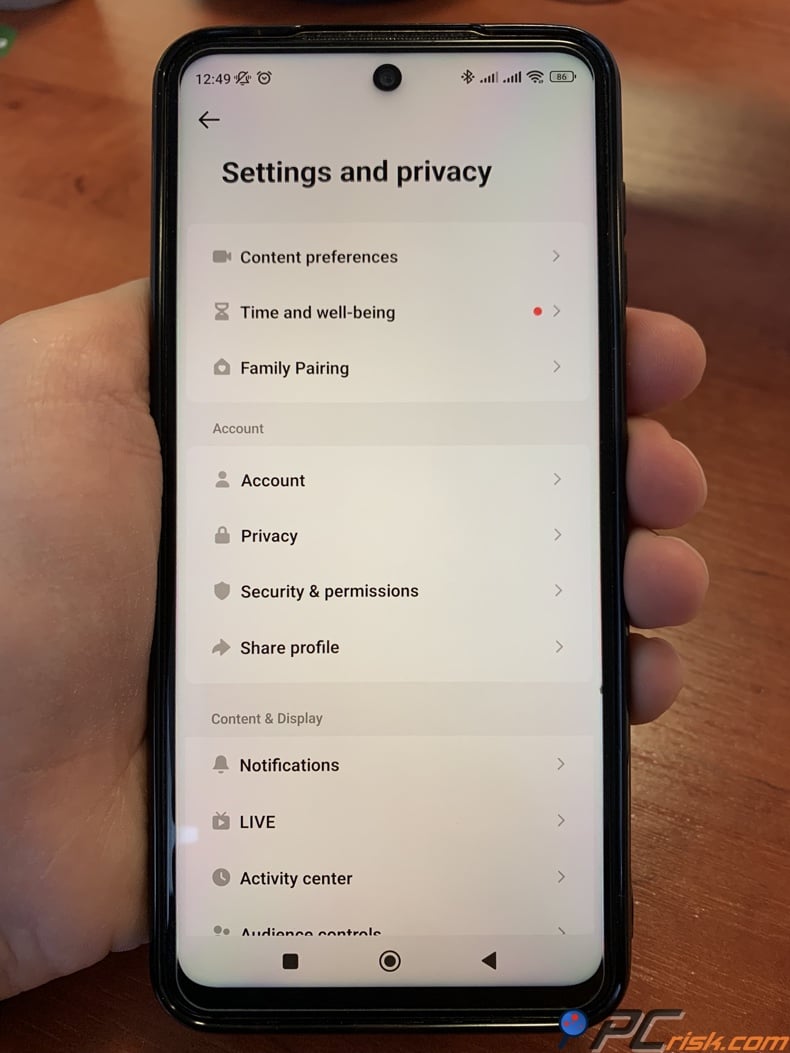
3. Review TikTok's own location permissions before opening the app. TikTok says you can manage location access in the app by going to Profile > Menu > Settings and privacy > Privacy > Location Services. Its help pages also say that if Location Services are unavailable or turned off, TikTok may continue to estimate approximate location using the SIM region, IP address, and system settings. That means limiting location permissions does not erase all location clues, but it can reduce the influence of GPS-based data.
4. Connect NordVPN to your target country. Nord's support docs say you can connect by selecting a country from the list or by searching for a specific country or city. On restrictive networks, Nord also provides obfuscated servers, and you can choose a country for them as well. For general TikTok use, a standard server in your target country is usually the best place to start.
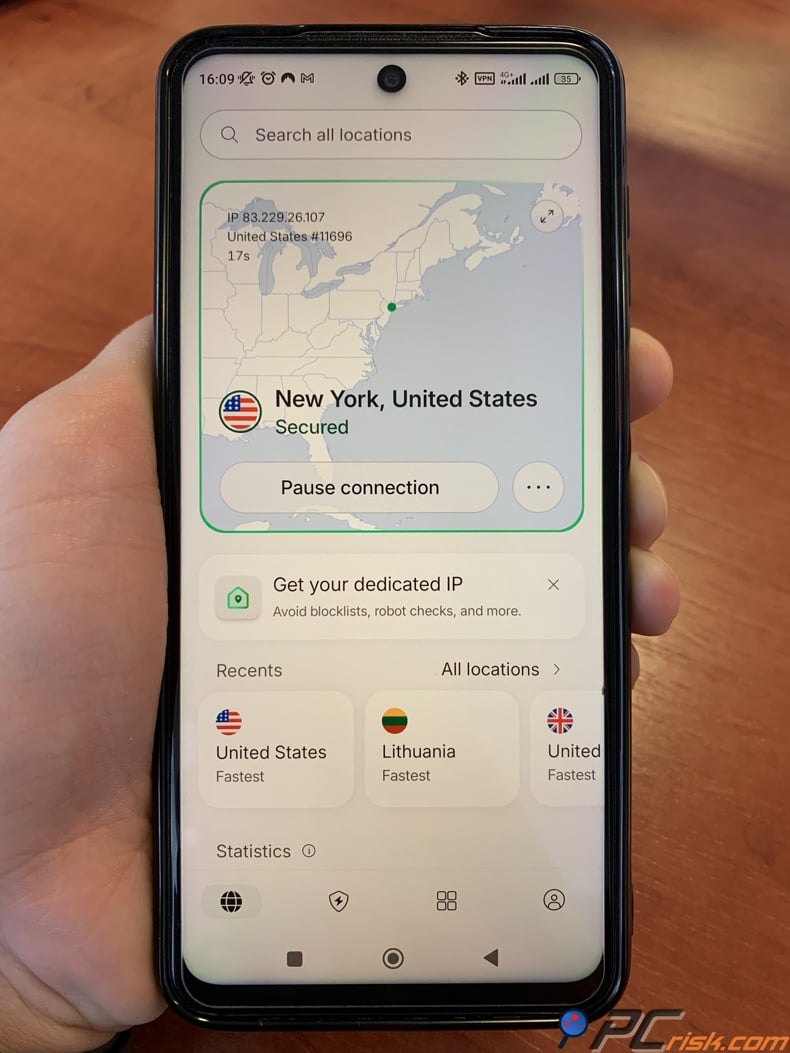
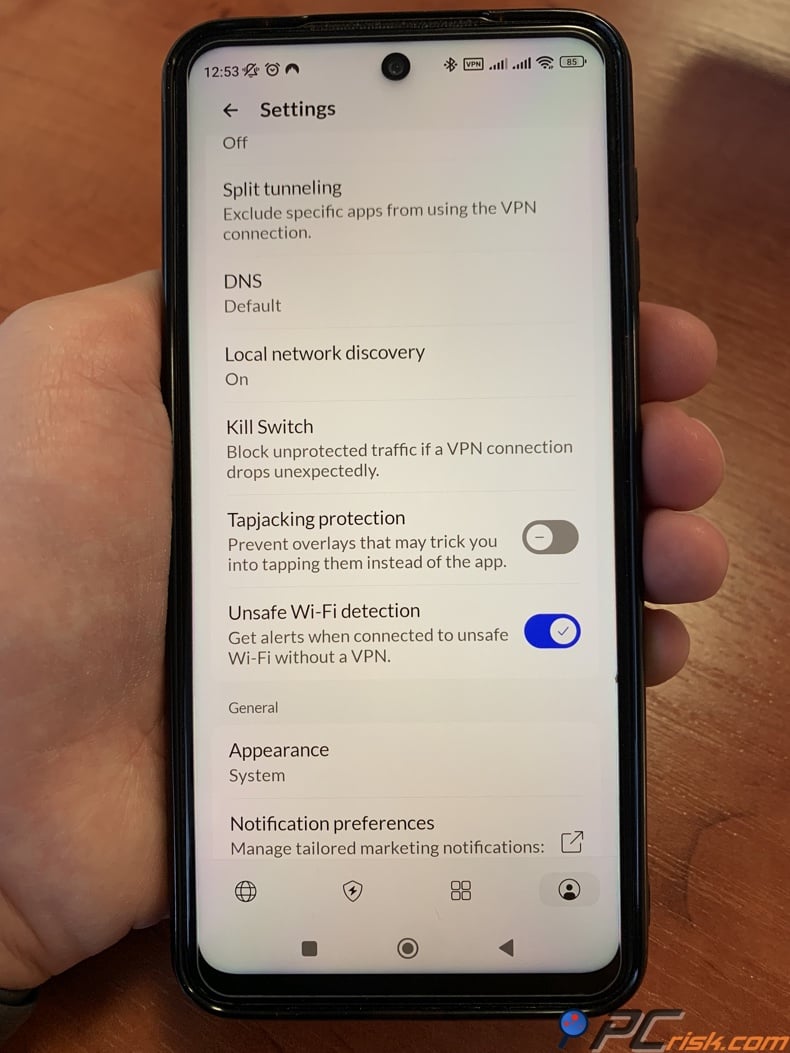
5. Enable NordVPN's safety features for better results. NordVPN's Kill Switch stops your internet from working if you are not connected to a NordVPN server. The auto-connect feature keeps you connected to your chosen country when you join Wi-Fi or switch networks. This is important because an unstable location can make apps switch between local and foreign content. PCrisk's review also found that NordVPN's mobile apps are quick to respond and handle reconnections well when moving between Wi-Fi and mobile data.
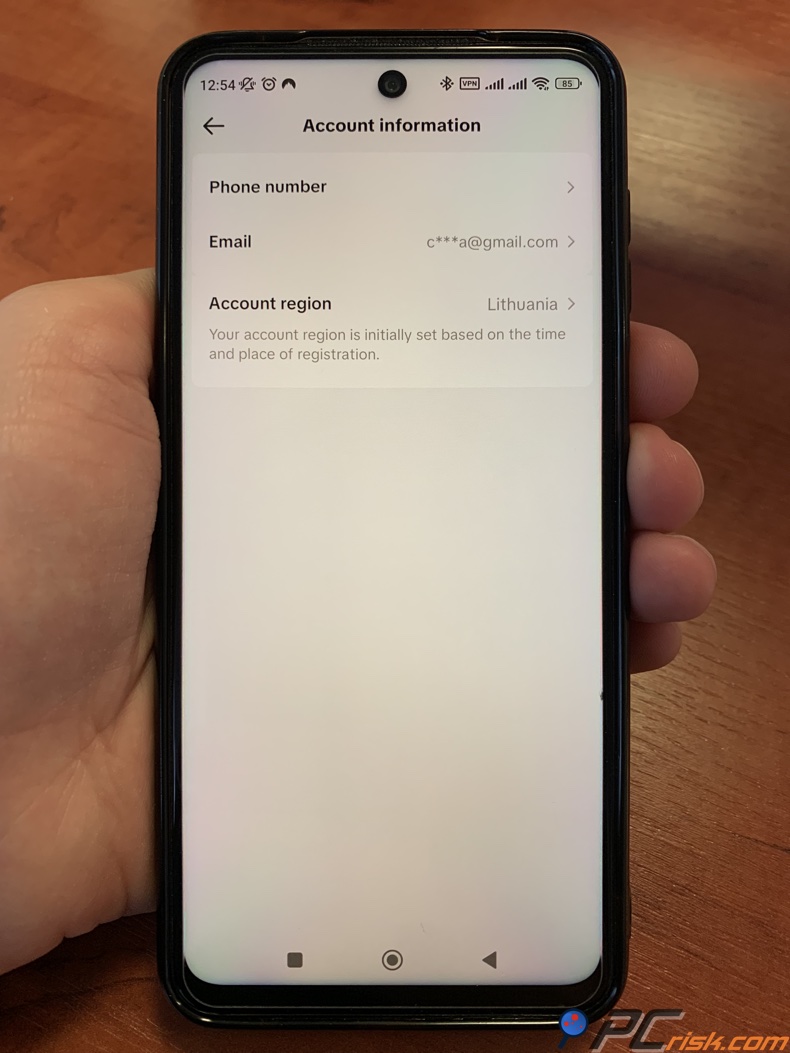
6. Open TikTok and check whether the Account region option is available. TikTok says the in-app path is Profile > Menu > Settings and privacy > Account > User Information > Account region. It also says that once you change your country or region, you may not be able to change it again, and that you may need to have been in that country and active on TikTok. In practice, this means you should use the setting carefully if it appears on your account.
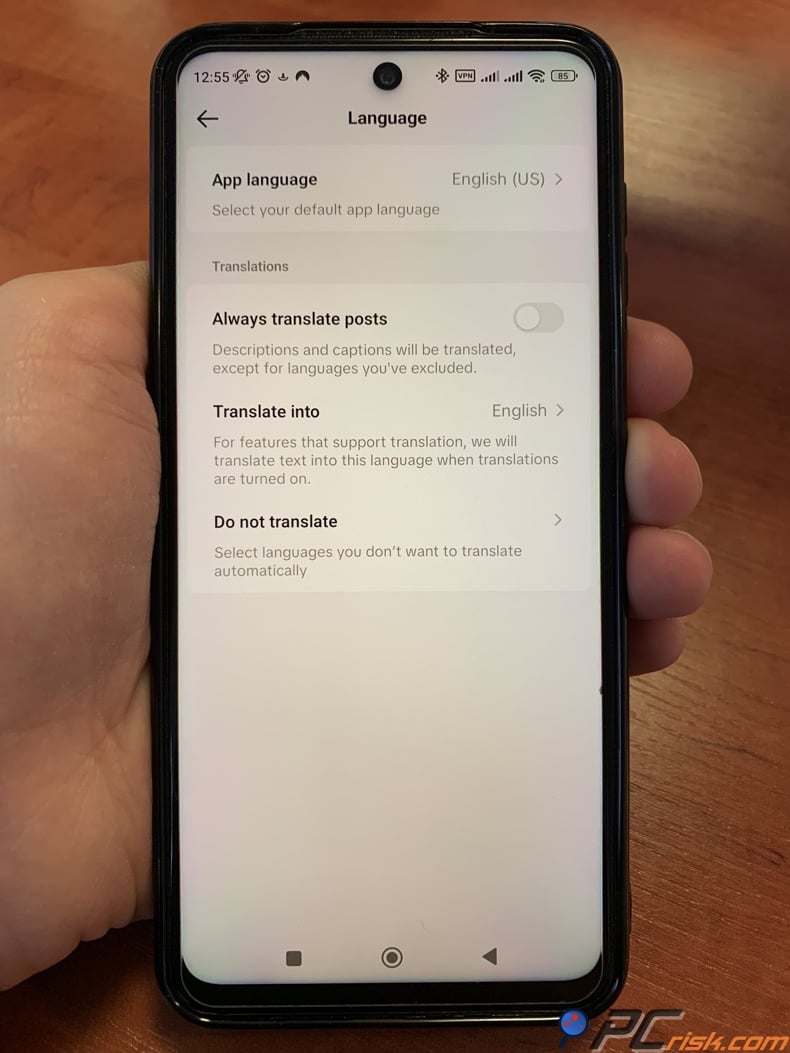
7. Align the app's recommendation signals with your new target region. TikTok says you can change app language under Profile > Menu > Settings and privacy > Language. It also says you can manage topic preferences in the For You feed and refresh it through Content preferences. This matters because TikTok's recommendation systems consider language, location, and device settings, while also placing strong weight on what you actually watch, like, skip, search for, and comment on. If you want the app to feel more local to your target country, do not stop at the VPN. Change the surrounding signals too.
8. Use the Nearby feed's own region switch if your goal is local discovery. TikTok says you can change the region of the Nearby feed by going to Nearby, tapping the region name at the top, and following the prompts. The company also notes this feature is not available everywhere, so do not assume every account has it. Still, if your goal is to browse local travel, event, food, or service content from a different place, this is one of the most direct tools TikTok offers.
9. If the app still looks stuck, troubleshoot as TikTok recommends. TikTok's troubleshooting guidance says to restart the app and your device, ensure you are using the latest version, and clear the cache if needed. If your first NordVPN server does not produce the result you want, disconnect and reconnect to another server in the same country, then reopen TikTok and give the app time to rebuild recommendations.
It’s best to take this process step by step. The VPN changes your IP address. TikTok’s settings let you adjust language and feed preferences. Your activity tells the app what to show you. When all three match your target location, your location change will work better.
Best VPNs for changing TikTok location
For this guide, we only included VPNs reviewed in PCrisk's 2026 VPN section. The top five are NordVPN, Surfshark, Mullvad VPN, Proton VPN, and ExpressVPN. For TikTok, NordVPN is our preferred pick due to its fast speeds, reliable access to major video platforms, good mobile experience, and a wide range of features. Based on video performance, mobile usability, and how well they unblock content, ExpressVPN ranks above Proton VPN, and Mullvad is last, even though it is great for privacy.


NordVPN - NordVPN is the best overall VPN for changing TikTok location in 2026. PCrisk ranks it first overall, and that makes sense for this use case. The review highlights fast performance, strong security, reliable access to region-specific video platforms, intuitive apps, and support for 10 devices per account. PCrisk also notes that NordVPN excels for streaming and has responsive mobile apps that reconnect cleanly when you switch between Wi-Fi and mobile data. For a video-heavy app like TikTok, those are exactly the qualities you want.
NordVPN's main strengths are easy to see. It offers strong leak protection, a Kill Switch, verified no-logs claims, and fast speeds worldwide. PCrisk tests both local and international servers, checks for leaks, and looks at streaming performance, which supports this ranking. If you want the easiest way to browse TikTok from another region, NordVPN is our top pick.
NordVPN does have some downsides. It costs more for short-term plans, lacks a permanent free version, and offers limited split tunneling on iOS and macOS. This may not matter to everyone, but it is important if you want more control over which apps use the VPN on Apple devices.
Surfshark - Surfshark is the best value option for changing TikTok location, especially if you have multiple devices. PCrisk describes it as one of the best budget VPNs, with unlimited devices, strong performance, and a broad set of extras. The review also says Surfshark delivered smooth streaming across major platforms and performed especially well with WireGuard. That matters for TikTok because many people want to test region changes across a phone, tablet, laptop, and maybe even a smart TV at the same time.
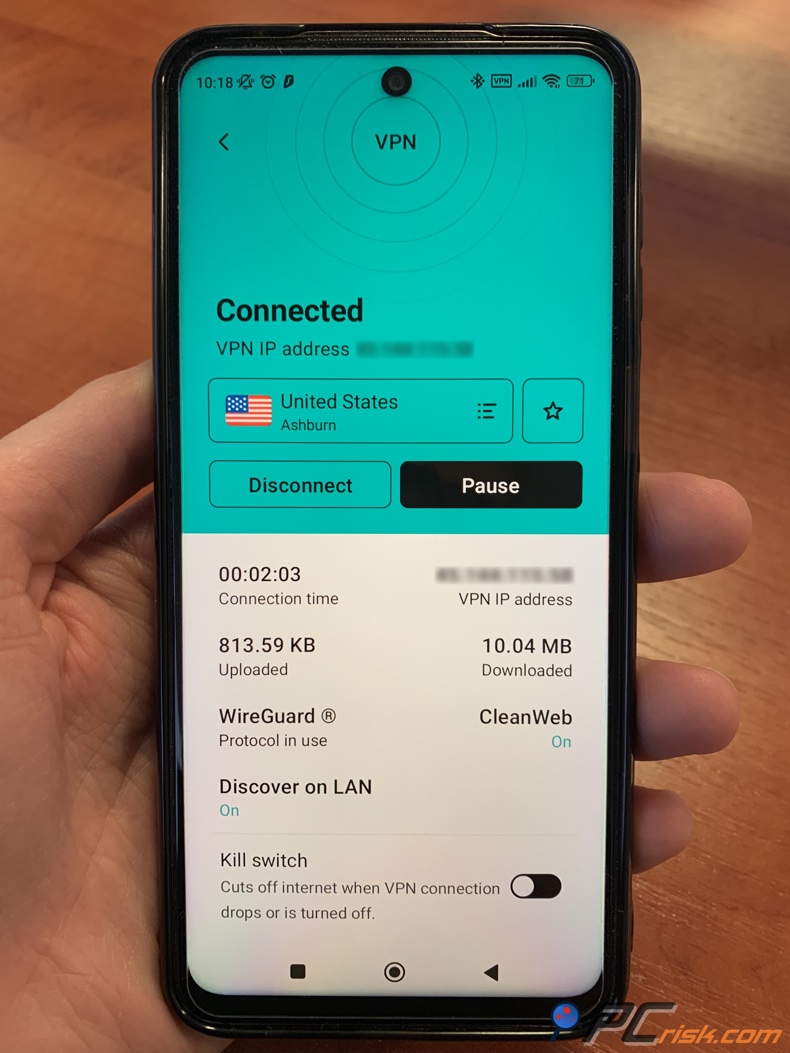
Surfshark's pros go beyond price. We highlight MultiHop, CleanWeb, split tunneling, and Everlink, a feature designed to reduce the chance of accidental exposure when a server drops. Our review notes that Surfshark's iOS experience was fast and stable and that mobile streaming worked smoothly. That makes it a very practical choice for people who mainly use TikTok on a handset and want a cheap service that still feels premium.
Surfshark's main weaknesses are in pricing and features. PCrisk notes that renewal prices can increase significantly after the first term, there is no full free plan, and some features are missing on iOS and Linux. For example, split tunneling is not available on iOS, so you have less control over which apps use the VPN.
ExpressVPN - ExpressVPN earns its spot because of consistency and simplicity. Our review found it fast on local and long-distance servers, reliable for video use, and successful in streaming and geo-unblocking tests. If you want a premium VPN that is easy to operate and does not bury you in advanced settings, ExpressVPN remains one of the cleanest choices for TikTok users who want to access another country quickly and with minimal friction.
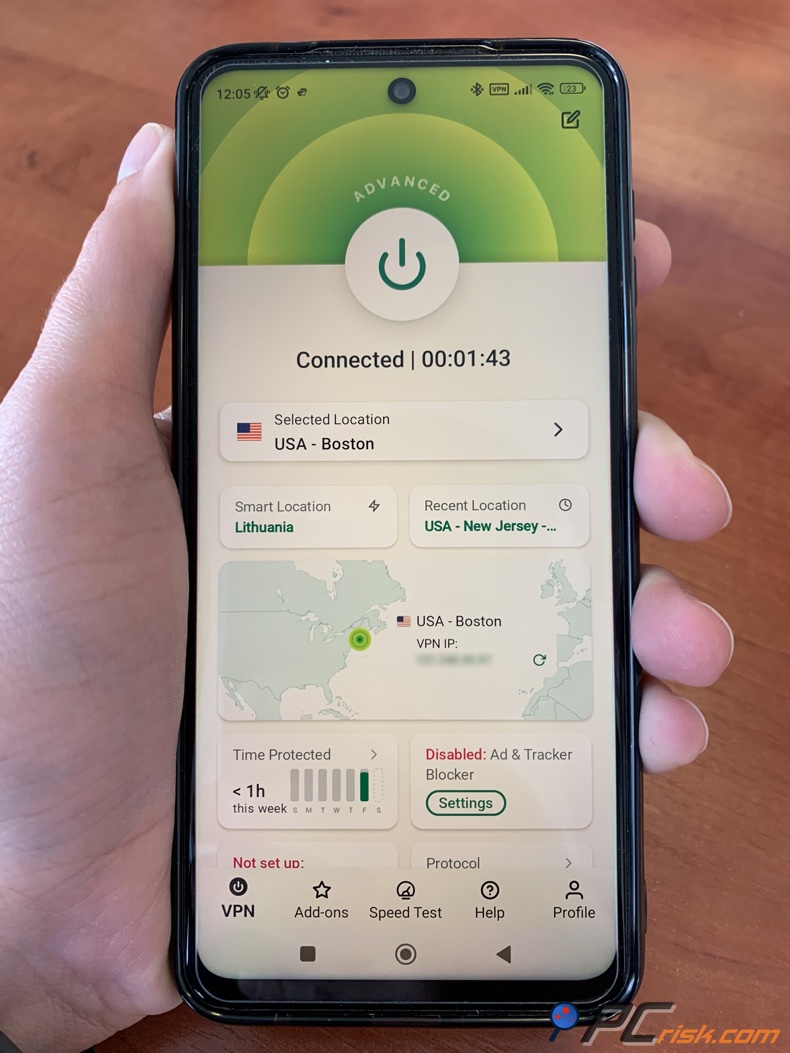
Its strongest selling points are stable speed, polished apps, and a broadly beginner-friendly design. PCrisk says it performed well for HD and even 4K streaming in testing, used RAM-only servers, and delivered simple one-click usability across devices. That combination makes it a strong fit for people who care more about getting a smooth, low-maintenance location switch than tinkering.
The main drawbacks are price and fewer features. PCrisk says ExpressVPN is expensive, lacks some advanced options found in other VPNs, and its long-term plans are not as competitive. If you want the best value or most features, Surfshark and NordVPN are better choices. But if you want something simple and premium, ExpressVPN is still a good option.
Proton VPN - Proton VPN is the privacy-first all-rounder in this shortlist. We appreciate its Swiss base, open-source apps, no-logs stance, and feature-rich design, and note that its paid plans support streaming and a large country selection. For TikTok users who care deeply about privacy and want a VPN that handles region changes well on paid plans, Proton VPN Plus is a serious contender.
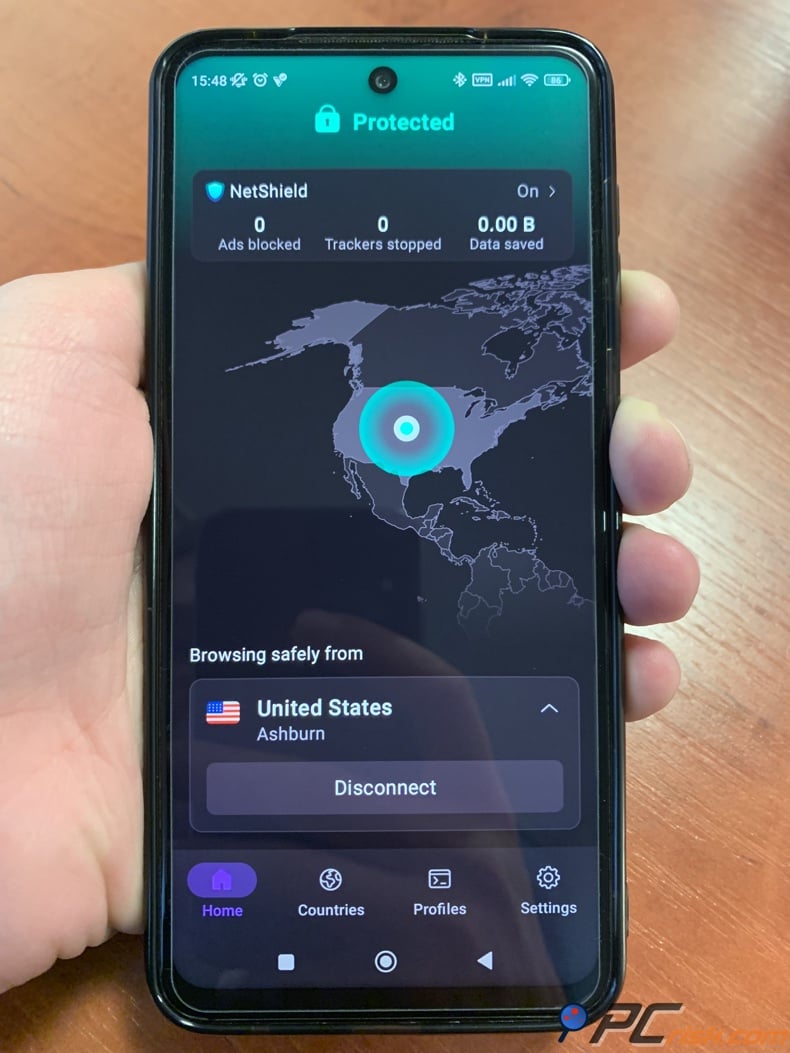
Proton VPN's strengths are especially appealing for cautious users. Our testing found strong nearby speeds, paid servers capable of smooth HD and even 4K playback, and protection against IP and DNS leaks. Features like Secure Core and NetShield add more depth than you strictly need for TikTok, but they make the service attractive if you want a broader security package instead of just a basic country switcher.
There are some trade-offs with Proton VPN. It can get more expensive over time, is usually fast but not the fastest, and support can be slower for some users. The free version is tempting, but it only works on one device, has a small country list, and does not support streaming services, so it is not ideal for serious TikTok location changes.
Mullvad VPN - Mullvad VPN is an outstanding privacy service, but it is not the best fit here for changing TikTok's location specifically. We appreciate its anonymous sign-up model, audited open-source apps, and strong nearby performance. If your main goal is privacy and you only occasionally need a different IP, Mullvad is still a credible and trustworthy option.
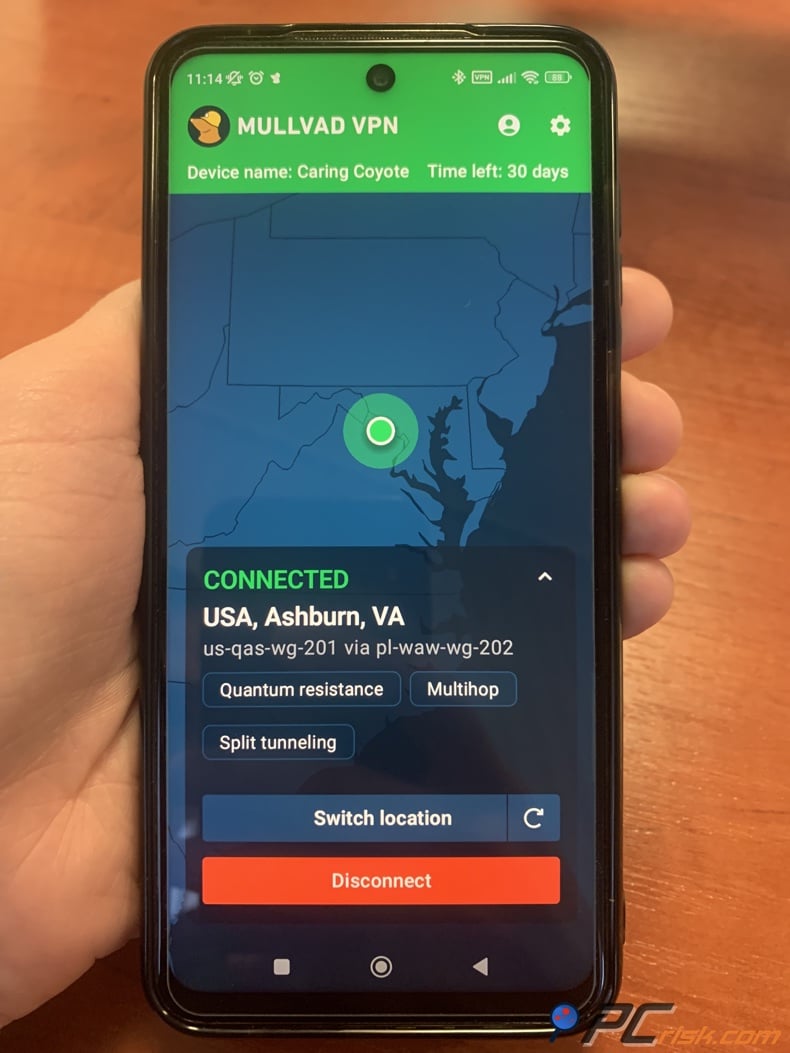
Mullvad's main issue is not security, but how it handles media. Mullvad has trouble unblocking major streaming services. This is important for TikTok, since the app is all about video, and location changes often run into the same problems as other video platforms. That is why Mullvad is last on this TikTok list, even though it is still a top choice for privacy.
Its other drawbacks are straightforward. PCrisk notes a smaller network, fewer convenience features, and flat pricing that can look expensive compared with longer discounted plans from bigger rivals. For users who want privacy above all else, those trade-offs may be acceptable. For most people trying to change their TikTok location smoothly, it's harder to justify.
How We Test VPNs
At PCrisk, we do not just repeat what vendors say about being the fastest or most secure. Our published VPN testing method evaluates services in real-world conditions and scores them on security, speed, streaming, privacy, usability, support, and features. This is important for TikTok location changes, since a VPN needs to work well on mobile, keep a steady connection, and play videos smoothly while changing your location.
Security is the first filter. PCrisk says it checks encryption and protocol choices, tests for IP, DNS, and WebRTC leaks, and simulates dropouts to verify Kill Switch behavior. Those are the basics that tell you whether a VPN is doing its core job. If a VPN leaks your real IP or stumbles during reconnects, it is a poor tool for location shifting, as TikTok may see inconsistent signals.
Performance is the next big factor. PCrisk's method compares normal internet speed to speeds on local, mid-distance, and far-away servers, tests at different times, and checks results with real tasks like streaming, large downloads, and activities that require low latency. This matters for TikTok, since the app needs to load videos quickly. If switching countries causes buffering or disconnects, it is not helpful.
Streaming and geo-unblocking get special attention, too. PCrisk explicitly states that it tests VPNs against region-restricted services and checks whether playback is smooth, high-quality, and stable over extended sessions. Even though TikTok is not a subscription streaming platform, the underlying demands are similar. You still need fast startup, steady playback, clean reconnections, and enough server quality to keep video moving. That is why VPN services with strong streaming records score better for this article.
Usability is just as important as speed. PCrisk checks how easy it is to install, pick servers, use the interface, get support, and how stable the app is. We also look at features like auto-connect, split tunneling, and multi-hop. This matches how we test other software too. If a VPN is hard to use, tricky to reconnect, or confusing on your phone, it is not a good choice for changing TikTok location, even if its security is strong.
Will TikTok work with a VPN?
In most cases, yes. A VPN changes the IP address TikTok sees, and TikTok's help pages say IP address is one way it figures out your country or region. That makes a VPN useful. But TikTok also uses your SIM region, device settings, location permissions, language, time zone, and other details. So, while TikTok usually works with a VPN, it does not rely only on your IP address.
The more subtle point is recommendations. TikTok says its feeds and recommendation surfaces are shaped by user interactions, content information, and user information, and for many users, the interaction layer is weighted more heavily than the location layer. This explains why a fresh VPN connection does not always make your For You feed look dramatically different right away. Your watch history, likes, skips, comments, and searches are still telling TikTok who you are.
That is why the best approach is not just using a VPN. Combine the VPN with the right language, updated topic preferences, a refreshed For You feed, and spend some time searching for and interacting with creators from your target country. The more signals you match, the more likely TikTok will recognize your new location.
Can I use a free VPN to change TikTok location?
You can try, but we do not recommend it as your main solution. In the PCrisk-reviewed group used for this article, the only notably strong free option is Proton VPN Free. We appreciate it for having no data limits or ads, which already places it above many questionable free VPNs. But the same review also says it is limited to one device, to a small number of countries, to average speeds, and to no support for streaming services. That combination makes it better as a privacy starter than as a serious TikTok location tool.
The issue with Proton VPN Free is not safety, but performance. TikTok uses a lot of video, and when you start switching regions, testing discovery, and watching lots of clips or LIVE content, the limited servers and slower speeds become a problem. We found the paid version of Proton VPN worked much better, especially for streaming and unblocking. Free is okay for basic privacy, but paid plans are usually needed for smooth, reliable location changes.
Before you try another free VPN or an unofficial TikTok location tool, check if your device already has unwanted apps, adware, or suspicious files. Combo Cleaner can scan for malware, adware, and other security problems, and it also helps clean up unnecessary files. Run it for a quick safety check before you test VPNs or change your TikTok location.
 Made by RCS LT, the company behind PCrisk
- Detect malware already on the device
- Block phishing pages once you open them
- Remove adware or browser hijackers
- Scans for free and shows what it finds
- Removes it with a licence, 7-day free trial
- Blocks scam and phishing sites in the browser (Windows)
Is it legal to change my location on TikTok?
The practical answer is that legality depends on where you are and what you are doing exactly. Cisco's guidance on VPN restrictions says rules are dynamic and can change without warning, and it identifies both complete-ban and limited-ban jurisdictions for VPN use. Security.org also says VPNs are legal in many countries, but not everywhere. So there is no universal yes-or-no answer that applies to every reader in every jurisdiction.
For ordinary privacy and viewing use in places where VPNs are legal, changing your IP location is usually a routine activity. But a VPN does not turn illegal conduct into legal conduct, nor does it override local laws, age restrictions, or platform rules. If you are in a country that restricts VPN use, or if you are trying to bypass regulations rather than simply browse privately, you should check the law where you are before doing anything else.
TikTok also makes some terms and features specific to each region. Its help pages say that terms, policies, and features can change depending on the country you choose, and some account-region changes have special requirements. So, even if using a VPN is legal, you cannot assume every TikTok feature will work just by connecting through another country. This is general information, not legal advice.
Alternative ways to change TikTok's location
The most direct official alternative is TikTok's own Account region control. TikTok says some users can change their country or region in the app by going to Profile > Menu > Settings and privacy > Account > User Information > Account region, or on the web under Manage account. The company also warns that once you change region, you may not be able to do it again, so this is not a setting to play with casually.
If your goal is to discover local content rather than fully restructure your account, TikTok's Nearby feed can be more useful than a VPN alone. TikTok says the Nearby feed has a built-in region switch that lets you choose another location directly from inside the feed. That will not necessarily rewrite your entire profile or For You recommendations, but it is one of the cleanest official ways to browse location-linked content in another place.
TikTok also has other ways to adjust recommendations. You can change the app language, manage topics in your For You feed, and refresh the feed to help change what you see. These tools do not replace a VPN if you need a new IP address, but they can help a lot if your feed still shows your old habits. Often, these settings make more difference than people expect.
If the problem is app availability rather than feed personalization, your app store may be the real bottleneck. Google's help pages say you can change your Google Play country, but generally only once per year, and profile updates can take up to 48 hours. Apple says you must spend any remaining account balance and cancel subscriptions that block a region change before switching country or region. That is a completely separate layer from VPN use, and many users overlook it.
Do not forget the simple fixes. TikTok recommends restarting the app and your device, checking your internet connection, updating the app, and clearing the cache if things are not working right. If your location change is not working as expected, it might be because of old app data or an incomplete recommendation reset, not just the VPN.
Wrapping up
You can definitely change your TikTok location in 2026, but it is not just a one-step process. TikTok says your account region can depend on your SIM card or IP address, and things like location services, device settings, language, time zone, and your activity also matter. The best results come from using a good VPN, adjusting TikTok's settings, and being patient while your recommendations update.
If you want the shortest recommendation, choose NordVPN. It is PCrisk's top VPN for 2026, and its blend of speed, stability, streaming-friendly performance, and mobile usability makes it the strongest all-around option for TikTok location changes. Surfshark is the best value pick if you want to cover many devices. ExpressVPN is excellent if you want premium simplicity. Proton VPN is strong for privacy-focused users. Mullvad remains impressive for privacy, but it is not the best match for a video-first geo-switching use case.
General advice is just as important as choosing the right product. Use a VPN to control your IP location and protect your privacy. If possible, use TikTok’s Account region and Nearby settings. Change your language, topics, and refresh your For You feed to adjust recommendations. If TikTok or a feature is missing from your app store, remember that app store region settings are a separate issue.
At PCrisk, our main advice is simple: avoid unreliable free apps, use a trusted VPN, and keep your expectations realistic. You can change your TikTok location, but it takes several steps. If you follow this approach, the process will be easier and less frustrating.
Our top pick of the year: almost no slowdown in our speed tests, and it unblocked Netflix, BBC iPlayer and Disney+ without trouble. $3.39/mo on the 2-year plan or $4.99/mo on the 1-year plan, 30-day money-back guarantee. Compare all three
Frequently asked questions (FAQs)
Does TikTok use GPS or just my IP address?
TikTok uses more than just your IP. Its help pages say account region can be based on SIM region or IP address, and its location-information article says that when Location Services are available and enabled, TikTok may use approximate or precise device location. If Location Services are off or unavailable, TikTok says it can still estimate a location based on the SIM region, IP address, and system settings.
Why didn't my For You feed change right after I turned on a VPN?
Because TikTok does not rank content solely by location. TikTok says its recommendation systems consider user interactions, content information, and user information, and that, for many users, the interaction layer is weighted more heavily than the other factors. That means your watch history, likes, skips, searches, and follows can keep the feed looking familiar until you refresh it and spend time engaging with content from the new region.
Can I change my TikTok region inside the app without a VPN?
Sometimes, yes. TikTok says some users can change country or region through Profile > Menu > Settings and privacy > Account > User Information > Account region. It also says the Nearby feed has its own region switch in supported markets. The catch is that the Account region option may be conditional, unavailable to everyone, or non-repeatable after a change.
Do I need to turn off Location Services to change TikTok location?
Not always, but it can help reduce conflicting signals. TikTok says Location Services can provide approximate or precise device location in supported regions, and it explains how to manage this setting inside the app. If you want TikTok to rely less on device location and more on network signals like your VPN IP, limiting location permissions can be useful. Just remember that TikTok says it may still infer approximate location from SIM region, IP address, and system settings.
Which VPN is best for changing TikTok location?
Our top recommendation is NordVPN. We rank it first in our 2026 VPN roundup and consider it fast, feature-rich, strong for streaming-heavy use, and easy to use across devices. For TikTok specifically, that combination of speed, stability, and leak protection gives it the strongest all-around advantage.
Can I use a free VPN to change TikTok location?
You can, but you will usually get a weaker experience. Among the PCrisk-reviewed services in this guide, Proton VPN Free is the only truly respectable free option, with no data cap or ads. But it is limited to one device, offers only a small server selection, and lacks support for streaming services, which makes it a poor main solution for a video-heavy app like TikTok.
Do I need to change my phone's app store region, too?
Only if the problem is store or feature availability rather than feed recommendations. Google's help pages say you can generally change your Google Play country only once per year, and updates can take up to 48 hours. Apple says you must spend the remaining account balance and cancel blocked subscriptions before changing country or region. That process is separate from using a VPN.
Is it legal to change your TikTok location with a VPN?
That depends on where you are. Cisco says VPN restrictions are dynamic and can change without warning, and it lists both complete-ban and limited-ban jurisdictions. Security.org likewise says VPNs are legal in many countries, but not all. In places where VPNs are legal, using one for privacy or ordinary browsing is generally routine. In places where VPNs are restricted, you should check local law first.
Can a VPN alone unlock region-specific creator or reward features?
Usually not. TikTok says some monetization tools require an account registered in an eligible region, and its account-region page says region changes may require you to have been in the new country or region and active on TikTok, among other conditions. A VPN can help with IP-based browsing and research, but it should not be treated as a universal shortcut to region-dependent account eligibility.
What should I do if TikTok still shows my location after I change it?
Start with TikTok's own troubleshooting steps. The company recommends restarting the app and your device, updating the app, and clearing the cache if needed. After that, reconnect to a different VPN server in the same country, check your Account region setting, change app language if relevant, refresh the For You feed, and spend some time searching and interacting with creators from the target region. Usually, the problem is a mix of stale app data and old recommendation history, not a total VPN failure.
Share:
 Facebook
 X.com
X.com
 LinkedIn
 Copy Link

Rimvydas Iliavicius
Researcher, author
Rimvydas is a researcher with over four years of experience in the cybersecurity industry. He attended Kaunas University of Technology and graduated with a Master's degree in Translation and Localization of Technical texts. His interests in computers and technology led him to become a versatile author in the IT industry. At PCrisk, he's responsible for writing in-depth how-to articles for Microsoft Windows.
▼ Show Discussion