
We may earn commissions from products we recommend. Learn more.
How to watch MLB.TV in 2026 with a VPN

How to watch MLB.TV in 2026 with a VPN?
MLB.TV is Major League Baseball's primary streaming service, offering live out-of-market regular-season games, on-demand replays, live audio, and additional MLB programming. While the service is convenient and widely accessible, the viewing experience varies by region. Some games may be unavailable due to local blackout rules, national exclusivity agreements, or country-specific rights.
This article covers MLB.TV content availability and explains how to use a VPN (Virtual Private Network) service to access unavailable or restricted content. Although no tool guarantees success, VPNs provide one of the best chances of access.
Disclaimer: PCrisk.com does not promote, encourage, or endorse bypassing geoblocks/geo-restrictions or violating streaming platforms' terms of service. This information is provided for educational purposes to help users understand geo-restrictions, privacy tools, and practical troubleshooting. Always follow local laws and use any method described at your own risk.
Watch MLB.TV with NordVPNSpecial deal30-day money-back guarantee→
Table of Contents:
- Introduction
- MLB.TV availability
- MLB.TV and geoblocking
- How to access geoblocked MLB.TV content?
- Watch MLB.TV with a VPN in 2026
- Best VPNs to watch MLB.TV
- Can you use a free VPN to access MLB.TV?
- Common issues and solutions when accessing MLB.TV with a VPN
- Is using a VPN to access MLB.TV legal in the US?
- In closing
- Frequently Asked Questions (FAQ)
MLB.TV availability
Major League Baseball markets MLB.TV as an out-of-market package for fans who want to watch teams outside their local television area. MLB.TV is also available internationally. The subscription offers more than live game video, including live Minor League Baseball games, MLB Big Inning, and access to MLB Network through the MLB app (US-only).
MLB's streaming options are now more complex than the previous single-package model. In 2026, many clubs (over 20 in recent seasons) offer in-market, blackout-free streaming (where games are not blocked based on your location due to local broadcasting rights) through club-specific services or regional partnerships. Therefore, local access depends on both MLB.TV and separate club packages like Dbacks.TV, Padres.TV, and Rockies.TV. For example, a game may be available through a local club package in one area, while another viewer can access it via standard out-of-market MLB.TV elsewhere.
MLB.TV may seem inconsistent if you are not familiar with its rights arrangements. According to MLB's subscription pages, blackout restrictions apply to home television territories regardless of whether a club is playing at home or away, and these restrictions can sometimes extend beyond the United States. MLB's game-availability materials also note that nationally exclusive games may differ for domestic and international viewers. To elaborate, some ESPN games unavailable in the US may be accessible internationally, while Peacock Sunday Night Baseball may not be available outside the US. In Canada, all live Toronto Blue Jays games are currently unavailable on MLB.TV.
To summarize, MLB.TV is a rights-managed service, not a global all-access pass. Local broadcasters, club territories, and national partners determine which games are available to stream in each location. Hence, attempting to access all games from your location will likely lead you to encounter blackout restrictions.
MLB.TV and geoblocking
MLB is explicit that blackout restrictions are geolocation-based. Its streaming pages state that restrictions apply based on your physical location and that MLB may determine location using several factors, including viewers' IP addresses. According to the platform's terms, clicking a live MLB.TV stream triggers checks designed to verify whether the user is outside the relevant blackout territory.
This is geoblocking in practice. Rather than relying on your account's country, MLB.TV checks the apparent origin of your connection. On apps and mobile devices, location verification may be more extensive. According to MLB's Apple-device FAQ, MLB.TV uses app-provided location data for blackout verification. MLB's terms also state that it may be necessary to authorize access to your location data.
Website sessions often depend on IP-based checks, while apps may use device-level location data. Hence, MLB.TV access can vary between desktop browsers, smartphones, tablets, and smart TVs. Users attempting to bypass blackouts often find browsers more effective than official mobile apps.
How to access geoblocked MLB.TV content?
VPNs (Virtual Private Networks) are a common solution for bypassing geoblocks on streams. VPNs route your Internet traffic through a remote server - thus, websites are typically led into perceiving that server's IP address rather than yours. Most of these tools also encrypt your traffic, thereby improving your security on untrustworthy networks.
Our top recommendation for streaming and privacy. NordVPN consistently leads our tests with fast speeds, reliable geo-unblocking, and a strict no-logs policy.
- ✔ Unblocks geo-restricted streaming services reliably
- ✔ 202+ locations across 111 countries
- ✔ 30-day money-back guarantee · Special deal available
The blackout enforcement for MLB.TV relies on visible location signals. If MLB.TV detects an IP address from a region without a blackout - access may be granted, provided there are no conflicting signals and the VPN connection is not flagged. Reliable VPNs with extensive US and international server coverage are best for sports streaming. More server options increase the likelihood of finding a fast, working connection.
A VPN offers benefits beyond allowing access to geoblocked and geo-restricted content. On public Wi-Fi, it helps protect your browsing traffic from local monitoring. On school, hotel, or office networks, it can help you bypass network-level content restrictions. It also limits what your local network operator or ISP (Internet Service Provider) can see by encrypting your traffic between your device and the VPN service.
However, a VPN is not a guaranteed solution. MLB.TV may use IP checks, app location data, and other verification methods. Troubleshooting may be required even with reputable VPN services, as access is never assured.
Watch MLB.TV with a VPN in 2026
The standard VPN setup in 2026 is a relatively simple, four-step process:
1. Choose a reputable VPN provider. For MLB.TV - your priorities should include stable speeds, a large server network, and a strong privacy record. We recommend our Top 2026 VPN Pick - NordVPN - for its extensive server coverage, independently audited no-logs policy, and broad device compatibility.
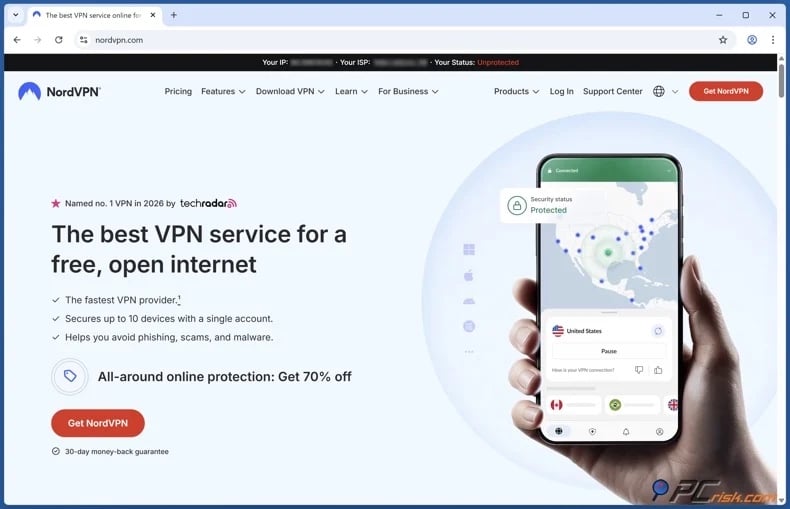
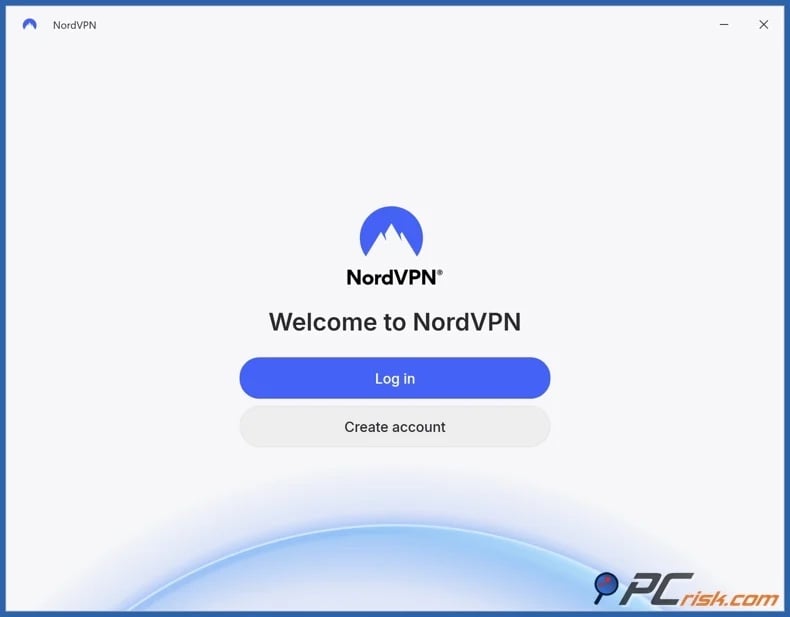
2. Install the VPN app on your streaming device and sign in. Most major providers support Windows, macOS, Android, iPhone, iPad, and streaming hardware. Usually, a single subscription can cover multiple devices - yet the number and supported platforms may vary.
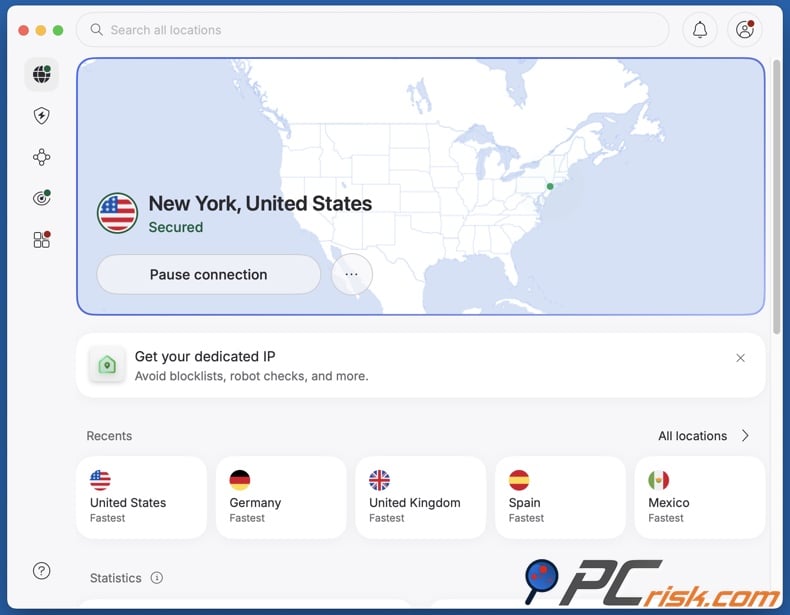
3. Connect to an appropriate server. To bypass local US blackouts, select a server outside the affected area. For broader regional restrictions, choose a country or region where the desired MLB.TV stream is available. Note that nearby servers typically offer a more stable streaming performance.
4. Open MLB.TV and sign in. Try a browser first, as they are generally easier to troubleshoot than apps; you can quickly clear cookies, use a private window, or switch servers without app store or device region complications. If the browser works, you can then determine if using the official app is necessary.
To watch MLB.TV on your smart TV, the setup process depends on your device type:
For TVs and streaming devices that support VPN apps - install the native VPN application, connect to the target server, and open MLB.TV.
For TVs without native VPN app support - configuring a VPN at the router level is typically the most effective solution. This approach routes all home network traffic through the VPN. As an alternative, some providers offer Smart DNS solutions for streaming; they can work on certain TVs but generally do not provide the same privacy or encryption. Connecting to or mirroring from a VPN-supported device is another option.
It has to be mentioned that a VPN does not replace dedicated security software. Visiting unfamiliar websites or unofficial streams may expose you to malicious ads, phishing, and deceptive downloads. Combo Cleaner mitigates these risks by blocking harmful pages, flagging suspicious files, and detecting malware. While no solution is absolute, using a VPN alongside trusted security software enhances your privacy, browsing security, and device integrity.
A VPN encrypts your traffic — but your device still needs protection against malware and ransomware. Combo Cleaner adds the missing layer of defense.
Download Combo CleanerAntivirusDetect & remove malware threats→Best VPNs to watch MLB.TV
To access geoblocked or blackout-restricted MLB.TV content, choose a VPN with extensive server coverage in the US and other relevant regions. Fast, stable speeds are crucial for live sports streaming to prevent buffering and interruptions. Look for reliable applications, consistent connectivity, and features like DNS leak protection and a kill switch - to ensure a stable viewing experience. Additionally, prioritize strong privacy measures, including a strict no-logs policy, modern encryption, and a proven record of protecting user data. Privacy is especially important when using public networks or accessing region-restricted services.
The following are our top five VPN choices for 2026 (read our dedicated article for an in-depth comparison):
1. NordVPN is our Top VPN Choice. It is the best overall option for most MLB.TV users. It operates 9,100+ servers in over 200 countries, has an independently audited no-logs policy, and supports smart TVs, routers, and SmartDNS streaming setups. These factors make it an excellent choice for streaming MLB.TV on the big screen as well.
2. Surfshark is the best choice for households. The VPN's unlimited simultaneous device connection policy offers the best value for users with multiple devices. Surfshark provides over 4,500 RAM-only servers in 100 countries and an independently audited no-logs policy.
3. Mullvad VPN is the best choice for privacy. It is the top choice for privacy-focused users with its independently audited no-logs policy, no requirement for personal data upon registration (not even an email), and anonymous payment options. However, Mullvad VPN is less optimized for streaming than mainstream competitors.
4. Proton VPN is an excellent choice that balances security and transparency. This VPN is notable for its functional free plan that has no ads or data limits, and does not log activity or require entering credit card details. Proton's paid plans offer access to 18,000+ servers across over 130 countries. According to its MLB.TV guide, a paid plan is required for this streaming platform.
5. ExpressVPN is an excellent choice for ease of use. It is known for its intuitive app design, comprehensive guides, and 24/7 live chat support. ExpressVPN offers 3,000+ servers in over 100 countries.
It must be reiterated that no VPN can guarantee consistent MLB.TV access. Streaming platforms frequently update detection methods, and official applications may use multiple location signals.
Can you use a free VPN to access MLB.TV?
While it is technically possible to use a free VPN, these services are generally unsuitable for MLB.TV. Live sports streaming requires stable speeds, sufficient bandwidth for HD video, and unblocked IP addresses. Most free VPNs do not meet these requirements.
Top VPN ReviewsExclusive dealsExpert-tested · hands-on reviews→
Below are some of the key limitations and risks associated with free VPNs:
Limited server networks and overcrowded IPs - most free VPNs provide fewer locations and servers than paid options. Hence, the same IP addresses are often shared by many users, making them easy for streaming platforms to detect and block. Additionally, overcrowded servers tend to be far slower, and this can be an issue when streaming live events.
Intentionally limited streaming support - many VPN providers do not promote their free tiers as viable streaming options, and offer relevant optimizations and features as a premium.
Inadequate security - some free VPNs do not have sufficient protection. For example, they may provide weak or no encryption at all. Several free services have been responsible for leaking user traffic.
Privacy tradeoffs and potential risks - free VPNs require revenue to maintain their infrastructure and may be monetized through dubious means, including untrustworthy ads, redirecting traffic, or selling user data to third-parties. Not only does this undermine privacy (often the primary reason for using a VPN), but it can also lead to severe privacy issues.
Bundled software risk - some free VPN installers, particularly ones downloaded from suspect third-party sources - are bundled with unreliable, fake, or downright malicious software. A "free VPN" can also be a disguise for spreading malware, and high-risk infections can result in serious privacy issues, financial losses, and identity theft.
To summarize, if your primary goal is reliable access to MLB.TV - use a paid VPN service. However, if you want a VPN for general browsing - we recommend the free plan from Proton VPN. It is a reputable choice that has no data caps, is not ad-supported, and does not log user activity. Proton VPN does have a guide for MLB.TV, which states that streaming on this platform requires a paid plan.
Common issues and solutions when accessing MLB.TV with a VPN
Even robust VPNs may encounter issues with MLB.TV. The service uses blackout verification, relies on location data, and requires stable, high-speed connections. Fortunately, most problems can be resolved by doing the following:
Blackout message is still displayed - this usually indicates that MLB.TV continues to perceive your connection as originating from a restricted area. Another reason could be a conflict between stored location data and the VPN-provided IP address. Alternatively, the server you are connected to could have been flagged.
Potential solutions:
- Connect to another server in a location where the game is not blacked out.
- Clear browser cookies and cache.
- Use a private browsing window.
- Try opening MLB.TV in a browser before returning to the app, as app-based location checks can be stricter.
MLB.TV app on phone/tablet is revealing your real location - according to MLB, its Apple-device app relies on location data for blackout verification. In which case, a VPN alone may not be enough if the application is checking device-level location signals as well.
Potential solutions:
- Use the desktop website instead of the mobile app.
- Review the app's location permissions and device location settings before retrying.
- If mobile continues to fail, switch to a supported TV or laptop setup.
Buffering, low video quality, or frequent pauses - most likely caused by a speed issue, and is unrelated to blackouts. Long-distance routing, congested servers, and weak home Wi-Fi can all cause it.
Potential solutions:
- Check your base Internet connection.
- (If this data is available) Connect to a less crowded server.
- (If possible) Connect to a blackout-free server that is geographically closer to your real location.
- (If possible) Switch to a wired connection or stronger Wi-Fi.
- (If applicable) Pause unrelated bandwidth-heavy activities (e.g., applications, downloads, etc.).
MLB.TV app is unavailable in your local app store - MLB.TV apps for iOS, iPadOS, Android, and Android TV are tied to US app-store availability in the documented streaming workflow.
Potential solutions:
- Use the desktop website instead of the app.
- Install the app on a device that already has access to the correct regional store.
- If app-store availability is the only obstacle, use a router-level setup on a TV.
VPN connection drops or leaks expose your real location - if the VPN disconnects in the middle of a session, MLB.TV may immediately see your actual IP address. Conflicting DNS or routing information can also cause problems.
Potential solutions:
- Reconnect the VPN and start a fresh session.
- (If available) Switch to a different VPN protocol (some work better on certain networks).
- Clear the DNS cache and restart the device before retrying.
- (If available) Enable DNS leak protection.
- (If available) Enable the kill switch feature.
You seem to be blacked out when you should not be - MLB's own support pages acknowledge that verification can be inaccurate and state that users experiencing incorrect blackout issues should refresh their connection, and that includes resetting the Internet setup.
Potential solutions:
- Restart your modem or router.
- If you are not using a VPN, contact MLB support about incorrect blackouts.
- If you are using a VPN, test first without it so you can tell whether the issue is your ISP's geolocation or the VPN route.
In most cases, the quickest solution is to switch servers, clear cached data, and use the browser version first. Remember that reputable VPN services typically offer reliable support, which may be able to resolve the issue you are experiencing with MLB.TV access. Furthermore, high-quality paid VPNs offer more server options and consistent fallback solutions - in comparison to budget or free services.
Is using a VPN to access MLB.TV legal in the US?
VPNs are legal in many countries and are commonly used for privacy and security. The primary concern for MLB.TV users relates to platform rules rather than criminal law. According to MLB's ToS (Terms of Service), attempting to bypass blackout or other access restrictions may result in account limitations, suspension, or termination of the subscription. While policies may vary depending on the subscription type, users should not expect guaranteed access if they attempt to circumvent location-based controls.
However, there are countries that regulate, block, or discourage VPN use through government action. Notable examples include:
China - according to reports, Chinese authorities block unauthorized VPNs and may penalize users. China often receives high rankings among restrictive environments in Internet freedom reports.
Iran - according to reports, Iran's Supreme Council of Cyberspace has prohibited unlicensed VPNs and directs users toward domestic circumvention tools. VPNs have been intermittently blocked during times of unrest, although enforcement and technical blocking have often been inconsistent.
Russia - reports indicate that Russian authorities intensified VPN blocking, including the blocking of hundreds of VPNs in late 2024, as part of broader efforts to isolate users from the global Internet.
Belarus - reporting describes a continued deterioration in Internet freedom within the country. Separate monitoring documented VPN blocking during politically sensitive periods.
Myanmar - restricts anti-censorship tools, and authorities had blocked major VPNs in 2024.
Turkey - while VPNs are legal, reports state that several VPN services have been blocked. Ongoing throttling and online censorship have also been reported on.
Pakistan - the Telecommunication Authority (PTA) has introduced registration requirements for certain VPN use, resulting in a more regulated environment than most open markets.
India - VPN use is permitted, but the Indian Computer Emergency Response Team (CERT-In) requires local VPN and similar service providers to retain detailed customer information. Hence, several privacy-focused services have changed their operations in India or removed their physical servers.
Using a VPN to watch MLB.TV is often legal in the sense that VPN software is not prohibited in many countries. However, this does not override MLB.TV's ToS or local laws, especially in countries with strict Internet regulations. It must also be mentioned that laws can change, and it is important to stay informed.
In closing
MLB.TV is a leading official platform for following baseball, but blackout territories, local rights, and national exclusivity agreements affect content availability. Users can experience different access based on their location. Using a VPN can change the location that MLB.TV detects, providing additional privacy and flexibility, particularly on public Wi-Fi or restricted networks.
For best results, use a reputable paid VPN and test access in a browser first, as streaming availability is not guaranteed. Free VPNs are generally less effective for MLB.TV due to limited servers, more blocked IPs, and greater privacy risks. Keep in mind that while VPN use may be legal where you are, using such a tool to bypass MLB.TV's blackout restrictions violates platform ToS and may result in account consequences.
Frequently Asked Questions (FAQ)
Why is some content unavailable on MLB.TV?
MLB.TV content availability depends on local broadcast territories, national exclusivity agreements, and country-specific rights. Hence, users may face local blackout restrictions.
How can I watch unavailable or geoblocked content on MLB.TV?
A common workaround is using a VPN, which routes your traffic through a remote server and shows a different IP address to MLB.TV. This is a good solution, but it is not always effective - especially if the app uses other location signals.
Is using a VPN to watch MLB.TV legal?
In many countries, using a VPN is legal. Some countries, such as China, Iran, Russia, Belarus, Myanmar, and Pakistan, restrict VPN use. Additionally, MLB's terms state that attempting to bypass blackout restrictions may result in account termination or other penalties.
Share:
 Facebook
 X.com
X.com
 LinkedIn
 Copy Link

Karolis Liucveikis
Experienced software engineer, passionate about behavioral analysis of malicious apps
Author and general operator of PCrisk's News and Removal Guides section. Co-researcher working alongside Tomas to discover the latest threats and global trends in the cyber security world. Karolis has experience of over 8 years working in this branch. He attended Kaunas University of Technology and graduated with a degree in Software Development in 2017. Extremely passionate about technical aspects and behavior of various malicious applications.
▼ Show Discussion