
We may earn commissions from products we recommend. Learn more.
Best ad blockers for Android in 2026 | Top 5 picks

Best ad blockers for Android in 2026
Ads on Android show up in more places than just websites. You’ll see them as banners in games, full-screen pop-ups, autoplay videos, sponsored posts, and even inside apps. Because of this, blocking ads on Android is trickier than just adding a browser extension on your computer. The best Android ad blockers need to filter ads across apps and browsers while remaining light enough to run smoothly on your phone or tablet.
For this guide, we looked only at products we reviewed on PCrisk: AdGuard, Total Adblock, AdLock, Surfshark CleanWeb, and Adblock Plus. In our overall rankings, AdGuard comes out on top, followed by Surfshark CleanWeb, Total Adblock, AdLock, and Adblock Plus. But for Android, we ranked them based on our mobile tests, which showed real differences in how well each one blocks ads across the entire device, handles in-app ads and YouTube, installs, and works with VPNs. AdGuard is still our top pick.
 Our top-rated VPN
4.5/5 in our review. Our top pick of the year: almost no slowdown in our speed tests, and it unblocked Netflix, BBC iPlayer and Disney+ without trouble.
Table of Contents:
- Introduction
- Why do you need an ad blocker on your Android device?
- Our top-tested ad blockers for Android
- Best ad blockers for Android comparison
- How we test ad blockers
- Buying guide: How to choose the right ad-blocker for your Android device
- Final recommendations
- Frequently asked questions (FAQs)
Why do you need an ad blocker on your Android device?
Android phones face ads in many places. You’ll find them on websites in browsers like Chrome, but also inside games, news apps, free tools, streaming apps, and social media. Some ads are just annoying, while others use up data, slow things down, or track your activity. That’s why our PCrisk tests look at banners, pop-ups, autoplay videos, native ads, trackers, and in-app ads, not just how a few websites appear.
Security is another reason to use an ad blocker. Sometimes, ads are used to spread malware, and tracking scripts can collect more data about you than you might realize. While an ad blocker isn’t a substitute for Android’s security features or anti-malware apps, blocking known ad, tracking, phishing, and malicious domains adds an extra layer of protection.
Android’s setup gives you another reason to pick your ad blocker carefully. Regular browser blockers only protect the browser they’re installed in. But apps like AdGuard, Total Adblock, and AdLock use Android’s local VPN feature to filter network traffic across the whole device. This means they can block ads in different browsers and, depending on the app, in other Android apps and games too.
There’s a catch, though. Android usually allows only one VPN connection at a time, so if your ad blocker uses the VPN slot, it can’t run alongside a regular VPN. AdGuard offers several advanced ways to work around this, but our tests showed that AdLock couldn’t run alongside another VPN. Surfshark doesn’t have this issue because CleanWeb is built into its VPN app.
Android does have some built-in protections, but they aren’t full ad blockers. For example, Chrome for Android can block pop-ups and has a setting for intrusive ads. These features help with some of the worst ads, but they don’t block ads everywhere on your device, like in apps and games.
No ad blocker can remove every single ad. Ad companies keep changing how they deliver ads, websites add anti-adblock tools, and platforms like YouTube often update their ad systems. The real goal is to block most unwanted ads and trackers without causing problems for the apps and sites you use.
Our top-tested ad blockers for Android
For Android, we rank AdGuard first, then Total Adblock, AdLock, Surfshark CleanWeb, and Adblock Plus. This order is a bit different from our usual PCrisk ranking, which looks at both desktop and mobile. Here, we focus more on Android-wide filtering and our mobile test results.
1. AdGuard - best ad blocker for Android overall
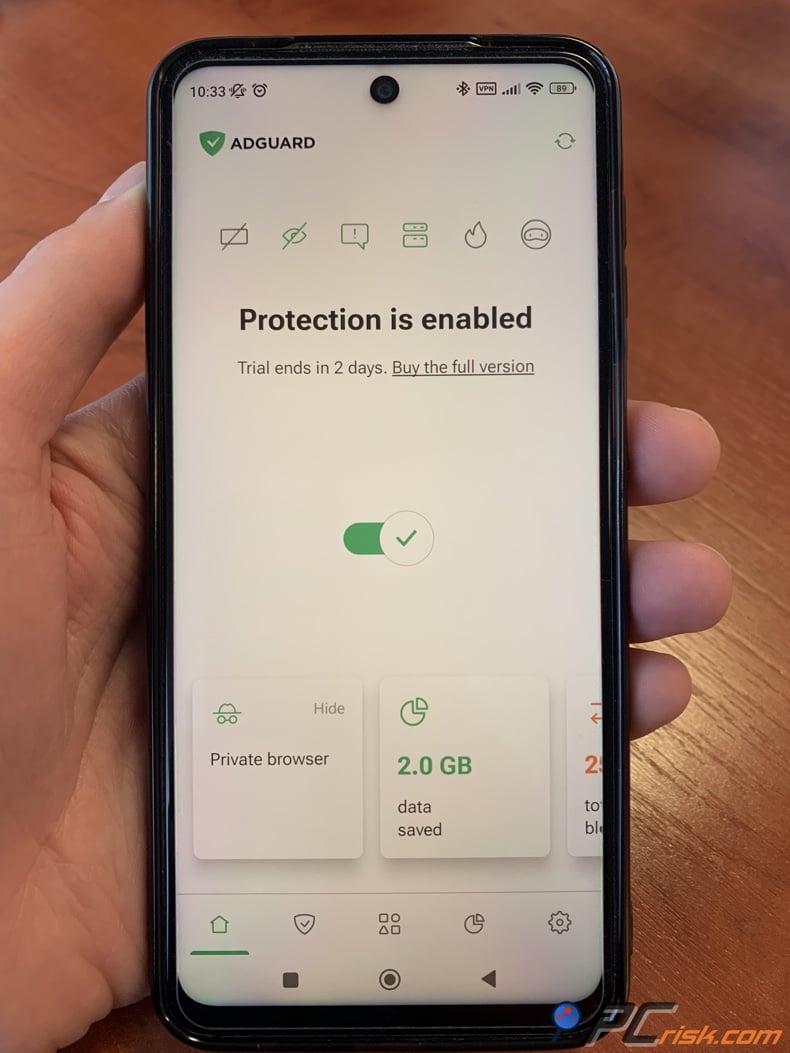
We recommend AdGuard first because its Android app offers what we find most important on a phone: system-wide filtering, strong tracker protection, detailed settings, app-specific controls, and support for more than one browser. You install the full app as an APK, not from Google Play, and it uses a local VPN without needing root access. According to AdGuard, its app filters ads and trackers in browsers, games, and other apps. In our Android tests, it worked very well in browsers and many apps with lots of ads.
AdGuard also gives users who are comfortable with technical settings more control. It supports several filter lists, tracking protection, custom rules, allowlisting, DNS options, HTTPS filtering, and app management. HTTPS filtering helps with tougher ads, but turning it on may require installing a local certificate and takes more setup than a basic browser blocker.
Our wider tests show why AdGuard is ranked first. With its default settings, it scored 80 out of 100 in AdBlock Tester, and reached 100 out of 100 after we turned on extra filters. It scored 2.5 out of 3 in the EFF Cover Your Tracks checks and blocked all three categories in our Can You Block It tests. In our Android review, it also removed most ads from apps with lots of advertising.
YouTube is a tough platform for ad blockers, so we would not buy one just because it claims to block every YouTube ad forever. In our AdGuard review, it blocked YouTube ads in mobile browsers, and we could also filter ads in the Android YouTube app after setting up HTTPS filtering. Since YouTube often changes how it delivers ads and blocks ad blockers, we see this as a strong feature, but not a permanent guarantee.
Licensing is simple. AdGuard Personal covers up to three devices, and the Family plan covers up to nine. You can use these licenses on different operating systems, not just Android. The current Personal plan costs $29.88 per year before taxes, and there are also annual and lifetime options. The Android app offers a 14-day premium trial.
- Pros: Excellent system-wide Android filtering; blocks ads in browsers and many apps; extensive privacy and filter controls; strong results in our tests; three-device and nine-device licenses; lifetime licensing available.
- Cons: Full Android functionality requires installing an APK; the local VPN approach can complicate simultaneous use with another VPN; HTTPS filtering and advanced settings take more effort to configure; full system-wide protection is a paid feature.
- Verdict: We would pick AdGuard for Android users who want a strong mix of broad ad blocking, privacy controls, customization, and support for several devices. It is especially good for people who want to block ads outside their browser, too.
2. Total Adblock - best for straightforward system-wide Android blocking
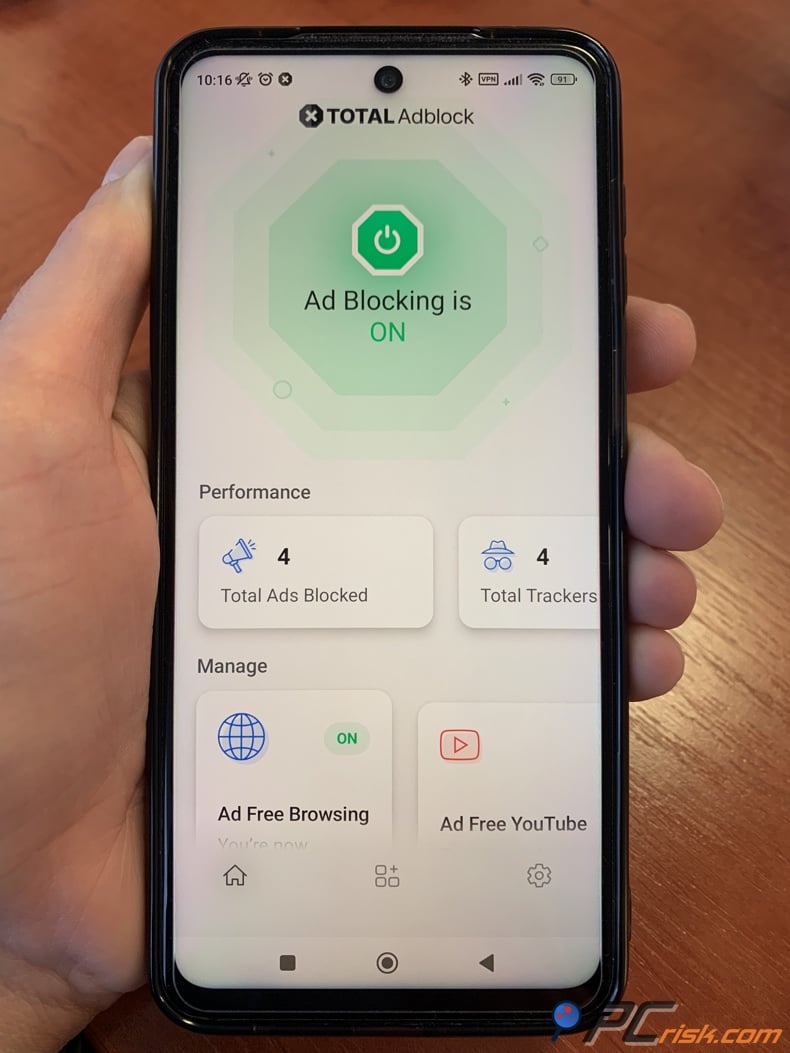
Total Adblock earns second place in this Android-focused ranking because its Android application uses a local VPN to filter traffic across browsers and applications. Our tests found that it reduced advertising in ad-supported apps and games instead of restricting protection to a dedicated web browser. That makes it more useful on Android than a browser-only blocker.
We also found Total Adblock easier to use than some more complex options. However, it does not offer as much control as AdGuard. For example, you cannot add your own filter lists, write detailed blocking rules, or use very fine-grained filtering. This simplicity is helpful for beginners, but experts who want to adjust every setting may find it limiting.
It's important to know how Total Adblock handles YouTube on Android before you subscribe. Our review explains that you can share a YouTube video to Total Adblock and play it without ads. This method is less convenient than automatic filtering because it adds an extra step, but it gives an option for users who really want to avoid video ads.
You get the full Android version of Total Adblock directly from the official website, not just through Google Play. Their instructions warn that Android may show a warning when you install it from outside the Play Store. As with any app you sideload, we recommend downloading the APK only from the official website, not from unofficial sources.
Pricing is our biggest concern. Our PCrisk comparison found an introductory price of about $19 for the first year, with coverage for six devices, but the renewal price increases significantly. The official site lists Total Adblock Plus at $99 per year as the regular price, with special offers for new customers. So, it is very important to check the renewal terms before you pay.
- Pros: System-wide Android filtering; works across multiple browsers and many apps; simple interface; good overall ad-blocking results; useful YouTube workaround; six devices listed in our PCrisk comparison.
- Cons: Limited advanced customization compared with AdGuard; the full Android version may require sideloading; YouTube handling may require an extra step; standard renewal pricing is substantially higher than some introductory offers.
- Verdict: Total Adblock is a good choice for Android users who want simple, broad filtering instead of lots of settings. Just make sure to check both the starting and renewal prices before you subscribe.
3. AdLock - best alternative for system-wide app and game filtering
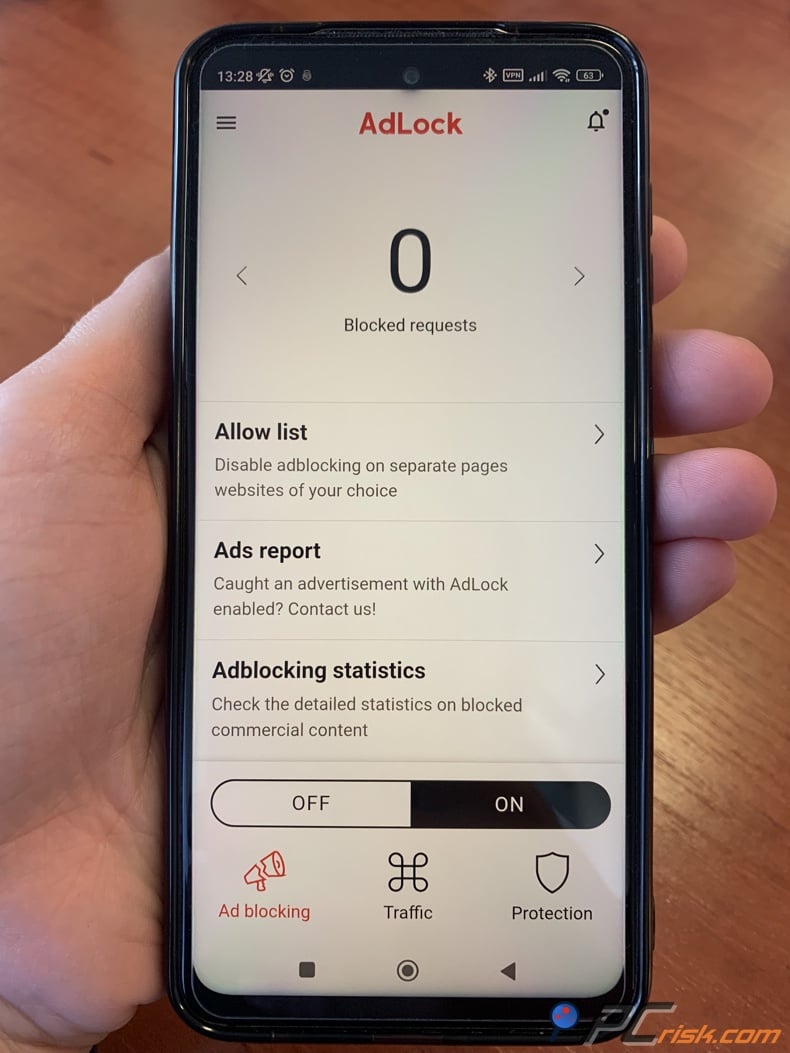
AdLock is another true system-wide Android blocker, not just a browser extension. Its app uses a local VPN to filter traffic from Chrome, Firefox, games, social apps, and streaming services. In our Android tests, AdLock removed ads from YouTube, Spotify, and several free games. However, this does not mean it will always block ads in every app or future ad format.
According to the official Android product page, AdLock is a system-wide solution for browsers, games, and apps that works without root access. The Premium plan covers five devices, which is more than AdGuard Personal’s three-device limit but less than Surfshark’s unlimited coverage.
There are two key things to know about AdLock on Android. First, you need to install it as an APK rather than from Google Play, so setup takes a bit more work. Second, AdLock uses the VPN interface for filtering, and in our review, it couldn’t run alongside another VPN in the usual setup. This can be a major drawback if you always use a VPN for privacy.
During our review, we noticed some glitches and inconsistent behavior, and user feedback was more mixed than we expected from a top competitor to AdGuard. Still, the interface is simple, you can adjust filtering options, and it removed ads well in our tests. The annual plan is at $34, with discounts for longer terms. The official site confirms five devices per Premium plan and a 30-day money-back guarantee.
- Pros: Blocks ads across Android; works in browsers, games, and many apps; covers five devices with the Premium plan; doesn’t need root; performed well with YouTube and in-app ads in our tests; doesn’t use an "Acceptable Ads" policy.
- Cons: Requires APK installation for full Android functionality; local VPN setup can’t run alongside another VPN at the same time; sometimes experiences mobile glitches; user reviews are mixed.
- Verdict: AdLock is a strong alternative to AdGuard if you want system-wide Android filtering and five-device coverage suits your needs. We still rank AdGuard higher for its polish and privacy controls, but AdLock is one of the best Android-focused options.
4. Surfshark CleanWeb - best for Android users who also need a VPN
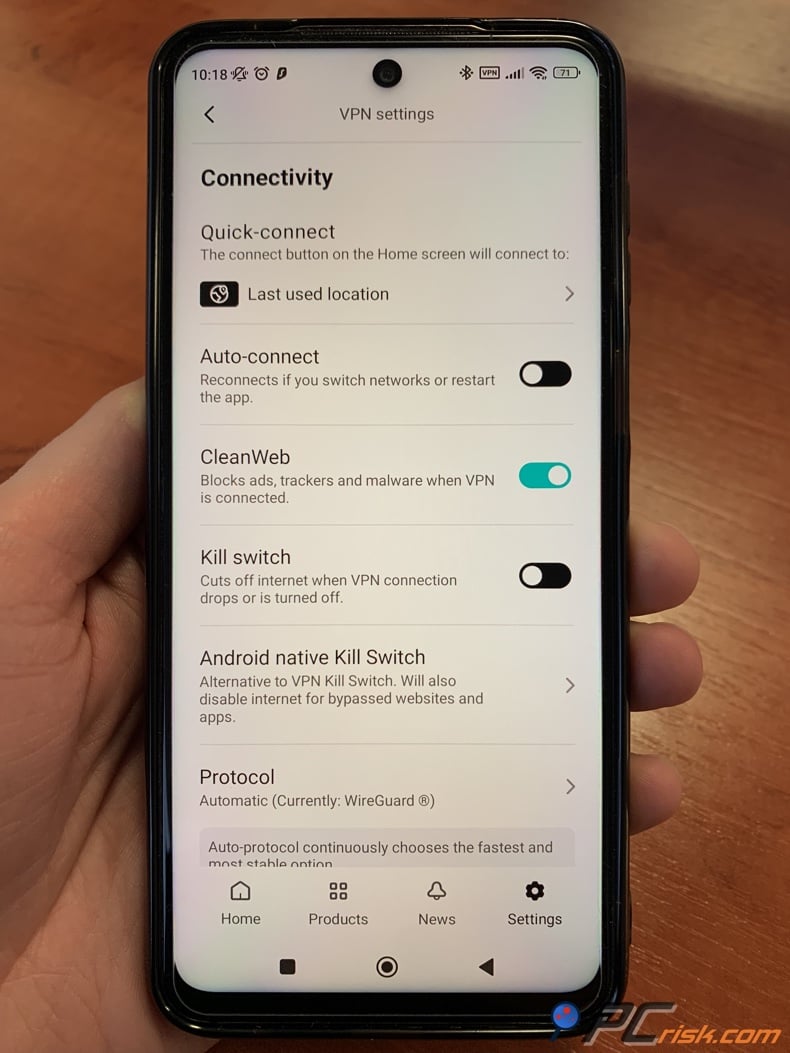
Surfshark CleanWeb is different from the three products above. CleanWeb comes with Surfshark VPN rather than being sold primarily as a separate Android ad blocker. On Android, you enable CleanWeb in the Surfshark app, which filters traffic while the VPN is active. Surfshark subscriptions support unlimited devices simultaneously, which is a big advantage for large households.
If you already want a VPN, this integration is convenient. You only need to manage one app, and CleanWeb can reduce ads, known trackers, and malicious domains while Surfshark encrypts your device’s network connection. As of August 2026, long-term Surfshark plans start at $2.49 per month, but promotional terms and renewal prices may change.
We ranked CleanWeb fourth for Android based on our mobile performance tests. On an Android phone, CleanWeb scored 60 out of 100 in the mobile AdBlock Tester we used. Most standard web ads in Chrome were reduced, but in-app ads were much harder to block. In our test, ads still appeared in the YouTube app and in an ad-supported game.
This makes CleanWeb quite different from AdGuard or AdLock. It’s a useful extra feature in a VPN subscription, but we wouldn’t buy Surfshark just for its Android ad blocking. Its main strengths are convenience, unlimited device coverage, and the full VPN package.
- Pros: Comes with Surfshark VPN; unlimited devices; simple Android interface; blocks many browser ads and known tracking domains, and malicious domains; no separate local ad-blocking VPN to compete with Surfshark VPN, since CleanWeb is built in.
- Cons: Weaker in-app blocking than the top dedicated Android blockers; YouTube app ads stayed in our Android test; CleanWeb in the Android VPN app depends on the VPN connection; fewer detailed filtering controls than AdGuard.
- Verdict: We recommend Surfshark CleanWeb mainly for Android users who already want a VPN and would like ad blocking included. If you only want ad blocking, AdGuard, Total Adblock, and AdLock provide more Android-focused filtering.
5. Adblock Plus - best free browser-focused Android option
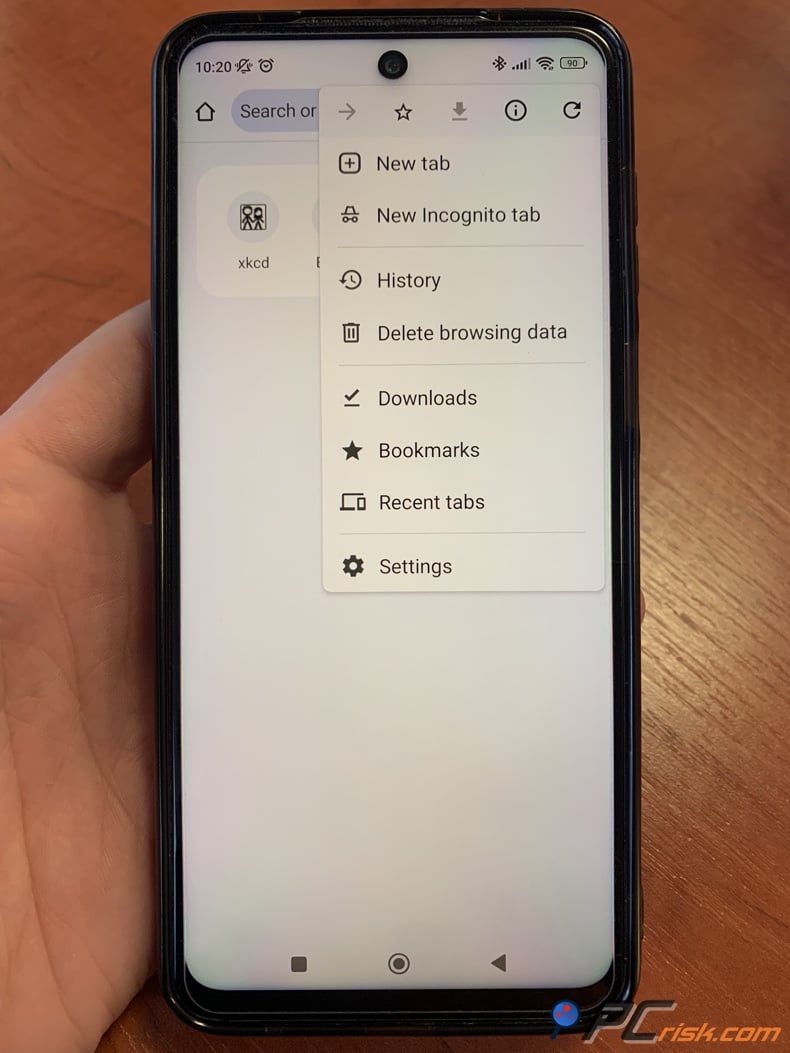
Adblock Plus is in a different category. On Android, the main option is Adblock Browser, which is a Chromium-based browser with built-in ad blocking. Samsung Internet users can also use a dedicated Adblock Plus integration for that browser. This matters because Adblock Plus doesn’t offer the same Android-wide filtering as AdGuard, Total Adblock, or AdLock.
The main draw is the price. Adblock Browser for Android is free, and you don’t need to install a system-wide local VPN just to get basic browser ad blocking. The browser filters intrusive ads and trackers, and its interface will feel familiar if you’re used to Chromium-based browsers.
One important default setting is that Acceptable Ads is enabled. This program lets certain ads appear if they meet specific criteria, but you can turn this feature off in Adblock Browser’s settings. If you want the strongest possible filtering, I suggest checking this setting right after you install the app.
The biggest limitation is just as clear. Adblock Browser can only filter ads inside that browser, not across all Android apps. It doesn’t block ads inside mobile apps like the native YouTube app.
- Pros: Free Android browser; easy to install; no local VPN conflict; good for web-focused ad blocking; filters trackers; Acceptable Ads can be turned off.
- Cons: This option only works in browsers, not across your whole device. It cannot remove ads in regular Android apps or games. You need to use Adblock Browser or a compatible browser. Acceptable Ads is turned on by default.
- Verdict: We recommend Adblock Plus if you want a truly free and simple way to cut down on ads while browsing, and you do not need to block ads across your entire device.
Best ad blockers for Android comparison
The table below highlights the key differences for Android users. Prices may change due to promotions or subscription terms, so be sure to check the final price and renewal details before you buy.
Our top-rated VPN4.5/5 in our review. Our top pick of the year: almost no slowdown in our speed tests, and it unblocked Netflix, BBC iPlayer and Disney+ without trouble.
| Ad blocker | Android approach | Ads inside other apps | YouTube approach | Devices | Free option | Best for |
| AdGuard | Local VPN, system-wide APK | Yes, in many apps and games | Browser and advanced Android filtering performed strongly in our tests | 3 Personal, 9 Family | Browser-level option and premium trial | Best overall Android blocker |
| Total Adblock | Local VPN, system-wide Android app | Yes, where traffic can be filtered | Share-to-Total-Adblock method for Android video playback | 6 in PCrisk comparison | Limited/free promotional access varies | Simple system-wide blocking |
| AdLock | Local VPN, system-wide APK | Yes, strong results in our tests | Strong Android performance in our review | 5 | Free browser option, Premium for full coverage | Apps and games across several devices |
| Surfshark CleanWeb | Integrated with Surfshark VPN | Limited compared with dedicated blockers | Native YouTube ads remained in our Android test | Unlimited | No permanent standalone free CleanWeb plan | VPN plus basic ad blocking |
| Adblock Plus | Dedicated Android browser or Samsung Internet integration | No universal app filtering | Browser-based blocking, not native YouTube app filtering | Unlimited in PCrisk comparison | Yes | Free browser ad blocking |
The main difference is not just between free and paid options. It is whether the blocker works only in your browser or across your whole device. If you mostly want to block ads on websites, Adblock Plus should work well. If you are bothered by ads in games or other apps, a system-wide blocker like AdGuard, Total Adblock, or AdLock is a better fit. Surfshark falls in between, since its VPN-based CleanWeb feature blocks many network requests but was less effective against tough in-app ads in our Android tests.
How we test ad blockers
At PCrisk, we do not just open one website to see if a banner is gone. We use both lab-style tests and regular browsing to look at the types of ads people really see. This includes static and animated banners, pop-ups, pop-unders, autoplay video ads, native and sponsored ads, and, for system-wide blockers, ads inside mobile apps.
We test with both real websites and special ad-testing pages. By comparing pages with and without ad blocking, we can see exactly what gets removed. Our test pages also let us check how blockers handle certain ads and tracking methods in a controlled way.
We test privacy separately from visible ads. This means checking how well the blocker stops trackers, scripts, third-party tracking, cookies, fingerprinting, social trackers, and other profiling tools. We also look at the blocker's own privacy practices, since we would not recommend a blocker that removes trackers but has poor data policies itself.
Performance is important on Android because a blocker often runs all day. We measure its impact on page loading and system resources, comparing normal browsing with and without the blocker. On phones, I also check for issues such as instability, excessive battery use, slow connections, or broken apps. For example, our Surfshark and AdLock tests looked at everyday Android performance as well as blocking strength.
We also score compatibility and usability. This includes how easy it is to install and set up, how clear the interface is, which platforms and browsers are supported, how well it works by default, the quality of documentation, customization options, and how simple it is to turn off protection or make exceptions. For Android, we also note whether you can get the app from the regular store or need to install an APK, since that changes the setup process.
Our scoring model gives 40% weight to ad-blocking performance, 20% to privacy and anti-tracking, 15% to speed and performance, 15% to ease of use and compatibility, and 10% to extra features and customization. For this Android guide, we also use results from our reviews to highlight which blockers work best system-wide and which ones are stronger on desktop than mobile.
No single test can pick a clear winner. A perfect score in a lab test does not mean a blocker will catch every ad in every Android app. Missing an ad now and then does not make a blocker useless. We focus more on how well a blocker works across real browsing, Android apps, privacy tests, usability, and daily stability.
Buying guide: How to choose the right ad-blocker for your Android device
First, decide if you need to block ads only in your browser or across your whole device. If you mostly read websites, a browser-focused option like Adblock Plus is enough. If you want to cut ads in games and other apps, consider AdGuard, Total Adblock, or AdLock.
Think about whether you use a VPN. Local VPN filtering is a handy way to block ads across apps on Android, but you usually cannot run two VPN-style services simultaneously. AdLock has a clear conflict with this, while AdGuard offers more advanced ways to work with VPNs. Surfshark CleanWeb is the easiest choice if you already want a VPN, since the ad blocker is built into the VPN service.
Check how you install the Android app. AdGuard, Total Adblock, and AdLock offer their full Android blockers outside Google Play, so you may need to download an APK and allow installation from that source. This is not unsafe if you get the app from the official website and keep it updated. If you prefer a regular app store experience, Adblock Browser is a better choice.

Do not pick a blocker just because of YouTube claims. YouTube ads change often, and what works now might not work after an update. In our tests, AdGuard and AdLock did well, but Surfshark CleanWeb did not block ads in the YouTube app. Total Adblock has a different playback method, and Adblock Plus mainly works in browsers on Android.
Look at how many devices each plan covers, not just the price. AdGuard Personal covers three devices, Family covers nine. AdLock covers five devices. Surfshark lets you connect unlimited devices. Our PCrisk comparison lists six devices for Total Adblock and unlimited for Adblock Plus. A cheaper plan may cost more if you need extra subscriptions for your household.
Watch out for renewal prices. For example, Total Adblock had a low first-year price in our PCrisk review, but the regular annual rate is much higher. Surfshark also uses long-term promotional pricing. Check the total first-term cost, renewal price, commitment length, refund policy, and how many devices are covered, not just the big promotional number on the sales page.
Focus on having control, not just blocking everything. Sometimes an ad blocker might remove something a website or app needs to work. Features like allowlisting, app exclusions, adjustable filter lists, and easy ways to temporarily turn blocking off are helpful in these cases. AdGuard offers the best advanced filter management among these five, while Total Adblock is intentionally simpler and less customizable.
We suggest using just one main ad blocker unless you have a clear reason to use more than one. Running several blockers at once can use more resources, break web pages, make troubleshooting harder, and sometimes trigger anti-adblock warnings. Usually, one well-set-up blocker works better than having several at the same time.
Final recommendations
Based on our PCrisk test results and Android users' needs, AdGuard is our top pick for 2026. It offers strong system-wide filtering, works in browsers and many apps, has great tracker and privacy controls, supports custom filters, and did very well in our tests. The main downsides are that you need to install it as an APK, pay for the premium version, and deal with extra steps if you use a separate VPN.
Total Adblock is a good choice if you want system-wide protection without much setup, as long as you check the subscription renewal terms carefully. AdLock is also strong, especially if you want to cover five devices and filter at the app level, but its VPN conflicts and mixed reliability reviews put it behind AdGuard.
Surfshark CleanWeb is best if you already plan to get a VPN. It lets you use unlimited devices and has built-in ad filtering, which adds value to a Surfshark subscription. However, our Android tests showed that CleanWeb is not as strong at blocking ads inside apps as the top dedicated blockers.
If you just want to browse with fewer ads and don’t want to pay, Adblock Plus and its Adblock Browser are still good options. Keep in mind these only work in the browser, not across your whole device. Also, check the Acceptable Ads setting if you want to block all ads instead of allowing some nonintrusive ones.
To sum up, my Android rankings are: AdGuard first, Total Adblock second, AdLock third, Surfshark CleanWeb fourth, and Adblock Plus fifth. There’s no single best choice for everyone, but AdGuard is the strongest option if you want protection across your whole Android device, not just cleaner web pages.
Frequently asked questions (FAQs)
What is an ad-blocker?
An ad blocker is software that stops or removes ads by blocking requests to known ad servers, using filters, hiding parts of a page, or filtering network traffic. It can block banners, pop-ups, video ads, trackers, and other unwanted elements. Some Android ad blockers work across the whole device, blocking ads in multiple apps, not just in your browser.
Why do you need an ad-blocker?
The main reason is convenience: you get fewer pop-ups, banners, autoplay videos, and interruptions. Ad blockers can also cut down on advertising and tracking requests, which may help your device download less unwanted content. Some filters can even block connections to known malicious or phishing sites. Still, you should use ad blockers alongside Android security updates and other safety steps, not as a replacement.
Does Android have a built-in ad blocker?
Android does not have a built-in feature that removes ads from every website, app, or game. Chrome for Android can block pop-ups, redirects, and some annoying ads, but this only works in the browser. Full system-wide blockers like AdGuard, Total Adblock, or AdLock go further by blocking ads across your whole device.
Is there a 100% free ad blocker app for Android?
Yes, if blocking ads in your browser is enough for you. Adblock Browser, made by the Adblock Plus team, is a free Android browser with built-in ad blocking. AdGuard and AdLock also offer free options for browsers. However, free browser solutions usually can't block ads across your whole device like the paid, system-wide versions can.
It's also important to remember that "free" doesn't mean "blocks every ad." No ad blocker can guarantee to remove all ads forever, since advertising methods and anti-blocking tools are always changing.
Is there an Android browser that blocks all ads?
Adblock Browser is made for Android and is designed to block annoying ads, so it can cut down on web ads without needing extra add-ons. Still, no browser can block every single ad forever. Sponsored content, new ad types, anti-adblock systems, and server-side ads can still appear. By default, Adblock Browser allows Acceptable Ads, but you can turn this setting off.
Can ad blockers block ads inside Android apps and games?
Some ad blockers can do this. AdGuard, Total Adblock, and AdLock use system-wide filtering on Android, so they can block ads in many apps and games, not just in browsers. However, results can vary because different apps get ads in different ways, and sometimes ads are mixed in with important app content, making them hard to block safely.
Adblock Plus is different because its Android version mainly works in browsers. Surfshark CleanWeb filters at the network level, but in our Android tests, it missed many tough in-app ads.
Can an Android ad blocker block YouTube ads?
Yes, but YouTube is one of the hardest places to block ads. In our tests, AdGuard worked well against YouTube ads on Android, and AdLock also did a good job. Total Adblock uses a share-and-play method for Android. Surfshark CleanWeb did not block YouTube ads in our mobile test, and Adblock Plus is better for browsers than for the YouTube app.
Since YouTube can change how it delivers ads or blocks ad blockers at any time, don't count on any current solution to always work.
Can I use an ad blocker and a VPN at the same time on Android?
It depends on the ad blocker. Many Android system-wide ad blockers use the device's local VPN feature to filter traffic. This can cause problems if you want to use a regular VPN at the same time, since most devices can't run two VPNs together. In our AdLock tests, this was a clear limitation. AdGuard offers some workarounds with proxies or integration, but these setups are more technical.
Surfshark CleanWeb is the easiest choice if you want both an ad blocker and a VPN, because CleanWeb is built into Surfshark's VPN app. You just connect to the VPN and turn on CleanWeb in the same service, instead of running a separate ad blocker.
Are APK-based Android ad blockers safe to install?
An APK is just an Android app file, and some trusted developers offer their apps directly instead of through Google Play. AdGuard, Total Adblock, and AdLock all let you install their full ad blockers this way. The key is to always download the installer from the developer's official website, make sure you're on the right site, and keep the app updated.
Avoid downloading modified, "premium unlocked," cracked, or repackaged ad blockers from unknown APK sites. Since ad blockers handle a lot of your browsing and network traffic, using a tampered version can put your security at risk.
Will an ad blocker break websites or apps?
Sometimes, yes. Strong ad blocking can stop important scripts, video players, login tools, or other features from loading. Some websites also detect ad blockers and block content until you turn them off. Good ad blockers offer allowlists, exclusions, or easy ways to pause blocking when needed.
If something suddenly stops working, try turning off the ad blocker just for that site or app before changing other Android settings. If that fixes the problem, add a specific exception instead of turning off ad blocking everywhere. This way, you keep most of the benefits while avoiding compatibility issues.
Share:
 Facebook
 X.com
X.com
 LinkedIn
 Copy Link

Rimvydas Iliavicius
Researcher, author
Rimvydas is a researcher with over four years of experience in the cybersecurity industry. He attended Kaunas University of Technology and graduated with a Master's degree in Translation and Localization of Technical texts. His interests in computers and technology led him to become a versatile author in the IT industry. At PCrisk, he's responsible for writing in-depth how-to articles for Microsoft Windows.
▼ Show Discussion